
Crystal Mirror Pyro 60 - Oven FRANKE - Free user manual and instructions
Find the device manual for free Crystal Mirror Pyro 60 FRANKE in PDF.
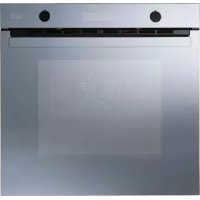



| Brand | Franke |
| Model | Crystal Mirror Pyro 60 |
| Product type | Built-in multifunction oven |
| Useful capacity | 57 liters |
| Useful dimensions (W x D x H) | 430 x 410 x 370 mm |
| Power supply | 220/240 V ~ 50-60 Hz |
| Total power | 2850 W |
| Recommended fuse | 16 A |
| Number of programs | 9 manual cooking modes + 35 pre-set recipes |
| Cooking modes | Natural convection, turbo fan, master cooking, fan cooking, fan cooking multipower, quick cooking, grill, turbogrill, soft cooking (defrost, keep warm) |
| Pyrolysis function | Yes (automatic cleaning at 480°C) |
| Number of oven levels | 5 or 6 positions (depending on model) |
| Interior lighting | Halogen bulb G9 25W (SM 981 P) or E14 15W (other models) |
| Cooling ventilation | Yes, automatic |
| Enamel type | Special easy-clean enamel |
| Child safety | Control lock via long press |
| Removable door | Yes, with removable inner glass |
| Display | Graphic LCD screen |
| Timer | Independent, up to 9h59 |
| Delayed programming | Yes (delayed start with duration and end cooking) |
| Target country | Europe (according to rating plate) |
Frequently Asked Questions - Crystal Mirror Pyro 60 FRANKE
User questions about Crystal Mirror Pyro 60 FRANKE
0 question about this device. Answer the ones you know or ask your own.
Ask a new question about this device
Download the instructions for your Oven in PDF format for free! Find your manual Crystal Mirror Pyro 60 - FRANKE and take your electronic device back in hand. On this page are published all the documents necessary for the use of your device. Crystal Mirror Pyro 60 by FRANKE.
USER MANUAL Crystal Mirror Pyro 60 FRANKE
Built-in multifunction electronic oven with 9 programmes

(SM 981 P) 2950 W - 16 A

- 2004/108 EEC (Electromagnetic Compatibility)
Electromagnetic Compatibility).
Models CR M M, CR P M, CS M M,
CSPM, SGMM, SMM: 65 liters
Models SM M and SM P: 57 liters
Introduction 17 A close view. 17 Switching on the first time 18 Useful advice. 18 Operation 18 Cooking table 23 Oven cleaning and maintenance 25 Assistance 26 Safety instructions 26 Installation (Fig. 5) 27 Installation instructions 27 Electrical connection 28 Technical data 28
Introduction
Thank you for choosing a Franke product.
Before using the appliance, please carefully read the instructions and advice contained in this manual. In this way you will be able to make best use of the appliance and also ensure its lasting efficiency. Keep this booklet for further reference.
A close view
Control panel
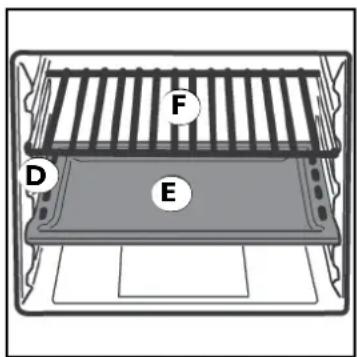
A Cooking Mode selection knob B LCD graphic display for showing: before cooking: cooking selection and various settings menu during cooking: temperature cooking times (incremental, duration, cooking end) timer selected cooking mode various operation information for the user C Increase (+) / decrease (-), forward/back and confirm (OK) knob D Rack and drip-tray runners
Used for correctly positioning the racks and drip-trays in 5 or 6 pre-arranged positions (depending on model; from 1 to 6 starting from the bottom); the cooking table (page 23) gives the best position for each type of cooking.
E Drip-trays
Normally used for collecting juices from grilled food or for cooking food directly; the drip-trays must be removed from the oven if not used. The drip-trays are made from "AA" food-grade enamelled steel. N.B.: To achieve optimal cooking results it is advisable to insert the drip-tray with the inclined part towards the rear wall of the oven compartment.
F Grill
Used for supporting pans, pastry moulds and any containers different from the drip-trays provided, or for cooking meat and fish mainly with the grill and turbo grill functions, toasting bread, etc. Direct contact of the grill with food is inadvisable.
Switching on the first time
When using the oven for the first time, operate it while empty at its maximum temperature for at least 40 minutes with the door open, airing the room well and selecting the fan-assisted cooking function.
The odour noticed during this operation is due to the evaporation of substances used to protect the oven during the period between manufacture and installation. At the end of this time, the oven will be ready to use.
Useful advice
For successful cooking, never place food in the oven when it is cold; wait until it has reached the set temperature.
During cooking, never place pots or containers directly on the oven floor; place them above the grills or drip-trays provided, on one of the five shelves available; failure to do so could damage the oven enamel.
Never cover the walls of the oven with aluminium foil, especially in the lower part of the cooking compartment.
Any repairs must be carried out by specialised, licensed personnel.
Contact our nearest service centre and demand only original spare parts.
Your Franke oven uses a special enamel which is easy to keep clean, however it is advisable to clean it frequently to avoid baking on grime and previous cooking residuals.
NB: - Read the relevant instructions carefully before switching the oven on.
Operation
This oven combines the advantages of "static" natural convection ovens with those of modern "fan" ovens. It is a very versatile appliance enabling safe and easy selection of different cooking methods. For best use of your Franke oven, consult the cooking table on page 23.
Settings
Firstly, access the " SETTINGS" menu and update the data shown as required.
Switch the oven on. With the knob C go to " SETTINGS" and confirm by pressing it.
By turning the knob it is now possible to select the date and time, language, control panel brightness, display contrast and acoustic alarm tone settings.
It is also possible to change the various values and confirm them by pressing the knob C.
Once confirmed, these settings are saved even after the oven is switched off; the settings are saved even in case of a temporary power failure lasting up to hours 10 hours.
Options
Eco display: when activated, this option reduces the brightness of the display during oven standby, also offering energy saving.
Display off: when activated, this option ensures that the display is not backlit (for aesthetic reasons and/or energy saving) when the oven is not working.
SW versions: indicates the oven software version. This is useful in case of any work on the oven by a technician.
Demo: a password must be entered in order to be activated. It allows the oven to be used without activating the heating elements. Not usable by the end-user.
Manual oven operation
Turn the knob A to instantly access the Self Cooking Modes. Each mode is associated with a recommended temperature, modifiable as required by turning the right knob.
Once a Cooking Mode is selected, the oven starts to heat up: the display shows the time from the start of cooking.
To reset this time and restart it (e.g. from when food is placed in the oven), press the knob C, then select and confirm "Reset incremental timer".
The display shows the description of the activated function, which will alternate with the message "PREHEATING" until the set temperature is reached.
When the set temperature is reached, the oven emits a triple sound twice and the display only shows the description of the activated function. The thermometer symbol ( ) will indicate that the "mercury column" has reached the
maximum level: this is always an indicator of the instantaneous inside temperature (even with the set temperature reached, a temporary fluctuation with the second-last level of the "mercury column" is considered a normal oven self-regulating process).
The preset temperature can be changed at any time with the knob C, going from a minimum of 50°C (except for the defrost, conventional grill and turbo grill functions - see section "Cooking mode") to a maximum of 270°C (except for the defrost, soft cooking (230°C), conventional grill and turbo grill functions) in steps of 5°C.
Instantaneous temperature reading: press and hold knob C (for approx. 5 seconds) to display the instantaneous oven temperature reading.
Child safety lock: press and hold knob C for even longer (approx. 10 seconds) to activate the child safety lock function (a small key appears on the display to indicate its activation). This will effectively disable knob operation. To deactivate this function, press and hold knob C again, for approx. 10 seconds.
Cooking mode


Soft Cooking (Defrost - Quick defrost - Plate warmer)
The circular and top (roof) heating elements are partially activated. The low power and the fan allow very gentle and even cooking. Ideal for dry pastry and all types of prolonged low-temperature cooking.
The temperature is preset to 100°C for "wellness" cooking and provides for preheating of the oven before placing food in it.
With this oven, Franke further develops this cooking programme, allowing the air to be heated gradually in a controlled way and at low power, by means of the knob C. This offers new possibilities for treating the food:
Defrost The temperature is only 25 - 30°C with the inside fan on.
Quick Defrost: The conditions for quick thawing of food are obtained between 35 and 55°C with the fan on. Plate warmer: Increasing the temperature to between 60 and 80°C allows the warming of cooked but cold food or food which must be kept hot without affecting the cooking.

Natural conventional cooking
The heat source is from above (roof heating element) and below (floor heating element). This is the conventional cooking function which ensures even cooking using a single shelf.
The temperature is preset to 180°C and provides for preheating of the oven before placing food in it.

Fan cooking
The top (roof) heating element, bottom (floor) heating element and fan inside the oven are activated.
The constant and uniform heat cooks and browns the food evenly. Various dishes can be cooked at the same time, using a maximum of 2 shelves.

"Master Cooking"
The circular, bottom (floor) and top (roof) heating elements are partially activated. The even temperature distribution, in combination with forced air circulation, makes this function ideal for baking all types of pizzas.

Hot air
The circular heating element is switched on and the fan starts. The constant and even heat cooks and browns the food evenly. Different foods can also be cooked at the same time, provided their cooking temperatures are similar. This is the gentlest type of fan cooking available with this Franke oven, and is ideal for preparing cakes and pastries, enabling three shelves to be used at the same time.
The temperature is preset to 150°C and provides for preheating of the oven before placing food in it.

"Multi power" hot air cooking
This turns on the circular heating element together with partial activation of the top (roof) and bottom (floor) heating elements and the fan. Compared with the previous function, it is a more powerful and faster way to reach the required temperature; this, in combination with an even distribution of heat, makes it ideal for roast meat and fish and for baked pasta, using up to three shelves.
The temperature is preset to 200°C and provides for preheating of the oven before placing food in it.

"Quick cooking"
The circular heating element is turned on together with the top (roof) and bottom (floor) heating elements and fan. This is the most powerful function available on your Franke oven, and the heat distribution is designed to be more intense towards the bottom; this makes it ideal for preparing pizzas or fast cooking of frozen foods in general. It can be used for quickly bringing the oven to the required temperature, and then setting any of the other available programmes. The temperature is preset to 220°C and provides for preheating of the oven before placing food in it.
Activating the Grill heating element at the top of the oven, these cooking programmes work using infrared radiance; therefore it is not the temperature that is important but the amount of radiance, which depends on the set power level. It is possible to select from 4 power levels: 20%, 40%, 60% (default) and 80% max. grill power.
It is best to put the food in the oven when the oven is cold, immediately exploiting the incandescence of the grill heating element. This quick surface cooking keeps the meat tender on the inside; it is also possible to quickly toast up to 9 slices of bread.
If the grill is used for a prolonged period the oven automatically limits the maximum temperature, in which case the grill reduces its effectiveness.
The Franke oven is designed to grill food with the oven door completely closed.
Important: Franke has designed the oven opening to protect hands as much as possible. However, the grill heating element is still very hot when in use; be careful not to touch it accidentally when handling food to be grilled.
The preset power level is 60% max. power and does not provide for oven preheating.

Turbo grill cooking
The grill heating element at the top of the oven and the fan are activated. It combines one-way heat radiation with forced air circulation inside the oven. This prevents burning the surface of the food and increases penetration of the heat. Excellent results are obtained using the turbo grill for mixed meat and vegetable kebabs, sausages, spare-ribs and lamb chops, broiled chicken, quail with sage, pork fillets, etc.
The preset power level is 60% max. power and does not provide for oven preheating.

Oven light (all models except CR 981 P M, CS 981 P M and SM 981 P M)
This symbol corresponds to switching on of the oven light without activation of any type of heating. This option is useful for cleaning the oven when it is switched off, to see the cooking compartment.

Pyrolytic automatic cleaning (CR 981 P M, CS 981 P M and SM 981 P M only)
The PYROLYTIC self-cleaning function turns oven cleaning into a quick, easy and instant procedure. The temperature reached in the cooking compartment, 480°C, carbonises all food and fat residue. During this process, some particles of residue may glow; this is a normal phenomenon due to instantaneous combustion.
The activation of this function by means of knob A ensures that, from the point at which a temperature of 330°C is reached and (after reaching the maximum temperature) until the oven temperature drops below 180°C, the oven door is locked and cannot be opened. This situation is indicated by the padlock icon lighting up.
Furthermore, during heating, the "P" icon also lights up.
Before cleaning:
- Do not leave anything inside the oven; remove all accessories such as drip trays, racks, runners, telescopic guides, etc. In fact, as well as hindering the correct circulation of heat on all the walls, these could also be damaged by the high temperature.
- Remove food residues using a moist sponge; never use detergents or any other specific cleaning product.
- Do not obstruct the circulation of air in the area in front of the oven.
Above all, do not leave anything on the door handle.
During "Pyrolytic" automatic cleaning the surfaces can become very hot. Keep children away.
Any obscuring of the LCD display during the Oven Cleaning - Pyrolysis process is normal and not a cause for concern. It is a precautionary display protection feature, caused by the high temperatures in use. This obscuring may last for several tens of minutes; during this period the latter two indicator lights will provide all necessary information relating to the process as it is running (P) and the door lock status (padlock).
N.B.: Any obscuring of the LCD display during Cooking processes may be caused by a fault in the oven cooling system, which activates a protection feature (indicated by the flashing P symbol). If this situation arises, switch off the oven and leave it to cool. If the problem persists, contact our After-Sales Service.
Cooling fan
In order to reduce the temperature at the door, control panel and sides, the Franke oven is equipped with a cooling fan which is automatically activated when the oven is hot. When the fan is on, air blows from the front of the oven between the front panel and oven door; special attention has been paid to ensure that the exiting air does not disturb the kitchen environment and that noise is kept to a minimum.
To protect kitchen units, the fan stays on after cooking until the oven has cooled down sufficiently.
Programming cooking time
This enables a cooking mode to be programmed with the required times and temperature.
The possibilities are:
- timer: countdown of a fixed time, without effects on start and end of cooking;
- duration: instant start of cooking with set duration;
- cooking end: delayed start of cooking with set duration.
Setting the Timer
The Timer is separate from any other oven function and is used to set a required time after which an acoustic signal sounds, without affecting the cooking processes.
Switch the oven on, press the knob C once, the icon Δ starts flashing, and the display will show the message "SET TIMER". Select "TIMER" and confirm by pressing the same knob. Then set the required time in 30-second steps (and one-minute steps for a time of more than 1 hour) up to a max. of 9 hours and 59 minutes. Confirm by pressing the knob C. (After 15 seconds the oven confirms in any case, even if the user does not confirm).
The display will now show the message "TIMER" and starts the countdown.
If the time remaining is more than 1 hour it will be shown in hours and minutes (e.g. 1h:03, indicates 1 hour and 3 minutes remaining).
If the time remaining is less than 1 hour it will be shown in minutes and seconds (e.g. 9'14, indicates 9 minutes and 14 seconds remaining).
An acoustic alarm sounds for 1 minute at the end of the set time. It can be muted by pressing any button. At the same time, the display shows the message "END OF TIMER".
To reset the timer press the knob C and turn it to change the timer duration.
If other programming parameters are set as well as the timer, the display highlights both. In any case the oven will carry out its countdown with an acoustic signal at the end.
The timer can be activated even after selecting a cooking function from the self cooking menu: the setting modes are the same as those described above.
Instant start of cooking with set duration
To cook for 30 minutes at 200°C. With the oven on, select a cooking mode from the "self cooking" menu, then select "duration". Confirm by pressing the knob C.
Then set the required cooking duration (30 minutes in the example) and in any case from a minimum of 1 minute to a maximum of 9 hours and 59 minutes. After confirming, the display shows the cooking end time. Cooking starts after confirming again (cooking will start automatically after 15 seconds even without confirming). By turning the knob C, the temperature can now be increased or decreased from a minimum of 50°C to a maximum of 270°C (200°C in the example) in steps of 5°C.
NOTE: For all the functions, except defrost, grill, and turbo grill, after having confirmed the cooking duration, and when it is at least 15 minutes, the programme asks if the last 5 minutes of cooking are to be used with the grilling function. This additional function is suitable for browning food.
A - preheating stage
(The set parameters can always be corrected with the same operations)
The display now shows the message "PREHEATING" together with the Cooking Mode Name, e.g. "MULTI POWER", as well as the set duration and current time.
The thermometer with mercury column rising indicates that the oven is becoming hotter.
The display starts the countdown only after the required temperature is reached (except in grill functions, where the countdown begins immediately), when two series of three sounds will be heard.
B - cooking stage
Place food in the oven.
The display now shows the message "DURATION" together with the Cooking Mode Name, e.g. "MULTI POWER", as well as the current time and the countdown which indicates the residual cooking time.
C - end of cooking
An acoustic alarm sounds for 1 minute at the end of the set time. It can be muted by pressing any button. At the same time the display shows the message "COOKING END".
The oven automatically switches off the heating, and the inside lamps remain on for about 15 minutes for checking cooking. However, the temperature will remain high for several minutes.
To continue cooking manually, just press the knob C and follow the procedures as described above in the Self Cooking section.
To end everything, turn knob A to the off position.
It is possible to return to the previous menu screen at any time by selecting "Back" using knob C.
Delayed start of cooking with set duration
Set the cooking duration and the end of cooking time. Assuming the time is 8:00h and cooking is for 30 minutes ending at 13:00h. After setting the duration and cooking mode as described in the previous section, select "COOKING END" and confirm by pressing the knob C. Select the cooking end time (13:00h in the example) and confirm.
(After about 13 seconds the oven confirms in any case, even if the user does not confirm.)
The oven is now programmed and in standby mode.
The display shows:
0h30 / 13:00
alternatively the display indicates that their meaning is respectively
DURATION / COOKING END TIME
The set parameters, mode, temperature and times can always be corrected by selecting "Back" using knob C.
Cooking stage:
On reaching the cooking stage the oven behaves as in point B of the previous section.
The cooking duration countdown starts immediately, and not after the required temperature has been reached. This is because it assumes that the food has already been placed in the oven at the moment of programming. The preheating time is included in the cooking duration.
Cooking table
| Selection knob setting | Type of food or recipe Weight (kg) | Shelf position | Preheating time (min.) | Thermostat setting (d2) | Duration (min.) |
| Natural conventional cooking | Roast pork | 1 | 3 | 9.5 | 180 °C |
| Omelettes | 1.5 | 2 | 10.5 | 200 °C | |
| Cod-gilthead-turbot | 1 | 3 | 9.5 | 180 °C | |
| Bread rolls | 1 | 2-4 cont. | 9.5 | 175 °C | |
| Pies | 1 | 2 | 10.5 | 200 °C | |
| Freshwater fish | 1.5 | 3 | 10.5 | 200 °C | |
| Polenta with sauce | 0.5 | 2 | 9.5 | 180 °C | |
| Cheesecakes | 1.5 | 2 | 9.5 | 180 °C | |
| Fan cooking | Roast pork | 1 | 3 | 9 | 180 °C |
| Baked rabbit | 1 | 2 | 9.5 | 190 °C | |
| Crescia Marchigiana (quick flat bread) | 1.5 | 2 | 10 | 200 °C | |
| Baked crayfish | 0.5 | 3 | 10 | 200 °C | |
| Cod-gilthead-turbot | 2 | 2-4 cont. | 7.5 | 150 °C | |
| Bread rolls | 2 | 2-4 cont. | 9 | 180 °C | |
| Fruit tarts | 1.5 | 2 | 9 | 175 °C | |
| Meat & veg pies | 2 | 3-5 cont. | 9 | 180 °C | |
| “Master Cooking” | Bread rolls | 1 | 3 | To speed | 170 °C |
| Pitta bread | 1 | 1 | up preheating | Max | |
| Vegetable pie | 0.8 | 3 | up preheating | 180 °C | |
| Pizza | 0.4 | 1-3 cont. | time, use the | Max | |
| Chicken (pieces) | 0.8 | 2 or 3 | “Quick Cooking” function | 170 °C | |
| Guinea fowl-Rabbit (pieces) | 0.8 | 2 | 170 °C | ||
| Turkey | 1.5 | 3 | 170 °C | ||
| Duck | 1.5 | 2 or 3 | 170 °C | ||
| Roast beef | 1 | 3 | 185 °C | ||
| Gilthead-bass-cod | 0.8 | 3 | 150 °C | ||
| Stuffed vegetables | 1.5 | 3 | 180 °C | ||
| Biscuits | 0.5 | 3 | 160 °C | ||
| Fruit tarts | 0.8 | 3 | 170 °C | ||
| Meringues | 0.5 | 3 | 90 °C | ||
| Hot air | Pumpkin bread | 2.5 | 2, 3 or 4 | 7 | 180 °C |
| Wholemeal bread | 1 | 1-4 cont. | 8 | 190 °C | |
| Puff pastry | 1 | 1-4 cont. | 8 | 190 °C | |
| Salt biscuits | 0.75 | 1-3-5 cont. | 8 | 190 °C | |
| Vegetable pies | 1 | 3 | 7 | 180 °C | |
| Cakes | 0.5 | 2 or 3 | 7 | 180 °C | |
| Cheese pies | 1.5 | 3 | 7 | 180 °C | |
| Trout en papillote | 0.3 | 3 | 8.5 | 200 °C | |
| “Multi power” hot air cooking | Baked rabbit + Meat pies + Meat & veg pies | 1.5 | 1-3-5 cont. | 7.5 | 200 |
| Pork and/or pigs | 1.5 | 1-3-5 cont. | |||
| Chicken | 1.5 | 2 | 6 | 180 °C | |
| Roast suckling-pig | 6.5 | 3 | 7.5 | 200 °C | |
| Salt biscuits | 0.3 | 3 | 6 | 180 °C | |
| Fruit tarts | 1.5 | 3 | 7.5 | 200 °C | |
| Roast potatoes | 1 | 3 | 6 | 180 °C | |
| “Quick cooking” | Focaccia | 1 | 3 | 11.5 | Max |
| Bread rolls | 1 | 1-4 cont. | 5.5 | 180 °C | |
| Black bread | 1 | 3 | 5.5 | 180 °C | |
| Pizza | 0.9 | 1-3-5 cont. | 11.5 | Max | |
| Roast beef | 1.5 | 3 | 5.5 | 180 °C | |
| Pork/veal leg | 1 | 3 | 5.5 | 180 °C | |
| Turkey | 1 | 3 | 5.5 | 180 °C | |
| Grilling | Chicken wings | 1 | 4-5 cont. | 7 | Max |
| Chops | 0.8 | 3 | 7 | Max | |
| Scallops | 0.5 | 3 or 4 | 7 | Max | |
| Roast potatoes | 1 | 3 | 7 | Max | |
| Freshwater fish | 1 | 3 or 4 | 7 | Max | |
| Tomatoes au gratin | 0.5 | 2 or 3 | 7 | Max | |
| Eel kebabs | 0.5 | 3 | 7 | Max | |
| Turkey kebabs | 0.5 | 4 | 7 | Max | |
| Turbo grill cooking | Chicken legs | 1 | 4 or 5 | 9.5 | 220 °C |
| Spare-ribs | 0.5 | 4 | 14 | Max | |
| Guinea fowl | 1.2 | 4 | 14 | Max | |
| Gilthead en papillote | 0.3 | 3 | 8 | 200 °C | |
| Chicken | 1.5 | 3 | 14 | Max | |
| Quails | 0.8 | 4 | 14 | Max | |
| Sausages | 1 | 4 | 14 | Max | |
| Vegetables | 1 | 4 or 5 | 14 | Max |
NB: The indications given in the table are the result of cooking tests carried out by a team of professional chefs. They are given only as a guide and can be changed according to personal tastes.

Guided cooking setting
This Franke electronic oven offers the possibility of cooking 35 different types of food using preset programmes, times and temperatures: therefore after selecting the recipe, the oven automatically cooks with the best combination of programmes, cooking temperature and time to obtain the best possible results. All the preset recipes have been tried and tested by professional chefs.
To set one of the 35 recipes, proceed as follows.
Pressing and turning the knob C, select "GUIDED COOKING" and choose from one of the 5 categories of food described (vegetables or pasta, meat, fish, cakes, bread or pizza) confirming with the same knob. Then select one of the proposed recipes, confirm and place food inside the oven on the shelf recommended in the cooking table (see previous page).
The display shows the selected recipe and a preset weight of the food: this weight can be modified by turning the knob C (the weight of the food will affect the cooking time). It is now possible to choose to start cooking immediately ("INSTANT START") or to start cooking later in an independent way, setting the cooking end time. The latter will be initially proposed on the display, taking into account the duration of the chosen recipe: with the knob C it is possible to change the cooking end time and therefore the start. Select the function suggested on the display by turning the knob A; press the knob C to confirm and the oven will automatically start heating up according to a preset temperature and time. If the wrong function is selected the oven will not start and an audible alarm signals the error. No preselected recipe starts the preheating function.
During cooking, the display shows the name of the preselected recipe and the function active at that moment.
Cooking can be stopped and cancelled at any stage by returning the knob A to the 0 (off) position. An acoustic signal sounds at the end of cooking and the oven switches off automatically; the food is kept hot for about another 30 minutes, since the temperature is lowered to 80°C.
Wellness function
The Wellness programme enables the cooking of meat, fish and vegetable dishes in a completely natural and dietetic way. In fact, this programme requires prolonged cooking at a low temperature (around 100°C) without using oil or other condiments: this preserves all the food's nutrient elements (minerals, vitamins, etc.), enhancing its natural taste.
After selecting "GUIDED COOKING", select the Wellness programme and one of the 6 preset recipes, each time confirming with the knob C.
Then follow the same sequence of operations as described above for the preset recipes.
"Complete Menus" function
This function allows you to cook up to 3 different dishes (hors-d'oeuvre, first course, main course, dessert) at the same time for a complete meat or fish menu, or bake up to 3 pizzas or bread in 3 trays at the same time.
To set this function, proceed as follows.
Press and turn knob C to select "GUIDED COOKING", then select "COMPLETE MENUS" and confirm by pressing the same knob. Then choose from the various combinations (A = Hors-d'oeuvre, I = First course, 2 = Main course,
D = Dessert) of the meat and fish menus and confirm the 3 dishes, positioning them as shown on the display. Then turn knob A until you select the function suggested by the display and confirm with knob C. The display will show the total cooking duration of the selected menu.
The meat menu can consist of:
- Hors-d'oeuvre: 500 g - single-portion soufflés/savoury pies/omelettes for 6/8 people - First course: 2000 g - cannelloni / lasagna - Main course: 1500 g - chicken / rabbit (pieces) - Dessert: 800 g - sponge cake / angel cake
The fish menu can consist of:
- Hors-d'oeuvre: 400 g - scallops / mussels / clams au gratin - First course: 1800 g - tuna crêpes / cannelloni with perch / gilthead - Main course: 1500 g - gilthead / bass / cod (whole) - Dessert: 800 g - angel cake / fruit tart
The oven will now start to heat up according to an automatically preset temperature and time. The complete menus, except for the 3 pizzas or bread on 3 trays, do not provide for preheating.
During cooking, the display shows the time remaining until the next dish is ready to be taken out. An acoustic signal sounds (for 1 minute) when each of the 3 dishes is cooked: at the same time, the display shows "REMOVE TRAY" and the corresponding letter starts blinking.
Once also the third and last tray has been removed, the display shows "COOKING END".
Cooking can be stopped and cancelled at any stage by returning knob A to the off position.
An acoustic signal sounds at the end of cooking and the oven switches off automatically; the food is kept hot for about another 30 minutes, since the temperature is lowered to 80°C.
IMPORTANT: If cooking only two dishes at the same time, make sure to place the trays on the specific levels. In this case, when a message on the display says to remove an unused tray, simply ignore it and wait for the next message.
Also, never put food that is still frozen in the oven.
Important
Before servicing the oven, always unplug it or disconnect the power at the main electrical system switch.
The stainless steel and enamelled parts will always remain like new if cleaned with water or specific products, drying them thoroughly. - Never use scouring pads, steel wool, muriatic acid or other products that can scratch or mark the surface. Do not use steam cleaners or direct jets of water. - Any stains (sauces, sugar, egg white and fat) on the bottom of the oven are always due to spills and splatters. Spattering occurs during cooking at too high temperatures, whereas spills are due to the use of pots that are too small or wrongly judged increases in volume during cooking. These two problems can be avoided by using pots with high rims or using the drip-tray supplied with the oven. For cleaning the lower part of the oven, it is advisable to clean any stains when the oven is still warm; stains are easily removed when fresh.
Cleaning the oven door (Fig. 6)
- The oven door must be cleaned (internally and externally) when the oven is completely cold, using hot water. Do not use coarse cloths. Clean the glass with suitable detergents.
- Do not use coarse abrasive materials or sharp metal scrapers to clean the glass parts of the oven door, as they could scratch the surface and cause the glass to shatter.
- Clean the enamelled surfaces and inside the oven with hot water and non-abrasive detergents.
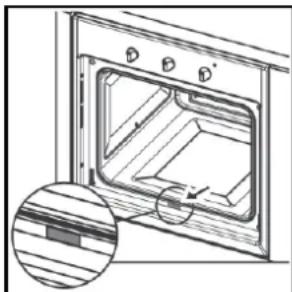
- The oven door's plastic panel can be removed for more thorough cleaning. With the door open, press at the sides and remove the panel, as shown in the figure. To refit the panel in the oven door, just slide it in place and press lightly to engage the side hookings.
Removing the oven door internal glass (models CR, CS and SM only) (Fig. 2)
The oven door can be removed to enable thorough cleaning of the internal glass, by proceeding as follows:
with the door completely open, turn the two black blocks (with the word "CLEAN") at the bottom of the door 180° so that they fit into the seats in the oven structure.
N.B.: Make sure you turn them fully (the blocks will click into this position).
- Carefully lift the internal glass: the two blocks will prevent the door from closing (if the blocks are not turned fully, removing the glass will cause immediate closing of the door).
After carrying out the cleaning operations, refit the internal glass (the correct position is indicated by the wording "TEMPERED GLASS", which must be perfectly legible) and turn the two glass retaining blocks back to their original position.
CAUTION: Never try closing the door when only one or both blocks have partially or completely freed the internal glass. After cleaning, always remember to turn both blocks before closing the door.
Removing the oven door internal glass (models TL and CM only) (Fig. 3)
The oven door can be removed to enable thorough cleaning of the internal glass, by proceeding as follows:
With the door completely open, turn the two black blocks at the bottom of the door 180° (fig. 3a and 3b). N.B.: Make sure you turn them fully (the blocks will click into this position). - Carefully lift the internal glass (fig. 3c): the two blocks will prevent the door from closing (if the blocks are not turned fully, removing the glass will cause immediate closing of the door). To remove the glass in between, slide out the two side gaskets (fig. 3d) and then lift out the glass (fig. 3e). - After carrying out the cleaning operations, refit the intermediate glass (fig. 3f) (the correct position is indicated by the wording "TEMPERED GLASS", which must be perfectly legible) by inserting it carefully into the relevant grooves located at the top of the door and pushing it all the way to the end of the groove. - Then replace both gaskets (fig. 3g), taking extra care to ensure they are inserted as far as possible, until they come into contact with the upper edge of the door. - Finally, refit the internal glass (fig. 3h) and turn the two glass retaining blocks back to their original locking position.
CAUTION: Never try closing the door when only one or both blocks have partially or completely freed the internal glass. After cleaning, always remember to turn both blocks before closing the door.
Removing the side frames (all models except CR 981 PM, CS 981 PM and SM 981 PM)
Bend down the crosspiece engaged in the fixing bush and remove it from the groove.
Tilt the frame upwards approx. 60° and push it lightly in the direction of inclination. Keeping the frame tilted, remove the two top hooks from the respective holes.
Fitting the side frames (all models except CR 981 PM, CS 981 PM and SM 981 PM)
Keeping the frame tilted, insert the top hooks in the respective holes, pushing lightly in the direction of inclination. With the frame tilted, pull in the direction of inclination until the top hooks stop against the outside of the compartment wall. Turn the frame towards the compartment wall. Bend down the crosspiece engaged in the fixing bush and remove it from the groove.
Removing the oven door
To facilitate oven cleaning, the oven door can be removed (see Fig. 4a, Fig. 4b and Fig. 4c), operating on the hinges as follows:
- The hinges (A) have two movable saddles (B). Lift the saddle (B) to release the hinge.
- Then lift the door up and pull it outwards; to do this, hold the door at the sides near the hinges.
- To refit the door, firstly insert the hinges in the special grooves. Before closing the door, remember to turn the two movable saddles (B) previously used to release the two hinges.
Replacing the oven lamp (Fig. 7)
Franke ovens are equipped with two rectangular lamps. To replace the oven lamp, proceed as follows:
- Turn off the power to the appliance by means of the omnipolar switch used for connecting it to the electrical system, or disconnect the plug if accessible.
- Remove the glass cover (A), prising it off with a flat screwdriver. Remove the lamp and replace it with one resistant to high temperature (300°C), having the following characteristics: Voltage: 220/240 V ~ 50-60 Hz
Power: 25 W (SM 981 P) or 15 W (all other models)
Connection: G9 for halogen bulb (SM 981 P) or E14 small (all other models).
Note: It is advisable not to touch the lamp with your hands; use a cloth or a piece of absorbent paper.
Assistance
In case of any operation problems, contact a Franke After-Sales Service Centre (refer to the enclosed list).
Never resort to unauthorized technicians.
Specify:
- Type of fault; - Appliance model (Art.); - Serial number (S.N.).
This information is given on the appliance dataplate and on the warranty certificate.
Safety instructions
The Manufacturer declines any liability for damage due to: incorrect installation, improper, wrong, or unreasonable use. This appliance is not intended for use by persons (including children) with limited mental or motory abilities or without experience and knowledge of it, unless supervised or instructed in its use by someone responsible for their safety. Children must be supervised to ensure that they do not play with the appliance.
Always contact qualified personnel in the following cases:
To ensure safe and efficient operation of this electrical appliance:
- only contact authorised service centres;
- always demand the use of original spare parts;
- the appliance is designed for non-professional household use; do not modify its characteristics;
- the dataplate gives the symbols indicating the countries for which the instructions apply;
- appliance electrical safety is guaranteed only when it is connected to an earthing system in compliance with the current regulations.
- Do not touch the heating elements or any parts of the oven door during use, as they become very hot. Keep children away.
Do not allow children to touch:
- the controls and the appliance in general;
- the packing elements (bags, polystyrene, staples, etc.);
- the appliance during and immediately after oven use, since it becomes very hot;
- the appliance when not used (make any potentially hazardous parts safe).
Do not:
- touch the appliance with wet parts of the body;
- use the appliance when barefoot;
- pull the appliance or power cable to unplug it from the socket;
- carry out improper or hazardous operations;
- block the ventilation and cooling openings;
- leave the power cables of other electric appliances on hot parts of the appliance;
- expose the oven to atmospheric agents (rain, sun);
- use the oven to store various objects;
- use flammable liquids near the appliance;
- use adapters, multi-sockets and/or extension leads;
- allow anyone except qualified personnel to install or repair the appliance.
Always contact qualified personnel in the following cases:
- installation (according to the manufacturer's instructions);
- doubts regarding appliance operation;
- replacing the socket if incompatible with the appliance plug.
Contact service centres authorised by the manufacturer in the following cases:
- immediately after unpacking, in case of doubts about appliance integrity;
- replacing or damage to the power cable;
- malfunction or poor operation; always demand original spare parts.
Important:
- only use the appliance to cook food;
- disconnect the appliance from the power supply before any cleaning or maintenance or in case of malfunction;
- use oven gloves when placing containers in the oven or removing them;
- since the end of the door handle may be hotter due to exiting hot air, always grip it in the middle;
- always make sure the control knobs are in the off position when the oven is not in use;
- if the oven is no longer to be used, disconnect it from the power supply;
Installation (Fig. 5)
Important: Installation must comply with the current standards and regulations. It must be only be carried out by specialised and licensed personnel.
Cabinet requirements
For fitted units, the components (plastic materials and veneered wood) must be assembled with heat-resistant adhesives (max. 100°C): unsuitable materials and adhesives can result in warping and ungluing. The cabinet must allow sufficient room for the electrical connections. The cabinet in which the oven is fitted must be strong enough to take the weight of the equipment.
The oven must be securely fitted in the recess. The oven can be installed in a column unit or under the top of a modular unit, provided sufficient ventilation is guaranteed (see Fig. 6 depending on the model).
Installation instructions
Models CM and TL (Fig. 8a/8b/8c)
Measure the width of the cabinet shoulder (S), which normally can be 16, 18 or 20 mm.
16 mm shoulder: on each fixing bracket (F) position 2 lugs (T) marked with the number 16.
18 mm shoulder: on each fixing bracket (F) position 2 lugs (T) marked with the number 18.
20 mm shoulder: the 20 mm shoulder does not require the use of lugs.
Position the brackets (F) against the cabinet shoulder and at the bottom on the oven support top.
Secure the brackets (F) with the screws (V). Position the oven inside the cabinet, open the door fully and fix it to the brackets (F) using the 4 screws (V) and the 4 plastic spacers (D).
Models CR, CS, SG and SM (Fig. 8d)
Fit the appliance in the compartment; fix the oven to the cabinet with the 4 screws and the 4 bushings provided, using the holes prepared in the side panels (Fig. 8d).
Note: (applies to all models) If the oven is to be fitted under a cooktop, firstly turn the top connection (R) to the right or left so that the oven fits properly (Fig. 8e).

Electrical connection
The FRANKE oven is supplied with a three-core power cable with free terminals.
If the oven is permanently connected to the power supply install a device that ensures disconnection from the power supply, with a contact opening distance enabling complete disconnection in category III overvoltage conditions. Make sure:
a) the plug and socket are suitable for a 16 A current; b) both can be easily reached and are positioned so that no live part is accessible when inserting or removing the plug; c) the plug can be easily inserted; d) the oven does not rest against the plug when installed in the cabinet; e) the terminals of two appliances are not connected to the same plug; f) a 3 x 1.5 mm² cable type H05V-F is used when replacing the power cable; g) the connection polarities of the free terminals are respected (Brown=Line, Blue=Neutral, Yellow/Green=Earth).
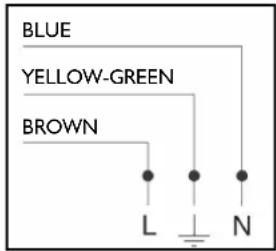
NB: Make sure the characteristics of the household electrical system (voltage, maximum power and current) are compatible with those of your FRANKE oven.
NB: If the power cable is damaged, it must be replaced by the manufacturer or its after-sales service or else by a person with similar qualifications, in order to avoid any risks.
Technical data
Useful oven dimensions:
Models CR M M, CR P M, CS M M, CS P M, SG M M, SM M M
width 430 mm
depth 410 mm
height 370 mm
Models SM M and SM P
width 430 mm
depth 410 mm
height 320 mm
Consumption (fan function):
to reach 200°C: 0.31 kW/h
to maintain 200°C .. 0.81kW / h
total consumption: 1.12 kW/h
Power supply voltage and frequency:
220/240 V ~ 50-60 Hz
Total power and fuse rating:
2850W-16A
(SM 981P)2950W-16A

This appliance complies with the following EC Directives:
- 2006/95/EC (Low Voltage); -2004/108 EEC
(Electromagnetic
Compatibility).
Useful oven volume:
models CR M M, CR P M, CS M M,
CSPM,SGMM,SMM:65 litres
models SM M and SM P: 57 litres
Heating element power:
roof 1000 W
floor 1250 W
grill 2250 W
circular 2000 W
fan 30 W
oven light I x 15 W
oven light (SM 981 P) I x 25 W
tangential fan 15 W
tangential fan (SM 98 I P): 35 W
Consumption (conventional function):
to reach 175°C 0.32 kW/h
to maintain 175°C .. 0.62 kW/h
total consumption: 0.94 kW/h
INFORMATION FOR USERS
in accordance with the article of Legislative Decree no. 15 of July 25 "Implementation of Directives 2002/95/ EC, 2002/96/EC and 2003/108/EC, regarding reduction of the use of hazardous substances in electrical and electronic appliances, and waste disposal".
The barred dustbin symbol given on the appliance indicates that at the end of its useful life the product must be collected separately from other waste.
Therefore, when the appliance has reached the end of its useful life the user must take it to an appropriate differentiated collection centre for electronic and electrotechnical waste, or return it to the dealer when purchasing a new appliance of equivalent type.
Adequate differentiated collection of the scrapped appliance for subsequent recycling, treatment and environmentally-friendly disposal will help prevent possible negative effects for the environment and the health of people and favours recycling the materials the appliance is made from.
Improper disposal by the user involves application of the administrative penalties under Leg. Decree no. 22/1997 (art. 50 et seq. of Leg. Decree no. 22/1997).
Summary
Natural convection
CSPM, SGMM, SMM: 65 litres
(SM 981 P) 2950 W - 16 A
Heating element power:
top: 1000 W
bottom: 1250 W
grill: 2250 W
circular: 2000 W
Models CR M M, CR P M, CS M M, CS P M, SG M M, SM M M
Width: 430 mm
Depth: 410 mm
Height: 370 mm
(SM 981P) 2950 W - 16 A

Round heating element: 2000 W
Fan: 30 W
Oven interior light: 1 x 15 W
Oven interior light (SM 981 P): 1 x 25 W
Tangential fan: 15 W
Tangential fan (SM 981 P): 35 W
USER INFORMATION
- INTRODUCTION
- A CLOSE VIEW
- CONTROL PANEL
- SWITCHING ON THE FIRST TIME
- USEFUL ADVICE
- OPERATION
- SETTINGS
- OPTIONS
- MANUAL OVEN OPERATION
- COOKING MODE
- SOFT COOKING (DEFROST - QUICK DEFROST - PLATE WARMER)
- NATURAL CONVENTIONAL COOKING
- FAN COOKING
- MASTER COOKING
- HOT AIR
- MULTI POWER" HOT AIR COOKING
- QUICK COOKING
- TURBO GRILL COOKING
- OVEN LIGHT (ALL MODELS EXCEPT CR 981 P M, CS 981 P M AND SM 981 P M)
- PYROLYTIC AUTOMATIC CLEANING (CR 981 P M, CS 981 P M AND SM 981 P M ONLY)
- COOLING FAN
- PROGRAMMING COOKING TIME
- SETTING THE TIMER
- INSTANT START OF COOKING WITH SET DURATION
- A - PREHEATING STAGE
- B - COOKING STAGE
- C - END OF COOKING
- DELAYED START OF COOKING WITH SET DURATION
- COOKING STAGE
- COOKING TABLE
- GUIDED COOKING SETTING
- WELLNESS FUNCTION
- COMPLETE MENUS" FUNCTION
- IMPORTANT
- CLEANING THE OVEN DOOR (FIG. 6)
- REMOVING THE OVEN DOOR INTERNAL GLASS (MODELS CR, CS AND SM ONLY) (FIG. 2)
- REMOVING THE OVEN DOOR INTERNAL GLASS (MODELS TL AND CM ONLY) (FIG. 3)
- REMOVING THE SIDE FRAMES (ALL MODELS EXCEPT CR 981 PM, CS 981 PM AND SM 981 PM)
- FITTING THE SIDE FRAMES (ALL MODELS EXCEPT CR 981 PM, CS 981 PM AND SM 981 PM)
- REMOVING THE OVEN DOOR
- REPLACING THE OVEN LAMP (FIG. 7)
- ASSISTANCE
- SPECIFY
- SAFETY INSTRUCTIONS
- ALWAYS CONTACT QUALIFIED PERSONNEL IN THE FOLLOWING CASES
- DO NOT ALLOW CHILDREN TO TOUCH
- DO NOT
- CONTACT SERVICE CENTRES AUTHORISED BY THE MANUFACTURER IN THE FOLLOWING CASES
- INSTALLATION (FIG. 5)
- CABINET REQUIREMENTS
- INSTALLATION INSTRUCTIONS
- MODELS CM AND TL (FIG. 8A/8B/8C)
- MODELS CR, CS, SG AND SM (FIG. 8D)
- ELECTRICAL CONNECTION
- TECHNICAL DATA
- USEFUL OVEN DIMENSIONS
- CONSUMPTION (FAN FUNCTION)
- TOTAL POWER AND FUSE RATING
- USEFUL OVEN VOLUME
- HEATING ELEMENT POWER
- CONSUMPTION (CONVENTIONAL FUNCTION)
- INFORMATION FOR USERS
- SUMMARY
- NATURAL CONVECTION
- USER INFORMATION
Brand : FRANKE
Model : Crystal Mirror Pyro 60
Category : Oven