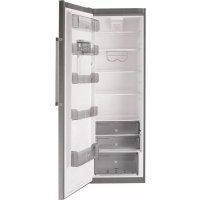
FFK1674XW - Refrigerator FAGOR - Free user manual and instructions
Find the device manual for free FFK1674XW FAGOR in PDF.



| Product type | Refrigerator |
| Brand | Fagor |
| Model | FFK1674XW |
| Dimensions (H x W x D) | 1770 x 560 x 550 mm (estimate) |
| Weight | 70 kg (estimate) |
| Power supply | 220-240 V, 50 Hz, grounded outlet |
| Refrigerant | R600A (environmentally friendly) |
| Climate class | N-ST (estimate) |
| Recommended refrigerator temperature | 4 °C |
| Quick cooling function | Activates the coldest temperature for 6 hours |
| Holiday function | Operates at 9 °C to reduce consumption |
| Control lock | Yes (press and hold for 3 seconds) |
| Open door alarm | Triggered after 1 minute of opening |
| Charcoal filter | Replacement recommended every 6 months |
| Ice Maker (accessory) | Produces up to 20 ice cubes (5 trays) |
| Door opening direction reversal | Possible (detailed instructions in the manual) |
| Interior lighting | Bulb E14, 220-240 V, 15/25 W |
| Interior cleaning | With water and baking soda, non-abrasive sponge |
| Exterior cleaning | Soft cloth, do not use steam |
| Rear grille cleaning | Once a year with a vacuum cleaner |
| Safety instructions | Do not damage the refrigeration circuit; do not use non-recommended electrical appliances |
| Repairability | Spare parts available (bulb, charcoal filter); contact after-sales service |
Frequently Asked Questions - FFK1674XW FAGOR
User questions about FFK1674XW FAGOR
0 question about this device. Answer the ones you know or ask your own.
Ask a new question about this device
Download the instructions for your Refrigerator in PDF format for free! Find your manual FFK1674XW - FAGOR and take your electronic device back in hand. On this page are published all the documents necessary for the use of your device. FFK1674XW by FAGOR.
USER MANUAL FFK1674XW FAGOR




□ ESPRESS
□ PHARMANS
□ PONTEURIS
□ ENGLISH
□ ITALIANO
□ DEUTSCH
□ HEDDPLANS
□ CHSKY
□ MISHAR
□ BLOVENSKY
□ عر bounded
□ CATALA
□ GALEGO
□ HASKHA
Very important: Please read this manual fully before using your refrigerator.
This manual has been designed so that the text is linked to the relevant drawings.

Identifi cation

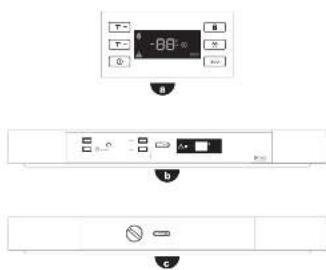
Identify the model of your refrigerator ("a", "b", "c") by comparing the control panel with the illustrations.
1
Installation

1.1 Unpacking. Remove all the protection.
1.2 Location. Position the refrigerator away from heat sources and protected from direct sunlight to reduce consumption.
Do not install the refrigerator outside or anywhere it is exposed to rain.
Air must be able to circulate around the back of the refrigerator. Leave 25 mm between the back of the refrigerator and the wall behind it. Do not block the space between your refrigerator and the floor or ceiling with any object.
Level the refrigerator to prevent any vibrations or noise. Remember that if the refrigerator is located next to a wall or cabinet, it might make a small noise.
Also check that the shelves have been fitted correctly, and place containers apart to prevent any vibrations.
1.3 Electrical connection. Stand the refrigerator upright for at least 2 hours before plugging it in. Check the information on the specifications plate (220-240V earthed) (1.3.1, 1.3.2).
Do not use any adapters or extension leads.
Make sure that the lead is not touching the motor or trapped underneath it.
1.4 Changing the direction the door opens.
Unplug the refrigerator from the mains supply and empty it completely.
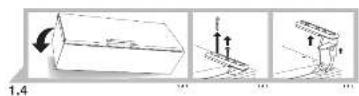
Gently lay the appliance on its back (1.4.1).
Undo the screws (1.4.2) and remove the top hinge and the rotating bushing with the aid of a screwdriver (1.4.3).
Unplug by pressing on the connector tab (1.4.4). Remove the refrigerator door (1.4.5). Remove the control panel, levering it up by inserting a screwdriver in the notches provided for that purpose (1.4.6).
Make a notch for the lead on the other side, in the area indicated on the casing (1.4.7). Replace the control panel passing the lead through the notch made (1.4.8).
Undo the screws from the bottom hinge and remove it. Change the position of the pin in the hinge and position it on the other side (1.4.9).
Remove the vertical handle and fit it on the other side of the door turning it 180^ (1.4.10).
Fit the closing capsule in the top hinge space on the other side (1.14.12). Press the connector to plug it into the door (1.4.13).
Fit the top hinge and the rotating bushing, inserting any spare lead in the control panel (1.4.14) and replace the screws (1.4.15).
Lift the refrigerator up carefully (1.4.16).
1.5 Levelling the appliance. Adjust the feet so that it is tilting backwards slightly, to help the door close correctly (1.5.1).

Use

2.1 Switching on the refrigerator. Press the ① button (2.1.1). Press +, — until a digit appears on the display (2.1.2) or turn the control (2.1.3). In models b and c, the “on” LED will come on to indicate that the appliance is switched on.
The child lock is automatically activated in model a, to release it press the button for 3 seconds (2.3.6).
2.2 Setting the temperature. Press the T^ + T^ - buttons (2.2.1). Press +, - (2.2.2), or turn the control (2.2.3). Once you have set the temperature required, you can find out the actual temperature by pressing the T^ + , T^ - (2.2.4) , + or - (2.2.5) buttons for five seconds. The temperature will flash. Model does not have this function.
Recommendation: The recommended temperature for your refrigerator is 4 degrees. It is best to always keep it between 1 and 9 degrees.
Remember that the temperature inside the refrigerator depends on the ambient temperature, the location and how often the refrigerator door is opened.
2.3 Refrigerator functions.
Fast cooling function: This function sets the refrigerator to the coolest temperature for 6 hours. It is recommended that you activate this function when you put a large amount of food into the refrigerator. To activate and deactivate it: Press ✦ (2.3.1) or SUPER (2.3.2, 2.3.3), in model b the display will show SC whilst the function is activated.
Holiday function: Ideal for when you are away from home for a long time. The refrigerator will remain set at 9 degrees, preventing any bad smells from developing and keeping electricity consumption very low.
To activate and deactivate it: Press the button until ECO appears on the display (2.3.4) or press the 📄, button, the screen will show HO whilst the function remains activated (2.3.5). Model ⬆ does not have this function.
⚠ Warning: For the holiday function to work correctly, the refrigerator door must be closed.
Child lock: Ideal for preventing changes being made inadvertently to appliance settings or children from interfering with them. The screen will display the 🔒 icon whilst the child lock is activated. Press ⬆ (2.3.6) or ⏻ (2.3.7). The screen will show alternating with the normal display whilst the function is activated. Model ⬇ does not have this function.
2.4 Arranging food in your refrigerator. The temperature is not uniform inside your refrigerator. Some areas are colder than others. Food must be stored in the right area to make sure that it is kept correctly (2.4.1):
- Butter.
- Hors d'oeuvres, cheese, yoghurts, cream, sauces, eggs.
- Bottles, milk.
-
Meat, poultry, game and fresh fish, cooked meats.
-
Pulses and vegetables.
- Vacuum box (accessory).
- Ice maker (accessory).
2.5 ICE MAKER. This is an accessory in your refrigerator that can generate up to 20 cubes of ice. If you have an Ice Maker, take it out of the refrigerator (2.5.1). Remove each of the 5 ice-trays inside (2.5.2) and fill them with water (2.5.3). Put the ice-trays back trying not to spill any water (2.5.4). Put your Ice Maker carefully back into place inside the refrigerator (2.5.5). The ice cubes will be ready for use in 24 hours.
2.6 Switching the refrigerator off. Press ① for 3 seconds or press — until no temperature appears on the display (2.6.1, 2.6.2), or turn the control to the off setting (2.6.3). In models b, c the “on” LED will go off.
2.7 Recommendations for use.
- Keep the fan switched off for greater energy savings (2.7.1).
- Do not open the doors for longer than necessary. This will allow your refrigerator to work more efficiently and prevent any increase in energy consumption.
- Store food in sealed containers to prevent it from drying out.
3 Maintenance and cleaning

3.1 Cleaning the inside. Use a sponge or cloth soaked in water with bicarbonate of soda to clean the inside of the refrigerator to prevent any smells from forming.
Never use a steam cleaner, solvents or scouring powders.
3.2 Cleaning the outside. Never use a steam cleaner to clean the displays.
It is a good idea to clean the grille at the back once a year with a vacuum cleaner.
3.3 Cleaning the accessories. Do not put them in the dishwasher. Clean them by hand with the help of a sponge or cloth.
3.4 Changing the light bulb. If the light bulb blows: switch off the refrigerator. Remove the cover by pressing on the lug (3.4.1) and removed the blown bulb (3.4.2). Replace it
with another with the same type of thread, E14, 220-240V, 15/25W or as indicated on the light fi tting.
3.5 Changing the carbon fi Iter. Your refrigerator may have a carbon fi Iter to absorb any strange smells from some types of food and capture any microorganisms (fungus and bacteria) circulating in the air.
The fi Iter keeps its properties for a limited time of 6 months. After this time it is recommended that you replace it with a new one. Its location varies depending on the model.
To activate the fi iter: Press down on the tab and remove the cover to access the fi iter (3.5.1). Separate the used fi iter from the cover (3.5.2). Remove the seals from the new fi iter (3.5.3).
Press the BIOFILTER visor until you hear a light click (3.5.4) and in a few seconds the duration scale will start to colour. Put the filter back into place.
⚠️ Keep used and new fi Iters out of the reach of children; digesting large quantities can be dangerous.
Do not wet the fi Iter as it can lose its properties.

Troubleshooting

4.1 Door open. If you leave the door open for more than 1 minute, the ⚠️, signal will come on, an alarm will sound and the refrigerator light will go off (4.1.1, 4.1.2). The alarm will stop when the door is closed.
4.2 Power cut.
Open the refrigerator as few times as possible.
4.3 Normal noises in the refrigerator.
Your refrigerator may make a number of quite normal operating noises which should not concern you.
- The refrigerant may make a gargling noise as it passes through the circuits.
- The compressor may make a buzzing and/or a slight knocking noise, above all when it switches on.
- The dilation or contraction of the materials used can make clicking or creaking noises.
- The air moved by the freezer fan can make a small background noise.
Do not tamper with your refrigerator in an attempt to repair it. Call for service.

Safety

- Be careful not to damage the refrigeration circuit.
- Do not use any electrical appliances inside your refrigerator unless they are of the type recommended by the manufacturer.
- Do not use any mechanical devices or any other means to speed up defrosting other than those recommended by the manufacturer.
- This appliance is not intended for use by people (including children) with reduced physical, sensory or mental capabilities, or lack of experience or knowledge, unless they have been given supervision or instruction concerning use of the appliance by a person responsible for their safety. Children should be supervised to ensure that they do not play with the appliance.
- If the power lead is damaged, it must be replaced by the manufacturer, or by their after sales service or a similar qualified person to prevent any risk.

The environment

This refrigerator was designed with environmental conservation in mind.
The appliance operates with coolant R600A, which does not damage the environment.
Respect the environment. Use the recommended temperatures for each compartment. They will depend on the mode you need for efficient use of your refrigerator.
Disconnect the refrigerator or set it to holiday mode when you will not be using it for a prolonged period. You will reduce power consumption and save energy.
Avoid leaving the doors open more time than necessary. It causes an increase in power use.
Waste management of electrical and electronic appliances.
The symbol indicates that the appliance must not be disposed of in traditional bins for domestic waste.
Deliver your refrigerator to a special collection centre.
Recycling domestic appliances prevents negative impacts on health and the environment and helps save energy and resources.
For more information, contact your local authorities or the establishment where you purchased your refrigerator.
5.Malbwaliyatwalchir
Brand : FAGOR
Model : FFK1674XW
Category : Refrigerator