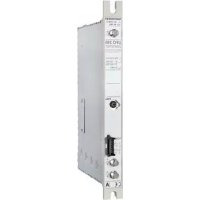
UFO 395 - Receiver KATHREIN - Free user manual and instructions
Find the device manual for free UFO 395 KATHREIN in PDF.

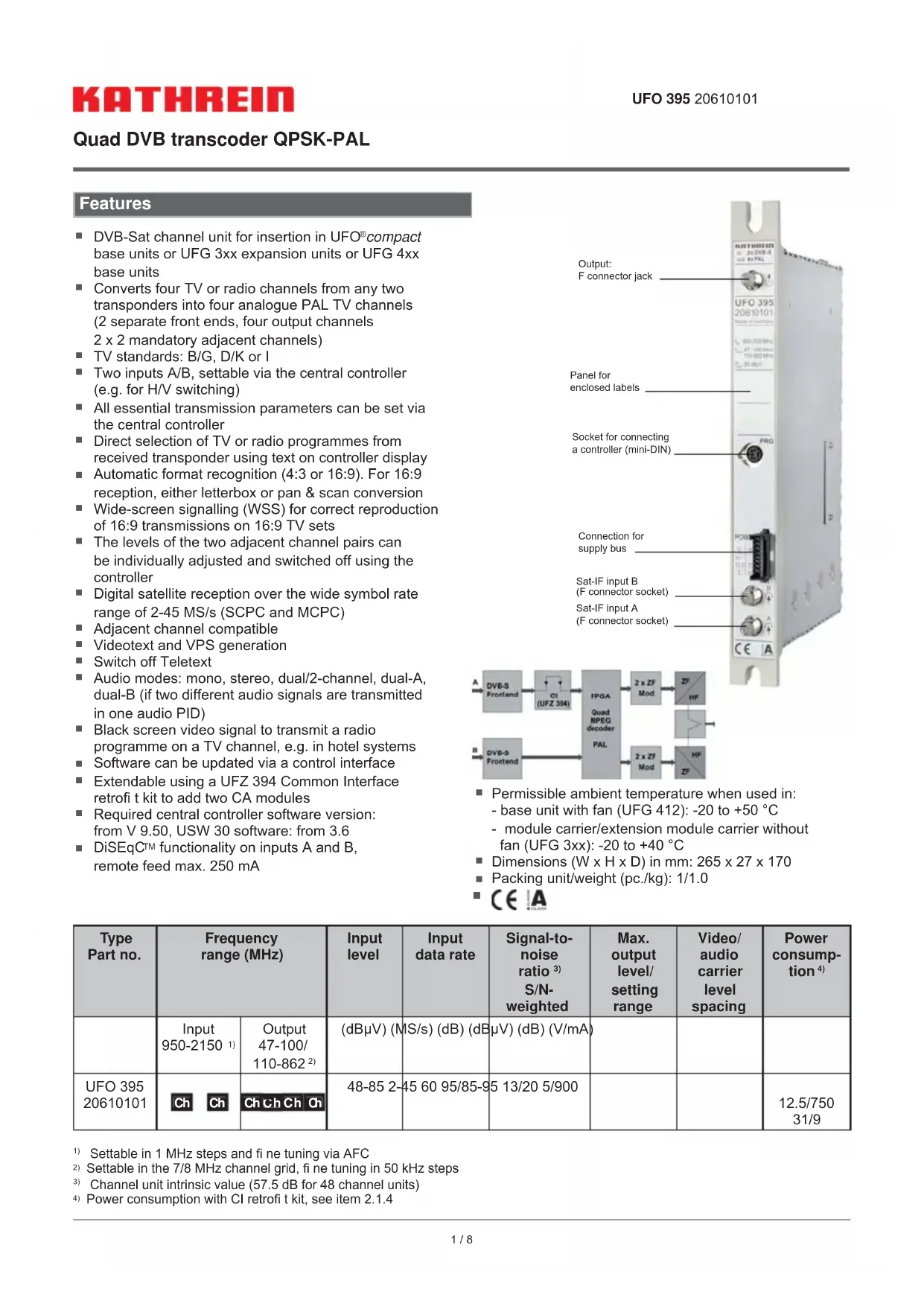


| Product type | Digital satellite receiver (QPSK-PAL transcoder) |
| Brand | Kathrein |
| Model | UFO 395 |
| Dimensions (W × H × D) | 265 × 27 × 170 mm |
| Weight | 1.0 kg |
| Power supply (consumption) | 5 V/1.3 A, 12.5 V/800 mA, 31 V/9 mA (depending on configuration) |
| Input frequency range | 950 - 2150 MHz |
| Output frequency range | 47 - 862 MHz (depending on TV standard) |
| Input data rate | 2 - 45 MS/s |
| Input level | 48 - 85 dBµV |
| Max. output level | 95 dBµV (adjustable 85 - 95 dBµV) |
| Signal-to-noise ratio (S/N) | 60 dB (intrinsic value) |
| Supported TV standards | B/G, D/K, I |
| Sound modes | Mono, Stereo, Dual track (A, B) |
| Number of output channels | 4 (2 pairs of adjacent channels) |
| Satellite inputs | 2 (A/B) with DiSEqC switching |
| Features | DiSEqC 1.0, Teletext, VPS, Letterbox/Pan&Scan, software update |
| Common Interface | Yes (via UFZ 394, 2 slots for CA modules) |
| Operating temperature | -20°C to +50°C (with fan) / -20°C to +40°C (without fan) |
| Maintenance | Clean with a soft, dry cloth. Do not use liquid or abrasive products. |
| Safety | Observe temperature limits. Disconnect the device before cleaning. Do not expose to moisture. |
| Spare parts / Repairability | Replaceable CA modules. Software update possible via adapter cable (BN 700K002). |
Frequently Asked Questions - UFO 395 KATHREIN
User questions about UFO 395 KATHREIN
0 question about this device. Answer the ones you know or ask your own.
Ask a new question about this device
Download the instructions for your Receiver in PDF format for free! Find your manual UFO 395 - KATHREIN and take your electronic device back in hand. On this page are published all the documents necessary for the use of your device. UFO 395 by KATHREIN.
USER MANUAL UFO 395 KATHREIN
As of 1 April 2019, KATHREIN SE's (formerly KATHREIN-WERKE KG) "Terrestrial & Satellite Reception" business unit will be transferred to KATHREIN Digital Systems GmbH (limited liability company).
Commerzbank AG
IBAN:DE24 7114 0041 0611 9002 00
BIC: COBADEFFXXX
From 1 April 2019, the new company data are:
KATHREIN Digital Systems GmbH
Anton-Kathrein-Str. 1-3
83022 Rosenheim, Germany
Tax ID No.: 156/117/31083
ZF = Empfangsfrequency - Oscillatorfrequency
ZF = Empfangsrequency - Oszillatorfrequency = 11836 - 10600 = 1236 MHz
DVB-Sat channel unit for insertion in UFO®compact base units or UFG 3xx expansion units or UFG 4xx base units
- Converts four TV or radio channels from any two transponders into four analogue PAL TV channels (2 separate front ends, four output channels 2 × 2 mandatory adjacent channels)
TV standards: B/G, D/K or I
Two inputs A/B, settable via the central controller (e.g. for H/V switching)
All essential transmission parameters can be set via the central controller
- Direct selection of TV or radio programmes from received transponder using text on controller display
Automatic format recognition (4:3 or 16:9). For 16:9 reception, either letterbox or pan & scan conversion
Wide-screen signalling (WSS) for correct reproduction of 16:9 transmissions on 16:9 TV sets
The levels of the two adjacent channel pairs can be individually adjusted and switched off using the controller
Digital satellite reception over the wide symbol rate range of 2-45 MS/s (SCPC and MCPC)
- Adjacent channel compatible
Videotext and VPS generation
Switch off Teletext
Audio modes: mono, stereo, dual/2-channel, dual-A, dual-B (if two different audio signals are transmitted in one audio PID)
- Black screen video signal to transmit a radio programme on a TV channel, e.g. in hotel systems
Software can be updated via a control interface
- Extendable using a UFZ 394 Common Interface retrofit kit to add two CA modules
Required central controller software version: from V 9.50, USW 30 software: from 3.6
DiSEqCTM functionality on inputs A and B, remote feed max. 250mA
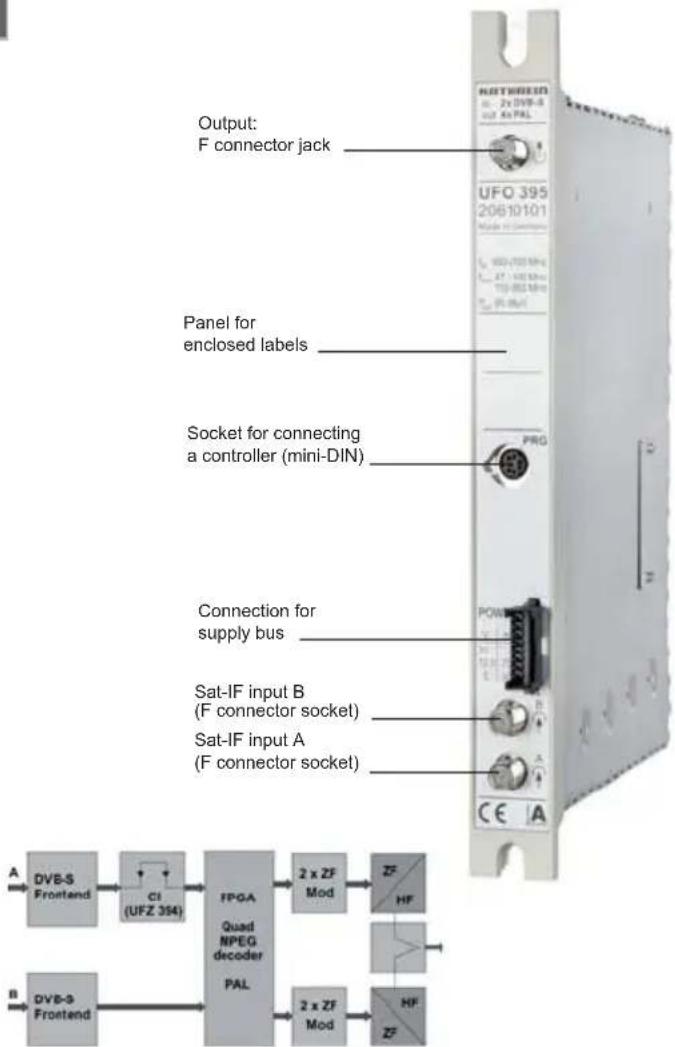
- Permissible ambient temperature when used in: - base unit with fan (UFG 412): -20 to +50 °C
- module carrier/extension module carrier without fan (UFG 3xx): -20 to +40 °C
Dimensions (W× H× D) in mm: 265× 27× 170
Packing unit/weight (pc./kg): 1/1.0
| Type Part no. | Frequency range (MHz) | Input level | Input data rate | Signal-to-noise ratio 3) S/N-weighted | Max. output level/ setting range | Video/ audio carrier level spacing | Power consumption 4) | |
| Input 950-2150 1) | Output 47-100/ 110-862 2) | (dBμV) (MS/s) (dB) (dB μV) (dB) (V/mA) | ||||||
| UFO 395 20610101 | Ch Ch | Ch Ch Ch Ch | 48-85 2- | 45 60 95/85-9 | 5 13/20 5/900 | 12.5/750 31/9 | ||
1) Settable in 1 MHz steps and fi ne tuning via AFC
2) Settable in the 7/8 MHz channel grid, fine tuning in 50 kHz steps
3) Channel unit intrinsic value (57.5 dB for 48 channel units)
4) Power consumption with CI retrofit kit, see item 2.1.4
2. Setup instructions
The QPSK-PAL UFO 395 quad transponder is set up via the UFG 300 manual controller or the UFG 3xx base unit central controller. General instructions for setting up can be found in the respective user instructions.
2.1 Setting the input
2.1.1 Selecting the signal input
| Inp. 1 1236MHz 27.500MS/s 3/4 CI Inp. 2 A 1588MHz 27.500MS/s 3/4 |
| *** UFO 395-E 1 *** |
| DiSEqC-A off |
| DiSEqC-B off |
Display of the input used for the two receivers. A/B changeover, input Sat-IF frequency, symbol rate, code rate, CI module (if a UFZ 394 is plugged in).
The type designation of the module including display of the input unit that the controller is addressing
Selection of the DiSEqCT ^TM signal to be sent via the HF socket, e.g. "A"
Press the sub-menu button to return to the main menu.
2.1.2 Selecting input frequency
| Inp. 1 A | 1236MHz |
| 27.500MS/ s | 3/4 CI |
| Inp. 2 A | 1588MHz |
| 27.500MS/ s | 3/4 |
| *** | UFO 395-E1 *** |
| SNR | 12dB |
| BER | 1.0E-07 |
Press the button to call up the sub-menu. Select the parameter "Input frequency" and set it in 1 MHz steps between 950-2150 MHz (using the scroll button or by inputting the figures)
| Instruction for calculating the Sat-IF frequency: |
| IF = reception frequency - oscillator frequency |
| The oscillator frequency is determined as follows: |
| 9750 MHz is used for reception frequencies between 10700 and 11700 MHz |
| (low-band). 10600 MHz is used for reception frequencies between 11700 MHz and 12750 MHz (high-band). |
| This gives the value for ARD - Das Erste as: |
| IF = reception frequency - oscillator frequency = 11836 - 10600 = 1236 MHz |
Press the button to call up the sub-menu with:
The type designation of the module
The signal-to-noise ratio (SNR)
The Bit Error Rate (BER) associated with the SNR
Press the sub-menu button to return to the main menu.
2.1.3 Selecting the input symbol rate
| Inp. 1 A | 1236MHz |
| 27.500MS/s | 3/4 CI |
| Inp. 2 A | 1588MHz |
| 27.500MS/s | 3/4 |
Select the parameter "Symbol rate".
Set the desired symbol rate between 2.000 and 45.000 MS/s.
Setting is by using the scroll button or by inputting the fi gures.
For channels with very low symbol rates it can take 1-4 minutes before the channel can be received.
2.1.4 Common Interface Module (this menu item appears only when the UFZ 394 is plugged in)
| Inp. 1 A | 1236MHz |
| 27.500MS/ s | 3/4 CI |
| Inp. 2 A | 1588MHz |
| 27.500MS/ s | 3/4 |
The power consumption of the combination of UFO 395 with UFZ 394 and two Alphacrypt CA modules is as follows:
$$ 5 \mathrm {V} \rightarrow 1. 3 \mathrm {A}; 1 2. 5 \mathrm {V} \rightarrow 8 0 0 \mathrm {m A}; 3 1 \mathrm {V} \rightarrow 9 \mathrm {m A} $$
The upper slot is number 2, the lower slot is number 1.
| *** | UFO 395 | *** |
| Slot | 1 | |
| Cryptoworks | ||
| PMT | oaa | normal |
Press the button to call up the sub-menu.
The UFZ 394 CA module slot to be used for decrypting the channel can be selected here.
Access the submenu for setting the UFZ 394 module (only input 1).
| *** | UFO 395 | *** |
| Slot 1 | ||
| Cryptoworks | ||
| PMT | oaa | normal |
The module name or an indication whether a module is plugged in is displayed in the third line of this view.
This menu is active only if the same slot for decrypting the channel is selected on Q1, Q2, Q3 or Q4 (multiple decryption using a CAM).
Conditional Access Modules (CAM) manage a list of channels to be decrypted (in the form of entries called CA-PMTs). Where a CAM is required to decrypt several channels, the list can be transferred in either of two different forms.
However not all CAMs support both types of transfer. The two types are called "Only-Add-Add (oaa)" and "First-More-More-Last (fmmI)" in the UFO® compact controller and the USW 30 software.
Therefore it is necessary to set the type of transfer to be used separately for each CAM.
| *** | UFO 395 | *** |
| Slot 1 | ||
| Cryptoworks | ||
| PMT | oaa | normal |
PMT change "normal" and "optimised":
Every now and again certain management information that is required for decrypting a channel (PMT) may change. This changed information must be communicated to the CAM. One procedure for doing this, which here we call "normal", consists of sending the complete channel list with the updated management information afresh to the CAM. This succeeds with any CAM, but can lead to short-term loss of picture for all the channels to be decrypted.
Some CAMs support the transfer of the changed management information for each individual channel (list update), without affecting the other channels that require decryption ("optimised" procedure). If the option is activated inadvertently or by mistake it can however lead to loss of picture for one or all the channels to be decrypted for an indefinite period of time (e.g. until the channel unit is next restarted).
2.2 Setting the input
2.2.1 Selecting the input
| E 1 TV | DasErste | K65 |
| E 1 TV | Bayerisch | K66 |
| E 2 TV | RTL Telev | K67 |
| E 2 TV | n-tv | K68 |
Selection of input 1 or 2 for the respective output.
2.2.2 Choosing between TV or radio channels
| E 1 TV | DasErste | K65 |
| E 1 TV | Bayerisch | K66 |
| E 2 TV | RTL Telev | K67 |
| E 2 TV | n-tv | K68 |
Select the parameter "Ra/TV". Set the desired type of reception using the scroll button.
Press the button; the feature settings sub-menu will be displayed:
2.2.3 Selection of the feature settings
2.2.3.1 Teletext
| *** UFO 395-Q1 *** Videotext On CI 16:9 Letterbox |
The insertion of Teletext can be switched on or off here.
2.2.3.2 Common Interface Module (this menu item appears only when the UFZ 394 is plugged in)
| *** UFO 395-Q1 | *** |
| Videotext on CI | 1 |
| 16:9 Letterbox |
Selection of the slot in which the set channel can be decrypted.
2.2.3.3 Selecting the picture format
| *** UFO 395-Q1 *** Videotext on CI 16:9 Letterbox |
Selecting the procedure for reception of 16:9 wide-screen format:
Letterbox
Pan & Scan (always 4:3)
2.2.3.3.1 Selecting the TV channel under "TV"
| E 1 TV | DasErste | K65 |
| E 1 TV | Bayerisch | K66 |
| E 2 TV | RTL Telev | K67 |
| E 2 TV | n-tv | K68 |
Displaying the name of the programme to be selected. Use the scroll button to display the TV programme to be selected.
On pressing the sub-menu button, will be displayed:
2.2.3.3.2 Selecting a language for the TV or radio programme/PID display
| *** | UFO | 395-Q1 | *** |
| Video | PID | 0065 | unscr |
| Audio | PID | 0066 | deu |
- The type designation for the module and the quad (channel unit part) Q1 to Q4
- The video PID for the selected TV programme and the information whether or not it is encrypted
- The audio PID for the selected TV audio If the programme is transmitted in more than one language (e.g. "Euronews"), the scroll buttons can be used to select the desired language. Press the sub-menu button to return to the main menu.
2.2.3.4 Selecting a radio programme under "Ra"
| E 1 Ra Bayern3 K65 |
| E 1 TV Bayerisch K66 |
| E 2 TV RTL Telev K67 |
| E 2 TV n-tv K68 |
Displaying the name of the programme to be selected. Use the scroll button to display the radio programme to be selected.
Note: If no radio channels are registered in the transponder, the display "no ra service-" appears and the current TV channel continues to be displayed.
On pressing the sub-menu button, will be displayed.
2.2.4 Selecting the output channel
| E 1 TV | DasErste | K65 |
| E 1 TV | Bayerisch | K66 |
| E 2 TV | RTL Telev | K67 |
| E 2 TV | n-tv | K68 |
Select the parameter "Output channel" for the PAL signal. Use the scroll buttons to set the output channel in 7 MHz or 8 MHz steps from 111.25 MHz to 847.25 MHz (depending on the standard). Under the TV standards D/K and I, channel display for special channels is performed by ---". This setting is applied directly on the adjacent channel also (for Q1 on Q2 and for Q3 on Q4). Press the sub-menu button to display the sub-menu "Special settings for cable signals".
2.2.4.1 Frequency fine adjustment
| *** UFO 395-Q1 *** 823.25MHz Standard B/G HF on Level max Stereo Vol + 0d B |
Select "Output Frequency". By using the scroll buttons, the exact fine adjustment frequency setting for the video carrier can be made in 250 kHz steps. This setting is applied directly on the adjacent channel also (for Q1 on Q2 and for Q3 on Q4).
2.2.4.2 Selecting the TV standard
| *** UFO 395-Q1 *** |
| 823.25MHz Standard B/G |
| HF on Level max |
| Stereo Vol + 0d B |
The parameter "TV Standard" allows selection between the standard B/G, D/K and I.
Note:
B/G: 7 MHz or 8 MHz channel raster, audio carrier: 5.500 MHz and 5.742 MHz
D/K: 8 MHz channel raster, audio carrier: 6.5 MHz and 6.258 MHz
I: 8 MHz channel raster, audio carrier: 6.0 MHz
The setting up of the standard will be performed in Q1 and will take effect during Q2, Q3 and Q4.
2.2.4.3 Switching the output signal on/off
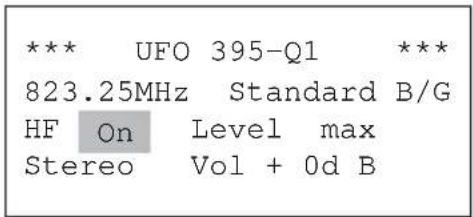
The output channel can be switched on/off via the "RF on/off" parameter. This setting can be specified individually for each output channel.
2.2.4.4 Setting the common output level
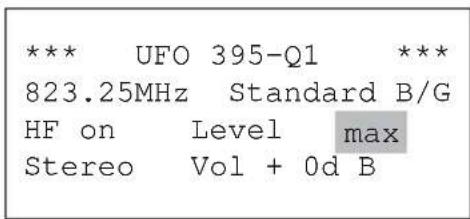
The parameter "Output Level" allows the output level of the output channel to be continuously varied in 40 steps (approx. 20 dB).
The setting limits are designated "Min" and "Max".
This setting is applied directly on the adjacent channel also (for Q1 on Q2 and for Q3 on Q4).
2.2.4.5 Selecting the audio mode
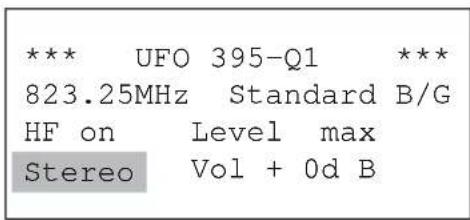
Selecting the audio mode. The scroll buttons allow selection of the following audio modes:
"Auto", "Mono", "Stereo", "2-channel", "2-channel A" and "2-channel B"
Note:
- In "Auto" the audio mode is set by the SAT signal
- In "2-channel A" only channel 1 is transmitted during 2-channel reception
- In "2-channel B" only channel 2 is transmitted during 2-channel reception
2.2.4.6 Setting the Volume
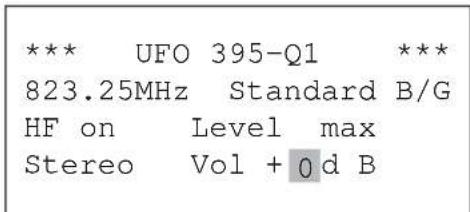
Select the parameter "Volume".
Perform the volume setting using the scroll buttons.
The adjustment range is from -3 through 0 to +3 dB.
3. Reading the software version
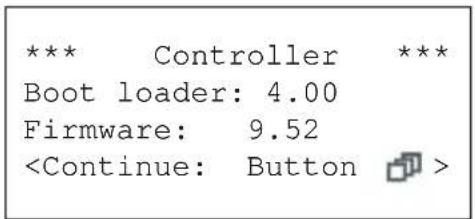
To display the software information, press the button.
First the software version of the controller will be shown.
Pressing the button again "pages" through the various levels.
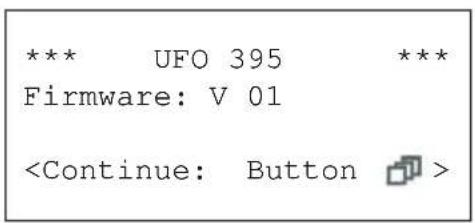
Pressing the button once displays the system information for the channel unit.
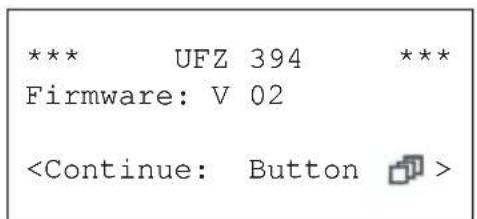
If the UFZ 394 is plugged in, pressing the button again displays the respective software levels.
Pressing the button reverts to the main menu.
4. Software update
The operating software for the channel unit can be updated locally. A Kathrein service tool is available for this. The update program and the latest firmware for the module can be ordered for downloading from the homepage of the Kathrein Service Centre ESC at "http://www.esc-kathrein.de".
To connect the PC/laptop to the Kathrein device you will require a device-specific adapter cable (BN 700K002), which you can order from our Service Centre, the company ESC GmbH (Elektronik Service Chiemgau GmbH). The reference source for this is the respective Kathrein sales centre or the respective agent for the country.
Important:
Software can be updated during reception of programmes. The channel currently being received will be interrupted while the update is in progress.
If the module is removed or mains power is lost during an update, this does not permanently damage the module. The update simply must be repeated.