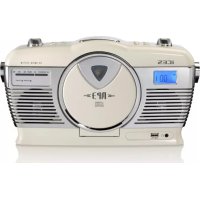
ISCD33 - Cd player/recorder Ices - Free user manual and instructions
Find the device manual for free ISCD33 Ices in PDF.


| Product Type | Portable CD player/recorder with FM radio |
| Brand | Ices |
| Model | ISCD33 |
| Mains power supply | 220-240 V, 50 Hz (detachable cord) |
| Battery power supply | 6 C-type batteries (UM-2) |
| Supported audio formats | Audio CD, MP3 CD (bitrate 32-320 kbps, sampling 32/44.1/48 kHz), MP3 files on USB drive |
| Radio | FM stereo with telescopic antenna |
| Playback functions | Play, pause, skip, repeat (1, folder, all), shuffle, program up to 20 tracks |
| Display | LCD with track, folder and indicator display |
| Outputs | 3.5 mm headphone jack, built-in speakers |
| Inputs | USB port (for MP3 drive) |
| Controls | Power/standby, volume, tuner, CD/USB, play/pause, stop, next/previous, folder, memory, repeat/shuffle, mute |
| Power consumption | Approximately 15 W (estimated) |
| Cleaning | Soft dry cloth, do not use liquids |
| Safety | Do not expose to water, heat, do not block ventilation, unplug if not used for extended period |
| Repairability | Entrust to an authorized technician; any opening voids the warranty |
| Warranty | Complies with European legislation, contact your dealer |
| Included accessories | Power cord, rod antenna (built-in) |
| Weight | Approximately 1.2 kg (estimated) |
| Dimensions | Approximately 28 x 20 x 12 cm (estimated) |
Frequently Asked Questions - ISCD33 Ices
User questions about ISCD33 Ices
0 question about this device. Answer the ones you know or ask your own.
Ask a new question about this device
Download the instructions for your Cd player/recorder in PDF format for free! Find your manual ISCD33 - Ices and take your electronic device back in hand. On this page are published all the documents necessary for the use of your device. ISCD33 by Ices.
USER MANUAL ISCD33 Ices
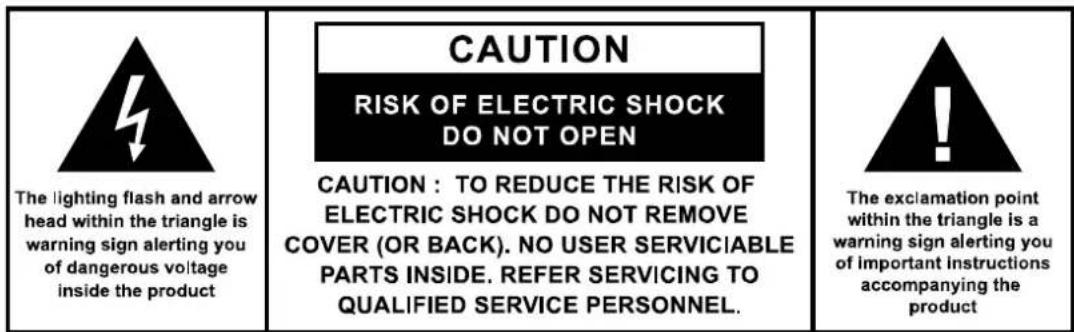
The lighting flash and arrow head within the triangle is warning sign alerting you of dangerous voltage inside the product
CAUTION
RISK OF ELECTRIC SHOCK DO NOT OPEN
CAUTION: TO REDUCE THE RISK OF ELECTRIC SHOCK DO NOT REMOVE COVER (OR BACK). NO USER SERVICIABLE PARTS INSIDE. REFER SERVICING TO QUALIFIED SERVICE PERSONNEL.

The exclamation point within the triangle is a warning sign alerting you of important instructions accompanying the product
IMPORTANT SAFETY INSTRUCTIONS:
- Read the instructions. All uses guidelines must be read before start device.
- Keep the instructions for future use.
- Attention, use and security guidelines must be respected.
- The device must not be used near water or be put in contact with moisture.
- Make sure has no liquid is spilled on device and device openings.
- Move device carefully, avoid shocks.
- Do not block the breakdown of the device outputs.
- Do not place the device near from a heat source (e.g. radiator). Do not expose it to the Sun.
- Plug the device as indicate on this information form.
- This device has a connection with overload protection (security device) decision-making. If the replacement of decision-making is required, please you send has an experienced or the device manufacturer technician.
- For cleaning the device, please follow the recommendations of the notice.
- The sector cord should be unplugged a long period of use.
- Device shall be repaired by a qualified person when:
a. the taken or the power cord is damaged,
b. objects have fallen into the apparatus or a liquid has been spilled into device,
c. device was exposes to the rain,
d. device does not work correctly without notable exterior change,
e. device fell and the subwoofer is broken.
- The user shall not try to maintain device beyond that which is described in this information form. The guarantee would negate.
- Unpack all parts and remove protective material.
- Do not connect the unit to the mains before checking the mains voltage and before all other connections have been made.
- Do not cover any vents and make sure that there is a space of several centimeters around the unit for ventilation.
- The apparatus shall not be exposed to dripping or splashing and that no objects filled with liquids, such as vases, shall be placed on the apparatus.
- The ventilation should not be impeded by covering the ventilation openings with items, such as newspapers, table-cloths, curtains, etc.
- No naked flame sources, such as lighted candles, should be placed on the apparatus.
- The mains plug is used as the disconnect device, the disconnect device shall remain readily operable.

CLASS I LASER PRODUCT
Location of controls
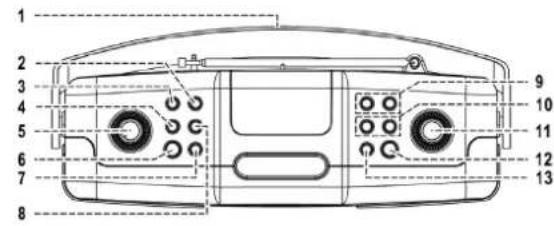
1) Leather handle
2) Memory button
3) Repeat/Ran button
4) Tuner/CD button
5) Volume up/down knob
6) On/standby button
7) Mute button
8) CD/USB exchange button
9) Folder up/down button
10)Skip up /down button
11) Tuning knob
12) Play/pause button
13) Stop button
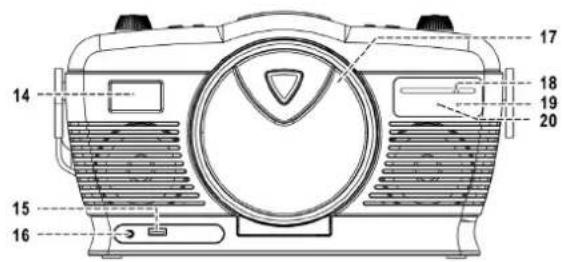
14) LCD display
15) USB socket
16) 3.5mm headphone jack
17) CD door open/close
18) Dial pointer
19) FM-stereo LED indicator
20) Tuner LED indicator
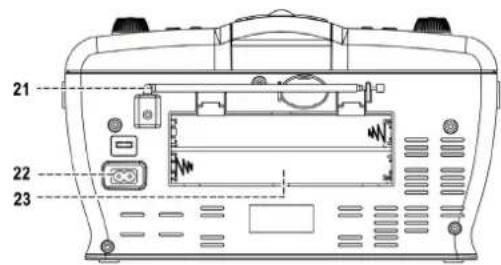
21) Rod antenna
22) Ac socket
23) Battery compartment
Caution:
Usage of controls or adjustments or performance of procedures other than those specified herein may result in hazardous radiation exposure.
This unit should not be adjusted or repaired by anyone except qualified service personnel.
Precautions for use
Installation
- Unpack all parts and remove protective material.
- Do not connect the unit to the mains before checking the main voltage and before all other connections have been made.
- Do not cover any vents and make sure that there is a space of several centimeters at the back of the unit for ventilation.
AC connection
- Connect the one end of the detachable power cord to the ac socket (22) and the other end to the ac outlet.
- When you first plug the unit into the mains, the unit will go into standby mode.
- Turn on the unit by On/Standby button (6), the TUNER LED indicator (20) will light up.
DC connection
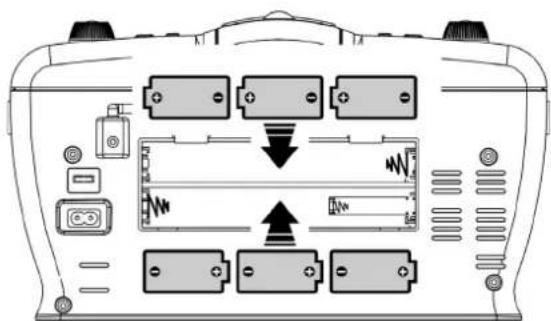
For DC operation, please insert 6 pcs size C (UM-2) battery at batter compartment (23) as below direction:
Listening to radio
Operation
- Turn on the unit by On/Standby button (6), unit defaulted on Tuner mode and the TUNER LED indicator (20) will light up.
- Turn the tuning knob (11) to set the station frequency as desired.
- Adjust volume knob (5) to the desired volume level.
Hints for best reception:-
FM : the receiver has rod antenna (21) hanging at the rear cabinet. this wire should be totally unraveled and extended for best reception.
FM & FM-stereo reception
- Appliance was auto default in FM stereo mode, once receiving stereo programs. The "FM-ST indicator (19) will light up to show the FM stereo program are receiving.
Playing CD/MP3 disc
Getting start
- Press Tuner/CD button (4) to select CD mode.
- Open the CD compartment by pressing the CD door open/close (17). Put a CD disc into the compartment and close the CD door.
- Focus search is performance if disc is inside. Total number of tracks is read and will start to playback automatically.
- Play / pause mode
- If Play/Pause button (12) is pressed during playback, system go to pause mode and the play indicator will start flashing at the LCD display (14). Press again to resume normal playback.
- Stop mode
- If Stop button (13) is pressed during play or pause mode. Go to stop mode and display total number of track on the LCD display (14).
- Skip mode (skip up>1/skip down<1)
- During play or pause mode, if skip up button (10) is pressed it will go to next track and display the track no. and then continuous the play or pause mode.
- During play or pause mode, if Skip down button (10) is pressed, it will go back to the beginning of the track, same track no. is display and continuous the play or pause mode.
- After step 2, press skip down button (10) again, it will go to the previous track and continuous the play or pause mode.
For MP3 disc/file
- Place the MP3-CD to CD compartment. After focus search is performing, the total number of track will be shown on the LCD display (14).
- Press Skip up or Skip down (10) button to select the track number.
- When the desired track and album is being selected, press the "Play/Pause " button (12) to start playback.
Remark
- Press "Folder up or down button (9) on main unit can select the MP3 folder directly.
The number of folder will display on LCD (14) for 1-2 seconds selected and then it will resume to the number of the track being playback
- Repeat/Random mode
Press the "Rep/Ran" button (3) during playback to select repeat and random function, a single track, single folder (MP3 only) or all the tracks can be played in difference mode as follow:-
For CD

| Play mode | Indicator on LCD display |
| Repeat track | REP |
| Repeat all | REP |
| Random | RANDOM |
| Off mode | -------- |
For MP3 disc/file
(1) Repeat 1 (2) Repeat 1 folder (3) Repeat all tracks (4) Random (5) Off mode
| Play mode | Indicator on LCD display | |
| Repeat single track | REP | |
| repeat single folder | REP & FOLDER | |
| Repeat all tracks | REP | |
| Random | RAN | |
| Off mode | ||
Repeat play
You can listen the desired tracks or folder repeatedly by this function.
- Random play
You can listen all the tracks in a random order by this function
CD / MP3 disc programming
Up to 20 tacks can be programmed for disc play in any order. Before use, be sure to press the stop button.
- Set in CD mode.
- Press the Memory button (2), "MEMORY & " P01" will appear and flashing on LCD display (14).
- Select a desired track by using the Skip up▶/Skip down▶buttons (10).
- Press the Memory button (3) to enter the track into the memory.
- Repeat steps 3 and 4 to enter additional tracks into the memory if necessary.
- When all the desired tracks have been programmed, press "Play/Pause button (12) to play the disc in the order you have programmed.
- Press "Stop" button (13) to terminate program play.
Press "Stop" button (13) at CD stop mode to cancel all programmed memory until the "MEMORY indicator disappear on LCD display (14).
For MP3 disc / file, press the "Folder up" button (9) to select the 1^st track of next folder directly and hence to speed up the song selection.
The programming mode will automatically stop if no button is being pressed in a period of about 30 seconds after pressing the Memory button (3).
Remark:-
MP3 track format requirement:-
Bit rate : 32 kbps~320kbps, sampling rate : 32kHz, 44.1kHz and 48 kHz decodable
The performance of playing MP3 disc is various from the quality of recording disc and the method of recording. Furthermore, the searching lead-time for MP3-CD is longer than normal CD due to difference format.
Playback of MP3 song via USB storage media
Connecting
The system is able to decode and playback all MP3 file which stored in the memory media with USB connecting port.
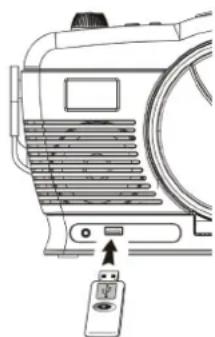
- Set the system at standby mode first or other function except USB mode.
-
Plug-in the USB pen-drive with the face up & make sure it going into completely.
-
Connecting the USB upside down or backwards could damage the audio system or the storage media (USB thumb driver). Check to be sure the direction is correct before connection.
-
Turn on the unit again by On/Standby button (6) and set press Tuner/CD button (4) to select CD mode. Press CD/USB exchange button (8) to change to USB mode. The system will start reading the storage media automatically after connecting, and LCD display (14) will show the total number of MP3 files being detected.
- Repeat the same playback procedure as playing CD/MP3 disc as above.
Remark
The system can detect and read the file under MP3 format only at USB mode but not other music file format.
If connect the system to MP3 player via the USB socket, due to variances in MP3 encoding format, some MP3 player may not be able to play via the USB socket. This is not a malfunction of the system.
- USB port does not support connection with USB extension cable and is not designed for communication with computer directly
Due to ErP stage two requirement and protect the environment. The unit will switch to standby mode automatically once no any music playing over 15 minutes.
Removing of USB
To remove the USB turn off the power or switch the function mode to either cd or tuner mode first. For USB port - un-plug it by pulling out the USB socket directly
Service and support
For information: http://www.ices-electronics.com/
For support: http://icesupport.zendesk.com
ICES helpdesk:
Germany 0900-1520530 (Local charges)
The Netherlands 0900-23553626 (Local charges + 1ct P/min)
Belgium 02-6200115 (Local charges)
France 0170480005 (Local charges)
The helpdesk is accessible from Monday to Friday from 9 AM till 6 PM.
In case your device needs repair, our helpdesk will redirect you to your local dealer.
ICES offers service and warranty in accordance to European law, which means that in case of repair (both during and after the warranty period), you should contact your local dealer.
Please note: It is not possible to send products directly to ICES for repair.
Important note: If this unit will be opened, or accessed in any way by a non-official service center, the warranty expires immediately.
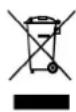
This symbol indicates that the relevant electrical product or battery should not be disposed of as general household waste in Europe. To ensure the correct waste treatment of the product and battery, please dispose them in accordance to any applicable local laws of requirement for disposal of electrical equipment or batteries. In so doing, you will help to conserve natural resources and improve standards of environmental protection in treatment and disposal of electrical waste (Waste Electrical and Electronic Equipment Directive).

Products with the CE marking comply with the EMC Directive (2004/108/EC) and the Low Voltage Directive (2006/95/EC) issued by the Commission of the European Community.
The declaration of conformity may be consulted at http://www.stl.nl/supportfiles/ices/CE/284bfgwmebr5y51.pdf
STL Group P.O Box 3092, 5902
RB Venlo, The Netherlands
All rights reserved
iCES®
DRAAGBARE RETRO CD/MP3/USB-SPELER MET RADIO
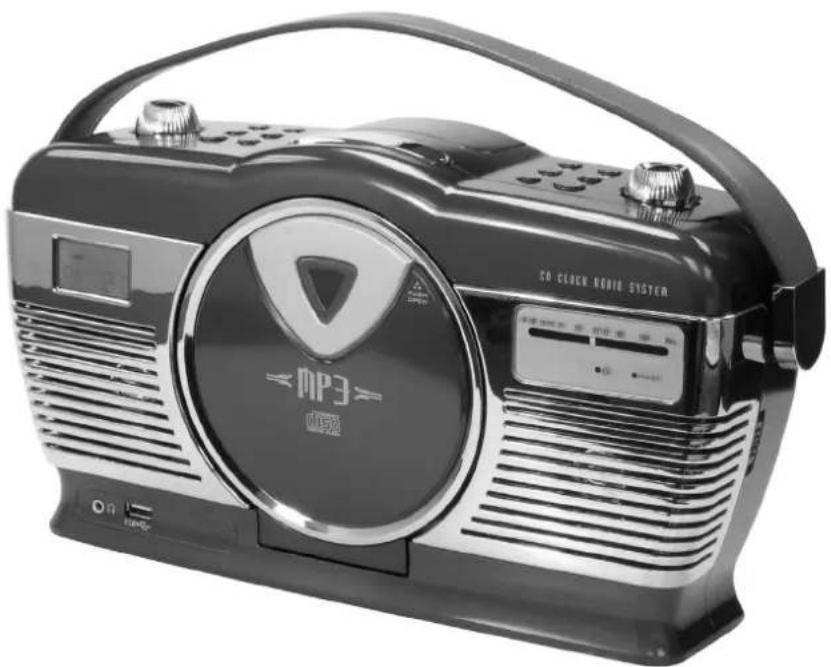
ISCD-33
HANDLEIDING
BELAGRIJKVEVILIGHEIDSINSTRUCTIES:
KLASSE 1 LASERPRODUCT
Programma CD / MP3-disc
MANUEL D'INSTRUCTION
INSTRUCTIONS IMPORTANTES CONCERNANT LA SECURITE
CLASS I LASER PRODUCT
http://www.ices-electronics.com/
Pour de l'aide:
http://icesupport.zendesk.com
France 0170480005 (appeal local)
The lighting flash and arrow head within the triangle is warning sign alerting you of dangerous voltage inside the product
CAUTION
RISK OF ELECTRIC SHOCK DO NOT OPEN
CAUTION: TO REDUCE THE RISK OF ELECTRIC SHOCK DO NOT REMOVE COVER (OR BACK). NO USER SERVICIABLE PARTS INSIDE. REFER SERVICING TO QUALIFIED SERVICE PERSONNEL.

The exclamation point within the triangle is a warning sign alerting you of important instructions accompanying the product
CLASS I LASER PRODUCT
The declaration of conformity may be consulted at http://www.stl.nl/supportfiles/ices/CE/284bfgwmebr5ty51.pdf
The lighting flash and arrow head within the triangle is warning sign alerting you of dangerous voltage inside the product
CAUTION
RISK OF ELECTRIC SHOCK DO NOT OPEN
CAUTION: TO REDUCE THE RISK OF ELECTRIC SHOCK DO NOT REMOVE COVER (OR BACK). NO USER SERVICIABLE PARTS INSIDE. REFER SERVICING TO QUALIFIED SERVICE PERSONNEL.

The exclamation point within the triangle is a warning sign alerting you of important instructions accompanying the product
CLASS I LASER PRODUCT


- CAUTION
- RISK OF ELECTRIC SHOCK DO NOT OPEN
- IMPORTANT SAFETY INSTRUCTIONS:
- CLASS I LASER PRODUCT
- Location of controls
- Caution:
- Precautions for use
- Installation
- AC connection
- DC connection
- Listening to radio
- Operation
- Hints for best reception:-
- FM & FM-stereo reception
- Playing CD/MP3 disc
- Getting start
- - Play / pause mode
- - Stop mode
- - Skip mode (skip up>1/skip down<1)
- For MP3 disc/file
- Remark
- - Repeat/Random mode
- For CD
- Repeat play
- - Random play
- CD / MP3 disc programming
- Remark:-
- Playback of MP3 song via USB storage media
- Connecting
- Removing of USB
- Service and support
- ICES helpdesk:
- iCES®
- DRAAGBARE RETRO CD/MP3/USB-SPELER MET RADIO
- BELAGRIJKVEVILIGHEIDSINSTRUCTIES:
- KLASSE 1 LASERPRODUCT
- Programma CD / MP3-disc
- INSTRUCTIONS IMPORTANTES CONCERNANT LA SECURITE
Brand : Ices
Model : ISCD33
Category : Cd player/recorder