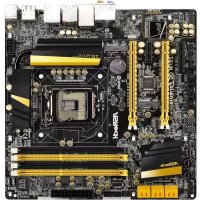
Z87M OC FORMULA - Motherboard ASROCK - Free user manual and instructions
Find the device manual for free Z87M OC FORMULA ASROCK in PDF.



User questions about Z87M OC FORMULA ASROCK
0 question about this device. Answer the ones you know or ask your own.
Ask a new question about this device
Download the instructions for your Motherboard in PDF format for free! Find your manual Z87M OC FORMULA - ASROCK and take your electronic device back in hand. On this page are published all the documents necessary for the use of your device. Z87M OC FORMULA by ASROCK.
USER MANUAL Z87M OC FORMULA ASROCK
Copyright©2013 ASRock INC. All rights reserved.
Copyright Notice:
No part of this documentation may be reproduced, transcribed, transmitted, or translated in any language, in any form or by any means, except duplication of documentation by the purchaser for backup purpose, without written consent of ASRock Inc.
Products and corporate names appearing in this documentation may or may not be registered trademarks or copyrights of their respective companies, and are used only for identification or explanation and to the owners' benefit, without intent to infringe.
Disclaimer:
Specifications and information contained in this documentation are furnished for informational use only and subject to change without notice, and should not be constructed as a commitment by ASRock. ASRock assumes no responsibility for any errors or omissions that may appear in this documentation.
With respect to the contents of this documentation, ASRock does not provide warranty of any kind, either expressed or implied, including but not limited to the implied warranties or conditions of merchantability or fitness for a particular purpose.
In no event shall ASRock, its directors, officers, employees, or agents be liable for any indirect, special, incidental, or consequential damages (including damages for loss of profits, loss of business, loss of data, interruption of business and the like), even if ASRock has been advised of the possibility of such damages arising from any defect or error in the documentation or product.

This device complies with Part 15 of the FCC Rules. Operation is subject to the following two conditions:
(1) this device may not cause harmful interference, and
(2) this device must accept any interference received, including interference that may cause undesired operation.
CALIFORNIA, USA ONLY
The Lithium battery adopted on this motherboard contains Perchlorate, a toxic substance controlled in Perchlorate Best Management Practices (BMP) regulations passed by the California Legislature. When you discard the Lithium battery in California, USA, please follow the related regulations in advance.
"Perchlorate Material-special handling may apply, see www.dtsc.ca.gov/hazardouswaste/perchlorate"
ASRock Website: http://www.asrock.com
The terms HDMI ^™ and HDMI High-Definition Multimedia Interface, and the HDMI logo are trademarks or registered trademarks of HDMI Licensing LLC in the United States and other countries.

Manufactured under license under U.S. Patent Nos: 5,956,674; 5,974,380; 6,487,535; 7,003,467 & other U.S. and worldwide patents issued & pending. DTS, the Symbol, & DTS and the Symbol together is a registered trademark & DTS Connect, DTS Interactive, DTS Neo:PC are trademarks of DTS, Inc. Product includes software.
© DTS, Inc., All Rights Reserved.

Connect

Interactive

Neo:PC
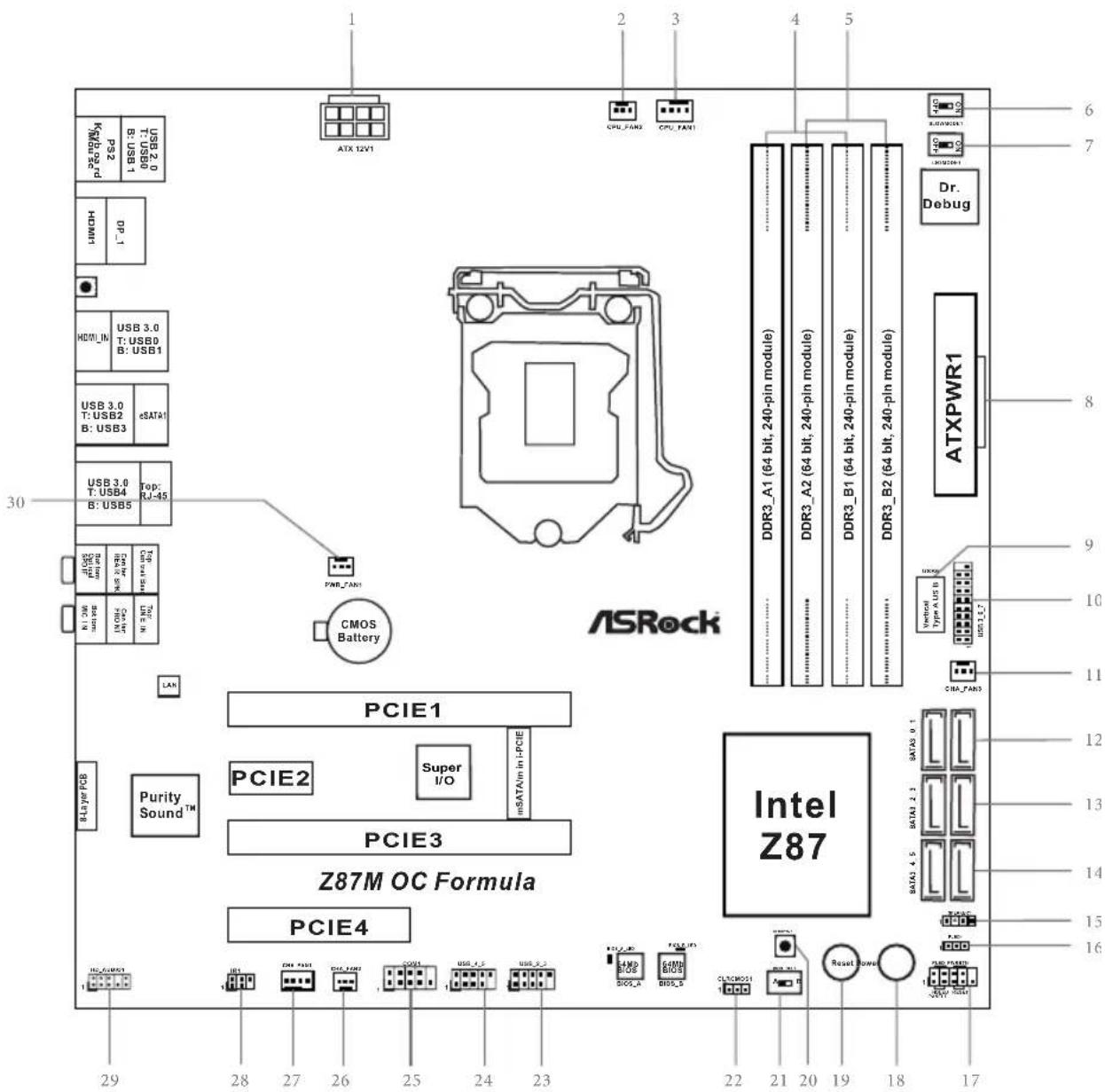
Motherboard Layout
text_image
ASRock PCIE1 PCIE2 PCIE3 Z87M OC Formula PCIE4 Intel Z87 ATX 12V1 CPU_FAN1 CPU_FAN1 Dr. Debug ATXPWR1 6 7 8 9 10 11 12 13 14 15 16 22 21 20 19 18 17 1 2 3 4 5 6 7 8 9 10 11 12 13 14 15 16 29 28 27 26 25 24 23 22 21 20 19 18 17 PME_LAN1 CMOS Battery USB 3.0 T: USB0 B: USB1 USB 3.0 T: USB2 B: USB3 USB 3.0 T: USB4 B: USB5 Top: RJ-45 N: DM I/O/IN/IN/IN/IN/IN/IN/IN/IN/IN/IN/IN/IN/IN/IN/IN/IN/IN/IN/IN/IN/IN/IN/IN/IN/IN/IN/IN/IN/IN/IN/IN/IN/IN/IN/IN/IN/IN/IN/IN/IN/IN/IN/IN/IN/IN/IN/IN/IN/IN/IN/In / USB 200 0 7-1060 1-1060 3-1060 5-1060 7-1060 9-1060 10-1060 12-1060 14-1060 16-1060 18-1060 20-1060 22-1060 24-1060 26-1060 28-1060 30-1060 32-1060 34-1060 36-1060 38-1060 40-1060 42-1060 44-1060 46-1060 48-1060 50-1060 52-1060 54-1060 56-1060 58-1060 60-1060 62-1060 64-1060 66-1060 68-1060 70-1060 72-1060 74-1060 76-1060 78-1060 80-1060 82-1060 84-1060 86-1060 88-1060 90-1060 92-1060 94-1060 96-1060 98-1060 100-1060 12VNo. Description
| 1 ATX 12V Power Connector (ATX12V1) |
| 2 CPU Fan Connector (CPU_FAN2) |
| 3 CPU Fan Connector (CPU_FAN1) |
| 4 2 x 240-pin DDR3 DIMM Slots (DDR3_A1, DDR3_B1) |
| 5 2 x 240-pin DDR3 DIMM Slots (DDR3_A2, DDR3_B2) |
| 6 Slow Mode Switch |
| 7 LN2 Mode Switch(LN2MODE1) |
| 8 ATX Power Connector (ATXPWR1) |
| 9 Vertical Type A USB 2.0 (USB6) |
| 10 USB 3.0 Header (USB3_6_7) |
| 11 Chassis Fan Connector (CHA_FAN3) |
| 12 SATA3 Connectors (SATA3_0_1) |
| 13 SATA3 Connectors (SATA3_2_3) |
| 14 SATA3 Connectors (SATA3_4_5) |
| 15 Chassis Speaker Header (SPEAKER1) |
| 16 Power LED Header (PLED1) |
| 17 System Panel Header (PANEL1) |
| 18 Power Switch (PWRBTN1) |
| 19 Reset Switch (RSTBTN1) |
| 20 Clear CMOS Button |
| 21 Clear CMOS Jumper (CLRCMOS1) |
| 22 BIOS Selection Switch (BIOS_SEL1) |
| 23 USB 2.0 Header (USB2_3) |
| 24 USB 2.0 Header (USB4_5) |
| 25 COM Port Header (COM1) |
| 26 Chassis Fan Connector (CHA_FAN2) |
| 27 Chassis Fan Connector (CHA_FAN1) |
| 28 IR header (IR1) |
| 29 Front Panel Audio Header (HD_AUDIO1) |
| 30 Power Fan Connector (PWR_FAN1) |
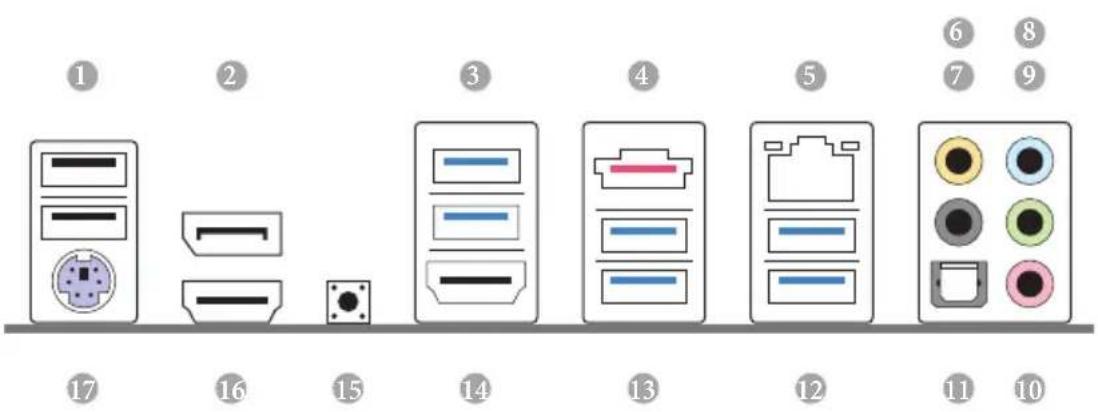
I/O Panel
text_image
Diagram showing nine labeled electronic components or devices arranged in a row, with numbers 1 to 17 and numbered circles above each component.No. Description No. Description
1 USB 2.0 Ports (USB01) 10 Microphone (Pink)
2 DisplayPort 11 Optical SPDIF Out Port
3 USB 3.0 Ports (USB3_01) 12 USB 3.0 Ports (USB3_45)
4 eSATA Connector*** 13 USB 3.0 Ports (USB3_23)
5 LAN RJ-45 Port* 14 HDMI-In Port
6 Central / Bass (Orange) 15 Clear CMOS Button (CLRCBTN)
7 Rear Speaker (Black) 16 HDMI-Out Port
8 Line In (Light Blue) 17 PS/2 Mouse/Keyboard Port
9 Front Speaker (Lime)**
* There are two LEDs on each LAN port. Please refer to the table below for the LAN port LED indications.
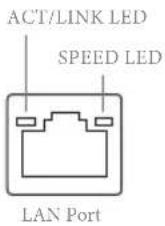
| Activity / Link LED Speed LED | |||
| Status Description Status Description | |||
| Off No Link Off | 10Mbps connection | ||
| Blinking | Data Activity | Orange | 100Mbps connection |
| On Link Green | Gbps connection | ||
** If you use a 2-channel speaker, please connect the speaker's plug into "Front Speaker Jack". See the table below for connection details in accordance with the type of speaker you use.
| Audio Output Channels | Front Speaker (No. 9) | Rear Speaker (No. 7) | Central / Bass (No. 6) | Line In (No. 8) |
| 2 V -- -- -- | ||||
| 4 V V -- -- | ||||
| 6 V V V -- | ||||
| 8 V V V V |

To enable Multi-Streaming, you need to connect a front panel audio cable to the front panel audio header. After restarting your computer, you will find the "Mixer" tool on your system. Please select "Mixer ToolBox", click "Enable playback multi-streaming", and click "ok". Choose "2CH", "4CH", "6CH", or "8CH" and then you are allowed to select "Realtek HDA Primary output" to use the Rear Speaker, Central/Bass, and Front Speaker, or select "Realtek HDA Audio 2nd output" to use the front panel audio.
*** The eSATA connector supports SATA3 with cables within 1 meters.
Chapter 1 Introduction
Thank you for purchasing ASRock Z87M OC Formula motherboard, a reliable motherboard produced under ASRock's consistently stringent quality control. It delivers excellent performance with robust design conforming to ASRock's commitment to quality and endurance.

Because the motherboard specifications and the BIOS software might be updated, the content of this documentation will be subject to change without notice. In case any modifications of this documentation occur, the updated version will be available on ASRock's website without further notice. If you require technical support related to this motherboard, please visit our website for specific information about the model you are using. You may find the latest VGA cards and CPU support list on ASRock's website as well. ASRock website http://www.asrock.com.
1.1 Package Contents
ASRock Z87M OC Formula Motherboard (Micro ATX Form Factor)
ASRock Z87M OC Formula Quick Installation Guide
ASRock Z87M OC Formula Support CD
4 x Serial ATA (SATA) Data Cables (Optional)
10 x OC Stands
GELID Solution GC-Extreme Thermal Compound
1 x WiFi Module Screw
1 x mSATA Screw
1.2 Specifications
| Platform | Micro ATX Form FactorPremium Gold Capacitor design (100% Japan-made high-quality Conductive Polymer Capacitors) |
| A-Style | Home CloudPurity SoundTMHDMI-In |
| OCFormulaKit | OC Formula Power Kit12 Power Phase DesignDigi PowerDual-Stack MOSFET (DSM)Multiple Filter Cap (MFC) (Filter different noise by 3 different capacitors: DIP solid cap, POSCAP and MLCC)Premium Alloy Choke (Reduce 70% core loss compare to iron powder choke)OC Formula Connector KitHi-Density Power Connector (8 pin)15μGold Finger (CPU sockets, memory sockets and PCIE x16 slots)Distortion-Free SlotOC Formula Cooling Kit8 Layer PCB4 x 2oz copperGELID Solutions GC-Extreme Thermal Compound |
| CPU | Supports 4th Generation Intel® CoreTM i7 / i5 / i3 / Xeon® / Pentium® / Celeron® in LGA1150 PackageSupports Intel® Turbo Boost 2.0 TechnologySupports Intel® K-Series unlocked CPUSupports ASRock BCLK Full-range Overclocking |
| Chipset | Intel® Z87 |
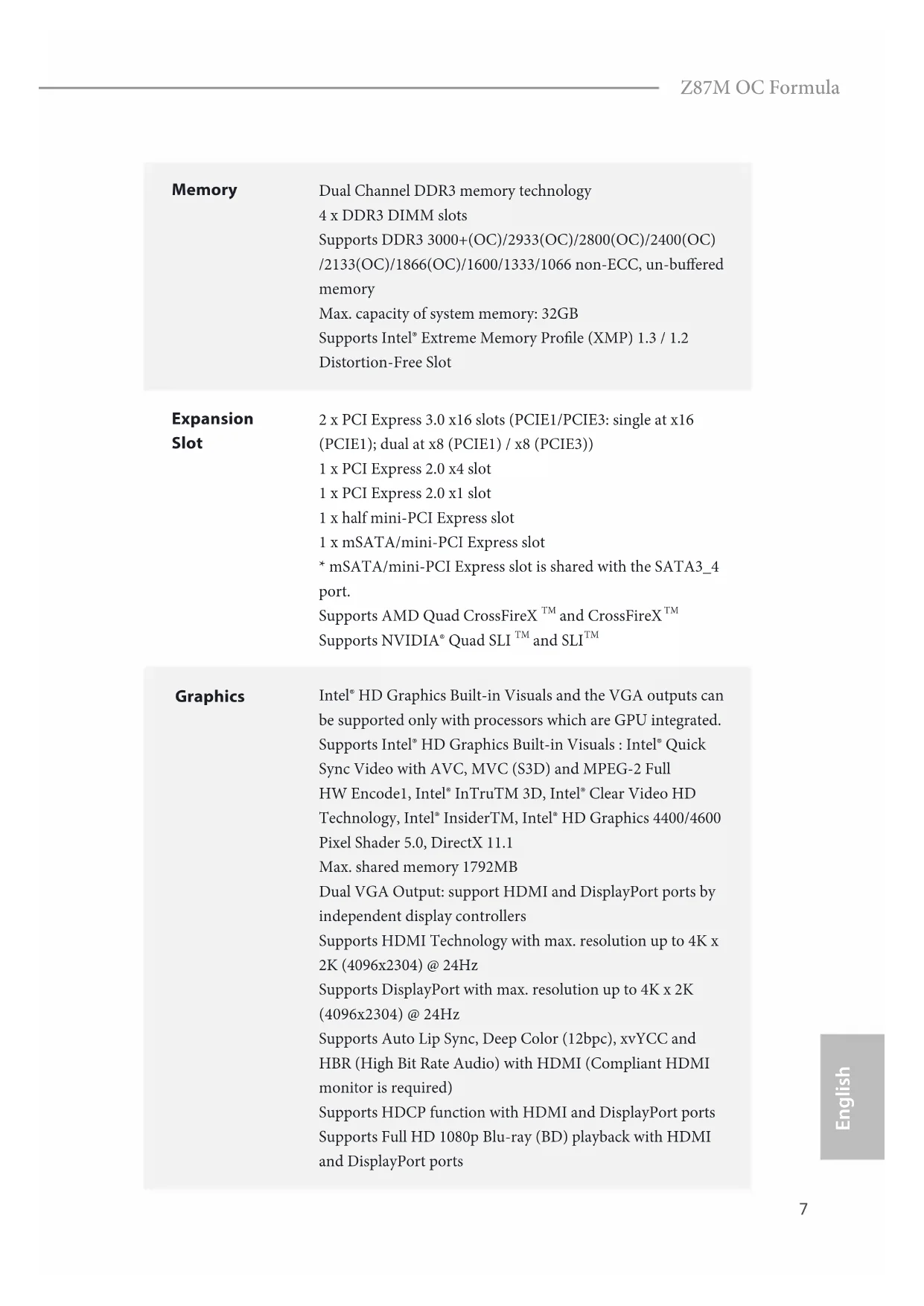
Memory
Dual Channel DDR3 memory technology
4 x DDR3 DIMM slots
Supports DDR3 3000+(OC)/2933(OC)/2800(OC)/2400(OC)
/2133(OC)/1866(OC)/1600/1333/1066 non-ECC, un-buffered memory
Max. capacity of system memory: 32GB
Supports Intel ^® Extreme Memory Profile (XMP) 1.3 / 1.2
Distortion-Free Slot
Expansion Slot
2 x PCI Express 3.0 x16 slots (PCIE1/PCIE3: single at x16
(PCIE1); dual at x8 (PCIE1) / x8 (PCIE3))
1 x PCI Express 2.0 x4 slot
1 x PCI Express 2.0 x1 slot
1 x half mini-PCI Express slot
1 x mSATA/mini-PCI Express slot
* mSATA/mini-PCI Express slot is shared with the SATA3_4 port.
Supports AMD Quad CrossFireX ^TM and CrossFireX ^TM
Supports NVIDIA* Quad SLI ^TM and SLI ^TM
Graphics
Intel ^® HD Graphics Built-in Visuals and the VGA outputs can be supported only with processors which are GPU integrated.
Supports Intel ^® HD Graphics Built-in Visuals : Intel ^® Quick
Sync Video with AVC, MVC (S3D) and MPEG-2 Full
HW Encode1, Intel® InTruTM 3D, Intel® Clear Video HD
Technology, Intel ^® InsiderTM, Intel ^® HD Graphics 4400/4600
Pixel Shader 5.0, DirectX 11.1
Max. shared memory 1792MB
Dual VGA Output: support HDMI and DisplayPort ports by independent display controllers
Supports HDMI Technology with max. resolution up to 4K x 2K (4096x2304) @ 24Hz
Supports DisplayPort with max. resolution up to 4K x 2K (4096x2304) @ 24Hz
Supports Auto Lip Sync, Deep Color (12bpc), xvYCC and HBR (High Bit Rate Audio) with HDMI (Compliant HDMI monitor is required)
Supports HDCP function with HDMI and DisplayPort ports Supports Full HD 1080p Blu-ray (BD) playback with HDMI and DisplayPort ports
Audio
7.1 CH HD Audio with Content Protection (Realtek ALC1150
Audio Codec)
Premium Blu-ray audio support
Supports Purity Sound™
- 115dB SNR DAC with differential amplifier
- TI® NE5532 Premium Headset Amplifier (supports up to 600 Ohms headsets)
- Direct Drive Technology
- EMI shielding cover
- PCB isolate shielding
Supports DTS Connect
LAN
Gigabit LAN 10/100/1000 Mb/s
Giga PHY Intel ^® I217V
Supports Intell ^® Remote Wake Technology
Supports Wake-On-LAN
Supports Energy Efficient Ethernet 802.3az
Supports PXE
Rear Panel
1 x PS/2 Mouse/Keyboard Port
I/O
1 x HDMI-Out Port
1 x HDMI-In Port
1 x DisplayPort
1 x Optical SPDIF Out Port
1 x eSATA Connector
2 x USB 2.0 Ports
4 x USB 3.0 Ports (Intel® Z87) (ASMedia Hub)
2 x USB 3.0 Ports (Intel® Z87)
1 x RJ-45 LAN Port with LED (ACT/LINK LED and SPEED LED)
1 x Clear CMOS Button
HD Audio Jack: Rear Speaker / Central / Bass / Line in / Front Speaker / Microphone
Storage
6 x SATA3 6.0 Gb/s connectors, support RAID (RAID 0, RAID 1, RAID 5, RAID 10, Intel Rapid Storage Technology 12 and Intel Smart Response Technology), NCQ, AHCI and Hot Plug 1 x eSATA connector, support RAID (RAID 0, RAID 1, RAID 5, RAID 10, Intel Rapid Storage Technology 12 and Intel Smart Response Technology), NCQ, AHCI and Hot Plug * eSATA Connector is shared with the SATA3_1 port.
Connector
1 x IR header 1 x COM port header 1 x Power LED header 2 x CPU Fan connectors (1 x 4-pin, 1 x 3-pin) 3 x Chassis Fan connectors (1 x 4-pin, 2 x 3-pin) 1 x Power Fan connector (3-pin) 1 x 24 pin ATX power connector 1 x 8 pin 12V power connectors (Hi-Density Power Connector) 1 x Front panel audio connector 2 x USB 2.0 headers (support 4 USB 2.0 ports) 1 x Vertical Type A USB 2.0 1 x USB 3.0 header (supports 2 USB 3.0 ports) 1 x Power Switch with LED 1 x Reset Switch with LED 1 x Clear CMOS Button 1 x Post Status Checker (PSC) 1 x Slow Mode Switch 1 x LN2 Mode Switch 1 x BIOS Selection Switch
BIOS
2 x 64Mb AMI UEFI Legal BIOS with Multilingual GUI support (1 x Main BIOS and 1 x Backup BIOS) Supports Secure Backup UEFI Technology ACPI 1.1 Compliance Wake Up Events SMBIOS 2.3.1 Support CPU, DRAM, PCH 1.05V, PCH 1.5V Voltage Multi-adjustment
Feature
| Support CD | Drivers, Utilities, AntiVirus Software (Trial Version), Cyber-Link MediaEspresso 6.5 Trial, Google Chrome Browser and Toolbar, Start8, MeshCentral, Splashtop Streamer |
| Hardware | CPU/Chassis Temperature SensingCPU/Chassis/Power Fan TachometerCPU/Chassis Quiet Fan (Allow Chassis Fan Speed Auto-Adjust by CPU Temperature)CPU/Chassis Fan Multi-Speed ControlVoltage Monitoring: +12V, +5V, +3.3V, CPU Vcore |
| OS | Microsoft® Windows® 8 / 8 64-bit / 7 / 7 64-bit compliant |
| Certifications | FCC, CE, WHQLErP/EuP Ready (ErP/EuP ready power supply is required) |
* For detailed product information, please visit our website: http://www.asrock.com

Please realize that there is a certain risk involved with overclocking, including adjusting the setting in the BIOS, applying Untied Overclocking Technology, or using third-party overclocking tools. Overclocking may affect your system's stability, or even cause damage to the components and devices of your system. It should be done at your own risk and expense. We are not responsible for possible damage caused by overclocking.

Due to limitation, the actual memory size may be less than 4GB for the reservation for system usage under Windows ^® 32-bit operating systems. Windows ^® 64-bit operating systems do not have such limitations. You can use ASRock XFast RAM to utilize the memory that Windows ^® cannot use.
1.3 Unique Features

ASRock Formula Drive
Formula Drive is ASRock's multi purpose software suite with a new interface, more new features and improved utilities, including XFast RAM, Dehumidifier, Good Night LED, FAN-Tastic Tuning, OC Tweaker and a whole lot more.

ASRock Instant Flash
ASRock Instant Flash is a BIOS flash utility embedded in Flash ROM. This convenient BIOS update tool allows you to update the system BIOS in a few clicks without preparing an additional floppy diskette or other complicated flash utility. Just save the new BIOS file to your USB storage and launch this tool by pressing

ASRock APP Charger
Simply by installing the ASRock APP Charger makes your iPhone/iPad/iPod Touch charge up to 40% faster than before on your computer. ASRock APP Charger allows you to quickly charge many Apple devices simultaneously and even supports continuous charging when your PC enters into Standby mode (S1), Suspend to RAM (S3), hibernation mode (S4) or power off (S5).

ASRock XFast USB
ASRock XFast USB can boost the performance of your USB storage devices. The performance may depend on the properties of the device.

ASRock XFast LAN
ASRock XFast LAN provides faster internet access, which includes the benefits listed below. LAN Application Prioritization: You can configure your application's priority ideally and add new programs to the list. Lower Latency in Game: After setting online game's priority higher, it can lower the latency in games. Traffic Shaping: You can watch Youtube HD videos and download simultaneously. Real-Time Analysis of Your Data: With the status window, you can easily recognize which data streams you are currently transferring.

ASRock XFast RAM
ASRock XFast RAM is included in Formula Drive. It fully utilizes the memory space that cannot be used under Windows® 32-bit operating systems. ASRock XFast RAM shortens the loading time of previously visited websites, making web surfing faster than ever. And it also boosts the speed of Adobe Photoshop 5 times faster. Another advantage of ASRock XFast RAM is that it reduces the frequency of accessing your SSDs or HDDs in order to extend their lifespan.

ASRock Crashless BIOS
ASRock Crashless BIOS allows users to update their BIOS without fear of failing. If power loss occurs during the BIOS updating process, ASRock Crashless BIOS will automatically finish the BIOS update procedure after regaining power. Please note that BIOS files need to be placed in the root directory of your USB disk. Only USB 2.0 ports support this feature.

ASRock OMG (Online Management Guard)
Administrators are able to establish an internet curfew or restrict internet access at specified times via OMG. You may schedule the starting and ending hours of internet access granted to other users. In order to prevent users from bypassing OMG, guest accounts without permission to modify the system time are required.

ASRock Internet Flash
ASRock Internet Flash downloads and updates the latest UEFI firmware version from our servers for you without entering Windows OS. Please setup network configuration before using Internet Flash.

ASRock UEFI System Browser
ASRock System Browser shows the overview of your current PC and the devices connected.

ASRock Dehumidifier Function
Users may prevent motherboard damages due to dampness by enabling “Dehumidifier Function”. When enabling Dehumidifier Function, the computer will power on automatically to dehumidify the system after entering S4/S5 state.

ASRock Easy RAID Installer
ASRock Easy RAID Installer can help you to copy the RAID driver from the support CD to your USB storage device. After copying the RAID driver to your USB storage device, please change "SATA Mode" to "RAID", then you can start installing the OS in RAID mode.

ASRock Easy Driver Installer
For users that don't have an optical disk drive to install the drivers from our support CD, Easy Driver Installer is a handy tool in the UEFI that installs the LAN driver to your system via an USB storage device, then downloads and installs the other required drivers automatically.
ASRock Interactive UEFI
ASRock Interactive UEFI is a blend of system configuration tools, cool sound effects and stunning visuals. The unprecedented UEFI provides a more attractive interface and more amusement.

ASRock Fast Boot
With ASRock's exclusive Fast Boot technology, it takes less than 1.5 seconds to logon to Windows 8 from a cold boot. No more waiting! The speedy boot will completely change your user experience and behavior.

ASRock Restart to UEFI
Windows® 8 brings the ultimate boot up experience. The lightning boot up speed makes it hard to access the UEFI setup. ASRock Restart to UEFI allows users to enter the UEFI automatically when turning on the PC. By enabling this function, the PC will enter the UEFI directly after you restart.
NickShih's OC Profile
Have you ever wondered how the global OC champion overclocks his motherboards? Now you've got a chance to learn a few tricks from the champion with NickShih's OC Profile. It doesn't matter whether you're using a K-Series or No-K Series CPU, NickShih's OC Profile will automatically detect your CPU and offer you different levels of overclocking. Have a taste of Nick's secret recipe for overclocking this motherboard instantly.
Fine-Tuning V-Controller
Fine-Tuning V-Controller is a new collection of voltage fine tuning options in ASRock UEFI Setup Utility. It provides more than enough voltage configuration options for overclockers who wish to pursuit extremes.
Timing Configurator
Timing Configurator is a fast and easy tool that provides users with an abundant collection of subtle DRAM settings for professional tweaking. You won't even have to waste time on entering into the UEFI or restarting the system, Timing Configurator is an independent application that runs under Windows® OS and your changes will take effect immediately.

ASRock Good Night LED
ASRock Good Night LED technology offers you a better sleeping environment by extinguishing the unessential LEDs. By enabling Good Night LED in the BIOS, the Power/HDD LEDs will be switched off when the system is powered on. Good night LED will automatically switch off the Power and Keyboard LEDs when the system enters into Standby/Hibernation mode as well.

ASRock USB Key
In a world where time is money, why waste precious time everyday typing usernames to log in to Windows? Why should we even bother memorizing those foot long passwords? Just plug in the USB Key and let your computer log in to windows automatically!

ASRock Home Cloud
This motherboard supports remote wake with the onboard Intel LAN, so you can connect with your PC from anywhere in the world. You will be able to power your PC on or turn it off, monitor and take control of it remotely with another smartphone, tablet or computer.
ASRock FAN-Tastic Tuning
ASRock FAN-Tastic Tuning is included in Formula Drive. Configure up to five different fan speeds using the graph. The fans will automatically shift to the next speed level when the assigned temperature is met.
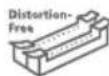
ASRock Distortion-Free Slot
ASRock's new pin design for the memory slots may appear to be the same as former designs, but actually effectively reduces distortion and promotes performance, because we strive for perfection even in the most trivial details.
Chapter 2 Installation
This is an Micro ATX form factor motherboard. Before you install the motherboard, study the configuration of your chassis to ensure that the motherboard fits into it.
Pre-installation Precautions
Take note of the following precautions before you install motherboard components or change any motherboard settings.
Make sure to unplug the power cord before installing or removing the motherboard.
Failure to do so may cause physical injuries to you and damages to motherboard components.
In order to avoid damage from static electricity to the motherboard's components,
NEVER place your motherboard directly on a carpet. Also remember to use a grounded wrist strap or touch a safety grounded object before you handle the components.
Hold components by the edges and do not touch the ICs.
Whenever you uninstall any components, place them on a grounded anti-static pad or in the bag that comes with the components.
When placing screws to secure the motherboard to the chassis, please do not over-tighten the screws! Doing so may damage the motherboard.
2.1 Installing the CPU

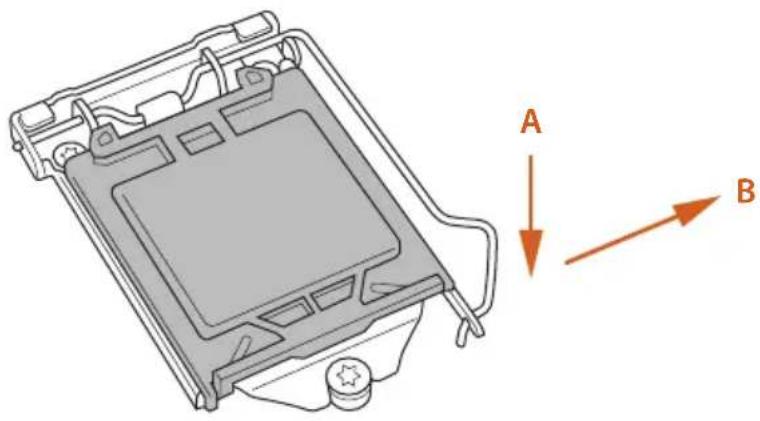
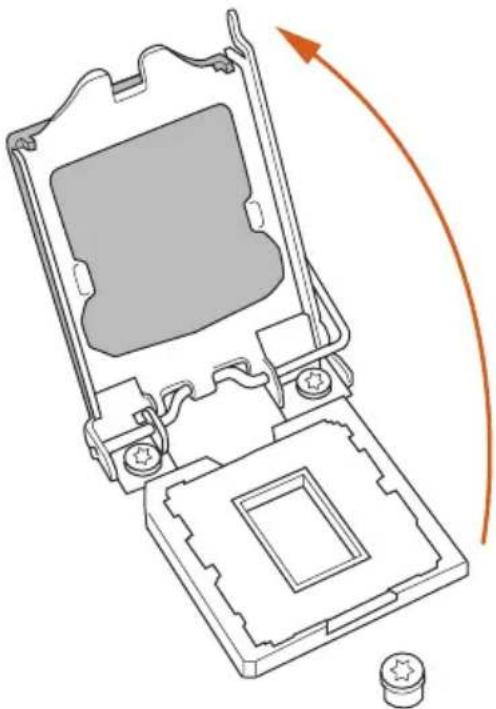
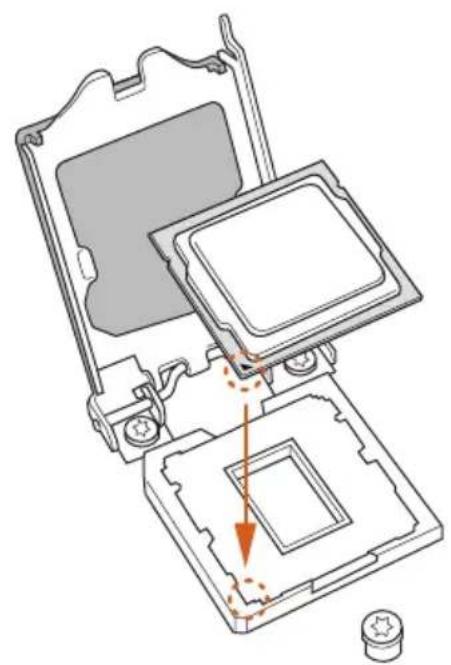
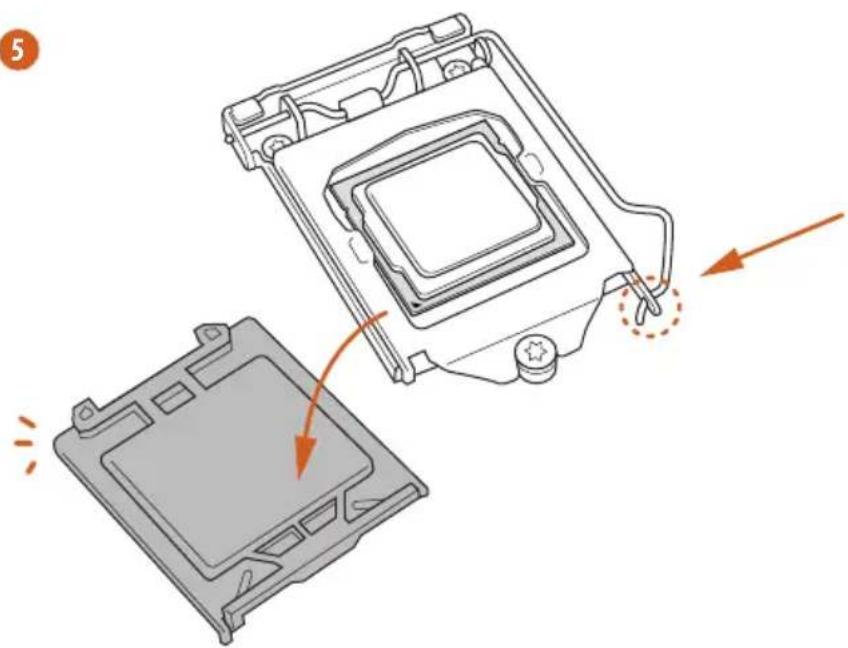
- Before you insert the 1150-Pin CPU into the socket, please check if the PnP cap is on the socket, if the CPU surface is unclean, or if there are any bent pins in the socket. Do not force to insert the CPU into the socket if above situation is found. Otherwise, the CPU will be seriously damaged.
- Unplug all power cables before installing the CPU.
1
natural_image
Technical line drawing of a mechanical component with labeled directional arrows (A and B) indicating movement or force directions.2
natural_image
Technical line drawing of a mechanical device with internal components and an orange curved arrow indicating rotation (no text or symbols)3
natural_image
Technical diagram of a computer processor internal structure showing mounting holes and internal components (no text or labels)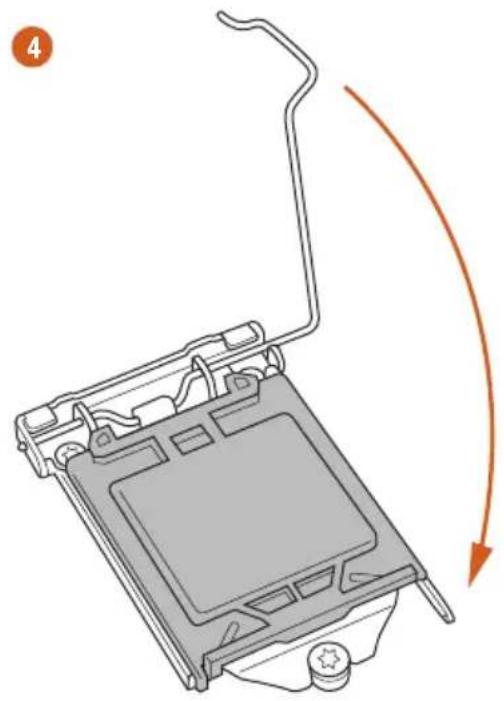
natural_image
Diagram of a computer monitor with an orange curved arrow indicating motion or rotation (no text or symbols present)5
natural_image
Diagram showing a computer processor's internal structure and external casing, with no visible text or symbols.
Please save and replace the cover if the processor is removed. The cover must be placed if you wish to return the motherboard for after service.
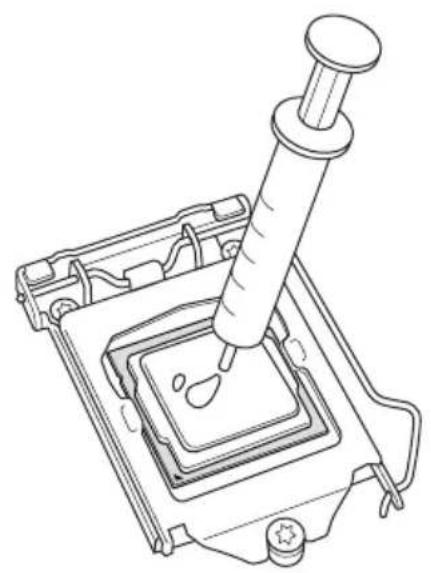
2.2 Installing the CPU Fan and Heatsink
natural_image
Line drawing of a mechanical device with a syringe inserted into a square component (no text or symbols)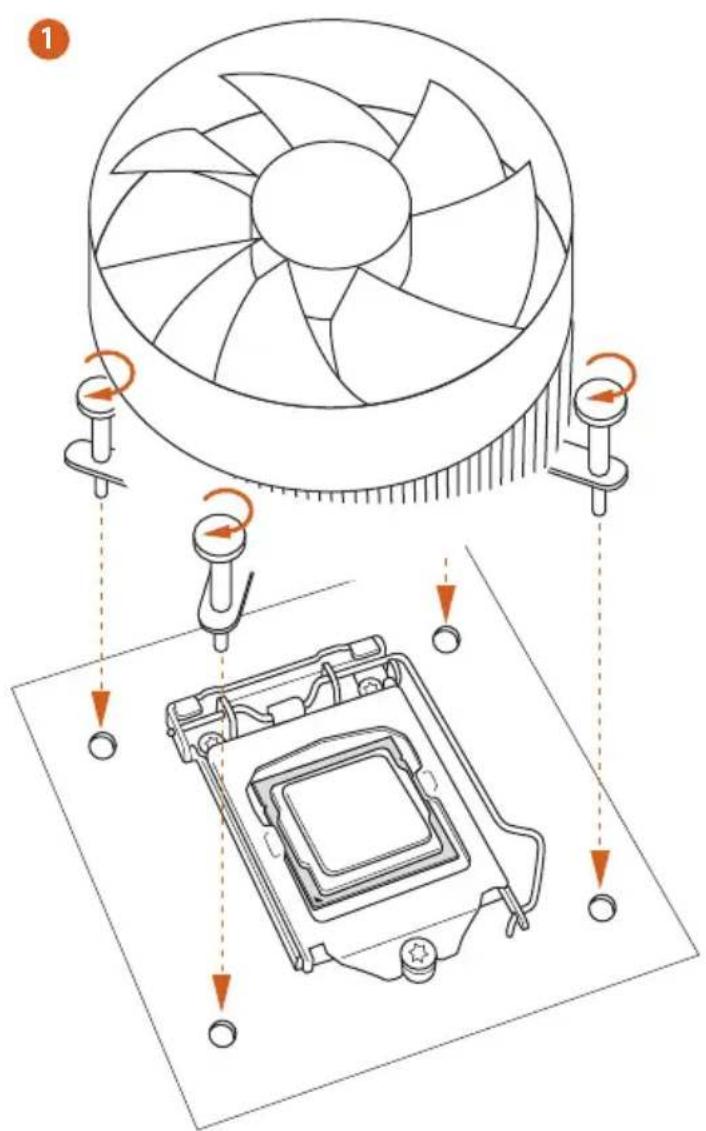
text_image
Diagram illustrating the installation of a CPU fan with cooling mechanism, showing component assembly and rotation arrows.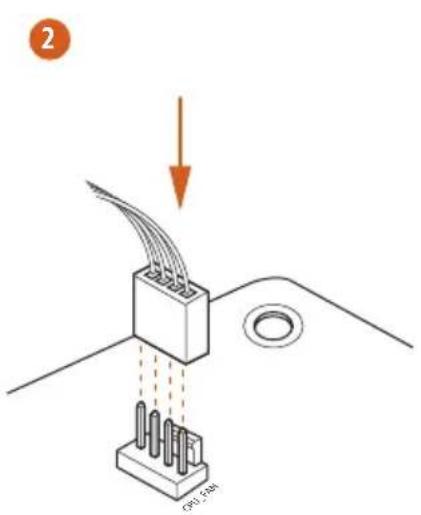
text_image
2 CPU 1.0M
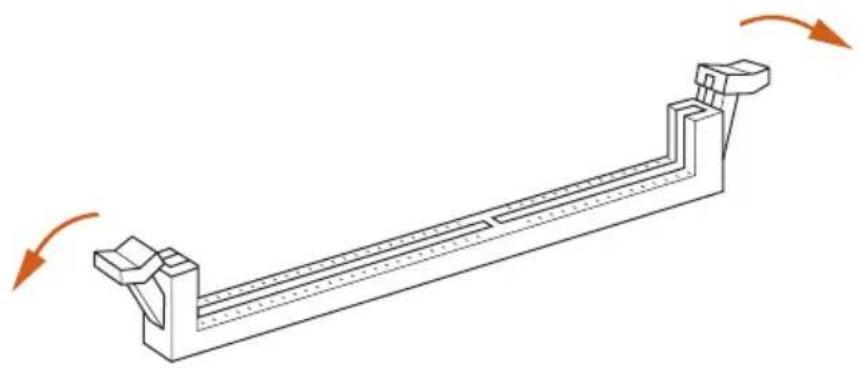
2.3 Installing Memory Modules (DIMM)
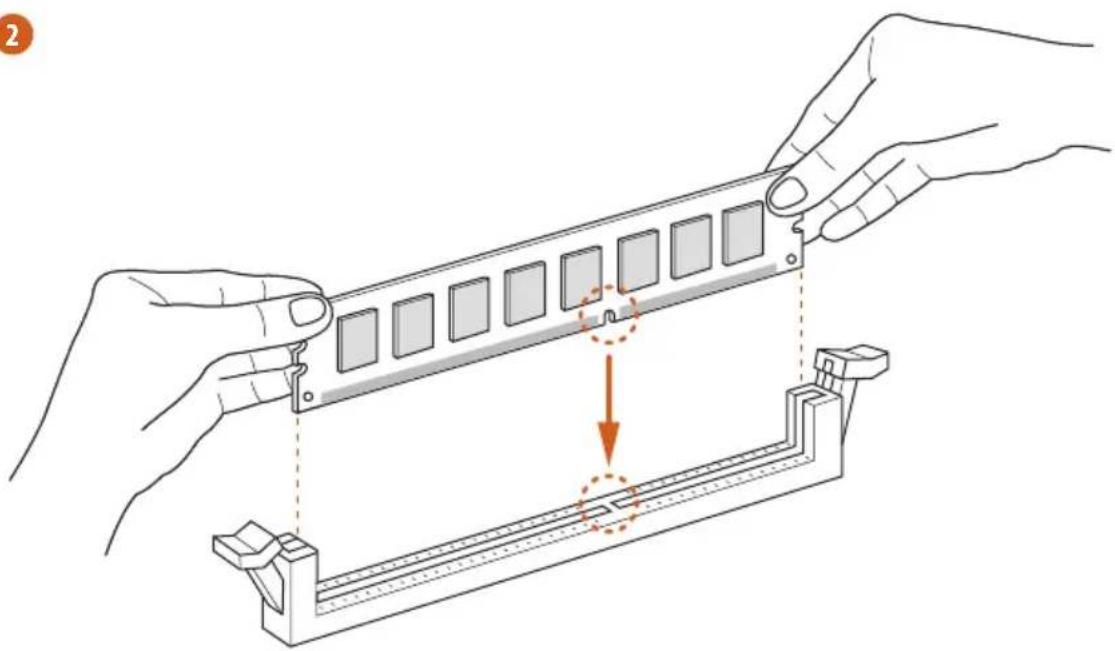
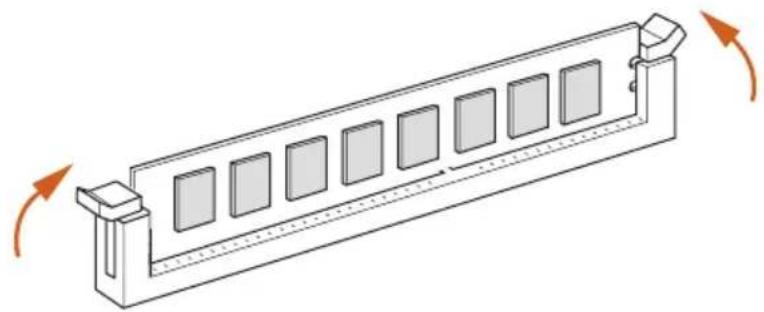
This motherboard provides four 240-pin DDR3 (Double Data Rate 3) DIMM slots, and supports Dual Channel Memory Technology.

- For dual channel configuration, you always need to install identical (the same brand, speed, size and chip-type) DDR3 DIMM pairs.
- It is unable to activate Dual Channel Memory Technology with only one or three memory module installed.
- It is not allowed to install a DDR or DDR2 memory module into a DDR3 slot; otherwise, this motherboard and DIMM may be damaged.
Dual Channel Memory Configuration
Priority DDR3_A1 DDR3_A2 DDR3_B1 DDR3_B2
| 1 Populated Populated | |||
| 2 Populated Populated | |||
| 3 Populated Populated Populated Populated |

The DIMM only fits in one correct orientation. It will cause permanent damage to the motherboard and the DIMM if you force the DIMM into the slot at incorrect orientation.
1
natural_image
Technical line drawing of a mechanical support structure with rotational arrows indicating motion (no text or symbols)2
natural_image
Illustration of hands assembling a mechanical component with a highlighted section (no text or symbols)3
natural_image
Isometric line drawing of a rectangular structure with multiple square panels and directional arrows indicating rotation (no text or symbols)2.4 Expansion Slots (PCI and PCI Express Slots)
There are 4 PCI Express slots, 1 mini-PCI Express slot, and 1 mSATA/mini-PCI Express slot on this motherboard.

Before installing an expansion card, please make sure that the power supply is switched off or the power cord is unplugged. Please read the documentation of the expansion card and make necessary hardware settings for the card before you start the installation.
PCIe slots:
PCIE1 (PCIe 3.0 x16 slot) is used for PCI Express x16 lane width graphics cards.
PCIE2 (PCIe 2.0 x1 slot) is used for PCI Express x1 lane width cards.
PCIE3 (PCIe 3.0 x16 slot) is used for PCI Express x8 lane width graphics cards.
PCIE4 (PCIe 3.0 x16 slot) is used for PCI Express x4 lane width graphics cards.
MINI_PCIE1 (mini-PCIe slot) is used for WiFi module.
MINI_PCIE2 (mSATA/mini-PCIe slot) is used for mSATA or mini-PCIe module.
*** The mSATA/mini-PCIe slot is shared with SATA3_4 connector.
PCIe Slot Configurations
PCIE1 PCIE3
Single Graphics Card x16 x8
Two Graphics Cards in
CrossFireX ^TM or SLI ^TM Mode
N/A x8

For a better thermal environment, please connect a chassis fan to the motherboard's chassis fan connector (CHA_FAN1 or CHA_FAN2) when using multiple graphics cards.
2.5 Jumpers Setup
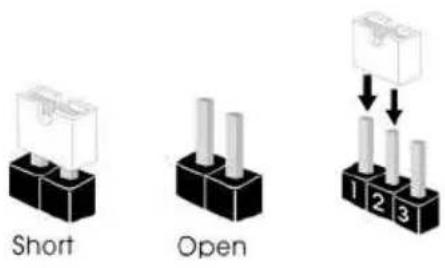
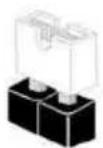
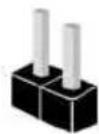
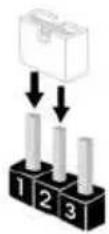
The illustration shows how jumpers are setup. When the jumper cap is placed on the pins, the jumper is "Short". If no jumper cap is placed on the pins, the jumper is "Open". The illustration shows a 3-pin jumper whose pin1 and pin2 are "Short" when a jumper cap is placed on these 2 pins.
text_image
Short OpenClear CMOS Jumper (CLRCMOS1)
(see p.1, No. 22)
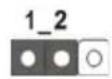
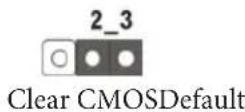
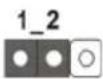
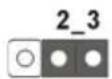
CLRCMOS1 allows you to clear the data in CMOS. To clear and reset the system parameters to default setup, please turn off the computer and unplug the power cord from the power supply. After waiting for 15 seconds, use a jumper cap to short pin2 and pin3 on CLRCMOS1 for 5 seconds. However, please do not clear the CMOS right after you update the BIOS. If you need to clear the CMOS when you just finish updating the BIOS, you must boot up the system first, and then shut it down before you do the clear-CMOS action. Please be noted that the password, date, time, and user default profile will be cleared only if the CMOS battery is removed.

The Clear CMOS Button has the same function as the Clear CMOS jumper.
2.6 Onboard Headers and Connectors

Onboard headers and connectors are NOT jumpers. Do NOT place jumper caps over these headers and connectors. Placing jumper caps over the headers and connectors will cause permanent damage to the motherboard.
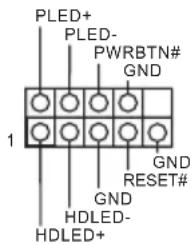
System Panel Header (9-pin PANEL1)
(see p.1, No. 17)
text_image
PLED+ PLED- PWRBTN# GND 1 GND RESET# GND HDLED- HDLED+Connect the power switch, reset switch and system status indicator on the chassis to this header according to the pin assignments below. Note the positive and negative pins before connecting the cables.

PWRBTN (Power Switch):
Connect to the power switch on the chassis front panel. You may configure the way to turn off your system using the power switch.
RESET (Reset Switch):
Connect to the reset switch on the chassis front panel. Press the reset switch to restart the computer if the computer freezes and fails to perform a normal restart.
PLED (System Power LED):
Connect to the power status indicator on the chassis front panel. The LED is on when the system is operating. The LED keeps blinking when the system is in S1/S3 sleep state. The LED is off when the system is in S4 sleep state or powered off (S5).
HDLED (Hard Drive Activity LED):
Connect to the hard drive activity LED on the chassis front panel. The LED is on when the hard drive is reading or writing data.
The front panel design may differ by chassis. A front panel module mainly consists of power switch, reset switch, power LED, hard drive activity LED, speaker and etc. When connecting your chassis front panel module to this header, make sure the wire assignments and the pin assignments are matched correctly.
Power LED Header
(3-pin PLED1)
(see p.12, No. 16)
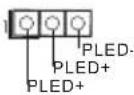
Please connect the chassis power LED to this header to indicate the system's power status.
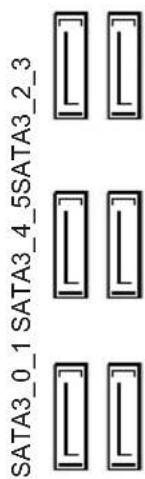
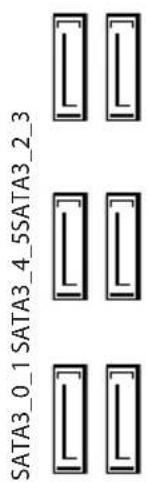
Serial ATA3 Connectors
(SATA3_0_1:
see p.1, No. 12)
(SATA1_2_3:
see p.1, No. 13)
(SATA3_4_5:
see p.1, No. 14)
text_image
SATA3_0_1_SATA3_4_5_SATA3_2_3These six SATA3 connectors support SATA data cables for internal storage devices with up to 6.0 Gb/s data transfer rate.
USB 2.0 Headers
(9-pin USB2_3)
(see p.1, No. 23)
(9-pin USB4_5)
(see p.1, No. 24)
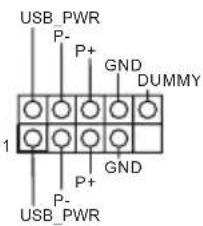
text_image
USB_PWR P- P+ GND DUMMY 1 P+ GND P- USB_PWRBesides two USB 2.0 ports on the I/O panel, there are two headers and one port on this motherboard. Each USB 2.0 header can support two ports.
(USB6)
(see p.1, No. 9)
USB 3.0 Headers
(19-pin USB3_6_7)
(see p.1, No. 10)
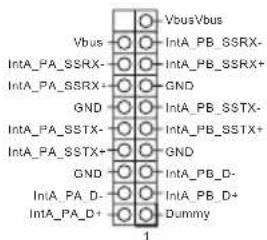
text_image
VbusVbus Vbus IntA_PB_SSRX- IntA_PA_SSRX- IntA_PB_SSRX+ GND GND IntA_PB_SSTX- IntA_PA_SSTX- IntA_PB_SSTX+ GND GND IntA_PB_D- IntA_PA_D- IntA_PB_D+ Dummy 1Besides six USB 3.0 ports on the I/O panel, there are one header on this motherboard. Each USB 3.0 header can support two ports.
Front Panel Audio Header
(9-pin HD_AUDIO1)
(see p.1, No. 29)
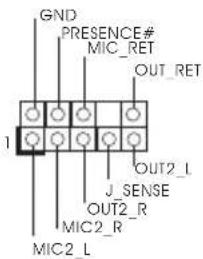
text_image
GND PRESENCE# MIC_RET OUT_RET 1 J_SENSE OUT2_R MIC2_R MIC2_LThis header is for
connecting audio devices to the front audio panel.

- High Definition Audio supports Jack Sensing, but the panel wire on the chassis must support HDA to function correctly. Please follow the instructions in our manual and chassis manual to install your system.
- If you use an AC'97 audio panel, please install it to the front panel audio header by the steps below:
A. Connect Mic_IN (MIC) to MIC2_L.
B. Connect Audio_R (RIN) to OUT2_R and Audio_L (LIN) to OUT2_L.
C. Connect Ground (GND) to Ground (GND).
D. MIC_RET and OUT_RET are for the HD audio panel only. You don't need to connect them for the AC'97 audio panel.
E. To activate the front mic, go to the "FrontMic" Tab in the Realtek Control panel and adjust "Recording Volume".
Chassis Speaker Header
(4-pin SPEAKER1)
(see p.1, No. 15)
DUMMY SPEAKER
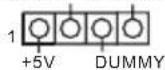
Please connect the chassis
speaker to this header.
Chassis and Power Fan
Connectors
(4-pin CHA_FAN1)
(see p.1, No. 27)
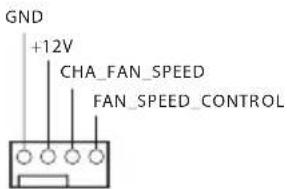
text_image
GND +12V CHA_FAN_SPEED FAN_SPEED_CONTROLPlease connect fan cables to the fan connectors and match the black wire to the ground pin.
(3-pin CHA_FAN2)
(see p.1, No. 26)
(3-pin CHA_FAN3)
(see p.1, No. 11)
(3-pin PWR_FAN1)
(see p.1, No. 30)
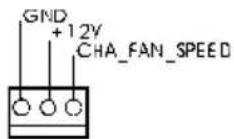
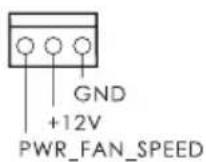
CPU Fan Connectors
(4-pin CPU_FAN1)
(see p.1, No. 3)
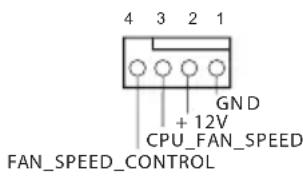
text_image
4 3 2 1 GND + 12V CPU_FAN_SPEED FAN_SPEED_CONTROL(3-pin CPU_FAN2)
(see p.1, No. 2)
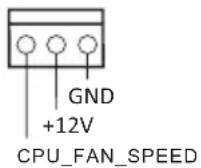
This motherboard provides a 4-Pin CPU fan (Quiet Fan) connector. If you plan to connect a 3-Pin CPU fan, please connect it to Pin 1-3.
ATX Power Connector
(24-pin ATXPWR1)
(see p.1, No. 8)
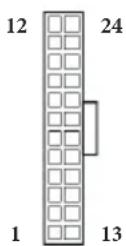
This motherboard provides a 24-pin ATX power connector. To use a 20-pin ATX power supply, please plug it along Pin 1 and Pin 13.
ATX 12V Power
Connector
(8-pin ATX12V1)
(see p.1, No. 1)
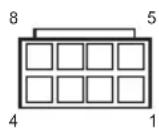
This motherboard provides an 8-pin ATX 12V power connector. To use a 4-pin ATX power supply, please plug it along Pin 1 and Pin 5.
Infrared Module Header
(5-pin IR1)
(see p.1, No. 28)
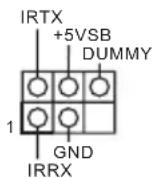
This header supports an optional wireless transmitting and receiving infrared module.
Serial Port Header
(9-pin COM1)
(see p.1, No. 25)

This COM1 header supports a serial port module.
2.7 Smart Switches
The motherboard has three smart switches: Power Switch, Reset Switch and Clear CMOS Button, allowing users to quickly turn on/off the system, reset the system or clear the CMOS values.
Power Switch (PWRBTN) (see p.1, No. 18)

Power Switch allows users to quickly turn on/off the system.
Reset Switch (RSTBTN) (see p.1, No. 19)
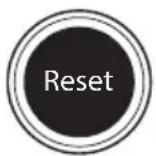
Reset Switch allows users to quickly reset the system.
Clear CMOS Button (CLRCBTN) (see p.1, No. 20)
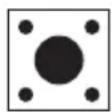
Clear CMOS Button allows users to quickly clear the CMOS values.

This function is workable only when you power off your computer and unplug the power supply.
Slow Mode Switch (SLOWMODE1) (see p.1 No. 6)
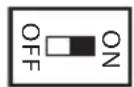
If Slow Mode is on, the processor runs at lowest frequency.
BIOS Selection Switch (BIOS_SEL1) (see p.1 No. 21)
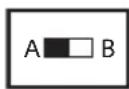
BIOS Selection Switch allows the system to boot from either BIOS A or BIOS B.

This motherboard has two BIOS chips, a primary BIOS (BIOS_A) and a backup BIOS (BIOS_B), which enhances the safety and stability of your system. Normally, the system will work on the primary BIOS. However, if the primary BIOS is corrupted or damaged, just flip the BIOS Selection Switch to "B", then the backup BIOS will take over on the next system boot. After that, use "Secure Backup UEFI" in the UEFI Setup Utility to duplicate a working copy of the BIOS files to the primary BIOS to ensure normal system operation. For safety issues, users are not able to update the backup BIOS manually. Users may refer to the BIOS LEDs (BIOS_A_LED or BIOS_B_LED) to identify which BIOS is currently activated.
LN2 Mode Switch
(LN2MODE1)
(see p.1, No. 7)
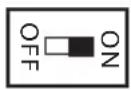
The LN2 mode aids in
eliminating the cold-boot bug issues in processors during extreme overclocking with Liquid Nitrogen.

1 Einleitung
Serial-ATA-III-Anschlüsse
(SATA3_0_1:
siehe S. 1, Nr. 12)
(SATA1_2_3:
siehe S. 1, Nr. 13)
(SATA3_4_5:
siehe S. 1, Nr. 14)
text_image
SATA3_0_1_SATA3_4_5SATA3_2_3Kit OC Formula Power
Formula
Kit OC Formula Connector
PCIE x16)
Kit OC Formula Cooling
Compound
Processeur
CoreTM i7 / i5 / i3 / Xeon ^® / Pentium ^® / Celeron ^® en package
LGA1150
Chipset
^* Z87
Mémoire
3000+(OC)/2933(OC)/2800(OC)/2400(OC)/2133(OC)/1866 (OC)/1600/1333/1066
Fente
d'expansion
/2400(OC)/2133(OC)/1866(OC)/1600/1333/1066 non-ECC, un-buffered
Slot di
espansione
(RAID 0, RAID 1, RAID 5, RAID 10, Intel Rapid Storage Technology 12 ed Intel Smart Response Technology), NCQ, AHCI e Hot Plug
text_image
Short Open2800(OC)/2400(OC)/2133(OC)/1866(OC)/1600/1333/1066 Non-ECC Unbuffered
Гнезда
расширения
x16 (PCIE1); двойной при x8 (PCIE1) / x8 (PCIE3))
(RAID 0, RAID 1, RAID 5, RAID 10, Intel Rapid Storage Technology 12 e Intel Smart Response Technology), NCQ, AHCI e Hot Plug
RAID 1, RAID 5, RAID 10, Intel Rapid Storage Technology 12 e Intel Smart Response Technology), NCQ, AHCI e Hot Plug * Conector eSATA partilhado com porta SATA3_1.
Conector
pinos)
OC Formula Soğutma Kiti
CPU
text_image
USB_PWR P- P+ GND DUMMY 1 P- GND P- USB_PWRnatural_image
Simple graphic with a magnifying glass icon and horizontal line, no text or symbols present.1.1 パッケージの内容
1.2 仕様
TM
OC Formula
CPU
Z87
TM
TM
'TM
TM
@ 24Hz
24Hz
LAN
日本語
Splashtop Streamer
os
日本語


1.3 ジャンパー設定
Short
Open
(CLRCMOS1)

(Voltage Multi-adjustment)
支持光盘
MediaEspresso 6.5 试用版、Google Chrome 浏览器和工具栏、Start8、MeshCentral、Splashtop Streamer
硬件
扇速度)
操作系统
认证
RESET (Switch Atur Ulang):
If you need to contact ASRock or want to know more about ASRock, you're welcome to visit ASRock's website at http://www.asrock.com; or you may contact your dealer for further information. For technical questions, please submit a support request form at http://www.asrock.com/support/tsd.asp
ASRock Incorporation
2F., No.37, Sec. 2, Jhongyang S. Rd., Beitou District,
Taipei City 112, Taiwan (R.O.C.)
ASRock EUROPE B.V.
Bijsterhuizen 3151
6604 LV Wijchen
The Netherlands
Phone: +31-24-345-44-33
Fax: +31-24-345-44-38
ASRock America, Inc.
13848 Magnolia Ave, Chino, CA91710
U.S.A.
Phone: +1-909-590-8308
Fax: +1-909-590-1026