CP935W - Conference phone Yealink - Free user manual and instructions
Find the device manual for free CP935W Yealink in PDF.



| Product type | Conference phone |
| Brand | Yealink |
| Model | CP935W |
| Dimensions (L x W x H) | 335 x 335 x 75 mm (estimated) |
| Power supply | Original 12V/1.25A AC adapter |
| Operating modes | DECT and Wi-Fi |
| Local conference capacity | Up to 5 participants |
| Connectivity | Bluetooth, USB Type-C, Wi-Fi, Ethernet (via base) |
| Number of registrable handsets | Up to 10 on W70B base |
| Operating temperature | -10°C to 50°C |
| Operating relative humidity | 5% to 90% non-condensing |
| Storage temperature | -30°C to +70°C |
| Compliance | RoHS, IC, CE |
| Warranty | Limited to the device under normal use |
| Maintenance | Soft dry antistatic cloth, disconnect before cleaning |
| Safety | Do not expose to moisture, do not disassemble, use original accessories |
| Spare parts and repairability | Contact authorized after-sales service |
| General information | Manufacturer: Yealink Network Technology Co., Ltd., made in China |
Frequently Asked Questions - CP935W Yealink
User questions about CP935W Yealink
0 question about this device. Answer the ones you know or ask your own.
Ask a new question about this device
Download the instructions for your Conference phone in PDF format for free! Find your manual CP935W - Yealink and take your electronic device back in hand. On this page are published all the documents necessary for the use of your device. CP935W by Yealink.
USER MANUAL CP935W Yealink
HD Wireless Conference Phone
CP935W
English | Deutsch | Espanol | Français
Quick Start Guide(V1.0)
Table of Contents
English 1
Deutsch 7
Espanol 13
Francais 19
CP935W Package Contents
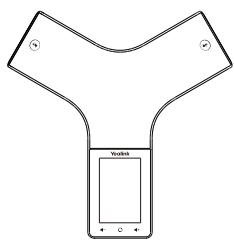
CP935W
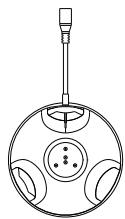
Charging Cradle
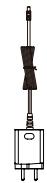
Power Adapter

Quick Start Guide
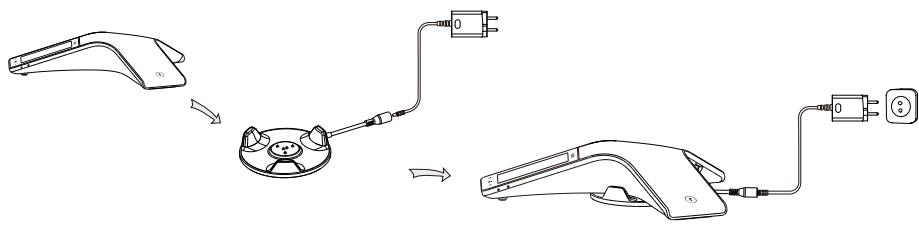
Charging the CP935W
Note:
- Use Yealink-supplied power adapter (12V/1.25A). A third-party power adapter may damage the wireless conference phone.
- Check the charging status in the upper-left corner of the LCD screen.
Getting Started
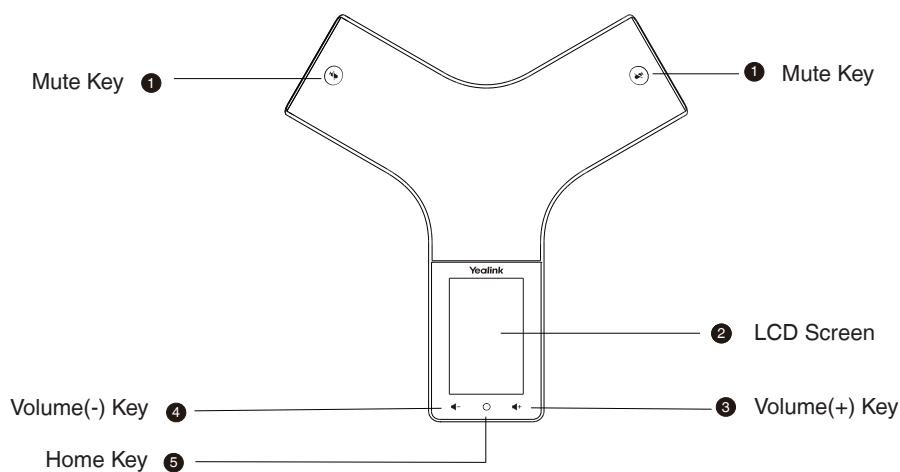
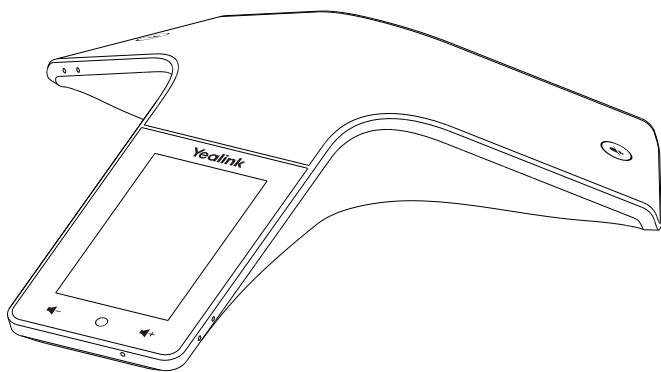
Hardware Overview
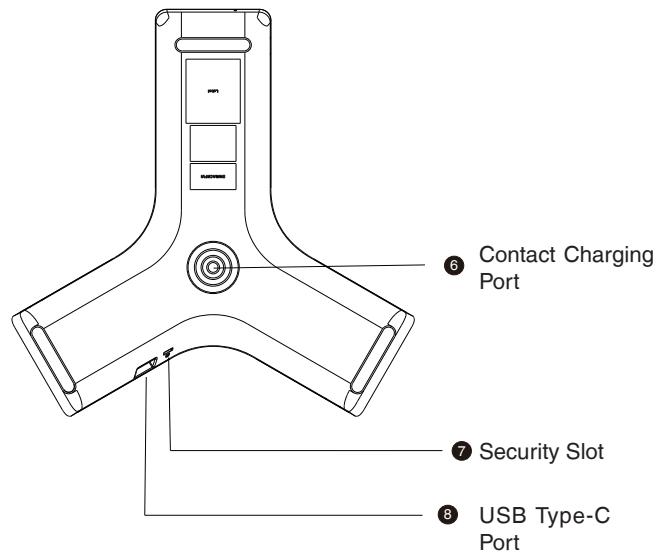
Power on/off the CP935W
Power on: Press the home key for 3 seconds or charge the CP935W.
Power off: Press the home key for 10 seconds then tap OK or tap More->Basic->Power
Off->OK on the LCD screen of the CP935W.
Select Mode
When the CP935W is powered on for the first time or reset to factory setting, the screen displays DECT Mode and Wi-Fi Mode, choose one and click OK. If you want to switch modes, tap More->Basic->Phone Mode on the LCD screen of the CP935W.
Registration (DECT Mode)
You can register up to 10 CP935W to one W70B base station. Each CP935W can only be registered to one base station.
When the CP935W LCD screen prompts "Unregistered!", long press on the base station till the registration LED indicator flashes. There are two methods to register a new CP935W:
Easy Registration:
- Tap Reg on the CP935W screen to register quickly.
Normal Registration:
- Tap More->Basic->Registration->Register on the LCD screen of the CP935W. The CP935W begins searching the base station.
- Tap OK after searching a base station successfully (if it's not the base which you want to register to, tap Next to search another base).
- Enter the base station password (default: 0000), and then tap OK to complete the registration.
Note:
- If the CP935W is registered to the base station successfully, the LCD screen prompts "Subscribe Succeeded".
- If the CP935W LCD screen prompts "Searching for Base", check whether the registration LED indicator of your base station flashes.
Account Settings (DECT Mode)
Before you start using the CP935W, please set up your account via web user interface of the base station. Follow the steps below:
- Tap More->Status->Base Status->IPv4 on the LCD screen of the CP935W and access the IP address with a browser (the default username and password are admin).
- Go to Account->Register, select the account, enable Active Line, enter account information and click Confirm.
If you don't know the server account, please contact the administrator to obtain the information.
Note:
When you enter the account information, the Display Name, Register Name,Username and Server Host are required.
Wireless Network Connection (Wi-Fi Mode)
Please connect to a wireless network before using the CP935W. Follow the steps below:
- Tap More->Basic->Wi-Fi on the LCD screen of the CP935W.
- Turn Wi-Fi on. The CP935W will automatically search for available wireless networks in your area.
- Select an available wireless network to connect.
- If the network is secure, enter its password in the Password field, and then tap Connect.
SIP Registration (Wi-Fi Mode)
Before you start using the CP935W, you also need to register via web user interface of the CP935W. There are two methods to register the CP935W:
Register via the LCD screen:
- Tap More->Advanced and enter the password (default: admin).
- Go to Accounts, enable Active Line and enter account information.
If you don't know the server account, please contact the administrator to obtain the account information.
Register via the web page:
- Tap More->Status->General->IPv4 IP on the LCD screen of the CP935W and access the IP address with a browser (the default username and password are admin).
- Go to Account->Register, enable Active Line and enter account information.
If you don't know the server account, please contact the administrator to obtain the account information.
Note:
When you enter the account information, the Display Name, Register Name,Username and Server Host are required.
Local Conference
You can host a five-way conference with up to other four parties.
To create a five-way local conference:
- Tap Call, enter the number of the second party and call out. You can also select a contact from Directory to invite them to join the conference.
- Tap Conference (tap Invite in Wi-Fi Mode) when the second party answers then enter the number of the third party.
- Repeat step 2 to invite more parties to the conference.
- Tap More->merge calls then you can start the multi-party conference.
If you connect to a mobile phone via Bluetooth and connect to PC via Type-C, you can also create a hybrid UC conference.
Upgrade Firmware
For a better experience, please go to the Yealink's official website to download the latest firmware, then upgrade the base station and CP935W.
DECT Mode:
You can upgrade base station and CP935W in DECT Mode.
- Tap More->Status->Base Status->IPv4 IP on the screen of the CP935W and access the IP address with a browser (the default username and password are admin).
- Go to Settings->Upgrade, you can upgrade the base station and CP935W that registered to the base station.
If one of the CP935W is not upgraded successfully, tap More->Basic->upgrade Firmware on the screen of the CP935W, you can check the new firmware and upgrade the CP935W separately (make sure the provision server is configured).
Wi-Fi Mode:
You can only upgrade the CP935W in Wi-Fi Mode.
- Tap More->Status->General->IPv4 IP on the screen of the CP935W and access the IP address with a browser (the default username and password are admin).
- Go to Settings->Upgrade, you can upgrade the CP935W.
Regulatory Notices
Operating Ambient Temperatures
Operating temperature: +14 to 122°F (-10 to 50°C)
Relative humidity: 5% to 90% , noncondensing
Storage temperature: -22 to +160°F (-30 to +70°C)
Warranty
Our product warranty is limited only to the unit itself, when used normally in accordance with the operating instructions and the system environment. We are not liable for damage or loss resulting from the use of this product, or for any claim from a third party. We are not liable for problems with Yealink device arising from the use of this product; we are not liable for financial damages, lost profits, claims from third parties, etc., arising from the use of this product.
DC symbol
is the DC voltage symbol.
Restriction of Hazardous Substances Directive (RoHS)
This device complies with the requirements of the EU RoHS Directive. Statements of compliance can be obtained by contacting support@yealink.com.
Safety Instructions
Save these instructions. Read these safety instructions before use!
The following basic safety precautions should always be followed to reduce risk of fire, electrical shock, and other personal injury.
General Requirements
- Before you install and use the device, read the safety instructions carefully and observe the situation during operation.
- During the process of storage, transportation, and operation, please always keep the device dry and clean.
- During the process of storage, transportation, and operation, please avoid collision and crash of the device.
- Please attempt not to dismantle the device by yourself. In case of any discrepancy, please contact the appointed maintenance center for repair.
- Without prior written consent, no organization or individual is permitted to make any change to the structure or the safety design of the device. Yealink is under no circumstance liable to consequences or legal issues caused by such changes.
- Please refer to the relevant laws and statutes while using the device. Legal rights of others should be respected as well.
Legal rights or orders should be Environmental Requirements
- Place the device at a well-ventilated place. Do not expose the device under direct sunlight.
- Keep the device dry and free of dusts.
- Place the device on a stable and level platform.
- Please place no heavy objects on the device in case of damage and deformation caused by the heavy load.
- Keep at least 10cm between the device and the closest object for heat dissipation.
- Do not place the device on or near any inflammable or fire-vulnerable object, such as rubber-made materials.
- Keep the device away from any heat source or bare fire, such as a candle or an electric heater.
- Keep the device away from any household appliance with strong magnetic field or electromagnetic field, such as a microwave oven or a refrigerator.
Operating Requirements
- Do not let a child operate the device without guidance.
- Do not let a child play with the device or any accessory in case of accidental swallowing.
- Please use the accessories provided or authorized by the manufacturer only.
- The power supply of the device shall meet the requirements of the input voltage of the device. Pleaseusethe provided surge protection power socket only.
- Before plugging or unplugging any cable, make sure that your hands are completely dry.
-
Do not spill liquid of any kind on the product or use the equipment near water, for example, near a bathtub, washbowl, kitchen sink, wet basement or near a swimming pool.
-
Do not tread on, pull, or over-bend any cable in case of malfunction of the device.
- During a thunderstorm, stop using the device and disconnect it from the power supply. Unplug the power plug and the Asymmetric Digital Subscriber Line (ADSL) twisted pair (the radio frequency cable) to avoid lightning strike.
- If the device is left unused for a rather long time, disconnect it from the power supply and unplug the power plug.
- When there is smoke emitted from the device, or some abnormal noise or smell, disconnect the device from the power supply, and unplug the power plug immediately. Contact the specified maintenance center for repair.
- Do not insert any object into equipment slots that is not part of the product or auxiliary product.
- Before connecting a cable, connect the grounding cable of the device first. Do not disconnect the grounding cable until you disconnect all other cables.
Cleaning Requirements
- Before cleaning the device, stop using it and disconnect it from the power supply.
- Use a piece of soft, dry and anti-static cloth to clean the device.
- Keep the power plug clean and dry. Using a dirty or wet power plug may lead to electric shock or other perils.
ENVIRONMENTAL RECYCLING
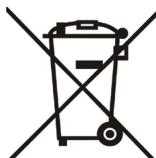

Never dispose of the device with domestic waste
Ask your Town Council about how to dispose of it in an environmentally friendly way. The cardboard box, plastic packaging and player components may be recycled in accordance with prevailing recycling regulations in your country.
Always adhere to prevailing regulations
Those who fail to do so may be fined or prosecuted in accordance with the law. The crossed out garbage can that appears on the device means that when it has reached the end
of its useful life, it should be taken to a special waste disposal centre and treated separately to general urban waste.
Troubleshooting
The unit cannot supply power to Yealink device.
There is a bad connection with the plug.
-
Clean the plug with a dry cloth.
-
Connect it to another wall outlet.
The usage environment is out of operating temperature range.
- Use in the operating temperature range.
The cable between the unit and the Yealink device is connected incorrectly.
- Connect the cable correctly.
You cannot connect the cable properly.
-
You may have connected a wrong Yealink device.
-
Use the correct power supply.
Some dust, etc., may be in the port.
- Clean the port.
Contact your dealer or authorized service facility for any further questions.
Contact Information
YEALINK NETWORK TECHNOLOGY CO.,LTD.
309, 3rd Floor, No.16, Yun Ding North Road, Huli District, Xiamen City, Fujian, PR.C
YEALINK (EUROPE) NETWORK TECHNOLOGY B.V.
Strawinskylaan 3127, Atrium Building, 8th floor, 1077ZX Amsterdam, The Netherlands
YEALINK (USA) NETWORK TECHNOLOGY CO., LTD.
999 Peachtree Street Suite 2300, Fulton, Atlanta, GA, 30309, USA
Made in China
309, 3rd Floor, No. 16, Yun Ding North Road, Huli District, Xiamen City, Fujian, VR China
YEALINK (EUROPE) NETWORK TECHNOLOGY B.V.
Strawinskylaan 3127, Atrium Building, 8th floor, 1077ZX Amsterdam, Niederlande
YEALINK (USA) NETWORK TECHNOLOGY CO., LTD.
999 Peachtree Street Suite 2300, Fulton, Atlanta, GA, 30309, USA
Hergestell in China
Normal Registration:
309, 3rd Floor, No.16, Yun Ding North Road, Huli District, Xiamen City, Fujian, PR.C
YEALINK (EUROPE) NETWORK TECHNOLOGY B.V.
Strawinskylaan 3127, Atrium Building, 8th floor, 1077ZX Amsterdam, The Netherlands
YEALINK (USA) NETWORK TECHNOLOGY CO., LTD.
999 Peachtree Street Suite 2300, Fulton, Atlanta, GA, 30309, USA
Made in China
Contenu du pack
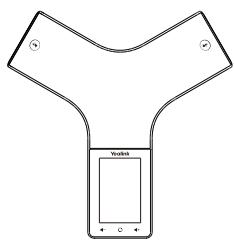
CP935W
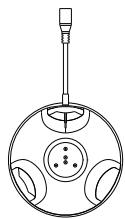
Socle de chargeur
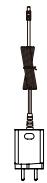
Adaptateur secteur
Registration (DECT Mode)
309, 3rd Floor, No.16, Yun Ding North Road, Huli District, Xiamen City, Fujian, China
YEALINK (EUROPE) NETWORK TECHNOLOGY B.V.
Strawinskylaan 3127, Atrium Building, 8th floor, 1077ZX Amsterdam, Pays-Bas YEALINK (USA) NETWORK TECHNOLOGY CO., LTD.
FCC Compliance Statements
This device complies with Part 15 of the FCC Rules. Operation is subject to the following two conditions: (1) this device may not cause harmful interference, and (2) this device must accept any interference received, including interference that may cause undesired operation.
Note: This equipment has been tested and found to comply with the limits for a Class B digital device, pursuant to Part 15 of the FCC Rules. These limits are designed to provide reasonable protection against harmful interference in a residential installation. This equipment generates, uses and can radiate radio frequency energy and, if not installed and used in accordance with the instructions, may cause harmful interference to radio communications. However, there is no guarantee that interference will not occur in a particular installation.
If this equipment does cause harmful interference to radio or television reception, which can be determined by turning the equipment off and on, the user is encouraged to try to correct the interference by one or more of the following measures:
-- Reorient or relocate the receiving antenna.
-- Increase the separation between the equipment and receiver.
-- Connect the equipment into an outlet on a circuit different from that to which the receiver is connected.
-- Consult the dealer or an experienced radio/TV technician for help.
Caution: Changes or modifications not expressly approved by the party responsible for compliance could void the user's authority to operate the equipment.
This equipment complies with FCC radiation exposure limits set forth for an uncontrolled environment. This equipment should be installed and operated with minimum distance 20cm between the radiator and your body.
ISED Compliance Statements
This device contains licence-exempt transmitter(s)/receiver(s) that comply with Innovation, Science and Economic Development Canada's licence-exempt RSS(s). Operation is subject to the following two conditions: (1) This device may not cause interference. (2) This device must accept any interference, including interference that may cause undesired operation of the device.
This equipment complies with IC RSS-102 radiation exposure limits set forth for an uncontrolled environment. This equipment should be installed and operated with minimum distance 20cm between the radiator and your body.
- HD WIRELESS CONFERENCE PHONE
- CP935W
- TABLE OF CONTENTS
- CP935W PACKAGE CONTENTS
- CHARGING THE CP935W
- NOTE
- GETTING STARTED
- POWER ON/OFF THE CP935W
- SELECT MODE
- REGISTRATION (DECT MODE)
- EASY REGISTRATION
- NORMAL REGISTRATION
- ACCOUNT SETTINGS (DECT MODE)
- WIRELESS NETWORK CONNECTION (WI-FI MODE)
- SIP REGISTRATION (WI-FI MODE)
- REGISTER VIA THE LCD SCREEN
- REGISTER VIA THE WEB PAGE
- LOCAL CONFERENCE
- TO CREATE A FIVE-WAY LOCAL CONFERENCE
- UPGRADE FIRMWARE
- DECT MODE
- WI-FI MODE
- REGULATORY NOTICES
- OPERATING AMBIENT TEMPERATURES
- WARRANTY
- DC SYMBOL
- RESTRICTION OF HAZARDOUS SUBSTANCES DIRECTIVE (ROHS)
- SAFETY INSTRUCTIONS
- THE FOLLOWING BASIC SAFETY PRECAUTIONS SHOULD ALWAYS BE FOLLOWED TO REDUCE RISK OF FIRE, ELECTRICAL SHOCK, AND OTHER PERSONAL INJURY
- GENERAL REQUIREMENTS
- LEGAL RIGHTS OR ORDERS SHOULD BE ENVIRONMENTAL REQUIREMENTS
- OPERATING REQUIREMENTS
- CLEANING REQUIREMENTS
- ENVIRONMENTAL RECYCLING
- NEVER DISPOSE OF THE DEVICE WITH DOMESTIC WASTE
- ALWAYS ADHERE TO PREVAILING REGULATIONS
- TROUBLESHOOTING
- CONTACT INFORMATION
- CONTENU DU PACK
- FCC COMPLIANCE STATEMENTS
- ISED COMPLIANCE STATEMENTS
Brand : Yealink
Model : CP935W
Category : Conference phone