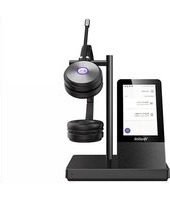
EHS60 - Headset Yealink - Free user manual and instructions
Find the device manual for free EHS60 Yealink in PDF.


Pick your language and provide your email: we'll send you a specifically translated version.
| Product Type | Electronic Hookswitch (EHS) Adapter for Headsets |
| Brand | Yealink |
| Model | EHS60 |
| Compatibility | Yealink SIP-T2 series, T4 series, T5 series, and other desk phones with EHS port |
| Dimensions (W x D x H) | Approx. 6.0 cm x 4.0 cm x 2.0 cm |
| Weight | Approx. 30 g |
| Power Supply | Powered by the connected phone via RJ9 cable; no external power required |
| Interface | RJ9 connector for phone; 2.5mm or 3.5mm jack for headset (depends on headset model) |
| Main Functions | Enables wireless headset usage with desk phone, controls call answer/end, volume adjustment, and mute |
| LED Indicator | Red/Green LED for power and call status |
| Cable Length | Approx. 50 cm between adapter and phone |
| Operating Temperature | 0°C to 40°C |
| Storage Temperature | -20°C to 60°C |
| Humidity | 10% to 90% non-condensing |
| Material | ABS plastic |
| Maintenance | Clean with a soft, dry cloth. Do not use liquids or solvents. |
| Safety | Use only with compatible Yealink phones. Do not expose to water or excessive heat. |
| Spare Parts & Repairability | No user-serviceable parts. Contact Yealink support for replacement. |
| Certifications | CE, FCC, RoHS |
Frequently Asked Questions - EHS60 Yealink
What is the Yealink EHS60 used for?
The Yealink EHS60 is an Electronic Hookswitch (EHS) adapter that allows you to connect a wireless headset to a compatible Yealink desk phone, enabling hands-free call control.
Which phones are compatible with the EHS60?
The EHS60 is compatible with Yealink SIP-T2 series, T4 series, T5 series, and other Yealink desk phones that have a dedicated EHS port (usually an RJ9 jack).
How do I install the EHS60?
Connect the RJ9 cable from the EHS60 to the EHS port on your Yealink phone. Then connect your wireless headset base station to the EHS60 using the appropriate cable (2.5mm or 3.5mm). Follow your headset's pairing instructions.
Does the EHS60 require batteries or external power?
No, the EHS60 is powered directly by the connected phone via the RJ9 cable. No batteries or external power adapter are needed.
How do I answer a call using the EHS60?
When a call comes in, press the answer/end button on your wireless headset. The EHS60 sends the signal to the phone to answer the call. The same button ends the call.
Can I adjust the volume with the EHS60?
Volume control depends on your wireless headset. Most headsets have volume up/down buttons that work independently of the EHS60. The EHS60 does not have its own volume controls.
What does the LED indicator on the EHS60 mean?
A solid red LED indicates the EHS60 is powered and idle. A flashing green LED indicates an active call. A solid green LED may indicate the headset is connected.
My headset is not working with the EHS60. What should I check?
First, ensure the EHS60 is firmly connected to the phone's EHS port. Verify that your headset is compatible and properly paired with its base. Check that the correct cable type (2.5mm or 3.5mm) is used between the headset base and the EHS60.
Can I use the EHS60 with a non-Yealink phone?
The EHS60 is designed specifically for Yealink phones with an EHS port. It may not work with other brands due to different pin configurations and signaling protocols.
How do I clean and maintain the EHS60?
Use a soft, dry cloth to wipe the exterior. Do not use any liquids, cleaning solvents, or abrasive materials. Avoid exposing the device to moisture or extreme temperatures.
User questions about EHS60 Yealink
0 question about this device. Answer the ones you know or ask your own.
Ask a new question about this device
No questions yet. Be the first to ask one.
Download the instructions for your Headset in PDF format for free! Find your manual EHS60 - Yealink and take your electronic device back in hand. On this page are published all the documents necessary for the use of your device. EHS60 by Yealink.
USER MANUAL EHS60 Yealink
Manual assistant
Powered by Anthropic
Waiting for your message
Product information
Brand : Yealink
Model : EHS60
Category : Headset