
PL-N12 KIT - Network ASUS - Free user manual and instructions
Find the device manual for free PL-N12 KIT ASUS in PDF.
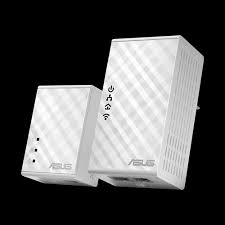


| Brand | ASUS |
| Model | PL-N12 KIT |
| Product Type | Powerline Wi-Fi Kit (Powerline and Wi-Fi access point) |
| Category | Network |
| Powerline Speed | 500 Mbit/s (Homeplug AV) |
| Wi-Fi Standard | Wireless-N300 (802.11n, 2.4 GHz) |
| Ethernet Ports | 1 RJ-45 10/100 Mbps port (on each adapter) |
| Power Supply | 100-240 V AC, 50-60 Hz |
| Package Contents | 1× PL-N12 Powerline Wi-Fi, 1× PL-E41 Powerline Adapter, 2× Ethernet cable, quick start guide, warranty card |
| Main Functions | Wi-Fi cloning, secure pairing, energy-saving mode, reset |
| Security | Button pairing to create a secure Powerline network |
| Configuration | Via WPS/cloning button or web interface http://ap.asus.com |
| Compatibility | Homeplug AV, compatible with other Homeplug AV Powerline adapters |
| Warranty | Warranty card included (24 months as per standard) |
| Indicator LEDs | Power, Powerline, Ethernet, Wi-Fi |
| Maintenance | No special maintenance required |
Frequently Asked Questions - PL-N12 KIT ASUS
User questions about PL-N12 KIT ASUS
0 question about this device. Answer the ones you know or ask your own.
Ask a new question about this device
Download the instructions for your Network in PDF format for free! Find your manual PL-N12 KIT - ASUS and take your electronic device back in hand. On this page are published all the documents necessary for the use of your device. PL-N12 KIT by ASUS.
USER MANUAL PL-N12 KIT ASUS
PL-N12 Kit includes:
- PL-N12 Wireless-N300 Wi-Fi PowerLine
- PL-E41 Homeplug AV 500Mbps PowerLine Adapter
U10923 / First Edition / October 2015
Table of contents
English 3
Былгарск. 10
Hrvatski 17
Cestina. 24
Dansk. 31
Nederlandss. 38
Eesti. 45
Francais. 52
Suomi. 59
Deutsch. 66
Elambdavika. 73
Magyar. 80
Italiano. 87
Latviski 94
Lietuviu. 101
Norsk. 108
Portugues. 115
Polski. 122
Pycckn 129
Româna. 136
Espanol. 143
Srpski 150
Slovensky. 157
Slovenscina. 164
Svenska. 171
Turkish. 178
Ukrainian. 185
Package contents
PL-N12 Wireless-N300 Wi-Fi PowerLine x 1, PL-E41 Homeplug AV 500Mbps PowerLine Adapter x 1, Ethernet (LAN) cable x 2, Quick Start Guide x 1, Warranty card x 1
NOTE: If any of the items is damaged or missing, contact your retailer.
A quick look
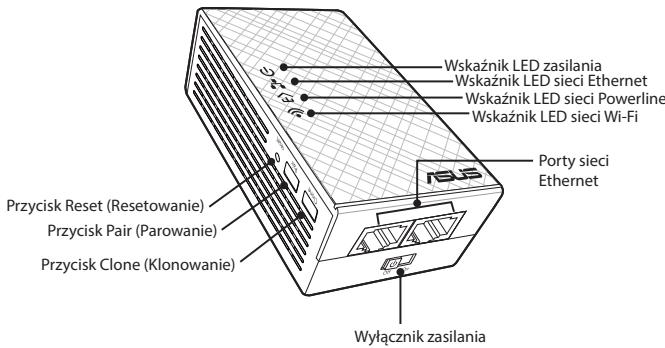
PL-N12 Wireless-N300 Wi-Fi PowerLine
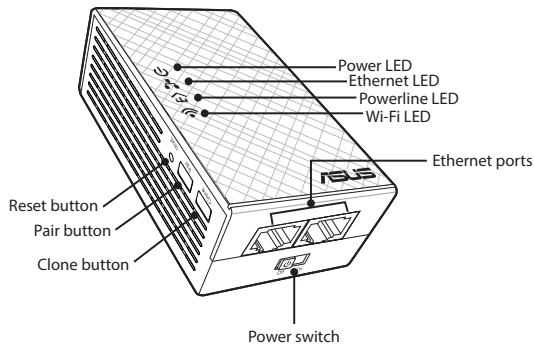
PL-E41 Homeplug AV 500Mbps PowerLine Adapter
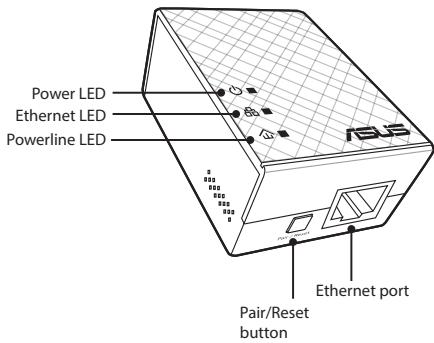
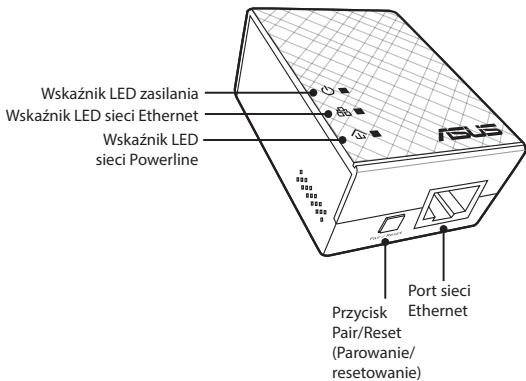
LEDs and buttons
| LED | STATUS | DESCRIPTION | |
| Power | On/Off | Your PL-N12 is on/off. When switched on, the power LED turns from red to green in about one minute, indicating that it is ready to use. | |
| Blinking | Blinking every second: Pairing is in progress. | ||
| Powerline | On | The device is connected to one or more powerline devices. | |
| Off | The device is not connected to any powerline devices. | ||
| Blinking | In Power-Saving mode, the power-line LED blinks every 15 seconds. | ||
| Ethernet | On/Off | A device is connected or not connected to the Ethernet port. | |
| Blinking | The powerline adapter is transferring data via the Ethernet port. | ||
| Wi-Fi | Blinking rapidly | Your PL-N12 is cloning the parent AP's SSID and password. | |
| Blinking every five seconds | Your PL-N12 is resetting to the factory default settings. | ||
| BUTTON | DESCRIPTION |
| Clone | Press and hold the button for about one second to start cloning the parent AP's SSID and password. |
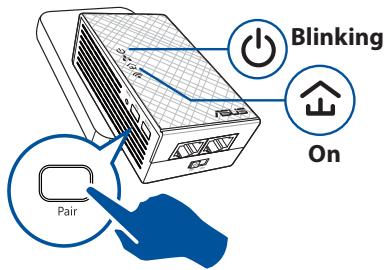
| Pair | Press and hold the button for about one second to start the pairing process. |
| Reset | Press and hold the button for about five seconds to restore the PL-N12 to the factory default settings. |
Setting up your PL-N12
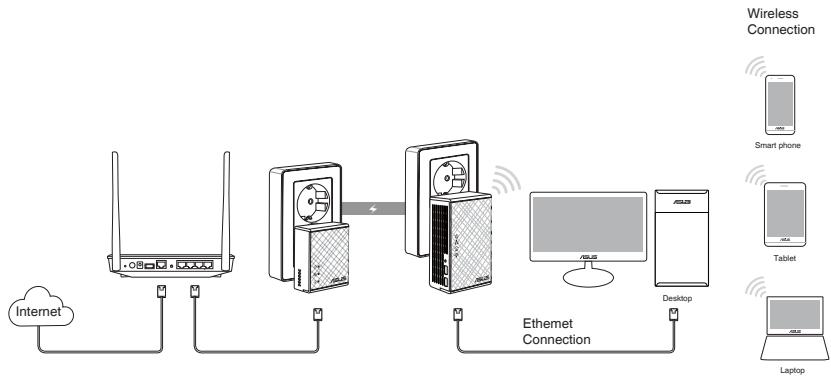
- Use the bundled Ethernet/network cable to connect your PL-E41 to your network's router or switch. Plug your PL-E41 to a wall outlet.
- Plug your PL-N12 to a wall outlet located in the same circuit. Wait until the power LED turns green, indicating that your PL-N12 has finished booting up.
- Wait until the powerline LED turns green, indicating that your PL-N12 has successfully connected to your PL-E41 via the powerline.
- Connect your device to your PL-N12 via wired or wireless connection.
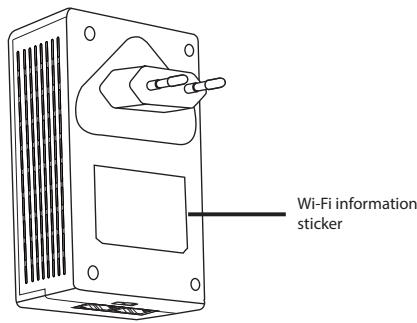
- The Wi-Fi SSID and Password is posted on the Wi-Fi information sticker on your PL-N12.
Security pairing
Creating a secure powerline network
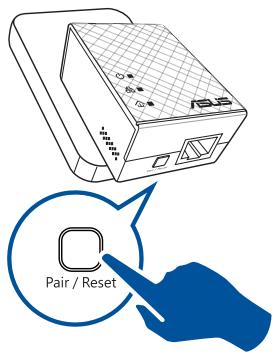
- Press the Pair/Reset button on your PL-E14.
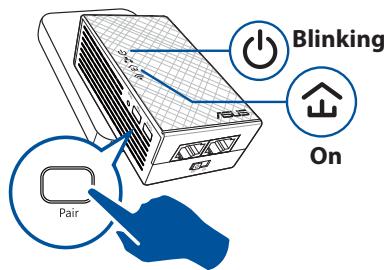
- Press the Pair button on your PL-N12. Wait until the powerline LED lights up, indicating that a secure powerline network has been created.

Joining a secure powerline network
- Press the Pair button on a powerline device in the powerline network.
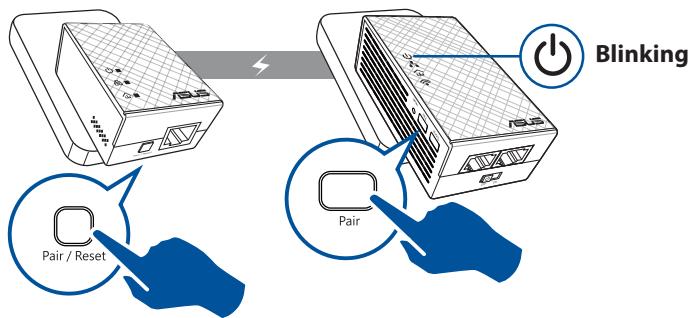
- Press the Pair button on another extender or adapter. Wait until the powerline LED lights up, indicating that pairing is successful.
Configuring your PL-N12 wireless settings
You can configure the wireless settings of your PL-N12 via its Wi-Fi Clone function or via its web interface.
Configuring via Wi-Fi Clone
Use your router's wireless network name and password to configure your PL-N12 settings.
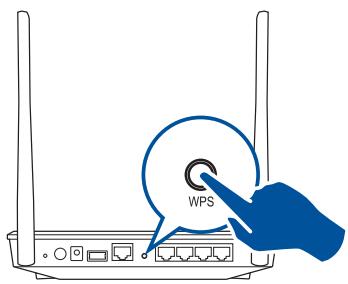
- Place your PL-N12 next to your router, and turn both devices on.
- Press the WPS button on your router.
- Press the Clone button on your PL-N12.
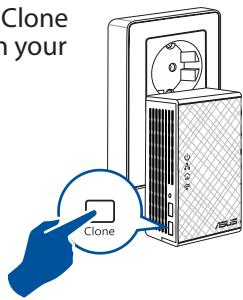
- Your PL-N12 and your router now have the same wireless network name and password.
NOTE: If Wi-Fi Clone succeeds, move your PL-N12 to your preferred location. If it fails, follow the steps in Configuring via the web interface.
Configuring via the web interface
- Set up your PL-N12 via wired or wireless connection. For details, refer to the section Setting up your PL-N12.
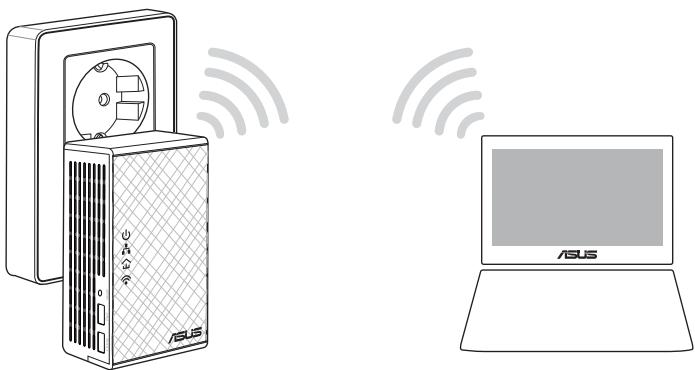
- Go to http://ap.asus.com
- Use admin as both the username and password.
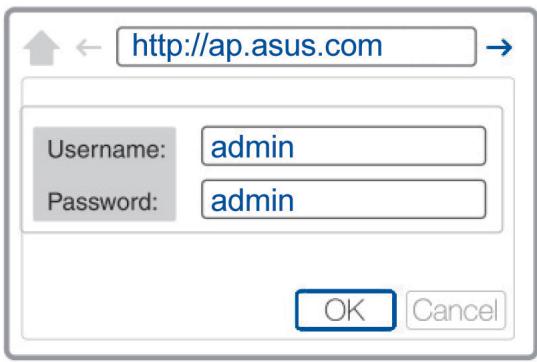
- Go to Wireless > General and set the SSID (network name) and password.
- When done, click Apply.
Frequently Asked Questions (FAQs)
Q1: How do I reset my PL-N12?
With your PL-N12 switched on, use a pin to press and hold the Reset button until the Wi-Fi LED starts blinking. When the power LED turns green and the Wi-Fi LED is on, the reset process is completed.
Q2: My devices cannot connect to the Internet.
Check your Internet connection. - Ensure that the powerline LED lights up on all your powerline devices in the network. If they do not, try pairing the devices again. - Ensure that all your devices are in the same network. - Ensure that all the extenders and adapters are in the same electrical circuit.
Q3: My successfully-paired PL-N12 does not work after I moved it to a new location.
- Try to pair your extender with your adapter again. For details, see Pairing devices via the Pair button.
- Check for any possible interferences that may be too close to your extenders or adapters such as air conditioners, washing machines, and other electrical appliances.
- Ensure that all your devices are in the same network.
- Ensure that all the extenders and adapters are in the same electrical circuit.

PL-N12 Wireless-N300 Wi-Fi PowerLine x 1, PL-E41 Homeplug AV 500Mbps PowerLine adapter x 1, Ethernet (LAN) cable x 2, Quick Start Guide x 1, Warranty Card x 1
WARNING: If any of the components are damaged or missing, contact your dealer.
PL-N12 Wireless-N300 Wi-Fi PowerLine
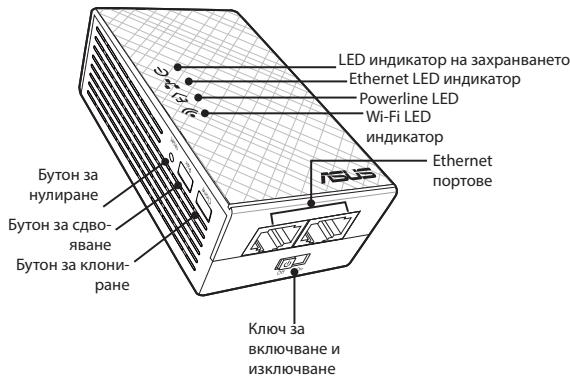
PL-E41 Homeplug AV 500Mbps PowerLine adapter
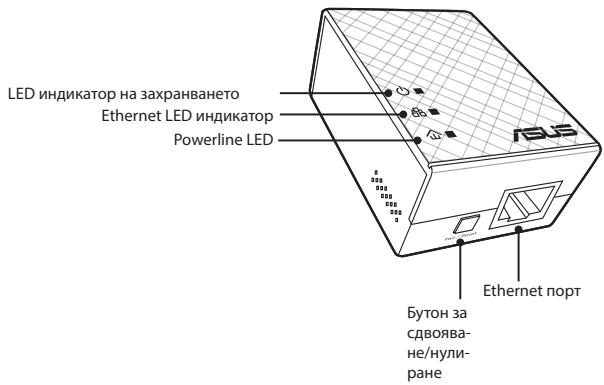
LED indicators and buttons
| LED | СБСТОВЕ | ОПИСАНЕ | |
| Вкlioоч- вае и иЗкlioоч- вае | Вкл./Изкл. | Вашягт PL-N12 e Вкlioочen/N3Кlio- чен. Във Вкlioочen поожение LED от червен CTаBa 3eelen B рамкит ha еда минута, Коeto OЗначаы, ч устюйст.Botо e Готово за работа. | |
| Мira | Мira на BCяka секунда: П robоча сдвога ве. | ||
| Powerline | Вкл. | УстюйстOTO e Вкlioочen Кьм едно яли пооче powerline ус- туйства. | |
| Изкл. | УстюйстOTO He e CBьрзано Кьм powerline устюйства. | ||
| Мira | В Иковомч乘车 ржим, LED Иndида- торьт на powerline мira на BCeki 15 секунда. | ||
| Ethernet | Вкл./Изкл. | УстюйстВо e CBьрзано яли He Кьм Ethernet пот. | |
| Мira | Powerline.adan'terpbт пэрхьрл данни празз Ethernet пот. | ||
| Wi-Fi | Мira 6ьрзо | Вашягт PL-N12 клоонра SSIDи napола差别 на рODителската точka зд достп. | |
| Мira на BCяки пет секунда | Вашягт PL-N12 ce hyлра и сe врьцат Фабрични te настюй по пордаизрае. | ||
Device components
PowerLine Wi-Fi N300 PL-N12
PowerLine adapter PL-E41 Homeplug AV 500 Mb/s
B2: The device cannot connect to the Internet.
- Check the Internet connection.
- Make sure that the power indicator is lit on all devices connected to the power network. If not, repeat the device pairing.
- Make sure that all devices are within range.
- Make sure that all devices are within range of the electrical circuit.
B3: PL-N12 was successfully paired, but does not work when moved to a new location.
Try pairing again. For more information, see the section Pairing devices using the Pair button. Check for any possible interference from computers, washing machines, and other electrical appliances. - Make sure that all devices are within range of the network. - Make sure that all devices are within range of the electrical circuit.
Prohibition of Co-location
This device and its antenna(s) must not be co-located or operating in conjunction with any other antenna or transmitter.
IMPORTANT NOTE:
Radiation Exposure Statement: This equipment complies with FCC radiation exposure limits set forth for an uncontrolled environment. End users must follow the specific operating instructions for satisfying RF exposure compliance. To maintain compliance with FCC exposure compliance requirement, please follow operation instruction as documented in this manual.
Declaration of Conformity for R&TTE directive 1999/5/EC
Essential requirements - Article 3
Protection requirements for health and safety - Article 3.1a
Testing for electric safety according to EN 60950-1 has been conducted. These are considered relevant and sufficient.
Protection requirements for electromagnetic compatibility - Article 3.1b
Testing for electromagnetic compatibility according to EN 301 489-1 and EN 301 489-17 has been conducted. These are considered relevant and sufficient.
Effective use of the radio spectrum - Article 3.2
Testing for radio test suites according to EN 300 328-2 has been conducted. These are considered relevant and sufficient.
CE Mark Warning
This is a Class B product. In a domestic environment, this product may cause radio interference, in which case the user may be required to take adequate measures. Operation Channels: CH1~11 for N. America; Ch1~13 for Japan; CH1~13 for Europe (ETSI)
REACH
Complying with the REACH (Registration, Evaluation, Authorisation, and Restriction of Chemicals) regulatory framework, we published the chemical substances in our products at ASUS REACH website at http://csr.asus.com/english/REACH.htm
ASUS Recycling/Takeback Services
ASUS recycling and takeback programs come from our commitment to the highest standards for protecting our environment. We believe in providing solutions for you to be able to responsibly recycle our products, batteries, other components, as well as the packaging materials. Please go to http://csr.asus.com/english/Takeback.htm for the detailed recycling information in different regions.
This equipment may be operated in AT, BE, CY, CZ, DK, EE, FI, FR, DE, GR, HU, IE, IT, LU, MT, NL, PL, PT, SK, SL, ES, SE, GB, IS, LI, NO, CH, BG, RO, TR.
Networks Global Hotline Information
| Area | Hotline Number | Support Languages | Availability |
| Australia | 1300-2787-88 | English | Mon. to Fri.8:00-20:00 |
| Austria | 0043-820240513 | German | Mon. to Fri.9:00-18:00 |
| Belgium | 0032-78150231 | Dutch /French | Mon. to Fri.9:00-17:00 |
| China | 400-620-6655 | Simplified Chinese | Mon. to Sun.9:00-18:00 |
| Denmark | 0045-3832-2943 | Danish/English | Mon. to Fri.9:00-17:00 |
| Finland | 00358-9693-7969 | Finnish/English/Swedish | Mon. to Fri.10:00-18:00 |
| France | 0033-170949400 | French | Mon. to Fri.9:00-17:45 |
| Greece | 00800-44-14-20-44 | Greek | Mon. to Fri.9:00-13:00/14:00-18:00 |
| Hong Kong | 3582-4770 | Cantonese/Chinese/English | Mon. to Fri.10:00-20:00Sat.10:00-17:00 |
| Indonesia | +62-21-500128 | Indonesia, English | Mon. to Fri9:30 - 17:00 |
| Ireland | 0035-31890719918 | English | Mon. to Fri.9:00-17:00 |
| Italy | 199-400089 | Italian | Mon. to Fri.9:00-13:00/14:00-18:00 |
| Japan | 0800-123-27870081-570-783-886 | Japanese | Mon. to Fri.9:00-18:00Sat. to Sun.9:00-17:00 |
| Malaysia | +603 2148 0827 (Check Repair Detail Status Only)/ +603-6279-5077 | Bahasa Melayu/English | Mon. to Fri.10:00-19:00 |
| Netherlands / Luxembourg | 0031-591-570290 | Dutch / English | Mon. to Fri.9:00-17:00 |
| New Zealand | 0800-278-788/ 0800-278-778 | English | Mon. to Fri.9:00-17:00 |
| Norway | 0047-2316-2682 | Norwegian /English | Mon. to Fri.9:00-17:00 |
| Philippines | +632-636 8504/180014410573 | English | Mon. to Fri.9:00-18:00 |
| Poland | 00225-718-033/ 00225-718-040 | Polish | Mon. to Fri.9:00-17:00;30-17:30 |
| Portugal | 707-500-310 | Portuguese | Mon. to Fri.9:00-17:00 |
| Russia | +8-800-100-ASUS/+7-495-231-1999 | Russian/English | Mon. to Fri.9:00-18:00 |
Networks Global Hotline Information
| Singapore | +65-6720-3835 (Check Repair Detail Status Only)/ +65- 66221701 | English | Mon. to Fri. 11:00-19:00 |
| Slovak | 00421-232-162-621 | Czech | Mon. to Fri.8:00-17:00 |
| Spain | 902-88-96-88 | Spanish | Mon. to Fri.9:00-18:00 |
| Sweden | +46-858769407 | Swedish/English | Mon. to Fri.9:00-17:00 |
| Switzerland | 0041-848111010 | German/French | Mon. to Fri.9:00-18:00 |
| 0041-848111014 | French | Mon. to Fri.9:00-17:45 | |
| 0041-848111012 | Italian | Mon. to Fri.9:00-17:00 | |
| Taiwan | 0800-093-456/ 02-81439000 | Traditional Chinese | Mon. to Fri. 9:00-12:00/13:30-18:00 |
| Thailand | +662-679-8367 -70/ 001 800 852 5201 | Thai/English | Mon. to Fri. 9:00-18:00 |
| Turkey | +90-216-524-3000 | Turkish | Mon. to Fri.09:00-18:00 |
| United Kingdom | +44-1442265548 | English | Mon. to Fri.9:00-17:00 |
| USA/Canada | 1-812-282-2787 | English | Mon. to Fri. 8:30am-12:00am EST (5:30am-9:00pm PST) Sat .to Sun. 9:00am-6:00pm EST (6:00am-3:00pm PST) |
| Manufacturer | ASUSTeK Computer Inc. Tel: +886-2-2894-3447 Address: No. 150, LI-TE RD., PEITOU, TAPEI 112, TAIWAN |
| Authorised representative in Europe | ASUS Computer GmbH Address: HARKORT STR. 21-23, 40880 RATINGEN, GERMANY |
| Authorised distributors in Turkey | BOGAZICII BIL GISAYAR SAN. VE TIC. A.S. Tel: +90 212 3311000 Address: AYAZAGA MAH. KEMERBURGAZ CAD. NO.10 AYAZAGA/ISTANBUL |
| CIZGI Elektronik San. Tic. Ltd. Sti. Tel: +90 212 3567070 Address: CEMAL SURURI CD. HALIM MERIC IS MERKEZI No: 15/C D:5-6 34394 MECIDIYEKOY/ ISTANBUL | |
| KOYUNCU ELEKTRONIK BilGi iSLEM SiST. SAN. VE DIS TIC. A.S. Tel: +90 216 5288888 Address: EMEK MAH.ORDU CAD. NO:18, SARIGAZI, SANCAKTEPE ISTANBUL |
This product must not be disposed together with the domestic waste. This product has to be disposed at an authorized place for recycling of electrical and electronic appliances. By collecting and recycling waste, you help save natural resources, and make sure the product is disposed in an environmental friendly and healthy way.
"~" for the identification of alternating current symbol
For the identification of CLASS II EQUIPMENT only.

- TABLE OF CONTENTS
- PACKAGE CONTENTS
- A QUICK LOOK
- LEDS AND BUTTONS
- SETTING UP YOUR PL-N
- SECURITY PAIRING
- CREATING A SECURE POWERLINE NETWORK
- JOINING A SECURE POWERLINE NETWORK
- CONFIGURING YOUR PL-N12 WIRELESS SETTINGS
- CONFIGURING VIA WI-FI CLONE
- CONFIGURING VIA THE WEB INTERFACE
- FREQUENTLY ASKED QUESTIONS (FAQS)
- Q1: HOW DO I RESET MY PL-N
- Q2: MY DEVICES CANNOT CONNECT TO THE INTERNET
- Q3: MY SUCCESSFULLY-PAIRED PL-N12 DOES NOT WORK AFTER I MOVED IT TO A NEW LOCATION
- PL-N12 WIRELESS-N300 WI-FI POWERLINE
- PL-E41 HOMEPLUG AV 500MBPS POWERLINE ADAPTER
- DEVICE COMPONENTS
- B2: THE DEVICE CANNOT CONNECT TO THE INTERNET
- B3: PL-N12 WAS SUCCESSFULLY PAIRED, BUT DOES NOT WORK WHEN MOVED TO A NEW LOCATION
- PROHIBITION OF CO-LOCATION
- IMPORTANT NOTE
- DECLARATION OF CONFORMITY FOR R&TTE DIRECTIVE 1999/5/EC
- CE MARK WARNING
- REACH
- ASUS RECYCLING/TAKEBACK SERVICES
- NETWORKS GLOBAL HOTLINE INFORMATION
Brand : ASUS
Model : PL-N12 KIT
Category : Network