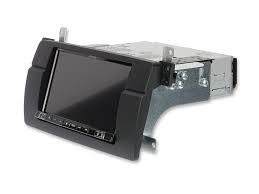
INE-W997E46 - Car audio system ALPINE - Free user manual and instructions
Find the device manual for free INE-W997E46 ALPINE in PDF.



| Product Type | Car audio system with navigation |
| Brand | ALPINE |
| Model | INE-W997E46 |
| Screen size | 7 inches (model INE-W997D) |
| Screen type | Clear LCD TN, active matrix TFT |
| Screen resolution | 800 × 480 pixels (1,152,000 pixels) |
| Monitor dimensions (W × H × D) | 170 × 96 × 17 mm |
| Chassis dimensions (W × H × D) | 178 × 100 × 164 mm |
| Weight | 2.7 kg (INE-W997D) |
| Power supply | 14.4 V DC (11-16 V allowed) |
| Maximum output power | 50 W × 4 |
| FM tuner | Range 87.5-108.0 MHz, sensitivity 8.1 dBμV |
| MW/LW tuner | MW 531-1602 kHz, LW 153-281 kHz |
| USB version | USB 2.0 (CDP support) |
| USB audio formats | MP3, WMA, AAC, FLAC |
| Bluetooth | HFP, OPP, PBAP, A2DP, AVRCP, SPP |
| GPS | Frequency 1575.42 MHz, sensitivity -130 dB |
| HDMI input | Yes (for optional DVD player) |
| Main functions | Radio, DAB/DAB+/DMB, USB, iPod/iPhone, HDMI, hands-free Bluetooth, GPS navigation, favorites |
| Maintenance and cleaning | Clean with a soft, dry cloth. Do not use chemical products. |
| Safety | Do not watch video while driving. Install properly to avoid distraction. |
| Operating temperature | Not specified, but standard automotive use |
Frequently Asked Questions - INE-W997E46 ALPINE
User questions about INE-W997E46 ALPINE
0 question about this device. Answer the ones you know or ask your own.
Ask a new question about this device
Download the instructions for your Car audio system in PDF format for free! Find your manual INE-W997E46 - ALPINE and take your electronic device back in hand. On this page are published all the documents necessary for the use of your device. INE-W997E46 by ALPINE.
USER MANUAL INE-W997E46 ALPINE
KPATKOE CIPABOQUHOE PYKOBOJCTBO
SKROCONA INSTRUKCJA DLA UZYTKOWNIKA
Contents
WARNING 2
CAUTION 3
Getting Started 4
Favourite Function 6
Registering Items 6
Radio/RDS Operation 7
DAB/DAB+/DMB Operation 8
USB Flash drive Operation (Optional) 9
HDMI Device (DVD Player) Operation (Optional) 10
iPod/iPhone Operation (Optional) 11
Hands-Free Phone Control 12
Map Functions 13
Navigation Menu. 14
Setting a Destination 15
Specifications 16
IMPORTANT
Please record the serial number of your unit in the space provided below and keep it as a permanent record.
SERIAL NUMBER:
ISO SERIAL NUMBER: AL
INSTALLATION DATE:
INSTALLATION TECHNICIAN:
PLACE OF PURCHASE:
For details on all functions, refer to the Owner's Manual stored in the supplied CD-ROM. (As it is data CD, the CD cannot be used for playing back music and images on the player.) If required, an ALPINE dealer will readily provide you with a print out of the Owner's Manual contained in the CD-ROM.

WARNING
This symbol means important instructions. Failure to heed them can result in serious injury or death.
INSTALL THE PRODUCT CORRECTLY SO THAT THE DRIVER CANNOT WATCH TV/VIDEO UNLESS THE VEHICLE IS STOPPED AND THE EMERGENCY BRAKE IS APPLIED.
It is dangerous for the driver to watch TV/Video while driving a vehicle. Installing this product incorrectly enables the driver to watch TV/Video while driving. This may cause a distraction, preventing the driver from looking ahead, thus causing an accident. The driver or other people could be severely injured.
DO NOT WATCH VIDEO WHILE DRIVING.
Watching the video may distract the driver from looking ahead of the vehicle and cause an accident.
DO NOT OPERATE ANY FUNCTION THAT TAKES YOUR ATTENTION AWAY FROM SAFELY DRIVING YOUR VEHICLE.
Any function that requires your prolonged attention should only be performed after coming to a complete stop. Always stop the vehicle in a safe location before performing these functions. Failure to do so may result in an accident.
DO NOT FOLLOW ROUTE SUGGESTIONS IF THE NAVIGATION SYSTEM INSTRUCTS YOU TO PERFORM AN UNSAFE OR ILLEGAL MANEUVER, OR PLACES YOU IN AN UNSAFE SITUATION OR AREA.
This product is not a substitute for your personal judgement. Any route suggestions by this system should never supersedes any local traffic regulations or your personal judgement or knowledge of safe driving practice.
KEEP THE VOLUME AT A LEVEL WHERE YOU CAN STILL HEAR OUTSIDE NOISES WHILE DRIVING.
Excessive volume levels that obscure sounds such as emergency vehicle sirens or road warning signals (train crossings, etc.) can be dangerous and may result in an accident. LISTENING AT LOUD VOLUME LEVELS IN A CAR MAY ALSO CAUSE HEARING DAMAGE.
MINIMIZE DISPLAY VIEWING WHILE DRIVING.
Viewing the display may distract the driver from looking ahead of the vehicle and cause an accident.
DO NOT DISASSEMBLE OR ALTER.
Doing so may result in an accident, fire or electric shock.
USE ONLY IN CARS WITH A 12 VOLT NEGATIVE GROUND.
(Check with your dealer if you are not sure.) Failure to do so may result in fire, etc.
KEEP SMALL OBJECTS SUCH AS SCREWS OUT OF THE REACH OF CHILDREN.
Swallowing them may result in serious injury. If swallowed, consult a physician immediately.
USE THE CORRECT AMPERE RATING WHEN REPLACING FUSES.
Failure to do so may result in fire or electric shock.
DO NOT BLOCK VENTS OR RADIATOR PANELS.
Doing so may cause heat to build up inside and may result in fire.
USE THIS PRODUCT FOR MOBILE 12V APPLICATIONS.
Use for other than its designed application may result in fire, electric shock or other injury.
MAKE THE CORRECT CONNECTIONS.
Failure to make the proper connections may result in fire or product damage.
BEFORE WIRING, DISCONNECT THE CABLE FROM THE NEGATIVE BATTERY TERMINAL.
Failure to do so may result in electric shock or injury due to electrical shorts.
DO NOT ALLOW CABLES TO BECOME ENTANGLED IN SURROUNDING OBJECTS.
Arrange wiring and cables in compliance with the manual to prevent obstructions when driving. Cables or wiring that obstruct or hang up on places such as the steering wheel, gear lever, brake pedals, etc. can be extremely hazardous.
DO NOT SPLICE INTO ELECTRICAL CABLES.
Never cut away cable insulation to supply power to other equipment.
Doing so will exceed the current carrying capacity of the wire and result in fire or electric shock.
DO NOT DAMAGE PIPE OR WIRING WHEN DRILLING HOLES.
When drilling holes in the chassis for installation, take precautions so as not to contact, damage or obstruct pipes, fuel lines, tanks or electrical wiring. Failure to take such precautions may result in fire.
DO NOT USE BOLTS OR NUTS IN THE BRAKE OR STEERING SYSTEMS TO MAKE GROUND CONNECTIONS.
Bolts or nuts used for the brake or steering systems (or any other safety-related system), or tanks should NEVER be used for installations or ground connections. Using such parts could disable control of the vehicle and cause fire etc.
DO NOT INSTALL IN LOCATIONS WHICH MIGHT HINDER VEHICLE OPERATION, SUCH AS THE STEERING WHEEL OR SHIFT LEVER.
Doing so may obstruct forward vision or hamper movement etc. and results in serious accident.

CAUTION
This symbol means important instructions. Failure to heed them can result in injury or material property damage.
HALT USE IMMEDIATELY IF A PROBLEM APPEARS.
Failure to do so may cause personal injury or damage to the product. Return it to your authorized Alpine dealer or the nearest Alpine Service Center for repairing.
HAVETHE WIRING AND INSTALLATIONDONE BY EXPERTS.
The wiring and installation of this unit requires special technical skill and experience. To ensure safety, always contact the dealer where you purchased this product to have the work done.
USE SPECIFIED ACCESSORY PARTS AND INSTALL THEM SECURELY.
Be sure to use only the specified accessory parts. Use of other than designated parts may damage this unit internally or may not securely install the unit in place. This may cause parts to become loose resulting in hazards or product failure.
ARRANGE THE WIRING SO IT IS NOT CRIMPED OR PINCHED BY A SHARP METAL EDGE.
Route the cables and wiring away from moving parts (like the seat rails) or sharp or pointed edges. This will prevent crimping and damage to the wiring. If wiring passes through a hole in metal, use a rubber grommet to prevent the wire's insulation from being cut by the metal edge of the hole.
DO NOT INSTALL IN LOCATIONS WITH HIGH MOISTURE OR DUST.
Avoid installing the unit in locations with high incidence of moisture or dust. Moisture or dust that penetrates into this unit may result in product failure.
Getting Started
Location of Controls
The screen design used in the Owner's Manual may differ from the actual screen.
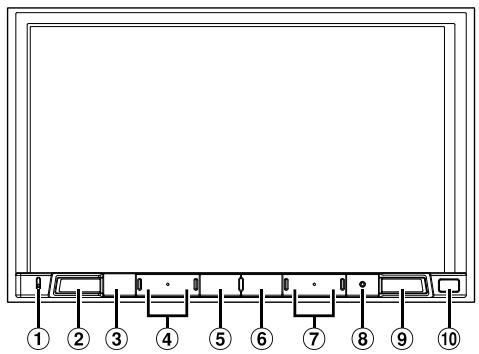
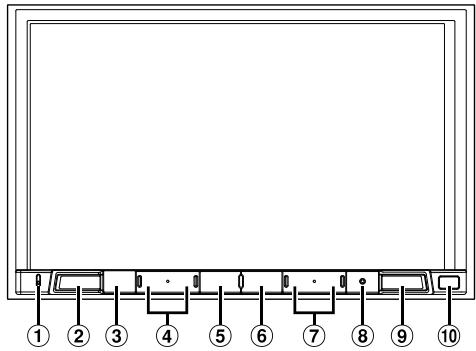
For X801D-U/INE-W997D
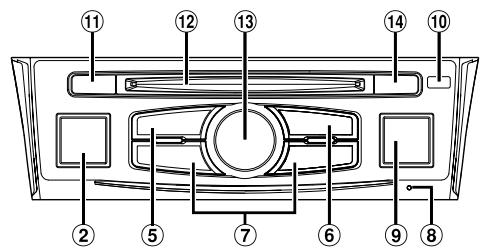
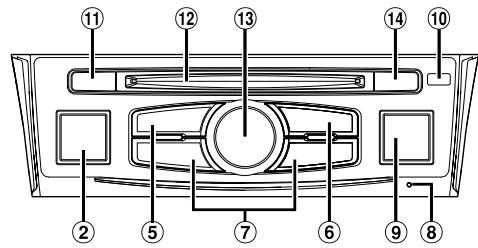
For X701D
① Microphone
Used for Hands-free or Voice Control modes.
For X701D, the microphone is built into the left side of the monitor.
② (AUDIO) / (Voice Recognition mode) button
Displays the Audio/Visual screen. If the Audio/Visual screen is already displayed, changes the source.
When a hands-free phone with Voice Recognition is connected, press and hold for at least 2 seconds to switch to the Voice Recognition mode.
(3) (MUTE) button (X801D-U/INE-W997D only)
Press to activate/deactivate the mute mode.
(4) / (DOWN/UP) button (X801D-U/INE-W997D only)
Press to adjust the volume.
(5) ★ (Favourite) button
Recalls the Favourite screen.
-
Press and hold this button for at least 2 seconds to switch to the Climate screen. (displayed only on the X801D-U/INE-W997D when connected to the optional CAN Interface box.)
-
Press and hold this button for at least 2 seconds to switch to Vehicle info mode. (X701D only)
⑥ MENU/(Power Off) button
Recalls the Menu screen.
Press and hold this button for at least 5 seconds to turn the power off.
⑦ 1▶/▶按钮
Press to seek down/up a station in radio mode or down/up a track, chapter, etc., in other audio/visual sources.
⑧ RESET switch
The system of this unit is reset.
(9) A (NAVI/NAV) button
Recalls the navigation map screen.
Press again to switch to Navigation menu screen.
Press and hold this button for at least 2 seconds to change to Go Home route screen. (If Home is not set yet, it will change to the Home setting screen.)
For details of navigation operations, refer to "Navigation System OM" in the CD-ROM.
Remote Sensor
Point the remote control transmitter towards the remote sensor within a range of 2 meters.
CAM (CAMERA) button (X701D only)
Use to display the camera image.
12 Disc Slot (X701D with DVE-5300X only)
Rotary encoder/MUTE button (X701D only)
Adjust the volume by turning to the left or right.
Press to activate/deactivate MUTE mode.
(14) (Eject) button (X701D with DVE-5300X only)
Ejects a disc.
1 Turn the ignition key to the ACC or ON position.
The system is turned on.
2 Press and hold the MENU button for at least 5 seconds to turn the power off.
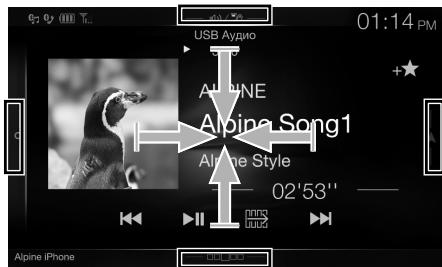
Switching the Audio Sources Screen to a Dedicated Screen
You can switch the Audio Sources screen to a dedicated screen by touching the icon on one of the four edges of the screen, or by swiping vertically or horizontally.
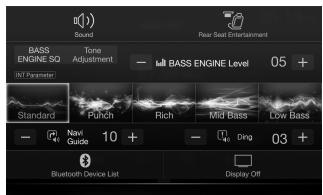
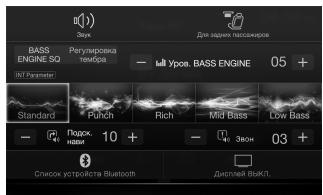
Shortcut Setup Screen
You can set the Sound Setup or Rear Seat Entertainment System.

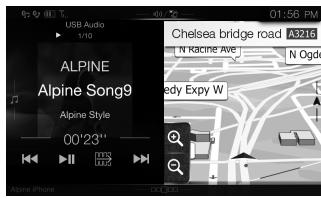
Dual Screen
You can switch between the displayed screens on the Dual Screen.
(USB Audio)
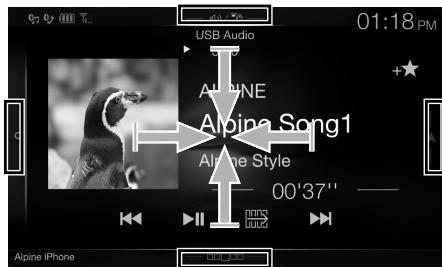
Audio Sources Screen
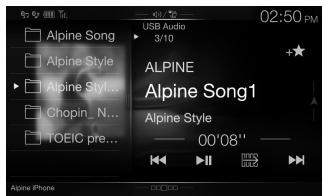
Preset button or Quick Search mode Screen*

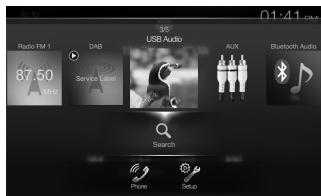
Menu Screen
You can make settings on the Menu Screen.
- The Search mode differs depending on the audio source. For details, see the operating instructions of the audio source.
Favourite Function
This unit enables you to recall functions easily by registering frequently used items such as the Audio source, the navigation search function, etc. to the Favourite screen. You can recall any of these items easily.
1 Press the (Favourite) button.
The Favourite screen is displayed.
Favourite screen example
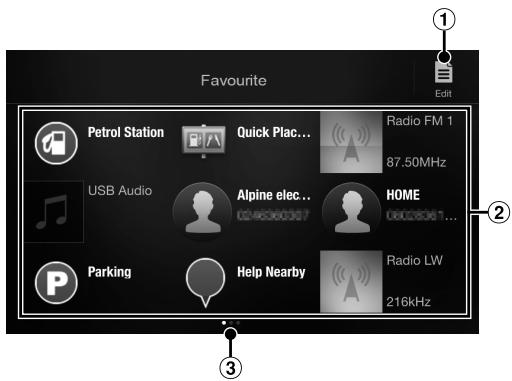
1 Changes to the Edit screen used for registering items or changing names.
Favourite registration item
③ Indicates the location of the currently displayed Favourite screen.
Swipe to the left and right to change the pages. You can add up to 6 pages.
Registering Items
1 Touch [i] (Edit).
A checkbox is displayed on the upper left area of the registration icon and it changes to Edit mode.
![ALPINE INE-W997E46 - Touch [i] (Edit). - 1](/content/2019/10/333/images/b484ad31e0dccf471c8b05376d4a1eeec3c614105f0bd9c2457aaba29426f15f.jpg)
2 Touch [E] (Add).
The items to be added (categories) are displayed.
3 Touch the desired item to be added (category).
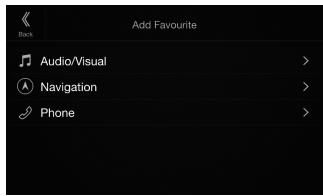
4 Choose the desired item to be added.
For details on the items to be added, refer to "Editing the Favourite Screen" in the Owner's Manual.
- You can add up to 54 items.
- You cannot register an item more than once.
5 After editing is complete, touch [Back).
6 After the caption for the confirmation is displayed, touch [OK].
7 Editing is complete and the screen switches to the Favourite screen.
- If you touch [·] (Cancel) while editing, the screen switches to the previous Favourite Edit screen.
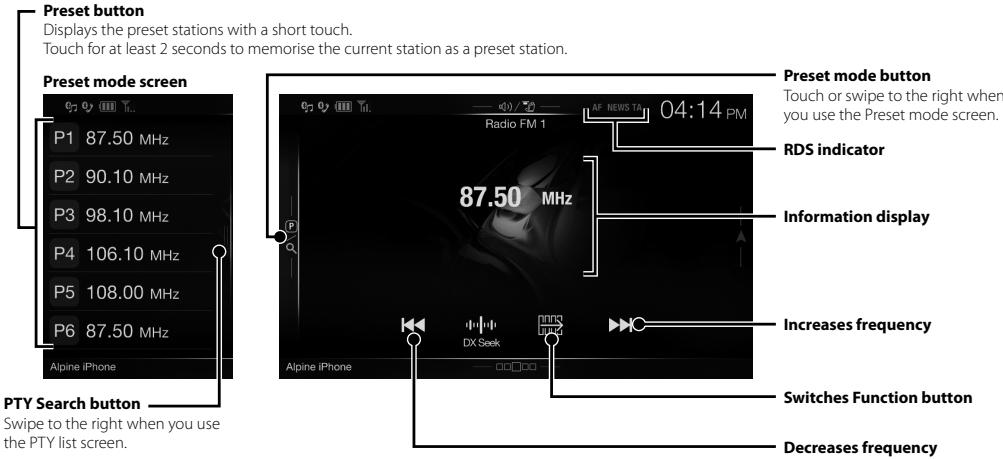
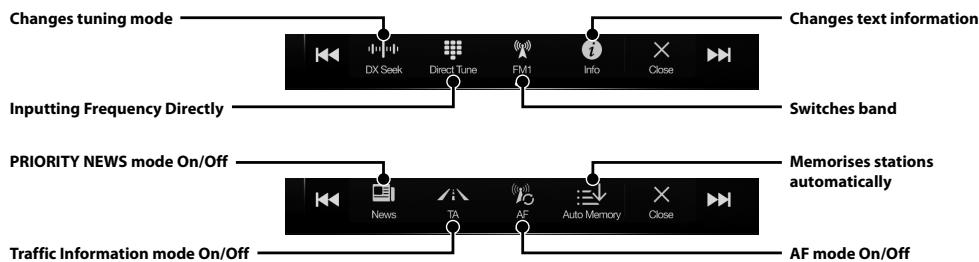
Radio/RDS Operation
DAB/DAB+/DMB Operation
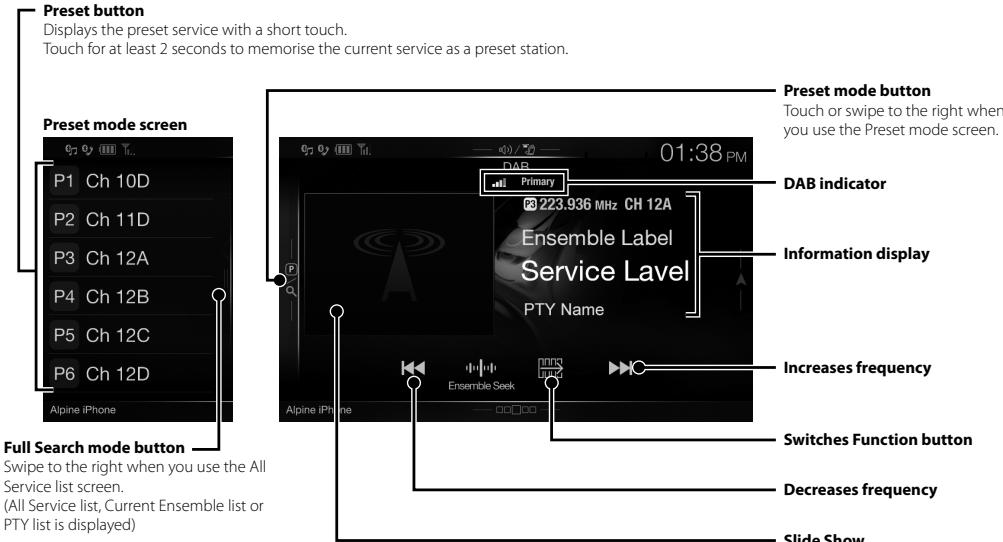
Displays the programme information, artist photos, and advertisements that are synchronised with the Service component currently being received.*
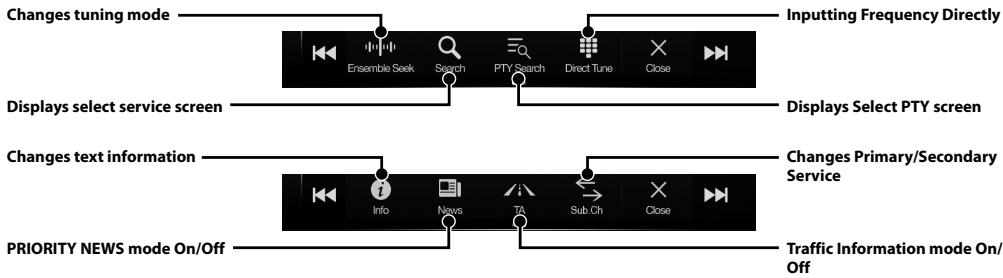
* They may not be displayed, depending on the Service component currently being received.
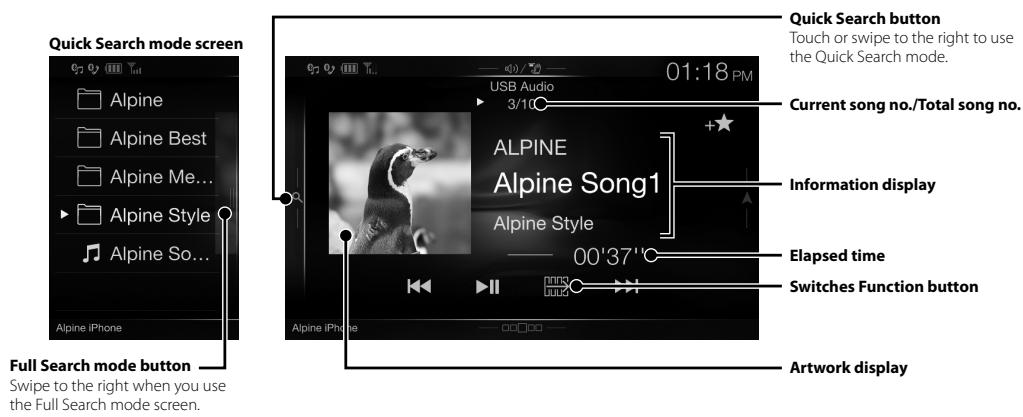
USB Flash drive Operation (Optional)
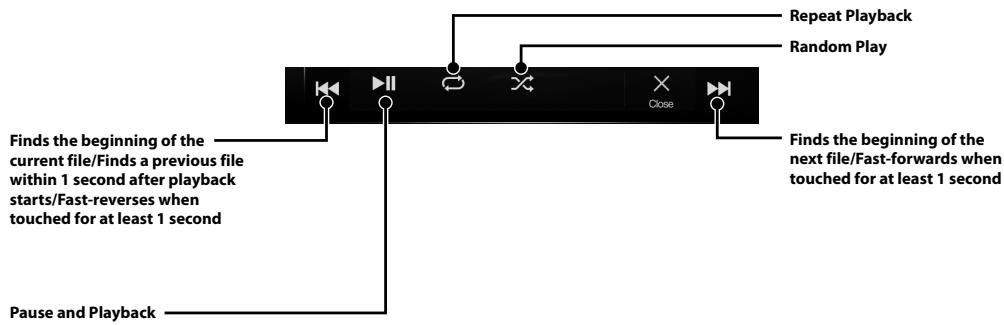
You can play back music files (MP3/WMA/AAC/FLAC) stored in a USB flash drive on the internal player of this system
HDMI Device (DVD Player) Operation (Optional)
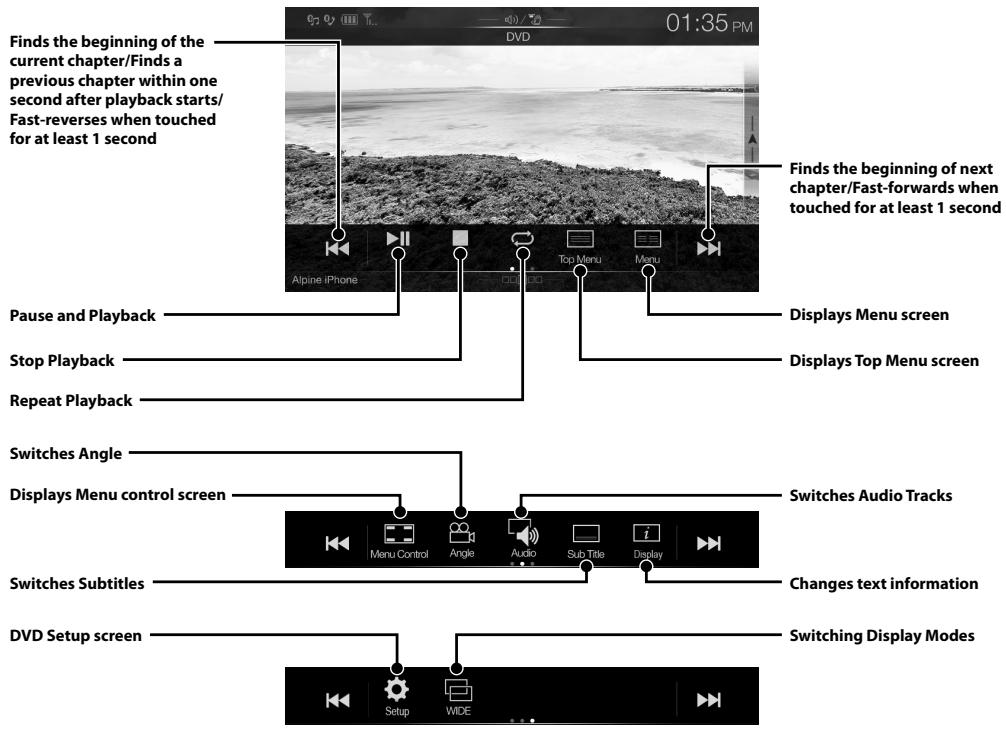
When you connect an optional DVE-5300 (DVD Player), you can operate it from the unit.
iPod/iPhone Operation (Optional)
A separately sold USB iPod/iPhone AV cable (KCU-461iV) or a separately sold Lightning to USB cable (KCU-471i) is required depending on the type of iPod/iPhone.
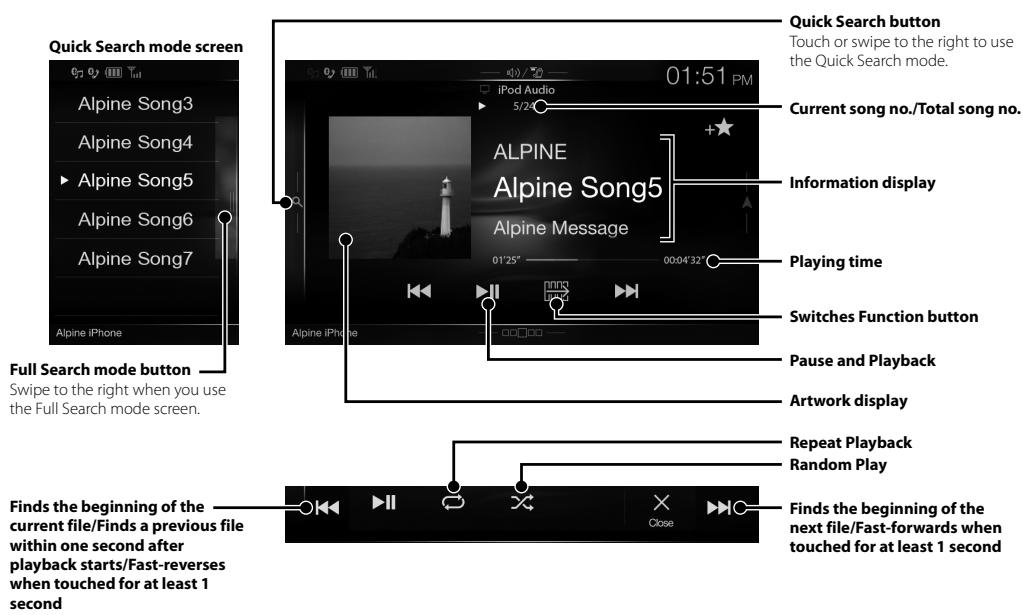
Audio mode
Searching for a Music File (Full Search Mode)
For example: Searching by Artist name
1 Touch [Artists] in the Full Search mode screen.
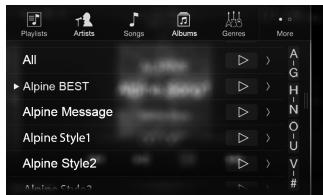
2 Touch the desired artist's name.
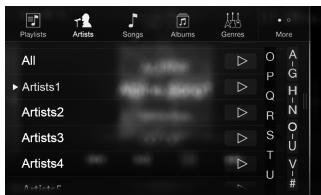
The Albums search screen of the selected artist is displayed.
Touching [▶] of the desired artist will play back all songs of the selected artist.
3 Touch the desired album's name.
All songs of the selected album are displayed.
Touching [▶] of the desired album will play back all songs of the selected album.
4 Touch the desired song's name.
The selected song is played back.
- Touching & & of "All" will play back all songs in the list.
Hands-Free Phone Control
Hands-free calls are possible when using an HFP (Hands-Free Profile) compatible mobile phone with this unit.
How to connect to a BLUETOOTH compatible device (Pairing)
The BLUETOOTH function is always available on this unit.
You can, therefore, search for a BLUETOOTH device for pairing at any time.
1 Touch [Setup] button on the Menu screen.
![ALPINE INE-W997E46 - Touch [Setup] button on the Menu screen. - 1](/content/2019/10/333/images/f828798fb9ce9735191a8b51dd9d9fca4fb3392ba504f82785e6cfd962355150.jpg)
2 Touch [Bluetooth].
- Make sure the "Bluetooth" setting is "On"(☑).
3 Touch [Set Bluetooth Device].
![ALPINE INE-W997E46 - Touch [Set Bluetooth Device]. - 1](/content/2019/10/333/images/adba8e3a83921db08b2f84a85b6e7668820fad90b34ef665afec9f0a9426e098.jpg)
4 Touch [Q] (Search) of "No Device."
![ALPINE INE-W997E46 - Touch [Q] (Search) of "No Device." - 1](/content/2019/10/333/images/a3a97b4c24f722a942a143be299921d8c324748d5a1d2b516df26561b0000225.jpg)
5 Touch [J] (Audio), [J] (Hands-free) or [J/ J] (Both) of the device you want to connect from the list.
Audio: Sets for use as an Audio device.
Hands-free: Sets for use as a Hands Free Device.
Both: Sets for use as both an Audio device and Hands Free Device.
6 When the device registration is complete, a message appears and the device returns to normal mode.
- You can register up to 5 BLUETOOTH compatible mobile phones.
- The BLUETOOTH registration process differs depending on the device version and SSP (Simple Secure Pairing). If a 4 or 6 character Passcode appears on this device, enter the Passcode using the BLUETOOTH compatible device. If a 6 character Passkey appears on this device, make sure the same passkey is displayed on the BLUETOOTH compatible device and touch "Yes."
Answering a Call
1 An incoming call triggers the ringtone and an incoming call display.
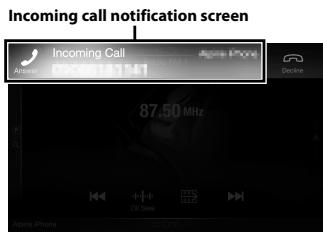
2 Touch incoming call notification screen.
The call starts.
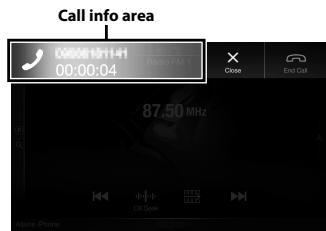
By touching the call info area during phone call, you can change to the Phone Operation screen and adjust the speech volume, etc.
Hanging up the Telephone
1 Touch [O] (End Call).
The call finishes.
Below is an overview of different buttons and icons on the map display. For more detailed information about this screen, please see the Owner's Manual.
![ALPINE INE-W997E46 - Touch [O] (End Call). - 1](/content/2019/10/333/images/4b90726c4103fb45f37cad885c7d83f5e5435215fbe10b6a6d49cd7a10bdd9ec.jpg)
![ALPINE INE-W997E46 - Touch [O] (End Call). - 2](/content/2019/10/333/images/607ff94a5b48da29cd3367e9d413ba112de9dd0e8f570fd87bd48159163d5f7b.jpg)
Navigation Menu
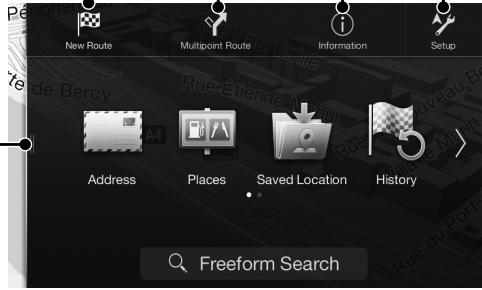
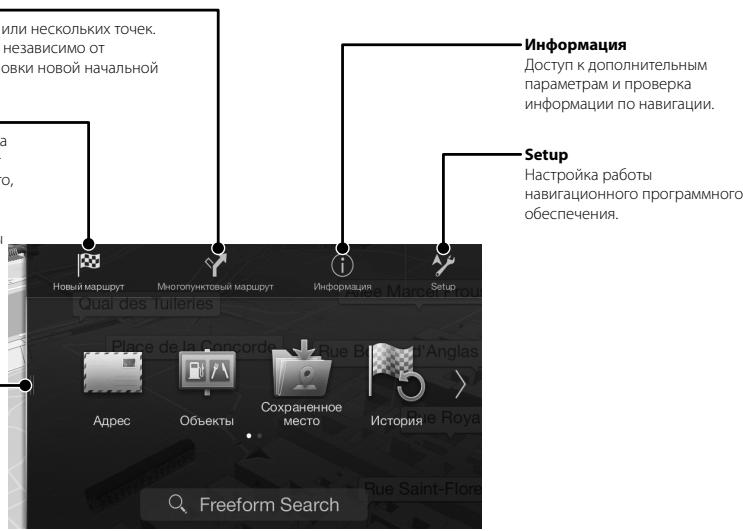
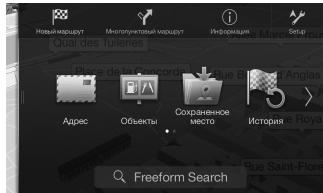
To access the Navigation Menu, touch [Q] on the right edge of the map screen or swipe to the left. Alternatively, press the A button.
Multipoint Route
Build your route from one or more route points. You can also plan a route independently of your current GPS position by setting a new starting point.
Information
Access additional options and check navigation-related information.
NewRout
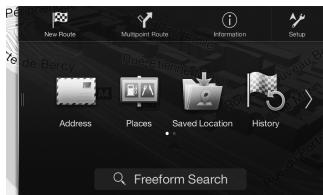
Select your destination by entering an address or its coordinate, or by selecting a Place, a Saved Location, or a Saved Route. You can also look up your recent destinations from the History. When Internet connection is available, the Online Search option can be a further help to find your destination.
Touch or swipe to the right.
Access the Map
The following example describes how to search for a destination when choosing [Town/Postcode] from [Address].
- You can search and narrow down the Country/State by starting from [Country/State].
1 Touch [New Route] from the Navigation Menu.
2 Touch [Address].
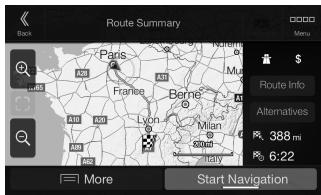
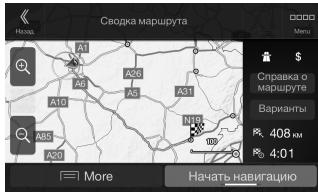
7 Touch [More] to modify the route parameters, or touch [Start Navigation] to start your journey.
3 Touch [Town/Postcode].
4 Enter the town name or postcode.
- Touch to display the candidate list.
5 Enter the desired street name.
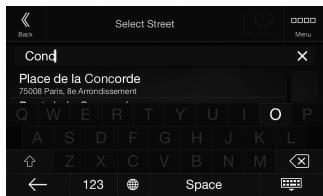
- Touch to display the candidate list.
6 Enter the house number or crossing street.
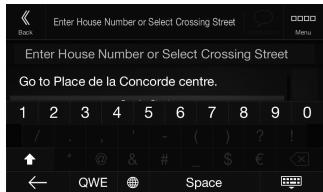
The route is calculated, and a map appears, showing the entire route. Here you can check route information and route alternatives.
Specifications
MONITOR SECTION
Screen Size 8"(X801D-U)
7"(X701D/INE-W997D)
LCD Type Transparent type TN LCD
Operation System TFT active matrix
Number of Picture Elements 1,152,000 pcs.
(800× 480× 3 RGB))
Effective Number of Picture Elements
99% or more
Illumination System LED
FM TUNER SECTION
Tuning Range 87.5 - 108.0 MHz
Mono Usable Sensitivity 8.1 dBf (0.7 V / 75 ohms)
50 dB Quieting Sensitivity 12 dBf (1.1 V/75 ohms)
Alternate Channel Selectivity 80 dB
Signal-to-Noise Ratio 65 dB
Stereo Separation 35 dB
Capture Ratio 2.0 dB
MW TUNER SECTION
Tuning Range 531-1,602 kHz
Usable Sensitivity 25.1 V / 28 dBf
LWTUNERSECTION
Tuning Range 153-281 kHz
Sensitivity (IEC Standard) 31.6 V/30 dBf
USB SECTION
USB requirements USB 2.0
Max. Power Consumption 1,500 mA (CDP Support)
USB Class USB (Play From Device)/
USB (Mass Storage Class)
File System FAT16/32
Number of Channels 2-Channels (Stereo)
Frequency Response*1 5-20,000 Hz (±1 dB)
Total Harmonic Distortion 0.008% (at 1 kHz)
Dynamic Range 95 dB (at 1 kHz)
Signal-to-Noise Ratio 100 dB
Channel Separation 85 dB (at 1 kHz)
*1 Frequency response may differ depending on the encoder software/bit rate.
HDMI SECTION
Input Format 720p/480p/VGA
Output Format 480p
GPS SECTION
GPS Reception frequency 1,575.42 ±1 MHz
GPS Reception sensitivity -130 dB max.
Bluetooth SECTION
Bluetooth Specification
Output Power
Profile
Bluetooth V2.1+EDR
+4 dBm Max. (Power class 2)
HFP (Hands-Free Profile)
OPP (Object Push Profile)
PBAP (Phone Book Access Profile)
A2DP (Advanced Audio
Distribution Profile)
AVRCP (Audio/Video Remote
Control Profile)
SPP (Serial Port Profile)
GENERAL
Power Requirement
14.4V DC
(11-16 V allowable)
Operating temperature
-4°F to +140°F
(-20^ to +60^)
Maximum Power Output
50W× 4
Weight
2.9 kg (X801D-U)
2.7 kg (INE-W997D)
Audio output level
4V/10k ohms (max.)
Preout (Front, Rear):
4V/10k ohms (max.)
CHASSIS SIZE
Width 178mm
Height 100 mm
Depth 164 mm
NOSE SIZE
Width 190 mm (X801D-U)
170 mm (INE-W997D)
Height 121 mm (X801D-U)
96 mm (INE-W997D)
Depth 22 mm (X801D-U)
17 mm (INE-W997D)
-
Due to continuous product improvement, specifications and design are subject to change without notice.
-
The LCD panel is manufactured using an extremely high precision manufacturing technology. Its effective pixel ratio is over 99.99% . This means that there is a possibility that 0.01% of the pixels could be either always ON or OFF.
CD/DVD SECTION
Frequency Response
Wow & Flutter (% WRMS)
Total Harmonic Distortion
Dynamic Range
Channel Separation
Horizontal resolution
Video output level
Video S/N ratio
Audio S/N ratio
CD:5-20,000 Hz (±1 dB)
Below measurable limits
0.02% (at 1 kHz)
95 dB (at 1 kHz)
65 dB (at 1 kHz)
500 lines or greater
1Vp-p (75 ohms)
DVD: 60 dB
95 dB
PICKUP
Wave length
DVD:665 nm
CD: 800 nm
Laser power
CLASS II
REMOTE CONTROL
Battery Type
CR2025 battery
Width
42 mm
Height
90 mm
Depth
11.6mm
Weight
50 g (battery excluded)
X801D-U/X701D/INE-W997D
Made for

iPod iPhone
BASS ENGINE

HOMI™
HIGH-DEFINITION MULTIMEDIA INTERFACE

Digital Audio Broadcasting

Bluetooth

Maps for Life
MP3 AAC

Windows
Media
For Optional DVE-5300X
Made for

iPod iPhone
BASS ENGINE

HOMI™
HIGH-DEFINITION MULTIMEDIA INTERFACE

Digital Audio Broadcasting

Bluetooth

Maps for Life
MP3 AAC

Plays
Windows
Medial
- 实验原理

dtts
2.0+Digital Out

DOLBY
DIGITAL

VIDEO

DIGITALVIDEO

DIGITAL AUDIO
TEXT
- Windows Media, and the Windows logo are trademarks, or registered trademarks of Microsoft Corporation in the United States and/or other countries.
- iPhone, iPod, iPod classic, iPod nano and iPod touch are trademarks of Apple Inc., registered in the U.S. and other countries.
- "Made for iPod," and "Made for iPhone," mean that an electronic accessory has been designed to connect specifically to iPod, or iPhone, respectively, and has been certified by the developer to meet Apple performance standards. Apple is not responsible for the operation of this device or its compliance with safety and regulatory standards. Please note that the use of this accessory with iPod, or iPhone may affect wireless performance.
Android is a trademark of Google Inc. - The Bluetooth® word mark and logos are registered trademarks owned by the Bluetooth SIG, Inc. and any use of such marks by Alpine Electronics, Inc. is under license.
- The terms HDMI and HDMI High-Definition Multimedia Interface, and the HDMI Logo are trademarks or registered trademarks of HDMI Licensing, LLC in the United States and other countries.
- MPEG Layer-3 audio coding technology licensed from Fraunhofer IIS and Thomson. Supply of this product only conveys a license for private, non-commercial use and does not convey a license nor imply any right to use this product in any commercial (i.e. revenue-generation) real time broadcasting (terrestrial, satellite, cable and/or any other media), broadcasting/streaming via internet, intranets and/or other networks or in other electronic content distribution systems, such as pay-audio or audio-on-demand applications. An independent license for such use is required. For details, please visit http://www.mp3licensing.com
©1987-2014 HERE. All rights reserved.
X701D with DVE-5300X
This item incorporates copy protection technology that is protected by U.S. patents and other intellectual property rights of Rovi Corporation. Reverse engineering and disassembly are prohibited.
- Manufactured under license from Dolby Laboratories. Dolby and the double-D symbol are trademarks of Dolby Laboratories.
- For DTS patents, see http://patents.dts.com. Manufactured under license from DTS Licensing Limited. DTS, the Symbol, & DTS and the Symbol together are registered trademarks, and DTS Digital Surround is a trademark of DTS, Inc. ©DTS, Inc. All Rights Reserved.
DVD is a trademark of DVD Format/Logo Licensing Corporation.
Inhalt
PBAP (Phone Book Access Profile)
A2DP (Advanced Audio
Distribution Profile)
AVRCP (Audio/Video Remote
Control Profile)
SPP (Serial Port Profile)
ALLGEMEINES
Spannungsversorgung

Digital Audio Broadcasting

Bluetooth

Maps for Life
MP3
AAC

Plays
Windows
Media

Digital Audio Broadcasting

Bluetooth

Maps for Life
MP3
AAC

Plays
Windows
Medial
- 实验原理

dtts
2.0+Digital Out

DOLBY
DIGITAL

VIDEO

DIGITALVIDEO

DIGITAL AUDIO
TEXT
DATE D'INSTALLATION:
TECHNICIEN D'INSTALLATION:
LIEU D'ACHAT:
Specification Bluetooth
Puisance de sortie
Profil
Bluetooth V2.1+EDR

Digital Audio Broadcasting

Bluetooth

Maps for Life
MP3
AAC

Windows
Media

Digital Audio Broadcasting

Bluetooth

Maps for Life
MP3
AAC

Plays
Windows
Medial
- 实验原理

dt
2.0+Digital Out

DOLBY
DIGITAL

VIDEO

DIGITALVIDEO

DIGITAL AUDIO
TEXT
PBAP (Phone Book Access Profile)
A2DP (Advanced Audio
Distribution Profile)
AVRCP (Audio/Video Remote
Control Profile)
SPP (Serial Port Profile)
GENERAL

Digital Audio Broadcasting

Bluetooth

Maps for Life
MP3
AAC

Windows
Media
Para DVE-5300X optional
Made for

iPod iPhone
BASS ENGINE
SQ
HOMI ™
HIGH-DEFINITION MULTIMEDIA INTERFACE

Digital Audio Broadcasting

Bluetooth

Maps for Life
MP3
AAC

Plays
Windows
Media

dt
2.0+Digital Out

DOLBY
DIGITAL

T4
VIDEO
□COMPACT



DIGITAL AUDIO
TEXT
PBAP (Phone Book Access Profile)
A2DP (Advanced Audio
Distribution Profile)
AVRCP (Audio/Video Remote
Control Profile)
SPP (Serial Port Profile)
SPECIFICHE GENERALI

Digital Audio Broadcasting

Bluetooth

Maps for Life
MP3 AAC

Windows
Media

Digital Audio Broadcasting

Bluetooth

Maps for Life
MP3 AAC

Plays
Windows
Media

dt
2.0+Digital Out

DOLBY
DIGITAL

T4
VIDEO
□COMPACT



DIGITAL AUDIO
TEXT
INSTALLATIONSTEKNIKER:
INKÖPSSTÄLLE:
SE TILL ATT INTE KABLARNA TRASSLAR IN SIG I OMGIVANDE FÖREML.
Kanslighat (IEC standard)
31,6 V/30 dBf
USB-AVSNITT
USB-standard
USB 2.0
Max strömforbrukning
1500mA(CDP-stod)
USB-klass
Total harmonisk distorsion
5-20 000 Hz (±1 dB)
Dynamiskt omrade
0,008% (vid 1 kHz)
Signal-brusforhallande
95 dB (vid 1 kHz)
Kanalseparation
100dB
85 dB (vid 1 kHz)
HFP (Handsfree-Profile)
OPP (Object Push Profile)
PBAP (Phone Book Access Profile)
A2DP (Advanced Audio
Distribution Profile)
AVRCP (Audio/Video Remote
Control Profile)
SPP (Serieport-Profile)
ALLMÄNT
Ingängsspänning
14,4 V likspanning
(11-16Vtillatet)
Drifttemperatur
-20°C till +60°C
Maximal uteffekt
4 × 50 ~W
Vikt
2,9 kg (X801D-U)
2,7 kg (INE-W997D)
Utmatingsniva for ljd

Digital Audio Broadcasting

Bluetooth

Maps for Life
MP3
AAC

Plays
Windows
Media

Digital Audio Broadcasting

Bluetooth

Maps for Life
MP3
AAC

Plays
Windows
Media

dt
2.0+Digital Out

DOLBY
DIGITAL

T4
VIDEO
COMPACT



DIGITAL AUDIO
TEXT
(DEMPen)-knop (alleen X801D-U/INE-W997D)
(4) ∨/∧ (OMLAAG/OMHOOG)-knop (alleen X801D-U/INE-W997D)
USB (Mass Storage Class)
Bestandssystem FAT16/32
PBAP (Phone Book Access Profile)
A2DP (Advanced Audio
Distribution Profile)
AVRCP (Audio/Video Remote
Control Profile)
SPP (Serial Port Profile)
ALGEMEEN
Stroomvereiste
14,4VDC

Digital Audio Broadcasting

Bluetooth

Maps for Life
MP3
AAC

Plays
Windows
Media

Digital Audio Broadcasting

Bluetooth

Maps for Life
MP3
AAC

Plays
Windows
Media

dtts
2.0+Digital Out

DOLBY
DIGITAL

14 :
VIDEO
COMPACT

DIGITALVIDEO

DIGITAL AUDIO
TEXT
HEYCTAHABJIBAIYE YCTPOICTBO B MECTAX CBICOKIM YPOBHEM BJIAXHOCTN INJIN 3ANBJIEHOOCTN.
I36a8aIeYtcaAraHbAHBbYbCTpOHTBO B MECTAX C bLbOKHM YPOBHbBbJIaKHOCTn HIN 3aIIbJIeHIOCHTn. IpnOHkaIOJIe B yCTpOHTBO BlaRa H IIbJIb MOYr Bb3BaTbE rHO HcNHPaOBCTb
PpncTynpaK pa6oTe
PacnoIoxHeNHe 3JIeMeHToB ynpaBJIeHnA
BHeuHn BmD 3KpaHOB, nCpOJIb3yEmbIX B pyKOBoDCTBE NOJIb3ObaTeIa, MoKeT OTIIuaTbCra OpeAJIbHbIX 3KpaHOB.
DnX801D-U/INE-W997D
X701D
① MnkpoΦoH
IcnoB3yETcI dIpezxMa"Cb6oDhIe pyKn"nnI pexMAm roIocOBOr yIpaBVeHnI.
Ha mojelen X701D minkpofoh BcTpoeh BJIebyo CTOPOHY MOHITOPA.
② KhoNka (AUDIO)/(peKIM paCnO3HaBaHnRA roLoCa)
OTo6paKaHeNtAkpHa ayDIO/BInEO.EcIIN 3kpH aayDIO/BInEO yye oTo6paKaetc,6ydtBbIOnHeHa CMeHa NCTOuHnka.
Ecni nodkniohen Tepeohc yHkUnei Cbo6oDbie pyuN n peKIMOM paCno3HabAHn rONoCA, hAkmite n uYedpkBaiTe Me HeeMe 2 cekyHd InepeKIOueHnB B peKHM paCno3HabAHn rONoCA.
③ KhoNka (MUTE) (Tolbko严禁 X801D-U/INE-W997D)
Hajmite, yTO6bI BkIOuHTb/BblKIOuHTb peXIM OKKIOUHeHn 3Byka.
④ KhoNka / (DOWN/UP) (TOnbKO nJa X801D-U/INE-W997D)
Perylnpobka rpoMKoCTn.
⑤ Khonka★(M36paHHoe)
IpeeknIOueHne Ha 3KpaH"N36paHnoe".
-
Hαχmnte n yüdpjxmbaTne 3Ty kHONky He MeHee 2 cekynd, yTO6bI oTO6pa3ntb ᵋkρaH "Klɪmət" (OTo6pɑaKeTc TOnIko ha X801D-U/INE-W997D npn pOdkJIoUeHm K dɒpOJIHnTeIbHOMy nHTepΦeIchOMy 6bOKY CAN).
-
Hαχmīte n yüdepακnBaɪte ΘTy Khoɪŋk Ye Me Hee 2 cεkyhД, qTObbI OTo6pa3ntb ᵋKpAη "ДaHHbIe aBtOM." (ToIbko dπr X701D).
⑥ Khonka MENU/ (OTKNIUOyeHne nMTaHn)
IpekeKIOUeHHe Ha 3KpaH MeHIO.
HaxmTe uyeepKbAte 3Ty KhoNkY He MeHee 5 cekyH, UTO6bl OTKIOUHTb NITaHne.
⑦ Khonka
HaJMMTE, YTObI nepeiTn PO cNcCKy paNDocHTnHmBHN3/BVeBX PEXKIMe paNDIO INI YTObI nepeiTn BHN3/BVePX NO cNcCKY dOPOKeK, rNaB I T. D. B. pDyROM nCTOCHNIke ayDIOo/BvDEO.
(8) Khonka RESET
BocstaHOBJIeHne CnCTeMbI 3TOrO yCTPOJCTBa.
9 KhoNka (NAVI/NAV)
OTkpblte 3KpaHa c KapToH HABINaUN.
JahmMTe eue pa3, qTo6bI nepeTNI K 3KpaHy mHeO HABINaIGN.
HaJMMITE uYedepKINBAIte 3Tu KKHONky He MeHee 2
ceKyHd, YTOb6I nepeyHn Ha 3KpaH MAp7pyTOB "DOMO." (EcHnnapametp "DOM" ehe Ye cTahOBNeH,
OTo6pa3NTcEkanp HycaTHOBKn napamTePa "DOM)."
IJIOnIPOUYENH DOpONHInTeBHOH INHΦOpMaCIN O
pa6ote CnCTembHabIRaCm CM.PyKOBOCTBO
NoJIb3OBeTIEL CNCTeMbHabIRaCm HA DCske CD-ROM.
10 DAtyNK dmtaHnHO nHO ynpaBHeHH
HapabBe nepeaTuk nyIbTa nCTaHIOHOHorO ynpabHeHa Na DaTuk Dc pacctOraHn Do 2 MetPOB.
11 KhoNka CAM (CAMERA) (Tolbko dny X701D)
Icnonb3ynte InOTo6paXeHnI N3o6paXeHnKamepbl.
12 CnotДЯнСka(ToIbkoДЯнX701DcDVE-5300X)
⑬ BpauaouniocperynTop/khonka MUTE (ToIbko dny X701D)
IIOBepHnTepepyJIaTOpBHeNoBnPabO,HTo6bI NaCTpOntB yPoBeHb rpoMkoCTN.
HaxMMte, UTO6bI BKIOUHTb/BvIKIOUHTb peXIM OTKIOUHeHn 3Byka (MUTE).
14 KhoIka (N3BneueHme) (TOnbko JnX701Dc DVE-5300X)
IcnoIb3yETcIЯI3BneUeHnIaKa.
1 Nobepnhte KIOUc 3aXnuraHnB B NOJoxHe ACC nIOn.
CnCTema BkIIOUHTcA.
2 Haxmnte u yedejkuaite khoNKy MENU B teueHne He MeHee 5 ckynd, qTo6bl bBikIOuHTb yctpoCTBO.
IpeeknueHne 3KpaHa NCTOCHNKOB 3Byka Ha Heo6XoDmbl 3KpaH
Moxho nepekIIOuHTb 3KpaH nCTOCHNKOB 3ByKa Ha HeO6XoIMbMy 3KpaH, KOChyBUnCb 3HaUka Ha OJHom I3 ueTbIePex KpaEB 3KpaHa nnnepeTaunB 3KpaH NO BepTnKaJIIN nnrROPn3OHTaII.
3KpaH HactpoiKm 6bIcTporo Bbl3Oba
Mozho yctaHOBHTb HaCTPOIky 3Byka
mIcTEmy dIy 3aIHHX
PiaccAknPOB.

3KpaH NcToUHmKOB 3ByKa
(USB Aynio)
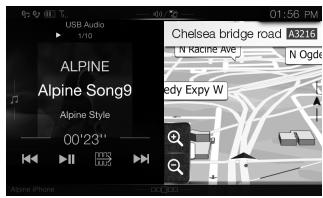
ДвоюнэКран
HaIbOHOM 3KpaHe MoXHO npeKeJIIOuYaTbCMyEJy OTO6paKaembIMN 3KpaHaMn.
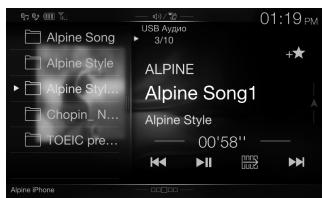
KhONka IpeDbapntelbHoi NaCTpoKNuI INkpan pexkma 6bICTPO NOscKa*

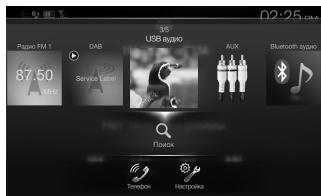
KpaH MeHIO
Ha 3KpaHe MeHIO MOXHO BbIIOJIHrTb HAcTPOJKN.
- Pēkμm noucka pa3πuαemc8 3abucumocmu om ucmouhnuka 38yka. Дя поучени donatingониMuHо uHfopmauu cm. uHcmpykuu no 3κκηλуamaauiu umoohnuka 38yka.
Функця"ИЗбразноe"
JaHHeO yCTpoIcTB NO3BOJIaRrT NOLyAusb TpOcTOI DOctYKΦyHKUaM,IO6aBIAJHa 3KpaH "136paHHOe" aCtTo IcNoJIb3yEmbIe 3JeMeHbIb, HApPIMep IVcTOUHNK 3ByKa, ΦyHKUIO NOnCKa HABINFaUIMn T.D. 3TO IO3BOJIaRrT 6bICTpo BbIbPaTb HxKbI bIeMeHrT.
1 Haxmnte KhoNky (M36paHHOe).
Pa6ota c DAB/DAB+/DMB
Khonka npedbapntelbHoh NaCTpoKn
Kopotkoe kacahne oTo6pa3nI ppeBaPntelbHO hAcTpoEHHyO cnJx6y.
KoCHNTecb N ydepXnBaIte B TeueHne He MeHee 2 cekyH, YTO6b3aOpMHnTb TckyuO Cnyk6y H do6abNtB eE CnCOK ppeBaPntBHO NaCTpoEHhIX.
Hapnpimep: pONCK PNO IMeHN IcNpOHLHTeIa
1 Kocnntecb [Icnpohnteni]Ha 3kpahe peximma paacunpeHHoro nonka.
![ALPINE INE-W997E46 - Kocnntecb [Icnpohnteni]Ha 3kpahe peximma paacunpeHHoro nonka. - 1](/content/2019/10/333/images/00314a1fcafe79a680facab56798c054a2294af9422215a10de7ad926d595f9e.jpg)
2 Kochntecb mEnH nyxHoro nCnONHHTeIa.
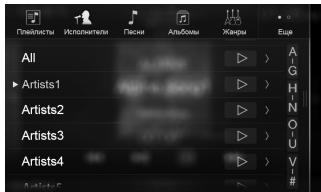
OTkpoetc3kpaH noicKa aIb60Ma Bb6paHHOrO nCpONHHTeJ.
KOCHITECb]Ha HUJHKOMIICIOJIHNITENE,HTO6bl BOCIPON3BECTBnCE KOMN03UNBb6paHHORO ICNIOHNITJEA.
3 KocHTecb Ha3BaHnHyxHoro anb6oma.
BydUT OTO6paKHeBi BCE KOMnO3nCmN 13 BbIbpaHHOro aIb6oma.
KOCHITECb ]Ha HUXHOM aJIbGOme, YTO6bI BOCIPON3BcETn BCE KOMT03UNi Bbl6paHHORO aJIbGOMa.
4 KocHnTeCb Ha3BaHnHyJxHoI KOMnO3mUe.
HaHHeTcB OBCPOn3BedeHne Bb6paHHoKOMIO3NUIN.
Kochumecb [B] "Bce", umoobb bocnpou3becmu BCE komno3uuu u cncke.
MHoronyHKTOBbIM MapwpyT
MapuPT MOKHO NOCTPOnTb N3 OJHO IINI HECKOJIbKINTO TceK. MapuPT MOKHO TAKKE CnIaHINPOBAt H3eABICIMMO OT teKyuIeTo NOJIOKeHNI GPS PnyTeM yctAHOBKn HOBOH NaHauNbHO TO TOKKn.
Hobbl MapwpyT
BbOop NyHtKa H3aHauChENIy TEmE BWoDa aApdeca IINI KoOpDInAT. BbOpat bYHKT H3aHauChENI TAKKe MOXHO, YK3a3B MECTO COxpaHeHHOE MecToNOLOXeHne IINI COxPAHeHHb MAnpUyt. KPOme TORO, MOxHO NpOCmOTpeTB HeBaDHNe IYNHTb H3aHauChENI B VICTOPIN.
PraHaiNHN CoEINHeNc H C
VInTEPhETOMMOXHOJONHINHTeBHO
ObIeRHTb 3aDaY hAXoKdEny IyNkTa
HaNzAeHEny PYZTEM NOCKa ERO B
VInTEPhETe.
Docyn K Kapte
Kochniteb nii npobedite BnpaBo.
Приимер Ноже ONICbIbAe T procecc noncKa nYHKta Na3NaueHnЯ Nytem BbIbopa MeHIO [TporoJ/NHKeKc]ВMeHIO [Aapec].
- BbnoHumb noucK u cy3umb nouck cmpaHbI/uamama moKHo, hauab c meHIO [CmpaHa/uamam].
1 KocHTecb [Hobbl MappyT] B MeHIO HABMraUIM.
2 KocHInTeEcB [Aapec].
7 KocHTecb [More], yTo6bl n3MeHnTb napaMeTpbl Mappyta, nn [Haayatb HauRauuio], yTo6bl hauAtb noe3dky.
3 KocHTecb [ToPoa/InHdeK].
4 BBeDnTe Ha3BaHme ropoJa mnn HnDEKC.
KoCHNTecb uto6b OTO6pa3ntb CnncOK IOXODJxHx H3BaHn.
5 BBeHte Huxhoe Ha3BaHne ynuu.
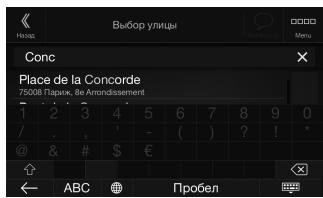
KoCHNTecb, UTo6bl OTo6pa3nTb Cnncok IOXODAHIX HA3BaHNI.
6 BBeDnTe HOMep DoMa mnn nepeceKaioyuyu.
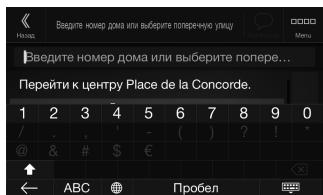
Mapy6bIeT BvUcSclen, n OTo6pa3ntc4 Kapta, noka3bBAIOUaB Becb Mappy. Tocne 3TOrO MoXHO 6yET npOBepNTuHΦOpMaUIO mappya n aIbTePHaTINBHeIe Mappytbl.
TexHmuecknexapaKTepeuCTMKN
MOH/TOP
Pazem ekpana 8"(X801D-U)
7"(X701D/INE-W997D)
Tin LCD npo3paHbTin TN LCD
CnCTema pa60tby aKTHBna MaTPuca TFT
KoIueCTBO 3JIeMeHToB I3O6paXeHHa
1152000 nikkenei
(800× 480× 3 RGB)
Фaktnueckoe KOJIuYeCTBO 3JemeHToB N3O6paXeHHN
He MeHee 99%
CnCTema noCDBETKIN LED
FM-TIOHEP
Диаэзон NaCTPОИК 87,5-108,0Mg
IoporobayyBCTBNTbHOCtB ONDHO KAHaHa
8,1DΦBt(0,7MKB/75OM)
IoporobaruyBCTBntenbHoctb50dB
12D5ΦB7(1,1MKB/75OM)
136npatelbHOCTaIbTePHaTINBHOKahala
80 dB
OTHOWeHnE CnHaJ/WM 65dB
IpepexoHoe 3aTyxAHme MeKJy KaHaJaMn Stereo
35dB
Ko3ΦΦnIeHt 3axBaTa 2,0dB
MW-TIOHEP
Ioporobar ybcTeBnBHOCTb 25,1MKB/28DΦBT
LW-TIOHEP
Dnana3OH NaTPOIKN 153-281 K
UyBCTBnteIbHOCTb (CTaHdapt IEC)
31,6MKB/30ДБΦВТ
USB
Tpe6obnK USB 2.0
MaKcImaJIbHaI noTpe6nJaMa MoUHOCTb
1500 mA (noidepka CDP)
Klacc USB USB (Bocnpo3BeHeHne c
yctpoictba)/
USB(KJacc MaccOBN namTn)
Фаиловая сисема FAT16/32
KoJnueCTBO KaHaIIOB 2 KaHaJa (Ctepeo)
YacToTHaXapaKTepeNTnKa*5-20000T(±1dB)
CymMaHbI KO3ΦΦNlneHT rapMOHnueCKnx NCKaXeHH
0,008% (npn 1 kT)
DnHaMnueckn DnaNa3OH 95 dB (npn 1 KfU)
OTHOSEHNE CnHn/1yM 100 dB
Pa3deneHne KaHaNoB 85dB (np1 1KfU)
^1* YACTOHTHAAxapKtrepHcKa MOKeT OTNHATCBAB 3aBnCIMoCTN OTpRpAMMHOro OecneYenHyaYctpoCTBa KOINIOPAHNA/CKPOCTN HpeDauh6NT.
HDMI
BxodnofopMaT 720p/480p/VGA
BbIXoHNofOpMaT 480p
GPS
Yactota npnema GPS 1575,42 ±1 Mf
YyBCTBtTeNbHcOt b npHeMa GPS
mKc. -130 dB
Bluetooth
Texhne XapaktpnKn Bluetooth
Bluetooth V2.1+EDR
BbIXOHaMoUHOCb MaKc.+4Dm (Knacc MoUHOCTn 2)
HFP (npoΦnib rapHnTpybl)
OPP (npoΦnIb dIy npepaun
faiIOB)
PBAP (npofoiNbIy o6MeHa
3aINICAMN B TeJeOHHbIX KHNrAX)
A2DP (paacnpeHbI npoPhiIb
pacnpoctpaehnaydno)
AVRCP (npoΦnIb IINCTaHIOHNOHOrO
MaKcImaJIbHaB BbIXOHaJ MoUHOCtB
50 Bτ × 4
Bec 2,9 Kr (X801D-U)
2,7 kr (INE-W997D)
YpOBeHb BbIXoJHO aUdIOcRHaHa
PpeBapnteIbHbIy BbIXoD (pOHT, TbI):
4 B/10 KOM (MaKc.)
PpeBapuTeNbHbBbXoD (ca6Byep):
4 B/10 KOM (MaKc.)
PA3MEP KOPITYCA
山nHa 178MM
BbICota 100 MM
Iy6Ha 164MM
PA3MEP BbICTYNAIOUEN YACTN
山nHa 190MM(X801D-U)
170 MM (INE-W997D)
BbICota 121 MM (X801D-U)
96 MM (INE-W997D)
Ipy6nHa 22 MM (X801D-U)
17 MM (INE-W997D)
-
I3-3a HenpepbibHzo cObepueHcMbObaHua npodykma e2o mexHuueckue xapaKmepucmuu u du3aun Mozym u3menymbc6 be3 npebapumelbHzo ybebdomenu.
-
Panelb LCD u3zomoblena no c6epxmouho mexhnozua. Koiuecmbo 3phiekmuibx nukecei npebuiaaem 99.99%. 3mo o3naeaem, umo cyuecmyem bepoarnmocmb nauiu 01% nukecei, komopbte bce2da Bknuenb uiu bce2da Bknuonb.
CD/DVD
YachtoTHaXapakTepeCTnka CD:5-20000T(±1dB)
Ko3ΦΦnμηENT DeToHaζm (%cp-KB)
Hnke n3mepmoro npedena
CymMapHbI KO3ΦΦuIeHT rapMOHnuecknx NcKaJxHn
0,02% (npn 1 kT)
DnHaMnueckN Dnana3OH 95dB (npn1KfU)
Pa3deneHne KaHaNoB 65dB (npn1KtU)
Topn3oHTaJIbHoe pa3peSeHne 500 nHHn nn6oJbSe
yobbeNb bixoHoro cunHaJa 1Vp-p (75OM)
OTHOWeHHe CnHaI/7yM BnDcEOCnHaJa
DVD:60 dB
OTHOWeHHe CnHnA/7uM ayDIOscnHaJa
95 dB
ONTNUeCKN 3BYKOCHMATEJIb
ДиHABOHbI
DVD:665HM
CD:800HM
MoUHocTb na3epa CLASS II
NYIbT DICTAHUOHHOYUPABJIENH
Tin 6atapen 6atapea CR2025
UmpHa 42MM
BbICota 90 MM
Iy6Ha 11,6MM
Bec 50r (6e3 6aTapei)
Cpok cnjxkbdaHnHO n3dennr -Tnp rOda.
X801D-U/X701D/INE-W997D
Made for

iPod iPhone
BASS ENGINE

HOMI™
HIGH-DEFINITION MULTIMEDIA INTERFACE

Digital Audio Broadcasting

Bluetooth

Maps for Life
MP3
AAC

Plays
Windows
Media
Для дожинтугу уства DVE-5300X
Made for

iPod iPhone
BASS ENGINE

HOMI ™
HIGH-DEFINITION MULTIMEDIA INTERFACE

Digital Audio Broadcasting

Bluetooth

Maps for Life
MP3
AAC

Plays
Windows
Media

dtts
2.0+Digital Out

DOLBY
DIGITAL

T4
VIDEO
COMPACT

DIGITALVIDEO

DIGITAL AUDIO
TEXT
- Windows Media 和 Windows 罗尔托
TOBAPHbIMN 3Hakamn INI 3apeINCTpIPoBaHHbIMN TOBAPHbIMN 3Hakamn Microsoft Corporation B CLJA n/ INI INDpyrIXCtpaHax.
iPhone, iPod, iPod classic, iPod nano i iPod touch RNAIIOCT TOBAPHIMN 3HaKaAMN KOPnpaUMn Apple Inc., 3aperINCTPnPOBAAHbIMN B CUSA IN Dpyrnx CTpaHax.
"Made for iPod" n "Made for iPhone" o3naohot,уTo эл ektpoHnbl akceccyap pa3pa6b0tah cneuaalbHo dIy nodkluoyenra K yctpoiCTby iPod nIи iPhone coOTBETCTBEHNO,И cepTnФuPBOaH pa3pa6bOTKOM kak yOBDNETBOPAOUIN KcNPLnyatauONHBM ctaNDaptam Apple. KopnpoAuae Apple He Hecet OTBETCTBEHOCHTa pa6bTy daHHoro yCTPOICTBA nIe ero COOTBETCTBNE CTaNaptAm Be3OpaNCHOCTn I peYJRAITNBHM HopmAM. ImMeTe B BVHy,уTO icPOnb3OBaHne daHHoro akceccyaPa c iPod nIи iPhone moKeT nobJIaRb Ha pa6bTy beCpnoBoDHOI CB8Nl.
Android JbIaETcT ToBapHbIM 3HaKOM Google Inc.
CnoBechbln 3nak n lorottnbI Bluetooth aBIAHOTcA 3apeNCTPnpoBaHbIMn TOBAPbIMn 3NaAMn Koprnapaunn Bluetooth SIG, Inc. n nCnObn8yTOcKoprnapaoune Alpine Electronics, Inc. no nIpuEn3n. - TepmnbH HDMI n HDMl High-Definition Multimedia Interface, a TaKke Iorotn HDMI YBJIOTc ToBapbIMn 3HaKaMn KomnaHn HDMI Licensing LLC, 3apeNCTpnpoBaHbIMn B CUSA n pyrnx ctpaHax.
- LluehenHaTexHONIOKOJINPOBAHNA3BykaMPEG Layer-3 nonyuenaOT Fraunhofer IIS n Thomson.PnnoCTABKe 3TOro npOdykTa npEOoctabJIeTcra liuehenHa Ha cTHOe,HEKOMMEpCeKOE nCnOJb3OBAHne n He npEOctABJeTcRAIeHNuEHHNn HnHe NOpa3yMeBaIOTc KaKHe-JIn6Pnaba HA nCnOJb3OBAHne dAnHORo npOdykTa B CEJAX KOMMepeCKoro (t.e. daNOnyehnnpIn6bln) pAdNOBEuaHnBpeAhnBopemEHn (Ha3EMHOrO,CnyTHNKOBOrO,Ka6eJIbHOrO u/Inn INHOrO),
INpOKoRo BeUaHnNnNtOKOBoN pePeaDu nnDaHbIX uepe3 INtepHet, INTPacETn u/Inn INhle CETn INn
dpyTne CETn pacnPpeJelennaNeKtPOHNO
COePJAHN, TAKMe KAc PnINOJoxEHn
3BykoBOcPon3BeJEnHn 3aPiATy INnNo TpE6oBaHIO.
Dn TaKoTO nCnOJb3OBAHn Tpe6yeTc OTdEnbNa
LIueHEN. Dn PaNOnyehn DOnonHTenbHO
INΦopMaUNn NocTeNTe Be6-caIT
http://www.mp3licensing.com
© 1987-2014 HERE. Bce npaba 3aunuieHbI.
X701D c DVE-5300X
B 3TOM yCTPOICTBE npIMeHReTcRA TexHOLOrma 3aunTbO tOKnnpoBaHna, 3aunuEHHa naTeHTamu CUSA n DpyTNMI npaBAMn Ha INTEJIeKTyAJbHyIO co6CTBeHHocTb Rovi Corporation. BocctahOBLeHne aJlrOpNTMa paobtBu pa360pKa yCTPOICTBa 3aIpeSeHb.
- IV3rOToBHeNo IIO NIIeH3N KOMpaHnIu Dolby Laboratories.“Dolby"I dBoiHoN cMmBOJ"D"YABJIaOTcR ToBapbIMn 3hakamn Dolby Laboratories.
- Ддя поуеняинформалио nateHTax DTS nocetite Be6-caT http://patents.dts.com. Пюзбевно no liuhen3n DTS Licensing Limited. DTS, cIMBOL, a taKke DTS Bmte C cIMBOJOM JBJIOTcR 3aperiCtprpOBaHHbIMI TOBAPbIMI 3HaKaAM, a DTS Digital SurroundЯВЯETcR TOBAPbIMI 3HakOM Koprnapaui DTS, Inc. © DTS, Inc. BCE npaba 3aunieHbl.
DVD
[ \text{Давлелетс Товарныздан DVD Format/Logo Licensing Corporation.} ]
OOO «KoMaHnBaBoHaH3a»

Digital Audio Broadcasting

Bluetooth

Maps for Life
MP3 AAC

Windows
Media

Digital Audio Broadcasting

Bluetooth

Maps for Life
MP3 AAC

Plays
Windows
Media

dt
2.0+Digital Out

DOLBY
DIGITAL

14 :
VIDEO
□COMPACT

DIGITALVIDEO

DIGITAL AUDIO
TEXT
161-165 Princes Highway,
Hallam Victoria 3803, Australia
Phone 03-8787-1200
ALPINE ELECTRONICS GmbH
Alpine House Fletchamstead Highway,
Coventry CV4 9TW, U.K.
www.alpine.co.uk
ALPINE ELECTRONICS France S.A.R.L.