caméra de surveillanc LEXMAN 2 - Indoor security camera LEXMAN - Free user manual and instructions
Find the device manual for free caméra de surveillanc LEXMAN 2 LEXMAN in PDF.



User questions about caméra de surveillanc LEXMAN 2 LEXMAN
0 question about this device. Answer the ones you know or ask your own.
Ask a new question about this device
Download the instructions for your Indoor security camera in PDF format for free! Find your manual caméra de surveillanc LEXMAN 2 - LEXMAN and take your electronic device back in hand. On this page are published all the documents necessary for the use of your device. caméra de surveillanc LEXMAN 2 by LEXMAN.
USER MANUAL caméra de surveillanc LEXMAN 2 LEXMAN
EN Indoor connected rotative camera

80-10
Cable USB-C Micro USB 1,40m

Gabarit de perçage
PRÉSENTATION DU PRODUIT
FR
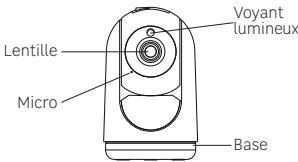
VUE DE FACE
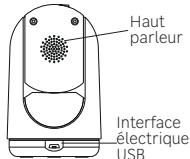
VUE DE DOS
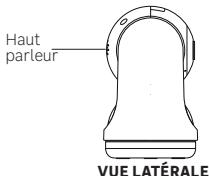
Unpacking. 80
Product presentation. 81
Getting started 82
Installing the MicroSD card. 83
Camera installation 84
Other possible Camera installation 84
Specifications 87
Warning 88
Resetting the camera 89

EN
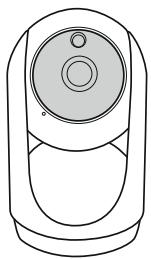
Reset pin
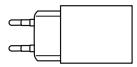
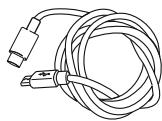
USB-C - Micro USB Cable 1,40m

Drilling template
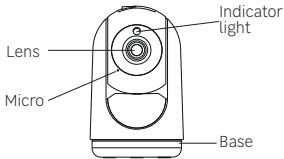
FRONTVIEW
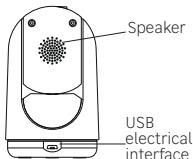
BACKVIEW
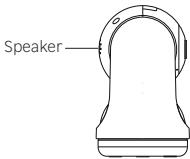
SIDE VIEW
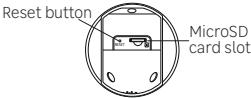
BOTTOM VIEW
IMPORTANT: This product does not require an ENKI box to operate, but the ENKI App.
GETTING STARTED
Make sure your internet router's Wi-Fi is 2.4 GHz.
Step 1
Open the ENKI application. In the «my items» tab, click on the button.
Step 2
Follow the instructions described on the screens of the application.
Step 3
The ENKI App will automatically recognize your object.
INSTALLING THE MICROSD CARD
The camera supports MicroSD cards with a capacity of 4 to 128 GB (Class 6 or higher). Please insert the MicroSD card into the microSD card slot according to the following illustration.
Note: Please insert the microSD card when the camera is turned off.
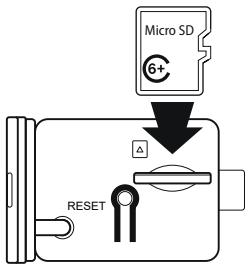
83
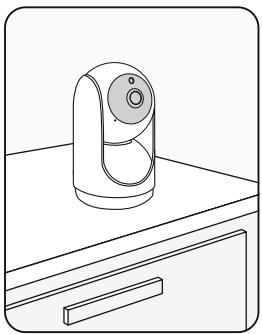
Free standing
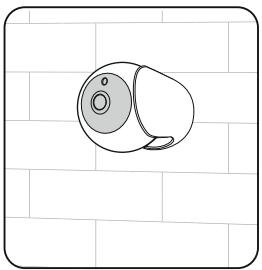
OTHER POSSIBLE CAMERA INSTALLATION
Wall mounted
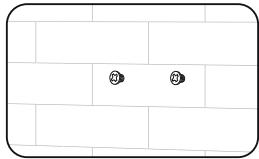
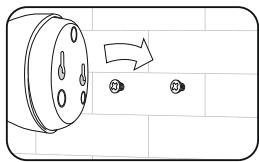
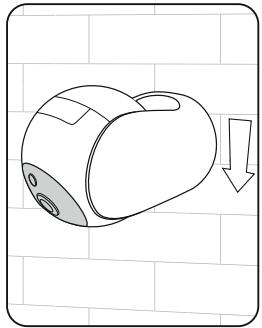
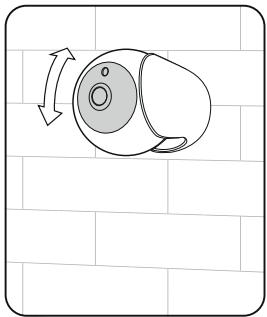
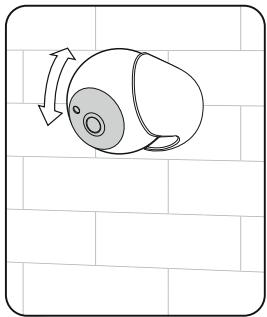
| Frequency band | 2400 - 2483,5 MHz |
| Mounting | Free standing or wall mounted |
| Maximum radio emission | 20 dBm |
| Operating temperature | -10°C > 50°C |
| Operating humidity | Up to 85% non-condensing |
| Storage temperature | -20°C > 60°C |
| Waterproof + dust protected | IP 20 |
| Manufacturer | Adeo Services |
| Model Identifier | LEXCAM-RI01 |
| Input voltage | 100-240V |
| AC input frequency | 50/60Hz |
| Output voltage | 5,0 V |
| Output current | 1,0 A |
| Output power | 5,0 W |
| Average active efficiency | 81,36% à 230V, 50Hz |
| No-load power consumption | 0,08W à 230V, 50Hz |
| Usage | Interior |
WARNING
- Any material between the product and your Wi-Fi transmitter reduces the operating distance. (mainly: reinforced concrete wall, concrete wall, metal surfaces). Take this into account when picking the positioning of your product.
- Please contact the retailer for assistance with any problems with the product and do not attempt to disassemble or repair the product without permission.
- It is normal for the temperature of the product to rise when this product is working.
- Please install this camera in a sheltered location.
- Do not install near heat sources.
- The AC adapter should be plugged in inside the house.
- Keep the AC adapter accessible so that it can be easily unplugged if necessary.
- If you need to clean the product, use a soft cloth.
- To limit accessibility, install the camera at a height over than 2.5m.
Step 1
Make sure the camera is turned on.
Step 2
Press the reset button next to the MicroSD card slot for 10 seconds.
Step 3
The reset is complete when the sound signal is heard and the blue light flashes for Wi-Fi pairing.
Adeo Services declares that the radio equipment bearing the reference mentioned on the first page of this docu- ment, is in conformity with Directive 2014/53/EU. The full text of the EU Declaration of Conformity is available at the following web address: www/product-regulatory.adeoservices.com


EN-Electrical products must not be disposed of with household waste. They must be taken to a dedicated collection point for environmentally-friendly disposal in accordance with local regulations. Contact your local authorities or retailer for information on recycling. Packaging materials are recyclable. Dispos of packaging materials in an environmentally-friendly way, and make them available to the recycling collection service. Do not dispose of batteries and disused appliances with household waste. The hazardous substances they may contain can damage your health and the environment. Have these appliances taken back by your retailer, or use the recycling facilities provided by your local authorities.
| Descripción des pictogramas / Descripción de pictogramas /Descrizione del pittogrammi / Ofis pictogrammi / Descrizión dos pictogramas / Descrivione pictogramer / Ilieipovap / tux evokopouqatav / Descrição deMBOLS / | |
| Appareil classe I / Aparato de class II / Dispositivo de Class II / Wyposazienie klasy II / Apareilho classes II / Echipament Class I / Elconlaiukpoc totoicnII / Class II equipment | |
| Utilisation interneire / Utilização en interior / Destinato ad uno inero / Sprzegt do uzykbu weewnitztrgeo / Utilização esplacemento interior / Echipament pertruno utilizesiren interior / Móvo y ovoi sprokni / xphom / Indoor use equipment | |
| Courant alternatif (CA) / Corrente alterna (CA) / Corrente alternativa (CA) / Prad zmeniy (AC) / Corrente alternada (CA) / Current alternativ (AC) / Evola loxodolvoe piuja (AC) / Alternating current (AC) | |
| Courant Continuo (CC) / Corrente Continua (CC) / Corrente continua (DC) / Prad stady (DC) / Corrente continua (DC) / Current continuu (DC) / Suvexyceç piuja (DC) / Direct current (DC) | |
Made in China