
Caméra extérieure connectée - Outdoor security camera LEXMAN - Free user manual and instructions
Find the device manual for free Caméra extérieure connectée LEXMAN in PDF.



| Brand | LEXMAN |
| Model | Connected outdoor camera |
| Product type | Connected outdoor surveillance camera |
| Power supply | 5V / 1A mains adapter (model LEXCAM-PS01) |
| Adapter input voltage | 100-240V AC, 50/60Hz |
| Standby power consumption | 0.07 W |
| Average efficiency | 73.6% |
| Wi-Fi frequency band | 2400 - 2483.5 MHz (2.4 GHz) |
| Max transmission power | 20 dBm |
| Protection rating | IP65 (water and dust resistant) |
| Operating temperature | -20°C to 60°C |
| Operating humidity | Up to 85% without condensation |
| Mounting | To hang or fix to wall (recommended height > 2.5 m) |
| Compatible memory card | MicroSD from 4 to 128 GB (class 6 or higher) |
| USB cable length | 1.85 m |
| Control app | ENKI (compatible with iOS and Android) |
| Cleaning | Soft cloth |
| Reset | Reset button (press 4s near microSD slot) |
| Storage conditions | -20°C to 60°C |
Frequently Asked Questions - Caméra extérieure connectée LEXMAN
User questions about Caméra extérieure connectée LEXMAN
0 question about this device. Answer the ones you know or ask your own.
Ask a new question about this device
Download the instructions for your Outdoor security camera in PDF format for free! Find your manual Caméra extérieure connectée - LEXMAN and take your electronic device back in hand. On this page are published all the documents necessary for the use of your device. Caméra extérieure connectée by LEXMAN.
USER MANUAL Caméra extérieure connectée LEXMAN
EAN code:3276007394351

This product does not require an ENKI box to operate, but the ENKI App.
GETTING STARTED
Make sure your internet router's Wi-Fi is 2.4 GHz.
Step 1
Open the ENKI application and log in.
Step 2
In the «my items» tab, click on the «+» button.
Step 3
Select the LEXMAN brand and choose the product from the list.
Step 4
Follow the instructions described on the screens of the application.
The ENKI App will automatically recognize your object.
Product description
Associate the connected camera with a scenario to secure your home.
PRODUCT PRESENTATION
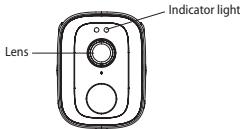
FRONTVIEW
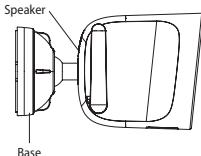
SIDE VIEW
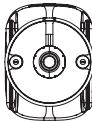
BACK VIEW
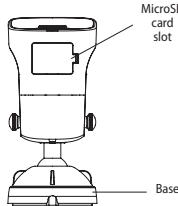
BOTTOM VIEW
INSTALLING THE MICROSD CARD
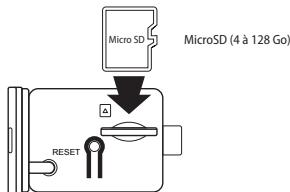
The camera supports MicroSD cards with a capacity of 4 to 128 GB (Class 6 or higher). Please insert the MicroSD card into the microSD card slot according to the following illustration.
Note: Please insert the microSD card when the camera is turned off.
CAMERA INSTALLATION
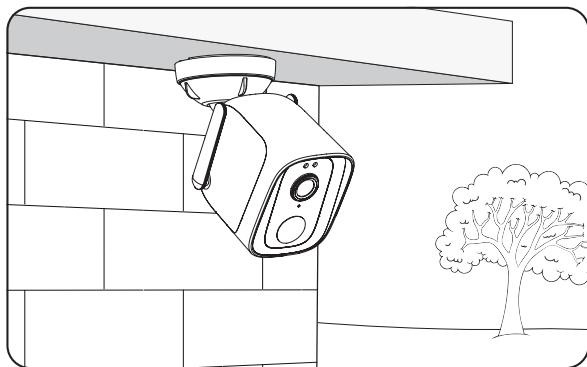
Suspended (sheltered)
CAMERA INSTALLATION
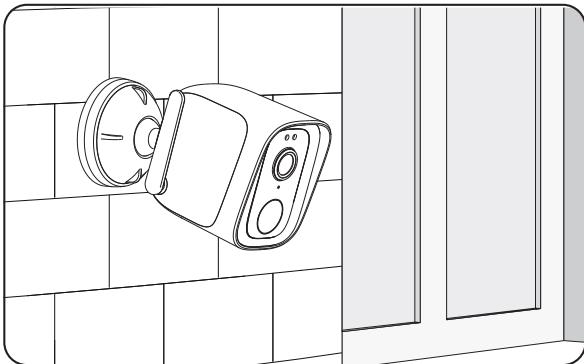
Hung on the wall
CAMERA INSTALLATION
For installation, a height over 2.5m is recommended.
| Specifications | |
| Frequency band | 2400 - 2483,5 MHz |
| Mounting | Hanging or wall-mounted |
| Maximum radio emission | 20 dBm |
| Operating temperature | -20°C > 60°C |
| Operating humidity | Up to 85% non-condensing |
| Storage temperature | -20°C to 60°C |
| Waterproof + dust protected | IP 65 |
| Adapter | Manufacturer: Adeo Services Model Identifier: LEXCAM-PS01 Input voltage: 100-240 V AC input frequency: 50/60 Hz Output voltage: 5.0 V —— Output current: 1.0 A Output power: 5.0 W Average active efficiency: 73,6% No-load power consumption: 0,07W |
- Any material between the product and your Wi-Fi transmitter reduces the operating distance. (mainly: reinforced concrete wall, concrete wall, metal surfaces). Take this into account when picking the positioning of your product.
- Please contact the retailer for assistance with any problems with the product and do not attempt to disassemble or repair the product without permission.
- It is normal for the temperature of the product to rise when this product is working.
- Please install this camera in a sheltered location.
- Do not install near heat sources.
- The AC adapter should be plugged in inside the house.
- Keep the AC adapter accessible so that it can be easily unplugged if necessary.
- If you need to clean the product, use a soft cloth.
- To limit accessibility, install the camera at a height over than 2.5m
RESETTING THE CAMERA
- Make sure the camera is turned on.
- Press the reset button next to the MicroSD card slot for 4 seconds.
- The reset is complete when the sound signal «reset success» is heard and the blue light flashes for Wi-Fi pairing.



Brand : LEXMAN
Model : Caméra extérieure connectée
Category : Outdoor security camera