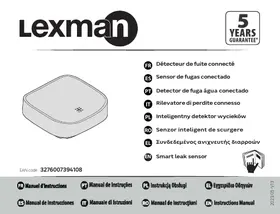
Détecteur de fuite connecté - Home Automation LEXMAN - Free user manual and instructions
Find the device manual for free Détecteur de fuite connecté LEXMAN in PDF.



| Product type | Connected leak detector |
| Brand | LEXMAN |
| Model | Connected leak detector |
| Category | Home automation |
| Connectivity | Zigbee 3.0 |
| Protocol | Zigbee 3.0 |
| Power supply | AAA battery (lithium) |
| Battery type | AAA |
| Battery life | 5 years |
| Protection rating | IP54 |
| Operating temperature | -10°C to 45°C |
| Operating humidity | Up to 85% without condensation |
| Frequency band | 2405 - 2480 MHz |
| Max radio transmission power | 20 dBm |
| Requires an ENKI box | Yes |
| Main functions | Water leak detection, notification via ENKI app |
| Maintenance | Clean with a soft cloth |
| Safety | Lithium battery, do not expose to excessive heat, keep out of reach of children |
| Recycling | Do not dispose of with household waste, take to a collection point |
Frequently Asked Questions - Détecteur de fuite connecté LEXMAN
User questions about Détecteur de fuite connecté LEXMAN
0 question about this device. Answer the ones you know or ask your own.
Ask a new question about this device
Download the instructions for your Home Automation in PDF format for free! Find your manual Détecteur de fuite connecté - LEXMAN and take your electronic device back in hand. On this page are published all the documents necessary for the use of your device. Détecteur de fuite connecté by LEXMAN.
USER MANUAL Détecteur de fuite connecté LEXMAN
EAN code: 3276007394108
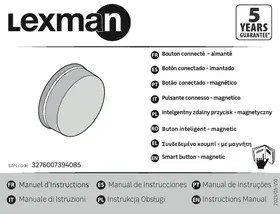
Détecteur de fuite connecté
5 Sensor de fugas conectado
Detector de fuga agua conectado
Rilevatore di perdite connesso
PL Inteligenty detektor wyciekow
RO Senzor intelligente scurgere
EL SuV6e6eMevoacVxveutc diappowv
EN Smart leak sensor

ACCOPIAMENTO E RESET
Accoppiamento
IMPORTANT: This product requires an ENKI box to work.
GETTING STARTED
Step 1
Open the ENKI app and sign in.
Step 2
In the "my objects" tab, click the "+" button.
Step 3
Follow the instructions on the application screens.
THE ENKI App will automatically recognize your object.
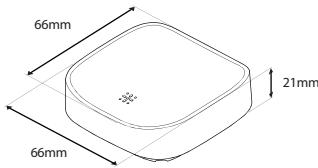
Description of the product
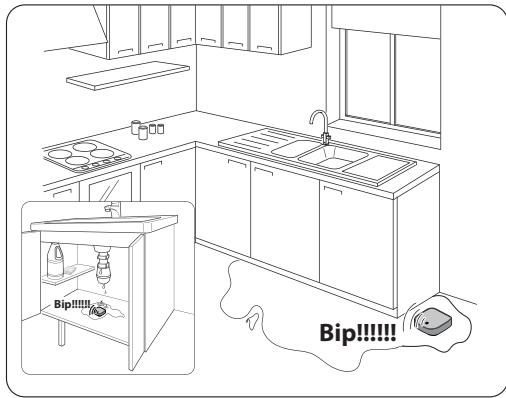
Place the detector on the floor in a bathroom, laundry room, under a sink, etc., and be immediately notified in case of water leakage, overf ow, water rise.
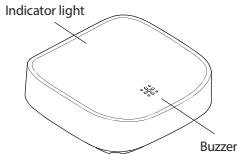
DESCRIPTION OF THE PRODUCT
PAIRING AND RESETTING
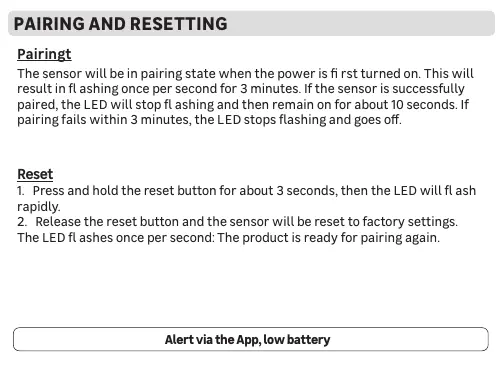
Pairingt
The sensor will be in pairing state when the power is first turned on. This will result in fl ashing once per second for 3 minutes. If the sensor is successfully paired, the LED will stop fl ashing and then remain on for about 10 seconds. If pairing fails within 3 minutes, the LED stops flashing and goes off.
Reset
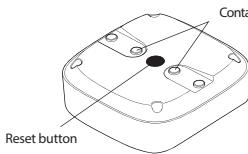
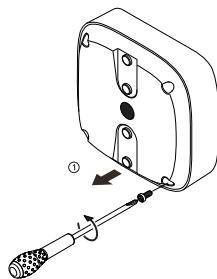
- Press and hold the reset button for about 3 seconds, then the LED will flash rapidly.
- Release the reset button and the sensor will be reset to factory settings. The LED flashes once per second: The product is ready for pairing again.
Alert via the App, low battery
Place the detector on the ground.
INSTALLATION
Place the detector on the ground.

Specifications
| Frequency band | 2405 - 2480 MHz |
| Battery life | 5 years |
| Operating temperature | -10°C - 45°C |
| Operating humidity | Up to 85% non-condensing |
| Storage temperature | -20°C - 60°C |
| Battery type | AAA |
| IP value | IP54 |
| Protocol | Zigbee 3.0 |
| Maximum radio transmission | 20dBm |
- This product should only be used indoors.
- This product contains a lithium battery.
Keep new and used batteries out of the reach of children.
If the battery is swallowed, it can cause severe internal burns in just 2 hours, and this can lead to death.
Seek medical assistance immediately if swallowed
-
Remove the battery and store it in a safe place if you do not use the product for a long time.
-
If the battery compartment does not work properly, stop using the product.
Risk of explosion if battery is placed incorrectly. - Replace the battery, only with the same type.
- The battery must not be exposed to excessive heat, such as sun, fire, etc.
- Do not place objects near the product to avoid altering detection performance.
- Any material between the product and the ENKI box reduces the operating distance
(mainly: Reinforced concrete wall, concrete wall, metal surfaces). Take this into account when picking the location for your product.
- If you need to clean the product, use a soft cloth.
- Do not expose the battery to extremely low air pressure that may result in an explosion or the leakage of flammable liquid or gas.
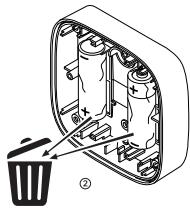
Electrical products must not disposed of with domestic waste. They must be taken to a communal collecting point for environmentally friendly disposal. The disposal of electronic and electronic waste is an environmental issue, and the disposal of material is recyclable. Disposal of the packaging in an environmentally friendly manner and make it available for the recyclable materials
Don't throw batteries or out of order products with the household waste (garbage). The dangerous substances that they are likely to include in your health or the environment. Make your retailer take back these products or use the selective collect of garbage proposed for your city.

www.product-regulatory.adeoservices.com.

www.product-regulatory.adeoservices.com

Adeo Services declares that the radio equipment bearing the reference mentioned on the first page of this document, is in conformity with Directive 2014/53/EU. The full text of the EU Declaration of Conformity is available at the following web address: www.product-regulatory.adeoservices.com
| 1 | Usage interieur uniquement /Sólo para uso interior /Utilização exclusivamente interior / Solo per um uso interno / doar pentu利用率 interior no/ Wäzyczne do outyku wewnatz prômieszczeh / Móvo vja χρηση Ε αειτερικός χμρους / Indoor use only. |
| 2 | Courant Continu (CC) / Corrente Continua (CC) / Corrente continua (DC) / Prad staly (DC) / Corrente continua (DC) / Current continua (DC) / Üvúexéç eρομá (DC) / Direct current (DC) |
Brand : LEXMAN
Model : Détecteur de fuite connecté
Category : Home Automation