Bouton connecté - Connected remote LEXMAN - Free user manual and instructions
Find the device manual for free Bouton connecté LEXMAN in PDF.



| Product type | Connected remote (connected button) |
| Brand | LEXMAN |
| Power supply | CR2032 lithium battery |
| Configurable press types | Short press (< 1 s), long press (> 1 s), double press (interval < 0.5 s) |
| Main functions | Activation of custom scenarios via the ENKI app (lighting, alarm, shutter, etc.) |
| Installation | Adhesive (3M film) or magnetic (integrated magnet) |
| LED indicator | LED indicator present |
| Reset button | Yes |
| Frequency band | 2405 - 2480 MHz |
| Maximum radio power | 20 dBm |
| Operating temperature | 0°C - 35°C |
| Usage | Indoor only |
| Compatibility | Requires an ENKI box and a 2.4 GHz Wi-Fi network |
| Configuration | Via the ENKI mobile app (connection, adding object, following instructions) |
| Maintenance | Clean with a soft cloth |
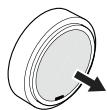
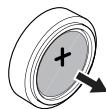
| Battery replacement | Open the cover, replace with an identical CR2032 battery |
| Safety - Battery | Keep out of reach of children. Risk of burns if ingested. Seek medical attention immediately. |
| Safety - Usage | Do not expose battery to excessive heat (sun, fire). Risk of explosion if battery is incorrectly placed. |
| Recycling | Do not dispose of with household waste. Deposit at a collection point for batteries and electronic devices. |
| Operating distance | Reduced by obstacles (concrete, metal). Consider when positioning. |
Frequently Asked Questions - Bouton connecté LEXMAN
User questions about Bouton connecté LEXMAN
0 question about this device. Answer the ones you know or ask your own.
Ask a new question about this device
Download the instructions for your Connected remote in PDF format for free! Find your manual Bouton connecté - LEXMAN and take your electronic device back in hand. On this page are published all the documents necessary for the use of your device. Bouton connecté by LEXMAN.
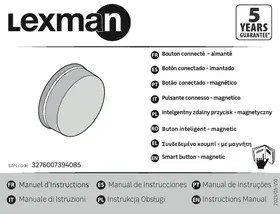
USER MANUAL Bouton connecté LEXMAN
EAN code: 3276007394085
FR Bouton connecté -aimante
Boton conectado -imantado
BOTAO conectado - magnétique
Pulsante connesso - magnetico
PL Intelgenty zdalny przycisk - magnetyczny
Buto n intelligent - magnetic
EL EuV6e6evo koumi -e maayvntn
EN Smart button - magnetic

| Specifications | |
| Battery type | CR2032 |
| Operating temperature | 0°C - 35°C |
| Frequency band used | 2405 - 2480 MHz |
| Maximum radio power | 20dBm |
-Auto to npoiov npenei va xpnoumoiteitalo move eowtepkouc wpuoc
-Auro to npoiov npiexi μnatapia 8iou
Ф�áξe TIC KAIVOUPIEC KAI TIC XPnOIpOnIOINUEVE CnTAPAE CJKpIa nO naSIa
Eyn matapatia katoanei, umepai v npokaleo oobapaeouetepika ekayopatae o jeic 2wpc, katoi omoievcteyatai ovnyohne o evarto
Zntheaouc iatpiok botheiae neepintwn katanoonc
-ApaiaeTe ayni npataiKa pfauaTe n te aaoaLec poeac evd evnpoketai va Xpnaonoiote to npoiov ia neyaoXoovkio diaotma.
- Ynapxekivduoc ekpnc evn mpatia dev ex tonoetneoiotá.
-Avtika8iotate tnu mnatapia e mnatapia isiou toun.
-H matapia 6ev npenei va ekti8etai oe unepboikn 8epohta, onwc niofoaveia, owi ta k.
- OtoiohnoTe uIko metaTu npoiovoc kai Tou koutou ENKI eUvei tv anotaan Keitoupyiac (isiuc to1o and onlauevo okupoeia, to1o1 o anokupoeia, mtaalikec etipaveic). Na laubavete autu unoyn oaov aopapov kaodopiao tnc 8eocn tou npoiovoc aac.
-Eav npenei va ka8apiae te to poiov, xpoiuomoinote eva maako navi.
ANTIKATAA T A H TH S M I NATAPIA
Apaipote to kaumu ta nC npataiaC
Avkataatao nty naia umpatiae me npatia iou toun, envatatanotettoe kaJauma kai nepiortpey to yia va kelaie



IMPORTANT: This product requires an ENKI box to work.
GETTING STARTED
Make sure that the Wi-Fi frequency of your internet router is 2.4GHz.
Step 1
Open the ENKI app and sign in.
Step 2
In the "my objects" tab, click the "+" button
Step 3
Select the brand LEXMAN and choose the product from the list.
Step 4
Follow the instructions on the application screens.
THE ENKI App will automatically recognize your object
Description of the product
The Enki application allows you to set the 3 button presses. Each type of press can activate a scenario, an object configured in the application (lighting, shutters...) 3 types of configurable presses: short press, long press, double press.
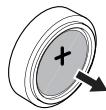
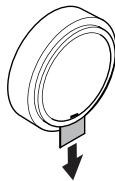
Make sure you remove the tab that protects the battery to activate your connected button
Create your own scenarios in the app and associate them with your connected button, for example:
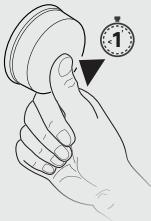
Single press
(<1 second)
"Alarm clock" scenario The alarm turns off, the lights switch on and the shutters
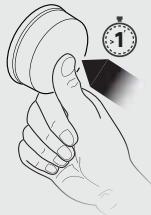
Long press
(>1 second)
Scenario "back home" the alarm turns off and the lights switch on.
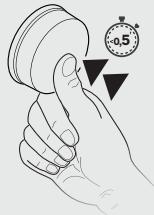
Double press
(duration between the two presses < 0.5 seconds) Scenario "leaving the house" the alarm starts, all the bulbs and sockets switch off, the shutters close.
Glued base
Remove the 3M film from the back of the product and the battery tab.
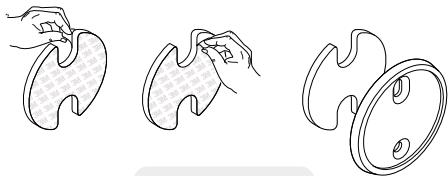
MAGNETIC INSTALLATION
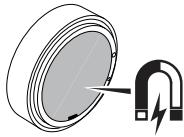
The connected button has a magnet, it can be attached to any type of metal surface: refrigerator, radiator, lamp, etc.
| Specifications | |
| Battery type | CR2032 |
| Operating temperature | 0°C - 35°C |
| Frequency band used | 2405 - 2480 MHz |
| Maximum radio power | 20dBm |
- This product should only be used indoors.
- This product contains a lithium battery.
Keep new and used batteries out of the reach of children.
If the battery is swallowed, it can cause severe internal burns in just 2 hours, and this can lead to death.
Seek medical assistance immediately if swallowed.
- Remove the battery and store it in a safe place if you do not use the product for a long time.
Risk of explosion if battery is placed incorrectly. - Replace the battery, only with one of the same type.
- The battery should not be exposed to excessive heat, such as sun, fire, etc.
- Any material between the product and the ENKI box reduces the operating distance (mainly: Reinforced concrete wall, concrete wall, metal surfaces). Take this into account when picking the location for your product.
- If you need to clean the product, use a soft cloth.
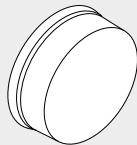
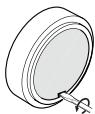
BATTERY REPLACEMENT
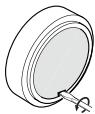
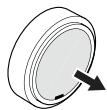
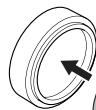
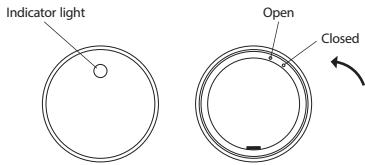
Remove the battery cover.
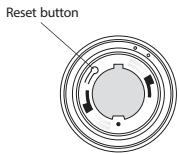
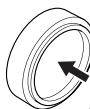
Replace the old battery with a battery of the same type, put the cover back, and turn it to close.


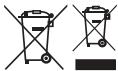
Electrical products must not be disposed of with domestic waste. They must be taken to a communal collecting point for environmentally friendly disposal, and the collection point should be located at the end of the collection path. The disposal material is recyclable. Disposal of the packaging in an environmentally friendly manner and make it available for the recyclable material is a legal responsibility of the manufacturer.
Don't throw batteries or out of order products with the household waste (garbage). The dangerous substances that they are likely to include in your health or the environment. Make your retailer take back these products or use the selective collect of garbage proposed for your city.

Adeo Services declares that the radio equipment bearing the reference mentioned on the first page of this document, is in conformity with Directive 2014/53/EU. The full text of the EU Declaration of Conformity is available at the following web address: www.product-regulatory.adeoservices.com
| Usage interférior uniquément /Sôla para um uso interior/Utilização exclusivement interior / Solo per um uso interno / doarpentuutilizaréin interior / Wryjaznie do ouytku wewnatzrom pomeszczeh/áovo iα χρηησε Εωιετριοκύς χρουος / Indoor use only. | |
| = | Courant Continu (DC) / Corrente Continua (DC) / Correntecontinua (DC)/Prad staty (DC)/Corrente continua (DC)/Currentcontinua (DC)/2ωενεξρεμα (DC)/Direct current (DC) |
FR Veuilleur préter attention aux avertissements de cette notice / ES Pour favoriste atencion a los+pontos de precaucion enumerados en el manual/PT For favor, preste atencion a lospontos de cauteita listados no aviso /IT Si prega di prestare atencionation al puniti di cauteita elenciati del navev/PL Nalezy zurocd uwage na punkty prestrogy wymionienne wym ypwadomeno/RO VAI (1) atenti) la avertissement de anecast manual/EL Adebade unodin tic nporofoiaenotio; oto mappy eyeysipoi/EN Please pay attention to the points of caution listed in the manual.

Garanty 5 Sanos de garanta Garanta 5 de Sanos / Garanta 5 Aeneo / yevno 3 los / Garantia 5 te-salvado / Garanta 5
- ANTIKATAA T A H TH S M I NATAPIA
- IMPORTANT: This product requires an ENKI box to work.
- GETTING STARTED
- Step 1
- Step 2
- Step 3
- Step 4
- Description of the product
- Create your own scenarios in the app and associate them with your connected button, for example:
- Single press
- Long press
- Double press
- Glued base
- MAGNETIC INSTALLATION
- BATTERY REPLACEMENT
Brand : LEXMAN
Model : Bouton connecté
Category : Connected remote