LEXMAN caméra de surveillanc LEXMAN 2 - Indoor security camera

caméra de surveillanc LEXMAN 2 - Indoor security camera LEXMAN - Free user manual and instructions

Find the device manual for free caméra de surveillanc LEXMAN 2 LEXMAN in PDF.

📄 95 pages English EN Download 💬 AI Question 12 questions ⚙️ Specs
Notice LEXMAN caméra de surveillanc LEXMAN 2 - page 88
Pick your language and provide your email: we'll send you a specifically translated version.
Product type Indoor surveillance camera
Brand and model LEXMAN LEXCAM-RI01
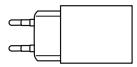
Power supply AC adapter 100-240 V, 50/60 Hz, output 5 V / 1 A
Power consumption Max 5 W, idle consumption 0.08 W
Connectivity Wi-Fi 2.4 GHz, band 2400-2483.5 MHz
Local storage MicroSD card from 4 to 128 GB (class 6 or higher)
Protection rating IP20 (indoor use only)
Operating temperature -10 °C to 50 °C
Operating humidity Up to 85% without condensation
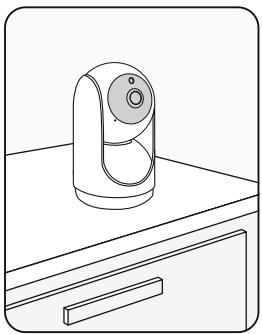
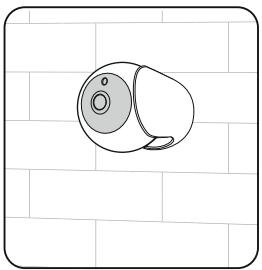
Mounting Freestanding or wall mount
App ENKI (no ENKI box required)
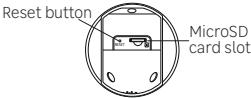
Reset Reset button next to the MicroSD slot (press for 10 seconds)
LED indicator Flashing blue light in Wi-Fi pairing mode
Audio signal Emitted during reset
Maintenance Clean with a soft cloth
Safety advice Install at a height of more than 2.5 m, avoid metal obstacles
Use Indoor only
Package contents Camera, AC adapter, user manual

Frequently Asked Questions - caméra de surveillanc LEXMAN 2 LEXMAN

How to install the LEXMAN 2 camera?
Download the ENKI app and make sure your Wi-Fi is on 2.4 GHz. Open the app, go to the 'My objects' tab, add an object with the '+' and follow the instructions. The app will automatically detect your camera.
How to reset the camera?
Make sure the device is powered on. Press the reset button next to the MicroSD card slot for 10 seconds. The reset is complete when you hear an audio signal and the blue light flashes.
Which MicroSD card should I use?
Use a MicroSD card from 4 to 128 GB, class 6 or higher. Insert it when the camera is powered off.
Does the camera work with an ENKI box?
No, this product does not require an ENKI box. It works directly with the ENKI app.
What is the Wi-Fi range?
The range depends on obstacles. Any material between the camera and your router reduces the distance, especially reinforced concrete walls or metal surfaces. Place the camera in an open area.
Where to install the camera?
Install it indoors, preferably at a height of more than 2.5 meters to limit accessibility. Avoid heat sources and damp areas. The AC adapter must remain accessible.
How to clean the camera?
Use a soft cloth to clean the camera. Do not use abrasive products or solvents.
What to do if the app doesn't detect the camera?
Check that your Wi-Fi is on 2.4 GHz and the camera is powered on. Try resetting the camera by pressing the reset button for 10 seconds, then restart the adding procedure.
Can the camera be used outdoors?
No, this camera is designed for indoor use only (IP20 rating). It is not water resistant.
What are the electrical specifications of the camera?
The AC adapter accepts an input of 100-240 V, 50/60 Hz and delivers an output of 5 V / 1 A. The maximum power consumption is 5 W.

User questions about caméra de surveillanc LEXMAN 2 LEXMAN

2 questions about this device. Answer the ones you know or ask your own.

Ask a new question about this device

The email remains private: it is only used to notify you if someone responds to your question.

How to reset the LEXMAN 2 indoor surveillance camera to factory settings?
Frequently Asked Questions - 17/04/2026
Response Notice-Facile

To reset your LEXMAN 2 indoor surveillance camera to factory settings, follow these simple steps:

  1. Locate the reset button: It is usually found at the back or underneath the camera, often in a small hole marked "Reset".
  2. Prepare a sharp object: Use a straightened paperclip, a pin, or a similar small tool to reach the button.
  3. Press and hold the button: Press the reset button for about 10 to 15 seconds. You should see the indicator lights flashing, indicating that the reset is in progress.
  4. Release the button: Once the lights are flashing, release the button. The camera will automatically restart and return to its factory settings.

After this operation, the camera will be like new, and you will need to reconfigure it, including connecting to the Wi-Fi network and custom settings.

Respond (be the first)
How to solve a Wi-Fi connection problem with the LEXMAN 2 surveillance camera when the box password does not work?
Frequently Asked Questions - 17/04/2026
Response Notice-Facile

If you are having trouble connecting your LEXMAN 2 surveillance camera to your Wi-Fi network despite entering the password for your box, here are several steps to follow to resolve this issue:

1. Check the Wi-Fi password

  • Make sure the password is entered correctly, respecting uppercase, lowercase, and special characters.
  • Try entering the password on another device to verify its validity.

2. Proximity and signal quality

  • Place the camera close to the router during setup to avoid a weak or unstable connection.
  • Check that the Wi-Fi network is functioning properly with other devices.

3. Wi-Fi network compatibility

  • The LEXMAN 2 camera is generally compatible with 2.4 GHz Wi-Fi networks. Ensure that you are trying to connect it to a 2.4 GHz network and not a 5 GHz one.
  • Check that the router's security mode is compatible, ideally WPA2. Some modes like WEP may not be supported.

4. Restarting and resetting

  • Restart the camera to reset the connection.
  • If the problem persists, perform a factory reset according to the specific procedure for your model, then start the setup again.

By following these tips, you should be able to connect your LEXMAN 2 camera to your Wi-Fi network. If the problem continues, it may be helpful to check the advanced settings of your router or contact technical support.

Respond (be the first)

Download the instructions for your Indoor security camera in PDF format for free! Find your manual caméra de surveillanc LEXMAN 2 - LEXMAN and take your electronic device back in hand. On this page are published all the documents necessary for the use of your device. caméra de surveillanc LEXMAN 2 by LEXMAN.

USER MANUAL caméra de surveillanc LEXMAN 2 LEXMAN

EN Indoor connected rotative camera
LEXMAN caméra de surveillanc LEXMAN 2 - 1

LEXMAN caméra de surveillanc LEXMAN 2 - 2

80-10

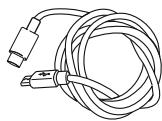
Cable USB-C Micro USB 1,40m

LEXMAN caméra de surveillanc LEXMAN 2 - 3

Gabarit de perçage

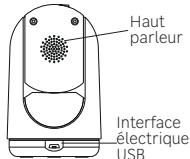
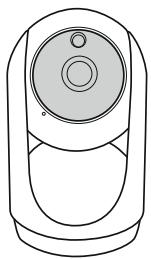
PRÉSENTATION DU PRODUIT

FR
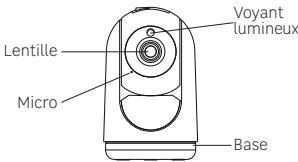
LEXMAN caméra de surveillanc LEXMAN 2 - PRÉSENTATION DU PRODUIT - 1
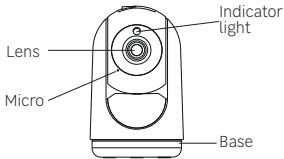
VUE DE FACE

LEXMAN caméra de surveillanc LEXMAN 2 - PRÉSENTATION DU PRODUIT - 2
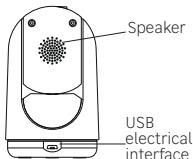
VUE DE DOS

LEXMAN caméra de surveillanc LEXMAN 2 - PRÉSENTATION DU PRODUIT - 3

Unpacking. 80
Product presentation. 81
Getting started 82
Installing the MicroSD card. 83
Camera installation 84
Other possible Camera installation 84
Specifications 87
Warning 88
Resetting the camera 89

LEXMAN caméra de surveillanc LEXMAN 2 - PRÉSENTATION DU PRODUIT - 4

EN

LEXMAN caméra de surveillanc LEXMAN 2 - PRÉSENTATION DU PRODUIT - 5
Reset pin

LEXMAN caméra de surveillanc LEXMAN 2 - PRÉSENTATION DU PRODUIT - 6

LEXMAN caméra de surveillanc LEXMAN 2 - PRÉSENTATION DU PRODUIT - 7
USB-C - Micro USB Cable 1,40m

LEXMAN caméra de surveillanc LEXMAN 2 - PRÉSENTATION DU PRODUIT - 8
Drilling template

LEXMAN caméra de surveillanc LEXMAN 2 - PRÉSENTATION DU PRODUIT - 9
FRONTVIEW

LEXMAN caméra de surveillanc LEXMAN 2 - PRÉSENTATION DU PRODUIT - 10
BACKVIEW

LEXMAN caméra de surveillanc LEXMAN 2 - PRÉSENTATION DU PRODUIT - 11
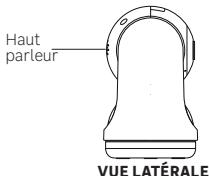
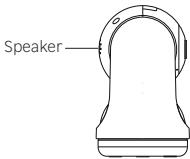
SIDE VIEW

LEXMAN caméra de surveillanc LEXMAN 2 - PRÉSENTATION DU PRODUIT - 12
BOTTOM VIEW

IMPORTANT: This product does not require an ENKI box to operate, but the ENKI App.

GETTING STARTED

Make sure your internet router's Wi-Fi is 2.4 GHz.

Step 1

Open the ENKI application. In the «my items» tab, click on the button.

Step 2

Follow the instructions described on the screens of the application.

Step 3

The ENKI App will automatically recognize your object.

INSTALLING THE MICROSD CARD

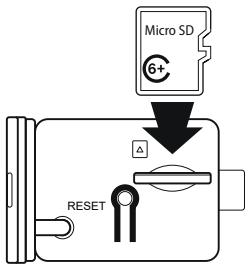
The camera supports MicroSD cards with a capacity of 4 to 128 GB (Class 6 or higher). Please insert the MicroSD card into the microSD card slot according to the following illustration.

Note: Please insert the microSD card when the camera is turned off.
LEXMAN caméra de surveillanc LEXMAN 2 - INSTALLING THE MICROSD CARD - 1
83

LEXMAN caméra de surveillanc LEXMAN 2 - INSTALLING THE MICROSD CARD - 2
Free standing

LEXMAN caméra de surveillanc LEXMAN 2 - INSTALLING THE MICROSD CARD - 3
OTHER POSSIBLE CAMERA INSTALLATION
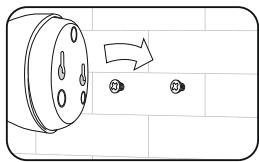
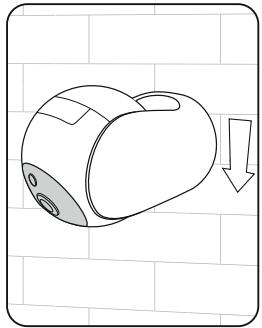
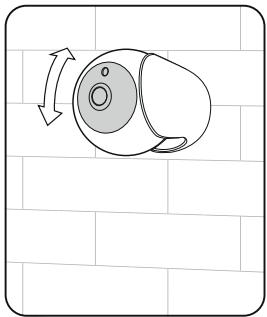
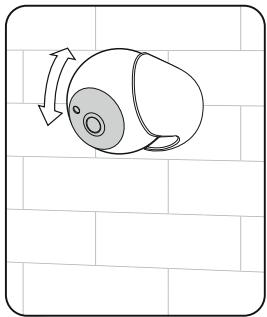
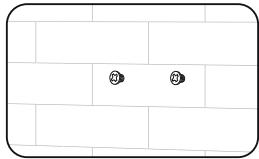
Wall mounted
LEXMAN caméra de surveillanc LEXMAN 2 - INSTALLING THE MICROSD CARD - 4

LEXMAN caméra de surveillanc LEXMAN 2 - INSTALLING THE MICROSD CARD - 5

LEXMAN caméra de surveillanc LEXMAN 2 - INSTALLING THE MICROSD CARD - 6

LEXMAN caméra de surveillanc LEXMAN 2 - INSTALLING THE MICROSD CARD - 7

LEXMAN caméra de surveillanc LEXMAN 2 - INSTALLING THE MICROSD CARD - 8

Frequency band2400 - 2483,5 MHz
MountingFree standing or wall mounted
Maximum radio emission20 dBm
Operating temperature-10°C > 50°C
Operating humidityUp to 85% non-condensing
Storage temperature-20°C > 60°C
Waterproof + dust protectedIP 20
ManufacturerAdeo Services
Model IdentifierLEXCAM-RI01
Input voltage100-240V
AC input frequency50/60Hz
Output voltage5,0 V
Output current1,0 A
Output power5,0 W
Average active efficiency81,36% à 230V, 50Hz
No-load power consumption0,08W à 230V, 50Hz
UsageInterior

WARNING

  • Any material between the product and your Wi-Fi transmitter reduces the operating distance. (mainly: reinforced concrete wall, concrete wall, metal surfaces). Take this into account when picking the positioning of your product.
  • Please contact the retailer for assistance with any problems with the product and do not attempt to disassemble or repair the product without permission.
  • It is normal for the temperature of the product to rise when this product is working.
  • Please install this camera in a sheltered location.
  • Do not install near heat sources.
  • The AC adapter should be plugged in inside the house.
  • Keep the AC adapter accessible so that it can be easily unplugged if necessary.
  • If you need to clean the product, use a soft cloth.
  • To limit accessibility, install the camera at a height over than 2.5m.

Step 1

Make sure the camera is turned on.

Step 2

Press the reset button next to the MicroSD card slot for 10 seconds.

Step 3

The reset is complete when the sound signal is heard and the blue light flashes for Wi-Fi pairing.

Adeo Services declares that the radio equipment bearing the reference mentioned on the first page of this docu- ment, is in conformity with Directive 2014/53/EU. The full text of the EU Declaration of Conformity is available at the following web address: www/product-regulatory.adeoservices.com

LEXMAN caméra de surveillanc LEXMAN 2 - Step 3 - 1

LEXMAN caméra de surveillanc LEXMAN 2 - Step 3 - 2

EN-Electrical products must not be disposed of with household waste. They must be taken to a dedicated collection point for environmentally-friendly disposal in accordance with local regulations. Contact your local authorities or retailer for information on recycling. Packaging materials are recyclable. Dispos of packaging materials in an environmentally-friendly way, and make them available to the recycling collection service. Do not dispose of batteries and disused appliances with household waste. The hazardous substances they may contain can damage your health and the environment. Have these appliances taken back by your retailer, or use the recycling facilities provided by your local authorities.

Descripción des pictogramas / Descripción de pictogramas /Descrizione del pittogrammi / Ofis pictogrammi / Descrizión dos pictogramas / Descrivione pictogramer / Ilieipovap / tux evokopouqatav / Descrição deMBOLS /
Appareil classe I / Aparato de class II / Dispositivo de Class II / Wyposazienie klasy II / Apareilho classes II / Echipament Class I / Elconlaiukpoc totoicnII / Class II equipment
Utilisation interneire / Utilização en interior / Destinato ad uno inero / Sprzegt do uzykbu weewnitztrgeo / Utilização esplacemento interior / Echipament pertruno utilizesiren interior / Móvo y ovoi sprokni / xphom / Indoor use equipment
Courant alternatif (CA) / Corrente alterna (CA) / Corrente alternativa (CA) / Prad zmeniy (AC) / Corrente alternada (CA) / Current alternativ (AC) / Evola loxodolvoe piuja (AC) / Alternating current (AC)
Courant Continuo (CC) / Corrente Continua (CC) / Corrente continua (DC) / Prad stady (DC) / Corrente continua (DC) / Current continuu (DC) / Suvexyceç piuja (DC) / Direct current (DC)

Made in China

LEXMAN caméra de surveillanc LEXMAN 2 - Step 3 - 3

Manual assistant
Powered by Anthropic
Waiting for your message
Product information

Brand : LEXMAN

Model : caméra de surveillanc LEXMAN 2

Category : Indoor security camera