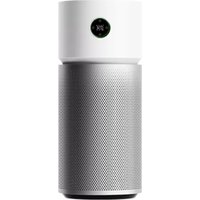
Smart Air Purifier 4 Pro - Air purifier Xiaomi - Free user manual and instructions
Find the device manual for free Smart Air Purifier 4 Pro Xiaomi in PDF.



| Product type | Air purifier |
| Brand | Xiaomi |
| Model | Smart Air Purifier 4 Pro (AC-M15-SC) |
| Dimensions (L × W × H) | 275 × 275 × 680 mm |
| Net weight | Approximately 6.8 kg |
| Rated voltage | 100-240 V~ |
| Rated frequency | 50/60 Hz |
| Rated power | 50 W |
| Network standby power consumption | < 2.0 W |
| Maximum noise level | ≤ 65 dB(A) |
| Particle CADR | 500 m³/h |
| Formaldehyde CADR | 185 m³/h |
| Recommended coverage area | 35 to 60 m² |
| Wireless connectivity | Wi-Fi 2.4 GHz IEEE 802.11 b/g/n |
| Main functions | Purification, negative ions, sleep mode, control via Mi Home/Xiaomi Home app |
| Safety | Child lock, automatic shutdown if grille not installed, minimum distance 20 cm from walls |
| Maintenance and cleaning | Cleaning of blades, air duct, laser dust sensor; vacuum cleaner or soft cloth |
| Spare parts | Filter (replaceable), grille, power cord |
| Repairability index | Not provided |
| Warranty | Xiaomi limited warranty (see conditions), duration according to local legislation |
| Country of manufacture | China |
Frequently Asked Questions - Smart Air Purifier 4 Pro Xiaomi
User questions about Smart Air Purifier 4 Pro Xiaomi
0 question about this device. Answer the ones you know or ask your own.
Ask a new question about this device
Download the instructions for your Air purifier in PDF format for free! Find your manual Smart Air Purifier 4 Pro - Xiaomi and take your electronic device back in hand. On this page are published all the documents necessary for the use of your device. Smart Air Purifier 4 Pro by Xiaomi.
USER MANUAL Smart Air Purifier 4 Pro Xiaomi
Xiaomi Smart Air Purifier 4 Pro User Manual .1
Manuale utente Xiaomi Smart Air Purifier 4 Pro .10
- When the power cord is damaged, it must be replaced with a genuine power cord purchased from the manufacturer or after-sales service department.
- This appliance can be used by children aged from 8 years and above and persons with reduced physical, sensory or mental capabilities or lack of experience and knowledge if they have been given supervision or instruction concerning use of the appliance in a safe way and understand the hazards involved.
- Children shall not play with the appliance. Cleaning and user maintenance shall not be made by children without supervision.
- Make sure the purifier is turned off and unplugged before performing the maintenance. Fix the grille with screw after cleaning fan blades and air duct.
Precautions
- Turn off and unplug the purifier before moving it.
- The purifier cannot turn on when the fan grille and the filter compartment cover are not installed properly.
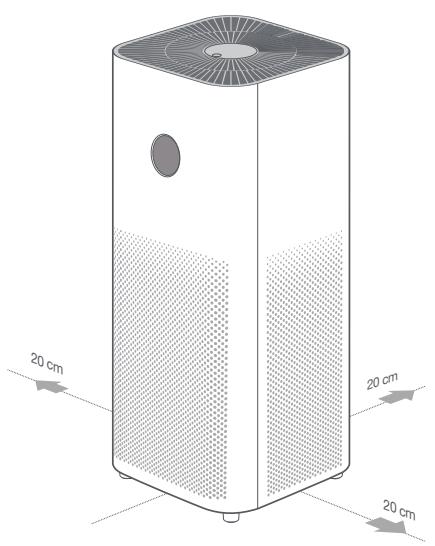
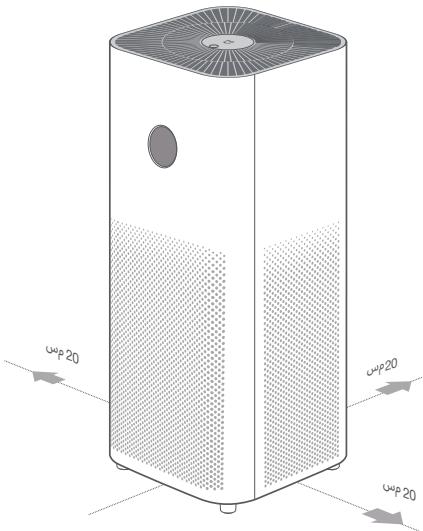
- Maintain a distance of at least 20cm between the air inlets and walls or other objects.
- The purifier must be placed on firm and flat floor.
- Prior to cleaning or other maintenance, the appliance must be disconnected from the supply mains.
- Frequently remove dust, hair, and other particles from the outer mesh screen of the filter, so as to reduce the chance of bacteria growth.
- Remove dust, hair, and particles from the purifier's air inlets to prevent a reduction of air intake.
Cover the air outlet to prevent dust, hair, and other particles from falling in when the purifier is left unused for a long time.
To avoid fire, electric shocks, or other damage, use the power cord and electrical outlet as instructed below:
Do not excessively pull, twist or bend the power cord, as this may expose or break the cord's core. - The power cord must be plugged into a suitable electrical outlet.
- Use the power cord that is provided with the purifier, do not use any third party power cords.
- Always unplug the purifier before carrying out maintenance to or moving the air purifier.
- Immediately stop using the purifier when it makes unusual sounds, gives off bad odors, overheats, or its fan rotates irregularly.
Do not stick your fingers or foreign objects into the protective parts, movable parts, air inlets, or air outlets. - Keep objects such as hairs or fabrics away from the purifier to avoid blocking the air inlets or air outlets.
- Do not sit on, lean on or tilt the purifier.
- When using in conjunction with gas-fueled appliances (such as gas stoves, gas heaters), please ventilate sufficiently to avoid carbon monoxide poisoning.
- Do not pour liquids, nor throw powders or other small substances into the purifier's air outlet.
Do not use the purifier in the following circumstances, as they may result in electric shocks, fire, or other damage: - Near open flames, such as candles, incense burners, stoves, fireplaces, cigarettes, firecrackers, lighters, multipurpose torches, candle lighters, or fire pans.
- Near appliances that generate high temperatures, such as electric heaters, fan heaters, electric foot warmers, electric stoves, or electric irons.
- Make sure no inflammable objects get into the purifier.
- In unstable locations where the purifier can easily fall over.
In environments that are extremely hot, humid, or damp, such as bathrooms.
Product Overview
Read this manual carefully before use, and retain it for future reference.
Note: Illustrations of the product, accessories, and user interface in this user manual are for reference purposes only. The actual product and functions may vary due to product enhancements.
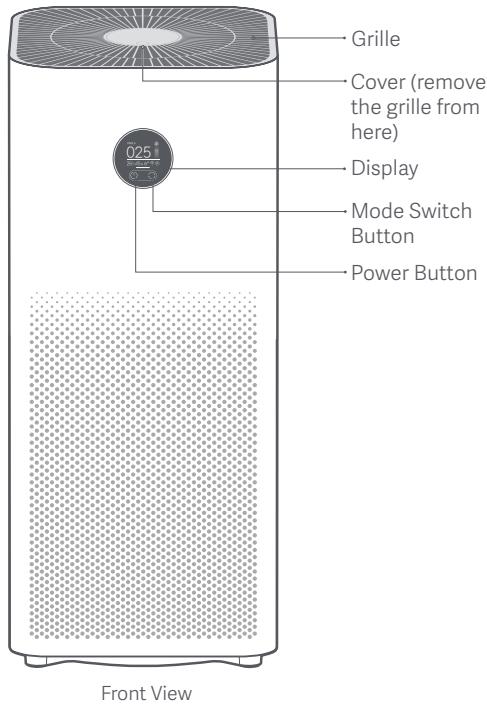
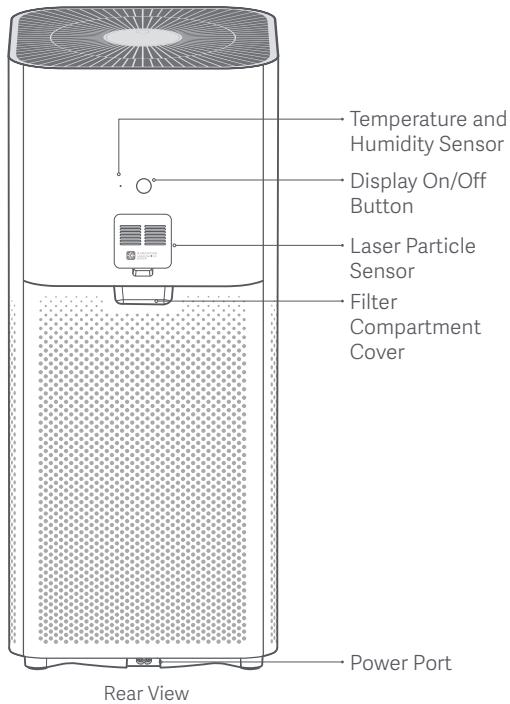
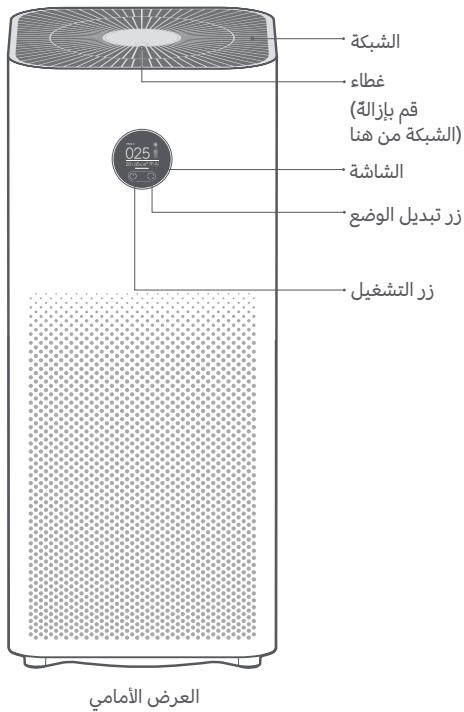
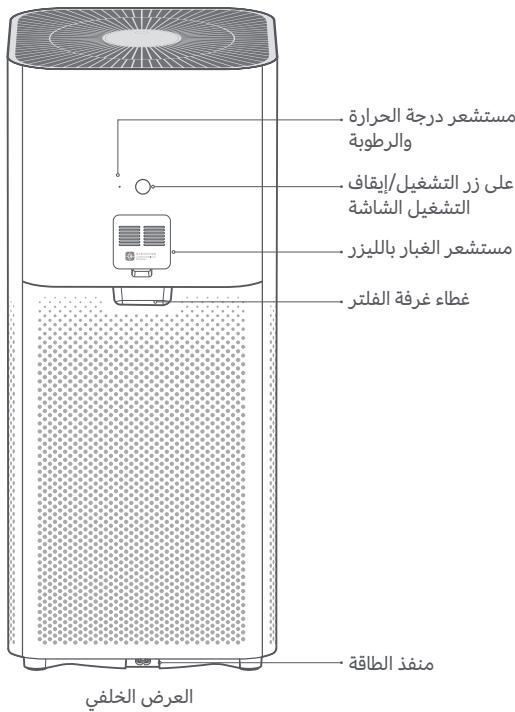
Product Overview
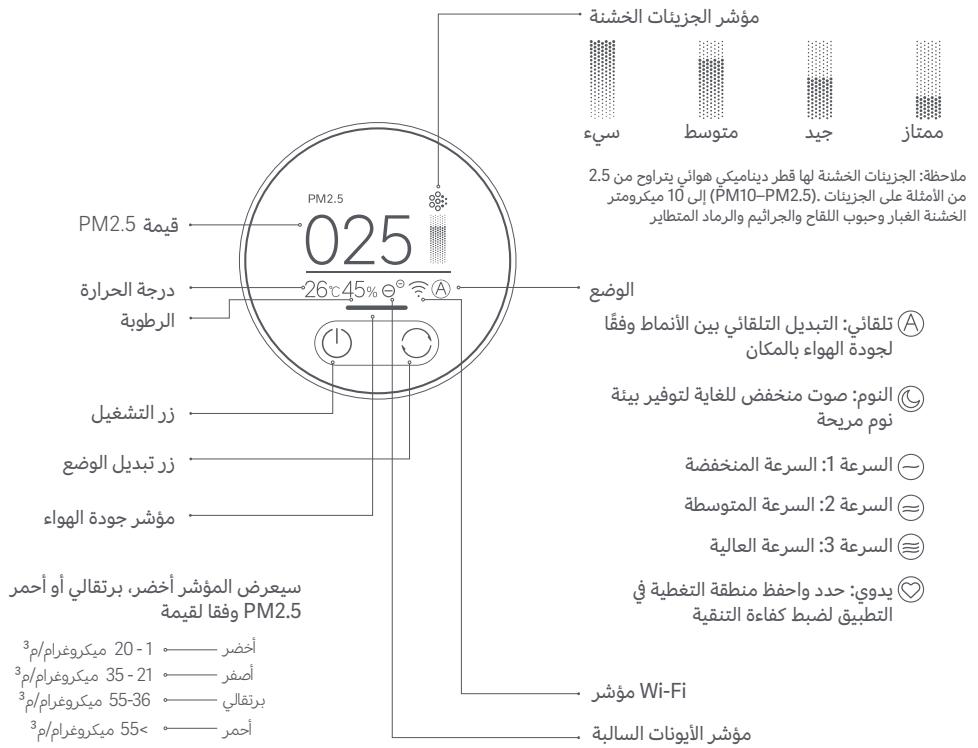
Display Instructions
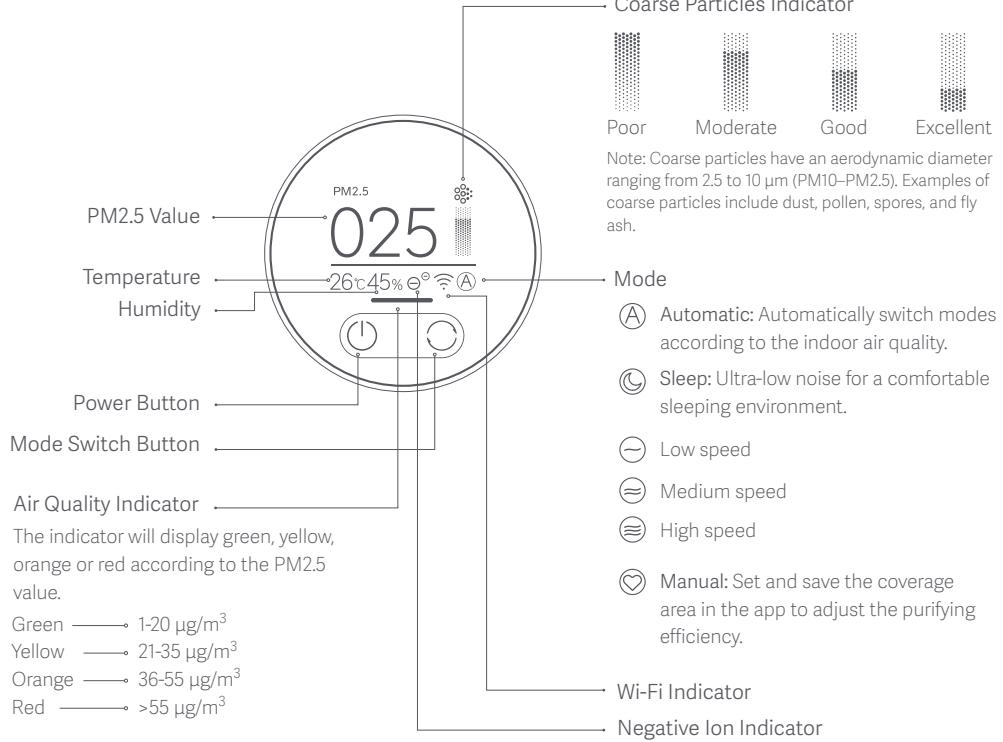
The negative ion function is enabled by default. The purifier can generate negative ions when it is working, and then the negative air ions (NAI) are produced through the reaction between the negative electron and the oxygen molecules. NAI is very good at trapping certain air pollutants. The function can be enabled or disabled in the app. When it is enabled, the negative ion indicator is on; when it is disabled, the indicator is off.
Installation
Placing the purifier
For optimal performance, make sure the distances between purifier's air inlets and other objects such as walls meet the requirements as suggested below.
Connecting to an electrical outlet
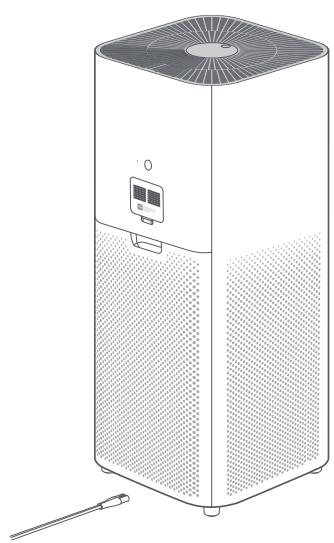
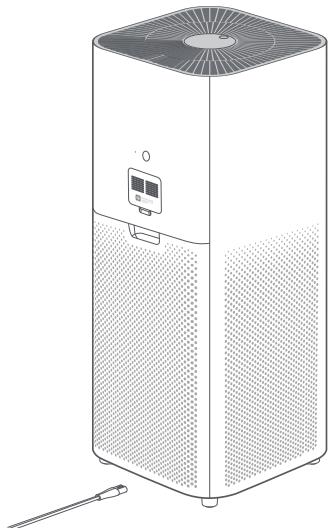
Connect the power cord to the power port at the bottom of the purifier and then plug it into an electrical outlet.
Note: It is recommended to keep doors and windows closed for a better purifying effect when using the purifier.
How to Use
Turning on/off
Tap the power button to turn on the purifier. While the purifier is on, tap the power button to turn it off.

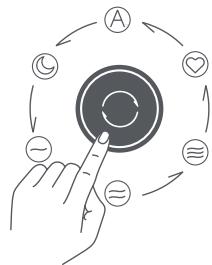
Switching mode
While the purifier is on, tap the mode switch button to cycle through modes.

Filter life notification
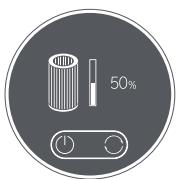
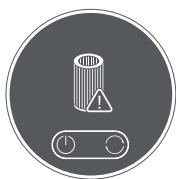
The display will show the remaining service time of the filter when the purifier is turned on. The display will show a warning icon if no genuine filter is detected.
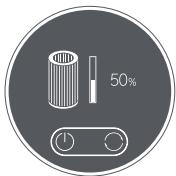
Filter service time remaining notification
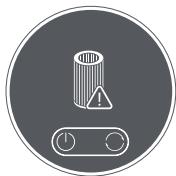
Not a genuine filter warning
Adjusting the display's brightness
Press the display on/off button to cycle through its brightness levels: on, dim, and off.
Resetting Wi-Fi
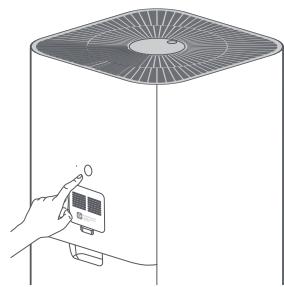
When connecting the purifier to the app for the first time or unable to connect to it, press and hold the display on/off button for 7 seconds. The purifier will make a notification sound once Wi-Fi is successfully reset.

Enabling/disabling the child lock function
Press and hold the mode switch button for 7 seconds to enable or disable the child lock function. The purifier will make the corresponding notification sound and show the corresponding icon on the display.
How to Use
Enabling/Disabling Wi-Fi
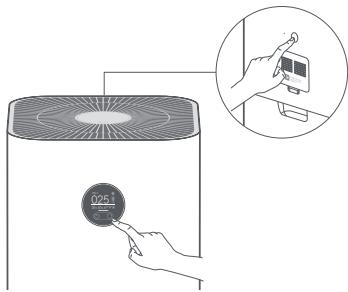
Simultaneously press and hold the mode switch button on the display and the brightness adjustment button for 7 seconds. The purifier will make a notification sound and the Wi-Fi will be disabled.
While Wi-Fi is off, simultaneously press and hold the mode switch button on the display and the brightness adjustment button for 7 seconds. The purifier will make a notification sound and the Wi-Fi will be enabled.
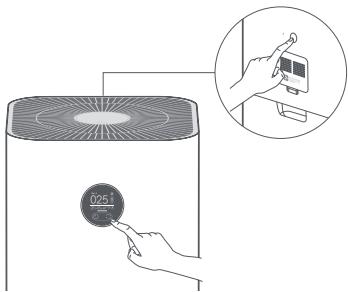
Connect with Mi Home / Xiaomi Home App
This product works with Mi Home / Xiaomi Home app*. Control your device with Mi Home / Xiaomi Home app.

EAED95A7
Scan the QR code to download and install the app. You will be directed to the connection setup page if the app is installed already. Or search "Mi Home / Xiaomi Home" in the app Store to download and install it. Open Mi Home / Xiaomi Home app, tap "+" on the upper right, and then follow prompts to add your device.
*The app is referred to as Xiaomi Home app in Europe (except for Russia). The name of the app displayed on your device should be taken as the default.
Note: The version of Mi Home app might have been updated, please follow the instructions based on the current app version.
Daily Care & Maintenance
Warning: Make sure the purifier is turned off and unplugged before performing the following operations.
Cleaning fan blades and air duct
- Press the indentation on the cover to open it. Use a screwdriver to loosen the screw, and then pull the cover upwards to remove the grille.
- Use a vacuum cleaner to remove any dust from the air duct and fan blades, or wipe the dust off gently with a soft cloth.
- Use a brush or soft cloth to gently wipe the negative ion transmitter.
- Install the grille back and fasten the screw after cleaning.
Note: To avoid missing, the screw is not removable. Loosen the screw to remove the grille.
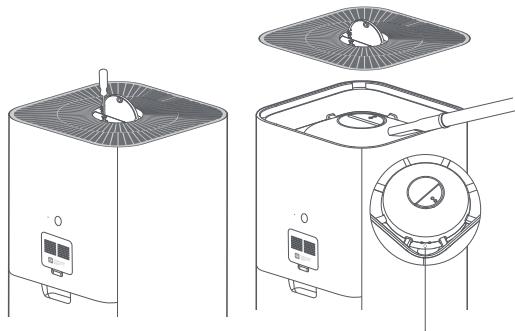
Negative Ion Transmitter
Note: To avoid damaging the purifier, do not rinse or spray the air duct and fan blades directly with water, or wipe them with a soaking wet cloth.
Daily Care & Maintenance
Cleaning the filter compartment
To ensure optimal ventilation and purification, use a vacuum cleaner to remove any dust from the air inlets and the filter compartment, or wipe these areas gently with a soft cloth.
Cleaning the laser particle sensor
Use a non-sharp tool to open the cover of the laser particle sensor, then use an air blow gun or hair dryer to clean the filter on the cover and the sensor, as illustrated in the figure.
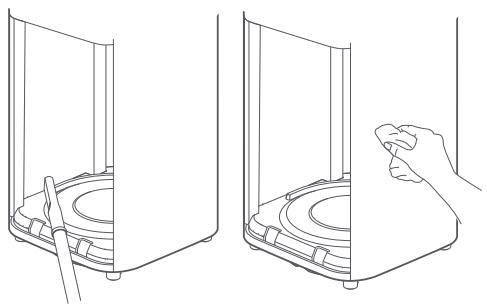
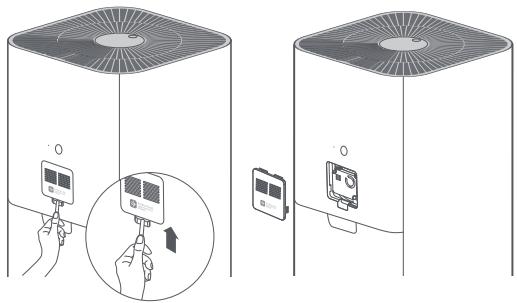
Note: To avoid damaging the purifier, do not rinse or spray the filter compartment directly with water, or wipe it with a soaking wet cloth.
Note: Do not use hot air.
Name: Xiaomi Smart Air Purifier 4 Pro
Model: AC-M15-SC
Item Dimensions: 275 × 275 × 680 mm
Net Weight: Approx. 6.8 kg
Effective Coverage: 35 - 60m^2
Rated Voltage: 100-240 V~
Rated Frequency: 50 / 60Hz
Rated Power: 50 W
Noise Level: ≤65 dB(A)
*Calculated according to standard GB/T 18801-2015
Network Standby Power Consumption: < 2.0 W
Particle Purification Efficiency: High
Formaldehyde Purification Efficiency: High
Particle's Clean Air Delivery Rate (CADR Particle): 500m^3 /h
Formaldehyde's Clean Air Delivery Rate (CADR Formaldehyde): 185m^3/h
Wireless Connectivity: Wi-Fi IEEE 802.11 b/g/n 2.4 GHz
Storage Temperature: -10^ to 40^
Storage Humidity: 5% - 90%
Production Date: See packaging
For details of the importer, please refer to the box.
RF Specification:
Wi-Fi 2.4 G (2400-2483.5 MHz), Max. RF Output Power: <20 dBm
RFID (13.56 MHz), Max. Magnetic Field Strength: < 60dB A / m@10m
Under normal use of condition, this equipment should be kept a separation distance of at least 20cm between the antenna and the body of the user.
Regulatory Compliance Information
Europe—EU declaration of conformity

Hereby, Beijing Smartmi Electronic Technology Co., Ltd. declares that the radio equipment - Xiaomi Smart Air Purifier 4 Pro, type AC-M15-SC is in compliance with Directive 2014/53/EU. The full text of the EU declaration of conformity is available at the following internet address: http://www.mi.com/global/service/support/declaration.html
Disposal and recycling information

All products bearing this symbol are waste electrical and electronic equipment (WEEE as in directive 2012/19/EU) which should not be mixed with unsorted household waste. Instead, you should protect human health and the environment by handing over your waste equipment to a designated collection point for the recycling of waste electrical and electronic equipment, appointed by the government or local authorities. Correct disposal and recycling will help prevent potential negative consequences to the environment and human health. Please contact the installer or local authorities for more information about the location as well as terms and conditions of such collection points.

Precauzioni
ArticleMaBe:275×275×680mm
Nettogewicht:ca. 6,8 kg
IHHOpMaunO COOTBETCTBnTpe6oBaHnA M
Дeкларачи O COOTBETCTBиH HOpMaTINBыM Tpe6OBaHnA M EC

Hactoamm Kompana Beijing Smarti Electronic Technology Co., Ltd. 3aBnAeT, TTO TnP paNoo6OpDOBAHN - Ummbny Ouchnttey B03yaXiaomi Smart Air Purifier 4 Pro, AC-M15-SC COOTBCTBET Tpe6OBAHNM DInpeKTNBbY 2014/53/EU. POnhny TEKT deknapaun o COOTBCTBnH NOpMaTHbHM Tpe6OBAHNM EC Doctynen No cIeJyoUcemy aIpecy: http://www.mi.com/ global/service/support/declaration.html
IhOpmauny o6ytin3aunn n nepepa6OTke OTXoOB 3eKtpuueckoro n 3eKtpoHnHO 06OpuydoBaHn

Bce m3dienn, 6o3aehenHbne CmBONOM pa3dEbnHOro c6bopa Otpa60anHORO 3eKtprueckoro n 3eKtporHoro 6opbydoabnna (WEEE, npeKtva 2012/19/EU), cneyet ytni3npobatb oTeNbHO to Hecoptypemybx 6bToBx bTOXOB. C ceIbIO oxpaHbI 3doobrN a 3auuNTbO CKyuaoiye cpeD TaKo6OpyDoBaHNe Heo6XoIMMo cDaBAtb HA nepep6OBy T cneIaHbI bnyhTb npimema 3eKtprueckoro n 3eKtporHoro 6oOpdyBaHnO, onpeJeHHe NbePapntbCTBOM INM MeCThBMn OprAhaMn Bnactn. PapanbHaBn ytlnaaunie npep6ObTKa NOMOT npedotBpATMb TOB3MOXHbHE rHaTHNBHe NOcIeCTBnI JnOKpykaioeu I cpeBn i 3doobrY chOBeka. U4To6bY3NaTb, rge HaxoadTcTa kAne nyhKTb C6bopa N KAK OHN pa6oataot, o6patntecb B KOMPAHNO, 3aHHMAOUIOCy tyaTOAHOBKO 6oOpdyBaHnO, INI B M CeHTNs OprAho BnACTn.

gaiiaoll aol oogl wpo lal aelb llw wll dwlswl bllw ccl sic
aale 1n no nno n no g jglll ldo aol 8 n w g jllb u k . gaii daii g i oal g oii y aai giae c g aiaa
jgljllljj
puee e aiee eae eae eae eae eae eae eae eae eae eae
. aIaIaI aI aI aI aI aI aI aI aI aI aI aI aI aI aI aI aI aI aI aI aI aI aI aI aI aI aI aI aI aI aI aI aI aI aI aI aI aI aI aI aI aI aI aI aI aI aI aI aI aI aI
aai jajjll aaiagai jgljg jaiaiai
Jusu Jusu uua julal aeg cllag ag gall asw ngy Iolic aaiill jge Jusu Say
oJzlll oIggl IjzglgIggl Iggs 20 aIgIg gge
aJgcllll aIbIaI IjzJcJySd cI JbJbJyJcJyAaI bI cJg
wliy jyjg s wlaa aalll lww
(5) = a + 2 | | = 12| |
gall aai jgljai alalall gai lai lll gell aai jgl
gull 1o aod gai aaiall 4jw jooogjpw yolal llwlll wcl l
piai jie gai jggi gljggl iijg jygl ailjgl aile jgl jlaaill jg piai jll
gglgglgglgglgglgglgglgglgglgglgglg
aIooI a.o.o.o.g i aLc o.o.o.g j 00
jgl jg aalll gaggge gge gge gge gge gge gge gge gge gge gge gge gge gge gge gge gge gge gge gge gge gge gge gge gge gge gge gge gge gge gge gge gge gge gge gge gge gge gge gge gge gge
aaiill jgagagallglglljoo gclaaaww ooyo sllsgalglgolally gllgwl
jolll no gglggl aalglgaaaagc aao ooggglgglgglgglgglgglgglgglg
julgogglgagaaalglgagolglgaglaalglgagaaalglgagaaalglgagaaalglg
auiyglgglgglgglgglgglgglgglgglgglgglgglgglgglgglgglgglgglgglgglgglgglgglgglgglgglgglgglgglgglgglgglgglgglgglgglgglgglgglgglgglgglgglgglgglgglgglgglgglgglggl
aull jgj g Jiau wu aIg 1g0g
aagawaailljgebgawg 0sowll aolllg
cIolaoaJl JUJIg aIgblgljolalssd
Cai jolldalg 100 (jllablll)
aio cldwgl jollgwl
jIabllglioJcAailllglg>slg|LcOyol.Aailllglg
iJg> aolc ojz
aaiiiae
g 1052 a uuul uugul ggl gaiuauuauuauuuaa uuuu uuuu uagll uagll uagll uagll uagll uagll uagll uagll uagll uagll uagll uagll uagll uagll uagll uagll uagll uagll uagll uagll uagll uagll uagll uagll uagll uagll uagll uagll uagll uagll uagll uagll uagll uagll
aiaaiy
alalall jol no sll tlll alll lglal all gnlaal
alalall lln lnnl jll grrll slwllg qaiall nn
olilj ciaao gao las
syyssy
jawgagall aibll jao go aibll cww Jygljll iayalog piaial
julc Juaaiaalgwlglsl aagaae:abao 10 aai piaiui iie aai
JU
gglj
aiaill Jaaii Jaii jle baiol. beoi Jaiai Jaiial ngloie alaijai Jaiai jui
Jaiil jaiil 10g laai Jaiil gogll jj 10e jai Jaiill jnn

jullllouoJocJoo
gaiall ngi llosie jilell gaiial ao aodai cag awlal oaoe 1e aasll pae Jl0j rjooa wail gabzulzaiill q
aall aol jai jali ao
Jolaljllj
aWulwglbWb
jJlJIaIlaJIJIJIJIJIJIJIJIJIJIJIJIJIJIJIJIJIJIJIJIJIJIJIJIJIJIJIJIJIJIJIJIJIJIJIJIJIJIJIJIJIJIJIJIJIJIJIJIJIJIJIJIJIJIJIJIJIJIJIJIJIJIJIJIJIJIJIJIJIJIJIJIJIJIJIJIJIJIJIJIJIJIJIJIJIJIJIJIJIJIJIJIJIJIJIJIJIJIJIJIJ
W-Fi
aJlaiill jiai gjll aaiy aaiy Jaiil aie
aaii laii iaii jai/ jaii 10 beai
bao oaley ayuigoi aiall jayg jgi 7 aoi
Jaiil Wi-Fi cai
Jablil icu vdo Jaalaiabbg Jbej/
j 7 o j j j j j j j j j j j j j j j j j j j j j j j j j j j j j j j j j j j j j j j j j j j j j j j j j j j j j j j j j j j j j j j j j j j j j j j j j j j j j j
pIeewllaaerb
aIgai
JUaJI JuaJIaJI/JaJIaJIWi-Fi
aBabwll baa jgg aulll al gagll JJb baoi Jbaai pug wgol Jaaiaal jaaaw .Jgl q ait7 Jail Wi-Fi.
Jglai jgfo laie Wi-Fi jjuejraaillgo baol,laqto
j g aizu7 osal egbawll baojjg aiaiwlge gogll J
Jglai nssai pugwglajaiall jaaalnagWi-Fi.
Mi Home / Xiaomi Home
Mi Home / Xiaomi Home Mi . gbsj jbji jbjj jbjj jbjj jbjj jbjj jbjj jbjj jbjj jbjj jbjj jbjj jbjj jbjj jbjj jbjj jbjj jbjj jbjj jbjj jbjj jbjj jbjj jbjj jbjj jbjj jbjj jbjj jbjj jbjj jbjj jbjj jbjj jbjj jbjj JHome* Home/Xiaomi Home.

EAED95A7
THIS WARRANTY GIVES YOU SPECIFIC RIGHTS, AND YOU MAY HAVE OTHER RIGHTS CONVEYED BY LAWS OF YOUR COUNTRY, PROVINCE OR STATE. IN SOME COUNTRIES, PROVINCES OR STATES, CONSUMER LAW MAY IMPOSE A MINIMUM WARRANTY PERIOD. OTHER THAN AS PERMITTED BY LAW, XIAMI DOES NOT EXCLUDE, LIMIT OR Suspend OTHER RIGHTS YOU MAY HAVE. FOR A FULL UNDERSTANDING OF YOUR RIGHTS WE INVITE YOU TO CONSULT THE LAWS OF YOUR COUNTRY, PROVINCE OR STATE.
1.LIMITEDPRODUCTWARRANTY
XIAOMI warrants that the Products are free from defects in materials and workmanship under normal use and use in accordance with the respective Product user manual, during the Warranty Period.
The duration and conditions related to the legal warranties are provided by respective local laws. For more information about the consumer warranty benefits, please refer to Xiaomi's official website https://www.mi.com/en/service/warranty/.
Xiaomi warrants to the original purchaser that its Xiaomi Product will be free from defects in materials and workmanship under normal use in the period mentioned above.
Xiaomi does not guarantee that the operation of the Product will be uninterrupted or error free.
Xiaomi is not liable for damages arising from non-compliance with the instructions related to the use of the Product.
2.REMEDIES
If a hardware defect is found and a valid claim is received by Xiaomi within the Warranty Period, Xiaomi will either (1) repair the product at no charge, (2) replace the product, or (3) refund the Product, excluding potential shipping costs.
3.HOW TO OBTAIN WARRANTY SERVICE
To obtain warranty service, you must deliver the Product, in its original packaging or similar packaging providing an equal degree of Product protection, to the address specified by Xiaomi. Except to the extent prohibited by applicable law, Xiaomi may require you to present proofs or proof of purchase and / or comply with registration requirements before receiving warranty service.
4.EXCLUSIONS AND LIMITATIONS
Unless otherwise stipulated by Xiaomi, this Limited Warranty applies only to the Product manufactured by or for Xiaomi and identifiable by the trademarks, trade name or "Xiaomi" or "Mi" logo.
The Limited Warranty does not apply to any (a) Damage due to acts of nature or God, for example, lightning strikes, tornadoes, flood, fire, earthquake or other external causes; (b) Negligence; (c) Commercial use; (d) Alterations or modifications to any part of the Product; (e) Damage caused by use with non-Xiaomi products; (f) Damage caused by accident, abuse or misuse; (g) Damage caused by operating the Product outside the permitted or intended uses described by Xiaomi or with improper voltage or power supply; or (h) Damage caused by service (including upgrades and expansions) performed by anyone who is not a representative of Xiaomi.
It is your responsibility to backup any data, software, or other materials you may have stored or preserved on the product. It is likely that the data, software or other materials in the equipment will be lost or reformatted during the service process, Xiaomi is not responsible for such damage or loss.
No Xiaomi reseller, agent, or employee is authorized to make any modification, extension, or addition to this Limited Warranty. If any term is held to be illegal or unenforceable, the legality or enforceability of the remaining terms shall not be affected or impaired.
Except as prohibited by laws or otherwise promised by Xiaomi, the after-sales services shall be limited to the country or region of the original purchase.
Products which were not duly imported and/or were not duly manufactured by Xiaomi and/or were not duly acquired from Xiaomi or a Xiaomi's official seller are not covered by the present warranties. As per applicable law you may benefit from warranties from the non-official retailer who sold the product. Therefore, Xiaomi invites you to contact the retailer from whom you purchased the product.
The present warranties do not apply in Hong Kong and Taiwan.
5. IMPLIED WARRANTYIS
Except to the extent prohibited by applicable law, all implied warranties (including warranties of merchantability and fitness for a particular purpose) will have a limited duration up to a maximum duration of this limited warranty. Some jurisdictions do not allow limitations on the duration of an implied warranty, so the above limitation will not be applied in these cases.
6.DAMAGE LIMITATION
Except to the extent prohibited by applicable law, Xiaomi shall not be liable for any damages caused by accidents, indirect, special or consequential damages, including but not limited to loss of profits, revenue or data, damages resulting from any breach of express or implied warranty or condition, or under any other legal theory, even if Xiaomi has been informed of the possibility of such damages. Some jurisdictions do not allow the exclusion or limitation of special, indirect, or consequential damages, so the above limitation or exclusion may not apply to you.
7.XIAOMI CONTACTS
For customers, please visit the website: https://www.mi.com/en/service/warranty/
The contact person for the after-sale service may be any person in Xiaomi's authorized service network, Xiaomi's authorized distributors or the final vendor who sold the products to you. If in doubt please contact the relevant person as Xiaomi may identify.
AVVISO SULLA GARANZIA
LA PRESENTE GARANZIA RICONOSCE AL CLIENTE DIRITTI LEGALI SPECIFICI E IL CLIENTE POTREBBE AVERE ALTRI DIRITTI PREVISTI DA LEGGI DEL PROPRIO PAESE, PROVINCA O STATO. IN ALCUNI PAESI, PROVINCE O STATI, LA LEGGE PER LA TUTELA DEI CONSUMATORI PUO IMPORRE UN PERIODO MINIMO DI GARANZIA. ECCETTO NEI CASI CONSENTITI DALLA LEGGE, XIAOMI NON ESCLUTE, LIMITA O REVoca ALTRI DIRITTI CHE L'UTENTE PUO AVERE. PER UNA COMPRENSIQ COMPLETA DEI PROPRI DIRITTI, INVITiamo GLI UTENTI A CONSULTARE LE LEGGI DEL PROPRIO PAESE, PROVINCIJA O STATO.
1.GARANZIA LIMITATA DI PRODOTTO
4.NCKJIIOUOEHNIMOPTAHNUEHN
3Ta orpaHnHnHa rapAHTnI paCnPoCTpAraTc TOnbko Ha npOdyKT, n3rOToBnHbI KOMpanHei Xiaomi nnI dJe He n oepaAsn ee ToBAPhIE 3nakn, TopoBOe HAnMeHOBaHne nnI ITOOTnK «Xiaomi» JIn6o «Mi», eCNI nHOe He npEycmOTpeHO KOMpanHei Xiaomi.
OrpaHueHHa rapaHTnHa he paCnpocTpaHraETcHa (a) NOBpeKdHnBa B pe3yIbTaTe CTnxnHbIX 6eDCTBn, Haprimep
yda pmoHnn, Cmepa, HabOHeHn, Noxapa, 3emIepcEHHn IIN dpyrnx 3K0ReHbIX oakTPOB; (6) cneCTBn xanlthocnt; (B) KOMMpeueckoe nCNoB3oBaHnve; (r) BHeceHhne I3MeHeHn IIN MoDfNkaun JIO60 JauChn npOdykTa; (d) NOpeXeHnE, Bb3BaHhne IcNoB3oBAHNm npOyKTOB npOu3BOJNTenei; (e) NOpeXeHnBn B pe3yIbTahe HeccactHO rCnya, 3NoynOpTe6BeHnN IIN HePabUhBOHO nCNoB3oBAHn; (j) NOpeXeHnB, Bb3BaHhne npImeHeHn mpoyDA tA pNepeDenAm p4repeHnHO IIN OONyCaekern IOcNoB3oBAHn, ONuCAHNO Xiaomi, a taKae B pe3yIbTahe HecoOTBETCTByUoJero HapnpErHn NII pHTAnA; (3) NOpeXeHnBn I3-3a 0cbLkyKBaHn (BKnIOyAB O6HOJIeHN i paCUnpeHn) liouom, he YBLIAUIMCM PpeDCTaBtJeEM KOMNaHNs Xiaomi.
Cozdahne pe3epBHOKoNN daHbIX, nporpaMMHoro oOecneueHnN dpynx MaTePnaIOB, KOtOpBe Bb MoKeTe XpAHNbHa npOdykTe, JbIaTcBAwei OTBCTBEHHOCtB. KomnaHn Xiaomi He Hecet OTBETCTBEHHOCt 3a noTePOu IINI nepeΦopMaTIPoBaHnE daHbIX, nporpaMMHO oOecneueHnN dpynx MaTePnaIOB, CoepeJkaUxxCB B oObyDobAHn, B npocce EKcIyataaun.
Hn oDHN pceIeep, areHT nI cOTpyNDK KOMaHHN XiaOMI He yNOHMOChE BHOCNTb 3MHeHHeN HIN DIOHOHNE B HactoYIO npapatHIO. Ecn kOakoeJI6O yCNOBne OOKaeTcE HezAOKHBM IIN opuDnueCKn HeJeCTBNTeBLHm, 3aKOHHOCT b INI MPOJHOIMCb OCTaBbHX NIOXeHn HE NOXHa HbBt 3aTPOHYta Nn HApUeHa.
PoclenpoaJHoe o6cIyKbAHe OcUeCTBJIaTc B CtpaHe IIN PERIOHe NOKyIKN, 3a NCKIIOueHnEM clyuaEB, 3aIPpeHbIX 3aKOHOM, INI ECIN INHO pEpyCMOTPeHO KOMpHaHne XiAmi.
Hactoa rapaHTn He nokpbaet npdykTb, KOtObe He bIy IOnJXbIM oba30m mnpotpoBaHb, bIy I3rTOBneHb He kOMNaHeyi Xiaomi u/nn pno6peTeHb Ye H YAomi IIOoo ee ofuuaAHLoro npctabnteJe. Cornacho deIcIbTuOeMy 3aKOHoateJIbCTBy, Bly MoKeTe paccNTbHaB Ta h rapaHTn OT oOfuuaHBO nDcTpi6bIoTopa, KOtObl npdoal npdyKT. PToOTmy KOMnaHia Xaomi dpndaraet opaasatcb K npdoBu, y KOTOPBO Rbl npio6peN npdokt.
Hactoiaa rapantna He paonpoctpaenrca Ha ToHKOH TaBaHb.
5.IOIPA3YMEBAEMbIE TAPAHIN
3aNCKJIUOeHHeM cnyaeb, 3anpeeHbix 3akOHoateNbCTBOM, NOpa3yMeBaembIe rapaHTn (BKJIIOuay rapaHTn TOBAPHO CoCTOHaHn I npINOaHcTIN dIy KOHKpeTHOn ueTI) IMeOT oRpaHnEHn CpOK deIeTBN, KOTOpB He MoKET npEbluath CpOK DeIeCTBn HAcTOHSe OrpaHnEHn RapaHTn B HEKOtOPbX IOpcDnIKunx He OJONYCAeTCs ORpaHnEHn cPoka DeCTBn POJa3yMeBaEmo rapaHTn. B TAKIX cLByaY ykaaAHoe OraPauHne He npImeHaeTc.
6.OTPAHnUeHHeIIOBPEKdEHnIa
3a ncknloeHnem clyaeb, 3anpeeHHbIX 3akoHodaTeBCTomb, kOMnHaH YAomi He Hecet OTBETCTBeHHOCTN 3a nobpeJeHnB H be3yIbTate ITPi, KocBeHHbIX, cneuHaJIbHbIX iIN noCnEduYIOxN NOpBeXeHnien, BKJIOaJ pno6blIn, DOxoOB INI daHHbIX, y6blKn, BO3NHKUme B pe3yIbTaTE hapyeHnA RbHbIX iIN noPDA3yMeBaEMbIX rapaHTN iIN yCLOBn, iIN IIO JIO60I dpyroKoTHNtHeOpnn, daJe cIIN KOMnHaNIA Xaomi bblNa npDynpExDa O BO3MOXHOCTN TAKNX nobpeJeHnB. B HEKOTOpBX IOHNcIKUNxH He onpysCaTeCR NCKLIOueHn iIN orpAnuHHe N OTEBTCTBEHHOCTN 3a cneuaJIbHbIe, KOCBeHHbIe iIN IIOncLeDyUOxne Y6blKn. B Taknx cIyauAx yka3aHhble BIIe OgrpanuHEnHe npImEHnIOTcR.
7.KOHTAKTbI KOMIIAHIN XIAOMI
ggljagaaalngilallgsllslwYxiaomi gawagwglgwlqgglgglgglgglgglgglgglgglggl
g i g i g i j aai g i j aai g i j g i j g i j g i j g i j g i j g i j g i j g i j g i j g i j g i j g i j g i j g i j g i j g i j g i j g i j g i j g i j g i j g i j g i j g i j g i j g i j g i j g i j g i j g i j g i j g i j g i j
olgl 1uul gl d uall cde bbyd d cd uall g awrall
JUAIJI XIAOMI.7
Jn Jnnn nn nnnnnnnnnnnnnnnnnnnnnnnnnnnnnnnnnnnnnnnnnnnnnnnnnnnnnnnnnnnnnnnnnnnnnnnnnnnnnnnnnnnnnnnnnnnnnnnnnnnnnnnnnnnnnnnnnnnnnnnnnnnnnnnnnnnnnnnnnnn
Manufactured by: Beijing Smartmi Electronic Technology Co., Ltd.
(a Mi Ecosystem company)
Address: Room 201-203, Unit 6, Building A, No. 66, Zhufang Road, Qinghe, Haidian District, Beijing
For further information, please go to www.mi.com
For detailed e-manual, please go to www.mi.com/global/service/userguide
Made in China
Fabbricatoda: Beijing Smartmi Electronic Technology Co., Ltd.
(a Mi Ecosystem company)
Indirizzo: Room 201-203, Unit 6, Building A, No. 66, Zhufang Road, Qinghe, Haidian District, Pechino
Adresse: Room 201-203, Unit 6, Building A, No. 66, Zhufang Road, Qinghe, Haidian District, Pekin
Dirección: Room 201-203, Unit 6, Building A, No. 66, Zhufang Road, Qinghe, Haidian District, Pekin
Adresse: Room 201-203, Unit 6, Building A, No. 66, Zhufang Road, Qinghe, Haidian District, Peking
Adres: Room 201-203, Unit 6, Building A, No. 66, Zhufang Road, Qinghe, Haidian District, Pekin
Wiecej informaci: www.mi.com
Ampoc: Room 201-203, Unit 6, Building A, No. 66, Zhufang Road, Qinghe, Haidian District, Pekinh
TTO6bI NOyUHTB DOnONHHTeBHyIO INHOpMaunIO, nocETnTe caIT www.mi.com
Плорбове Зелковенhoe руковоствсmo.no ampecy www.mi.com/global/service/userguide
CdeJanaHO B KNTae
Diproduksi oneself: Beijing Smartmi Electronic Technology Co., Ltd.
Alamat: Room 201-203, Unit 6, Building A, No. 66, Zhufang Road, Qinghe, Haidian District, Beijing
Room 201-203, Unit 6, Building A, No. 66, Zhufang Road, Qinghe, Haidian District, Beijing :
www.mi.com ggo 11jllaiillg jllloglaal
www.mi.com/global/service/userguide