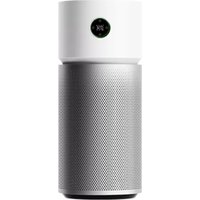
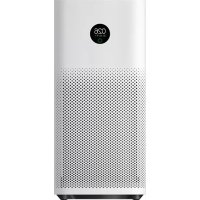
MiJia Air Purifier Pro - Air purifier Xiaomi - Free user manual and instructions
Find the device manual for free MiJia Air Purifier Pro Xiaomi in PDF.


| Product Type | Air Purifier |
| Brand | Xiaomi |
| Model | MiJia Air Purifier Pro |
| Dimensions (HxWxD) | 830 x 310 x 310 mm |
| Weight | 14 kg |
| Power Supply | AC 100-240V, 50/60Hz |
| Rated Power | 60 W |
| CADR (Clean Air Delivery Rate) | 500 m³/h |
| Filtration Stages | Primary filter, HEPA H13, Activated carbon |
| Noise Level | 32 – 64 dB(A) |
| Air Output | Up to 500 m³/h |
| Control Method | Touch panel, Wi-Fi via Mi Home app |
| Display | LED touchscreen with air quality index |
| Sensor | Laser particle sensor (PM2.5) |
| Operating Modes | Auto, Manual, Sleep, Favorite |
| Filter Replacement Indicator | Yes, via app and device indicator |
| Filter Lifespan | Approximately 6-12 months (depending on usage) |
| Safety Features | Child lock, overheat protection, tip-over shut-off |
| Maintenance | Clean pre-filter monthly; replace HEPA/carbon filter as indicated |
| Spare Parts Available | Replacement filter pack (HEPA + carbon) |
Frequently Asked Questions - MiJia Air Purifier Pro Xiaomi
User questions about MiJia Air Purifier Pro Xiaomi
0 question about this device. Answer the ones you know or ask your own.
Ask a new question about this device
Download the instructions for your Air purifier in PDF format for free! Find your manual MiJia Air Purifier Pro - Xiaomi and take your electronic device back in hand. On this page are published all the documents necessary for the use of your device. MiJia Air Purifier Pro by Xiaomi.
USER MANUAL MiJia Air Purifier Pro Xiaomi
Mijia Air Purifier Pro
Before using the device, read the instructions carefully
User Manual
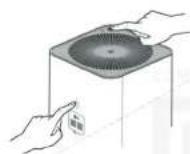
Please do not place any objects on the top panel of the fan
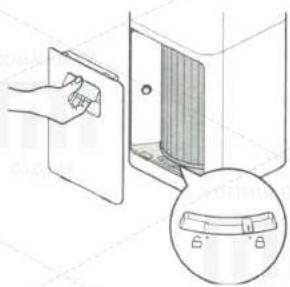
Open a battery compartment cover for the filter, pull the cable. Make sure that the filter is in locked position.
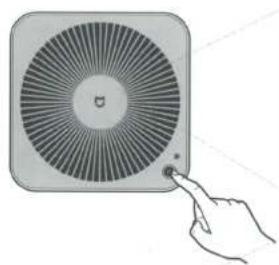
Press power button to turn the device on. Press and hold a button to turn the device off.
natural_image
Diagram showing a hand inserting a component into a device panel, with an inset close-up of a measuring scale (no text or symbols)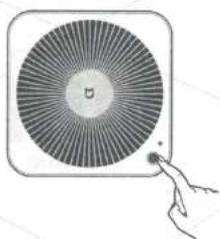
natural_image
Illustration of a circular fan with radial lines and a small hand holding a pointer (no text or symbols)2 Connect power cable
Scan QR-code, to install the application.
This product is already included in a list of Mi Smart Home devices, supports MIUI system, and can also be combined with other intelligent devices in your home.
natural_image
Simple line drawing of a device with a plug and terminal block (no text or symbols)
R recommended distance between the device and enclosure should be 20 cm and more. Recommended floor area of 35m2 - 60m2. Note: according to Q / BJZMK0001-2015 standard.

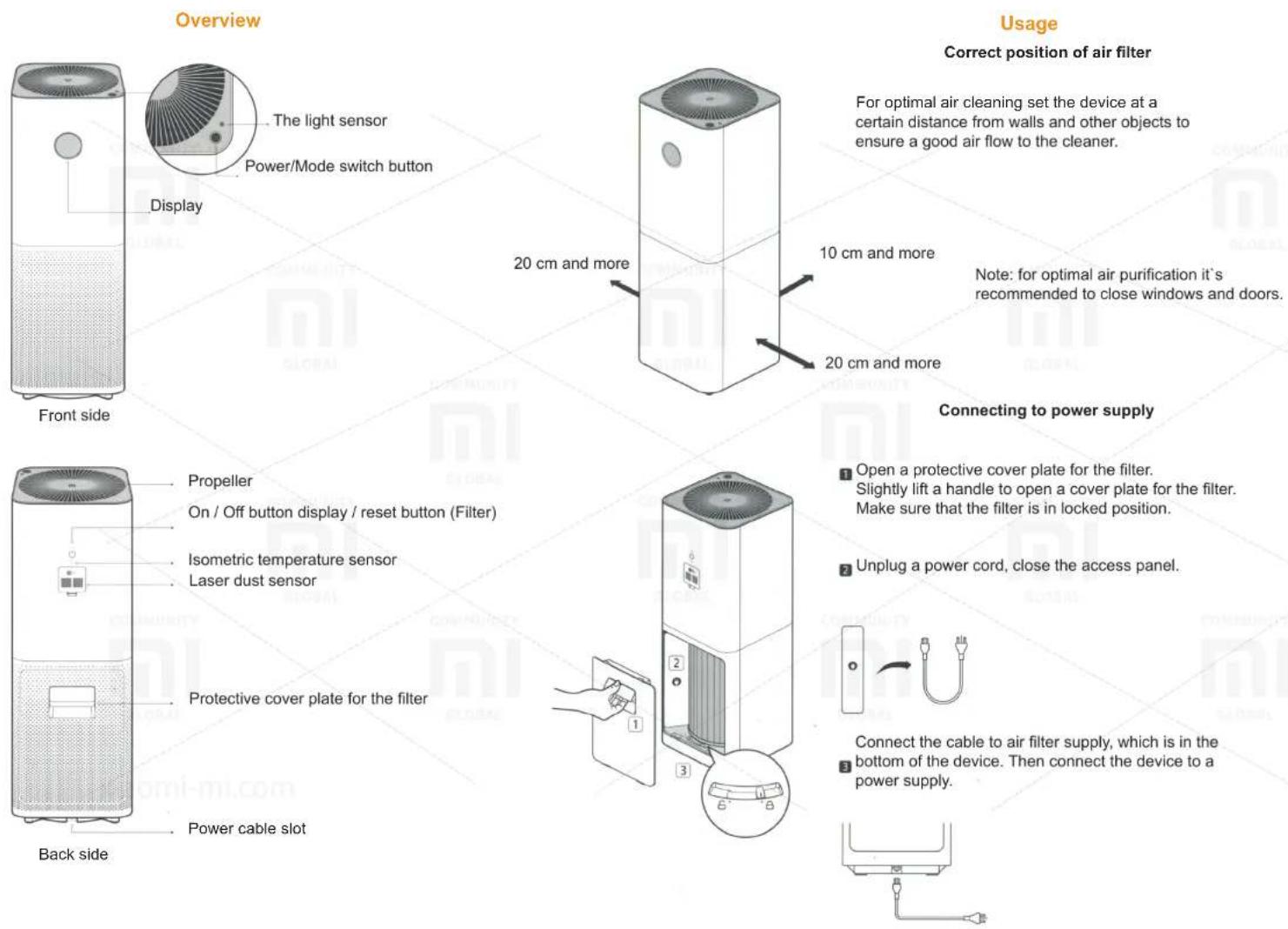
The light sensor
Power/Mode switch button
20 cm and more
Usage
Correct position of air filter
For optimal air cleaning set the device at a certain distance from walls and other objects to ensure a good air flow to the cleaner.
10 cm and more
Note: for optimal air purification it's recommended to close windows and doors.
20 cm and more
Connecting to power supply
Propeller
On / Off button display / reset button (Filter)
Isometric temperature sensor
Laser dust sensor
Protective cover plate for the filter
Power cable slot
1 Open a protective cover plate for the filter. Slightly lift a handle to open a cover plate for the filter. Make sure that the filter is in locked position.
2 Unplug a power cord, close the access panel.
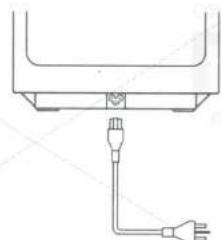
Connect the cable to air filter supply, which is in the
bottom of the device. Then connect the device to a power supply.
The power button / switch modes
Display
Installing the App
Wi-Fi Reset
Press the power button to turn the device on. Subsequent presses of a button you can switch between the cleaner work. Press and hold the power button for 2 seconds to turn off the device.
natural_image
Illustration of a hand pointing at a circular fan device with radial blades (no text or symbols)Click on the button «Display On / Off» to turn it on or off.
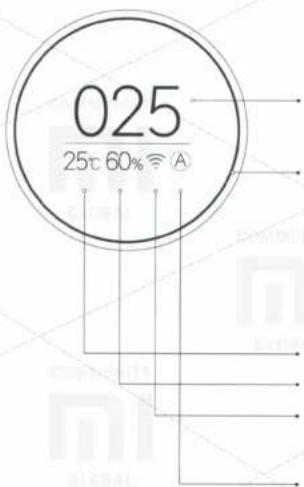
Indicator PM 2.5
Indicator (as a ring), indicating an air quality by some color Changing colors: PM 2.5. Green - 0-75; Orange - 76-150; Red - 150 or higher.
Temperature
Humidity
Wi-Fi Status
Mode switching

Favorites: cleaning efficiency set by the user. Set options in a client application, and save them.

Automatic: Automatic switching mode in accordance with a state of air in a room.

Sleep: low noise level, a favorable environment for sleep.
To install «Mijia» («Mi Home») application, find and download it from APP Store or scan a QR-Code. Open, click on «My Device» icon and add to your list of «Mijia Air Purifier Pro». After successfully adding the air filter, you will find it in «Smart Devices» list.

This device is already in Mi Smart Home list of devices, supports MIUI system, and can also be combined with other and interact with Mi Smart Home devices. To find out more information about operation of this device or to purchase other smart devices, register in Mi Smart Home APP.
If your smartphone is not connected to the air purifier, please click simultaneously on «switch modes» and «on / off the display» buttons and hold for 5 seconds until you hear a beep, indicating of successful Wi-Fi settings reset.
natural_image
Illustration of a hand holding a small electronic device next to a square fan (no text or symbols)Replacing a filter
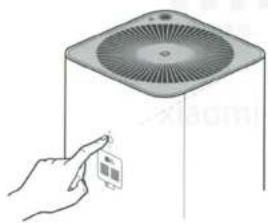
Replace a filter every 3-6 months. If useful life of a filter ends, a percentage appears on the display, indicating time of its use; A time, during which the filter can still be used - 10%.
Maintenance
Before performing steps, listed below, make sure you turn off the device and unplug it from a power supply.

pie
| Category | Value (%) | |---|---| | Progress | 10 |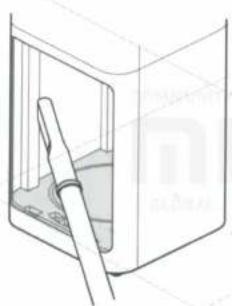
natural_image
Line drawing of a door with a handle inserted into the opening (no text or symbols)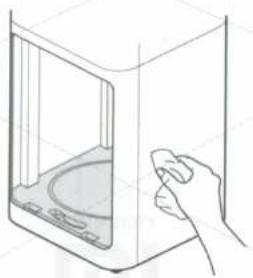
natural_image
Line drawing of a hand holding a small object inside a microwave oven (no text or symbols)Protective cover cleaning
For optimum air purification necessary to clean the air vents and all side walls. It is also possible to lightly wipe a compartment for a filter, using a soft cloth.
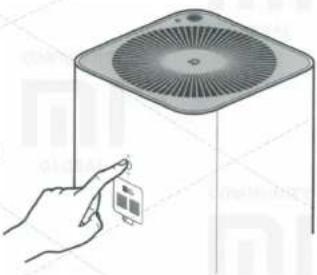
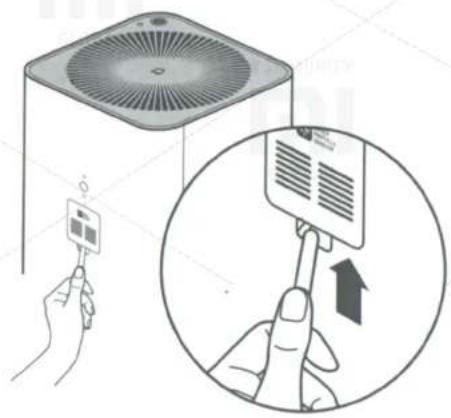
Before replacing a filter, carefully check the sticker «Replacing the filter», which is on the back side of a protective panel. * Before performing filter replacement, air cleaner must be switched off and disconnected from power supply.
After replacing a filter, switch on the air purifier. Press and hold the reset button until you hear a beep. Reset a filter usage time is successful. Air cleaner starts a new counting the life of a filter.
natural_image
Illustration of a hand interacting with a device labeled 'i' and a fan-like device (no text or symbols on the device itself)Warning: if you have RFID tag, do not need to perform a factory reset.
Warning: when a filter is filled with noxious gases or substances, you can detect a presence of specific uncharacteristic odor. It is necessary to leave a filter in the bright and well-ventilated place to resolve this issue.
Dust sensor cleaning
Using a not acute thing, open a dust sensor panel. Using a hair dryer or other similar device, clean a filter screen and a dust sensor. Warning: Do not use hot air.
Main parameters
| Name | Mi Air Puntier Pro | Rated voltage | 100-240V | CARD productivity (hard particles) | 500m3/4 |
| Model | AC-M3-CA | Rated frequency | 50/60Hz | CARD productivity (formaldehyde) | 70m3/4 |
| Dimensions | 260 x 260 x 735 mm | Rated power | 66W | CCM (hard particles) | P3 |
| Net weight | 8.0 kg | Noise level | 69dB(A) | Recommended area of use * | 35m2-60m2 |
| Gross weight | 9.7 kg | The cleaning efficiency | High cleaning level | Wireless connection | Wi-Fi IEEE 802 11 big/in 2 4GHz |
*According to standard Q/BJZMK0001-2015
Presence of toxic and harmful substances
| Parts name | PbPBDE | Hg | Cd | Cr6+ | PBB |
| Outer housing | O | O | O | O | O |
| PCBA | X | O | O | O | O |
| Additional components | O | O | O | O | O |
The table provided in accordance with the provisions of the SJ/T 11364. O: toxic and harmful substances in all components of the device are contained in an amount below the limit value according to the standard GB/T 26572. X: presence of toxic and hazardous substances at least one of the components of the device in an amount that exceeds the threshold, according to GB/T 26572.
Special notices
Transportation:
- When transporting the unit, switch off and disconnect it from a power.
Setting:
- Before turning on the device, make sure that an impeller and / or rear panel of the air cleaner installed.
- Openings for air inlet into the device must be within 20 cm or more from walls or surrounding objects.
Power:
- Do not twist, bend a power cable, because cable wires can remain bare or completely broken.
- When you turn off / turn on a power, do not pull a power cord.
- Please do not connect a power cord to an unsuitable socket.
- Please do not connect a power cables of other devices in a same outlet with the air cleaner.
Power cable:
The following information will help you to prevent fire, electrical shock or other damage.
- It is necessary to connect to an appropriate outlet additional power cable. - Use only Mi power cable, it is not necessary to use a power cables of other brands.
- Before you go beyond the technical care of the air cleaner before moving it or disconnect the device from a power supply.
Limitations:
The following information will help you to prevent a risk of fire, electric shock, or other damage.
- Do not turn to the device, do not install the device on an unstable surface.
- Do not install the unit in rooms with high temperature and high humidity.
While using:
- In case of untypical sound, peculiar smell, heat, or when failure is detected in impeller should immediately turn off the device;
- Do not insert fingers or other things into the openings for entry and exit of air.
- Place the air purifier out of hair, tissue, etc., to prevent them from falling into a hole for air inlet and outlet.
- Do not sit down, do not put your weight and do not install the unit tilted.
- When using the device, together with other (flue) heating device, ensure good air ventilation to avoid the likelihood of carbon monoxide poisoning.
Warranty
Warranty service is carried out in accordance with the law on «the rights of consumers of China» and «the quality of Chinese products.» Warranty service includes:
-
Within 7 days from the date of purchase, in case of a problem from the «List of faults», Xiaomi service center determines the cause of the problem, then you can choose a free replacement product or a refund.
-
Within 8-15 days of purchase, in case of a problem of «fault list» Xiaomi service center defines the problem, then you choose a free replacement or repair of the goods.
-
Within 12 months from the date of purchase, in case of a problem from the «List of faults», Xiaomi service center defines the problem, then you are given a free repair.
Terms, that are not included in the warranty service
- Completion of service, falling, neglect, abuse, liquid ingress, accident, damage to labels and labeling of devices;
- The warranty period has expired;
- Damage caused by force majeure;
- Failures, which do not correspond to the «List of faults» of Xiaomi center service;
- The failure of the device or its components from the «Fault list», which arose in connection with the human factor, and which interfere with normal operation. Failures that result from the use of air purifier with outsiders adapters with wrong rated voltage in an inappropriate setting.
Recommendation: use the packaging for safe transport of the device. We recommend keeping the original packaging within 30 days after receipt of the goods
List of faults
| Fault | Possible causes and troubleshooting |
| The device is not turning on | Be sure that filter protective panels installed;Is a power cable plugged properly? |
| Strong noise when switching | Is the filter installed?Check that the filter extracted from a packing; |
| Poor air purification | Is the filter installed?Check, that the filter extracted from a packing;Is the filter installed and locked correctly; |
| The indicator shows error of air quality | Clean a dust sensor and filtering mesh; |
| Dust Indicator (Ring) constantly lit yellow / red | Check a Wi-Fi signal. Ensure, that your phone and air cleaner are connected to the same local network;Reset Wi-Fi settings; |
| Problems with display | Make sure the button on/off display/reset button is turned off. |
Warranty terms
| Warranty | Warranty term | |
| Main device | Details of the main unit (without the basic elements) | 1 year |
| Additional accessories | Dust sensor | 1 year |
| Display | 1 year | |
| Motor | 1 year | |
| PCBA | 3 years | |
| Switching power supply | 3 years | |