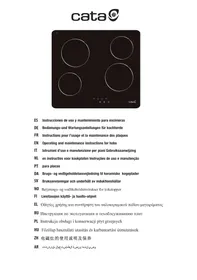
TD6003NBK - Ceramic hob CATA - Free user manual and instructions
Find the device manual for free TD6003NBK CATA in PDF.


| Product type | Induction ceramic hob |
| Brand | CATA |
| Model | TD6003NBK |
| Number of cooking zones | 4 |
| Control type | Touch Control (capacitive sensors) |
| Power levels | 9 (1 to 9) |
| Double circuit function | Yes (on some zones) |
| Residual heat indicator | Yes (displays "H") |
| Automatic shut-off | Yes (time limit depending on power) |
| Child safety (key lock) | Yes |
| Accidental start protection | Yes (stops after 10s of continuous press) |
| Power supply | 230 V ~ 50/60 Hz (according to rating plate) |
| Maximum power | 6400 W or 3600 W (adjustable) |
| Electrical connection | Requires professional installation |
| Surface material | Ceramic glass |
| Maintenance and cleaning | Glass scraper + suitable product, no abrasive sponges |
| Audible signal | Yes (keys, error) |
| Appliance dimensions (W x D) | Approximately 59 x 52 cm (standard estimate) |
| Weight | Approximately 10 kg (estimate) |
| Protection class | Class I (grounding required) |
Frequently Asked Questions - TD6003NBK CATA
User questions about TD6003NBK CATA
0 question about this device. Answer the ones you know or ask your own.
Ask a new question about this device
Download the instructions for your Ceramic hob in PDF format for free! Find your manual TD6003NBK - CATA and take your electronic device back in hand. On this page are published all the documents necessary for the use of your device. TD6003NBK by CATA.
USER MANUAL TD6003NBK CATA
THIS APPLIANCE IS DESIGNED FOR DOMESTIC USE ONLY. THE MANUFACTURER SHALL NOT IN ANY WAY BE HELD RESPONSIBLE FOR WHATEVER INJURIES OR DAMAGES ARE CAUSED BY INCORRECT INSTALLATION OR BY UNSUITABLE, WRONG OR ABSURD USE.
The manufacturer declares that this product meets all the essential requirements for low voltage electrical material set out in European directive 2014/35/EU and for electromagnetic compatibility as required by European directive 2014/30/EU.
PRECAUTIONS
- When one makes use of heating elements, we advise receptacles with flat bottom having same diameter or lightly higher than that of the hot area.
- Avoid overflows of liquid, therefore when boiling has happened, or in any case when liquid is heated, reduce the heat supply.
- Don't leave the heating elements on without receptacles on the top or with void pots and pans.
- Do not use any alluminium foil or place any foodstuffs wrapped in alluminium foil directly on the hob - do not place any metal objects such as knives, forks, spoons and lids on the hob surface as they will heat up.
- When cooking in a non-stick pan without seasoning, do not exceed 1-2 min
utes' pre-heating time.
- When cooking food that may easily stick, start at a low power output level and then slowly increase while regularly stirring.
- If the surface of the hob is damaged, immediately disconnect the appliance from the mains to prevent the possibility of electric shock.
- Never use a steam cleaner to clean the hob.
- The appliance and accessible parts may be hot during operation.
- Take care to avoid touching the heating elements.
- Children less than 8 years of age should be kept at a safe distance unless continuously supervised.
- This appliance may be used by children aged 8 or over and by persons with reduced physical, sensory or mental capabilities or lack of experience and knowledge, if they are supervised and have received suitable instructions on safe use of the appliance and understand the dangers involved. Children must not play with the appliance. User maintenance and cleaning should not be carried out by children except under constant supervision.
- Cooking with grease or oil may be dangerous and cause a fire if left unattended. NEVER try to extinguish a fire with water. Rather, disconnect the appliance and then cover the flames with a cover or sheet, for example.
- Fire hazard: do not store elements on
cooking surfaces.
- Only counter top protectors designed for use with the cooking appliance and listed in the manufacturer's instructions should be used as suitable protection for the counter top incorporated in the appliance. Use of unsuitable protectors may cause accidents.
- WARNING: Accessible parts will become hot when in use. To avoid burns and scalds children should be kept away.
Insert in the fixed wiring a mean for disconnection from the supply mains having a contact separation in all poles that provide full disconnection under overvoltage category III conditions, in accordance with the wiring rules. The plug or omnipolar switch must be easily reached on the installed equipment. This appliance is not intended to be used via an external timer or a remote control system.
The manufacturers decline any responsibility in the event of non-compliance with what is described above and the accident prevention norms not being respected and followed.
To avoid all risk, if the power cable becomes damaged, it must only be replaced by the manufacturer, by an authorised service centre, or by a qualified electrician.
User's Instructions
Installation
All operations relative to installation (electric connection) should be carried out by skilled personnel in conformity with the rules in force.
As for the specific instructions see part pertaining to installer.
Use TOUCH CONTROL HEATING ELEMENTS
Touch sensitive keys
All operations can be performed using touch sensitive keys (capacitive sensors) located on the front of the control board; each key has a corresponding display. All actions are confirmed by an audible signal.
TOUCH CONTROL (Fig. 2)
1 ON/OFF
2 Minus -
3 Plus +
4 Double / Triple Circuit
5 Cooking zone
6 Setting level display
7 Dual circuit pilot light
Switching the Touch Control on/off
After mains voltage is applied, the touch control initialises for approximately one second before it is ready for use.
All displays and LEDs flash for approximately one second after resetting. Once this period is complete, all displays and LEDs switch off and the touch control is in standby mode.
Press the ON/OFF (1) button to switch the touch control on. The cooking zone displays indicate "0". If a cooking zone is in "hot" (high temperature) mode, the display will alternately indicate "H" and "0".
After switching the touch control on, it will remain active for 20 seconds. If no cooking zone is selected, the touch control automatically switches back to standby mode.
The touch control can only be switched on by pressing the ON/OFF (1) button.
Pressing the ON/OFF (1) button at the same time as other buttons will have no effect and the touch control will remain on standby.
The touch control can be switched off at any time using the ON/OFF (1) button. This is even the case when the control has been locked by the child safety feature.
The ON/OFF (1) button always takes priority in the switching off function.
Automatic off
Once switched on, the touch control automatically switches off after 20 seconds of inactivity. After selecting a cooking zone, the automatic off time is divided into 10 seconds, after which the zone is deselected and, after another 10 seconds, the touch control switches off.
Switching a cooking zone on/off
If the touch control is switched on, the cooking zone can be selected by pressing the button (5) of the corresponding zone.
The display (6) of the zone selected lights up, while the remaining displays are dimmed. If the cooking zone is "hot", "H" and "0" are alternately displayed.
Press the PLUS (3) or MINUS (2) button to select a setting and the zone will begin to heat up.
Once the cooking zone has been selected, the setting can be selected by keeping the PLUS (3) button pressed down. The setting begins at level 1 and increases by 1 level every 0.4 seconds. When setting "9" is reached, the setting will not be changed further.
If the setting level has been selected using the MINUS (2) button, the start level is "9" (maximum level). Keep the button pressed down to lower the active level by 1 every 0.4 seconds. When setting "0" is reached, there will be no further setting changed. The setting can only be changed by pressing the MINUS (2) or PLUS (3) button again.
Switching a cooking zone off
Select the zone to be switched off using the corresponding button (5). The display (6) of the zone selected lights up, while the remaining displays are dimmed. Press the PLUS (3) and MINUS (2) buttons at the same time and the setting level of the zone is changed to 0. Alternatively, the MINUS button (2) can be used to reduce the setting level to 0.
If a cooking zone is "hot", "H" and "0" will be alternately displayed.
Switching all cooking zones off
Press the ON/OFF (1) button to immediately switch off all zones at any time. In standby mode, an "H" is displayed in all cooking zones that are "hot". The remaining displays will be switched off.
Setting level
The cooking zone can be set to 9 levels that are indicated by the numbers "1" to "9" on the seven-segment LED displays (6).
Residual heat indicator
This informs the user that the glass is at a dangerous temperature in the event of touching the area located around the cooking zone. The temperature is determined by a mathematical model and any residual heat is indicated by a "H" on the corresponding 7-segment display.
Heating and cooling are calculated based on:
The selected setting level (between "0" and "9")
The ON/OFF time.
After switching off the cooking zone, the corresponding display will indicate "H" until the temperature in the zone has dropped below the critical level (≤ 60^)
Automatic off function (operating time limitation)
In terms of the setting level, if no operation occurs each cooking zone switches off after an established maximum time.
Each operation in the cooking zone condition (using the PLUS (3) and MINUS (2) or dual zone) restarts the maximum operating time of the zone by resetting it to its initial value.
Protection against unintended switching on
- If the electronic control detects a button being held down for approx. 10 sec. it will switch off automatically. The control sends out an audible error signal to warn the user that the sensors have detected the presence of an object. The displays indicate error code "ER03". If the cooking zone is in "hot" mode, "H" will be indicated alternately on the display with the error signal.
- If no cooking zone is activated within 20 seconds after switching on the touch control, it will return to standby mode.
- When the control is switched on, the ON/OFF button has priority over all other button and, therefore, the control can be switched off at any time, even when several buttons are pressed at the same time or a button is kept held down.
- In standby mode, no effect will be caused by buttons being kept held down. However, before the electronic control can be switched back on, it has to detect that no button is pressed down.
Button lock (child safety feature)
- Child safety feature:
Button lock:
To activate the child safety feature after having switched on the Touch control, press de rear left cooking zone selection button at the same time as the MINUS button (2) for 3 seconds, followed by just the rear left cooking zone selection button. An "L" standing for LOCKED (child safety feature preventing unintended switch on) will be indicated on all displays. If a cooking zone is in "hot" mode, "L" and "H" will be alternately displayed.
This operation must take place within a 10 successive seconds and no button other than those described must be pressed. Otherwise, the sequence will be interrupted and the hob will not be locked.
The electronic control remains locked until it unlocked by the user, even if it has been switched off and back on meanwhile. Not even touch control resetting (after a voltage drop) will interrupt the button lock.
Cancelling the button lock:
After switching the touch control on, the child safety feature can be disabled. Press the rear left cooking zone selection button and the MINUS button (2) for 3 seconds, followed by just the MINUS button (2). If all operations are carried out in the right order within 10 seconds, the button lock will be cancelled and the touch control switched off. Otherwise, the sequence will be considered incomplete and the touch con
trol will remain locked and will switch off after 20 seconds. Switch the touch control back on using the ON/OFF button and all displays will be indicate "0", the decimal points will flash and the touch control will be ready for cooking. If a cooking zone is in "hot" mode, "0" and "H" will be alternately displayed.
Control of multiple circuits
Hobs without double or triple circuit, see Fig. 2A
Hob with double zone. (Fig. 2B)
When a dual cooking zone is activated, the two circuits are switched on at the same time. Activation of the external circuit is indicated by a pilot light (7) in the bottom right corner of the display. If only the internal circuit is to be switched on, the external circuit can be switched off using the dual circuit button (4). Press the dual circuit button (4) again to re-activate the external circuit and the corresponding pilot light (7) will switch on.
Sound signal (buzzer)
The following activities are indicated by a buzzer during use:
-
Normal button pressing by a short sound.
-
Buttons kept pressed down for more than 10 sec. by a long, intermittent sound.
Maintenance (Fig. 4)
By means of a scraper immediately remove any aluminium foil bits, food spills, grease splashes, sugar marks and other high sugarcontent food from the surface in order to avoid damaging the hob.
Subsequently clean the surface with some towel and appropriate product, rinse with water and dry by means of a clean cloth. Under no circumstance should sponges or abrasive cloths be used; also avoid using aggressive chemical detergents such as oven sprays and spot removers.
Installer's Instructions
Installation
These Instructions are for the qualified technician, as a guide to installation, adjustment and maintenance, according to the laws and standards in force. These operations must always be carried out when the appliance has been disconnected from the electric system.
Positioning (Fig. 5)
1 Front view
2 Front side
The appliance can be fitted into a working area as illustrated on the figure. Apply the seal supplied over the whole perimeter of the working area.
Electrical connection
Prior to carrying out the electrical connection, please ensure that:
the plant characteristics are such as to follow what is
indicated on the matrix plate placed at the bottom of the working area;
-
that the plant is fitted with an efficient earth connection, following the standards and law provisions in force.
-
The earth connection is compulsory in terms of the law.
Should there be no cable and/or plug on the equipment, use suitable absorption material for the working temperature as well, as indicated on the matrix plate. Under no circumstance must the cable reach a temperature above 50^ of the ambient temperature.
Power Limitation (TN 604/A)
-
Swith on power, and keep the hob off.
-
Press the zone selecting key (5) and (8) together for 3 seconds. The indicators will show "P" and "S".
-
Press (2) key,indicator will show "E", "P" and "S".
-
Press (3) key,indicator will show "E", "t", "P" and "S".
-
The press key (2) and (3) together, the indicators will show the maximum power value "XX00".
-
Press the key (3) alternatively, you can set the maximum output power to 6400W or 3600W alternatively.
-
Press key (2) and (3) together again will save the setting and exit the setting.
After finishing setting, the MCU can remember the power limited setting even cut off the power.
If the power off or turn off the hob during setting, the setting value will not save;
It can be Exit the setting by press the on/off ket or press the key (2) and (3) together.
QUESTO PRODOTTO è STATO CONCEPITO PER UN IMPIEGO DI TIPO DOMESTICO. IL COSTRUTTORE DECLINA OGNI RESPONSABILITA NEL CASO DI EVENTUALI DANNI A COSE O PERSONE DERIVANTI DA UNA NON CORRETTA INSTALLAZIONE O DA USO IMPROPRIO, ERRONEO O ASSURDO.
OBS!-FORHOLDSREGLER-ADVARS-LER
Knappsparr (sakerhetsmekanism for barn)
Hnctpykun nn JII HIOJIb3OBaTeJ MoHTaK
Bce Opeaunn IO MOHTaKy (JleKtpnueckne IIOKJIIOUeHnn) IOJIKHbI PPOIN3BOJITbC TOLKBO KBAJINΦHIIPOBAHHBIM IepcoHaIOM H COOTBeCTBHN C cyIeCTBYOIHMMH HOPMATBHAMN.
B Pa3JIe "IJIa MOHTaXHnKa" IIpHBeJeHbI BCE IIOJPO6-HOCTN MOHTaJa.
IIpHMeHeHHe 3JIEMEHTbI HAFPEBAHHIO TOUCH CONTROL (yipabJIeHne IprKoCHOBehm)
KJIaBnHaJIeKOrO HaKaTHa
KJIaBnIHJIeKOrO HauKaTINH (HIN ceHCopbI TIIIa eMKocCTHbIX DAuHTKOB) IpeDHa3NaHeHb IJIA BbIIOJIHeHH JIo-6oI ONEpaHH N paCIOJIKeHb HaΦoHTaJIbHOJ uacth KAPToKN, IIpHcM IJIa KaDIOI KAPToKN IIpeDyCMOTpeOH COOTBeTCTByUoiN DInCIJIeN. BblIOJIHeHH JIo6oR DeHCTBN IOITBepKJaAeTc 3BYKObIM CHrHaJOM.
CEHCOPHOE YIIPABJIEHNE (Pnc.2)
1 BkJIIOueHHe/BBKJIIOueHHe—«BKJI/BbIKJI»
2 KhoIIka «MHHYC» -
3 KhoIIKa «IJIIOC» +
4Двоинoi/Tpoинoi KOHTyp
5Bb6opBapouHoi3OnbI
6Дисплей уровь мошноctн
7 INHINKAtOp BKJIIOueHnI JBOHOHO 3OHBnHaIpeBa
BkIIOueHHe N BbIKIOueHHe ceHcOpHOro ynpabJIeHHa
IocJIe IIOKJIIOHcEHnK 3JIeKTPoCeTn cEhCopHoe yIpaBJIeHHe HHHuaJIH3HpyETcI pIIMepHO B TeueHHe 1 c.
Ппг ВКЛIOUeHINI BCE IINCIJIEN I INHДИKaTOpbl MHRaHTB TceHHe IIN6JIIN3HTeJIbHO OIOH OcKHyIbI. IocJIe TOrO KAK BCE IINCIJIEN I INHДИKaTOpbl IORacHyT,ФyHKIIIN CEHCOPHOrO yIpaBJIeHnCTaHYt IOCTyIHbIM NIA HcIOJIb-30BAHNi
Дяв BKЛЮЧЕНЯ ceHcOpHOrO yIpaBJIeHnHaJKMHTe KHOIIky BKJIIOUChEHNr (1).
HaIINCIIIEAXBAPOuHbIX30HIOIaBHtC3NaueHHe 0 .EcINKakai-JIN6oH3BAPOuHbIX30HrOpTuA,HaIINCIIIE6dyTIOIepemEHNOOTo6paKaTaBcA H H 0
Cehcnphoe yIipabIeHne octaetc aKTHBbIM B TeueHHe 20 cekyHII IIOcJIe BkIIIOUeHH. Ecln B TeueHne 3TOrO BpeMeHN He IpONCXoIHNT BbIbopa 3OHb HaRpeBaHH, ceHcnphoe yIipabIeHne abTOMaTHueckN IIepexOIH NT BpeKHM OKnDAHH.
CeHcOpHoe ynpabJIeHne BkJIIOHaeTcI IIpH HaKaTHN ToJIbKO Ha OJHy KHOIIKy BkJIIOHeHH (1).
EcIN OHOBpemHNO C KHOIIKO BKIIIOueHnI (1) IPOIN3BO- DIITc HAKaTHe HA KaKYIO-JIN6O IpyrYIO KHOIIKy, cEHcOp-HOE yIPaBJIeHHe OCTaeTcB PexHMe OKiDaHH.
BbKIOUHHe cEHcOpHOrO yIpaBJIeHH IPOIN3BOJNTc C IIOMOIIbTO ToJ Ke KHOKN. 3TO MOKHO cJeIaTb DaKe B TeX cIyAax, KOrDa yIpaBJIeHH 3a6IoKHOpBaHO OT eTei.
KHOIIKa BKVIOHcEHn (1) HMeET IINpHOpHTe T INPH BbIKHO-ueHH.
ABTomathueckoe BbIKJIOchHe
IocJIe BkJIIOueHnIy cTpoHCTBa ceHCOPHe ynpaJIeHne ABOTMAUChEckn BbIKIOHaTeCyepe3 20 cekyH, B cIyae OTCYCTBnA KAKOHJINo AKTHBHOCTN IOJIb3OBAteJIy. Ype3 10 cekyHIOcTe TOrO KaK BbIbpaHa BapOuHa 3OHa, BbIbOp 3ObHI bOTMeHReTc, a EIEpe3 10 cekyH, BblKIOHaTeC eHCOPHe ynpaJIeHne.
BkIIOueHHe/BBKIOueHHe BapOuHO30HbI
IIpn BKJIIOHcEHOM ceHCOPHom yIpaBJIeHHN MOKHO BbI-6paTb JIOOy BOAPoHy 3OHy HaKaTHem KHOIIKN BbIOopa COOTBTCTByIOUIe 30HbI (5).
ДисПлй Вьбранов 30нь (6) 3aRopaetcshЛь gee, a octaJIbHbI DeNcПлeN rachyT. EcJIN 3OHa HarpeBaetc, to IIoocheJIHO OTOБраЖaHTcchMBOJIb «H» N «O».
HaxHMaJ KHOIIKN IJIIOC 3) H MHHYC 2),MOKHO BbIbopaTb Heo6xoImbI yPoBeH MoIHOCTH, H 30HaHHeT HaIpeBaTbcJ.
Bb6paB BapOHyIO 30Hy, MoKHO HacTpoHb yPoBeHb MoIIOCTH, HaKHMa KHOIIKy «IJIIOC» (3); HauHHa c
yobHn 1 yBéHueHHe Ha OINH IIaIg 6yIeT IPOHCxOHTb KaKJIbE 0,4 c. YpOBeHb 9 YBIAETcRA MAKCmAJbHbIM yobHem MOIHOCTHN.
IIpn HnactpoRke ypOBH MaOIOHocTH IIpn IIOOMIIN KHOIKN (MmHVC)2) IepBOHaJIbHbIy yPOBEH 6yIET paBeH 9 (MAKcHMaJIbHbIy yPOBEH).Ecln UdepKHBATb 3Ty KHOIKN JAKaTOI, yPOBEH MoIOHocTH 6yIET ChNkAITbc Ha OIIHN KAKJIbIe 0.4 cKeYHbIy. YPOBEH 0 JaJIaETcM MHmAbJIbHbIM yPOBHeM MoIOHocTH.ДЯpergUPOBAHHy yPOBHe MIOOHCTNI Heo6XoJIMMO CHOBA NaKaTb KHOIKN «IIJIIOC» (2) HIn «MmHYC» (3).
BbIKJIIOueHHeBaOpHoi 30hI
BbI6epHTe 30Hy, KOtOpTu Heo6xOJHMo OTKJIOuHTb, IIpN IIOOMU COOTBetCTByIOUeH KHOIIKN (5). IINcIIJIe BbI6paHNOI 30HbI (6) 3aIopNTcA ChJIbHee, a OcTaJIbHEI dNcIIJIe IIOrACHT. IIpi OJIOHBpeMeHHOM HkaTHiN KHOIIOK «JIIOHC» (3) I N«MHVC» (2) ypoBeHb MoIHOCTH bIb6paHNo 30HbI ycTaHaJIbHaTeC Ta «0». B KaHeCTBe aJIbTePHTAHbMb MOxHO HcIOJIb3OBaTb KHOIIK«MHVC» (2), TTO6bI CHn3NTb ypoBeHb MoIHocTH Do «0».
EcJIKakaj-JIN60H3BapOHybIX30nTogPrya,HaDcIJIe 6yUTPiOpepemHNOOTo6paKaTbC8(H)H<0>
BbIKJIIOueHHe BcEx BApOuHbIX 30H
HaKaB KHOIIky BKJIIOueHnI (1) MoKHO cpa3y BbIKJIOUHTb BCE BapOuHbIe 30HbI. B peKHMe OKnJaHnHa dNcIIJIece BCex ropauHx BapOuHbIX 3OH oTO6paKaetc cHMBOJI «H> BCE ocTajbHbIe IncIIJIen 6dyT oTKJIIOueHbI.
YpOBeHb MoIIOHOCTN
Дян actpoiKN MOHIOCTN BAPoHbIX 3OH IIpeIyCMOTpeHbI 9 yOpBHei, KOTOpIe O6O3HaauTcIuHpamn OT 1do 9Ha7-ceRMENTbIX cBeToIHOIDbIX IINCHIIeex (6).
Hdkatop octatoHoroTeIIa
3TOT HINHKAtop IpeyIpeJaeTIOJIb3OBeTJIa 06 ONaC-HCTN IIpHKoCHOBeHHK KepaAMnueckoN IOBepxHOCTN BApouHNO30Hb, MHeIOeII BbICOKYIO TEmNEpATpyr.3Ha-ueHHe TEmIEpaTpybO IIpeJeJIeTcR HCXODI N3 MaTeMaTHNeCKoM MoJIeN, IN CJIyuae HAIHNHcOtAToHOrTO TEJIla HA COOTBETCTBYUoiEM 7-ceMeHTHom DInCIJIeE OTO6paKaTecra CHMBOJI
CteIeHb HaReBa H OXJIaXJDeHnPaCCHTbIBaetcHaOHOBE CJIeIyUIOHX IapAMETPOB:
- BbI6paHnHbI yPoBeHb MoIIOHOCTH (OT 0 Do 9);
BpeMa pa6oTbI.
IocJIe BbIKJIOueHnB aOpOHO 30HbHa nHcIIe 6yTeT OTO6paKaTbcra CmBOJI «H》,Ioka paCpuTHa TEmpeApTy pa 30Hb He OINyCTHTcra IIO 6e3oIIaChORo yPOBnA (≤ 60^) B COOTBeTCTBNH C MaTeMaTHueCKo MOnJIbIO.
Функия abTOMaTHUeCKOrO oTKJIIOUeHn(oRpaHHueHnE BpeMeHH pa60tBJ)
B 3aHcHMoCTN OT yCTaHOBJeHHORO yOBHRA MoIHocTH KAKdA BapOuHa 30Ha OTKJIIOuaETC IIO HCTeueHHI ONPeJdeJIeHHORO BpeMeHH, ecJIN B TeueHne 3aJaHHORO IIpOMeKytKa BpeMeHH 3Ta 30Ha He peYJHPOBaJIOcb.
KaJIOe H3MeHHeHcOCToHnH3OHbI pIN IHOOMUHN KHOIOK «IIIOC》(3),«MHYUC》(2) IN KOHKN BkJOHOeHHN IBOHn 3OHbI HaPBeA IIpHBOiHT K TOMy, YTO IpeJIb-Hoe Bpempa60tby HauHHaet OTCuHTbIbATbc83aHOBO.
3aHTa oT cIyauHoro BKJIIOueHn
-ПриДЛИТЕЛБHOMнжКатинHaKHOIIKY(ДOLьIIE10c)HArpeB6yIeT ABOTOMATUHECKN OTKJIIOUeH.ΕСЛНHa ceHCOPHOH KHOIIKE HAOJONITc KaKoi-JINHO ppeIMET, yCTpoIcTBO H3dA T 3ByKOBOB CHnHAI OIIH6KN.ПriN 3ToM Ha DnICJIeE OTObpa3tC KoI OIIH6Kn «E R 03).ΕСЛН 3OHa rOpIaYa,Ha NICIJIeE 6bYt ПОпepeMeHNo OTObpaKaIbCS KOn OIIH6KN 和CHMBOJ «H».
BcIyueae ecINB TeueHne 20 ckyHII IIOscJIe BKJIIOUeHnIceHCOPHOYnpaBJIeHnI He 6yIeT AKTHBnPOBaHa HN OJHaH3 BApOuHbIX 3OH, IIJIHTa ABTomATHueckn IpeKJIIOHTCBy PexHM OKHdaHH.
BkJIOUeHHom ceHCopHom yIpaJIeHHN KHOIIKA BkJIIOUeHHN IMeET IIINOPHTET NaI BCEMN OCTaJIbHMI NKOIIKAMN. 3TO IO3BOJAE TBYKIIIOHTB IIITy B JIO6OBI MOMEHT, DaJIe B CJYae OIOHBpeMeHHO IIN IIITeJIb-HORO HAKaTHI HECKOJIbKHX KHOIIOK.
BpeKHMe OKHJaHnI IIpN IJIHTeJIbHOM HauKaTHN KHOIIOK He IIPOHCXODHT HNKaKHX N3MeHeHNI. B JIO6OM cJyueae DITTO YTO6bI CHOBA BKJIIOHTb 3JEkTPOHHoe YIpPABJIeHne, y6eHNTeCb, YTO6bI HN OJHa KHOIIKA He 6blJa HauKaTa.
B TOM cIyae, ecII IJIa anIapata He IIpeYcMOTpeH IIHyp H - HII pO3ETKa BKJIIOueHn, Heo6XoJHMo HCIOJB-3OBATb
MaTepeHaJI, IIINHOIbHbI IJIa 3NaueHnI 3NaueHnI 3NaueHnI 3NaueHnI 3NaueHnI 3NaueHnI 3NaueHnI 3NaueHnI 3NaueHnI 3NaueHnI 3NaueHnI 3NaueHnI 3NaueHnI 3NaueHnI 3NaueHnI 1111111111111111111111111111111111111111111111
3aIIpeIaTcHcIOJIb3OBAITbIHypBcIyaeeroIpeIepBaHnIprnIpeBbIeHHN 50^ TeMIIepaTyprbOkpyKaioIeuI cpebl.
OrpaHnueHHe MoHIOCTn (TN 604/A)
1.ПОДКЛIOHHTe JIeKTPoHITaHHe,HO He BKJIIOHaIte BaPocHyIO IaHJIb.
2. YdejKnBaIte HkaKaTbIMN KHOJIky BbIbopa 3ObI (5) I (8) OJIOHBpeMeHNO B TeueHne 3ceKyH.I. Ha IHIIKAATopax OTO6pa3NTcA“P”I“S"
3. HαKMHTe KHOIIky (2), Ha INHДИΚaTOpe OTO6pa3HTcY “E”, “P”и“S”.
4. HαKMHTe KHOIIky (3), Ha HNДИКaTOpe OTo6pa3HTcY “E”, “t”, “P”и“S”.
5. HαχMITE KHOIky (2) n (3) OJIOHBpeMeHNO, HA INJKA-topax OTObpa3HTc8 3NaueHeNE MaKCHMaJIbHOI MOIIHOCTN "XX00".
6.Путем HeOДHOKpaTHORO HabaTHЯ HKONKY (3) BbMOKete yCTaHaBJIHbATb 3HaueHHe MAKcHMaJIbHOI BbIXODHOI MOIIHOCTH Ha yPoBHe 6400BT HIN 3600BT.
7. OJIOBpeMeHNO HauKMHTe Ha KHOIky (2) n (3) eIe pa3, YTO6bI COXpaHHTb IapAmETpbI H BIIITN Hx peKHMa HAcTPOHN
XocJIe 3aBepWeHnHaCTpOKn MHKpOKOHtPoJIIEp MoKET XpaHHTb 3aHuEHeN OgraPunHeHn MOIHOCTn DaKe IocJIe IOJIHOrOTKJIIOUeHN HITAHN.
EcJIN BbIKIOOHtB BApOHyIOIaHeJb HJIN IOJIHOCTbHO OTKIOOHtB 3JIeKTPOIIHTaHne B IIpoIecce HAcTPOKN,TO 3aJaHHoe 3HaueHene He CoXpaHNTc;
H3 peKHMa HAcTPOiKN MoKHO BbIHTH, HaKaB KHOIIKy BKJI/BBIKJI IIN OJIOHBpeMeHHO HaKaB KHOIIKy (2) H3.
PRODUKT TEN ZAPROJEK TOWANY ZOSTAŁ DO UZYTKU W GOSPODARSTWIE DOMOWYM. PRODUCENT NIE PONOSI ZADNEJ ODPOWIEDZIALNOŚCI ZA EWENTUALNE SZKODY RZECZOWE I OSOBOWE POWSTAI K SWSKUTEK JEGO NIEPRAWIDŁOWEJ INSTALACJI ORAZ NIEWLAŠCIWEGO, BLEDNEGOLUB NIEUZASADNIONEGO UZYTKOWANIA.
$$ \left. \right.\left. \right.\left. \right.\left. \right.\left.\left.\left.\left.\left.\left.\left.\left.\left.\left.\left.\left.\left.\left.\left.\left.\left.\left.\left.\left.\left.\left.\left.\left.\left.\left.\left.\left.\left.\left.\right.\right.\right.\right.\right.\right.\right.\right.\right.\right.\right.\right.\right.\right.\right.\right.\right.\right.\right.\right.\right.\right.\right.\right.\right.\right.\right.\right.\right.\right. $$
$$ \dots \text {l} g \quad \dot {j} \quad \dot {3} (3) \quad g (2) \quad \text {c o l l a s} $$
J 1
(3) 1. _D _D _D _D _D _D (7) _D _D _D _D _D
jlll jll jll jll l l l l l l l l l l
a a a a a a a a a a a a a a a a a a a a
y 10 j
aebaa
()
-
jaiwail baiiail ayaiy gijiy jaiil jie jaiii a
111 10 1
jipnall aaii jil 1b i o jil jll jll
ER03"lbiljorjbg.1ggljlaa
a a a a a a a a a a a a a a a a a a a a a a a a a a a a a a
yill kll Jall jaiil aal lal y
1
(TOUCH)
c
(4) a,b,c,d is a real number.
Cio 1s aalbll gaiy bll ygacgss
A
ON/OFF
-
+
4.2016 5/12-5
60 100
i1
42000000000000000000
1
i 1
a jll aal e jg y dall caii jd jy
jgs jzil 1
"Jaiia" all gbbg baa j1.0" all gbbg baa j2.0" all aaiia Jy jik kaii jay. jaiy aiia jie "0" and H" yjbjy (aiee)
J (Stand By)
.(1) jjge baiallie bi jgik jaiil
(1) (Stand By)
Jb
jll jaiy aie yagj lal (1) jlll j
Jus
gAaall gAaiaaJll aaiiIyI yIyIyIyIyIyIyIyIyIyIyIyIyIyIyIyIyIyIyIyIyIyIyIyIyIyIyIyIyIyIyIyIyIyIyIyIyIyIyIyIy
J 1 J 1 J 1 J 1 J 1 J 1 J 1 J 1 J 1 J 1 J 1 J 1 J 1 J 1 J 1 J 1 J 1 J 1 J 1 J 1 J 1 J 1 J 1 J 1 J 1 J 1 J 1 J 1 J 1 J 1 J 1 J 1 J 1 J 1 J
ggl aolz jso abwgy gl axiab 5alll gbrb ngsy bgi ydi jld lcl dlaic .blgso gjwddl oJd
AR
1 1
Jd jai Jaaui
ajglall Jy
g 12
alai j algal aia jyai
sill g u j 4uLi
g 1
g jll l l l l l l l l l l l l l l l l l l l l l l l l l l l l l l l l l l l l l l
2006/95/CEE
2004 15 2004/108/CEE
山
Egblb 103 no xLg gglgssg2aaglgealll aabaa cuglo plxuwl yzbiy dilgolpulw
L_ C
a a a a a a a a a a a a a a a a a a a a a a a a a a a a
aJg JgJgJgJgJgJgJgJgJgJgJgJgJgJgJgJgJgJgJgJgJgJgJgJgJgJgJgJgJgJgJgJgJgJgJgJgJgJgJgJgJgJgJgJg
a 1
Lgaiwui jiuji jiu bawl jie aabiy gao yuigouy iuyu wll Jto ayaeobplauoyi y
a a a a a a a a a a a a a a a a a a a a a a a a a a a a a a
Lgblbl 1
a. a. a. a. a. a. a. a. a. a. a. a. a. a. a. a. a. a. a. a. a. a. a. a. a. a. a. a. a. a. a. a. a. a. a. a. a. a. a. a. a. a. a. a. a. a. a. a. a. a. a.
aall aai lal all abio plal y
J 1
- THIS APPLIANCE IS DESIGNED FOR DOMESTIC USE ONLY. THE MANUFACTURER SHALL NOT IN ANY WAY BE HELD RESPONSIBLE FOR WHATEVER INJURIES OR DAMAGES ARE CAUSED BY INCORRECT INSTALLATION OR BY UNSUITABLE, WRONG OR ABSURD USE.
- PRECAUTIONS
- User's Instructions
- Installation
- Use TOUCH CONTROL HEATING ELEMENTS
- TOUCH CONTROL (Fig. 2)
- Switching the Touch Control on/off
- Automatic off
- Switching a cooking zone on/off
- Switching a cooking zone off
- Switching all cooking zones off
- Setting level
- Residual heat indicator
- Automatic off function (operating time limitation)
- Protection against unintended switching on
- Button lock (child safety feature)
- - Child safety feature:
- Button lock:
- Cancelling the button lock:
- Control of multiple circuits
- Sound signal (buzzer)
- Maintenance (Fig. 4)
- Installer's Instructions
- Positioning (Fig. 5)
- Electrical connection
- Power Limitation (TN 604/A)
- QUESTO PRODOTTO è STATO CONCEPITO PER UN IMPIEGO DI TIPO DOMESTICO. IL COSTRUTTORE DECLINA OGNI RESPONSABILITA NEL CASO DI EVENTUALI DANNI A COSE O PERSONE DERIVANTI DA UNA NON CORRETTA INSTALLAZIONE O DA USO IMPROPRIO, ERRONEO O ASSURDO.
- OBS!-FORHOLDSREGLER-ADVARS-LER
- Knappsparr (sakerhetsmekanism for barn)
- Hnctpykun nn JII HIOJIb3OBaTeJ MoHTaK
- IIpHMeHeHHe 3JIEMEHTbI HAFPEBAHHIO TOUCH CONTROL (yipabJIeHne IprKoCHOBehm)
- CEHCOPHOE YIIPABJIEHNE (Pnc.2)
- BkIIOueHHe N BbIKIOueHHe ceHcOpHOro ynpabJIeHHa
- ABTomathueckoe BbIKJIOchHe
- BkIIOueHHe/BBKIOueHHe BapOuHO30HbI
- BbIKJIIOueHHeBaOpHoi 30hI
- BbIKJIIOueHHe BcEx BApOuHbIX 30H
- YpOBeHb MoIIOHOCTN
- Hdkatop octatoHoroTeIIa
- Функия abTOMaTHUeCKOrO oTKJIIOUeHn(oRpaHHueHnE BpeMeHH pa60tBJ)
- 3aHTa oT cIyauHoro BKJIIOueHn
- OrpaHnueHHe MoHIOCTn (TN 604/A)
- PRODUKT TEN ZAPROJEK TOWANY ZOSTAŁ DO UZYTKU W GOSPODARSTWIE DOMOWYM. PRODUCENT NIE PONOSI ZADNEJ ODPOWIEDZIALNOŚCI ZA EWENTUALNE SZKODY RZECZOWE I OSOBOWE POWSTAI K SWSKUTEK JEGO NIEPRAWIDŁOWEJ INSTALACJI ORAZ NIEWLAŠCIWEGO, BLEDNEGOLUB NIEUZASADNIONEGO UZYTKOWANIA.
- AR
Brand : CATA
Model : TD6003NBK
Category : Ceramic hob