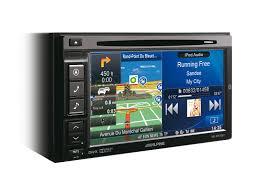
INE-W970BT - Car radio ALPINE - Free user manual and instructions
Find the device manual for free INE-W970BT ALPINE in PDF.



| Product type | Car stereo with GPS navigation |
| Brand | ALPINE |
| Model | INE-W970BT |
| Screen size | 6.1 inches |
| Display type | Active matrix TFT LCD, 1,152,000 pixels (800x3x480) |
| Lighting | LED |
| Audio formats | MP3, WMA, AAC |
| Video formats | DivX (via USB) |
| Bluetooth | V2.1+EDR, profiles HFP, OPP, PBAP, A2DP, AVRCP |
| GPS | Frequency 1575.42 MHz, sensitivity -130 dB max |
| FM tuner | Range 87.5-108 MHz, sensitivity 8.1 dBf |
| MW tuner | Range 531-1602 kHz |
| LW tuner | Range 153-281 kHz |
| Output power | 50 W x 4 (max) |
| Audio output voltage | 4000 mV/10 kΩ |
| Power supply | 14.4 V DC (11-16 V allowable) |
| Operating temperature | -20 °C to +60 °C |
| Weight | 2.25 kg |
| Main functions | GPS navigation, Bluetooth hands-free, CD/DVD player, USB, iPod/iPhone, FM/MW/LW radio |
| Maintenance and cleaning | Use a soft, dry cloth. Do not use solvents. |
| Safety | Do not disassemble the device. Use fuses of the appropriate amperage. Installation by a professional. |
| Spare parts and repairability | Contact an authorized Alpine dealer or a service center. Provide the serial number. |
| General information | Made under Dolby license, DivX compatible, Bluetooth SIG. © 2012 Nokia, etc. |
Frequently Asked Questions - INE-W970BT ALPINE
User questions about INE-W970BT ALPINE
0 question about this device. Answer the ones you know or ask your own.
Ask a new question about this device
Download the instructions for your Car radio in PDF format for free! Find your manual INE-W970BT - ALPINE and take your electronic device back in hand. On this page are published all the documents necessary for the use of your device. INE-W970BT by ALPINE.
USER MANUAL INE-W970BT ALPINE
KPATKOE CIPABOCHOE PYKOBOCTBO
SKROCONA INSTRUKCJA DLA UZYTKOWNIKA
Made for

iPodiPhone
Works with
NOKIA

Bluetooth





DOLBY DIGITAL
DIVX MP3 AAC

Contents
WARNING 2
CAUTION 2
Getting Started 3
Radio Operation 5
MP3/WMA/AAC Operation 5
DVD Operation 6
iPod/iPhone Operation (Optional). 7
USB Memory Operation (Optional) 8
Hands-Free Phone Control 9
Map Functions. 10
Navigation Menu. 10
Go to a Destination. 11
Installation 13
Connections 15
Specifications 17
IMPORTANT
Please record the serial number of your unit in the space provided below and keep it as a permanent record.
SERIAL NUMBER:
ISO SERIAL NUMBER: AL
INSTALLATION DATE:
INSTALLATION TECHNICIAN:
PLACE OF PURCHASE:
For details on all functions, refer to the Owner's Manual stored in the supplied CD-ROM. (As it is data CD, the CD cannot be used for playing back music and images on the player.) If required, an ALPINE dealer will readily provide you with a print out of the Owner's Manual contained in the CD-ROM.
WARNING

WARNING
This symbol means important instructions. Failure to heed them can result in serious injury or death.
DO NOT OPERATE ANY FUNCTION THAT TAKES YOUR ATTENTION AWAY FROM SAFELY DRIVING YOUR VEHICLE.
Any function that requires your prolonged attention should only be performed after coming to a complete stop. Always stop the vehicle in a safe location before performing these functions. Failure to do so may result in an accident.
KEEP SMALL OBJECTS SUCH AS SCREWS OUT OF THE REACH OF CHILDREN.
Swallowing them may result in serious injury. If swallowed, consult a physician immediately.
KEEP THE VOLUME AT A LEVEL WHERE YOU CAN STILL HEAR OUTSIDE NOISES WHILE DRIVING.
Excessive volume levels that obscure sounds such as emergency vehicle sirens or road warning signals (train crossings, etc.) can be dangerous and may result in an accident. LISTENING AT LOUD VOLUME LEVELS IN A CAR MAY ALSO CAUSE HEARING DAMAGE.
DO NOT DISASSEMBLE OR ALTER.
Doing so may result in an accident, fire or electric shock.
USE ONLY IN CARS WITH A 12 VOLT NEGATIVE GROUND.
(Check with your dealer if you are not sure.) Failure to do so may result in fire, etc.
USE THE CORRECT AMPERE RATING WHEN REPLACING FUSES.
Failure to do so may result in fire or electric shock.
DO NOT BLOCK VENTS OR RADIATOR PANELS.
Doing so may cause heat to build up inside and may result in fire.
USE THIS PRODUCT FOR MOBILE 12V APPLICATIONS.
Use for other than its designed application may result in fire, electric shock or other injury.
DO NOT PLACE HANDS, FINGERS OR FOREIGN OBJECTS IN INSERTION SLOTS OR GAPS.
Doing so may result in personal injury or damage to the product.
MAKE THE CORRECT CONNECTIONS.
Failure to make the proper connections may result in fire or product damage.
BEFORE WIRING, DISCONNECT THE CABLE FROM THE NEGATIVE BATTERY TERMINAL.
Failure to do so may result in electric shock or injury due to electrical shorts.
DO NOT SPLICE INTO ELECTRICAL CABLES.
Never cut away cable insulation to supply power to other equipment. Doing so will exceed the current carrying capacity of the wire and result in fire or electric shock.
DO NOT DAMAGE PIPE OR WIRING WHEN DRILLING HOLES.
When drilling holes in the chassis for installation, take precautions so as not to contact, damage or obstruct pipes, fuel lines, tanks or electrical wiring. Failure to take such precautions may result in fire.
DO NOT USE BOLTS OR NUTS IN THE BRAKE OR STEERING SYSTEMS TO MAKE GROUND CONNECTIONS.
Bolts or nuts used for the brake or steering systems (or any other safety-related system), or tanks should NEVER be used for installations or ground connections. Using such parts could disable control of the vehicle and cause fire, etc.
DO NOT INSTALL IN LOCATIONS WHICH MIGHT HINDER VEHICLE OPERATION, SUCH AS THE STEERING WHEEL OR GEARSHIFT.
Doing so may obstruct forward vision or hamper movement etc., and results in serious accident.
DO NOT FOLLOW ROUTE SUGGESTIONS IF THE NAVIGATION SYSTEM INSTRUCTS YOU TO PERFORM AN UNSAFE OR ILLEGAL MANEUVER, OR PLACES YOU IN AN UNSAFE SITUATION OR AREA.
This product is not a substitute for your personal judgment. Any route suggestions by this system should never supersede any local traffic regulations or your personal judgment or knowledge of safe driving practice.

CAUTION
This symbol means important instructions. Failure to heed them can result in injury or material property damage.
HALT USE IMMEDIATELY IF A PROBLEM APPEARS.
Failure to do so may cause personal injury or damage to the product. Return it to your authorized Alpine dealer or the nearest Alpine Service Center for repairing.
HAVETHEWIRINGAND INSTALLATIONDONEBYEXPERTS.
The wiring and installation of this unit requires special technical skill and experience. To ensure safety, always contact the dealer where you purchased this product to have the work done.
USE SPECIFIED ACCESSORY PARTS AND INSTALL THEM SECURELY.
Be sure to use only the specified accessory parts. Use of other than designated parts may damage this unit internally, or may not securely install the unit in place. This may cause parts to become loose resulting in hazards or product failure.
ARRANGE THE WIRING SO IT IS NOT CRIMPED OR PINCHED BY A SHARP METAL EDGE.
Route the cables and wiring away from moving parts (like the seat rails) or sharp or pointed edges. This will prevent crimping and damage to the wiring. If wiring passes through a hole in metal, use a rubber grommet to prevent the wire's insulation from being cut by the metal edge of the hole.
DO NOT INSTALL IN LOCATIONS WITH HIGH MOISTURE OR DUST.
Avoid installing the unit in locations with high incidence of moisture or dust. Moisture or dust that penetrates into this unit may result in product failure.
KEEP FINGERS AWAY WHILE THE MOTORIZED FRONT PANEL OR MOVING MONITOR IS IN MOTION.
Failure to do so may result in personal injury or damage to the product.
Getting Started
Touch operation
You can operate the system by using the touch panel on the screen.
Common onscreen buttons

Returns to the previous screen. Depending on the function, this button may cancel the operations performed on the screen.

Closes the window.
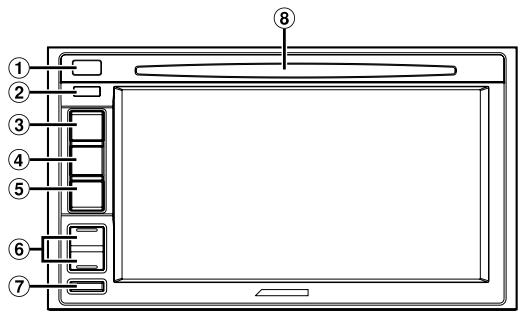
Location of Controls
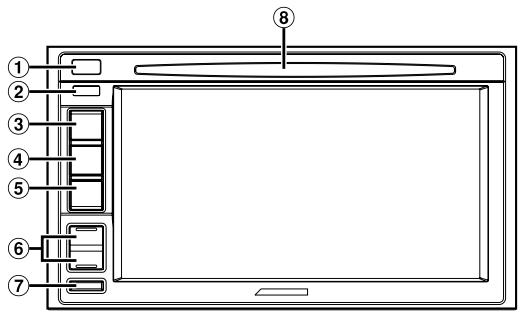
① (Eject) button
Ejects a disc.
② Remote Sensor
Point the remote control transmitter towards the remote sensor within a range of 2 metres.
③ A(MAP) button
Recalls the navigation map screen.
Press and hold this button at least 3 seconds to Dual Screen.
For details of navigation operations, refer to "Navigation System OM" in the CD-ROM.
(4) √(PHONE) button
Recalls the Telephone Menu screen.
When a hands-free phone is connected, press and hold for at least 3 seconds to switch to the call history screen.
⑤
Displays the Audio/Visual screen. If the Audio/Visual screen is already displayed, changes the source.
Press and hold AUDIO for at least 3 seconds to activate the "Setting the Balance/Fader/Subwoofer" mode.
(6) / (UP/DOWN) button
Press to adjust the volume.
MUTE/ button
Press to activate/deactivate the mute mode.
Press and hold for at least 3 seconds to turn the power off.
DISC Slot
Turning Power On or Off
1 Turn the ignition key to the ACC or ON position.
The system is turned on.
2 Press and hold the MUTE button for at least 3 seconds to turn the power off.
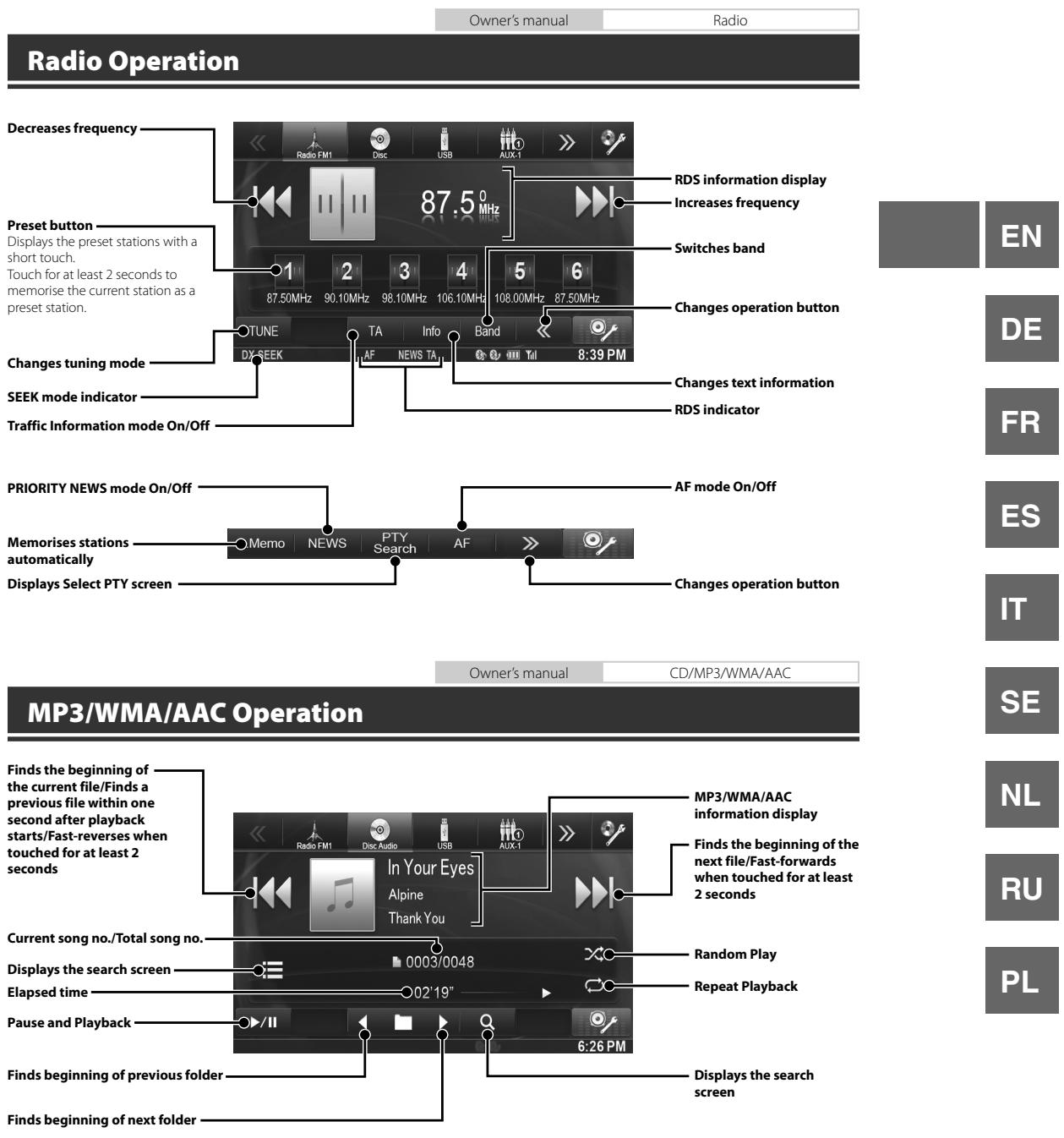
Rad
Decreases
Preset buti Displays the short touch. Touch for at memorise t preset static
Changes t
SEEK mod
Traffic Info
PRIORITY I
Memorises
automatica
Displays S€
MP3
Finds the b the current previous fi second aft starts/Fast touched fo seconds
Current soi
Displays th
Elapsed tin
Pause and
Finds begin
Finds begin
DVD Operation
When you touch the DVD playback screen, the DVD operation screen is displayed. The following is an example of the DVD-VIDEO operation screen.
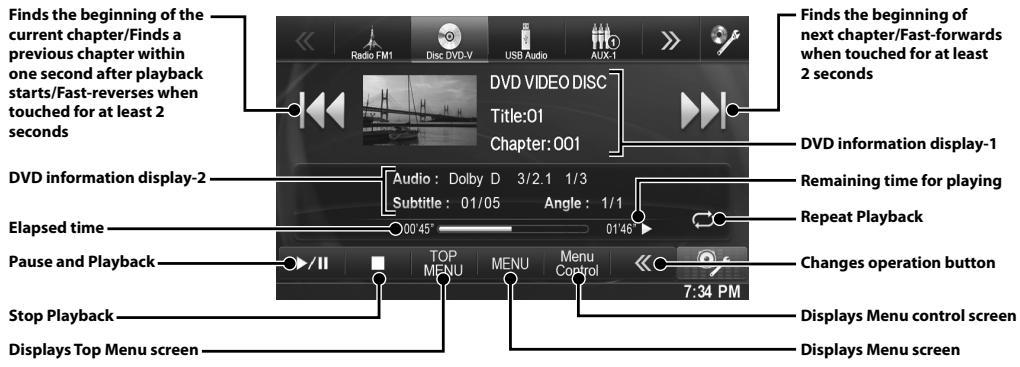

iPod/iPhone Operation (Optional)
An iPod/iPhone can be connected to this unit by using the cable (KCU-461iV) (sold separately). You can connect a video-capable iPod to enjoy not only Music but also Video files.
Audio mode
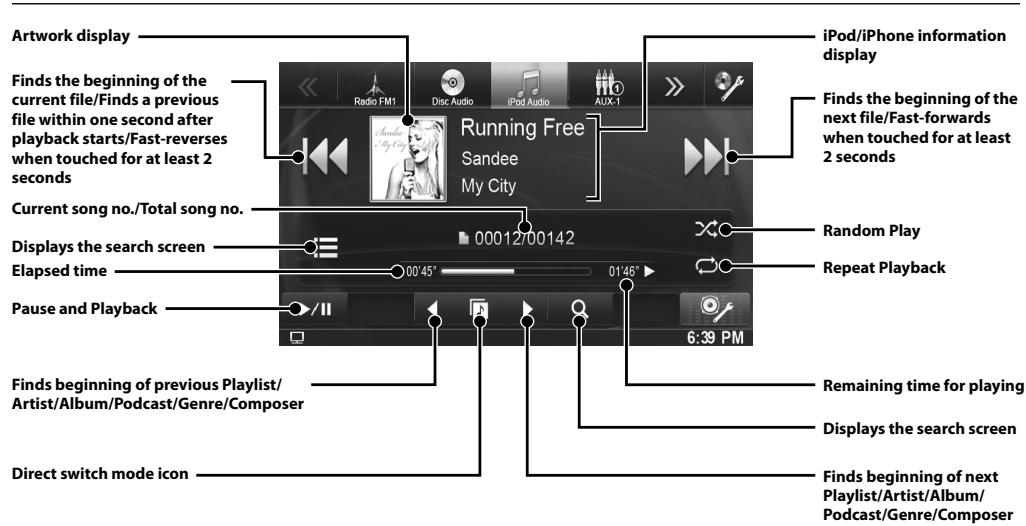
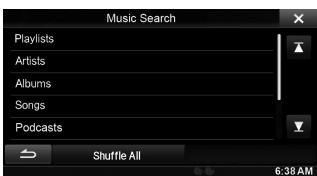
Searching for a Music File
For example: Searching by Artist name
1 Touch [Q (Search)] during playback.
2 Touch [Music].
3 Touch [Artists].
4 Touch the selected artist name.
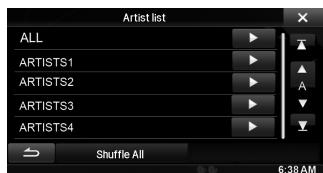
The Albums search screen of the selected artist is displayed.
Touching [▶] of the desired artist will play back all songs of the selected artist.
5 Touch the desired album's name.
All songs of the selected album are displayed. Touching [▶] of the desired album will play back all songs of the selected album.
6 Touch the desired song's name.
The selected song is played back.
- Touching [] of "ALL" will play back all songs in the list.
USB Memory Operation (Optional)
You can play back music files (MP3/WMA/AAC) and video files (DivX®) stored in a USB memory device on the internal player of this system.
Refer to the "MP3/WMA/AAC Operation" (page 5) for information on music.
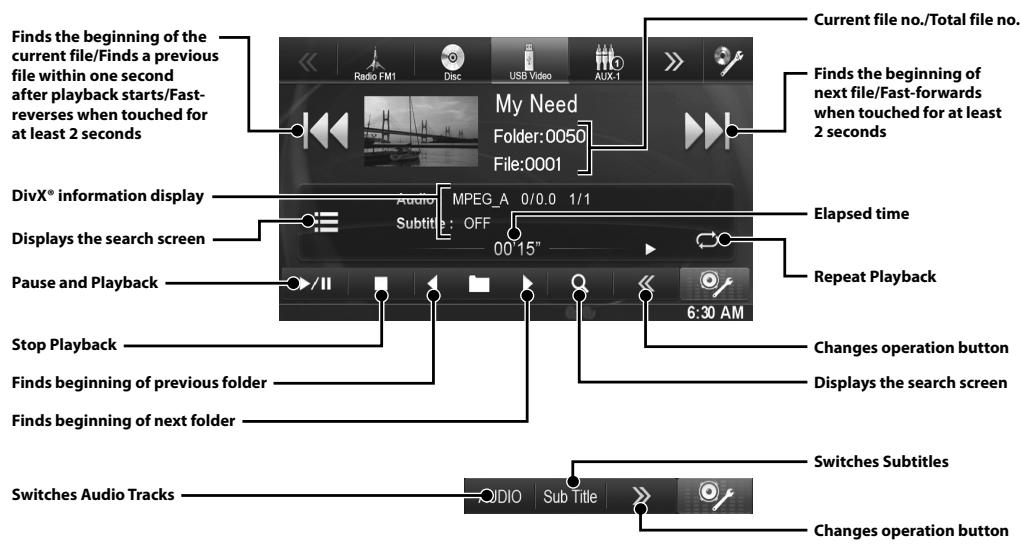
Video mode
DivX* files stored in a USB memory device and protected by DRM (Digital Rights Management) cannot be played.
Hands-Free Phone Control
Hands-free calls are possible when using an HFP (Hands-Free Profile) compatible mobile phone with the INEW970BT.
How to connect to a BLUETOOTH compatible device (Pairing)
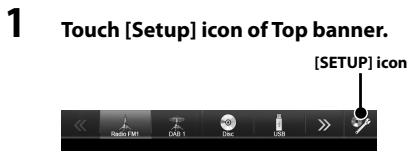
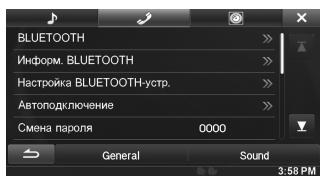
2 Touch (BLUETOOTH)).
3 Touch [BLUETOOTH].
4 Touch [<] or [>] of "BLUETOOTH" to set to "On."
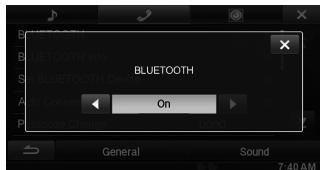
5 Touch [X].
6 Touch [Set BLUETOOTH Device].
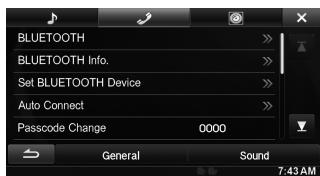
7 Touch [Search] of "No Device."
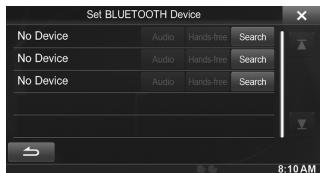
The Device list displays up to 3 items.
8 Touch [Audio] or [Hands-free] of the device you want to connect from the list.
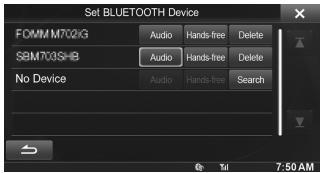
Audio: Sets for use as an Audio device. Hands-free: Sets for use as a Hands Free Device.
9 When the device registration is complete, a message appears and the device returns to normal mode.
- The BLUETOOTH registration process differs depending on the device version and SSP (Simple Secure Pairing). If a 4 or 6 character Passcode appears on this device, enter the Passcode using the BLUETOOTH compatible device. If a 6 character Passkey appears on this device, make sure the same passkey is displayed on the BLUETOOTH compatible device and touch "Yes."
Answering a Call
1 An incoming call triggers the ringtone and an incoming call display.
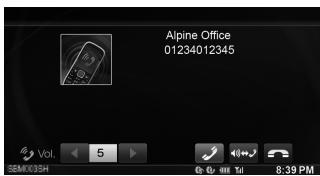
The call finishes.
2 Touch [] or press (PHONE) button.
The call starts.
Hanging up the Telephone
1 Touch [e].
Map Functions
Below is an overview of different buttons and icons on the map display. For more detailed information about this screen, please see the Owner's Manual.
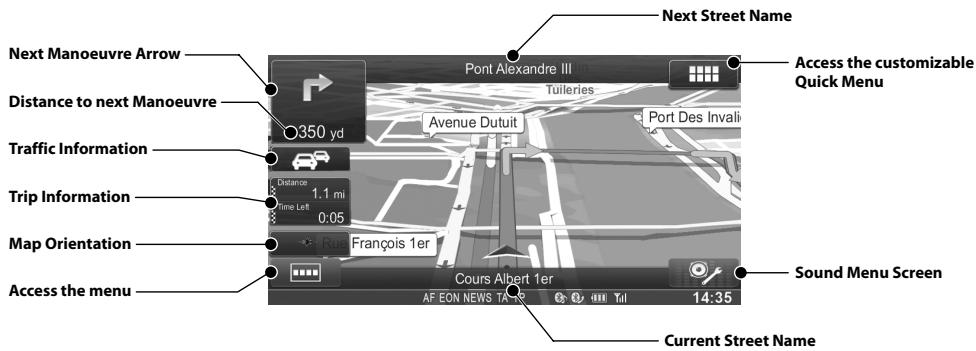
To access the map, press the 4 (MAP) button.
Navigation Menu
To access the Navigation Menu, touch [ ].
Route
Get route information, edit the route (set, delete, optimise waypoints, optimise route), see the route overview, avoid special sections, specific roads, the route ahead, save, load, delete the route, simulate navigation, change route settings, check for the itinerary and for max. 7 route alternatives.
Go to
Set destinations using any of 9 different input methods (Find Address, Postcode, Find Places (POI), Map, Address book, History, Coordinate, Picture, Free-form Search).
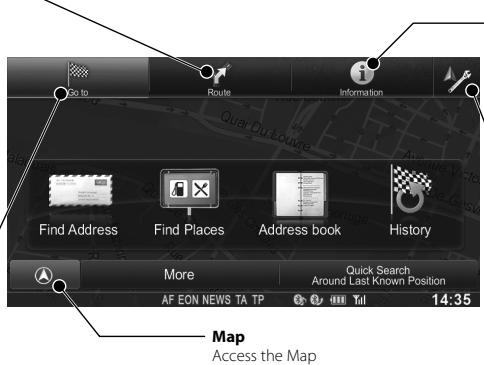
Information
Get access to useful add-ons like Picture Viewer, Unit Converter, Calculator, Trip Monitor, Fuel Consumption, Country Information.
Settings
Allows you to customize various characteristics of your navigation system's look and feel.
Go to a Destination
The following example briefly describes how to input a destination.
1 Touch [Go to] from Navigation Menu.
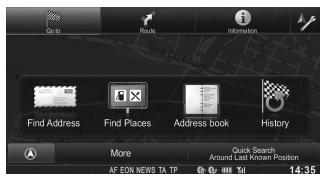
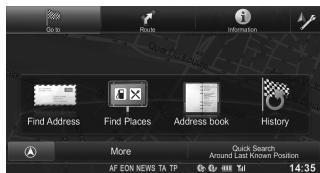
2 Select a destination input method. ([Find Address] is selected.)
3 To change the country, touch the button with the country name. Enter a country name and select the country from the list.
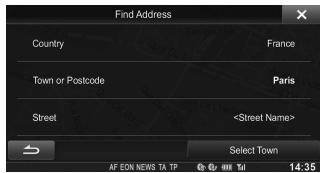
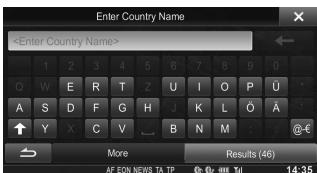
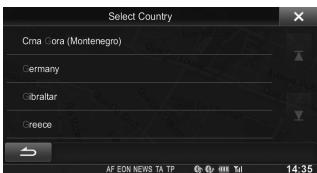
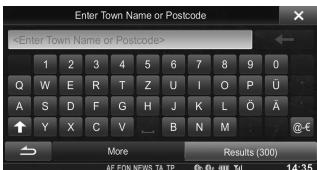
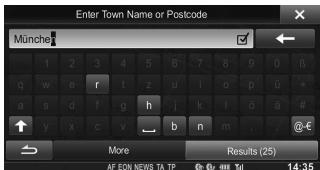
4 Type in the city name or postcode until displayed in the selection list. Select the matching entry.
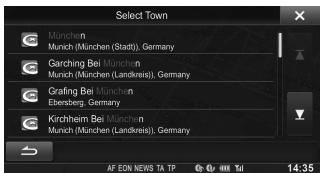
5 Type in the street name until displayed in the selection list. Select the matching entry.
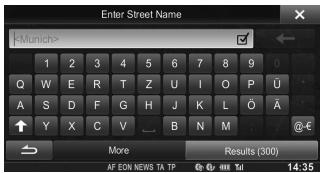
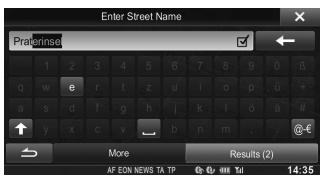
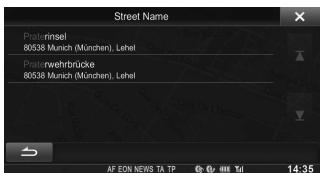
6 Enter a house number. Touch [Done] to access the confirmation screen.
![ALPINE INE-W970BT - Enter a house number. Touch [Done] to access the confirmation screen. - 1](/content/2019/10/330/images/5ec7dc0cf6de3dc0862a3616a4fe1d6f0b681468169b6f08c463b75c66adcb02.jpg)
7 Touch [Select] to initialize route calculation and start navigation.
![ALPINE INE-W970BT - Touch [Select] to initialize route calculation and start navigation. - 1](/content/2019/10/330/images/aa4622c7fbb6267d36654747b9c86ac4324c4b1a88832130c8b4daec8322a920.jpg)
Installation
- When making connections to the vehicle's electrical system, be aware of the factory installed components (e.g. on-board computer). Do not tap into these leads to provide power for this unit. When connecting the INE-W970BT to the fuse box, make sure the fuse for the intended circuit of the INE-W970BT has the appropriate amperage. Failure to do so may result in damage to the unit and/or the vehicle. When in doubt, consult your Alpine dealer.
- The Display must be completely retracted in the casing when installing. If it is not, problems may occur.
1 Install at an angle between horizontal and 30^ . Note that installing at an angle outside of this range will result in a loss of performance and possibly damage.

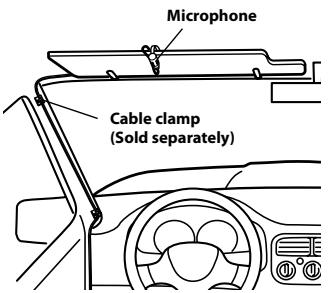
2 Mounting the Microphone.
For safe use, make sure of the following:
- location is stable and firm.
- driver's view and operations are not obstructed.
- microphone is located where the driver's voice can be easily picked up (on the sun visor, etc.).
When you speak into the microphone, you should not have to change your driving posture. This may cause a distraction, taking your attention away from safely driving your vehicle. Carefully consider direction and distance while mounting the microphone. Confirm that the driver's voice can be easily picked up at the selected location.
3 Remove the mounting sleeve from the main unit.
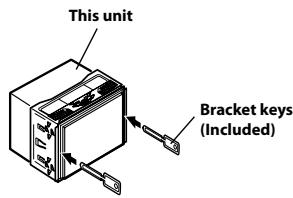
Slide the unit into the mounting sleeve and secure it.
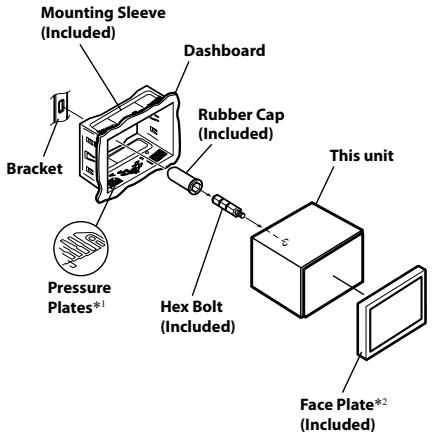
1 If the installed mounting sleeve is loose in the dashboard, the pressure plates may be bent slightly to remedy the problem.
2 The supplied face plate may be mounted.
4 When your vehicle has the Bracket, mount the long hex bolt onto the rear panel of the INE-W970BT and put the Rubber Cap on the hex bolt. If your vehicle does not have the Mounting Support, reinforce the head unit with the metal mounting strap (not supplied). Secure the ground lead of the unit to a clean metal spot using a screw (*1) already attached to the vehicle's chassis. Connect all the leads of the INE-W970BT according to details described in the CONNECTION section.
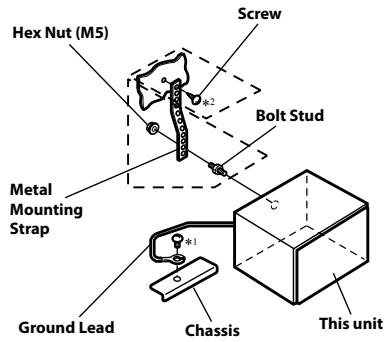
- For the screw marked “*2,” use an appropriate screw for the chosen mounting location.
5 Slide the INE-W970BT into the dashboard until it clicks. This ensures that the unit is properly locked and will not accidentally come out from the dashboard.
Connection Diagram of SPST Switch (sold separately)
(If the ACC power supply is not available)
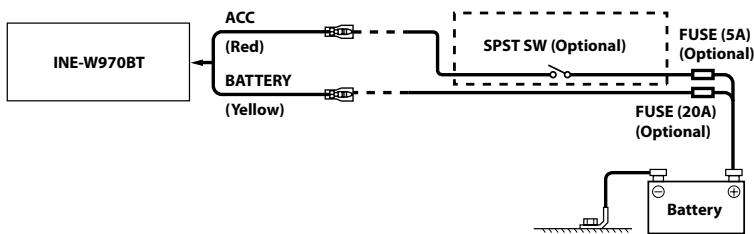
- If your vehicle has no ACC power supply, add an SPST (Single-Pole, Single-Throw) switch (sold separately) and fuse (sold separately).
- The diagram and the fuse amperage shown above are in the case when INE-W970BT is used individually.
- If the switched power (ignition) lead of the INE-W970BT is connected directly to the positive (+) post of the vehicle's battery, the INE-W970BT draws some current (several hundred milliamperes) even when its switch is placed in the OFF position, and the battery may be discharged.
Connections
Connections 1/2
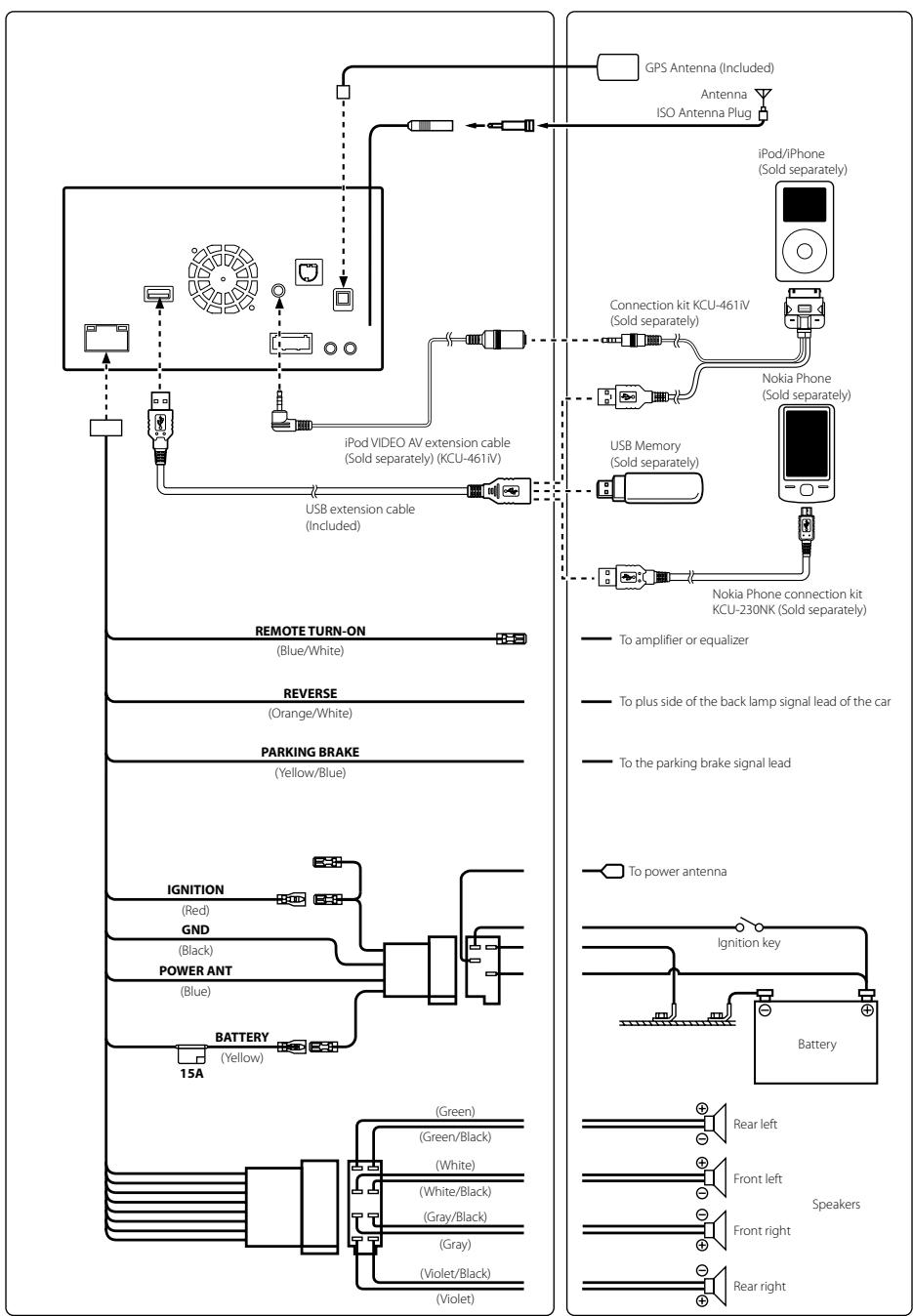
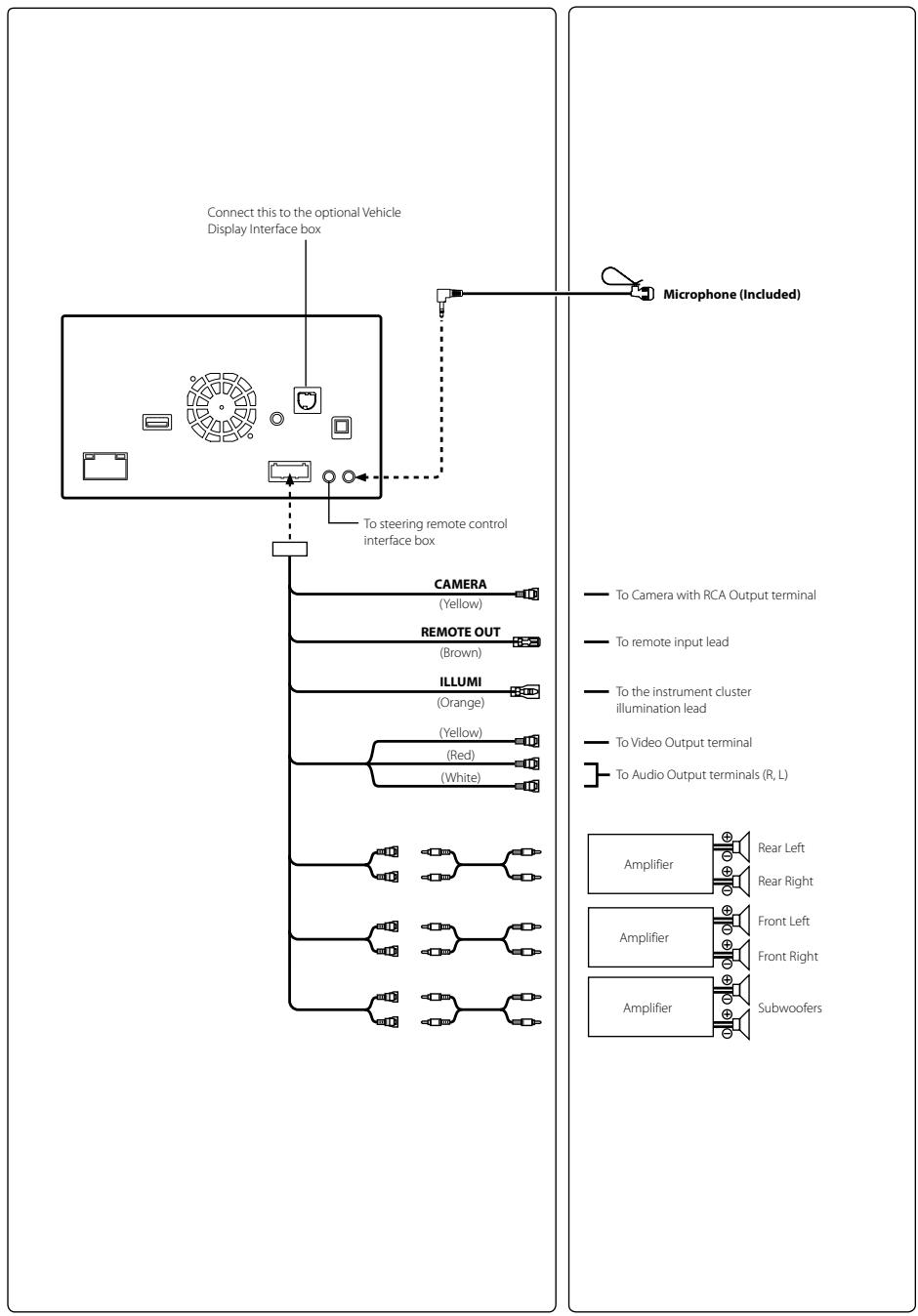
Spe
MONITC
Screen Size LCD Type
Operation Number of
Effective Nu
Illumination
FM TUNI
Tuning Ran Mono Usat 50 dB Que Alternate C Signal-to-N Stereo Sepi Capture Ra
MWTUN
Tuning Ran Usable Sen
LWTUNI
Tuning Ran Sensitivity (
USB SEC
USB require Max. Power USB Class
File System
MP3 Decoc
WMA Decc
AAC Decoc
Number of
Frequency
Total Harm
Dynamic R
Signal-to-N
Channel Se
- Frequencysoftware,
CD/DVD
Frequency Wow & Flut Total Harm Dynamic R. Channel Se Signal syste Horizontal Video outp Video S/N r Audio S/N i
Specifications
MONITOR SECTION
Screen Size
6.1"
LCD Type
Transparent type TN LCD
Operation System
TFT active matrix
Number of Picture Elements
1,152,000 pcs.
(800× 3× 480)
Effective Number of Picture Elements
99% or more
Illumination System
LED
FM TUNER SECTION
Tuning Range
87.5-108.0 MHz
Mono Usable Sensitivity
8.1 dBf (0.7 V / 75 ohms)
50 dB Quieting Sensitivity
12 dBf (1.1 V/75 ohms)
Alternate Channel Selectivity
80 dB
Signal-to-Noise Ratio
65 dB
Stereo Separation
35 dB
Capture Ratio
2.0 dB
MW TUNER SECTION
Tuning Range
531-1,602 kHz
Usable Sensitivity
25.1 V / 28 dBf
LWTUNERSECTION
Tuning Range
153-281 kHz
Sensitivity (IEC Standard)
31.6 V/30 dBf
USB SECTION
USB requirements
USB 1.1/2.0
Max. Power Consumption
1,000 mA
USB Class
USB (Play From Device)/
File System
USB (Mass Storage Class)
MP3 Decoding
FAT12/16/32
WMA Decoding
MPEG-1/2 AUDIO Layer-3
AAC Decoding
Windows Media™ Audio
Number of Channels
AAC-LC format.m4a"file
Frequency Response*
2-Channel (Stereo)
Total Harmonic Distortion
5-20,000 Hz (±1 dB)
Dynamic Range
0.008% (at 1 kHz)
Signal-to-Noise Ratio
95 dB (at 1 kHz)
Channel Separation
100 dB
- Frequency response may differ depending on the encoder software/bit rate.
CD/DVD SECTION
Frequency Response
5-20,000 Hz (±1 dB)
Wow & Flutter (% WRMS)
Below measurable limits
Total Harmonic Distortion
0.008% (at 1 kHz)
Dynamic Range
95 dB (at 1 kHz)
Channel Separation
85 dB (at 1 kHz)
Signal system
NTSC/PAL
Horizontal resolution
500 lines or greater
Video output level
1Vp-p (75 ohms)
Video S/N ratio
DVD: 60 dB
Audio S/N ratio
100 dB
PICKUP
Wave length
DVD:666 nm
Laser power
CD: 785 nm
GPS SECTION
GPS Reception frequency
1575.42±1MHz
GPS Reception sensitivity
-130 dB max.
BLUETOOTH SECTION
BLUETOOTH Specification
Bluetooth V2.1+EDR
Output Power
+4 dBm Max. (Power class 2)
Profile
HFP (Hands-Free Profile)
GENERAL
Power Requirement
14.4V DC
Operating temperature
(11-16 V allowable)
Maximum Power Output
-20°C to +60°C
Output Voltage
4,000 mV/10k ohms
Weight
2.25 kg
Audio output level
Preout (Front, Rear):
2 V/10k ohms (max.)
Preout (Subwoofer):
2 V/10k ohms (max.)
AUX OUT:
1.2V/10k ohms
CHASSIS SIZE
Width
178 mm
Height
100 mm
Depth
165 mm
NOSE SIZE
Width
170mm
Height
95 mm
Depth
8mm
- Due to continuous product improvement, specifications and design are subject to change without notice.
-
The LCD panel is manufactured using an extremely high precision manufacturing technology. Its effective pixel ratio is over 99.99% . This means that there is a possibility that 0.01% of the pixels could be either always ON or OFF.
-
This item incorporates copy protection technology that is protected by U.S. patents and other intellectual property rights of Rovi Corporation. Reverse engineering and disassembly are prohibited.
-
Manufactured under licence from Dolby Laboratories. Dolby and the double-D symbol are trademarks of Dolby Laboratories.
-
Windows Media, and the Windows logo are trademarks, or registered trademarks of Microsoft Corporation in the United States and/or other countries.
-
iPhone, iPod, iPod classic, iPod nano, iPod touch, and iTunes are trademarks of Apple Inc., registered in the U.S. and other countries.
-
"Made for iPod," and "Made for iPhone," mean that an electronic accessory has been designed to connect specifically to iPod, or iPhone, respectively, and has been certified by the developer to meet Apple performance standards. Apple is not responsible for the operation of this device or its compliance with safety and regulatory standards. Please note that the use of this accessory with iPod, or iPhone may affect wireless performance.
© 2012 Nokia. All rights reserved. Nokia and Works with Nokia are trademarks or registered trademarks of Nokia Corporation.
DivX®, DivX Certified® and associated logos are trademarks of Rovi Corporation or its subsidiaries and are used under license.
-
The BLUETOOTH® word mark and logos are registered trademarks owned by the Bluetooth SIG, Inc. and any use of such marks by Alpine Electronics, Inc. is under licence.
-
"MPEG Layer-3 audio coding technology licenced from Fraunhofer IIS and Thomson."
-
"Supply of this product only conveys a licence for private, non-commercial use and does not convey a licence nor imply any right to use this product in any commercial (i.e. revenue-generation) real time broadcasting (terrestrial, satellite, cable and/or any other media), broadcasting/Streaming via internet, intranets and/or other networks or in other electronic content distribution systems, such as pay-audio or audio-on-demand applications. An independent licence for such use is required. For details, please visit http://www.mp3licensing.com"
©1993-2012 NAVTEQ. All rights reserved.
Portions ©2013, Microsoft Corporation. All Rights Reserved.
Inhalt
WARNING 2
VORSICHT 2
Erste Schritte 3
Plage d'accord 87,5-108,0 MHz
Specifications BLUETOOTH
AUX OUT: 1,2 V/10k ohms
DIMENSIONS DU CHÄSSIS
Largeur 178 mm
Hauteur 100 mm
Profondeur 165 mm
TAILLE DU NEZ
Largeur 170 mm
Hauteur 95 mm
Profondeur 8mm
Fluctuation & tremolo (% WRMS)
PBAP (Phone Book Access Profile,
A2DP (Advanced Audio
Distribution Profile, profil de
AVRCP (Audio/Video Remote
Control Profile, profil de control
7 Toccare [Search] in "No Device".
Wow & Flutter (% WRMS)
m = 311
Preout (anteriore, posteriore):
2 V/10k ohm (max.)
OPP (Object Push Profile) PBAP (Phone Book Access Profile) A2DP (Advanced Audio
Distribution Profile)
AVRCP (Audio/Video Remote Control Profile)
GENERAL
Stromforsorjning 14,4Vlikstrom (11-16V tolerans)
Driftstemperatur -20°C till + 60°C
Maximal uteffekt 50 W × 4
Spänning ut 4 000 mV/10 k ohn
Vikt 2,25 kg
Ljudniva ut
Preout (fram, bak): 2V/10k ohm (max.)
Preout (Subwoofer): 2V/10k ohm (max.)
AUX OUT: 1,2V/10k ohm
CHASSISTORLEK
USB (Play From Device)/
Bestandssystem
USB (Mass Storage Class)
MP3-decodering
FAT12/16/32
WMA-decodering
MPEG-1/2 AUDIO Layer-3
AAC-decodering
Windows Media™ Audio
Aantalkanalen
AAC-LC-indeling.m4a'-bestand
Frequenterespons*
2-kanaals (stereo)
"PykoobOCTBa Nolb3OBaTeJIa, 3aIncaHHOro Ha KOMNaKT-DINCKe.
ПРЕДУПЕЖДЕНЕ

PPEyPPEKDEHNE
3TOT CUMBOI O6O3NaueT BAXKbIe INHCTpyKcIM. Hx HecobIoJeHne MoKet npVBcTe N TpaBMe IIN CMEptelbHomY NCxOyD.
HEIPEINPHIMAHTEHKAKIXDEIECTBWI,KOTOBPIMOTYRTOBTJEBCBACOTBE3OTACHOROBOXEKHABNABTOMOBJIA.
JIb66eIeBTHNBA,OTBKeAIOJIeBHUMAHNEHApIOJIaKHTIEhBNbC pOKOJIKHNbIyHbNTBcHToTbKO bNOce ITOHOBIOCTAHOBIN.IEpeJ BbHOIIHHeHMETAKHXIeBTHNBA BCErda OCAHTABHNAITEB ABOMOHbIb 6E03IaONCHMecTe.
Heco6IIOeHne 3TOro Tpe6OBaHnMoKet IpmbecTu K aBapuN.
XPAHNTHE HEBONJIWE OBEKTBI, TAKVE KAK TAIKNB, B HEHOCTYINHIXI BIAI DETEIM EECTAX.
Itohanea Taksch obkToBOT Moket NaHeCTe cepb3yIO TpaBM. Ecln pe6ehoK IpoTOnTH IOIo6BJO bOkTe, HemeJIeHNO ObpatrncB K bpVAy.
NIOJEPKXBIAIETP FOMKOCTb HAPOVBHE, PO3BOJLIOUcEM CJIbIaB BHEUIHBE 3BYKNO BO BPMEB DIBXHEHM.
Ype3mepHo BvocKnB yPoBeHb rPoMcoTH, 3aRyIuiaoHn TAKHe 3ByKIN, KaCnHb ABOtMObJIe ABAPHIOn CUYKbM I dOpOJHbE IpeDyIepTeJIbMbHe CNTHaJIb (IpnI nepeceHHN / kTne T nT.I.M), KO6BbIbONACNH M INpBEcTH K aApAHIN. IcIOIb3OBAHIE BblCOKOTO YPOBHr TPOMKOCTN B ABTOMOBJIe MOKET TAKKE BB3bBATb JDEEKT CJLYXA.
HE PA3bIPATb IN HE U3MEHrTb.
TO MOKET BtBbMbBat ABAPHIHyCtYaIiH0, BO3rOpHn HJN yIAP 3JIeKTHPueCKM TKOM.
NICIOJIb3OBObT TOJIKO B ABOTOMOBIJIK CX 3A3EMJIHEM OTPNIJIbHOrO NIOIOCA HA 12 BOJbT.
(B Cnyae comHENHEI PPOKOHCNbTyptBcY cBOeroJInepa.) Heco610dHeNE 3TOrTO pTeOBAHNO MOKET PBIHCTN K BOHKHIOBHENIO OHr H T.II.
PIM3AHEME INPEPOXAPAHNTJEEN MCOJb3yUTE TONBJKO AHANOHNHBE IO HOMMHAUYI.
HecoBioJIOHeNTO TpeBO8OHAJIHO MOKET PnIHcTn K BO30pAHOHIO NPOPAKeHHO 3NEKTPNYeCKHM TKOM.
HE 3AQPbIBAITE BEHTIJIAYLMOHNNbIE OTBEPCTIN JIIN PAHEJINI PADIATOPA.
B I PTOHBN HBI CIIYAE B3OMOKEN HAPREB BHYTPEHHX TEaJIeI, KOtOpB MOKETPINBPCEHTK B3OSTRAPAHIO.
NCIOJ3BYNEOTIPONDKTOIIBKOJABTOMOBNIE CBOPTOBJCETbHOHAPRJEHEM12B.
HnPaeBbIbHOe HIOJIbOBAHMe MOJEt PIIbEChT B K OIgOrpAHO, IPOApKeHNOI NIEkTePNIeCKM TOKOM IINI dIpyTN pTbAM.
HE NOMEUATTE PYKNI, PAJIbUII JIINI OTOCTOPOHNHIE OBkEBTI BO XOHDHII PA3bEMJI.
3To MoKcTepnBecTN KIOIpyeHINTOtpaBMbNIIIOBpeKdEHNIO pOdyKTa.
BbINOJIHЯITE NPABANlbHbIE NOKJIIOUeyHnA.
HnPaeBJIbHOe IOJIKJIOeHHe Moe KOTe pI IN BcO3rOpAHHIO IIN POBKePbEHNIO pIPOyKTa.
NEPEI NOJIKIJOYEHEMI NPOBOJOB OTOOEINHITTE KAE6JIb OT OPTRNUATELBNHOIO JIOJIOCA BATAPEI.
Heco6b0JIeHNEI 3TOO T6peOBAHNI MOKET PIPBNECH T KIOPAEHNHO 3IEKTPIYCEKN TMOKON IIK T PABME BCIJECTBKE OPKTOKOTAK 3AMkBHNO
HE CPAUBAI TE C 3JIKTPNUECKUMKABEJAMN.
HnKoJaIa He cpe3aiTe Ka6eJIbHyIO I3OIaIIIOI IOIKnOcHHeNIIaTIHAnI KpyrOy OOpbyOJbnHIO BpTNOBHOM CIyueA 6yET npBbIiSHA OJIcyTHMaH AHPy3aIO HO TQyI aDANHOPOBDA, I b P3eYbIbTaTE BO3MOHxBO3OPAHReI oPiAPKeHEE3kTPhVcckEMTKOMOH.
HE NOBPEJATE TPY60PBOObI bJI NII PPOBOKY PNI CBEPJIENH OTBEPCTI.
IIpI cBepENHnY cTAYaHOBNbX bOeTNBt B KOpHNy IMPHT Mepe MPe IpeoDCOTPOKHeCHN, TQ6bI 3IeKb4KTOKtA,IOBPEKdEHn HmI 3aynOPOBAHn 3py6bok 3OnIbHbONpOBuOH nIhEaKTPoIPOBdKn. HecoBdHHeNe 3TOrTOpeBOAHn MOKeTIPbCHeN K Bo3OrPAHno.
HENCIOJIb3YIte BOJITbI YINI TAIKNI TOPMO3HOI CNTEMbl NCICTEMbl PYIEBOTO YIPABJEHnI DA3AEMJIHnIA.
BoITM HnI RAIKH N3 TPOMP3OH CINCTEMb HnI CNCTEMb pyNEBOr UynPABENH (HnI NIO6B DpyTO Bc3AHNcB 6eO3ANOCHTbCtCNETMb) HnI 6aKOB HNKOΓA He cIeYET HcIOJIb3OBaTb PnH yCTaHOBKe HnI 3a3EeMNHe. NcIOJIb3OBaHMe TAKHJ dTeJIAM oKoFbO4BaT bUynPABHE ABOTMOBNI E n CTbPnVHNOB BOATOPAHN.
HE YCTAHABJINBAIYE YCTPOICTBO B MECTAX, IDE OHO MOXET MEUATb PAOTE ABTOMOBUNI, HANIPIMEP, PRDOM C PUYEBBM KOLECOM NIN PbYAHOM TEPEKJIIOUeyH NCKOCTEEN.
B I pOTHHOB N CIyuae yCTPOI CTBO MOKET Oo3aTb I NOmEXN IINI PHeJIHO 063opa HnI3ATpyDHNITb IBMNKeHNe, YTO MOKET IPNBecTN K cepb3HOI abaHNI.
HE CJEYUVE TPEJIOXEHNMR MAPUVTCA, ECNI HABIURAIOHNA CNTHEMA TPEJIOXJNT BblIOHNHTB HEBE3OTACHBI NUN 3ANPEUENHHM MAHEBP, A TAKKEB C BYLAAVEX, ECNI PLOJOIXEHHK MAPUIPYT OKAOKTCR TONEHTUJIBAHO ANPCHBIMUN PNMBEDET B OANACHYO3OH.
HcIeJeYIIOJIHOCTBOIIOIaIaTcBcHaJdHOHeY cTePOJIcTBc,3aMeHNbIM CO6tBeHHHe BueHHn. IIOJIbePnIOJIeOHKeM aLIpHTyA pIHHOHN CHsTeMH bEIOJIHKn 3MaJIeATbIO IIIOJIbCe MteBHeMbIe NpIbIaN OpoHEKHO bIOJIeHHKeH NIIc CO6tBeHHO BueHHn N/IIH eGEOAniHcy MpeAHy BOJEKHeH

BHMMAHNE
3TOT CUMBON 06O3Naayet BaXhble INHCTpyKuIN. IX Heco6IIOJeHne MoKeT PnIBeCTN K TpaBMe IIN BbIXOy U3 CTpor BaWero yCTpoiCTBa.
\PNBO3HMKOBEHMIPOJEIMHEMEJENHO PPKEPATMCNOLB3OBAHIMEIPOJDKTA.
I IIOPTHOM CIUYAe 3TO MOKET PnKIECTN K IOIYUEHHIO TpABMHI INIINIOBpeJKeHNIO pOyKTa. BepHTe IPOyKT cBOeMY aBtOPH3OBAHOMY IIaEPy Alpine INI B6IIaIKaIIHcEepCNHSI hENTP AlpIn ePMOTA.
PKNJLAKINPOBOOINYCTAHOBKAIOJIKNHbIbItbBIIIOHNHEbCIENLAJINTAMN.
IIaIIOKJAAnIOPOBDoJ U nTObAOHKB JdHOHORO YcTPORcTBa Tpe6OYOTc CnHJIaBJbTe XHNUeCKHe NABHKn O nOHTb. B IeHXs oBe6oNeHHE 6301AocHCTOny fBmIOHNHeNPAOBtB BCgDA oBa6TaBcAIE KcIINpEy, y KOTOPRo 6BkI pNo6OpEtER STO pIOyKT.
NCIOJb3VJTE TOJIbKO CNTELNAIMNPOBAHNBIE YCTAHOBOCHBIE KOMTOHEHTbI N TLIATEJBHO X3AKPEIJLJE.
IcnoJIb3yIteToTbIOK cneHIIHIOPOBAHHe BcNOMORATeBHe HOMOHTb. IcNoIb3oBAHHe HeIEpyDcMOTpeHHx KOMIOHOETOB MOKET BM3BaTb BYtPnEHHe NIOBcEJHnE YCTPOBCTa HIN CTbI pNCHHIO ETO HNeAIEKHOYCTAHOBKn. B P3eYbIbATE MOKET HApUHTbC KpeIENHE TAKHX KOMIOHOETOB, IIpHBoJD K BO3HNKHOBEHInO OIIaCHOCTH HIN C6IOO pOyDKTA.
\PABUINbHO IPIOJIOXEHHAR IPOBOJKA HE JOJIJKHA UNI5BATcBcN ⅢAIIeEMJIbTcBcOCTPbIMN METALJIHNECKIMK KAPMI.
IpoKnaIaBnIte Ka6eIIN IpoBOJky DanEko OT BnKyuixxC8aCteT (HapnIMep, HapNaBIOHxN CmEhBA) N OCTPbx MIn 3aoCTpeHHbX KpaEB. 3TO nO3oBIOJAE I pEOOTBPATHTb 3AaMENIEHm 3NAAKTaeN IpoBOJdoE. ECIN IPOBOJa IPOxoJNT hepe3 MetALIIueVcKO tEBPCTHe, HcIOJIb3yITte pe3HIOHOBe yIiIOTHENTbHOe KOJIbIA, YTObMb IpoEOBTpArHt NobpeKJeHne IOIaONIyMe METALIueVcKm EpaER oETBPTN.
HEYCTAHABINBAITEYCTPOYNCBOBMECTAXCBICOKUM YPOBHEBMJXACHOCTMIMN3A2bJIHECHOCTM.
H63eAitte UCTAHABINBHTB yCTPOCTBO B MecTAC C BVBCOKIM YPOBHEM BIAKHOCTH N3A 3nBJIeHNHOCTH. IIOHNKAIOJIIE MY BCTPOCTBO BIIaRa H IIbIb MOYrBTM3BtB eOHeNCiPABHOCTb.
SEPENTEI PIAIbIcI BO BPMEI PEIMELEIIH MOTOPIO3OBAHNIIEPEIDHEI PAHEJIINJIM MOHOTHOPA.
HeoctopooKHOCT MOBET NIOUYENHIO TpABMbI HIN NOBPEKDEHNIO pOyDKTA.
PykoobodTBO no 3KcIpyataunn YnpabLeHne kacaHem, PacnoIooKeHne 3eMeHToB ynpaBHeNn, BkIIOueHne n bIKIOueHne pntaHn
PpncTynpaK pa6oTe
UnpaBHeHne KacaHnem
CicTeMoI MoXHo yIppaBIArT bpri NpOMOUI CeHCOPHO NaHn Ha 3KpaHe.
OCHOBHbIe ceHCOPHbIe KHOKN

IcnoJIb3yeTcIgI Bo3BpTa K npdeIyUeMy EKpaHy. B 3aBcIMOCTn OT yHKun DaHHO KHONKOJ
MOXHO OTMEHHTB BbIIOJIHeHHbIe Ha 3KpaHe ONEpaUIN.
IcnoIb3yETcIdIz3aKpbITnOkHa.
PacnoIoxKeHne 3JIeMeHTOB ynpaBJeHnA
① KhoNka△(M3BbIeueHme)
VcnoIb3yETcTgIJIuN3BVeueHnIaCKa.
② DaTUnK dIcTaHcUHOHHOro ynpaBLeHn
HapabBepepeaTnK nyIbTa DCtHaONHOY npabHeHa 3OT DaTnK CpacCTOHNHO 2 MetPOB.
③ KhonkaA (MAP)
OTkpblTne 3KpaHa c KapToH HABrAciM.
Haxmte uyepeKbaiTe 3y KhoNky He MeHee 3 cekHy,OT6bI OT6pa3ntb DBOHNO kpaH.
ДололнITEьнHyиИнформацио O pa6ote CNTeMbI Habiragazm CM.В"PykoBoJCTBe ПОЛьЗOBaTeJIЯ CNTeMbI Habiragazm"HaДиСke CD-ROM.
④ Khonka (PHONE)
OtkpbItne əkpaHa MeHIO TeJefoHa.
Ecni nOdknIOUe TenefoH c yHyKUeNe "CBo6OuHbIe pykN"NaJxMTe N UyedePXDVAIBaTE KHOJky B TeueHne He MeHee 3 cekynd pnapeKIOUeHn K kpaHny JyphHana BblBOOB.
⑤ KhoNka (AUDIO)
TOKpbTMe 3KpaHa ayDIO/BIeO. EcNn 3KpaH ayDIO/ BIVeo yke OTobpaKaetaTc, 6yDet BBINOnHeHa CmHa nCTOuHika.
Hajmite n yapedkmbaTe KhoNky AUDIO B teueHne He meHee 3 cekynd dans BkIoueHnpexima "HaCtpoJa Balance/Fader/Subwoofer".
⑥ KhonkaV/∧(UP/DOWN)
Haxmnte, tO6bI OTperynilpoBaT rPOMKoCTb.
⑦ Khonka MUTE/
CnotnlaDka
HaxMMTe, yTO6bI BKNIOUHTb/BblKJIIOUHTb peXIM OKKIOUHEHNA 3Byka.
Hajmte uyepeKuBaIte HauKaToI 3Tu KHOnKy He MeHee 3 CekyH, UTObI bblkIOUHTb PItaHne.

BkJIIOUeHne N BbIKJIIOUeHne IITaHnI
1 Nobephnte KIOUc 3aXmraHnB B NOIOXeHne ACC mnn ON.
CnCTema BkIIOuHTcA.
2 HaxMMTe n ydepxuBaIte KhoNky MUTE B TeueHne He MeHee 3ceKyHd, YTO6bl BBIKJIIOHTb ycTpoIcTBO.

ymehbweh
Khonka np NaCTOPOEHI TIOBONJETI PINEPABATIOTCTAHUOIOD IIN3A3NIMC STAHUOHN HAI KHONIKY HE N
PepekloupeKIMHa
HnkaToJ
BKN./BbKn HΦOΦmaU DABXHEHM
Bk./BbIK HOBOCTN
ABTomAtn3aNcB CTA
OTo6paKa BbI6paT b

NoBonaRei noNCK hau cyfaan/nao faianb n pceKyndbn BCocPonBe HaxKatunn 60bnue2c b6ctpran
Nekyupei KoinjuceCT OTo6paxe Nctekuwee
Pexim nay Bocnpon3e
Ponck Ha.
Ponck Hau
IcnoIb3OBAHne paIaNo
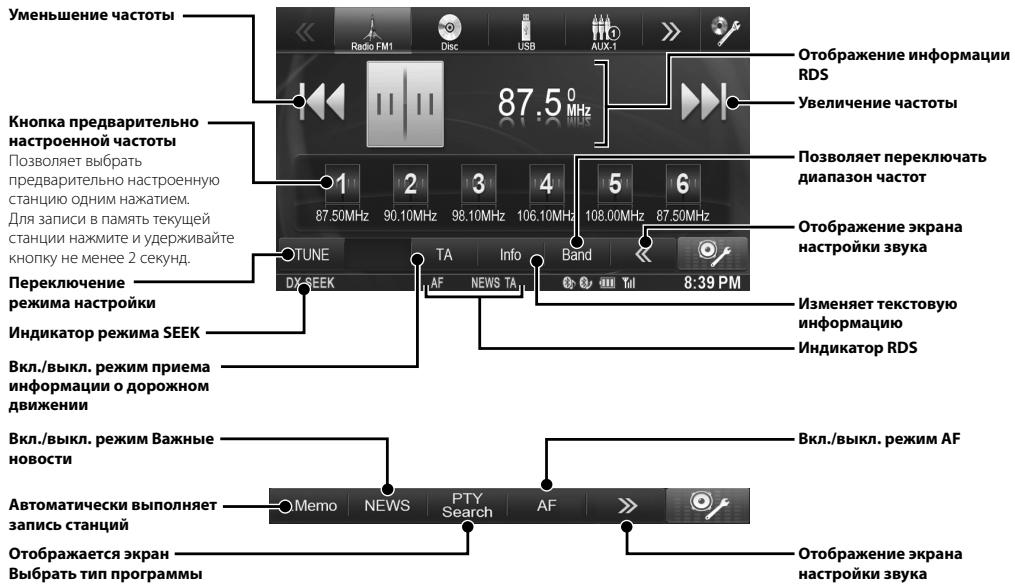
PykoBODCTBO no 3KcPnyatauun
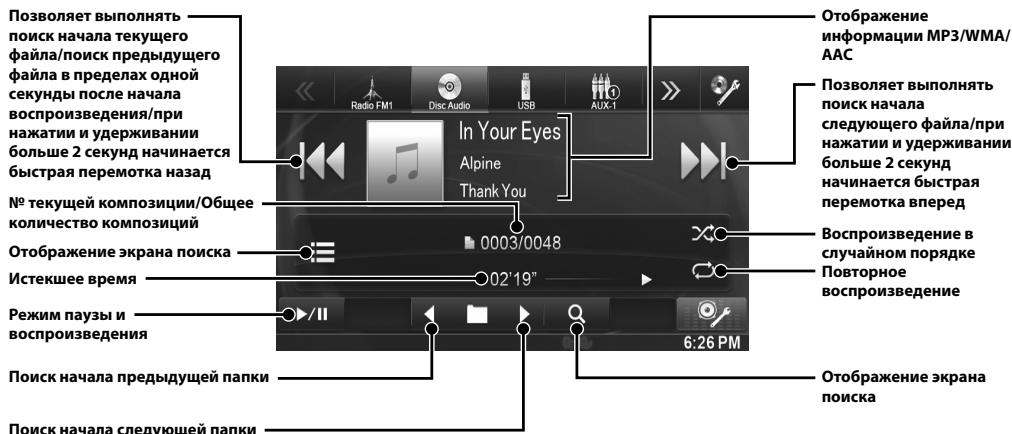
CD/MP3/WMA/AAC
Mcnonlb30BaHne npomrpbIbTaTeIa MP3/WMA/AAC
IcnoIb3OBAHnne npomrpbIBaTeTn DVD
Kak nodklouHTb COBMeCTHMoe c BLUETOOTH yctpoiCTBO (ConpJxHeH)
1 Haxmnte Khonky [Setup] B bepxhem 3aROJOBKe.
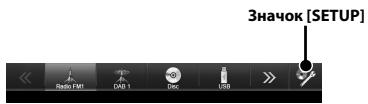
2 KocHTecb KHONKN [BLUETOOTH)].
3 KocHTecb KHONK [BLUETOOTH].
4 KocHTecb KHONKn [A] nnn [B] napaMeTp a "BLUETOOTH", yTO6bl yCTaHOBTb 3NaueHne "On".
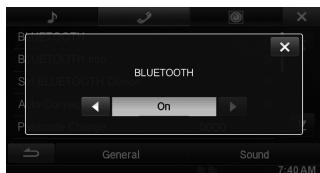
5 KocHTecb Khonkn [X].
6 KocHTecb KhoNKn [HaCTpoNka BLUETOOTH-ycTp.].
7 KocHTecb KHONKn [Search] napaMeTp a"No Device".
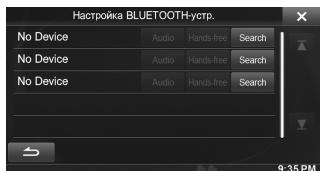
Cnncok yctpoiB OTO6paJaaET do 3 nyHkTob.
8 KocnTeCb KhoNk [Audio] nI [Hands-free] IJy yctpoiCTBa n3 cIINcKa, KOtopoe Bby XOTHe NOdKnIOuHTb.
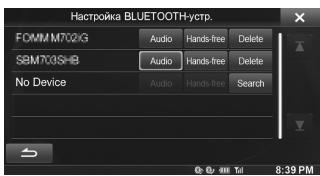
Audio: Дяи IncnoIb3OBAHnB B KaueCTBe aydno yctpoiCTBa.
IoporobayyBCTBNTbHOCtB ONDHO KaHaHa
8,1B(0,7MKB/75OM)
Ioporobaa yBCTBnTeNbHocTb 50d
12 dB (1,1 MKB/75 OM)
U36bpaTeNbHOCTb aIbTepHaTHBHO KAHana
80 n5
OTHOWeHnE CnHaI/7yM 65D6
IpepexoHoe 3aTyxAHne MeKdY CTepeOKaHaIaMn
35d6
Ko3ΦnueHt 3axbata 2,0D6
MW-TIOHEP
UyBCTBnTeJIbHOCTb (CTaHdapt M3K)
31,6 MKB/30 Φ
USB-PA3bEM
Tpe6obHnK USB 1.1/2.0
MaKcImaJIbHaI notpe6JIeMaI MOUHOCTb
1000 mA
Knacc USB USB (Bocnpom3BedeHne c yctpoiCTBA)/USB (Knacc MaccobOBI namTyr)
DnHaMueeckm Dnana3OH 95d (npn1 KfU)
Pa3deneHne KaHaoB 85Db (npn1 KfU)
CnCTema zBteHcTn CnHana NTSC/PAL
Topn3oHTaJIbHoe pa3peWeHne 500 nnHn nn6OJbWe
YpOBeHbBixHOJHO BnDeOcHnHa
1 B (75 OM)
OTHOSeHHe CNrHaI/WHyM BnDEOCnHHaI
DVD:60dB
OTHOWeHHe CnHnJI/WM ayDnOcHnJIa
100dB
Ontuueckn 3ByKoCHMaTeIb
ДИИНВОЛHBI DVD:666HM
CD:785HM
Mouchocbnaepa CLASS II
GPS
Yactota npnemga GPS 1575,42±1 Mf
UyBCTBNTeIbHOCTb npnema GPS
MaKc.-130D6
PA3ДEL BLUETOOTH
CneuФнkauaa BLUETOOTH
Bluetooth V2.1+EDR
BbIXoHnA MoUHOCTb
+4 MBT MAKC. (Knaacc MOHOCHTN 2)
PpoΦnB
HFP (npoΦnJIb rapHnTpybl)
OPP (npoФиь nepeсын)
06bekTOB)
PBAP (npofoNb doctyna K
TeJeOHHOH KHNRE)
A2DP (pacunpeHHbI npoHnB
pacnpoctpaehnaayno)
AVRCP (npoΦnIb IINCTaHcIOHHO
UnpaBHeHnAydno/BnDeO)
Oblue
PA3MEP BbICTYNAIOUEN YACTN
山nHa 170MM
BbICota 95 MM
Iy6nHa 8MM
Cpok cnjx6bI daHHoro n3dennra - Tpr rOda.
- ɪə-3a ᶏnèpèbɪŋhʊzo coēpeüeHcMbσoBua nɒpʊykma e0 zémhuueckue xapakmeμpcuMu u dusaih nuozym uʒemæntbɔː 63 e ɒpèbæpuμtěbHoZ yèbɒdümɛ.
- Panelb LCD u3zomoblena no cbepxmouho mexnooou. Konoecmbo 3fkekmuehbx nukceenu npebuuaem 99,99%. 3mo o3naaem, umo cyuecymeem bepoarnmocmb hauuui 0.01% nuKceenu, komopbte 6ce2d 8kliuuehbu uu 8ce2d 8bKluouenbI.
B 3TOM yCTPOINCTBE nPIMMeHReTC CnCTeMa 3aunTbO t OT KONPiPOBaHNi, 3aunIeHNHa NATEHTAMN B CUSA n Dpyrnnm npabAmn Ha nHTenJIeKTyalbHyIO co6CTBeHNHOCT b KopnpaOnu Rovi. BocpnOn3BeDeHne n pa36OpKa yCTPOINCTBa 3aInpeUeHb.
- I3ROTOBNEHO NOI MIIeH3Mn KOMPAnHH Dolby Laboratories.Dolby"m DBOHNO CMBOND"RABJHOrTcTc TOBaHPbIMn 3NakAMn Dolby Laboratories.
Windows Media norotin Windows yBIAOTc TOBaPbIMn 3HaKaAMn IIN 3apeiCtprpOBAHHbIMn TOBaPbIMn 3HaKaAMn Microsoft Corporation B CLIJA W/nnI DpyrIX CTpaHax.
- iPhone, iPod, iPod classic, iPod nano, iPod touch and iTunes
- JBANIOCTA TOBAPHBIMN 3HAKAMN KOPPORAQUIN Apple Inc.,
- 3APERINCTPNIPOBAHNHBIMN B CUSA IN DpyrNX cTpaHAX.
"Made for iPod"n"Made for iPhone"03hauoiT,чTo энкгюньй akceccsyap pa3pa6bTaH cneuaIaBHO nIЯ поКлочени КусроTыby iPod nIi iPhone, COOTBECTBHeHNO,И capTeNФицЮВан pa3pa6bTuKOM KAK yDObNTBOPAOUIIM KcPILyAtauONHbIM CTaHdaptAM Apple.KopnpaIGNaApple He HeCET OTBETCTBeHHOCTb 3a pa6bTy daHOrO yCtpoCTBa IINI ERO COOTBECTBINE CTaHdaptAM 6e3OnaChOHT NPERJYrNBHIM HOpMaM. ImMeYte B BVdy,чTO nCIOIb3OBaHNe daHHorO akceccya pa iPod nII iPhone MoKeT noBInIb Ta ba pa6bTy beCecpnoBOdHNo CBZHI.
© 2012 Nokia. BCE npaba 3aunueneb. Nokia n Works with Nokia JIJIHOTCT TOBAPHBIM 3HaKaMn INI 3apeNCTpnpoBaHbIMn TOBAPHBIM 3HaKaMn Nokia Corporation.
DivX^假 ,DivX Certified' CbBa3aHnBe IorOToBnIyraBnIpyTc ToBaPbHMn 3HaKaMk oKnpoAunRovi nnEe doOpEHN KOMNaHnN uCnOJb3yUO nIOuHeH3nn.
CnoBecnbl 3nK nIIOOTnbl BLUETOOTHaBIAHOTcT TOABpHbIMN 3nAkaM KOpnpaunu BleTooth Sig, Inc. nCnObn3yOToTc KOpnpaunei Alpine Electronics, Inc. NO NInueHEnNI.
"Пицентеля на Т电商лг�� Кдировая звka MPEG Layer-3 поуда ст Fraunhofer IIS и Thomson."
"Ipi nocobke 3TO rpoDykta npdeoctabnaretc Iiueh3na Ha cactHoe, HekOMMepueckoe ICNolb3oBaHne I He npdeocbaTRE TIOeH3Na I He NOpa3yMeBAOTcA KakaJe-1I60 Pnaba Ha NcNOb3OBAHne DaHHORO npdykta B ceJAX KOMpeCecKOr (t.e. dJI NaOnyehnnp6bl) padinOBeeaHnB PexmePealBOHRBpeMeHn (Ha3EMHoro, CNYTHNKOBoro, Ka6eBbHOro I/Inn INHO), WpOKoBO BeaHnra IIN NOTOKOB nepeDaun DaHHbx Upe3 IVHTepHET, INTPacTeIN w/Inn Inhle cetn IIN DpyrNe CeTn pacnPedeHnE IeKTKPOHO CODepxHnA, TaKe KAK pNILOXeHnI 3ByKBOCSPON3BeHEnn 3a IIaTy IIN No Tpe6oBaHNIO. IaTakO nCNoB3OBAHn Tpe6yctc OTdJIbNa IiueH3Na. IJa nOlyeHnI dONOHHeN IHOpMaun nocetnte Be6-caIT http://www.mp3licensing.com"
©1993-2012 NAVTEQ. Bce npaba 3aunueneHbI.
- Portions ©, Microsoft Corporation, 2013. Bce npaba zauniuhebl.
OOO «Kompanma BoHaHa3a»
777 Supertest Road, Toronto,
Ontario M3J 2M9, Canada
Phone 1-800-ALPINE-1 (1-800-257-4631)
1-888-NAV-HELP (1-888-628-4357)
ALPINE ELECTRONICS OF AUSTRALIA PTY. LTD.
161-165 Princes Highway,
Hallam Victoria 3803, Australia
Phone 03-8787-1200
ALPINE ELECTRONICS GmbH
Alpine House Fletchamstead Highway,
Coventry CV4 9TW, U.K.
Phone 0870-33 33 763
ALPINE ELECTRONICS FRANCE S.A.R.L.
(RCS PONTOISE B 338 101 280)
98, Rue de la Belle Etoile, Z.I. Paris Nord II
B.P. 50016, 95945 Roissy Charles de Gaulle Cedex,
France
Phone 01-48638989
Designed by ALPINE Japan
Printed in Korea
68-25285Z07-A (Y_A5)
M3514508010
JEIL Moon Hwa Co.
18-6, 3Ga, Pil_dong, Jung_gu, Seoul, Korea

- Contents
- IMPORTANT
- WARNING
- DO NOT OPERATE ANY FUNCTION THAT TAKES YOUR ATTENTION AWAY FROM SAFELY DRIVING YOUR VEHICLE.
- KEEP SMALL OBJECTS SUCH AS SCREWS OUT OF THE REACH OF CHILDREN.
- KEEP THE VOLUME AT A LEVEL WHERE YOU CAN STILL HEAR OUTSIDE NOISES WHILE DRIVING.
- DO NOT DISASSEMBLE OR ALTER.
- USE ONLY IN CARS WITH A 12 VOLT NEGATIVE GROUND.
- USE THE CORRECT AMPERE RATING WHEN REPLACING FUSES.
- DO NOT BLOCK VENTS OR RADIATOR PANELS.
- USE THIS PRODUCT FOR MOBILE 12V APPLICATIONS.
- DO NOT PLACE HANDS, FINGERS OR FOREIGN OBJECTS IN INSERTION SLOTS OR GAPS.
- MAKE THE CORRECT CONNECTIONS.
- BEFORE WIRING, DISCONNECT THE CABLE FROM THE NEGATIVE BATTERY TERMINAL.
- DO NOT SPLICE INTO ELECTRICAL CABLES.
- DO NOT DAMAGE PIPE OR WIRING WHEN DRILLING HOLES.
- DO NOT USE BOLTS OR NUTS IN THE BRAKE OR STEERING SYSTEMS TO MAKE GROUND CONNECTIONS.
- DO NOT INSTALL IN LOCATIONS WHICH MIGHT HINDER VEHICLE OPERATION, SUCH AS THE STEERING WHEEL OR GEARSHIFT.
- DO NOT FOLLOW ROUTE SUGGESTIONS IF THE NAVIGATION SYSTEM INSTRUCTS YOU TO PERFORM AN UNSAFE OR ILLEGAL MANEUVER, OR PLACES YOU IN AN UNSAFE SITUATION OR AREA.
- CAUTION
- This symbol means important instructions. Failure to heed them can result in injury or material property damage.
- HALT USE IMMEDIATELY IF A PROBLEM APPEARS.
- HAVETHEWIRINGAND INSTALLATIONDONEBYEXPERTS.
- USE SPECIFIED ACCESSORY PARTS AND INSTALL THEM SECURELY.
- ARRANGE THE WIRING SO IT IS NOT CRIMPED OR PINCHED BY A SHARP METAL EDGE.
- DO NOT INSTALL IN LOCATIONS WITH HIGH MOISTURE OR DUST.
- KEEP FINGERS AWAY WHILE THE MOTORIZED FRONT PANEL OR MOVING MONITOR IS IN MOTION.
- Getting Started
- Touch operation
- Common onscreen buttons
- Location of Controls
- ① (Eject) button
- ② Remote Sensor
- ③ A(MAP) button
- √(PHONE) button
- ⑤
- / (UP/DOWN) button
- MUTE/ button
- DISC Slot
- Turning Power On or Off
- DVD Operation
- iPod/iPhone Operation (Optional)
- Audio mode
- Searching for a Music File
- Touch the selected artist name.
- Touch the desired album's name.
- Touch the desired song's name.
- USB Memory Operation (Optional)
- Hands-Free Phone Control
- How to connect to a BLUETOOTH compatible device (Pairing)
- Answering a Call
- Hanging up the Telephone
- Map Functions
- Navigation Menu
- Route
- Go to
- Information
- Settings
- Go to a Destination
- Enter a house number. Touch [Done] to access the confirmation screen.
- Touch [Select] to initialize route calculation and start navigation.
- Installation
- Install at an angle between horizontal and 30° . Note that installing at an angle outside of this range will result in a loss of performance and possibly damage.
- Mounting the Microphone.
- Remove the mounting sleeve from the main unit.
- Slide the unit into the mounting sleeve and secure it.
- Connection Diagram of SPST Switch (sold separately)
- Connections
- Connections 1/2
- Specifications
- MONITOR SECTION
- FM TUNER SECTION
- MW TUNER SECTION
- LWTUNERSECTION
- USB SECTION
- CD/DVD SECTION
- PICKUP
- GPS SECTION
- BLUETOOTH SECTION
- GENERAL
- CHASSIS SIZE
- NOSE SIZE
- Inhalt
- DIMENSIONS DU CHÄSSIS
- TAILLE DU NEZ
- CHASSISTORLEK
- ПРЕДУПЕЖДЕНЕ
- PPEyPPEKDEHNE
- HEIPEINPHIMAHTEHKAKIXDEIECTBWI,KOTOBPIMOTYRTOBTJEBCBACOTBE3OTACHOROBOXEKHABNABTOMOBJIA.
- XPAHNTHE HEBONJIWE OBEKTBI, TAKVE KAK TAIKNB, B HEHOCTYINHIXI BIAI DETEIM EECTAX.
- NIOJEPKXBIAIETP FOMKOCTb HAPOVBHE, PO3BOJLIOUcEM CJIbIaB BHEUIHBE 3BYKNO BO BPMEB DIBXHEHM.
- HE PA3bIPATb IN HE U3MEHrTb.
- NICIOJIb3OBObT TOJIKO B ABOTOMOBIJIK CX 3A3EMJIHEM OTPNIJIbHOrO NIOIOCA HA 12 BOJbT.
- PIM3AHEME INPEPOXAPAHNTJEEN MCOJb3yUTE TONBJKO AHANOHNHBE IO HOMMHAUYI.
- HE 3AQPbIBAITE BEHTIJIAYLMOHNNbIE OTBEPCTIN JIIN PAHEJINI PADIATOPA.
- NCIOJ3BYNEOTIPONDKTOIIBKOJABTOMOBNIE CBOPTOBJCETbHOHAPRJEHEM12B.
- HE NOMEUATTE PYKNI, PAJIbUII JIINI OTOCTOPOHNHIE OBkEBTI BO XOHDHII PA3bEMJI.
- BbINOJIHЯITE NPABANlbHbIE NOKJIIOUeyHnA.
- NEPEI NOJIKIJOYEHEMI NPOBOJOB OTOOEINHITTE KAE6JIb OT OPTRNUATELBNHOIO JIOJIOCA BATAPEI.
- HE CPAUBAI TE C 3JIKTPNUECKUMKABEJAMN.
- HE NOBPEJATE TPY60PBOObI bJI NII PPOBOKY PNI CBEPJIENH OTBEPCTI.
- HENCIOJIb3YIte BOJITbI YINI TAIKNI TOPMO3HOI CNTEMbl NCICTEMbl PYIEBOTO YIPABJEHnI DA3AEMJIHnIA.
- HE YCTAHABJINBAIYE YCTPOICTBO B MECTAX, IDE OHO MOXET MEUATb PAOTE ABTOMOBUNI, HANIPIMEP, PRDOM C PUYEBBM KOLECOM NIN PbYAHOM TEPEKJIIOUeyH NCKOCTEEN.
- HE CJEYUVE TPEJIOXEHNMR MAPUVTCA, ECNI HABIURAIOHNA CNTHEMA TPEJIOXJNT BblIOHNHTB HEBE3OTACHBI NUN 3ANPEUENHHM MAHEBP, A TAKKEB C BYLAAVEX, ECNI PLOJOIXEHHK MAPUIPYT OKAOKTCR TONEHTUJIBAHO ANPCHBIMUN PNMBEDET B OANACHYO3OH.
- BHMMAHNE
- 3TOT CUMBON 06O3Naayet BaXhble INHCTpyKuIN. IX Heco6IIOJeHne MoKeT PnIBeCTN K TpaBMe IIN BbIXOy U3 CTpor BaWero yCTpoiCTBa.
- \PNBO3HMKOBEHMIPOJEIMHEMEJENHO PPKEPATMCNOLB3OBAHIMEIPOJDKTA.
- PKNJLAKINPOBOOINYCTAHOBKAIOJIKNHbIbItbBIIIOHNHEbCIENLAJINTAMN.
- NCIOJb3VJTE TOJIbKO CNTELNAIMNPOBAHNBIE YCTAHOBOCHBIE KOMTOHEHTbI N TLIATEJBHO X3AKPEIJLJE.
- \PABUINbHO IPIOJIOXEHHAR IPOBOJKA HE JOJIJKHA UNI5BATcBcN ⅢAIIeEMJIbTcBcOCTPbIMN METALJIHNECKIMK KAPMI.
- HEYCTAHABINBAITEYCTPOYNCBOBMECTAXCBICOKUM YPOBHEBMJXACHOCTMIMN3A2bJIHECHOCTM.
- SEPENTEI PIAIbIcI BO BPMEI PEIMELEIIH MOTOPIO3OBAHNIIEPEIDHEI PAHEJIINJIM MOHOTHOPA.
- PpncTynpaK pa6oTe
- UnpaBHeHne KacaHnem
- OCHOBHbIe ceHCOPHbIe KHOKN
- PacnoIoxKeHne 3JIeMeHTOB ynpaBJeHnA
- ① KhoNka△(M3BbIeueHme)
- ② DaTUnK dIcTaHcUHOHHOro ynpaBLeHn
- ③ KhonkaA (MAP)
- ④ Khonka (PHONE)
- ⑤ KhoNka (AUDIO)
- ⑥ KhonkaV/∧(UP/DOWN)
- ⑦ Khonka MUTE/
- CnotnlaDka
- BkJIIOUeHne N BbIKJIIOUeHne IITaHnI
- IcnoIb3OBAHne paIaNo
- Mcnonlb30BaHne npomrpbIbTaTeIa MP3/WMA/AAC
- IcnoIb3OBAHnne npomrpbIBaTeTn DVD
- Kak nodklouHTb COBMeCTHMoe c BLUETOOTH yctpoiCTBO (ConpJxHeH)
- MW-TIOHEP
- USB-PA3bEM
- Ontuueckn 3ByKoCHMaTeIb
- GPS
- PA3ДEL BLUETOOTH
- Oblue
- PA3MEP BbICTYNAIOUEN YACTN
- OOO «Kompanma BoHaHa3a»
Brand : ALPINE
Model : INE-W970BT
Category : Car radio