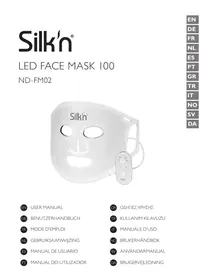
FaceMask 100 - Facial care device SILKN - Free user manual and instructions
Find the device manual for free FaceMask 100 SILKN in PDF.



| Product type | LED facial treatment device |
| Brand | SILKN |
| Model | FaceMask 100 (ND-FM02) |
| Dimensions (L × W × H) | 383 × 198 × 13.5 mm |
| Weight | 307 g |
| Power supply type | Rechargeable lithium battery 1500 mAh (3.7 V) + USB adapter 5 V / 1 A |
| Number of LEDs | 100 |
| Light programs | Red (M1), Blue (M2), Yellow (M3), Purple (M4) |
| Main functions | Reduction of fine lines and wrinkles, improvement of radiance, reduction of imperfections, anti-aging action, soothing for sensitive skin |
| Maximum session duration | 15 minutes (automatic mode) / 10 minutes (manual mode) |
| Operating modes | Manual (program selection) and automatic (program sequencing) |
| Mask material | Food-grade silicone and ABS |
| Package contents | Facial mask, remote control, 2 large elastic straps, 2 small elastic straps, USB cable, USB wall adapter |
| Care and cleaning | Clean with a dry cloth or damp wipe, do not use harsh products, do not immerse |
| Safety instructions | Do not use while charging, do not use more than 15 min per session, not recommended for pregnant women, people with epilepsy, etc., keep out of reach of children |
| Protection rating (adapter) | IP20, protection class II |
| Warranty | 2 years (in accordance with European regulations) |
| France customer service | 0891-655557, serviceconsommateurfr@silkn.eu |
Frequently Asked Questions - FaceMask 100 SILKN
User questions about FaceMask 100 SILKN
0 question about this device. Answer the ones you know or ask your own.
Ask a new question about this device
Download the instructions for your Facial care device in PDF format for free! Find your manual FaceMask 100 - SILKN and take your electronic device back in hand. On this page are published all the documents necessary for the use of your device. FaceMask 100 by SILKN.
USER MANUAL FaceMask 100 SILKN
Invention Works B.V. reserves the right to make changes to its products or specifications to improve performance, reliability, or manufacturability. Information furnished by Invention Works B.V. is believed to be accurate and reliable at the time of publication. However, Invention Works B.V. assumes no responsibility for its use. No license is granted by its implication or otherwise under any patent or patent rights of Invention Works B.V.
No part of this document may be reproduced or transmitted in any form or by any means, electronic or mechanical, for any purpose, without the express written permission of Invention Works B.V. Data is subject to change without notification.
Silkn Beauty Ltd. has patents and pending patent applications, trademarks, copyrights, or other intellectual property rights covering subject matter in this document. The furnishing of this document does not give you any license to these patents, trademarks, copyrights, or other intellectual property rights except as expressly provided in any written agreement from Silkn Beauty Ltd. Specifications are subject to change without notice.
Silk'n and the Silk'n logo are registered trademarks of Silkn Beauty Ltd.
Invention Works B.V.
Galileistraße 17, 3029 AL Rotterdam, The Netherlands
www.silkn.eu - info@silkn.eu
Table of contents
I Package contents/device parts 5
2 General information 5
2.1 Reading and storing the user manual 5
2.2 Explanation of symbols 5
3 Safety 7
3.1 Proper use 7
3.2 Safety instructions 7
4 Checking the product and package contents 10
5 Charging
6 Assembly 12
7 Operation 12
7.1 Carrying out the session 12
7.2 Manual mode 13
7.3 Auto mode 14
8 Regimen 14
9 Cleaning 14
10 Storage 15
11 Troubleshooting 15
12 Technical data 16
12.1 General 16
12.2 USB wall adapter 16
13 Disposal 17
13.1 Disposing of the packaging 17
13.2 Disposing of the product 17
14 Warranty 18
15 Customer service 18
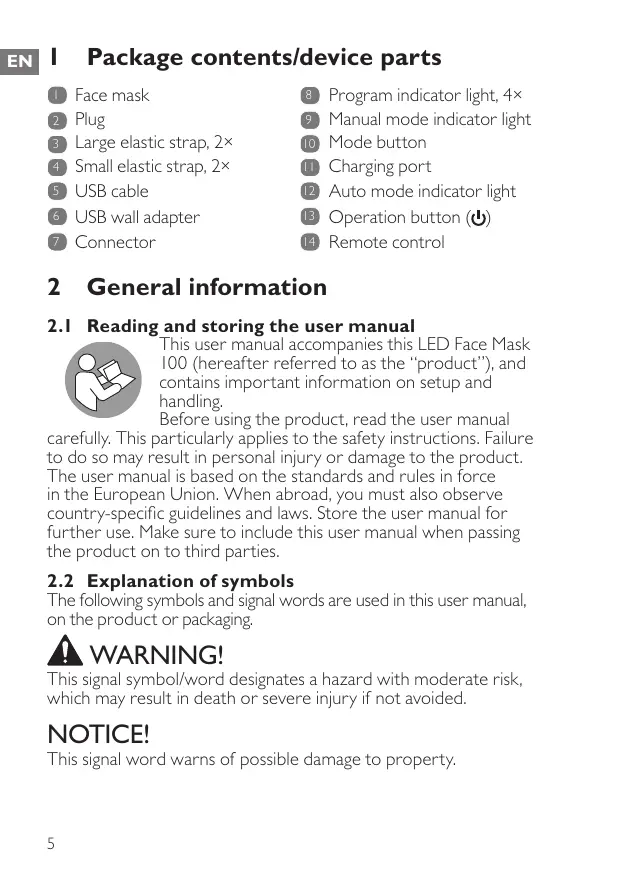
Package contents/device parts
Face mask
2 Plug
3 Large elastic strap, 2×
4 Small elastic strap, 2 ×
USB cable
USB wall adapter
7 Connector
8 Program indicator light, 4 ×
9 Manual mode indicator light
10 Mode button
11 Charging port
12 Auto mode indicator light
Operation button (b)
Remote control
2 General information
2.1 Reading and storing the user manual

This user manual accompanies this LED Face Mask 100 (hereafter referred to as the "product"), and contains important information on setup and handling.
Before using the product, read the user manual carefully. This particularly applies to the safety instructions. Failure to do so may result in personal injury or damage to the product. The user manual is based on the standards and rules in force in the European Union. When abroad, you must also observe country-specific guidelines and laws. Store the user manual for further use. Make sure to include this user manual when passing the product on to third parties.
2.2 Explanation of symbols
The following symbols and signal words are used in this user manual, on the product or packaging.

WARNING!
This signal symbol/word designates a hazard with moderate risk, which may result in death or severe injury if not avoided.
NOTICE!
This signal word warns of possible damage to property.


C E
UK CA


IP20


ta
This signal symbol provides you with useful additional information on handling and use.
Read the user manual.
Declaration of Conformity: Products labelled with this symbol meet all applicable provisions of the European Economic Area.
Declaration of Conformity: Products labelled with this symbol meet all applicable provisions of the United Kingdom.
Devices marked with this symbol are only suitable for household use (dry indoor rooms).
This symbol identifies voltage and the current rating for direct current.
The word "GS" stands for tested safety. Products marked with this symbol meet the requirements of the German Product Safety Act (ProdSG).
The USB wall adapter is protected against solid objects up to 12 mm.
The international efficiency mark indicates that the power supply meets the level VI requirements (USB wall adapter).
The USB wall adapter is equipped with a short-circuit proof safety transformer.
The USB wall adapter has a switching power supply.
This symbol indicates the polarity of the pins in the USB wall adapter.
This symbol identifies electrical devices that belong to the protection class II.
Ambient temperature (USB wall adapter).
3 Safety
3.1 Proper use
The product is exclusively designed to recover your skin's glow, elasticity and texture. It also helps to reduce the appearance of fine lines, wrinkles and other skin imperfections. It is only intended for private use and not suitable for commercial purposes.
Only use the product as described in this user manual. Any other use is considered improper and may result in damage to property or persons. The manufacturer cannot be held liable for damages or injury incurred through improper or incorrect use.
3.2 Safety instructions

WARNING! RISK OF ELECTRIC SHOCK!
- Only connect the product if the line voltage of the socket corresponds to the data on the rating plate of the USB wall adapter.
- Only connect the USB wall adapter to an easily accessible socket so that you can quickly disconnect it from the mains supply in the event of a problem.
- Only use the supplied USB cable and USB wall adapter for charging. Do not use them for other purposes.
- Do not use the product, USB cable or USB wall adapter if they are damaged or defective. The manufacturer or customer service must replace the damaged or defective parts to avoid risks.
- Do not open the housing; instead, have a qualified professional perform repairs.
Contact the customer service team for this. Liability and warranty claims are waived in the event of repairs performed by the user, improper connection or incorrect operation.
- Only parts that comply with the original device data may be used for repairs. This product contains electrical and mechanical parts which are essential for providing protection against sources of danger.
- Do not immerse the product, USB cable or USB wall adapter in water or other liquids. Keep them away from water.
- Always switch the product off when you are not using it, when you intend to clean it, or in the event of a malfunction. Always unplug the USB wall adapter when you are not charging the product.
- Never touch the housing, USB cable and USB wall adapter with wet or damp hands.
- Never insert any objects into the housing.
- Do not pull the USB wall adapter out of the socket by the USB cable; instead, always pull it out by the adapter itself. Never move, pull, or carry the product by the USB cable.
-
Keep the product, USB cable and USB wall adapter away from open flames and hot surfaces.
-
Lay the USB cable so that it does not pose a tripping hazard.
- Do not kink the USB cable or wrap it around the product. Do not lay the USB cable over sharp edges.
- Only use the product indoors.
- Do not use the product while charging.

WARNING! RISK OF INJURY!
- The product can be used by persons with reduced physical, sensory or mental capabilities or lack of experience and knowledge if they have been given supervision or instruction concerning the use of the product in a safe way and understand the hazards involved. Children must not play with the product. Cleaning and user maintenance must not be performed by children.
- The product cannot be used by pregnant women, children, people with epilepsy, thyroid patients, people using thyroid medications, people who are photoallergic or use light allergy medication.
- The product cannot be used on skin diseases, wound ulceration, trauma and post-operative wounds.
-
Do not use the product for more than 15 minutes per session.
-
Consult your physician if you are uncertain whether you can use the product.
- Stop using the product immediately if you feel any discomfort, develop any abnormal reactions (such as itching or uncomfortable inflammation) or in case your skin becomes warm to the point of discomfort.
- Keep children away from the product, USB cable and USB wall adapter.
NOTICE! RISK OF DAMAGE!
- Keep the product away from open fire, hot surfaces, high temperatures or the effects of the weather (e.g. rain).
- Do not fold or roll up the product.
- Do not stack heavy objects on top of the product.
- Stop using the product if its parts exhibit cracks or breaks or are deformed. Only replace damaged parts with corresponding original spare parts.
4 Checking the product and package contents
NOTICE! RISK OF DAMAGE!
- If you are not cautious when opening the packaging with a sharp knife or other pointed objects, you may quickly damage the product. Be very careful when opening it.
I. Take the product out of the packaging.
2. Check to make sure that all parts are included (see Fig. A).
3. Check whether the product or individual parts are damaged. If this is the case, do not use the product. Contact our customer service.
5 Charging

WARNING! RISK OF INJURY!
- Charge only with the supplied USB cable and USB wall adapter.
- Only charge the product at temperatures between 0 and 40^ C .

- Fully charge the product before first use and when the battery power is low.
- When the battery power is low, the indicator lights on the remote control will flash 10 times before switching off automatically. Recharge the product.
The product cannot be used during charging. - If the product is to be stored for an extended period, the charge level should be checked and the lithium battery should be charged regularly.
I. Connect the plug 2 of the face mask 1 with the connector 7 of the remote control.
2. Plug the smaller end of the USB cable 5 into the charging port 11 of the remote control.
3. Plug the larger end of the USB cable into the USB port of the USB wall adapter 6. You may also connect the USB cable to a compatible USB power source (5.0 V, I.0 A, 5.0 W) (e.g. PC, laptop or powerbank) for charging.
4. Plug the USB wall adapter into a mains socket for charging. Check the program indicator lights 8 for charging progress: One indicator light = 25% charged Two indicator lights = 50% charged
Three indicator lights = 75% charged
Four indicator lights = fully charged
- When charging is done, unplug the USB wall adapter from the mains socket and disconnect the USB cable from the charging port of the remote control.
6 Assembly
- Open the hook-and-loop fasteners on the elastic straps 3/4
- Guide the small elastic 4 straps through the small top openings and the large elastic straps 3 through the large side openings of the face mask 1 (see step I in Fig. B).
- Close the hook-and-loop fasteners to secure the elastic straps on the face mask (see step 2 in Fig. B).
7 Operation
WARNING! RISK OF INJURY!
- Do not use the product for more than 15 minutes per session.
7.1 Carrying out the session
- Fully charge the product and properly attach the elastic straps 3 / 4 (see chapter "Charging" and "Assembly").
- Thoroughly clean and dry your face and hands. Make sure they are free from any make-up or dirt.
- Sit or lie down and place the face mask over your face.
- Use the hook-and-loop fasteners on the ends of the elastic straps to fit the face mask comfortably on your face.
The small elastic straps 4 should be closed at the top of your head and the large elastic straps 3 should be closed at the back of your head (see Fig. C).
- Connect the plug 2 of the face mask into the connector 7 of the remote control 14.
- Press and hold the operation button (D) to switch on the product.
By default, the product goes into Manual mode with the MI (red) program selected after switching on.
- If desired, press the mode button 10 repeatedly to select between the Auto mode and Manual mode.
The corresponding mode indicator light (9 or 12) turns on according to your selection.
To use the Manual mode, see chapter "Manual mode".
To use the Auto mode, see chapter "Auto mode".
- After the session, remove the face mask and apply a serum and/or day/night cream on your face.
7.2 Manual mode
- By default, the product goes into Manual mode with the MI (red) program selected after switching on.
If another program (M2, M3 or M4) is desired, press the operation button (U) 13 1-3 times for selection. The corresponding program indicator light 8 turns on to show your selection.
Note: The product switches off when the operation button (U) is pressed a fourth time.
- When a program is selected, the manual mode indicator light 9 flashes 5 times before the indicator light stays lit and the product starts the selected program.
Functions of the programs:
| Program | LED | Best for |
| M1 | Red | Reduces fine lines and wrinkles, stimulates collagen and helps to improve blood circulation |
| M2 | Blue | Reduces acne-related redness and imperfections for clearer skin |
| M3 | Yellow | Improves skin hydration and sooths dry and sensitive skin |
| M4 | Purple | Anti-ageing and reduction of skin imperfections to improve the skin's vitality and radiance |
- The session lasts for 10 minutes. The product will switch off automatically after the session time has elapsed.
- You can also press and hold the operation button (U) to switch off the product any time.
7.3 Auto mode
- When Auto mode is selected, the auto mode indicator light 12 flashes 5 times before the indicator light stays lit and the product starts the session.
- In Auto mode, the product will carry out the programs in below order:
MI (red): 5 minutes
M2 (blue): 3 minutes
M3 (yellow): 4 minutes
M4 (purple): 3 minutes
- The whole session lasts for 15 minutes. The product will switch off automatically after the session time has elapsed.
- You can also press and hold the operation button (U) to switch off the product any time.
8 Regimen
If you are using the product for the first time, follow the schedule below:
| First week | Use once every 3 days, max. 10 minutes at a time |
| Second week | Use once every 2 days, max. 10 minutes at a time |
| Third week | Use once every 2 days, max. 10–15 minutes at a time |
| Fourth week | Use once every day, max. 10–15 minutes at a time |
As soon as results show, adjust the frequency to once or twice per week.
9 Cleaning
WARNING! RISK OF ELECTRIC SHOCK!
- Always unplug the product from the power source before cleaning.
NOTICE! RISK OF DAMAGE!
- Do not use any aggressive cleaners (e.g. vinegar or limescale removers), brushes with metal or nylon bristles, or sharp or metallic cleaning utensils such as knives, hard scrapers and the like.
- Do not use hot water for cleaning.
Use a damp cloth or a water-based wipe to wipe off the face mask. Then wipe it dry with a dry cloth.
10 Storage
All parts must be completely dry before being stored.
- Store the product in a clean and dry place, avoiding heat and direct sunlight.
- Store the product so that it is not accessible to children.
- For best protection, store the product in its original packaging.
II Troubleshooting
Some problems may be caused by minor faults that you can fix yourself. To do so, follow the instructions in the following table. If it is still not possible to resolve the problem, contact customer service. Do not repair the product yourself.
| Fault | Possible cause and solution |
| The product does not operate. | ·Make sure the product is properly charged. ·Make sure the product is not connected to a USB power source. The product does not work while charging. |
| The product does not charge. | ·Make sure the USB cable is securely connected between the charging port and the USB power source. |
12 Technical data
EN
12.1 General
Model: ND-FM02
Rated voltage: 3.7 V
Battery capacity: 1,500 mAh lithium
Number of LED lights: 100
Materials: Food grade silicon, ABS
Weight: 307 g
Dimensions (L× W× H) .. 383× 198× 13.5mm
12.2 USB wall adapter
Model number: PS06H050KI000EU/PS06H050KI000BU
Input: 100 - 240V 50 / 60Hz 0.25 A
Output: 5.0V = -1.0A,5.0W
Protection class: II
IP code: IP20
| Published information | Value and precision | Unit |
| Name or trademark of the manufacturer, commercial register number and address: | Shenzhen Flypower Technology Co., LtdBuilding A2, Haosan Linpokeng 2nd Industry Zone, Nanpu Road, Shajing, Bao'an, Shenzhen, Guangdong, China | |
| Model number: | PS06H050K1000EU / PS06H050K1000BU | |
| Input voltage: | 100–240 | V |
| Input alternating current frequency: | 50/60 | Hz |
| Output voltage: | 5.0 | V |
| Output current: | 1.0 | A |
| Output power: | 5.0 | W |
| Average efficiency during operation: | 73.62 | % |
| Efficiency at low load (10%): | 64.59 (min.) | % |
| Power consumption at zero load: | 0.1 | W |
13 Disposal
13.1 Disposing of the packaging

Sort the packaging before you dispose of it. Dispos of paperboard and cardboard with t recycled paper service and wrappings with th appropriate collection service.
13.2 Disposing of the product
(Applicable in the European Union and other European countries with separate collection systems of recyclable materials)
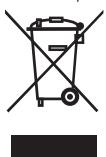
Old appliances may not be disposed of in the household waste!
Should the product no longer be capable of being used at some point in time, dispose of it in accordance with the regulations in force in your city or county. This ensures that old appliances are recycled in a professional manner and also rules out negative
consequences for the environment. For this reason, electrical equipment is marked with the symbol shown here.
Batteries and rechargeable batteries may not be disposed of with household waste!
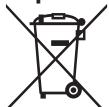
As the end user you are required by law to bring all batteries and rechargeable batteries, regardless whether they contain harmful substances* or not, to a collection point run by the communal authority or to a retailer, so that they can be disposed of in an
environmentally friendly manner.
Bring the entire product (including the rechargeable battery) to your collection point and make sure that it is in an uncharged state!
- labelled with: Cd = cadmium, Hg = mercury, Pb = lead
Note: To remove the rechargeable battery, wrap a towel around the remote control and use a hammer to smash the housing.
Make sure your eyes and hands are protected to avoid injury.
Please note, the removal of the rechargeable battery is not reversible.
I4 Warranty
This product is covered by a 2-year warranty according to European regulations and law. The extent of the warranty on this product is limited to technical defects caused by faulty production processes. In the event you want to claim warranty please be sure to contact our customer service for instructions. They may be able to solve your problem without needing to return the product to the store or our service center. Our customer service is always pleased to help you!
15 Customer service
For more information about the products of Silk'n visit your regional Silk'n website: www.silkn.eu. If the device is damaged, defective, in need of repair or you need our assistance, please contact your nearest Silk'n service center. This manual is also available as a PDF download from: www.silkn.eu.
Service number: 0906-2130009 / +31 (0) 180330550
Email: customercareuk@silkn.eu / info@silkn.eu
- mentions : Cd = cadmium, Hg = mercury, Pb = plomb
WAARSCHUWING! RISICO OP LETSEL!
WAARSCHUWING! RISICO OP LETSEL!
WAARSCHUWING! RISICO OP LETSEL!
Saía: 5,0 v --- I,0 A, 5,0 w
EIADONOIHsH! KINADYNOs BABHs!
Eoδoc: 5,0V=1,0A,5,0W
Katnyopia npoostaoiac: II
| Program | LED | Etkisi |
| M1 | Kırkızo | İnce çigileri ve kırkıklıkları azaltır, kolajeni ullarir ve kan dolaşimini iyileşirmeye yarduhtar olur |
| M2 | Mavi | Daha berrak bir ciltificant aknye®,®,®,®,®,®,®,®,®,®,®,®,®,®,®,®,®,®,®,®,®,®,®,®,®,®,®,®,®,®,®,®,®,®,®,®,®,®,®,®,®,®,®,®,®,®,®,®,®,®,®,®,®,®,®,®,®,®,®,®,®,®,®,®,®,®,®,®,®,®,®,®,®,®,®,®,®,®,®,®,®,®,®,®,®,®,®,®,®,®,®,®,®,®,®,®,®,®,®,®,® |
| M3 | Sarı | Cildin nemini artırlı ve kuru ve hassas cildi yatlştr |
| M4 | Mor | Cildin Yaşlanmasını onler ve cildin caniligişi ve parlakiğişi artırmakificantciltekki kiri azaltır |
Invention Works B.V.
Galileistraat 17, 3029 AL Rotterdam, Nederländerna
www.silkn.eu - info@silkn.eu
- märkta med: Cd = kadmium, Hg = kvicksilver, Pb = bly
Invention Works B.V.
Invention Works B.V.
Galileistraat 17,3029 AL Rotterdam
The Netherlands
Silk'n UK Ltd.
2nd Floor, De Burgh House
Market Road, Wickford, Essex, SS12 0FD,
United Kingdom
www.silkn.eu • info@silkn.eu