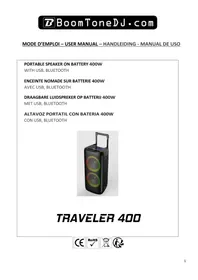
TRAVELER 400 - PA speaker BOOMTONEDJ - Free user manual and instructions
Find the device manual for free TRAVELER 400 BOOMTONEDJ in PDF.


| Product type | PA Speaker |
| Brand | BOOMTONEDJ |
| Model | TRAVELER 400 |
| Product dimensions | 290 x 271 x 580 mm |
| Box dimensions | 333 x 323 x 617 mm |
| Gross weight | 6.4 kg |
| Net weight | 5.3 kg |
| Power supply | AC 100-240V 50/60Hz via DC 9V-1A adapter |
| Maximum music power | 400 W |
| Battery type | Lithium rechargeable 7.4V – 2200 mAh |
| Battery life | 2 to 4 hours |
| Charging time | 3 to 4 hours |
| Power consumption | 30 W max |
| Frequency response | 55 Hz – 20 kHz |
| Bluetooth frequency range | 2402 – 2480 MHz |
| Max Bluetooth transmission power | 3.06 dBm |
| Speakers | 2 x 8"/20 cm + tweeter |
| Main functions | Bluetooth, USB, TF, Line In, wired microphone, recording, TWS, LED light |
| Maintenance and cleaning | Clean with a dry soft cloth. Do not use abrasive products. |
| Safety | Do not open the casing. Keep out of reach of children. Use only indoors. |
| Spare parts and repairability | Contact the retailer or after-sales service. The device is recycled at a waste disposal facility. |
| General information | Imported by BoomtoneDJ - MSC, 9 Avenue Camille Flammarion, 91630 Avrainville, France. |
Frequently Asked Questions - TRAVELER 400 BOOMTONEDJ
User questions about TRAVELER 400 BOOMTONEDJ
0 question about this device. Answer the ones you know or ask your own.
Ask a new question about this device
Download the instructions for your PA speaker in PDF format for free! Find your manual TRAVELER 400 - BOOMTONEDJ and take your electronic device back in hand. On this page are published all the documents necessary for the use of your device. TRAVELER 400 by BOOMTONEDJ.
USER MANUAL TRAVELER 400 BOOMTONEDJ
Please read the manual carefully and keep it for future reference.
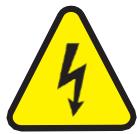
The lightning flash with arrow head symbol, within an equilateral Triangle, is intended to alert the user to the presence of notinsulated dangerous voltages within the product's enclosure that maybe of sufficient
magnitude to constitute a risk of electric shock to persons.
The exclamation point within an equilateral triangle is intended to alert the user to the presence of important operating and maintenance (servicing) instructions in the literature accompanying the appliance.

CAUTION
DO NOT OPEN THE HOUSING
SHOCK HAZARD
CAUTION:
Do not place any recipients filled with liquids, such as glasses or vases, on top of the directly next to the appliance. They could fall over, causing water to enter the appliance. Never put liquids over the appliance. Do not places small objects, such as coins or paper clips, on the appliance since they could fall inside the appliance and cause fire or shock hazard! If any liquid or objects enter the appliance, pull immediately the mains plug out of the socket and contact a specialist.
- Only pull the mains plug out of the socket by the intended gripping surface. Do not pull it by the cable.
- Never plug the mains plug in or out with damp or wet hands
Electrical appliances must be kept out of thereach of children. Be particularly careful if children are present. Children are not aware of the hazards involved in handling electrical appliancesimproperly. Children could attempt to poke objects into the appliance. There is a life-threatening danger of electrocution.
- Neverplacetheapplianceonanunstableormobilesurface. Personscouldbeinjuredortheappliancedamaged by it falling down.
All persons involved in operating, installing and servicing the appliance and putting it into service must be trained and qualified accordingly and observe these operating instructions.
Defective mains cables may only be replaced by specialists. Danger of shock hazard!
If you are not sure about the correct connection or if questions arise which are not answered by the operating instructions, please do not hesitate to contact support or a specialist of your choice. Consult a specialist if you are in doubt about the operating principle or the safety of the product.
- Please unplug the adaptor and switch the unit off if you don't use it for a long time, to avoid damage due to voltage surges.
No naked flame sources such as lighted candles should be placed on the apparatus.
- A warning that batteries (battery pack or batteries installed) shall not be exposed to excessive heats such as sunshine, fire or the like.
Where the MAINS plug or an appliance coupler is used as the disconnect device, the disconnect device shall remain readily operable.
The device in operation cannot be exposed to extreme temperatures (not below 5^ and not above 35^ )
The device can only be used indoors
RECOMMENDATIONS FOR BATTERIES
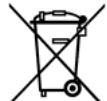
This symbol indicates that used batteries should not be disposed of with household waste but
deposited in separate collection points for recycling.
ATTENTION
Danger of explosion if batteryisincorrectlyplaced.Only replace by the same or equivalenttype. Keep new and old batteries out of the reach of children.
If the battery compartment doesn't close properly, stop using the product and keep it out of the reach of children.
Batteries shall not be exposed to excessive heat such as sunshine, fire or the like.
When the internal batteries are not to be used, remove them to avoid damage caused by battery leakage or corrosion.
WARNING
The supplied remote control contains abattery. In case of ingestion, it might cause serious internal burns within only 2 hours that might lead to death.
If you are indoubt whether the batteries have been swallowed or introduced into any other part of the body, contact immediately a doctor.

Electric products must not be put into household waste. Please bring them to a recycling centre. Ask your local
authorities or your dealer about the way to proceed.

Accordance with the requirements of CE standard

Recycled products can be recycled

The product is suitable for indoor use
CONTROL PANEL
- ON / OFF button to turn the unit on or off
- MODE/PRI. button To select different input MODE (short press) (Bluetooth / USB / TF / LINE IN) and activate the priority microphone mode (long press 'P ON' on the display)
- REC button to record the sound from the wired microphone to a USB memory stick.
- MENU button. Each press allows the setting of different functions / volume. Adjust the value/volume with the dial (10)
- Power supply input 9VDC - 1A. To connect the supplied power adapter.
- USB for connecting a USB stick for music playback or recording
- TF for connecting a TF card for music playback or recording
- AUX IN to connect a device with a 3.5mm jack audio output (tablet, laptop, etc)
- MIC IN to connect a dynamic 6.35mm microphone
-
Main Volume button to adjust the volume of the different functions.
-
Previous song button (In USB/TF mode). Long press to decrease the volume of the player.
- Play/Pause button (short press) and TWS pairing (long press) to pair two TRAVELER400 speakers to the same bluetooth source. See procedure in the rest of the manual.
- Next song button (In USB/TF mode). Long press to increase the volume of the player.
- LIGHT button to select the different light animation modes of the LED front panel.
- Display
BLUETOOTH OPERATION
- Turn on the power and press MODE button (2) on the unit to select the BLUETOOTH function "BLUE" will appear on the display and the unit will switch to search mode.
- Activate the Bluetooth function on the external device to be synchronised.
- Start the device search. The loudspeaker is displayed as "TRAVELER400".
- Select it and enter the password "0000" if necessary.
- Press the play button on the device on the remote control to start playback.
Select the titles with the NEXT and PREV buttons and the Volume with the rotary knob, making sure that the volume of the Bluetooth source (mobile, tablet) is active.
CHARGING THE BUILT-IN BATTERY
Before the first use, charge the unit. To do this, connect the supplied 9V-1A adapter to a 220-240VAC mains socket on one side and to the DC9V input on the speaker (5)
A red battery indicator will light up and flash on the display (15). When the battery is fully charged this light will become steady.
You can disconnect the adapter and use your speaker.
When the battery level gets too low, a tone will sound to warn the user to recharge the battery.
TWS MODE
- Press the PLAY/PAUSE/TWS button (12) to enter the TWS mode. When the TWS are successfully paired, flash "BLUE" on the display of one speaker and "BLUE" on the display of the other speaker.
- Turn on Bluetooth on your phone and select "TRAVELER 400" from the list of found devices
- When connected to Bluetooth, the displays on both speakers keep showing "BLUE".
- Now you can control the speaker through your Bluetooth device
- Disable the TWS function. Press and hold the TWS button on one speaker. The screen of the speaker displays "OFF" for a short time.
In USB/TF playback mode and after inserting a USB memory stick :
The REC function only records the sound of the microphones and never the sound of the line-in or Bluetooth.
Short press of the REC button (3) starts recording. Another short press stops the recording.
LINE IN MODE
To use this mode, press the mode button (2) until LINE appears on the display.
Then connect a compatible device with a mini-jack cable to the AUX IN (8) and adjust the volume with (10).
USB/TF OPERATION
Compatible music files: MP3, WMA
Press MODE button (2) to switch the audio sources to USB.
Play/Pause: Press to play, pause and resume playback.
Rewind/Next: During playback, press once to return to the beginning of the current or next title.
USE OF MICROPHONES
Connect the microphone to the microphone input (9). Adjust the volume with the MENU knob (4), go to "n" and adjust the volume with the VOL wheel (10)
Technical Specification
| Power supply | AC100-240V 50/60Hz via AC/DC adapter DC9V-1A MR-0901000EU-04 |
| Speakers | 2 x 8″/20cm + tweeter |
| Maximum musical power | 400W |
| Battery type | Rechargeable lithium 7.4V – 2200mAh |
| Play time | 2 to 4hours |
| Charging time | 3 to 4hours |
| Power consumption | 30W max |
| Frequency response | 55Hz – 20KHz |
| Bluetooth frequency range | 2402 – 2480MHz |
| Max BT RF emission | 3,06dBm |
| Packaging dimension | 333 x 323 x 617mm |
| Product dimension | 290 x 271 x 580mm |
| Gross weight / Net weight | 6.4KG / 5.3KG |
The EU declaration of conformity is available on our website www.msc-distribution.om