FOG 3000 DMX - Knife BOOMTONEDJ - Free user manual and instructions
Find the device manual for free FOG 3000 DMX BOOMTONEDJ in PDF.


| Product Type | DMX Smoke Machine |
| Brand | BOOMTONEDJ |
| Model | FOG 3000 DMX |
| Heating Time | 8 minutes |
| Control | DMX-512, HF wireless remote (25 m) and wired remote with timer |
| Tank Capacity | 2.5 liters |
| Smoke Output | 850 m³/min (30,000 ft³/min) |
| Power Supply | AC 230 V, 50-60 Hz |
| Power Consumption | 3000 W |
| Dimensions (L x W x H) | 540 x 265 x 240 mm |
| Weight | 7 kg |
| DMX Connectivity | XLR 3-pin input and output, addressing via DIP switch |
| Wired Remote Connector | DIN 5-pin |
| Projection Functions | Continuous, manual, with timer (interval, duration, output level) |
| Safety | Operation at very high temperature – do not touch, do not obstruct the output, do not move while operating, unplug before cleaning |
| Maintenance | Clean with demineralized water only, empty tank if not in use, do not use tap water |
| Repairability | No user-serviceable parts – contact the dealer or an authorized repairer |
| Included Accessories | HF wireless remote, wired remote with timer |
Frequently Asked Questions - FOG 3000 DMX BOOMTONEDJ
User questions about FOG 3000 DMX BOOMTONEDJ
0 question about this device. Answer the ones you know or ask your own.
Ask a new question about this device
Download the instructions for your Knife in PDF format for free! Find your manual FOG 3000 DMX - BOOMTONEDJ and take your electronic device back in hand. On this page are published all the documents necessary for the use of your device. FOG 3000 DMX by BOOMTONEDJ.
USER MANUAL FOG 3000 DMX BOOMTONEDJ
WARNING: This unit may cause serious injury when used incorrect. It therefore is strongly advised to read this user manual carefully, to get familiar with the funcons of this device.
WARNING: This unit must be operated by, or under connuous supervision of an adult. This device is not suitable for children. Keep the machine out of reach while using it amongst children.
WARNING: This device operates under high temperatures. Do not touch the fog machine while acve or directly aer use. Do not block the fog exit with your hands. Incorrect use may cause serious rst or second degree burns.
WARNING: A cooling down me of 20 minutes is obligatory aer use, to cool down the housing and internal components.
WARNING: Do not physically move the machine while in use.
WARNING: Always disconnect the unit from the power supply when cleaning the unit. Reconnect the unit only if any moist on the xture disappeared completely. -
- Keep the device away from moisture, rain, water or any liquids as this may cause a short circuit and/or electric shocks. If any liquid enters the unit, power supply or housing of the unit, disconnect the unit immediately and do not reconnect the power supply. Contact your local dealer or technician to inspect the unit for any damage. Only the liquid tank may contain liquid in the form of proper fog machine uids.
WARNING: When using this machine posioned on the oor, keep it out of reach of children. When used among children, this machine must be operated by and under connuous supervision of an adult.
WARNING: Always disconnect the xture from your wall outlet or any other power supply to prevent electric shocks. Always replace a broken fuse with a new fuse with the same type and rang. When the fuse is replaced, always close the fuse-cover. Reconnect the xture to your power supply to see if the problem is solved. When this does not solve your problem, contact your local dealer for help.
Spare parts This unit has no user serviceable parts inside. When any damage to internal components occur, contact your local dealer or a specialized technician in order to repair the xture.
Technical Specicaons:
| Smoke output : | 3,0000 cu.ft per minute |
| Warm up time : | approx. 8 min |
| Tank capacity : | 2.5L |
| Power consumption : | 3000W |
| Power supply : | 230Vac, 50Hz |
| Dimensions : | 540 x 265x 240mm |
| Weight : | 7 Kg |
Device overview
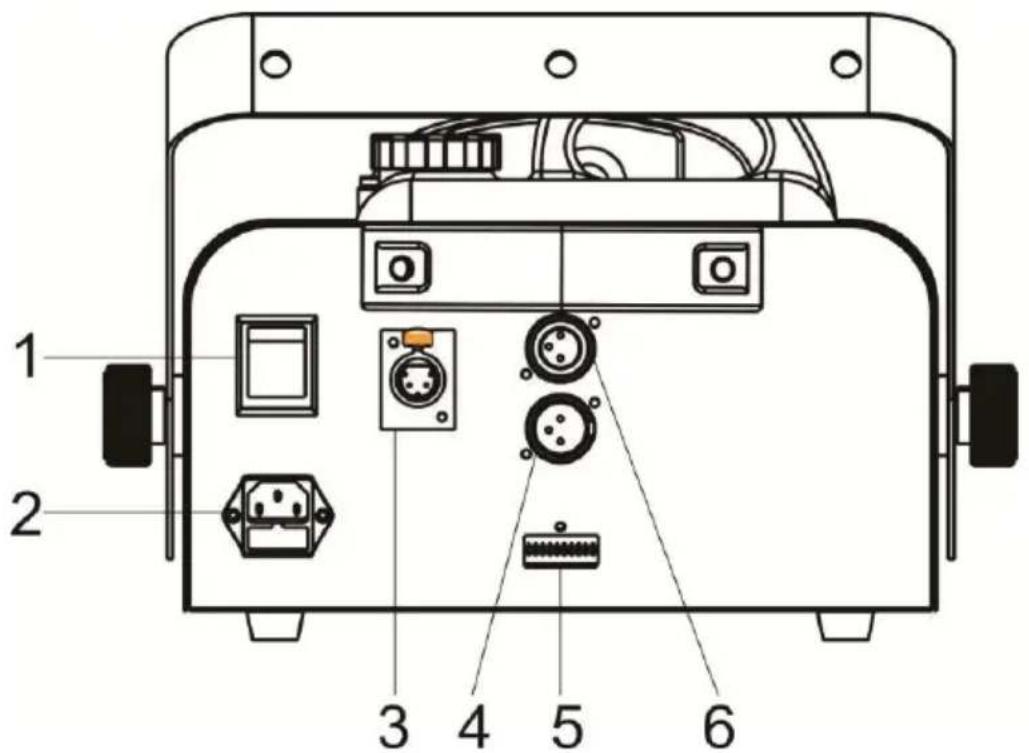
Function Description:
1 Power on / off
2 Mains input: Connect to supply mains power.
3 REMOTE
4 DMX output: For DMX512 link, use 3/5-pin XLR plug cable to link the next unit.
5 DMX ADDRESS
6 DMX input: For DMX512 link, use 3/5-pin XLR plug cable to input DMX signal.
Wireless keychain remote
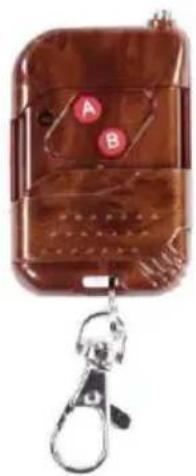
The wireless keychain remote is compact and gives you exibility. It operates under a range of max. 25 meters, if not obstructed by objects or walls. A receiver is built into the machine. The remote can be ached to your keychain with the included miniature carabiner. The keychain has a protecve cover, making it impossible to press buons while you aren't using the remote. The cover slides down easily, grangg access to the LED and buons. When pressing a buon, the LED will be lit, indicang that a signal is being sent to the receiver. The keychain remote has an expandable three-stage antenna to improve the range and signal transmission. To replace the internal baery, remove the three screws on the rear.
Seng up the unit
To make sure that you use this machine as intended, BoomToneDJ recommends to follow the steps described below.
Liquid Before turning on the machine, make sure there is enough fog liquid in the tank. This machine accepts most fog liquids and various densities for light or heavy fog. We recommends to use our fog liquid or ecient/economical and creates almost odorless fog. approximately 34 of its capacity. Overling the tank may cause the liquid to spill during transport, because of shocks, impact and ing of the machine. Fluid consumpon depends on the type of uid, the amount of fog that you wish to create and the mespan of use.
Wired mer remote
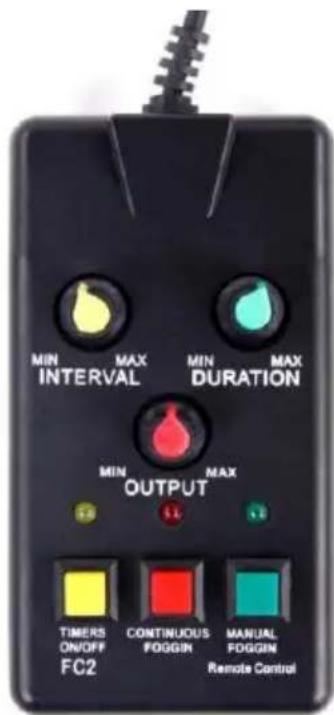
Wired mer remote
Connect this controller with the 5-pin DIN connector on the rear of the machine.
-
Interval selecon: Determines the mespan when the machine is acvated.
-
Duraon selecon: Determines the duraon if the mer acvates the machine. 3.
Output intensity: Output 0-100% (variable)
-
Timer functionality on/o
-
Connuous fog: Connuous operon with the selected output intensity
-
Manual fog: Fog projector at the selected output intensity, when pressed
Yellow LED: Timer funcon on/o
Red LED: Connuous fog funcon on/o
Green LED: Fog machine ready-indicator
DMX control
Connect the fog machine to your DMX-controller, using standard XLR male to XLR female cables. Select the correct DMX starng address by using the dipswitch panel just above the XLR-connectors. A status LED is provided, indicang that the machine receives DMX-signal from your controller.
Clogged system
It is possible that the fog output of your machine decreases over me. This may be caused by congeson in the uid pump system. To solve this, you have to follow the steps described below rst. Do not use special fog machine cleaning soluons rst, as these are the last expedients to save your fog machine. - If there is any fog liquid le in your tank, remove it from the tank. - Fill the uid tank with demineralized/dislled water.
WARNING: Never use tap or normal boled water as this contains chalk. This may clog your system, causing permanent damage.
- Fill the tank with approximately 1 liter demineralized/dislled water.
- Turn on the machine and let the heang process take place
- When your fog machine is ready, let the machine work at 100% output, connuously. This can be done through DMX or with the mer remote control.
- You will notice that the rst couple of output-bursts the machine mainly produces fog. This is caused due to the fog liquid that is sill inside the pipes of the heang system.
Aer several minutes you will noce that the fog output smoothly transforms into a light steam soluon. This means that the demineralized or distilled water has been pumped around the machine.
- Let the machine perform at full output for approximately 20 minutes, to make sure any internal dirt is removed when possible.
- Turn o the machine and let it cool down. Remove the demineralized/dislled water from the tank.
IMPORTANT: You can save the demineralized/dislled water that was not used, but only use it again for fog machine cleaning purposes, as traces of fog liquid have mixed with the water inside the tank.
NOTE: When the machine will not be used in the near future, you may leave the tank empty. The demineralized/dislled water will stay inside the machine, which is harmless. - Fill the machine with fog liquid and turn it back on. Let the heang process take place. When the fog machine is ready, let it perform at 100% output. You will notice that the machine produces steam, which will smoothly transform into fog as the fog liquid is pumped through the system.