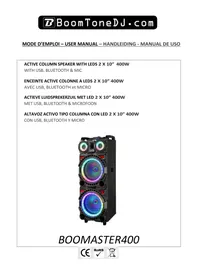
USER MANUAL THUNDER BLAZE BOOMTONEDJ
- Never install or use this device near a source of moisture: swimming pool, faucet, sink, bathtub, damp floor. Do not expose this equipment to dripping or splashing, and ensure that no objects containing liquids, such as vases, are placed on the unit. If any liquid or object enters the unit, immediately unplug it from the mains and contact your dealer.
- Do not install near heat sources such as radiators, heat registers or other heat-producing appliances, especially amplifiers. Do not block any ventilation openings. Install in accordance with the manufacturer's instructions.
- Always check that the speaker is placed on a flat, stable, level surface (make sure that the tripod legs are fully apart for perfect stability).
It's best to ask someone to help you set up the speaker at height.
- BoomToneDJ accepts no liability for damage to property or persons caused by improper handling or non-observation of safety instructions. The warranty does not apply.
- Unauthorized modifications to the device are forbidden for reasons of safety and licensing (CE).
- The device is in protection class II, and must be supplied at 220 - 240V~50/60 Hz via the adapter supplied. Never attempt to supply the device with any other voltage.
- Never connect or disconnect the mains plug with wet hands.
To preserve the life of your battery, we recommend storing it fully charged.
- There are no user-replaceable parts or components. Do not attempt to open the unit yourself. In the event of a malfunction, contact your dealer. Any attempt by the user to repair the unit will invalidate the warranty.
- Never plug in the appliance immediately after moving it from a cold to a warm place. The condensation that forms could damage the unit or cause an electric shock. Wait until the unit has reached room temperature before plugging it in. Wait for the condensation to evaporate, which may take several hours.
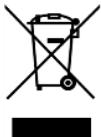
IMPORTANT NOTE: Electrical products must not be disposed of with household waste. Please have them recycled at specialized centers. Consult your local authorities or your dealer about how to recycle them.
WARNING!

Hearing damage.
High power levels can cause lasting hearing damage. Avoid proximity to loudspeakers used at high power levels. Use hearing protection at high power levels. Avoid prolonged exposure to SPL levels above 90dB.
COMMISSIONING
1- Before using for the first time, fully charge the battery (a 6-hour cycle is recommended). To do this, connect (point 7) the AC adapter supplied with
the speaker to a mains socket.
2- When storing your speaker, be sure to fully recharge the battery before storing. The battery is guaranteed for 6 months.
CONTROL PANEL
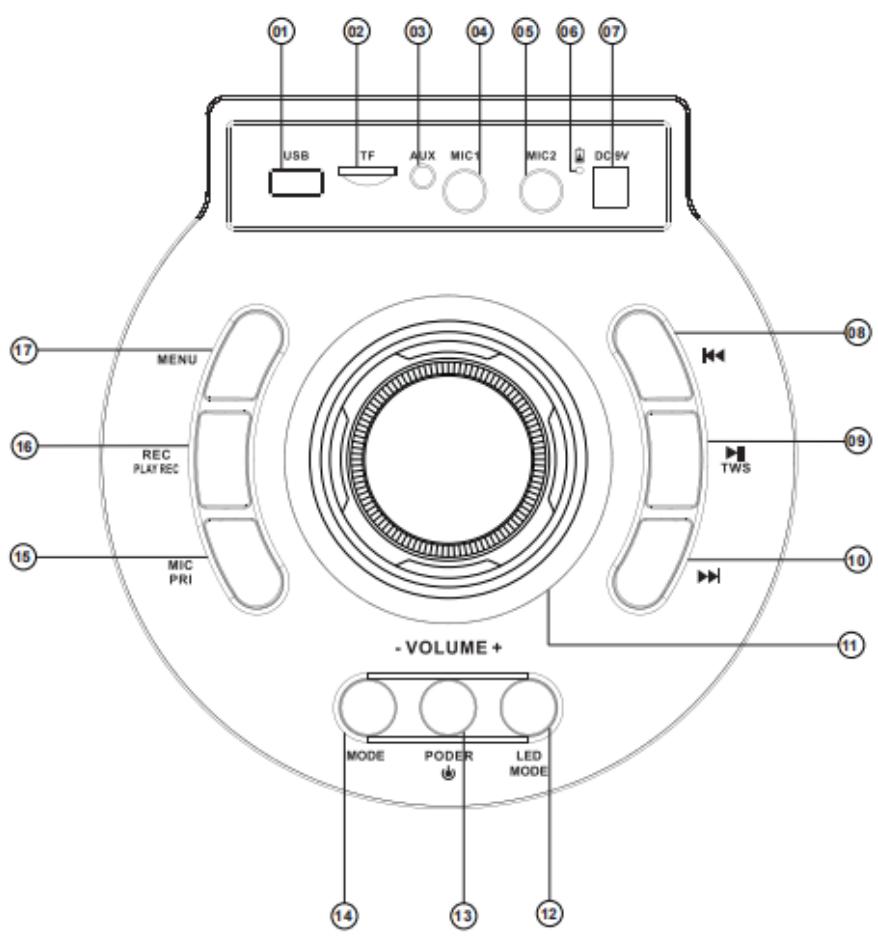
- USB input for MP3 and wave files
- Micro SD memory card
- 3.5 mm AUX input jack for line input
- 6.35MM microphone input jack
- 6.35MM microphone input jack
-
LED charging indicator: red light when charging, light off when charging complete
-
DC 9V charging input socket. For recharging the speaker with the supplied LHDY-915 AC adapter only.
- Previous button : Press briefly to select the previous channel/track
- Play/Pause/TWS: Play/stop music in USB/Micro SD/BT mode, scan FM channel in FM mode
- Next button : Press briefly to select the next channel / song
- Volume control
- LED mode and button for switching between different lighting effects (7)
- Power button. Press and hold to switch on or off.
- Mode button: press briefly to select USB/Micro SD/AUX/BT/FM mode.
- Microphone priority button. When this function is active, the music volume is automatically lowered when you speak into the microphone.
- Rec/Play Rec button: records the sound of the microphones only, to a USB stick or SD card. To do this, insert a USB key, connect a microphone and press this button, then press it again to stop.
- Menu button: press briefly to select Bass (b) or Treble (t) or Mic volume (U), then use the main rotary knob to decrease or increase.
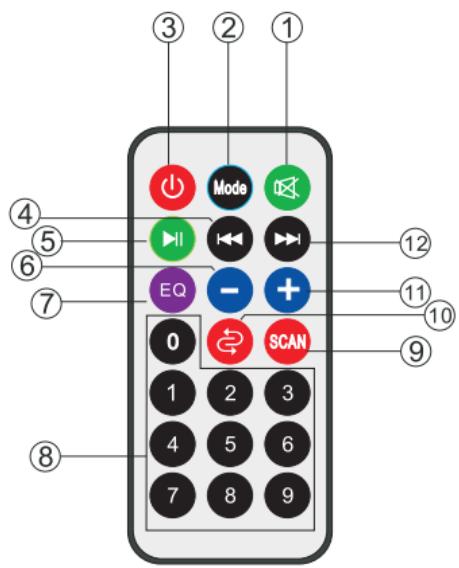
Remote control receiver on top of the device, please use the remote control alignment on top of the device when using the remote control.
- MUTE (to mute the sound)
- Mode button to select BT/AUX/FM/USB
- Stand-by button
- Previous button in USB/SD/FM mode
- Play/Pause. In Fm mode, to scan radio stations
- Reduce volume
- Selecting EQ in MP3 mode
- Direct access to tracks on USB/SD
- Scan FM radio stations when in FM mode
- USB/SD repeat functions
- Increase volume
- Next button in USB/SD/FM mode.
TWS MODE
(1) TWS connection: TWS connection is only for two active loudspeakers of the same model, cannot support a quantity greater than 2 pieces.
(2) Switch on two speakers, switch to BT mode for both speakers
(3) Press the TWS button on one speaker. Two speakers will then automatically connect to each other.
(4) Connect the phone: open the phone's BT settings, search for and connect the BT name, select the phone's music and enjoy TWS by playing in pairs with two speakers.
TECHNICAL SPECIFICATIONS
| Power supply | 9 VDC- 1.5 A / 13.5 W via supplied LHDY-915 adapter |
| Speakers | 2x 10'' / 25 cm + 1.5'' tweeter |
| Maximum musical power | 800 W Peak |
| Battery type | Rechargeable 7.4 V / 4400 mAh |
| Battery life | 2 to 4 hours |
| Charging time | 3 to 4 hours |
| Power consumption | 13.5 W max. |
| Frequency response | 50 Hz- 19 kHz |
| Max. Bluetooth transmission power | 2.18 dBm |
| Bluetooth frequency range | 2402-2480 MHz |
| Carton dimensions | 970 x 375 x 365 mm |
| Product dimensions | 911 x 350 x 325 mm |
| Gross weight / Net weight | 11.2 kg / 9.5 kg |
The undersigned, MSC Distribution, declares that the radio equipment of type THUNDER BLAZE800 and brand Boomtone DJ complies with Directive 2014/53/EU.
The full text of the EU Declaration of Conformity is available at the following Internet address:
https://www.boomtonedj.com/boomtonedj-thunder blaze800-p95288.html
ESPAGNOL
https://www.boomtonedj.com/boomtonedj-thunder blaze800-p95288.html
INSTALLATIE- EN VEILIGHEIDSINSTRUCTIES :
https://www.boomtonedj.com/boomtonedj-thunder blaze800-p95288.html
BoomToneDJ.com
www.boomtonedj.com