PAR IP 7X10W Quad - Effect machine BOOMTONEDJ - Free user manual and instructions
Find the device manual for free PAR IP 7X10W Quad BOOMTONEDJ in PDF.


| Product Type | IP LED PAR Projector |
| Brand | BOOMTONEDJ |
| Model | PAR IP 7X10W Quad |
| Category | Effect Machine |
| Protection Rating | IP65 (use in humid conditions or rain) |
| Light Source | 7 RGBW QUAD LEDs, 10W each |
| DMX Channels | 4, 6 or 8 channels |
| Power Supply | AC 100-240V, 50/60Hz |
| Fuse | F3A/250V |
| Dimensions | 215 x 215 x 320 mm |
| Gross Weight | 4.6 kg |
| Max Ambient Temperature | 40°C |
| DMX Connectors | 3-pin XLR (input/output) |
| Power Connectors | IN/OUT for daisy chaining |
| Operating Modes | Auto, Sound, Master/Slave, DMX |
| Display and Controls | MENU, UP, DOWN, ENTER buttons, signal indicator |
| Display Auto-off | After 10 seconds of inactivity |
| Auto Save Settings | After 2 seconds |
| Safety | Do not look directly into the beam, use a safety cable |
| Installation | By qualified personnel, out of reach of the public |
| Maintenance | Regular cleaning of lenses with a clean cloth and a little glass cleaner |
| Repairability | No user-serviceable parts, contact customer service |
| Importer | BoomtoneDJ - MSC, 7 avenue du 1er Mai, 91120 Palaiseau, France |
Frequently Asked Questions - PAR IP 7X10W Quad BOOMTONEDJ
User questions about PAR IP 7X10W Quad BOOMTONEDJ
0 question about this device. Answer the ones you know or ask your own.
Ask a new question about this device
Download the instructions for your Effect machine in PDF format for free! Find your manual PAR IP 7X10W Quad - BOOMTONEDJ and take your electronic device back in hand. On this page are published all the documents necessary for the use of your device. PAR IP 7X10W Quad by BOOMTONEDJ.
USER MANUAL PAR IP 7X10W Quad BOOMTONEDJ
1- Safety Instructions

Please read the instructions carefully which includes important information about the installation, operation and maintenance.
-
Please keep this User Manual for future consultation. If you sell the fixture to another user, be sure that they also receive this instruction booklet.
-
Unpack and check carefully there is no transportation damage before using the fixture.
It's important to ground the yellow/green conductor to earth in order to avoid electric shock.
- Disconnect main power before servicing and maintenance.
Maximum ambient temperature is Ta : 40^ . Don't operate it where the temperature is higher than this.
-
In the event of serious operating problem, stop using the fixture immediately. Never try to repair the fixture by yourself. Repairs carried out by unskilled people can lead to damage or malfunction. Please contact the nearest authorized technical assistance center. There are no user serviceable parts inside the fixture.
-
Do not connect the device to any dimmer pack.
-
Do not look directly at the LED light beam while the fixture is on.
-
Do not touch any wire during operation.
-
The unit should be mounted via its screw holes on the bracket. Always ensure that the unit is firmly fixed to avoid vibration and slipping while operating. Always ensure that the structure to which you are attaching the unit is secure and is able to support a weight of 10 times of the unit's weight. Also always use a safety cable that can hold 12 times of the weight of the unit when installing the fixture.
-
The equipment must be fixed by professionals. And it must be fixed at a place where is out of the touch of people and has no one pass by or under it.
2- Unit Description
The BoomtoneDJ PAR IP 7x10w Quad is a fixture that can be used under high humidity conditions and moist environments.
Buttons :
- MENU To go forward in the selected functions or go back the last layer menu
- UP To go forward in the selected functions or increase parameters
- DOWN To go backward in the selected functions or reduce parameters
-
ENTER To go into the next layer menu
-
Signal indicator light
In DMX or SLAVE mode, the Signal indicator light flashing when signals are detected
- Mains input: Connect to supply mains power.
- Mains output: Connect to supply mains power for the next unit.
- DMX input: For DMX512 link, use 3-pin XLR plug cable to input DMX signal.
- DMX output: For DMX512 link, use 3-pin XLR plug cable to link the next unit.
Note:
(1) In ten seconds, if no buttons to press, the LED display will be off. Press any button to turn the display on again.
(2) After pressing a button, all the parameters will save automatically after 2 seconds.
(3) No matter the item is in which program in which mode, once detecting DMX or SLAVE signal, the program will jump into DMX or SLAVE mode automatically. Then, if DMX/SLAVE signal off, the program will return to the original mode.
3- Technical Specifications
Power supply: AC100-240V 50/60Hz
- Fuse: F3A/250V
Power Supply: Input/output block
Light source: 7x10 Watt RGBW Quad LEDs
Channels: 4, 6, 8 DMX channels
- Dimensions : L215×W215×H320mm
Gross Weight: 4.6kg
4- Menu
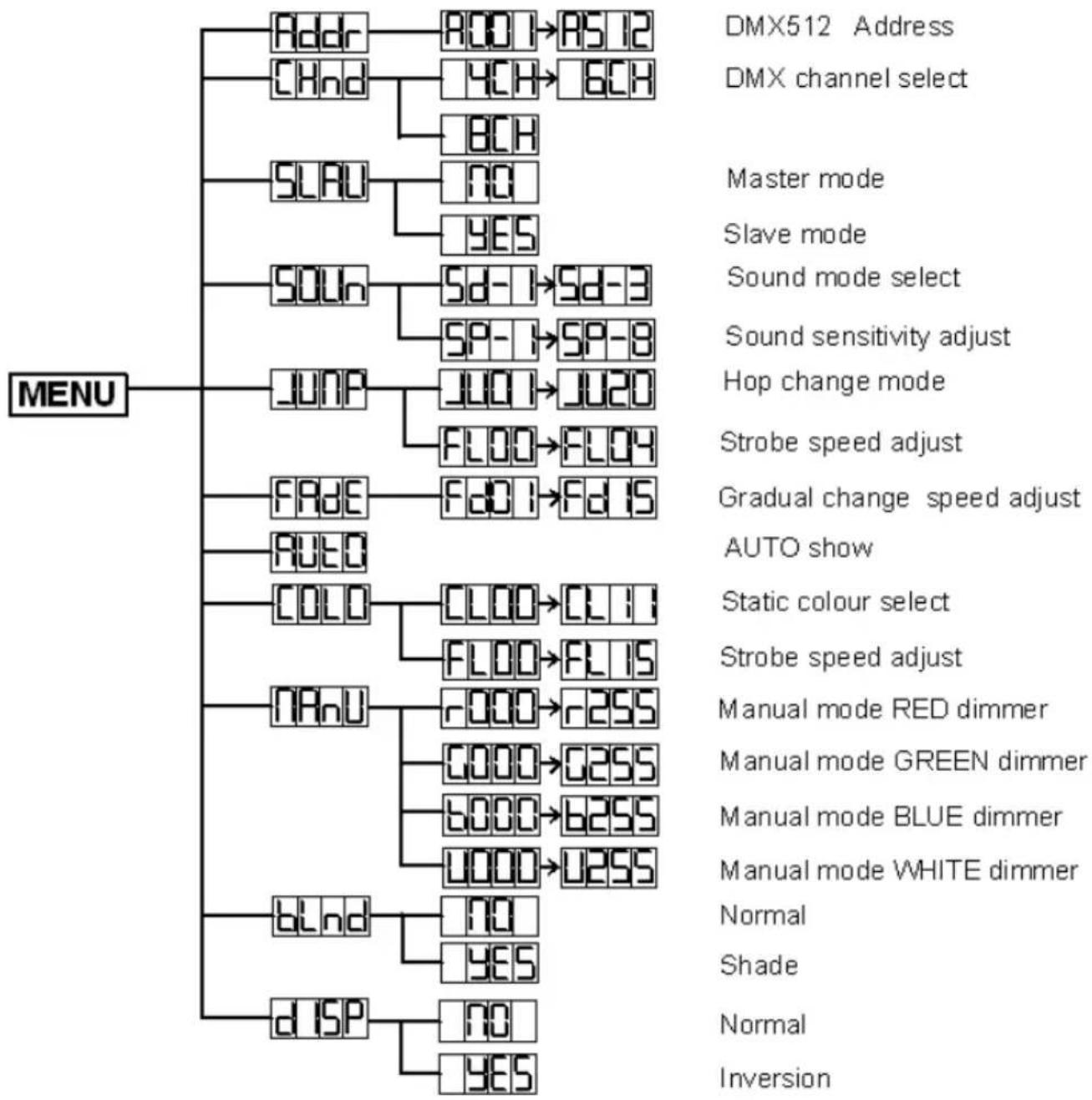
A. Master/Slave built-in program function.
By linking the units in master/slave connection, the first unit will control the other units to give an automatic, sound activated, synchronized light show. This function is good when you want an instant show. You have to set the first unit in Automatic, sound activated mode. Its DMX input jack will have nothing plugged into it. The other units will have to select ADDR, Their DMX cables plugged into the DMX input jacks (daisy chain) and the slave led lights will constantly on.
B. By universal DMX controller
Using universal DMX controller to control the units, you have to set DMX address from 1 to 512 channel so that the units can receive DMX signal.
Press the MENU, then find Addr, press ENTER, when the 1 is showing on the display. Pressing ENTER. Use DOWN and UP button change the DMX512 address.
4 channels DMX Protocole :
| Channel | Value | Function |
| CH1 | 0-255 | RED dimmer |
| CH2 | 0-255 | GREEN dimmer |
| CH3 | 0-255 | BLUE dimmer |
| CH4 | 0-255 | WHITE dimmer |
6 channels DMX Protocole :
| Channel | Value | Function |
| CH1 | 0-255 | RED dimmer |
| CH2 | 0-255 | GREEN dimmer |
| CH3 | 0-255 | BLUE dimmer |
| CH4 | 0-255 | WHITE dimmer |
| CH5 | 0-255 | Master dimmer |
| CH6 | 0-6 | Dimmer mode |
| 7-65 | Strobe from Slow to fast | |
| 66-69 | None | |
| 70-128 | Pulse strobe from slow to fast | |
| 129-132 | None | |
| 133-191 | Strobe fading in from slow to fast | |
| 192-195 | None | |
| 196-255 | Strobe fading out from slow to fast | |
| CH5 | 0-255 | Master dimmer |
| CH6(CH8<60) | 0-6 | Dimmer mode |
| 7-65 | Strobe from Slow to fast | |
| 66-69 | None | |
| 70-128 | Pulse strobe from slow to fast | |
| 129-132 | None | |
| 133-191 | Strobe fading in from slow to fast | |
| 192-195 | None | |
| 196-255 | Strobe fading out from slow to fast | |
| CH6(CH8>=60) | 0-255 | In calling program mode, running speed from slow to fast |
| CH7(In static color mode) | 0-255 | Static color selected |
| CH7(In hop change mode) | 0-255 | Strobe from slow to fast |
| CH8 | 0-59 | Dimmer mode |
| 60-119 | Calling static color mode | |
| 120-179 | Calling hop change mode | |
| 180-239 | Calling gradual change mode | |
| 240-245 | sound active mode 1 | |
| 246-251 | sound active mode 2 | |
| 252-255 | sound active mode 3 |
5. DMX 512 Connection
The DMX 512 is widely used in intelligent lightings and with a maximum of 512 channels.
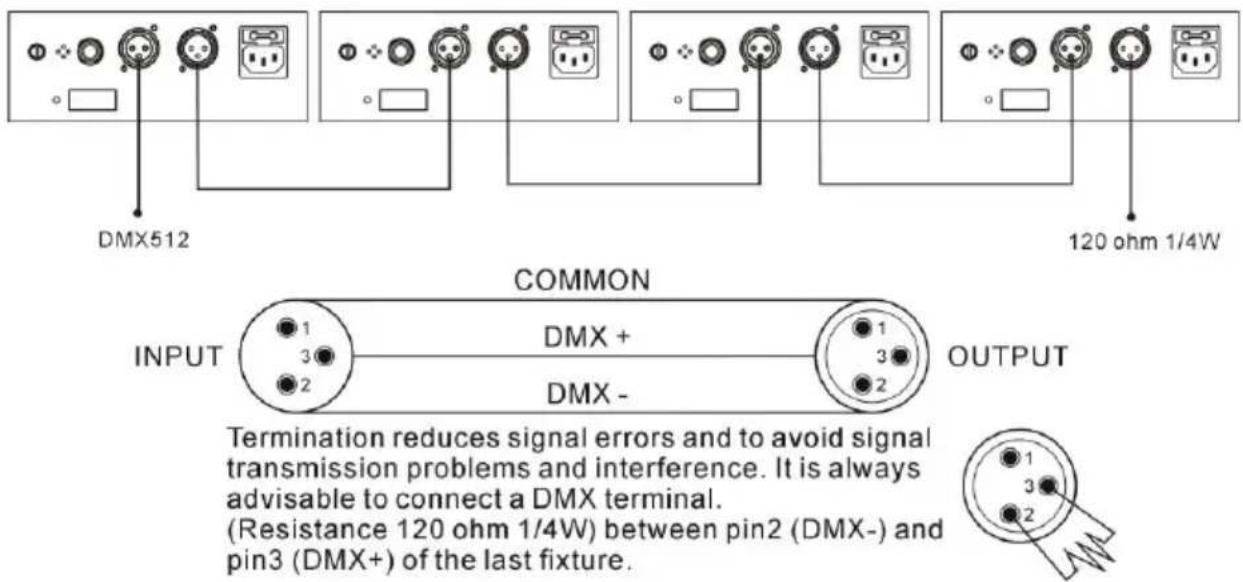
- If you using a controller with 5 pins DMX output, you need to use a 5 to 3 pin adapter-cable.
- At last unit, the DMX cable has to be terminated with a terminator. Solder a 120 ohm 1/4W resistor between pin 2(DMX-) and pin 3(DMX+) into a 3-pin XLR-plug and plug it in the DMX-output of the last unit.
- Connect the unit together in a 'daisy chain' by XLR plug from the output of the unit to the input of the next unit. The cable cannot be branched or split to a 'Y' cable. DMX512 is a very high-speed signal. Inadequate or damaged cables, solder joints or corroded connectors can easily distort the signal and shut down the system.
- Each lighting unit needs to have an address set to receive the data sent by the controller. The address number is between 0-511 (usually 0 & 1 are equal to 1).
6. Troubleshooting
Following are a few common problems that may occur during operation. Here are some suggestions for easy troubleshooting:
The fixture does not work, no light
Check the connection of power and main fuse.
Measure the mains voltage on the main connector.
-
Not responding to DMX controller
-
DMX LED should be on. If not, check DMX connectors, cables to see if link properly.
- If the DMX LED is on and no response to the channel, check the address settings and DMX polarity.
○ If you have intermittent DMX signal problems, check the pins on connectors or on PCB of the fixture or the previous one.
Try to use another DMX controller. - Check if the DMX cables run near or run alongside to high voltage cables that may cause damage or interference to DMX interface circuit.
Some fixtures don't respond to the easy controller
- You may have a break in the DMX cabling.
-
Check the LED for the response of the master/ slave mode signal.
-
No response to the sound
Make sure the fixture does not receive DMX signal.
Check microphone to see if it is good by tapping the microphone.
7. Fixture Cleaning
The cleaning of internal must be carried out periodically to optimize light output. Cleaning frequency depends on the environment in which the fixture operates: damp, smoky or particularly dirty surrounding can cause greater accumulation of dirt on the fixture's optics.
- Clean with soft cloth using normal glass cleaning fluid.
- Always dry the parts carefully.
- Clean the external optics at least every 20 days. Clean the internal optics at least every 30/60 days

BoomToneDJ.com
www.boomtonedj.com