DDJ-400 - USB controller PIONEER DJ - Free user manual and instructions
Find the device manual for free DDJ-400 PIONEER DJ in PDF.



| Product Type | All-in-one DJ controller for rekordbox dj |
| Weight | 2.1 kg (4.6 lb) |
| Operating Temperature | +5 °C to +35 °C |
| Operating Humidity | 5% to 85% (no condensation) |
| Sampling Rate | 44.1 kHz |
| D/A Converter | 24-bit |
| Nominal Output Level (MASTER OUT) | 2.1 Vrms / 10 kΩ |
| Frequency Response (USB) | 20 Hz to 20 kHz |
| S/N Ratio (USB, A-weighted) | 103 dB |
| Total Harmonic Distortion (USB) | 0.005% |
| MIC Input Impedance | 3 kΩ or higher |
| MASTER OUT Output Impedance | 1 kΩ or less |
| HEADPHONES Output Impedance | 10 Ω or less |
| MIC Input Jack | 1/4" TS jack (unbalanced) |
| MASTER OUT Output Jack | RCA stereo jack |
| HEADPHONES Output Jack | 3.5 mm stereo mini jack |
| USB Connector | Type B |
| Power Supply | Via USB (bus power) |
| Maintenance and Cleaning | Clean with a dry, soft cloth. Do not use liquids or aerosols. |
| Safety | Do not expose to water, humidity, or naked flames. Use in a well-ventilated area. |
| Spare Parts and Repairability | Contact an authorized Pioneer DJ service center. No user-serviceable parts. |
Frequently Asked Questions - DDJ-400 PIONEER DJ
User questions about DDJ-400 PIONEER DJ
0 question about this device. Answer the ones you know or ask your own.
Ask a new question about this device
Download the instructions for your USB controller in PDF format for free! Find your manual DDJ-400 - PIONEER DJ and take your electronic device back in hand. On this page are published all the documents necessary for the use of your device. DDJ-400 by PIONEER DJ.
USER MANUAL DDJ-400 PIONEER DJ
For FAQs and other support information for this product, visit the above site.
This equipment is not waterproof. To prevent a fire or shock hazard, do not place any container filled with liquid near this equipment (such as a vase or flower pot) or expose it to dripping, splashing, rain or moisture.
D3-4-2-1-3_A1_En
WARNING
To prevent a fire hazard, do not place any naked flame sources (such as a lighted candle) on the equipment.
D3-4-2-1-7a_A1_En
Operating Environment
Operating environment temperature and humidity: +5^ to +35^ (+41^ to +95^) ; less than 85% (cooling vents not blocked)
Do not install this unit in a poorly ventilated area, or in locations exposed to high humidity or direct sunlight (or strong artificial light).
D3-4-2-1-7c*A2_EN
When using this product, confirm the safety information shown on the bottom of the unit.
D3-4-2-2-4_B1_En
WARNING
Store small parts out of the reach of children and infants. If accidentally swallowed, contact a doctor immediately.
D41-6-4_A1_En
This product is for general household purposes. Any failure due to use for other than household purposes (such as long-term use for business purposes in a restaurant or use in a car or ship) and which requires repair will be charged for even during the warranty period.
K041_A1_En
The graphical symbol placed on the product means alternating current.
The graphical symbol placed on the product means direct current.
The graphical symbol l placed on the product means Class II equipment.
For Europe and other areas
CAUTION
TO PREVENT THE RISK OF ELECTRIC SHOCK, DO NOT REMOVE COVER (OR BACK). NO USER-SERVICEABLE PARTS INSIDE. REFER SERVICING TO QUALIFIED SERVICE PERSONNEL.
D3-4-2-1-1_B1_En
CAUTION
This product is evaluated in moderate and tropical climate condition.
For Europe

If you want to dispose this product, do not mix it with general household waste. There is a separate collection system for used electronic products in accordance with legislation that requires proper treatment, recovery and recycling.
Private households in the member states of the EU, in Switzerland and Norway may return their used electronic products free of charge to designated collection facilities or to a retailer (if you purchase a similar new one).
For countries not mentioned above, please contact your local authorities for the correct method of disposal.
By doing so you will ensure that your disposed product undergoes the necessary treatment, recovery and recycling and thus prevent potential negative effects on the environment and human health.
K058b_A1_En
For U.S.A. and other areas
NOTE:
This equipment has been tested and found to comply with the limits for a Class B digital device, pursuant to Part 15 of the FCC Rules. These limits are designed to provide reasonable protection against harmful interference in a residential installation. This equipment generates, uses, and can radiate radio frequency energy and, if not installed and used in accordance with the instructions, may cause harmful interference to radio communications. However, there is no guarantee that interference will not occur in a particular installation. If this equipment does cause harmful interference to radio or television reception, which can be determined by turning the equipment off and on, the user is encouraged to try to correct the interference by one or more of the following measures:
— Reorient or relocate the receiving antenna.
— Increase the separation between the equipment and receiver.
- Connect the equipment into an outlet on a circuit different from that to which the receiver is connected.
Consult the dealer or an experienced radio/TV technician for help.
D8-10-1-2_A1_En
Information to User
Alterations or modifications carried out without appropriate authorization may invalidate the user's right to operate the equipment.
D8-10-2_A1_En
FEDERAL COMMUNICATIONS COMMISSION DECLARATION OF CONFORMITY
This device complies with part 15 of the FCC Rules.
Operation is subject to the following two conditions: (1) This device may not cause harmful interference, and (2) this device must accept any interference received, including interference that may cause undesired operation.
Product Name: DJ Controller
Model Number: DDJ-400
Responsible Party Name:
PIONEER ELECTRONICS (USA) INC.
SERVICE SUPPORT DIVISION
Address: 2050 W. 190th Street, Suite 100, Torrance,
CA 90504, U.S.A.
Phone: 1-310-952-2915
URL: pioneererelectronics.com
D8-10-4*C1_En
IMPORTANT
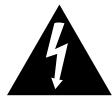
The lightning flash with arrowhead symbol, within an equilateral triangle, is intended to alert the user to the presence of uninsulated "dangerous voltage" within the product's enclosure that may be of sufficient magnitude to constitute a risk of electric shock to persons.
CAUTION
RISK OF ELECTRIC SHOCK DO NOT OPEN
CAUTION:
TO PREVENT THE RISK OF ELECTRIC SHOCK, DO NOT REMOVE COVER (OR BACK). NO USER-SERVICEABLE PARTS INSIDE. REFER SERVICING TO QUALIFIED SERVICE PERSONNEL.

The exclamation point within an equilateral triangle is intended to alert the user to the presence of important operating and maintenance (servicing) instructions in the literature accompanying the appliance.
D3-4-2-1-b_A1_En
The Safety of Your Ears is in Your Hands
Get the most out of your equipment by playing it at a safe level - a level that lets the sound come through clearly without annoying blaring or distortion and, most importantly, without affecting your sensitive hearing. Sound can be deceiving. Over time, your hearing "comfort level" adapts to higher volumes of sound, so what sounds "normal" can actually be loud and harmful to your hearing. Guard against this by setting your equipment at a safe level BEFORE your hearing adapts.
ESTABLISH A SAFE LEVEL:
- Set your volume control at a low setting.
- Slowly increase the sound until you can hear it comfortably and clearly, without distortion.
- Once you have established a comfortable sound level, set the dial and leave it there.
BE SURE TO OBSERVE THE FOLLOWING GUIDELINES:
- Do not turn up the volume so high that you can't hear what's around you.
- Use caution or temporarily discontinue use in potentially hazardous situations.
- Do not use headphones while operating a motorized vehicle; the use of headphones may create a traffic hazard and is illegal in many areas.
S001a_A1_En
For U.S.A.
CAUTION
This product is evaluated in moderate climate condition.
IMPORTANT
SAFETY
INSTRUCTIONS
1) Read these instructions.
2) Keep these instructions.
3) Heed all warnings.
4) Follow all instructions.
5) Do not use this apparatus near water.
6) Clean only with dry cloth.
7) Do not block any ventilation openings. Install in accordance with the manufacturer's instructions.
8) Do not install near any heat sources such as radiators, heat registers, stoves, or other apparatus (including amplifiers) that produce heat.
9) Do not defeat the safety purpose of the polarized or grounding-type plug. A polarized plug has two blades with one wider than the other. A grounding type plug has two blades and a third grounding prong. The wide blade or the third prong are provided for your safety. If the provided plug does not fit into your outlet, consult an electrician for replacement of the obsolete outlet.
10) Protect the power cord from being walked on or pinched particularly at plugs, convenience receptacles, and the point where they exit from the apparatus.
11) Only use attachments/accessories specified by the manufacturer.
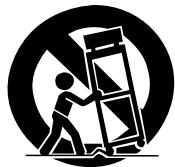
12) Use only with the cart, stand, tripod, bracket, or table specified by the manufacturer, or sold with the apparatus. When a cart is used, use caution when moving the cart/apparatus combination to avoid injury from tip-over.
13) Unplug this apparatus during lightning storms or when unused for long periods of time.
14) Refer all servicing to qualified service personnel. Servicing is required when the apparatus has been damaged in any way, such as power-supply cord or plug is damaged, liquid has been spilled or objects have fallen into the apparatus, the apparatus has been exposed to rain or moisture, does not operate normally, or has been dropped.
D3-7-13-69_En
IMPORTANT NOTICE
THE MODEL NUMBER AND SERIAL NUMBER OF THIS EQUIPMENT ARE ON THE REAR OR BOTTOM.
RECORD THESE NUMBERS ON PAGE 11 FOR FUTURE REFERENCE.
D36-AP9-3*A1_En
Before start
How to read this guide
Thank you for buying this Pioneer DJ product.
- This guide provides a brief description of the procedures up until connecting the unit to your PC/Mac and outputting audio. For the detailed procedures, refer to "Operating Instructions" on the Pioneer DJ site. Read both this guide and "Operating Instructions" which include important information to be understood before using this unit.
In particular, be sure to read safety regulations. - In this guide, names of buttons and terminals indicated on the unit, names of menus in the PC/Mac screen, etc., are indicated within square bracket ([]). (e.g. [File], [CUE] button, [PHONES] output terminal)
- Please note that the screens and specifications of the software described in this guide as well as the external appearance and specifications of the hardware are currently under development and may differ from the final specifications.
- Please note that depending on the operating system version, web browser settings, etc., operation may differ from the procedures described in this guide.
- Please note that the language on the screens of the software described in this guide may differ from the language on your screens.
Features
This unit is an all-in-one DJ controller designed specifically for "rekordbox dj."
It's interfaces incorporating various controls such as "JOG," "TEMPO slider," etc. are positioned with enough space, and make DJ
performances for functions on "rekordbox dj" comfortably.
What's in the box
USB cable
Warranty (for some regions)
- Operating Instructions (Quick Start Guide) (this guide)
-rekordbox dj license key card
The included warranty is for the European region.
For the North American region, the corresponding information is provided on the last page of both the English and French versions of the "Operating Instructions (Quick Start Guide)."
For the Japanese region, the corresponding information is provided on the back cover of the "Operating Instructions (Quick Start Guide)."
Note
Please keep the license key because it cannot be provided again.
Acquiring the manual
The various instructions are sometimes provided as files in PDF format. Adobe Reader must be installed in order to view files in PDF format.
Viewing the Latest Version of the "Operating Instructions"
1 Launch a web browser on PC/Mac and access the Pioneer DJ site below.
pioneerdj.com
- To select your language, click the flag icon or GLOBAL icon on the upper-right screen, and then select an area and language.
2 Click [Tutorials, manuals & documentation] under [Support].
3 Click [DDJ-400] in the [DJ CONTROLLER] category.
4 Click the desired language from the list.
Viewing "rekordbox Introduction"
"rekordbox Introduction" explains through setting uprekordbox.
1 Launch a web browser on the PC/Mac and access the "rekordbox.com".
rekordbox.com
2 Click [Manual] under [Support].
3 Click a language of "rekordbox introduction."
Aboutrekordbox
- rekordbox is comprehensive software which can manage audio tracks and make DJ performances.
-rekordbox dj is a DJ performance function ofrekordbox.You can use this function after entering the license key which is shown on the supplied license key card forrekordbox dj.
Minimum operating environment
| Supported operating systems | CPU and required memory |
| Mac: macOS High Sierra 10.13 / Sierra 10.12 / OS X 10.11 (latest version) | Intel® processor Core™ i7, i5, i3 |
| 4 GB or more of RAM | |
| Windows: Windows® 10 / Windows® 8.1 / Windows® 7 (latest service pack) | Intel® processor Core™ i7, i5, i3 |
| 32 bit / 64 bit | 4 GB or more of RAM |
Others
| USB port | A USB 2.0 port is required to connect the PC/Mac with this unit. |
| Display resolution | Resolution of 1 280 × 768 or greater |
| Internet connection | An Internet connection is required for registering the rekordbox user account and downloading the software. |
- Operation is not guaranteed on all PC/Mac, even if all the required operating environment conditions indicated here are fulfilled.
- Depending on power saving settings of PC/Mac, etc., the CPU and hard disk may not provide sufficient processing capabilities. For laptop in particular, make sure the PC/Mac is in the proper conditions to provide constant high performance (for example by keeping the AC power connected) when using rekordbox.
- Use of the Internet requires a separate contract with an internet service provider and payment of provider fees.
- Operating System support assumes you are using the latest point release for that version.
- To check the latest information on the operating environment and compatibility, and to acquire the latest operating system, refer to [System requirements] under [Support] of "rekordbox.com".
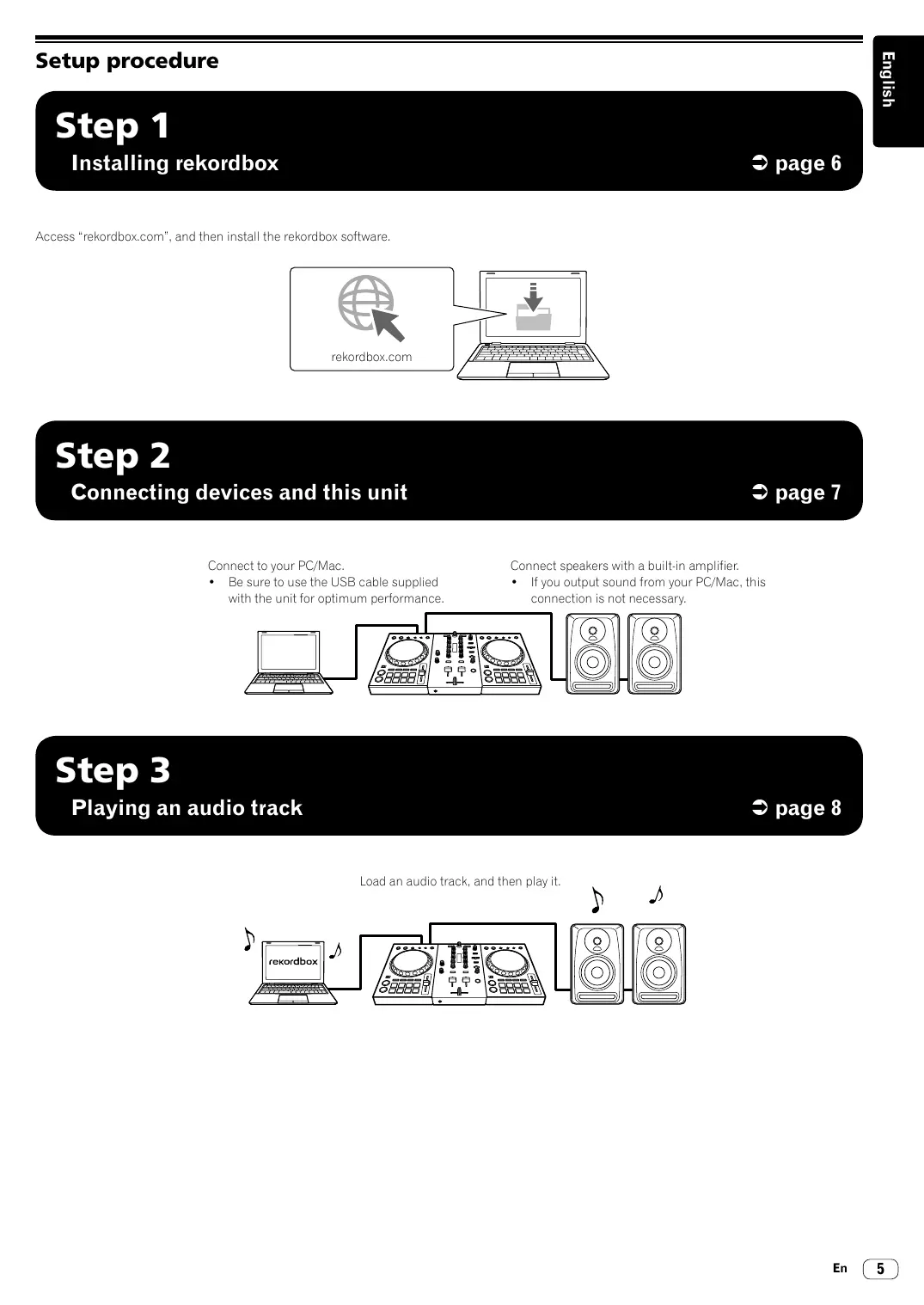
Step 1
Installingrekordbox

page 6
Access "rekordbox.com", and then install therekordbox software.
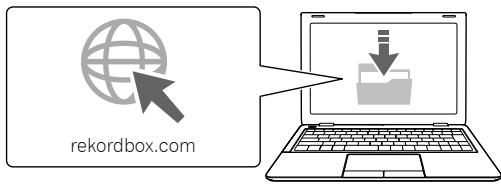
Step 2
Connecting devices and this unit

page 7
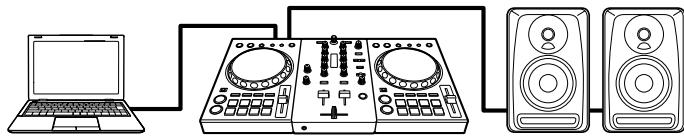
Connect to your PC/Mac.
- Be sure to use the USB cable supplied with the unit for optimum performance.
Connect speakers with a built-in amplifier.
- If you output sound from your PC/Mac, this connection is not necessary.
Step 3
Playing an audio track

page 8
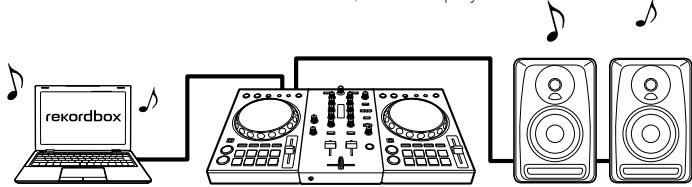
Load an audio track, and then play it.
Step 1 Installing rekordbox
Getting started forrekordbox
If you are using rekordbox for the first time, or rekordbox Ver.4.x or lower is used currently, install rekordbox with the following procedure. If rekordbox Ver.5.x is already installed, update rekordbox to the latest version using the Update Manager which is shown when starting rekordbox.
Installingrekordbox
1 Launch a web browser on PC/Mac, open rekordbox download page from the following site, and then download rekordbox.
rekordbox.com
For Windows, select 32 bit or 64 bit version according to your PC.
2 Double-click the downloaded file to unzip.
3 Double-click the unzipped file to start the installer.
4 Read the terms of the license agreement carefully, and then follow screens to install if you agree.
If you do not agree to the contents of the license agreement, stop installing.
5 When the screen for completing the installation appears, follow screens to finish the installer.
rekordbox installation is completed.
Step 2 Connecting devices and this unit
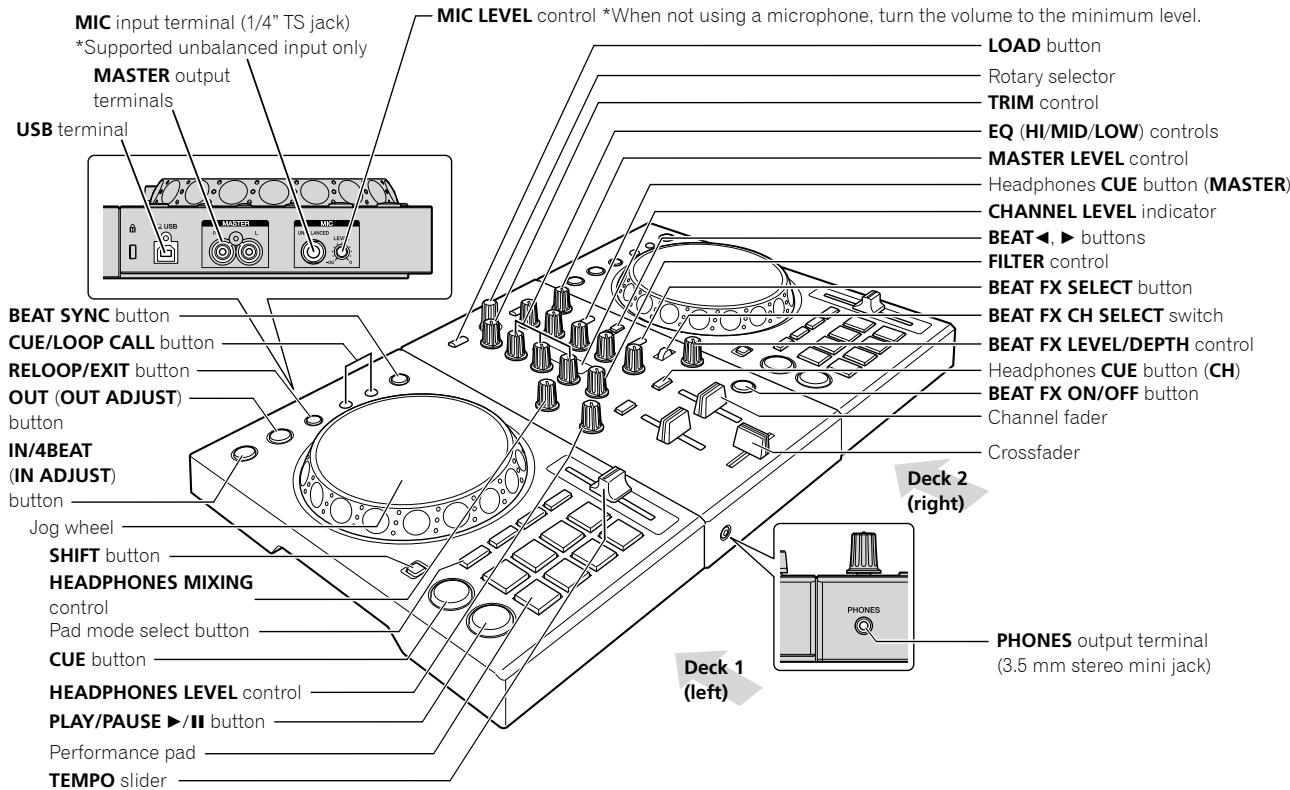
Names of Parts
For details, see the "Operating Instructions" of this unit.
Connecting speakers with a built-in amplifier to the unit with an audio cable (RCA)
Connect speakers with built-in amplifier, etc. to the [MASTER] output terminals of this unit.
- An audio cable (RCA) is not included with this unit. Please provide it yourself separately.
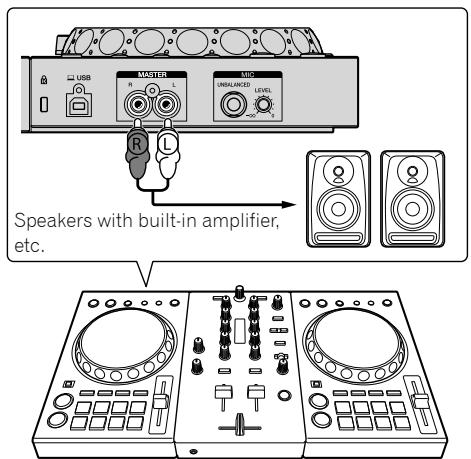
- For details on connecting the input/output terminals, see the "Operating Instructions" of this unit.
- Turn the volume of the device(s) (speakers with built-in amplifier, etc.) connected to the [MASTER] output terminals to an appropriate level. Note that the output sound may be loud if the volume is set too high.
Connecting your PC/Mac to the unit
1 Connect your PC/Mac to the unit via a USB cable. Make a direct connection with the supplied USB cable for optimum performance. A USB hub cannot be used.
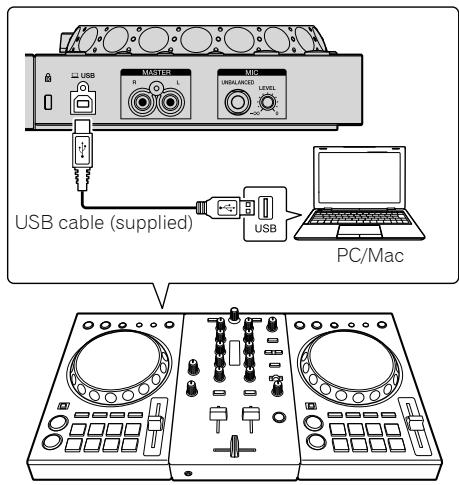
2 Turn on your PC/Mac.
3 Turn on the device(s) (speakers with built-in amplifier, etc.) connected to the output terminal.
Step 3 Playing an audio track
Startingrekordbox
It is necessary to register an account for usingrekordbox.
It is necessary to activaterekordbox dj using the supplied license key.
For details about each procedure, click [Manual] under [Support] of the following site, and then refer to "rekordbox introduction."
rekordbox.com
For Mac
In Finder, open the [Applications] folder, and then double-click the [rekordbox] icon.
For Windows 10
In [Start] menu, click the [rekordbox] icon under [Pioneer].
For Windows 8.1
In [Apps view], click the [rekordbox] icon.
For Windows 7
In the Windows [Start] menu, click the [rekordbox] icon under [All Programs] > [Pioneer] > [rekordbox X.X.X].
Checking the speaker setup
Depending on your audio environment, click at the right-upper of rekordbox screen to turn on/off the audio output from the speaker of PC/ Mac. (PC MASTER OUT feature)
- When connecting the unit to PC/Mac for the first time, audio is output from the speaker of PC/Mac. ( lights up.)
- When connecting the unit to the speakers with built-in amplifier, click to turn off the audio output from the speaker of PC/Mac. (lights off).
Checking audio setup
Check that Audio settings of [Preferences] on rekordbox are set as followings.
For Mac
[Output channels]:
Master Output: [DDJ-400:MASTER + audio device name on Mac]
- When [PC MASTER OUT] is off, Master Output in the Audio settings is [DDJ-400:MASTER].
For Windows
Audio: [DDJ-400 WASAPI]
[Output channels]:
Master Output: [DDJ-400 WASAPI: MASTER + audio device name on PC]
Headphones Output: [DDJ-400 WASAPI:PHONES]
- When [PC MASTER OUT] is off, Master Output in the Audio settings is [DDJ-400 WASAPI:MASTER].
Adding audio tracks into [Collection]
The [Collection] screen contains a list of audio track files managed byrekordbox.
Register audio tracks on your PC/Mac to rekordbox, and analyze them so they can be used on rekordbox.
1 Click [Collection] on the tree view.
A list of tracks which are registered in [Collection] is displayed.
2 Open Finder or Windows Explorer, and then drag & drop audio track files or folders with audio track files into the audio track list.
Audio track files are added into [Collection], and then analyzing of waveform information for audio track files starts. Wait until analyzing of all audio track files is completed.
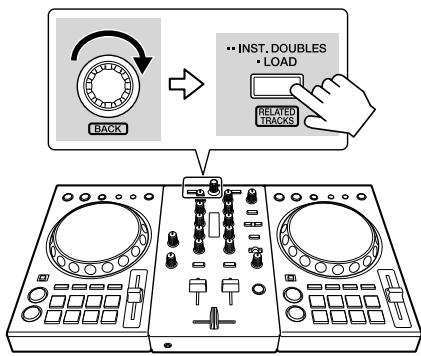
Loading an audio track into a deck of the unit
This section explains how to load an audio track into Deck 1 (left) as an example.
Turn the rotary selector to select an audio track from [Collection], and then press the [LOAD] button on Deck 1 (left).
The selected track is loaded.
![PIONEER DJ DDJ-400 - Turn the rotary selector to select an audio track from [Collection], and then press the [LOAD] button on Deck 1 (left). - 1](/content/2025/01/328508/images/dbdab62a1ed3ccb99309e45e935d8b561b5e6f09e4245f6454c3d1d9ab6904c8.jpg)
Playing a track
This section explains how to output sound from Deck 1 (left) as an example.
1 Set the positions of the controls, etc., as shown below.
| Names of controls, etc. | Position |
| TRIM control | Turned fully counterclockwise |
| EQ (HI/MID/LOW) controls | Center position |
| FILTER control | Center position |
| Channel fader | Bottom position |
| MASTER LEVEL control | Turned fully counterclockwise |
| Crossfader | Center position |
2 Press the [PLAY/PAUSE /II] button to play the track.
![PIONEER DJ DDJ-400 - Press the [PLAY/PAUSE /II] button to play the track. - 1](/content/2025/01/328508/images/06250ba7126753fd1a9635d67cc91b1fa022e21319fbadf53c42e7f0fda98f7c.jpg)
3 Turn the [TRIM] control.
Adjust the [TRIM] control so that the [CHANNEL LEVEL] indicator's orange indicator lights at the peak level.
![PIONEER DJ DDJ-400 - Turn the [TRIM] control. - 1](/content/2025/01/328508/images/4d678ca75a480d15d2177674fccb1cbeb0c61ee416b440ede061fc97cc075a58.jpg)
4 Move the channel fader to the maximum level.
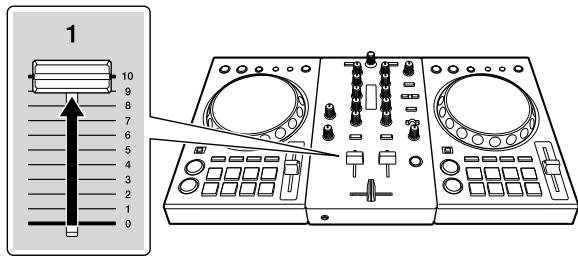
5 Turn the [MASTER LEVEL] control to adjust the audio level of the speakers.
Adjust the audio level output from the [MASTER] output terminals to an appropriate level.
![PIONEER DJ DDJ-400 - Turn the [MASTER LEVEL] control to adjust the audio level of the speakers. - 1](/content/2025/01/328508/images/83d835f81e29fc6bc47794a6a3a11463b0a125ccc40161ec6130207e27627b6e.jpg)
- To adjust the volume for speakers of PC/Mac, operate speakers of PC/Mac instead of using the [MASTER LEVEL] control.
- If the sound is not output from the [MASTER] output terminals or this unit is not recognized on your PC/Mac, access to the Pioneer DJ support site, and then refer to [FAQ]. pioneerdj.com/support/
Additional information
Changing settings
- For details about procedure to change settings for this unit, refer to "Changing settings" on "Operating Instructions".
Troubleshooting
- If you think that there is something wrong with this unit, check the items in the "Troubleshooting" section on the "Operating Instructions" of this unit, or access to the following Pioneer DJ support site, and then refer to [FAQ] of [DDJ-400]. pioneerdj.com/support/
Also, refer to [Support] > [FAQ] on "rekordbox.com". Sometimes the problem may lie in another component. Inspect the other components and electrical appliances being used. If the problem cannot be rectified, ask your nearest Pioneer authorized service center or your dealer to carry out repair work. - This unit may not operate properly due to static electricity or other external influences. In this case, proper operation may be restored by turning off the unit, waiting for 1 minute, then turning on the unit.
About trademarks and registered trademarks
- Pioneer DJ is a trademark of PIONEER CORPORATION, and is used under license. rekindbox and KUVO are trademarks or registered trademarks of the Pioneer DJ Corporation.
Mac, macOS, OS X and Finder are trademarks of Apple Inc., registered in the U.S. and other countries. - Windows is a registered trademark of Microsoft Corporation in the United States and other countries.
Intel and Intel Core are trademarks of Intel Corporation in the U.S. and/or other countries. - Adobe and Reader are trademarks or registered trademarks of Adobe Systems Incorporated in the U.S. and/or other countries. The names of companies and products mentioned herein are trademarks or registered trademarks of their respective owners.
Cautions on copyrights
recordbox restricts playback and duplication of copyright-protected music contents.
- When coded data, etc., for protecting the copyright is embedded in the music contents, it may not be possible to operate the program normally.
- When rekordbox detects that coded data, etc., for protecting the copyright is embedded in the music contents, processing (playback, reading, etc.) may stop.
Recordings you have made are for your personal enjoyment and according to copyright laws may not be used without the consent of the copyright holder.
- Music recorded from CDs, etc., is protected by the copyright laws of individual countries and by international treaties. It is the full responsibility of the person who has recorded the music to ensure that it is used legally.
- When handling music downloaded from the Internet, etc., it is the full responsibility of the person who has downloaded the music to ensure that it is used in accordance with the contract concluded with the download site.
About the license key
- Activation with the license key is allowed for up to 2 PC/Mac with the same account.
- If you are changing to a new PC/Mac, connect to internet, and then deactivate the license key on the old PC/Mac.
- Do not throw the old PC/Mac before deactivating.
- For details about deactivating the license, refer to "rekordbox Operation Instructions."
Specifications
General - Main Unit
Power supply. DC 5 V
Rated current 500 mA
Main unit weight. 2.1 kg (4.6 lb)
Max. dimensions 482 mm (W) × 58.5 mm (H) × 272.4 mm (D) (19.0 in. (W) × 2.3 in. (H) × 10.7 in. (D))
Tolerable operating temperature. +5^ to +35^
Tolerable operating humidity. 5 % to 85% (no condensation)
Audio Section
Sampling rate 44.1 kHz
D/A converter 24 bits
Rated output level/Load impedance
MASTER OUT. 2.1 Vrms/10 kΩ
Frequency characteristic USB. 20 Hz to 20 kHz
S/N ratio (rated output, A-WEIGHTED) USB 103 dB
Total harmonic distortion USB .0.005 %
Input impedance MIC. 3 kΩ or higher
Output impedance
MASTER OUT. 1 kΩ or less
HEADPHONES. 10 Ω or less
Input / Output terminals
MIC input terminal 1/4"TS jack. 1 set
MASTER OUT output terminal RCA pin jack. 1 set
HEADPHONES output terminal 3.5 mm stereo mini jack.. 1 set
USB terminal B type 1 set
- The specifications and design of this product are subject to change without notice.
© 2018 Pioneer DJ Corporation. All rights reserved.
Pioneer DJ
Pioneer DJ Americas, Inc.
LIMITED WARRANTY
WARRANTY VALID ONLY IN THE U.S.A. AND CANADA
WARRANTY
Pioneer DJ Americas, Inc. (PDJA) warrants that products distributed by PDJA in the U.S.A. and Canada that fail to function properly under normal use due to a manufacturing defect when installed and operated according to the owner's manual enclosed with the unit will be repaired or replaced with a unit of comparable value, at the option of PDJA, without charge to you for parts or actual repair work. Parts supplied under this warranty may be new or rebuilt at the option of PDJA.
THIS LIMITED WARRANTY APPLIESTOTHE ORIGINAL OR ANY SUBSEQUENT OWNER OF THIS PIONEER DJ PRODUCT DURING THE WARRANTY PERIOD PROVDEDTHERPRODUCT WASPACSED FROM AN AUTHORIZER PIONEER DJ DISTRIBUTOR/DEALER IN THE U.S.A,OR CANADA,YOU WILL BE REQUIRED TO PROVIDA THEASSERCIPT OR OTHERWISE VALID PROOF OF PURCHASE SHOWINGTHE DATE OF ORIGINAL PURCHASE OR,IF RENTED,YOUR RENTAL CONTRACT SHOWING THE PLACE ANDDATE OF FIRST RENTAL,IN THE EVENT SERVICE IS REQUIRED,THE PRODUCT MUST BE DELIVERED WITHIN THE WARRANTY PERIOD,TRANSPORTATION PREPAID,ONLY FROMWITHINTHE U.S.A. AS EXPLAINED IN THIS DOCUMENT. YOU WILL BE RESPONSIBLE FOR REMOVAL AND INSTALLATION OF THE PRODUCT. PDJA WILL PAYTO RETURNTHE REPAIRED OR REPLACEMENT PRODUCTTOYOU WITHINTHE U.S.A.
PRODUCT WARRANTY PERIOD
Parts Labor
DJ Audio and Video
1 Year 1 Year
The warranty period for retail customers who rent the product commences upon the date product is first put into use (a) during the rental period or (b) retail sale, whichever occurs first.
WHAT IS NOT COVERED
IF THIS PRODUCT WAS PURCHASED FROM AN UNAUTHORIZED DISTRIBUTOR, THERE ARE NO WARRANTYES, EXPRESS OR IMPLIED, INCLUDING THE IMPLIED WARRANTY OF MERCHANTABILITY AND THE IMPLIED WARRANTY OF FITNESS FOR A PARTICULAR PURPOSE AND THIS PRODUCT IS SOLD STRICTLY "AS IS" AND "WITH ALL FAULTS". PIONEER DJ SHALL NOT BE LIABLE FOR ANY CONSEQUENTIAL AND/OR INCIDENTIAL DAMAGES.
THIS WARRANTY DOES NOT APPLY IF THE PRODUCT HAS BEEN SUBJECTED TO POWER IN EXCESS OF ITS PUBLISHED POWER RATING.
THIS WARRANTY DOES NOT COVER THE CABINET OR ANY APPEARANCE ITEM, USER ATTACHED ANTENNA, ANY DAMAGE TO RECORDS OR RECORDING TAPES OR DISCS, ANY DAMAGE TO THE PRODUCT RESULTING FROM ALTERATIONS, MODIFICATIONS NOT AUTHORIZED IN WRITING BY PIONEER DJ, ACCIDENT, MISUSE OR ABUSE, DAMAGE DUE TO LIGHTNING OR TO POWER SURGES, SUBSEQUENT DAMAGE FROM LEAKING, DAMAGE FROM INOPERATIVE BATTERIES, OR THE USE OF BATTERIES NOT CONFORMINGTOTHOSE SPECIFIED INTHE OWNER'S MANUAL.
THIS WARRANTY DOES NOT COVER THE COST OF PARTS OR LABOR WHICH WOULD BE OTHERWISE PROVIDED WITHOUT CHARGE UNDER THIS WARRANTY OBTAINED FROM ANY SOURCE OTHER THAN A PIONEER DJ AUTHORIZATIONED SERVICE COMPANY OR OTHER DESIGNATED LOCATION. THIS WARRANTY DOES NOT COVER DEFECTS OR DAMAGE CAUSED BY THE USE OF UNAUTHORIZED PARTS OR LABOR OR FROM IMPROPER MAINTENANCE.
ALtered, DEFACED, OR REMOVED SERIAL NUMBERS Void THIS ENTIRE WARRANTY
NO OTHER WARRANTYES
PIONEER D.J. LIMITS ITS OBLIGATIONS UNDER ANY IMplied WARRANTYES INCLUDING, BUT NOT LIMITED TO, THE IMPLIED WARRANTYES OF MERCHANTABILITY AND FITNESS FOR A PARTICULAR PURPOSE, TO A PERIOD NOT TO EXCEED THE WARRANTY PERIOD. NO WARRANTYES SHALL APPLY AFTER THE WARRANTY PERIOD. SOME STATES DO NOT ALLOW LIMITATIONS ON HOW LONG AN IMPLIED WARRANTY LASTS AND SOME STATES DO NOT ALLOW THE EXCLUSIONS OR LIMITATIONS OF INCIDENTAL OR CONSEQUENTIAL DAMAGES, SO THE ABOVE LIMITATIONS OR EXCLUSIONS MAY NOT APPLY TO YOU. THIS WARRANTY GIVES YOU SPECIFIC LEGAL RIGHTS AND YOU MAY HAVE OTHER RIGHTS WHICH MAY VARY FROM STATE TO STATE.
TO OBTAIN SERVICE
PDJA has appointed a number of Authorized Service Companies throughout the U.S.A. and Canada should your product require service. To receive warranty service you need to present your sales receipt or, if rented, your rental contract showing place and date of original owner's transaction. If shipping the unit you will need to package it carefully and send it, transportation prepaid by a traceable, insured method, to an Authorized Service Company. Package the product using adequate padding material to prevent damage in transit. The original container is ideal for this purpose. Include your name, address and telephone number where you can be reached during business hours.
On all complaints and concerns in the U.S.A. and Canada call Customer Support at 1-800-872-4159.
For hook-up and operation of your unit or to locate an
Authorized Service Company, please call or write:
CUSTOMER SUPPORT
PIONEER ELECTRONICS (USA) INC.
P.O. BOX 1720
LONG BEACH, CALIFORNIA 90801
1-800-872-4159
http://www.pioneerelectronics.com
DISPUTERESOLUTION
F
To use the Complaint Resolution Program call 1-800-872-4159 and explain to the customer service representative the problem you are experiencing, steps you have taken to have the product repaired during the warranty period and the name of the authorized Distributor/Dealer from whom the Pioneer DJ product was purchased. After the complaint has been explained to the representative, a resolution number will be issued. Within 40 days of receiving your complaint, Pioneer DJ will investigate the dispute and will either: (1) respond to your complaint in writing informing you what action Pioneer DJ will take, and in what time period, to resolve the dispute; or (2) respond to your complaint in writing informing you why it will not take any action.
RECORD THE PLACE AND DATE OF PURCHASE FOR FUTURE REFERENCE
Model No.
Serial No.
Purchase Date
Purchased From
KEEP THIS INFORMATION AND YOUR SALES RECEIPT IN A SAFE PLACE
UCP0515
To register your product, find the nearest authorized service location, to purchase replacement parts, operating instructions, or accessories, please go to one of following URLs :
Headphones Output: [DDJ-400 WASAPI:PHONES]
Alimentation. 5 V CC
Courant nominal. 500 mA
Dimensions maxima. 482 mm (L) × 58,5 mm (H) × 272,4 mm (P) (19,0 in. (L) × 2,3 in. (H) × 10,7 in. (P))
Pioneer DJ Americas, Inc.
GARANTIE LIMITEE
GARANTIE VALABLE UNIQUEMENT AUX ETATS-UNIS ET AU CANADA
GARANTIE
Pioneer DJ Americas, Inc.
P.O. BOX 1720
LONG BEACH, CALIFORNIA 90801
1-800-872-4159
http://www.pioneerelectronics.com
RÉSOLUTION DES LITIGES
To register your product, find the nearest authorized service location, to purchase replacement parts, operating instructions, or accessories, please go to one of following URLs :
Headphones Output: [DDJ-400 WASAPI:PHONES]
De installment van rekordbox is voltooid.
I3dJIe NcKnIyATnpyeTc npn CneDyUOxNx TemnepaTy n BnaxHoCTn: +5°C Do +35°C; BnaxHoCTb MeHee 85% (He 3acNoHJrTe OXnJaHOuIe BeHTnJIrTOpbl) He yCTaHaBnBaYte I3dJIe N B pNOxo npOBETPnBaEMOM NOMEseHIN INB MMeTe C BbICOKo BnaxHoCTbH,OTKpbITOM DnIg PnMOrO COJIHeHORO CBeta (ININ CNIbHOrO NCKycCTBeHORO CBeta).
D3-4-2-1-7c*A1Ru
aydnooyctpoiCtBaHaMac]
Korda[PCMASTEROUT]BbIKIIOueH,IJIpyNkTa[MasterOutput]BNaCTPOJkax[Aydno]6ydtYcTAHOBNeHO[DDJ-400:MASTER].
Дя Windows
[Ayduo]: [DDJ-400 WASAPI]
[Output channels]:
Master Output: [DDJ-400 WASAPI: MASTER + Имя audnoустюп CTba на ПК]
Headphones Output: [DDJ-400 WASAPI : PHONES]
Kornda [PC MASTER OUT] BbIKNoUeH,ДЯ ПунКТа Master OutputВ HabtrpoIkax [Aydno] 6ydt YcTaHOBNeHo [DDJ-400 WASAPI:MASTER].
ДобavenеаунорожекВ [C6opнк]
Ha ekpahe [C6opn] npINBOJNTc CnMcOK faINOB ayNIOPOJKe, KOTOpbIMMOKHO ynpaJIbTb c NOMOuRekordbox.
3apernctpnyte aynoopoknn PK/MacBrekordbox npoahnniptyte nx,TO6bInx MOxHO 6blIO nCNoIb3OBaTbBrekordbox.
1 Haxmnte [C6opnK] B faaiNoBoi cTpykType. OTo6pa3ntcra CnICoK dOPOXeK, 3apeNCTpnpOBaHHbIX B MeHIO [C6opnK].
2 OtkpoTe Finder nI npoBOnHnK Windows n nepetaunTe faJIbI ayNoDopOxek nI npKnC faiJamn ayNoDopOxek B cncoc ayNoDopOxek.
ФаиblaaydnoDopOKeKdo6abIyIOCTB[C60pHnK],nocle yero NaHnaeTcAahnI3 daHHbIXoΦoPMe KOne6aHnB 3tNx φaHnax. Doxndtecb3aBepeHnAahnI3a φaHNoB aydnoDopOKeK.
3a rpy3ka aynodopokkN B deky yctpoiCTBa
B daHOM pa3dene onncbIbaeTc npoecc 3aRpy3kn ayDIOOpokky B deky 1 (cIeBa) B kaueCTbe npimepa.
IobepHnTe NOBOPOTbI CEJIeKTop IaY BbIbopa ayNoIOPOJoxKn N3 NyHKTe [C6OpHNk] n HaxMnte KhONky [LOAD] B DeKy 1 (cneBa).
Bb6paHnaDopoxka 6ydt 3aRpyxheHa.
Bocnpo3BeDeHne DopoxkN
B daHOM pa3dene onncbIbaertc npoecc BbIOda 3Byka n3 deKu 1 (CneBa) B kaeeCTBe npimepa.
1 YcTaHOBNTe POn3nCmPyuEKN Dp., KAc Noka3aHo HNKe.
BxOdbie/BbIXoDbIe TepMHaJIbI
BxodnoTepminanMIC THe3o1/4"TS. 1wT
BbIXoHoi TePmHaJI MASTER OUT ⅢbIpbKOBoe rHe3do RCA. 1 wT.
BbXoHNoTePmHaJI HEADPHONES CTepeofoHnueckoe MInHn-Γhe3do 3,5 MM. 1 Wt.
TepmHAn USB TnB 1 wt.
Texnueckne xapaKTepeNtKn N BHeuHn Bn daHHoro annpaTa mOryT n3MeHrTbC8 63 npdynpexDeHna.
© 2018 Pioneer DJ Corporation. Bce npaba 3aunuenebl.