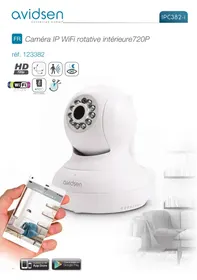
IPC382-i - Surveillance Camera AVIDSEN - Free user manual and instructions
Find the device manual for free IPC382-i AVIDSEN in PDF.



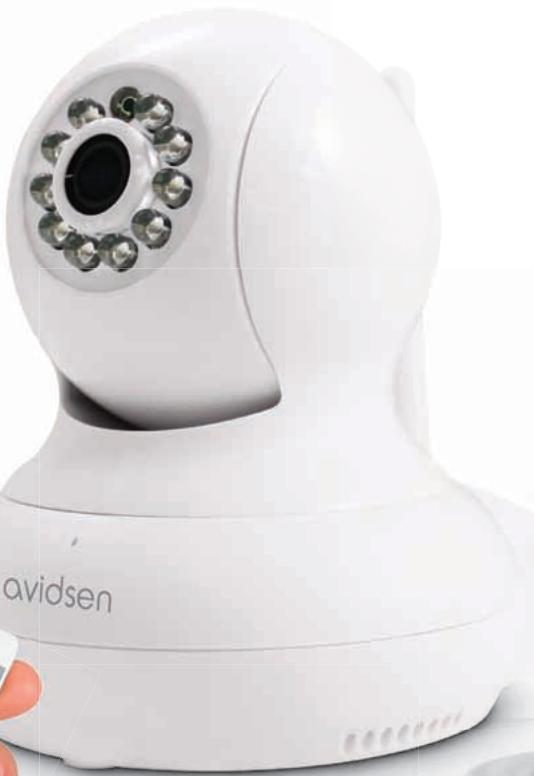
| Product type | Indoor 720P rotating WiFi IP camera |
| Maximum resolution | 1280 x 720 pixels (main stream) |
| Secondary resolution | 640 x 352 pixels |
| Night vision | Automatic (dusk sensor), range 10 meters |
| Horizontal rotation angle | 350° |
| Vertical rotation angle | 120° |
| Power supply | 5 VDC / 1 A (power adapter included) |
| Wireless connectivity | WiFi IEEE 802.11b/g/n 2.4 GHz |
| Wired connectivity | RJ45 Ethernet port |
| Local storage | microSD card slot up to 128 GB (not included) |
| Audio | Built-in microphone and speaker for two-way audio communication |
| Optical sensor | 1/4" CMOS |
| Minimum illumination | 0 lux (night vision) |
| Operating temperature | 0°C to 40°C, 20% to 85% RH non-condensing humidity |
| Usage | Indoor only |
| Warranty | 2 years parts and labor |
| Kit contents | 1 camera, 2 wall mounting arms, power adapter, USB cable, mounting screws, screws |
| Weight | Not specified in the manual |
Frequently Asked Questions - IPC382-i AVIDSEN
User questions about IPC382-i AVIDSEN
0 question about this device. Answer the ones you know or ask your own.
Ask a new question about this device
Download the instructions for your Surveillance Camera in PDF format for free! Find your manual IPC382-i - AVIDSEN and take your electronic device back in hand. On this page are published all the documents necessary for the use of your device. IPC382-i by AVIDSEN.
USER MANUAL IPC382-i AVIDSEN
3 - INSERTION D'UNE CARTE MICROSD (NON FOURNIE)
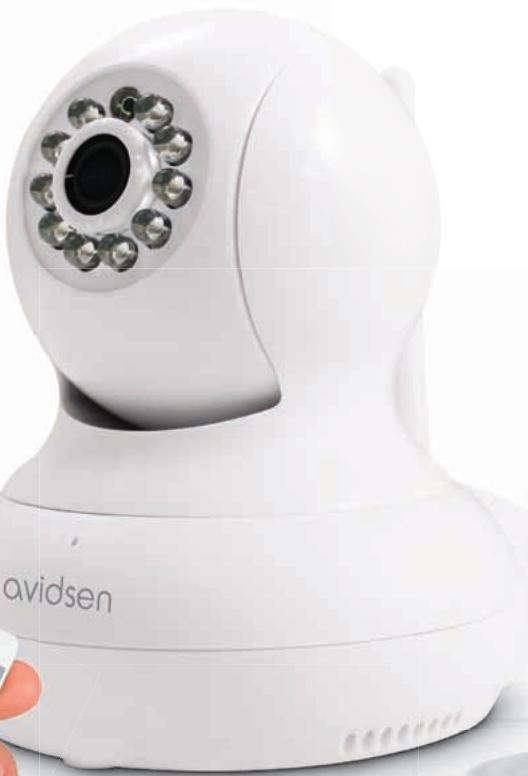
Indoor rotating 720P IP WiFi camera
ref. 123382

720p


2.4 GHz

Not included)

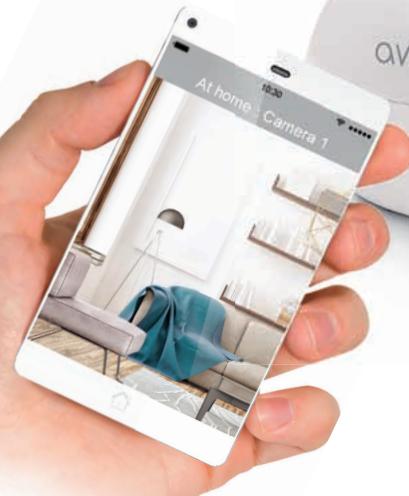

Available on the
App Store

Free available on
Google Play
TABLE OF CONTENTS
A - SAFETY INSTRUCTIONS 05
1-OPERATING PRECAUTIONS 05
2 - MAINTENANCE AND CLEANING 05
3-RECYCLING 05
B - PRODUCT DESCRIPTION 06
1 - CONTENTS OF THE KIT 06
2-CAMERA 06
3 - MAINS ADAPTOR 07
C - INSTALLATION 08
1- INSTALLING THE CAMERA 08
2-CONNECTING THE CAMERA 08
3-INSERTING A MICROSD CARD (NOT INCLUDED) 09
D - CONFIGURATION 10
1 - CONFIGURING THE CAMERA AND ADDING IT TO THE APP 10
2 - ACCESS TO ALL SETTINGS 12
2.1 - CONFIGURATION 12
2.2 - EXAMPLE: PROGRAMMING AN EMAIL ALERT TO BE SENT WHEN
MOVEMENT IS DETECTED 13
E - OPERATION 16
1-LIVEVIDEO 16
2 - VIEWING PHOTOS AND VIDEOS TAKEN BY THE CAMERA 16
F-RESETTING 17
G - TECHNICAL AND LEGAL INFORMATION 18
1-TECHNICAL CHARACTERISTICS 18
2 - WARRANTY 18
3- HELP AND ADVICE 18
4-PRODUCTRETURNS/AFTER-SALES SERVICE 19
5-DECLARATION OF CONFORMITY 19
A - SAFETY INSTRUCTIONS
1 - OPERATING PRECAUTIONS
- The cameras must not be installed where the lens filter may be vulnerable to scratching and dirt.
- Do not expose the lens to direct sunlight or any reflected light source.
- Do not daisy-chain extension cords and/or multi-socket adapters.
- Do not install near acidic chemicals, ammonia or sources of toxic gases.
- The installation and use of the camera must comply with local laws.
2 - MAINTENANCE AND CLEANING
- Always unplug the product from the mains before carrying out any maintenance.
- Never use abrasive or corrosive substances to clean the products.
- Use a soft, slightly damp cloth.
- Never use an aerosol to spray the product as this may damage the internal workings.
3 - RECYCLING
This logo indicates that devices which are no longer in use must not be disposed of as household waste. They are likely to contain hazardous substances which are dangerous to both health and the environment. Return the equipment to
your local distributor or use the recycling collection service provided by your local council.

B - PRODUCT DESCRIPTION
1 - CONTENTS OF THE KIT
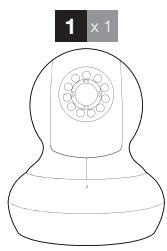
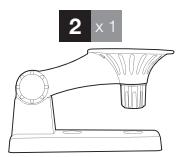
| 1 | Camera |
| 2 | Wall fastening arm |
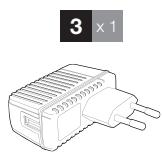
| 3 | 230 V A/C 50 Hz mains adaptor / 5 V 1 A |
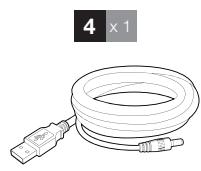
| 4 | USB cable for powering the camera |
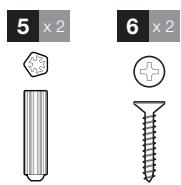
| 5 | Screws for attaching the base |
| 6 | Screw |
2-CAMERA
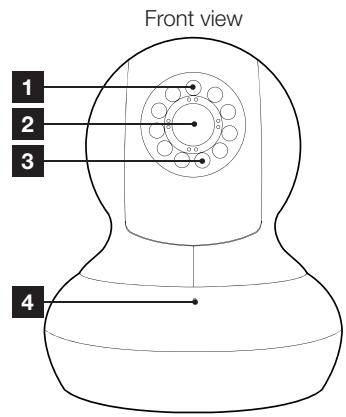
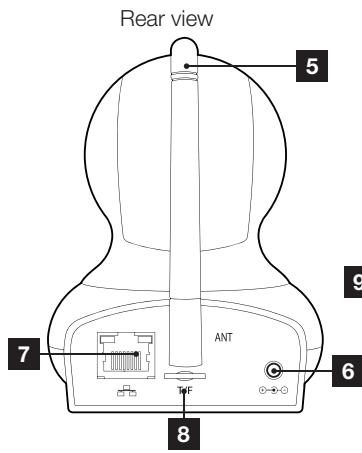
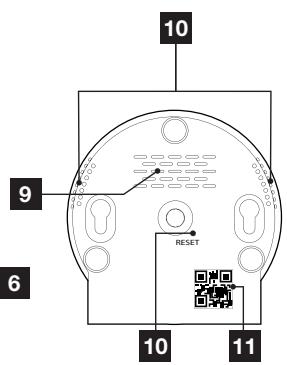
View from underneath
| 1 | Brightness sensor |
| 2 | Lens |
| 3 | Infrared light for night vision |
| 4 | Microphone |
| 5 | WiFi antenna |
| 6 | 5 V D/C 1 A mains adaptor power supply included in the kit |
| 7 | Wired network socket |
| 8 | MicroSD card slot (card not included) |
| 9 | Loudspeaker |
| 10 | Reset button |
| 11 | QR code |
3 - MAINS ADAPTER
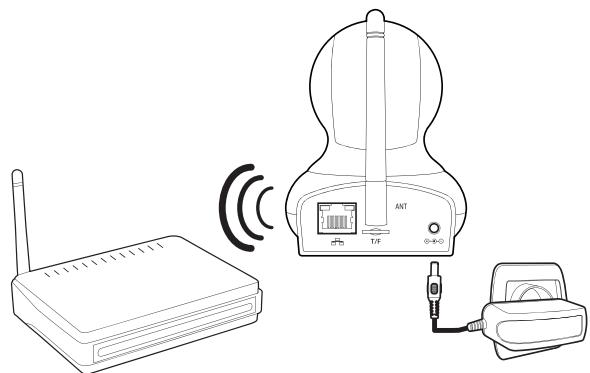
A 230VAC 50Hz / 5VDC 1A mains adapter for powering the camera is included in the kit. Do not use other power supplies as they could damage the camera and invalidate the warranty.
C - INSTALLATION
1 - INSTALLING THE CAMERA
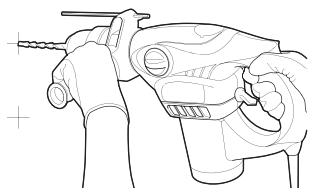
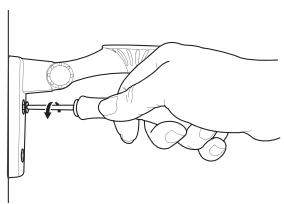
Mount the camera using suitable screws and wall plugs for the type of surface (the screws and plugs supplied are suitable for solid walls).
Make sure the camera is properly secured to prevent it from falling.
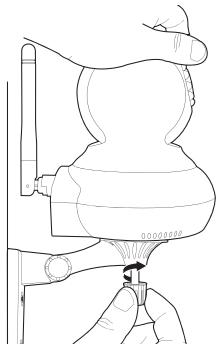
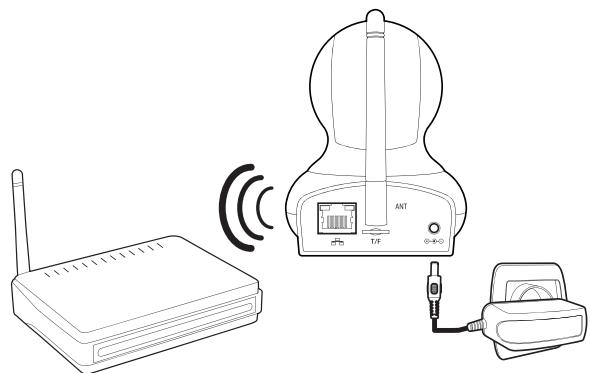
2 - CONNECTING THE CAMERA
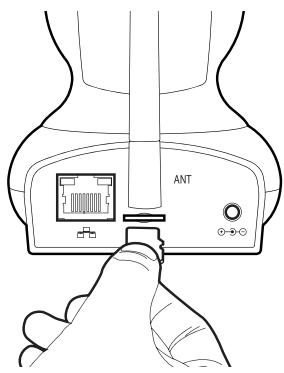
3 - INSERTING A MICRO SD CARD (NOT INCLUDED)
Your camera has a micro SD card slot, which gives it an internal storage memory. The maximum size is 128 GB.
D - CONFIGURATION
1 - CONFIGURING THE CAMERA AND ADDING IT TO THE APP

Download and install the Aviwatch
app from
the appstore or Google Play on your smartphone or tablet, then launch the app.
Click on "+" to add the camera

Caméra
Ajout camera
Then click "recherche wifi" (Scan WiFi) to add your camera and scan the QRCODE, if accessible, otherwise click "No QRCODE? Click here"
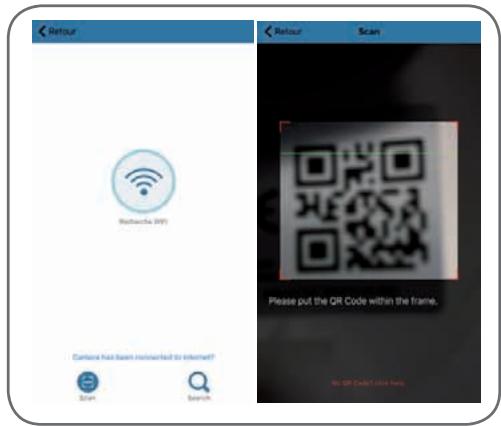
Important: connect your smartphone or tablet to the WiFi network that your camera should be using.
Not compatible with HT40 WiFi, not compatible with 5 GHz WiFi. Please check the WiFi parameters of your box with your internet service provider.
The special characters (#! " &, etc.) in your security key may lead to difficulties connecting to the WiFi.
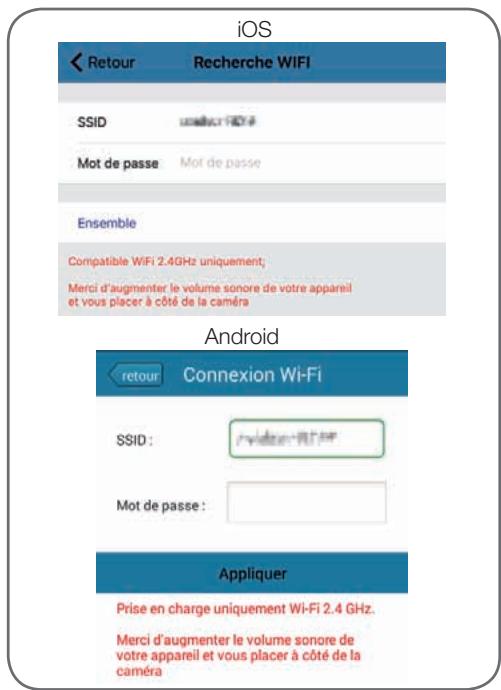
After entering the password for the WiFi network that the camera should be using, click on "Ensemble" (Set) or "Appliquer" (Apply): your tablet or smartphone is asking if the camera is accessible and if it is ready to be configured
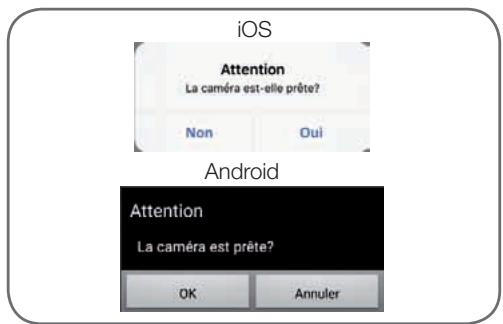
If your camera is nearby and not configured, click on "Oui" (Yes) or "OK" to begin configuration using the app.
Note: the camera will take 30 seconds to load up after being switched on.
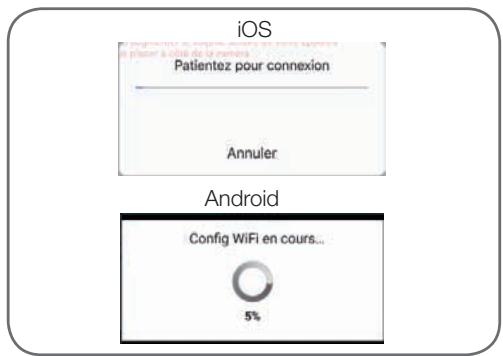
Once the WiFi connection information has been sent to the camera by the app, the camera will connect to the network using WiFi.
Your smartphone or tablet will ask you to change the password:
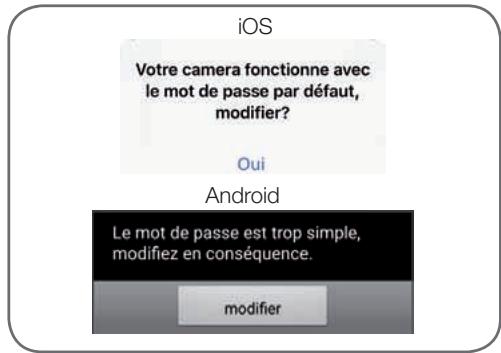
Click on "Oui" (Yes) and enter a new password
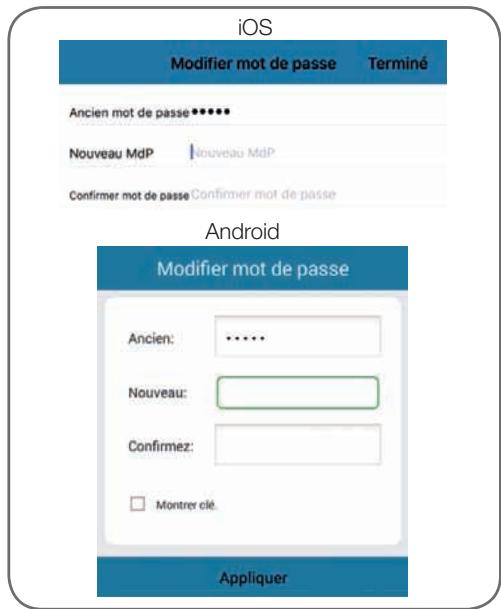
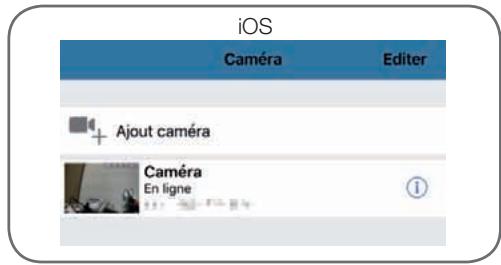
Finally, click on "Termine" (Done) on the upper right-hand side of the screen or on "Appliquer" (Apply) to add the camera to the list of cameras recognized by the app.
D - CONFIGURATION
Android
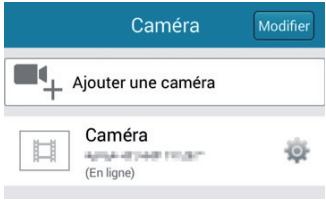
Your camera will appear in the list and you can access its video and settings.
2 - ACCESS TO ALL SETTINGS
2.1 - Configuration
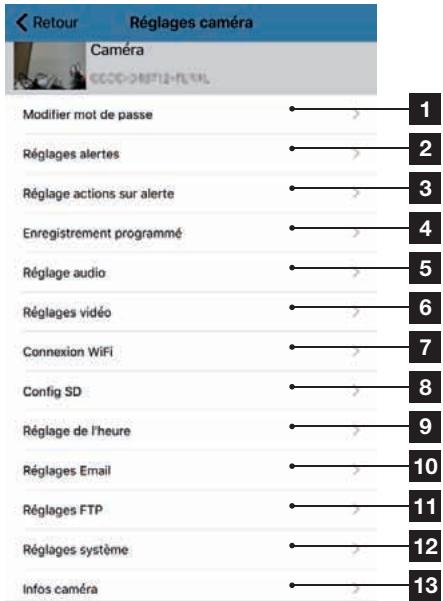
From the list of cameras, click on the (Android) or iOs) icon to the right of the name of your camera to display the configuration menus:
iOS
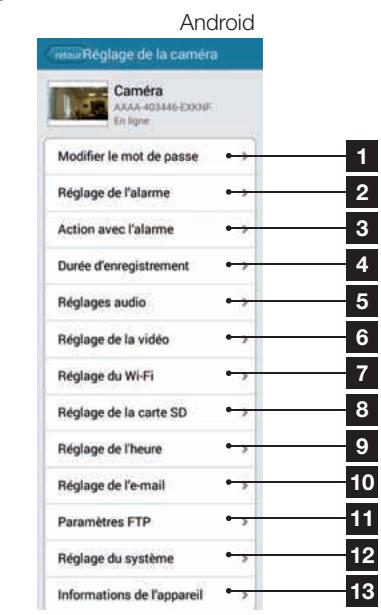
| 1 | Changing the password to log in to the camera ("admin", by default) |
| 2 | Activation/deactivation and sensitivity of the movement detector |
| 3 | Actions to take if movement is detected: notification, send an email, saving a file to the memory card (requires a micro SD card [not included] to be inserted into the camera) |
| 4 | Activation/deactivation of continuous recording to the micro SD card and the length of videos (requires a micro SD card [not included] to be inserted into the camera) |
| 5 | Audio and microphone volume settings |
| 6 | Video quality settings and number of frames per second. Warning: if you set the video quality to high with respect to the quality of the internet connection of your camera and smartphone or tablet, you may experience choppy video or loss of connection. Two streams can be adjusted: they correspond to the maximum resolution = "résolution Max", and low resolution = "résolution faible", which you can select from the live video display. Warning: in some cases, a change in camera resolution will only happen when the app is restarted. Exit and re-launch the Aviwatch app if there is a problem. |
| 7 | Configure the camera's current WiFi settings |
| 8 | If a micro SD card has been inserted into the camera, you can reformat it and display its total and free memory |
| 9 | Setting the date and time stamps on the camera's video |
| 10 | Settings for sending emails in the event of an alert (see the example below) |
| 11 | Settings for saving to an FTP server |
| 12 | Restarting the camera remotely/Update/Reset |
| 13 | Camera network information |
2.2 - Example: programming an email alert to be sent when movement is detected
To program an alert to be sent when movement is detected, you need 2 email addresses: the address of the sender which will be used by the camera, and the address which will receive the alerts. The camera uses the username and password of the sender address to connect and send the email. Configuration depends on the chosen email provider's settings.
Note: the 2 email addresses can be the same (you will simply be sending an email to yourself).
In our example, we use
www).(gmail.com: sender-address@gmail. com sends the alerts, recipient@gmail.com receives the alerts. Both addresses need to have been created beforehand.
First, go to "Réglages Email" (Email settings):
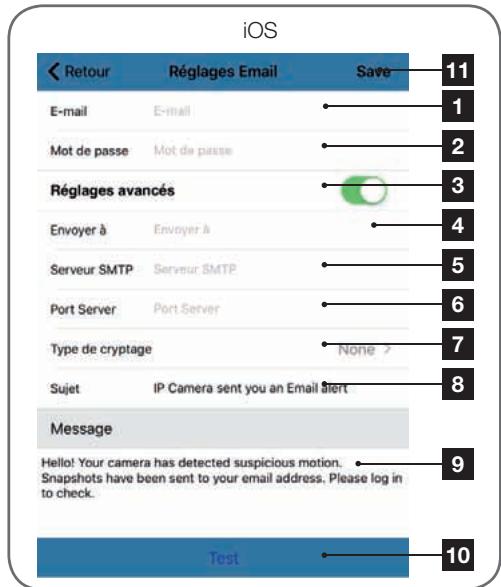
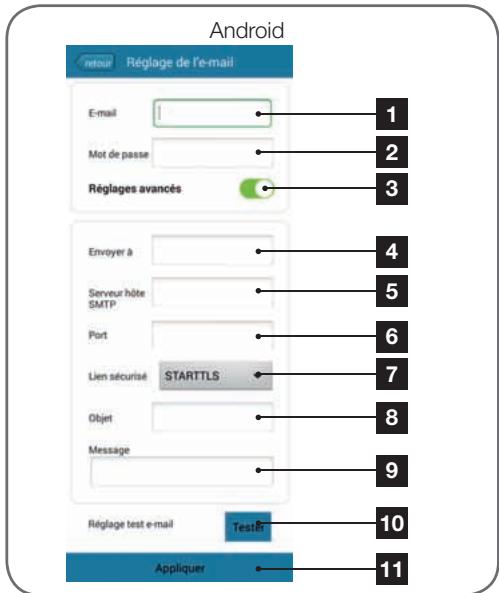
Email: Name that you should enter to log in to the email box which will send the alerts. In our example using Gmail, this is the sender address: sender-address@gmail.com
D - CONFIGURATION
| 2 | Password: The password used to log in to sender-address@gmail.com, in our example |
| 3 | Advanced settings |
| 4 | Send to: Enter the email address here that will receive the alerts. In our example: addressee@gmail.com |
| 5 | SMTP server: varies with the email provider of the address sending the alert. In our example, using Gmail, smtp gmail.com |
| 6 | Server port: depends on the email provider of the address sending the alert. I our example using Gmail, 587 |
| 7 | Encryption type: security when logging in, associated with the email provider. In our example using gmail, STARTTLS |
| 8 | Subject: subject of the email alert |
| 9 | Message: body of the email |
| 10 | Test: allows you to simulate an alert, send an email and to check that your camera is correctly configured. |
| 11 | Save/Apply: to save the configuration |
Note: it does not matter who the email provider of the recipient is, as it is the email provider of the sender that dictates what needs to be entered. However, you must ensure that the alerts are not treated as spam by the recipient's inbox.
Warning: some email providers will not accept that the camera has sent notifications without authorisation from you. Refer to your mailbox safety settings for more details.
Information: Our technical support will not be able to help you with these settings if you contact them, as it depends solely on your mailbox. For more information, please contact your email account provider.
When you have finished configuring your camera, it will be able to send emails. You must now tell it when to send them, in the "Action avec alarme" (Action with alarm) or "Réglage actions sur alerte" (Action on alarm settings) in the camera settings:
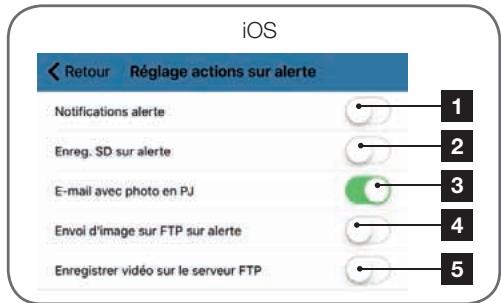
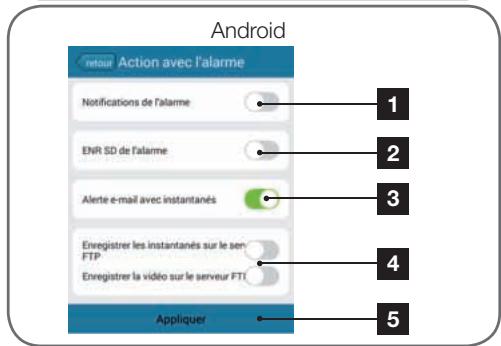
| 1 | App notification in the event of an alert: all devices on which the camera was added to the Aviwatch app will be notified if there is movement (the app must be running in the background on the tablet or smartphone) |
| 2 | Saving to SD: if a micro SD card was inserted into the camera, any alert triggers a video, which is saved to the card. The video can be viewed remotely (see below) |
| 3 | Email with attached photo: if email was set up (see the previous paragraph), an email will be sent when movement is detected |
| 4 | FTP options, not discussed here |
| 5 | Click on "Appliquer" (Apply) to save your settings, or "Retour" (Return) on iOS. |
Once this configuration has finished, simply activate movement detection in the "Réglages alertes (Set Alerts)" menu:
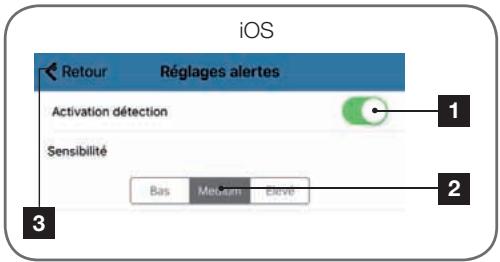
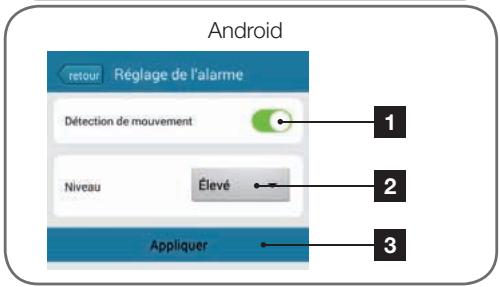
| 1 | Click here to activate movement detection |
| 2 | Use this to adjust the sensitivity of the movement detector. When set to high sensitivity the smallest movement will send an alert, in low sensitivity, only large movements on the screen will send an alert |
| 3 | Click on "Appliquer" (Apply) to save your settings, or "Retour" (Return) on iOS |
This completes the configuration. From this point on, any movement in front of the camera will result in an email alert, an Aviwatch app notification and/or a file to be saved to the memory card, depending on your settings.
E - OPERATION
1-LIVEVIDEO
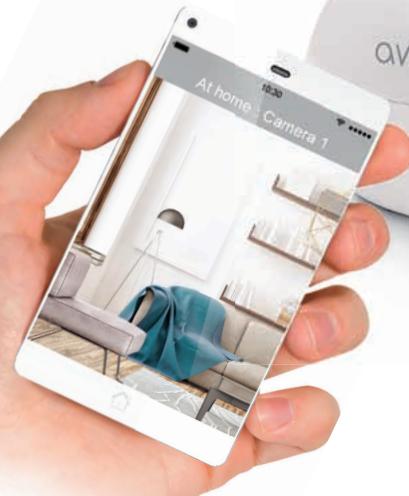
From the list of cameras, click on the image to the left of the name of your camera to display the live video:
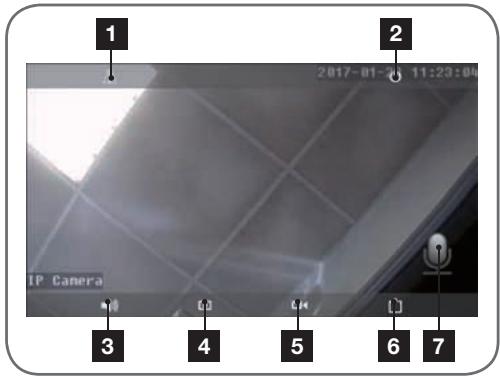
| 1 | Flipping/inverting the image |
| 2 | Return to the list of cameras |
| 3 | Activate remote listening |
| 4 | Take a snapshot and save to the smartphone/tablet |
| 5 | Record a video and save to the smartphone/tablet |
| 6 | Video quality selection (useful if the network or mobile connection is poor): 2 different settings are available |
| 7 | Activate voice transmission to the camera (only visible after pressing "3") |
2 - VIEWING PHOTOS AND VIDEOS TAKEN BY THE CAMERA
From the list of cameras, you have access to the photos taken by the camera and saved to the smartphone or tablet, videos saved to the smartphone or tablet and videos saved to the camera's microSD card (not included).
After receiving an alert, if you have activated memory card recording, you can view the video showing what was detected.
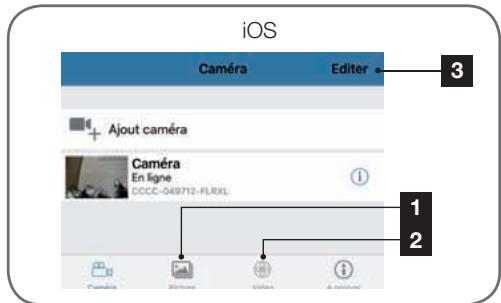
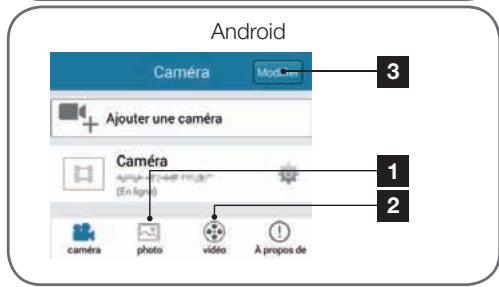
| 1 | Viewing photos taken by the camera and saved to the smartphone or tablet (" icon on the camera's live view). |
| 2 | Viewing the videos taken by the camera and saved to the smartphone or tablet ("on the camera's live view, "local" button in the Video [Video] menu) or to the micro SD card inserted into the camera (following an alert or continuous recording, "en ligne" [online] button in the Video [Video] menu). |
| 3 | "Editor" (Edit)/"Modifier" (Change) allows you to edit the name of your camera, as well as the password (in the event of an error) or to remove the camera from an Android device. To remove the camera from an iOS device, please scan to the left of the camera name |
If there is a problem or the login details have been lost, the camera can be reset to its default settings by pressing the Reset button for 15 seconds. Once reset, the camera will start up again. After 30 seconds, it is available for reconfiguration.
G - TECHNICAL AND LEGAL INFORMATION
1-TECHNICAL CHARACTERISTICS
| Camera | |
| Power supply | 5VDC / 1A |
| Wireless network interface | WiFi IEEE 802.11b/g/n 2.4 Ghz |
| Optical sensor | 1/4" CMOS |
| Minimum luminous intensity | 0 lux |
| Night vision | Automatic (dusk-to-dawn sensor) Range: 10m |
| Lens | f: 3.6 mm |
| Buttons | Reset button: restores factory settings |
| Video compression | H.264 |
| Resolution | Primary stream: up to 1280x720 pixels Secondary stream: up to 640x352 pixels |
| Audio | Built-in microphone and loudspeaker for two-way audio communication |
| Storage | 1 microSD card slot up to 128 GB memory for storing video via remote access |
| Motors | 350° horizontal sweep 120° vertical sweep |
| Operating temperature and humidity | 0°C to 40°C, 20% to 85% RH non-condensing For indoor use only |
| Storage temperature and humidity | -10°C to 60°C, 0% to 90% RH, non-condensing |
2 - WARRANTY
- This product is under warranty for parts and labour for 2 years from the date of purchase. Proof of purchase must be retained for the duration of the warranty period.
- The warranty does not cover damage caused by negligence, knocks or accidents.
to be opened or replaced by non-Avidsen employees. - The warranty will be void if the device is tampered with.
3 - HELP AND ADVICE
- If, despite the care we have taken in designing our products and drafting these instructions,
you do encounter difficulties when installing your product or you have any questions, we recommend you contact one of our specialists who will be glad to help.
- If you encounter operating problems during the installation or a few days afterwards, it is essential that you are in front of your installation when contacting us, so that one of our technicians can diagnose the source of the problem, as it will probably be the result of a setting that is incorrect or an installation that is not to specification. If the problem is caused by the product itself, the technician will give you an RMA number so that you can return the unit to the shop. Without this RMA number, the shop may refuse to exchange the product.
Contact our after sales team technicians on:
0892701369
Service 0.35 €/min + prix appel
Monday to Friday, 9AM to 12PM and 2PM to 6PM.
4 - PRODUCT RETURNS / AFTER SALES SERVICE
If, despite the care we have taken in designing and manufacturing your product, it needs to be returned to our customer service centre, you can check the progress of the work on our website at the following address:
http://sav.avidsen.com
Avidsen undertakes to keep a stock of spare parts for this product throughout the contractual warranty period.
5 - DECLARATION OF CONFORMITY
With the R&TTE directive
Avidsen hereby declares that the equipment designated below:
720P indoor WiFi IP camera 123382
Complies with the RED directive and its conformity has been assessed pursuant to the applicable standards in force:
EN 60065:2014
EN 62479:2010
EN301 489-1 V2.1.0:2016-04
EN 301 489-17 V3.1.0:2016-04
EN 300 328 V2.0.20:2016-03
Chambray les Tours, date: 06/02/2017
Alexandre Chaverot, CEO

Roterende Wifi IP binnencamera 720P
ref. 123382

720p


2.4 GHz

Not included)


Available on the
App Store

Free available on
Google Play
INHOUDSOPGAVE
A - VEILIGHEIDSVOORSCHRIFTEN 05
1 - GEBRUIKSVOORSCHRIFTEN 05
2-ONDERHOUD EN REINIGING 05
3 - RECYCLAGE 05
B-BESCHRIJVING VAN HET PRODUCT 06
1-INHOUD VAN DE KIT 06
2-CAMERA 06
3-LICHTNETADAPTER 07
C - INSTALLATIE 08
1-INSTALLATIE VAN DE CAMERA 08
2 - AANSLUITING VAN DE CAMERA 08
3 - EEN MICROSD-KAART PLAATSEN (NIET MEEGELEVERD) 09
D-CONFIGURATIE 10
1-CONFIGURATIE VAN DE CAMERA EN TOEVOEGEN IN DE TOEPASSING 10
2 - TOEGANG TOT HET GEHEEL VAN INSTELLINGEN 12
2.1 - CONFIGURATION 12
2.2 - VOORBEELD: INSTELLING VAN EEN E-MAILALERT BIJ
BEWEGINGSDETECTIE 13
E - GEBRUIK 16
1-LIVEVIDEO 16
2-LEZEN VAN FOTO'S EN VIDEO'S DIE MET DE CAMERA ZIJN GEMAAKT 16
F - HERSTARTEN 17
G - TECHNISCHE EN WETTELIJKE INFORMATIE 18
1-TECHNISCHEEIGENSCHAPPEN 18
2 - GARANTIE 18
3-HULP EN TIPS 18
4-RETOUR PRODUCT - SERVICE 19
5-CONFORMITEITSVERKLARING 19
A - VEILIGHEIDSVOORSCHRIFTEN
2 - LIGACAO DA CÁMARA
De segunda a sexta-feiran entre as 9h e as 13h e entre as 14h e as 18h.
m = 311
Notifications alerte
Enreg. SD surailete

- - INSERTION D'UNE CARTE MICROSD (NON FOURNIE)
- Indoor rotating 720P IP WiFi camera
- TABLE OF CONTENTS
- A - SAFETY INSTRUCTIONS 05
- B - PRODUCT DESCRIPTION 06
- C - INSTALLATION 08
- D - CONFIGURATION 10
- E - OPERATION 16
- F-RESETTING 17
- G - TECHNICAL AND LEGAL INFORMATION 18
- A - SAFETY INSTRUCTIONS
- - OPERATING PRECAUTIONS
- - MAINTENANCE AND CLEANING
- - RECYCLING
- B - PRODUCT DESCRIPTION
- - CONTENTS OF THE KIT
- 2-CAMERA
- - MAINS ADAPTER
- C - INSTALLATION
- - INSTALLING THE CAMERA
- - CONNECTING THE CAMERA
- - INSERTING A MICRO SD CARD (NOT INCLUDED)
- D - CONFIGURATION
- - CONFIGURING THE CAMERA AND ADDING IT TO THE APP
- - ACCESS TO ALL SETTINGS
- - Configuration
- - Example: programming an email alert to be sent when movement is detected
- E - OPERATION
- 1-LIVEVIDEO
- - VIEWING PHOTOS AND VIDEOS TAKEN BY THE CAMERA
- G - TECHNICAL AND LEGAL INFORMATION
- 1-TECHNICAL CHARACTERISTICS
- - WARRANTY
- - HELP AND ADVICE
- - PRODUCT RETURNS / AFTER SALES SERVICE
- - DECLARATION OF CONFORMITY
- Roterende Wifi IP binnencamera 720P
- INHOUDSOPGAVE
- A - VEILIGHEIDSVOORSCHRIFTEN 05
- B-BESCHRIJVING VAN HET PRODUCT 06
- C - INSTALLATIE 08
- D-CONFIGURATIE 10
- E - GEBRUIK 16
- F - HERSTARTEN 17
- G - TECHNISCHE EN WETTELIJKE INFORMATIE 18
- A - VEILIGHEIDSVOORSCHRIFTEN
- - LIGACAO DA CÁMARA
Brand : AVIDSEN
Model : IPC382-i
Category : Surveillance Camera