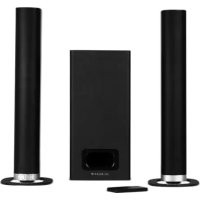
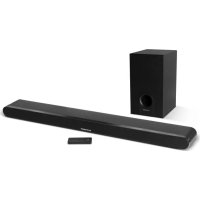
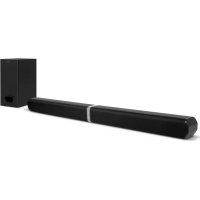
USER MANUAL SC100SND SCHNEIDER
natural_image
Black mechanical component with cylindrical shaft and circular opening (no text or symbols)
GROOVE THEATRE
- Getting started....22
- Overview of controls ......22
- Remote control....23
- TV Connections....25
- Connecting an MP3 player....27
- Connecting the external subwoofer....27
- General operation....27
- Bluetooth operation....29
- Wall mounting the sound bar....30
- Specifications....32
- Troubleshooting....33
Español
natural_image
Line drawing of a hand holding a small object with a circular knob, no text or symbols present
Accentuation des graves
natural_image
Technical line drawing showing three different mechanical or electrical components with no visible text or symbols
natural_image
Technical line drawing of a mechanical assembly with a magnified inset showing a component (no text or symbols)
Important safety instructions – please read carefully and keep for future reference

To reduce the risk of fire or electric shock, do not expose this product to water, rain or moisture. To prevent the risk of electric shock, do not remove the cover or back of this product. In case of product failure, only qualified personnel can repair. There are no user-serviceable parts inside.
CAUTION!
Dangerous tension inside the product! Do not open. Risk of electric shock! No parts can be repaired by the end-user. Only qualified personnel can repair and maintain this product.
If the electric cord is damaged, it must be replaced by the manufacturer or qualified after-sales personnel in order to avoid any danger.
The product must be installed in accordance with local laws.
Damaged batteries must be properly disposed. In order to protect the environment, please dispose the batteries properly, in accordance with local laws (information is available at your reseller).
Remote control battery (included) shall not be exposed to excessive heat (e.g. from sun or fire).
Where to install the product
- Place the product on a straight, rigid and stable place. Do not place the product on a carpet.
- Do not place the product on top of another that may cause overheating (for example, a receiver or amplifier).
- Do not place anything underneath the product (for example, CDs or magazines).
Proper ventilation
- Place the product in a sufficiently-aerated place to avoid overheating. Allow at least 10cm spacing at the back and top of the product, and 5cm spacing on both sides to prevent overheating.
- Do not place items such as newspapers, tablecloth, curtains, in front of the ventilating openings.
Do not expose the product to high temperatures, moisture, water and dust.
- The apparatus shall not be exposed to dripping or splashing. No object filled with liquids, such as vases, shall be placed on the apparatus.
- Do not place other items close to this product that may damage it (for example, objects containing water or lightened candles).
- No naked flame sources, such as lighted candles, should be placed on the apparatus.
Electric supply
- Please unplug the product in case of prolonged non-use.
- If the supply cable is damaged, it must be replaced by the manufacturer or qualified after-sales personnel to avoid any danger.
- This product must be connected to an electrical supply 230V \~ 50Hz.
- The mains plug is used as the disconnect device, so the disconnect device shall remain readily operable
- Only use this product with the AC adaptor provided.
Hereby, Admea declares that this sound bar is in compliance with the essential requirements and other relevant provisions of Directive 1999/5/EC.
The declaration of conformity is available on website:
http://www.schneiderconsumer.com

This product is compliant with directives 2006/95/CE (abrogating the directive 73/23/CEE modified by the directive 93/68/CEE) and 2004/108/CE (abrogating the directive 89/336CEE).
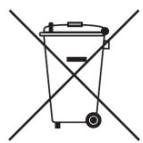

- This logo set on the product means that the recycling of this apparatus comes within the framework of the directive 2012/19/EC of July 4, 2012 concerning the waste on electrical and electronic equipment (WEEE).
- The presence of dangerous substances in the electrical and electronic equipments can have potential consequences on the environment and human health in the cycle of reprocessing this product.
- Therefore, at the end of its lifetime, this product shall not be disposed with other non-recycled waste.
- As the end user, your role is of prime importance in the cycles of re-using, recycling, and other forms of valorization of this electrical and electronic equipment. Local authorities and resellers have set special procedures for the purpose of collecting and recycling this product.
- You have the obligation to use the selective waste collection systems put in place by your local authorities.
1. Getting started
What's included?
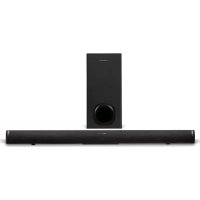
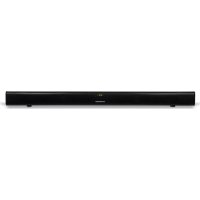
1 x Sound bar
1 x Remote control (with CR2032 battery)
1 x AC adaptor
1 x Audio cable (3.5mm-3.5mm)
1 x Audio cable (RCA-3.5mm)
1 x Instruction manual
2x Wall-mount bracket
- Overview of controls
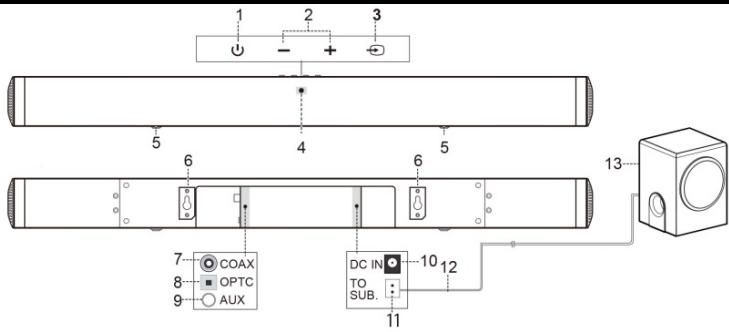
- STANDBY button: Switch on the Sound bar or switch to STANDBY mode.
- VOLUME + / - buttons: Increase or decrease the output volume.
- SOURCE button: Select an audio source from AUX, BLUETOOTH, COAXIAL or OPTICAL inputs.
- STATUS LED: Input mode and standby status.
- Non-skid Pad
- Wall-mount bracket
- COAXIAL AUDIO INPUT (RCA): Connect the digital audio output from a TV, DVD or Blu-ray player.
- OPTICAL AUDIO INPUT: Connect the digital audio output from a TV, DVD or Blu-ray player.
- AUX AUDIO INPUT (3.5mm): Connect the analogue audio output from an MP3 player or similar using a 3.5mm audio cable.
- DC INPUT SOCKET: Only connect to the power adaptor provided.
- TO SUBWOOFER CONNECTOR: Connect to the external subwoofer.
- SPEAKER CABLE: Connect the external subwoofer to the sound bar.
- SUBWOOFER
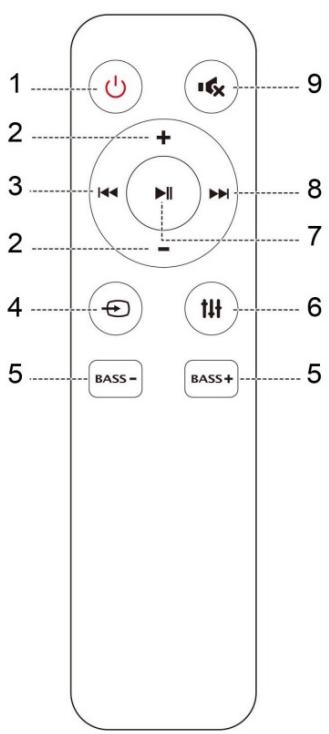
- STANDBY: Switch on the Sound bar or switch to STANDBY mode.
- VOL- / +: Increase or decrease the volume output.
- SKIP #: Skip to previous track for Bluetooth playback.
- SOURCE: Select an audio source from AUX, BLUETOOTH, COAXIAL or OPTICAL inputs.
- BASS - / +: Increase or decrease the bass output.
- SOUND EQ MODES: Press repeatedly to assign different sound. EQ modes: STANDARD or MOVIE.
- ▶/II PLAY/PAUSE: START or PAUSE Bluetooth playback. Press and hold for 5 seconds to remove a paired Bluetooth device.
- SKIP ▶: Skip to next track for Bluetooth playback.
- ✗ MUTE: Press to mute or restore the sound output.
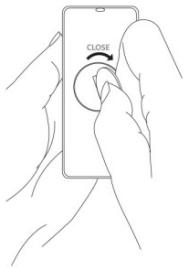
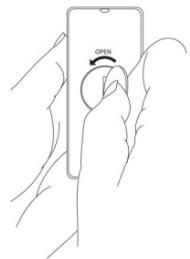
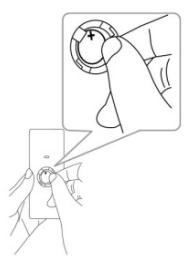
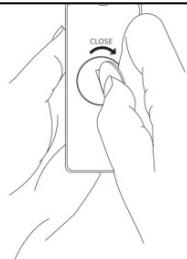
Installing batteries to the remote control
-
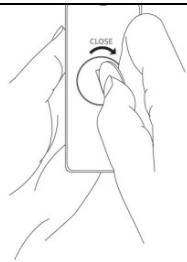
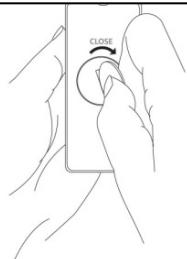
Turn the battery cover counterclockwise by using a coin. Then remove the battery cover.
-
Insert and fix the CR2032 battery into the battery compartment with the (+) facing upward.
-
Put the battery cover on the remote control and turn it clockwise to close.
natural_image
Illustration of a hand holding a small object with a knob, no text or symbols present
Disposal of batteries
Dispose of used batteries with regard to the recycling regulations in your area. Do NOT short circuit batteries or throw them into water, the general rubbish or in a fire. Weak batteries can leak and damage the remote control. Replace them in good time!
4. TV Connections
4.1 Connecting a TV, DVD, GAMES CONSOLE or SET-TOP BOX using the provide RCA-3.5mm audio cable.
NOTE: Ensure that the TV PHONO connectors are audio OUTPUTS and not audio INPUTS. If they are INPUTS then use connection 4.4
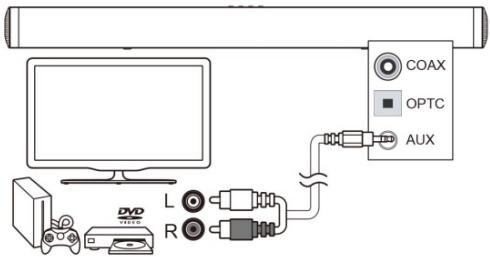
- Connect one end of the RCA cable to the TV, DVD or CONSOLE audio output RCA sockets.
- Connect the 3.5mm (small) end to the AUX inputs on the back of the Sound bar.
NOTE: Take care to match the RED plug to the RED socket and the WHITE plug to the WHITE socket.
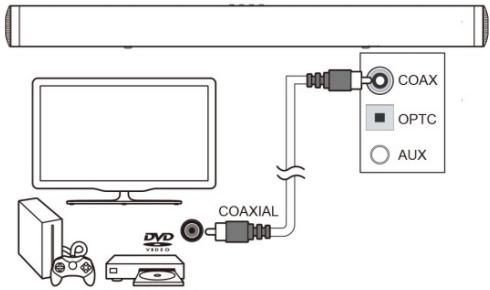
4.2 DIGITAL connection to a TV, DVD or Blu-ray player using the COAXIAL cable (not provided).
flowchart
graph TD
    A["Computer monitor"] --> B["Coaxial cable"]
    B --> C["COAX"]
    B --> D["OPTC"]
    B --> E["AUX"]
- Connect one end of the COAXIAL cable to the TV, DVD or Blu-ray COAXIAL audio output socket.
- Connect the other end to the COAXIAL input on the back of the Sound bar.
NOTE: You may need to activate PCM (Downmix) on your source device: TV, DVD or Blu-ray player.
4.3 DIGITAL connection to a TV, DVD or Blu-ray player using the OPTICAL cable (not provided).

flowchart
graph TD
    A["Computer monitor"] --> B["Optical cable"]
    B --> C["Coax"]
    B --> D["AUX"]
    B --> E["DVD"]
    style A fill:#f9f,stroke:#333
    style B fill:#ccf,stroke:#333
    style C fill:#cfc,stroke:#333
    style D fill:#fcc,stroke:#333
    style E fill:#cff,stroke:#333
-
Connect one end of the OPTICAL cable to the TV, DVD or Blu-ray OPTICAL audio output socket.
-
Connect the other end to the OPTC input on the side of the Sound bar.
NOTE: You may need to activate PCM (Downmix) on your source device: TV, DVD or Blu-ray player.
4.4 Connection to a TV using the 3.5mm-3.5mm audio cable.
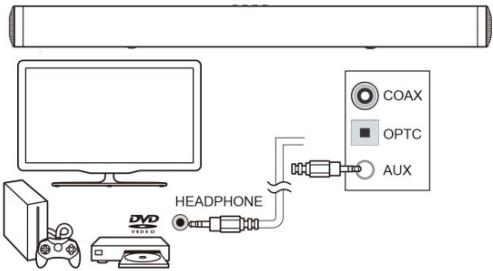
- Connect one end of the 3.5mm cable to the TV headphone 3.5mm audio output socket.
- Connect the other end of the cable to the AUX input on the back of the sound bar.
NOTE: In some cases the Sound bar volume output is affected by the volume level on the TV. In this case adjust the TV volume to increase the audio output from the sound bar.
5. Connecting an MP3 player

- Connect one end of the 3.5mm audio cable to the headphone output of your MP3 player.
2: Connect the other end to the AUX input (3.5mm socket) on the back of the Sound bar.
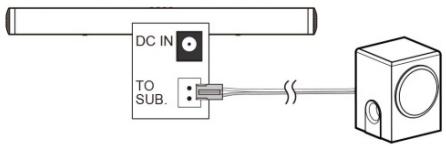
6. Connecting the external subwoofer
Connect the speaker cable from external subwoofer to the TO SUB socket on back of the sound bar.
7. General operation
Connecting mains power
- Connect the AC power adaptor of the sound bar between the DC IN socket and the power supply outlet.
- Switch the power outlet ON.
Standby mode
- Press the STANDBY button to wake the unit from STANDBY mode.
- To enter STANDBY mode, press either STANDBY buttons.
NOTE: As part of the power saving mode the unit will enter STANDBY mode automatically after 20 minutes (approx.) of no audio output.
Status LED
| Operation | Description | LED Status |
| STANDBY | Standby | RED (solid) |
| SOURCE | AUX | GREEN (solid) |
| Bluetooth-ready for pairing | BLUE (flash) |
| Bluetooth paired | BLUE (solid) |
| Coaxial | WHITE (solid) |
| Optical | PURPLE (solid) |
| VOL+/- | Adjust sound volume | Current input source color (blink once) |
| BASS +/- | Adjust bass level | Current input source color (blink once) |
| EQ MODE | Assign sound EQ STANBARD or MOVIE | Current input source color (blink once) |
| MUTE | Mute or restore sound | RED (flash) |
Follow the below steps to switch inputs among: Auxiliary, Bluetooth, Coaxial or Optical.
- Ensure the Sound bar is powered ON by pressing the STANDBY button.
- Press the SOURCE button repeatedly until you see the corresponding color on the indicator, and then an audible message will follow to confirm the source you selected.

Auxiliary input: ......GREEN
Coaxial input: ......WHITE
Bluetooth input: ......BLUE
Optical input: ......PURPLE
NOTE: When switching inputs there will be a 5 second pause after selecting BT while the unit scans for paired devices.
Adjusting the volume level
Press the VOLUME+/- button repeatedly to increase or decrease the volume level.
Sound effect presets
During playback, press the SOUND EQ button repeatedly to change the sound modes between STANDARD and MOVIE.
NOTE: When you select a sound mode, an audible message will follow to confirm the mode you selected.
Bass enhancement
Press Bass+/- to strengthen or lower the level of Bass.
Mute function
- Press the MUTE button on the remote will temporarily silence the audio output.
- Press the MUTE button again to resume the audio output.
NOTE: The LED indicator will blink in RED to indicate the mute function is active.
Disable the Audible Message
Follow the steps below in order to disable the audible message.
-
Press STANDBY button to switch to STANDBY mode.
-
Press and hold ▶/□ button for 5 seconds.
NOTE: Repeat the step 1 and 2 to activate the audible message.
8. Bluetooth operation
Pairing a Bluetooth device
Before you can use the sound bar with your phone or other Bluetooth capable device you will need to pair the device to the sound bar.
- Press SOURCE button repeatedly until you see the LED indicator turns blue, and then stay flashing when no other devices paired.
- Enable the Bluetooth function on your smart phone and search for a device labelled "SC100SND" in the available list.
- Select and enable pairing for the device "SC100SND". If prompted for a password, enter "0000".
- If pairing is successful the sound bar will beep and indicator stops flashing.
- If the connected device goes out of range, the sound bar will attempt to connect for 2 minutes. When the device comes into range the sound bar will reconnect again automatically.
- To remove the currently paired device, press and hold ▶/□ button on the remote control for 5 seconds. The indicator will begin flashing again.
During playback, you can:
-
Press PLAY/PAUSE button begin or pause playback of the selected track on the audio device.
-
Press ◀ or ▶ to skip to last or next track.
Bluetooth status table
| Operation | LED Status |
| Connected | RED (solid) |
| Auto re-connecting with last paired device. | GREEN (solid) |
| Pairing mode |
Note:
- The operation range of Bluetooth is approximately 10 meters (30 feet). Any obstacles in the path between devices may reduce this range.
- Only one Bluetooth device can be paired at a time.
- Not all Bluetooth devices are compatible.
9. Wall mounting the sound bar
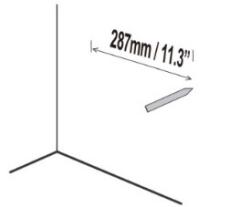
- Align the Sound bar in the chosen location. Use a pencil to mark the 2 drilling positions with a distance of 287mm (11.3") apart.

3 inches (7.5 cm) or more
Note: The Sound bar should be located at least 7.5cm (3") below the bottom of the TV.

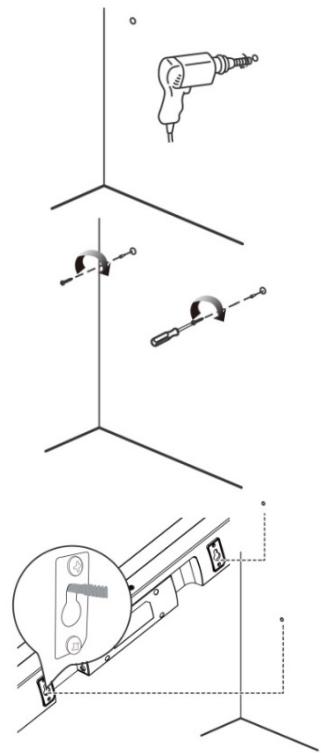
-
Drill holes as marked in step 1.
-
Insert 2 screws (not supplied) into the holes and tighten. Take care to leave 5mm between the screw heads and the wall.
NOTE: You will need to ensure the screws are long enough to sufficiently grip the wall while allowing 5mm between screw head and wall.
-
Hook the Sound bar into the screws. For secure mounting, ensure the screw heads slide firmly into the narrow part of the brackets.
Wall mounting advice
| Amplifier |
| Power output | 75W+2X30W |
| Frequency response | 50Hz-20KHz ± 3dB |
| Input sensitivity | 550 mV |
| Main unit |
| Power supply | Input:100-240V ~ 50-60HzOutput: 24V 1.5A |
| Power consumption | 25W |
| Standby power consumption | ≤ 0.5W |
| Full range speaker drivers | Impedance: 4 Ohm, 52mm (2")Frequency response: 250Hz ~ 20KH |
| Subwoofer | Impedance: 8 Ohm, 116mm (5.25")Frequency response: 45~250Hz |
| Dimensions | Sound Bar: W730xD60xH63 mmExternal subwoofer: W178xD221xH296 mm |
| Cable length | 1.5m |
| Remote control |
| Battery | 1 x CR2032 |
| Bluetooth |
| Bluetooth compatibility | EDR, A2DP, AVRCP |
| Bluetooth version | 2.1 |
11. Troubleshooting
In the unlikely event of difficulties with your appliance please follow the trouble shooting guide below.
| PROBLEM | POSSIBLE SOLUTION |
| No Power | Ensure the mains plug is connected to a power supply, and is switched ON.Make sure there is power to the mains socket. |
| No Sound | When playing from the AUX input, Make sure the external source has the volume turned up and is playing a track.Make sure the volume is turned up.If using the digital coaxial or optical cable connection ensure the source DIGITAL output is set to PCM, LPCM, PCM 2Ch stereo or PCM downmix.Bluetooth device not paired. Refer to “Bluetooth operation”. |
| No response from the unit | Unplug the power cable for 1 minute then plug back in again. |
| Remote control does not work | Reduce the distance between the remote and main unit.Check the batteries are installed correctly.Replace the batteries.Aim the remote directly at the Sound bar |
| Unit powers off after 20 minutes | This unit is designed to enter STANDBY mode automatically after 20 MINUTES of inactivity. Press the STANDBY button to wake the unit. |
Remark: Watt-peak measurement is obtained by multiplying the continuous average power (RMS) by 2 times the square root of 2 and rounding up the result by the nearest 5 or 0 digit.
SAV
ADMEA/LOGISAV
natural_image
Line drawing of a hand holding a small object with a circular knob, no text or symbols present
natural_image
Technical line drawing showing mechanical assembly with drill bit, clamp, and bracket (no text or symbols)
natural_image
Illustration of a hand holding a small object with a knob, no text or symbols present
7. Algemene werking
natural_image
Abstract grayscale wave pattern with overlapping curves (no text or symbols)