
WIFIDS20WT / WIFIDS20WT3 - Smoke detector NEDIS - Free user manual and instructions
Find the device manual for free WIFIDS20WT / WIFIDS20WT3 NEDIS in PDF.



| Product type | Wi-Fi smoke detector |
| Brand | Nedis |
| Model | WIFIDS20WT / WIFIDS20WT3 |
| Power supply | CR123A battery (included) |
| Battery life | Approximately 1 year (estimate) |
| Connectivity | Wi-Fi (2.4 GHz) |
| Compatible app | Nedis SmartLife (iOS and Android) |
| LED indicator | Red: alarm, test, malfunction, low battery |
| Button | Test / Silence |
| Silence mode | 9 minutes |
| Temperature range | -10 °C to 55 °C |
| Usage | Indoor only, domestic rooms |
| Mounting | On ceiling, at least 50 cm from walls |
| Dimensions (estimate) | 120 mm diameter, 40 mm height |
| Weight (estimate) | 150 g (battery included) |
| Material | Plastic |
| Certification | CE, RED 2014/53/EU |
| Maintenance | Test monthly; clean with a dry cloth |
| Spare parts | Not available individually |
| Warranty | See manufacturer's terms |
Frequently Asked Questions - WIFIDS20WT / WIFIDS20WT3 NEDIS
User questions about WIFIDS20WT / WIFIDS20WT3 NEDIS
0 question about this device. Answer the ones you know or ask your own.
Ask a new question about this device
Download the instructions for your Smoke detector in PDF format for free! Find your manual WIFIDS20WT / WIFIDS20WT3 - NEDIS and take your electronic device back in hand. On this page are published all the documents necessary for the use of your device. WIFIDS20WT / WIFIDS20WT3 by NEDIS.
USER MANUAL WIFIDS20WT / WIFIDS20WT3 NEDIS
| Product | Smoke alarm |
| Article number | WIFIDS20WT/WIFIDS20WT3 |
| Dimensions (1 x w x h) | 76 x 76 x 28.5 mm |
| EU Certification | EN 14604:2005/AC:2008 |
| Battery type | CR123A 3 V (Included) |
| Battery lifespan | 2 years |
| Alarm volume | ≥85 dB (at 3m) |
| Alarm output | Visual and audible indication, Nedis Smartlife notification |
| Low-battery alert | Yes |
| Operating temperature | -10 °C - 55 °C |
| Operating humidity | ≤95% |
| Wireless connections | Wi-Fi: 802.11 b/g/n |
| Wi-Fi frequency range | 2412 - 2472 MHz |
A
B
C
D
E
Smoke alarm
For more information see the extended manual online:
ned.js/ifwids20wt |ned.js/ifwids20wt3
Intended use
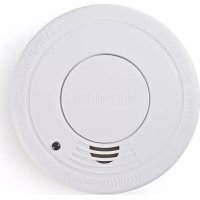
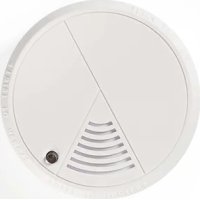
The WIFIDS20WT/WIFIDS20WT3 is a Wi-Fi smoke alarm.
This product is intended for smoke detection in confined spaces.
The product is powered by a CR123A battery (included) and has a low battery warning indicator.
The product is designed for detecting smoke in the air. The smoke alarm cannot prevent a fire.
The product is intended for indoor use only.
Any modification of the product may have consequences for safety, warranty and proper functioning.
This product is intended to be used in household and similar applications such as kitchen areas.
The product must not be mounted in damp rooms, near doors, windows, ventilators or radiators.
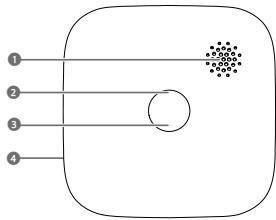
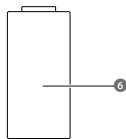
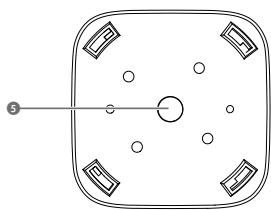
Main parts (image A)
1 Alarm
Test/Silence button
3 Indicator*
4 Battery compartment
*The led indicator can appear dim.
5 Mounting bracket
6 Battery
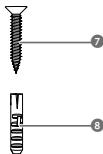
7 Screws (2x)
8 Plugs (2x)
Safety instructions

WARNING
- Ensure you have fully read and understood the instructions in this document before you install or use the product. Keep the packaging and this document for future reference.
Only use the product as described in this document. - Do not use the product if a part is damaged or defective. Replace a damaged or defective product immediately.
- Do not drop the product and avoid bumping.
- Do not expose the product to water, rain, moisture, or high humidity.
Test the product once per week to ensure proper operation. - Do not paint the product.
- Do not use this product in a dusty or smoky ambience.
- Do not use the product for outdoor uses, the product is designed for indoor use.
- Replace the product under conditions of malfunction or end-of-life.
- This product may only be serviced by a qualified technician for maintenance to reduce the risk of electric shock.
- Do not dismantle, open or shred cells or batteries.
- Do not expose cells or batteries to heat or fire. Avoid storage in direct sunlight.
- Do not short-circuit a cell or a battery.
- Do not store cells or batteries haphazardly in a box or drawer where they may short-circuit each other or be short-circuited by other metal objects.
- Do not subject cells or batteries to mechanical shock.
-
In the event of a battery leaking, do not allow the liquid to come in contact with the skin or eyes. If contact has been made, wash the affected area with copious amounts of water and seek medical advice.
Only use the battery type(s) recommended in this document. -
Keep cells and batteries clean and dry.
- Retain the original product literature for future reference.
Battery usage by children should be supervised. - Dispose of the cell or battery properly.
- Seek medical advice immediately if a cell or a battery has been swallowed.
Installing the battery
- Turn the alarm A① counter clockwise to remove it from the bracket A⑤.
- Insert the battery A into the battery compartment A. Make sure that the battery polarity (+/-) matches the polarity markings inside the battery compartment.
- Turn the alarm A1 clockwise to attach it to the bracket A5.
- Test the product.
Constant exposure to high or low humidity may reduce battery life.
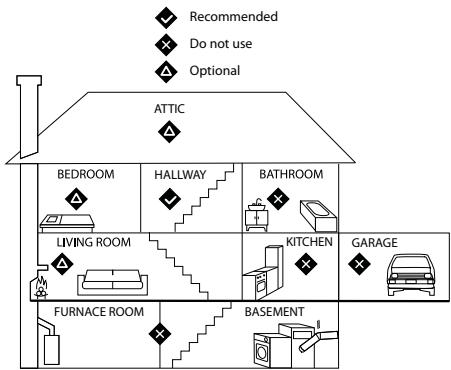
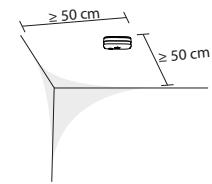
Choosing a location (image B)
For the highest safety, it is recommended to install the product in areas with a source of combustion where smoke can be detected as quickly as possible.
The product should be installed in:
Every sleeping area.
Both ends of a hallway longer than 12m
- Every room where a furnace, a heat source and/or other burning devices are located.
Every room where multiple people spend several consecutive hours.
Install at least one product on each floor of a multi-level home.
In areas with a source of combustion:
- On the ceiling, at least 50 cm away from surrounding walls.
At a central point in the room.
Not in turbulent air (near windows, ceiling fans or air conditioners).
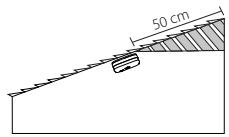
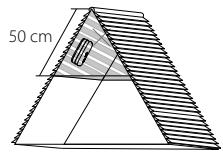
The product can also be installed on a sloped ceiling.
A Do not install in the tip of a sloped ceiling as smoke-free air can collect in these areas, preventing smoke from reaching the product.
In sleeping areas:
Not in turbulent air (near windows, ceiling fans or air conditioners).
Not behind objects (curtains or closets).
Other areas:
Not in turbulent air (near windows, ceiling fans or air conditioners).
Not behind objects (curtains or closets).
For optimal smoke detection install the product at a minimal height of 1.80m
Do not install the product:
in dirty,greasy or dusty areas.
in temperatures below -10^
in temperatures above 55^
in turbulent air (near ceiling fans, air conditioners or open windows).
within 3 meters of a high humidity source.
within 1.5 meters of kitchen appliances.
within 6m of a furnace or fuel burning heat sources.
behind objects like curtains or closets.
within 1m of fluorescent light.
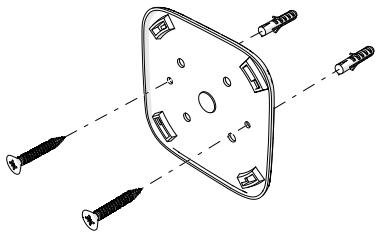
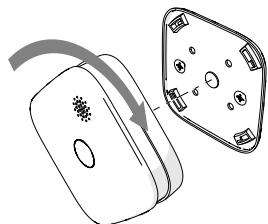
Installing/Mounting the product (image C & D)
- Place the bracket A5 in the desired location.
Follow steps 2. - 6. for stone/concrete surfaces. Continue to step 5. for wood surfaces.
- Use the bracket A5 to mark the drill locations with a pencil.
- Drill two 04mm holes.
- Insert the plugs A into the holes.
- Fasten the bracket A with the screws A7.
1 Do not overtighten the screws, this will deform the bracket.
① Alternatively, attach the mounting bracket to the surface with the adhesive strip.
- Turn the alarm A1 clockwise to attach it to the bracket A5.
Installing the Nedis SmartLife app
- Download the Nedis Smartlife app for Android or iOS on your phone via Google Play or the Apple App Store.
- Open the Nedis Smartlife app on your phone.
- Create an account with your e-mail address and tap Continue.
You will receive a verification code on your e-mail address.
4. Enter the received verification code.
5. Create a password and tap Done.
6. Tap Add Home to create a SmartLife Home.
7. Set your location, choose the rooms you want to connect with and tap Done.
Connecting the app
- Make sure Wi-Fi is enabled on your smartphone.
- Make sure Bluetooth is enabled on your smartphone.
- Open the Nedis Smartlife app on your phone.
- Register or login to your account.
- Tap + in the top right corner.
- Select "Wi-Fi Smoke detector"
- Follow the instructions in the app.
Disconnecting the app
- Open the Nedis Smartlife app on your phone.
- Open "Wi-Fi Smoke detector" by tapping the corresponding tile in the app.
- Tap the pencil icon in the top right corner.
- Tap Remove Device at the bottom and confirm.
Smoke alarm
When the product detects smoke, the alarm beeps and the indicator A ③ flashes red. In case of an alarm:
Identify the source of the smoke.
- Resolve the problem.
Testing the product
The product must be tested to ensure proper operation.
Press the test/silence button A2. The alarm beeps six times and the indicator
A3 flashed red.
Silent mode
In silent mode, the alarm does not sound for 9 minutes.
The silent mode can be activated manually during an alarm.
Press the test/silence button A2 while the alarm sounds to activate silent mode.
After 9 minutes, the product returns to standby mode.
| LED light | Sound alarm | |
| Standby mode | A®blinks red every 40 seconds. | Off |
| Silent mode | A®flashes red. | Off |
| Test | A®flashes red. | 6 long beeps. |
| Low battery condition | A®blinks red once every 40 seconds. | Beeps once every 40 seconds. |
| Malfunction | A®blinks red twice every 40 seconds. | Beeps once every 40 seconds. |
| Smoke alarm | A®flashes red. | Beeps continuously. |
The led indicator can appear dim.
Troubleshooting
| Problem | Possible solution |
| The alarm does not respond when you press the test button. | Make sure the battery is installed properly. |
| Try a different battery. | |
| A3blinks once and the alarm sound once every 40 seconds. | Battery is low. Replace the battery. |
| A3blinks twice and the alarm sound once every 40 seconds. | The product is malfunctioning. Replace it. |
The led indicator can appear dim.
Disposal

The product is designated for separate collection at an appropriate collection point. Do not dispose of the product with household waste.
For more information, contact the retailer or the local authority responsible for the waste management.
Declaration of Conformity
We, Nedis B.V. declare as manufacturer that the product WIFID520WT/ WIFID520WT3 from our brand Nedis*, produced in China, has been tested according to all relevant CE standards and regulations and that all tests have been passed successfully. This includes, but is not limited to the RED 2014/53/ EU regulation.
The complete Declaration of Conformity (and the safety datasheet if applicable) can be found and downloaded via: nedis.com/WIFIDS20WT#support nedis.com/WIFIDS20WT3#support

Kurzanleitung
Rauchmelder
Verbindingmakemetdeapp
Installation of batteriet
- Drej alarmen A ① mod uret for at fjerne den fra beslaget A ⑤.
- Indsabeti wattarat A i beriaterummet A4. Sorg for, at batterieti polaritet (+/-) svarrer tl polaritersmkeringerne inde i beriatermt.
- Drey alarmen A 1 med uret for at fastgore den til beslaget A 5
- Test produit.
Konstant ekspondering for hoj erler lavluftfugtighedkan reducere batteriets levetid.
Installation of Nedis SmartLife-appen
- Download Nedis Smartlife appen tl Android eller iOS pa din Telefon via Google Play eller Apples App Store.
- Abn Nedis SmartLife app'en pa din Telefon.
- Opret en konto med din e-mailadresse og tryk Continue.


- Smoke alarm
- Intended use
- Main parts (image A)
- Safety instructions
- WARNING
- Installing the battery
- Choosing a location (image B)
- Installing/Mounting the product (image C & D)
- Installing the Nedis SmartLife app
- Connecting the app
- Disconnecting the app
- Testing the product
- Silent mode
- Troubleshooting
- Disposal
- Declaration of Conformity
- Kurzanleitung
- Rauchmelder
- Verbindingmakemetdeapp
- Installation of batteriet
- Installation of Nedis SmartLife-appen
Brand : NEDIS
Model : WIFIDS20WT / WIFIDS20WT3
Category : Smoke detector