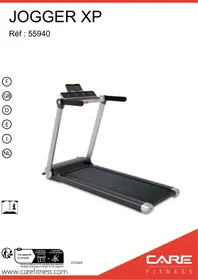
USER MANUAL CARE - JOG XP CARE FITNESS
Important: Read these instructions before using the equipment!
Safety
- Read this user manual and keep it in a safe place. Use this product exclusively in the manner indicated.
- This equipment must be assembled and used by adults.
- The equipment complies with the EN-957 standard, classification HC for use in the home. It must not be used in a sports center or any other public, associative or rented space.
- For totally safe use, a stable, level surface is required. Protect your floor covering with a mat. Do not use the equipment in damp areas (swimming pool, sauna, etc.).
- Do not allow children to play with this equipment. CARE declines all responsibility for any injuries they may incur. Do not allow children close to this equipment when you are training.
- CARE declines all responsibility if technical modifications are made to any of its products by the user.
- Maximum weight of user: 120 kg.
- Dimensions : 151 x 70 x 111 cm (1.06m²)
- The sound emission without user is 72db. The sound emission during exercise is greater than the sound emission without user.
Before you start training, it is essential that you consult your doctor to determine the intensity level of the program you use.
WARNING ! Heart rate monitoring systems may be inaccurate. THE overtraining can lead to serious injury or death. If you feel unwell, stop training immediately.
CAUTION: Heart rate monitoring systems may be faulty, the excessive exercise can cause serious injury or death. If you feel unwell, stop exercising immediately.
- Excessive or badly programmed training can damage your health.
- Keep your back straight when exercising.
- It is strongly recommended that your wear suitable clothing and footwear.
- For adjustable parts, bear the maximum positions in mind.
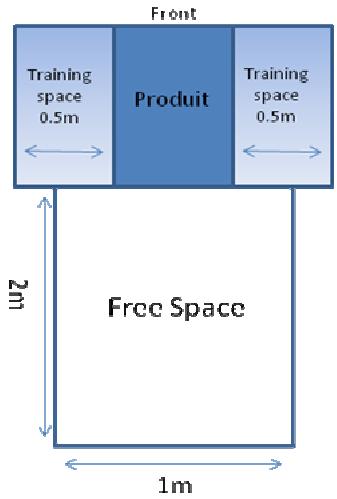
Make sure the installation base is level and stable. Make sure there is at least 2m^*1m of free space at the rear of the machine (see image below - the rectangle indicates the dimensions of the free area) and at least 0.5m of free space on each side of the machine (see image below)
Maintenance
- Regularly check that elements fastened with nuts and bolts are correctly tightened.
- To maintain the level of safety, the equipment must be regularly checked. It is vital that any faulty parts are replaced and that it is not used until completely repaired. Remember regularly to grease moving parts.
- As sweat is very corrosive, do not allow it to come into contact with the enameled or chromed parts of the equipment, particularly the computer. Immediately wipe the equipment after training. The enameled parts can be cleaned using a damp sponge. All aggressive or corrosive products should be avoided.
Guarantee: the chassis is guaranteed for 5 years. Moving parts are guaranteed for 2 years. The guarantee applies to normal use by a private individual in his home. Validate your product warranty on line www.carefitness.com
Recycling : The « crossed out dustbin » sign means that this product and its batteries cannot be thrown out whit domestic waste. They should be treated apart. When you have finished with them, drop them at an authorised collection point so they can be recycled. This gesture will go towards protecting the environment and your health.
Take the mat out of the packaging box. The mat is designed with double rollers which are convenient to move, has the function of folding without installation, and can be placed horizontally or upright for easy storage. When standing, please place it against the wall. There is a risk of falling after standing. Please keep children away to avoid unnecessary injury. The operation is as follows:
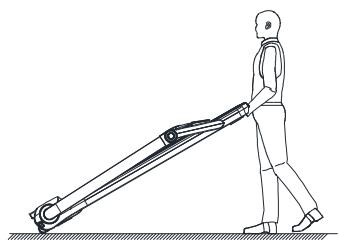
The user stands at the back of the treadmill, grasps the crossbar on the back of the treadmill with 2 hands, raises it 35^ , pushes the treadmill to a suitable location and lays it flat. A safety zone of at least 2000 ~mm × 1000 ~mm should be reserved behind the mat to avoid accidents when using the mat.
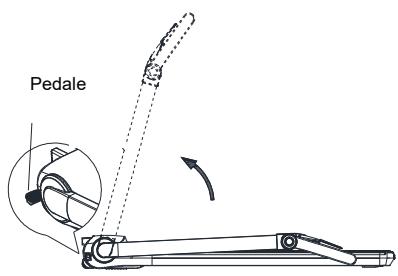
Folding the vertical post of the mat: the user stands on the left side of the mat, holds the vertical post with the right hand and lifts it slightly, presses with his left foot on the pedal located at the front of the mat, slowly. lifts the vertical post while leaving the pedal with your left foot and makes a "click" sound as the vertical post rotates in place, indicating that it is locked in place. Check and make sure it is locked before releasing it. When folding, hold the upright with your right hand, step on the pedal on the front of the mat with your left foot, slowly lower the upright and leave the pedal with your left foot. As the post rotates in place, it will make a "click" sound, indicating that it is locked in place. Note: Do not press the pedal without holding the vertical post to avoid impact. When the mat is folded, pay attention to rotating parts to avoid pinching injuries.
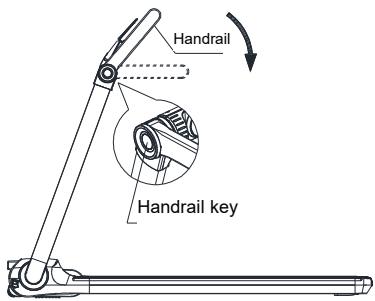
Folding the mat: While slightly lifting the mat, press the button on the side, at this time, the hand can rotate, and after rotating to a certain angle, the button can be released, and after rotating in place, it will make a "click" sound, indicating that it is locked in place.
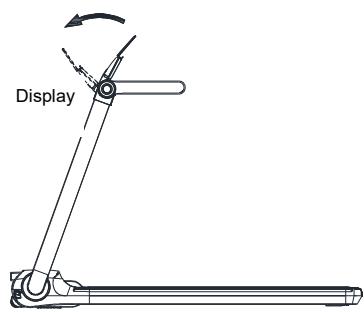
Folding the computer from the mat: Hold the computer with both hands, push the computer forward with slight force and rotate it.
Benutzerhandbuch
https://www.carefitness.com/sav
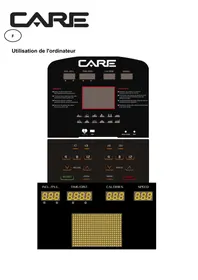
Computer instruction
Electronic watch display and function operation

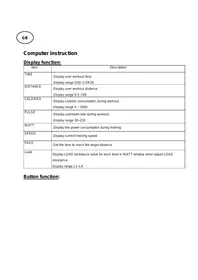
1 Display function:
1.1 The window:
Display the value from 0 to 999 when counting down, and clear it after to continue working; When counting down, it counts from the set value to 0. When counting down to 0, the treadmill will slowly slow down and stop working, and "End" will be displayed. After it completely shuts down, it will enter sleep state 5 seconds later.
1.2 "Time" window:
Depending on the duration of the exercise, the manual mode counts forward from 0:00 to 99:59, and when it counts up to 99:59, the treadmill slows down and stops smoothly, and the speed window displays "End" and enters the sleep state after 5 seconds of complete shutdown; The forward timing of distance and calories mode is 0:00 to 99:59, and it is allowed to continue running after 99:59; The countdown will decrease by the set time to zero. When the countdown reaches 0:00, the treadmill will slowly slow down and stop running, and "End" will be displayed. After it completely shuts down, it will enter sleep state 5 seconds later.
1.3 The "Distance" window:
Depending on the moving distance, the count is from 0.00 to 99.99, and after overflow, it is allowed to continue working; the count decreases by the value set to zero. When the countdown reaches zero, the treadmill gradually slows down and stops running, and "End" is displayed. After completely shutting down, it goes into standby state for 5 seconds.
"P01~P12, U01~U03, FAT" is displayed in the setting state.
1.4The Pulse/Speed window:
"Speed" is displayed by default, and the speed display range is 1.0 to 14.0km / h .
When the user holds the heart rate detection handrail with both hands, the system can automatically detect the user's heart rate and switch from "Speed" to "Pulse" to display the user's heart rate. The heart rate value display range is 50-200 beats/min. (This data is for reference only and cannot be regarded as medical data.)

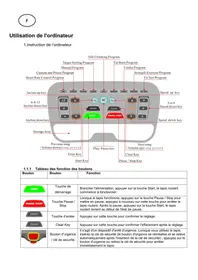
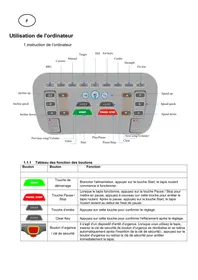
2 Function and operation of the keys:
2.1 "Program" is the program key: in standby state, press this key in turn to cyclically select the built-in fixed programs "P01~P12, U01~U03, FAT".
2.2 "Km/h" is the speed shortcut: when the treadmill is running, the speed can be adjusted quickly.
2.3 "Start" is the start key: when the device is turned on and the safety lock is engaged, press this key to start the operation of the treadmill.
2.4 "Stop" is the stop button: during exercise, pressing this button can stop the operation of the treadmill and reset it to zero.
2.5 "Speed-" is the deceleration key: in standby state, it is used to adjust the set value. It is used to adjust the speed after starting, and its adjustment amplitude is 0.1 each time, and it will automatically decrease continuously when pressed for more than 0.5 seconds.
2.6 "Speed+" is the accelerator key: in standby state, it is used to adjust the set value. It is used to adjust the speed after starting, and its adjustment amplitude is 0.1 each time, and it will automatically and continuously increase when pressed continuously for more than 0.5 seconds.
2.7 "Mode" is the mode key: press this key to switch "time countdown mode, distance countdown mode and calorie countdown mode" in turn. "30:00" is the time countdown mode, "1.00" is the distance countdown mode, and "50" is the calorie countdown mode. When selecting different modes, you can use the "Speed+ and "Speed-" keys to set the relevant countdown values. After setting, press the "Start" button to start the treadmill.
3 Quick start (manual mode):
Turn on the power switch of the mat and pull the safety lock correctly to the position of the mat safety lock. Press the "Start" key, the system will enter the 3-second countdown, the mat will make a quick sound, and the time window will display the countdown of 3, 2 and 1. After the countdown, the treadmill will start running at the speed of 1km/h . After starting, the user can adjust the speed of the treadmill using the "Speed+" and "Speed-" keys as needed.
4 Operation in motion:
4.1 Pressing the "Speed-" button will slow down the operating speed of the belt.
4.2 Pressing the "Speed+" button will increase the operating speed of the belt.
4.3 Pressing the "Stop" button will slow down the runner to stop running.
4.4 When the user holds the heartbeat handle with both hands, the mat reads the displayed heartbeat data for about 3 seconds. (Heart rate data can only be used as a reference for exercise, not as medical data.)
5 Manual mode:
5.1 In standby state, press the "Start" key and the treadmill starts to run at a speed of 1.0 km/h ; other windows start counting from 0 and press "Speed+" and "Speed-" keys to change the speed.
5.2 In standby state, press "Mode" key to enter countdown mode, the "time" window displays "30:00" and flashes, and press "Speed+" and "Speed-" keys to adjust exercise time, with the setting range from 5:00 to 99:00.
5.3 In countdown mode, press the "Mode" key to enter the Distance countdown mode, and the "Distance" window displays "1.00" and flashes. Press the "Speed+?" and "Speed-" keys to adjust the movement distance, and the distance adjustment range is 0.50-99.9.
5.4 In distance countdown mode, press the "Mode" key to enter the calorie countdown mode, and the "Calorie" window displays "50.0" and flashes. Press the "Speed+” and "Speed-” buttons to set the calories. The calorie setting range is from 10.0 to 999.0.
5.5 Press the start button after selecting one of the three countdown modes. The treadmill starts working after a 3 second countdown. Press the "Speed+ and "Speed- buttons to adjust the speed. Press the "Stop" button and the treadmill stops working.
6 Integrated fixed program:
Press "Program" key to select any built-in program from P01 to P12. The window displays program numbers P01 ~ P12; The "Time" window displays the default exercise time and flashes. Press the "Speed+" and "Speed-" buttons to set the required exercise time. (The built-in program is divided into 16 segments, and the running time of each segment is divided by 16.)
Press the "Start" key and once the system enters the "3, 2, 1" countdown, it starts running according to the speed of the first segment of the built-in fixed program. When the previous segment finishes executing, it automatically executes the next segment and the speed is automatically adjusted to the value of that segment at the same time. While running, you can press the "Speed+” and "Speed-” buttons to adjust the speed. However, it will automatically adjust to the program's defaults when entering the next paragraph. Once all segments are completed, the program ends and the treadmill slowly slows to a stop. During exercise, the user can press the "stop" button at any time or disconnect the "safety lock" to stop the operation of the mat.
Integrated fixed program table:
| Period of time Select a segment | Execution time of each segment = set time divided by 16 | |
| 1 | 2 | 3 | 4 | 5 | 6 | 7 | 8 | 9 | ten | 11 | 12 | 13 | 14 | 15 | 16 |
| P01-Lose weight | SPEED | 3 | 6 | 7 | 8 | 9 | ten | 9 | 8 | 8 | 9 | ten | 9 | 8 | 7 | 6 | 3 |
| P02-Burn fat | SPEED | 5 | 7 | 9 | 9 | 11 | 8 | 8 | ten | ten | 8 | ten | 8 | 6 | 5 | 4 | 3 |
| P03-Mountain | SPEED | 3 | 4 | 6 | 5 | 3 | 5 | 6 | 4 | 5 | 6 | 7 | 6 | 8 | 6 | 5 | 3 |
| P04-Running route | SPEED | 3 | 6 | 7 | 7 | 8 | 9 | 9 | ten | ten | ten | 9 | 9 | 8 | 6 | 4 | 3 |
| P05-Race | SPEED | 3 | 5 | 6 | 8 | 12 | 8 | 6 | 5 | 6 | 8 | 12 | 8 | 6 | 8 | 6 | 3 |
| P06-Slow walk | SPEED | 3 | 4 | 5 | 5 | 6 | 5 | 5 | 4 | 5 | 5 | 6 | 5 | 5 | 4 | 5 | 3 |
| P07-Quick walk | SPEED | 3 | 5 | 6 | 7 | 7 | 6 | 6 | 7 | 7 | 6 | 6 | 7 | 7 | 6 | 5 | 3 |
| P08-Random | SPEED | 5 | ten | 6 | 11 | 7 | 11 | 8 | 11 | 9 | 6 | ten | 7 | 11 | 9 | 6 | 3 |
| P09-Jog | SPEED | 5 | 7 | 8 | 9 | 9 | 9 | 8 | 8 | 9 | 9 | 9 | 8 | 9 | 8 | 6 | 5 |
| P10-Sprint | SPEED | 2 | 6 | 7 | 8 | 9 | ten | ten | 11 | 11 | 11 | ten | 9 | 8 | 6 | 4 | 2 |
| P11-Progressive | SPEED | 3 | 4 | 5 | 6 | 7 | 7 | 5 | 6 | 7 | 7 | 5 | 7 | 6 | 5 | 4 | 3 |
| P12-Learner | SPEED | 3 | 5 | 6 | 5 | 5 | 6 | 5 | 5 | 6 | 5 | 5 | 5 | 5 | 4 | 3 | 3 |
7 User defined program:
In addition to the 12 built-in programs, the mat also has 3 user-defined programs: U01, U02 and U03, which allow users to set their own programs according to their personal situation.
7.1 Settings for user-defined programs:
Press "Program" key in turn in standby state, and the window displays "U01~U03" as user-defined programs. Press the "Mode" key to enter the parameter, the "Time" window displays "S-01~S-16" and the "Speed" window displays the relevant data of the corresponding period. Then you can define each period. When setting, use "Speed+", "Speed-" keys or speed shortcuts "4Km/h" and "8Km/h" to adjust the speed, press "Mode" key to finish setting this period and enter the setting. The status of the next time period until all 16 time periods are defined. After setting, the data will be saved permanently until you reset it next time, and this data will not be lost due to power failure.
7.2 Activation of the user-defined program:
has. Continuously press the "Program" key in standby state until the user-defined program (U01~U03) you want to run is set, then press the Start key to start.
b. Press the "Start" key after the user-defined program and running time are set, and it can be started immediately.
7.3 User Defined Program Setup Instructions:
Each program divides the exercise duration into 16 periods. When setting, the speed and running time of the 16 periods should be set before pressing the "Start" button to start the treadmill.
8 Fitness test:
In standby state, successively press the "Program" key and the "Time" window displays "FAT" to enter the body mass index (FAT) detection function, and press the "Mode" key to enter F-1, F-2, F-3, F-4 and F-5 (F-1 is gender, F-2 refers to age, F-3 is height, F-4 is weight and F-5 to body mass index). Press "Speed+" and "Speed-" keys to set the parameters from F-1 ~ F-4 (see the following table for parameters). After setting, press the "Mode" key to enter the F-5 fitness test interface, then hold the heart rate chart 5 with both hands. Body mass index (FAT) is a measure of the relationship between a person's height and weight, not body proportion. FAT is suitable for all men and women and provides people with a basis for adjusting their weight as well as other health indicators. The ideal FAT should be between 20 and 24. If it is less than 19, it means too skinny, if it is between 25 and 29, it means overweight, and if it exceeds 30, it is considered to be obese. (This data is for reference only and cannot be regarded as medical data.)
| F-1 | Gender | 01 male | 02 female |
| F-2 | Age | 10 ~ 99 |
| F-3 | Height | 100 ~ 200 |
| F-4 | Weight | 20 ~ 150 |
| F-5 | Body mass index | ≤19 | Too thin |
| Body mass index | =(20 ~ 24) | Ideal |
| Body mass index | =(25 ~ 29) | Overweight |
| Body mass index | ≥30 | Obesity |
9 Display range for each value:
| Setting parameters | Initial | Set initial value | Set range | Indication range |
| Time (minutes: seconds) | 0:00 | 30:00 | 5:00 p.m.-99:00 p.m. | 0:00-99:59 |
| Speed (KM/H) | 1.0 | 1.0 | 1.0-14 | 1.0-14.0 |
| Distance (km) | 0.00 | 1h00 | 0.50-99.90 | 0.00-99.99 |
| Heart rate (beats/minute) | - | - | - | 50-200 |
| Calories (kcal) | 0 | 50 | 10-999 | 0-999 |
10 Safety lock function:
In any condition, the operation of the belt can be emergency stopped by removing the safety lock. The treadmill stops urgently, all windows display "---" and the treadmill emits 3 "Bi" alarms; at this time, the belt cannot perform any operation other than stopping. Once the safety lock is correctly installed, the mat will enter a sleep state again, waiting for the input instruction.
11 Energy saving function:
The mat has an energy saving function. In sleep state, if no instructions are entered within 10 minutes, the screen will automatically turn off, the mat system will enter power saving mode, and the mat can be woken up again by pressing n any key.
12 Close:
At any time, the mat can be turned off by turning off the power switch, which will not damage the mat.
13 Matters Requiring Attention:
13.1 Check if the mat is loaded before exercising; Check if the security lock is valid.
13.2 If an abnormal situation occurs during exercise, the safety lock can be removed and the running possibility will quickly slow down to a stop; then place the security lock, reset the equipment and wait for the entry command.
13.3 If there is a problem with this mat, please contact the retailer. Non-professionals, do not try to disassemble or repair it to avoid damage to the equipment.
Use and safety protection of the mat
1 Debugging the mat
1.1 After installation, place the safety lock in the corresponding position of the electronic watch.
1.2 Before electrification, check whether the ground wire of the power supply is well grounded, pull the treadmill by hand, and check whether it rotates flexibly without any noise.
1.3 Plug in the power plug, turn on the power switch, and all windows of the electronic watch will display the initial value and the belt will not move.
1.4 Press the "Start" key, and the treadmill starts to run at a low speed of 1.0 ~km / h , and observe whether the treadmill and the electronic watch work normally.
1.5 Press the acceleration key and deceleration key to observe whether the setting is normal.
1.6 Press the "Stop" button or remove the safety lock and the treadmill will stop working. Turn off the power switch and unplug the power plug.
2 Manual
The mat can be used after installation
2.1 Plug the power plug into the 220V power outlet, and the power outlet should have a good ground wire.
2.2 Put on the safety lock and press the "Start" key, and the treadmill will move slowly at a speed of about 1.0km/h and the speed of the treadmill will be displayed on the meter.
2.3 If you increase the speed of the treadmill, you can press the throttle button and the buzzer will "beep" to indicate an upgrade, with a maximum speed of 14km/h .
2.4 If you do not have time to slow down when running at high speed, remove the safety lock and stop the treadmill immediately.
2.5 After running, press the stop button on the treadmill and the treadmill will slowly stop.
3 Carpet safety protection
3.1 In case of emergency, as long as the user removes the safety lock, the treadmill will be powered off and stopped. Therefore, when exercising, you should tighten the safety lock clip to the appropriate position on your clothes to ensure the safety of the user.
3.2 When the treadmill belt slips or the running belt is stuck, the motor will stop after about 3 seconds.
Maintenance and Malfunction Treatment
1) The surface of the treadmill should be kept clean, remove the power cord before cleaning. You can clean the tread and surface of the treadmill with a soft, damp cloth.
2) The treadmill is factory set, it may not work properly after transport or use. Stop the treadmill before adjusting, pull the treadmill to the centre and adjust the left and right rear roller bolts with a hex key (see figure). It is recommended to adjust one half turn at a time. Then turn the switch and check if the mat is 10 turns off when the speed is about 4 to 5km/h .
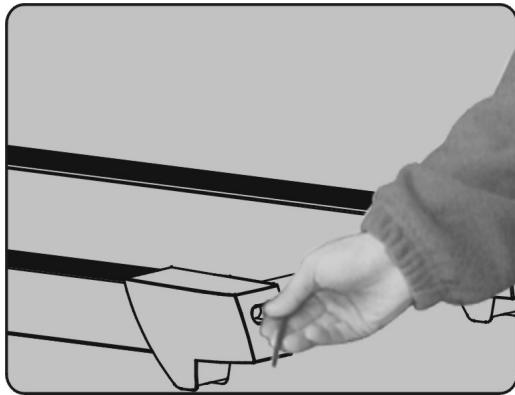
Warning: To prevent electrical shock, make sure the treadmill is turned off and unplugged before cleaning or performing routine maintenance.
LUBRICATING THE TREADMILL AND DECK
To extend the life of this treadmill, the treadmill requires regular lubrication, which is general maintenance for the machine. The routine maintenance procedure will prevent premature wear of the treadmill and motor system. The recommended lubrication schedule is as follows:
LUBRICATION USE
1-6 km/h Every 6 months
6-12 km/h Every 3 months
12- 16 km/h Every 2 months
This schedule corresponds to the recommended application for an individual user, up to 20-30 minutes at a time, 3-4 times a week.
CLEANING
Perspiration should be wiped off the console and treadmill surface after your workout. You should wipe your treadmill once a week with a soft, damp cloth. Do not over-moisten the display panel as this may cause electrical and electronic problems.
STORAGE
Store your treadmill in a clean, dry place. Make sure it is turned off and the plug is unplugged.
MOVING
This treadmill has been designed and equipped with wheels for easy movement. Before moving it, make sure it is turned off and the plug is unplugged.
FOR HOME USE ONLY!
This treadmill is designed for home use only. Do not use in an institution or for commercial purposes.
It is important to take care of your treadmill (especially the running surface underneath the treadmill). Proper silicone lubrication will also improve the performance of your treadmill.
WARNING: Turn off the treadmill and remove the safety key before lubricating the running surface.
HOW TO APPLY SILICONE TO THE TREADMILL
A/ Find the bottle of silicone. It is located in the DIY kit included with this treadmill.
B/ Find a straw and place it on the silicone bottle as shown in the drawing.
C/ Apply the silicone evenly as shown in the drawing (CAUTION: the treadmill MUST BE STOPPED before applying the lubricant to avoid injury, otherwise the edge of the treadmill could cut you or your fingers could be crushed by the rollers).
Do not apply too much silicone to the mat. Too much lubricant can cause the mat to slip on the rollers.
To order spare parts
To guarantee an efficient service, make sure you have the following items before you contact our After Sales Service:
The name or reference of the product.
The manufacturing number shown on the main chassis and on the packing box.
The number of the missing or faulty part shown on the exploded view of the product described in this manual.
After Sales Service
Email: service-uk@carefitness.com
E mail: service-de@carefitness.com
E mail : service-it@carefitness.com
E-mail: service-nl@carefitness.com
CARE
FITNESS