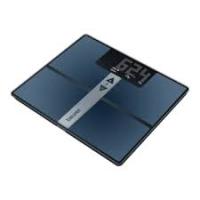
BF980 - Bathroom scale BEURER - Free user manual and instructions
Find the device manual for free BF980 BEURER in PDF.



| Brand | Beurer |
| Model | BF980 |
| Product type | Connected impedance scale |
| Dimensions (L x W x H) | 350 x 300 x 26 mm |
| Net weight | 2,220 g |
| Maximum capacity | 180 kg / 396 lb / 28 st |
| Accuracy | max ± (0.5% + 0.1 kg) |
| Power supply | Lithium-polymer battery 3.7 V / 1,500 mAh, rechargeable via USB-C |
| Battery life | Approximately 6 months (3 measurements/day) or 15 months (1 measurement/day) |
| Connectivity | Bluetooth Low Energy 4.2, WiFi 2.4 GHz (IEEE 802.11 b/g/n) |
| Measurement functions | Weight, BMI, body fat percentage, muscle mass, heart rate |
| User memory | 8 slots, up to 30 measurements per user |
| Display | Digital screen |
| Material | Glass surface with electrodes |
| Care and cleaning | Clean with a soft, slightly damp cloth; do not use abrasive products, do not immerse |
| Safety | Do not use with medical implants, during pregnancy, with wet feet, or on an unstable surface |
| Included accessories | USB-C cable, instruction manual, quick start guide |
| Warranty | According to the provided warranty card |
Frequently Asked Questions - BF980 BEURER
User questions about BF980 BEURER
0 question about this device. Answer the ones you know or ask your own.
Ask a new question about this device
Download the instructions for your Bathroom scale in PDF format for free! Find your manual BF980 - BEURER and take your electronic device back in hand. On this page are published all the documents necessary for the use of your device. BF980 by BEURER.
USER MANUAL BF980 BEURER
https://www.beurer.com/web/we-landingpages/de/cedeclarationofconformity.php
9. GARANTIE
Read these instructions for use carefully. Observe the warnings and safety notes. Keep these instructions for use for future reference. Make the instructions for use accessible to other users. If the device is passed on, provide the instructions for use to the next user as well.
Included in delivery
Check that the device packaging has not been tampered with and make sure that all contents are present. Before use, ensure that there is no visible damage to the device or accessories and that all packaging material has been removed. If you have any doubts, do not use the device and contact your retailer or the specified Customer Services address.
- 1 x the device
- 1 x USB-C charging cable
- 1 x set of these instructions for use
- 1 xquick guide
TABLE OF CONTENTS
- IMPORTANT SAFETY NOTES 14
2.SIGNS AND SYMBOLS. 15 - DEVICE DESCRIPTION 15
4.USAGE 16 - WHAT IF THERE ARE PROBLEMS? 18
- CLEANING AND MAINTENANCE 20
7.DISPOSAL 21 - TECHNICAL DATA 21
- WARRANTY 22
1. !IMPORTANT SAFETY NOTES
WARNING
- Intended use: the device is only intended for weighing humans and for recording your personal fitness data. The device is only intended for private use and not for medical or commercial purposes. The device must only be used for the purpose for which it was designed and in the manner specified in these instructions for use.
- The device may not be used by people with medical implants (e.g. pacemakers), as this may affect their functionality.
- Do not use the device during pregnancy.
- Danger of tipping! Never place the scale on an uneven surface (see Figure ). Never step onto the outer edge of the scale on just one side (see Figure ).
- Danger of slipping! Do not step onto the scale with wet feet (see Figure ). Do not step onto the scale when the surface is wet. Do not step onto the scale wearing socks.
- Please note that measuring tolerances are possible for technical reasons as this scale is not calibrated for use in a professional medical context.
- This scale works on the principle of B.I.A. (bioelectrical impedance analysis). When this measurement of the electrical resistance (impedance) is considered alongside constants and/or individual values (age, height, gender, activity level), the body fat percentage and other variables in the body can be calculated. Please note that the values calculated by the diagnostic bathroom scale only represent an approximation of the actual medical analytical values for the body. Only a specialist doctor can precisely establish the body fat, body water, muscle percentage and bone structure using medical methods (e.g. computer tomography).
- Obtain professional advice from appropriately qualified personnel (e.g. a doctor) when undertaking any treatment or diet to address being overweight or underweight. The health values determined using the scale can assist the qualified personnel in their diagnoses.
- Inaccurate or implausible results may occur when determining body fat in children, performance athletes or people with medical/physical limitations (e.g. oedema symptoms, osteoporosis, people who are taking cardiovascular medication or medication which changes the vascular system, people with major anatomical abnormalities on the legs).
- Inaccurate or implausible results may occur when determining the heart rate if there is insufficient circulation in the legs, excessive venous stasis, vascular constriction or extensive leg oedemas.
- Repairs may only be carried out by Beurer Customer Services or authorised retailers. Never open the scale yourself.
! Safety notes on handling batteries
- Always use the correct charging cable/charger for charging. Avoid continuous charging.
- It may be necessary to charge the battery after prolonged storage. This charging process should be observed.
If your skin or eyes come into contact with fluid from a battery cell, wash the affected areas with water and seek medical assistance.
! Risk of explosion!
- Never throw batteries into a fire.
- Protect batteries from excessive warmth, heat and sunlight.
-
Exposure of batteries to an environment with extremely high temperatures or a low air pressure may result in explosion or leakage of flammable liquids and gases.
-
Do not disassemble, split or crush the batteries. Never subject the battery to mechanical impacts.
2. SIGNS AND SYMBOLS
The following symbols are used on the device, in these instructions for use, on the packaging and on the type plate for the device:
| ! | WARNING Warning indicating a risk of injury or damage to health. | ||
| ! | IMPORTANT Warning indicating possible damage to the device. | ||
| The device may not be used by people with medical implants (e.g. pacemakers), as this may affect their functionality. | |||
| CE | CE labelling This product satisfies the requirements of the applicable European and national directives. | ||
| EAC | The products demonstrably meet the requirements of the Technical Regulations of the EAEU | ||
| Disposal in accordance with the Waste Electrical and Electronic Equipment EC Directive – WEEE | |||
| Manufacturer | PAP | Dispose of packaging in an environmentally friendly manner | |
| i | Observe the instructions for use | UK CA | United Kingdom Conformity Assessed Mark |
3. DEVICE DESCRIPTION
The associated drawings are shown on page 3.
1 Display
2 A button (for selecting a user measurement)
3 button (for calling up stored values after the user is selected)
4Electrodes
SET button
6 Reboot button
7 Charging socket
Measured value
9 Measurement unit
10 Body data
11 Scale connected to Bluetooth®
Measurement data transfer
13 Scale connected to cloud/server
14 Scale connected to WIFI
4. USAGE
4.1 Charging the scale
If "BAT" and "Lo" appear on the display 1 one after the other, you must charge the scale. We recommend that you fully charge the scale before initial use. Connect the scale to a USB power supply using the supplied USB-C cable (see Figure A). The scale cannot be used during charging. As soon as the scale is fully charged, "BAT" and "FuLL" appear on the display 1. Remove the USB-C cable from the scale. The current charge level is shown on the display 1 when the USB-C cable is removed.
4.2 Prerequisites for taking measurements correctly
- Place the scale on a flat and stable surface.
- Wherever possible, weigh yourself at the same time every day (ideally in the morning), after having been to the toilet, on an empty stomach and without clothing.
- To determine your body fat and heart rate/pulse, always stand barefoot on the electrodes 4 on the scale.
- Stand upright and still throughout, from when the weight measurement is being carried out until the heart rate measurement/pulse measurement is complete. Ensure that your weight is evenly distributed.
4.3 Creating scale users in the "beurer HealthManager Pro" app
The "beurer HealthManager Pro" app makes it easier for you to create user data, is required to transfer measured values and to display additional values (body water content, bone mineral mass, BMR/AMR, metabolic age).
The scale has 8 memory spaces for different scale users, enabling you to save the various members of your family, for example. You can use the "beurer HealthManager Pro" app to conveniently set up the individual app users and their corresponding scale user via your smartphone. To do so, proceed as follows:
- Download the free "beurer HealthManager Pro" app from the Apple App Store (iOS) or from Google Play (Android™).
This way to the "beurer HealthManager Pro" app
- Start the app and follow the instructions.
- Select BF 980 in the app and press the SET button
- Select WIFI network (SSID) and enter password (network key) to enable data transfer to scale via WIFI. If successful, the cloud 13 and WIFI 14 icons will appear on the display.
- Set up scale user: if the display 1 shows the scale user (e.g. "U: 1") and "0.0", carry out the initial measurement (for subsequent automatic personal recognition if within +/-3 kg of the last measurement of this scale user).
4.4 Weighing yourself
- Step onto the scale barefoot. Stand still on the electrodes 4 with both legs, making sure to distribute your weight evenly. The scale switches on automatically.
-
Your body weight appears on the display 1. The scale user detected (e.g. "U: 1" for scale user 1) should then appear automatically. If the scale has detected several possible scale users or the last weight is more than 3kg apart, use the button 2 to select the correct scale user and wait 3 seconds.
-
The following values will then appear one after the other.
| BMI | Body mass index (a healthy value is 18.5–25) |
| BF | Body fat percentage (a healthy value is 16–28% for women and 11–23% for men) |
| Muscle percentage (a healthy value is 27–43% for women and 37–57% for men) | |
| HR | Heart rate/pulse in bpm (healthy value: 50 – 100 beats per minute at rest) Please note that the measurement does not correspond to a defined resting pulse, as measurement takes place whilst standing up and not sitting or lying down. For this reason too, the value may differ slightly during a repeat measurement. |
Note: For more details of the values, please see the app or the FAQs at: www.beurer.com
- If a Bluetooth® or WIFI connection has been established and the user measurements have been successfully taken (e.g. for U: 1), the values will be transferred to the "beurer HealthManager Pro" app. This is indicated by the measurement data transfer symbol [12]. If the data cannot be transferred, up to 30 values will be stored per user. As soon as a connection is established, they are transferred with the next measurements.
- After measuring the heart rate, step off the scale. The scale switches itself off automatically.
Note: If the automatic scale user detection function is not working, briefly press the scale with your foot, press the button 2 repeatedly until your scale user is displayed, and wait 3 seconds. Then take the diagnostic measurement.
Note: To display your most recent diagnostic measurement, briefly press the scale with your foot, press the button repeatedly until your scale user is displayed, and wait 3 seconds. Then press the button to display the most recent diagnostic measurement. To display further measurements, press the button again. Up to 30 measurements can be shown on the display 1.
Note: If the measurement is carried out with shoes or socks on, then only the weight is displayed (when the scale user is recognised, the weight and BMI are displayed and saved).
4.5 ALTERNATIVE METHOD: creating scale users without the app
Alternatively, you can also create a scale user directly on the scale without using the app. This process is not required if the scale has already been connected to the app.
- Press and hold the SET button 5 for 4 seconds. "unit" appears on the display.
- Press the SET button ⑤ repeatedly until "on" appears on the display 1.
- Use the button 2 to select the scale user you need (you can select from U: 1 to 8). Confirm your selection with the SET button 5 .
- "170" flashes on the display. Use the 4 button 2 to set the height. Confirm with the SET button 5.
- "30" flashes on the display. Use the button 2 to set the age. Confirm with the SET button 5 .
- 串 flashes on the display. Use the A V V button 23 to set the gender. Confirm with the SET button 5.
- "Act3" flashes on the display. Use the button 2 to set your activity level based on how much you exercise (considered over the long term). (Act1 = none, Act2 = low, Act3 = medium, Act4 = high, Act5 = very high/athletic). Confirm with the SET button 5.
- "End" appears in the display. Confirm with the SET button [5]. The scale user has been created successfully.
- "0.0" and the user symbol appear on the display. Take the initial measurement.
4.6 Deleting scale users
You can delete individual scale users in the "beurer HealthManager Pro" app.
Alternatively, you can also delete scale users directly on the scale. To do so, proceed as follows:
- Press and hold the SET button 5 for 4 seconds. "unit" flashes on the display.
- Press the SET button 5 twice until "USER" flashes on the display.
- Use the button 2 to select the scale user to be deleted. Confirm your selection with the SET button.
- Press the SET button 5 repeatedly until "End" appears. Then press the button 2 within 5 seconds.
- "dEL" appears on the display. Confirm with the SET button 5. The scale user has now been deleted.
4.7 Changing the weight unit
You can change the weight unit either using the "beurer HealthManager Pro" app or directly on the scale:
- Press and hold the SET button 5 for 4 seconds. "unit" appears on the display 1 .
- Use the 4 button 2 or button 3 to select the desired weight unit (kg, lb or stlb). kg = kilograms, lb = pounds, stlb = stones
- To confirm, press the SET button ⑤ repeatedly until the display ① switches off.
4.8 Deactivating Bluetooth® and WIFI
To deactivate Bluetooth® and WIFI, proceed as follows:
- Press and hold the SET button 5 for 4 seconds.
- Press the SET button ⑤ repeatedly until "on" appears on the display 1.
- Select "oFF" with the button 2 or the button 3 .
- To confirm, press the SET button ⑤ repeatedly until the display ① switches off.
Note: Please note that the Bluetooth® and WIFI function is then NO longer possible.
To reactivate it, set it from "oFF" to "on".
5. WHAT IF THERE ARE PROBLEMS?
5.1 Restarting scale
If it is necessary to restart the scale (e.g. scale software freezes), briefly press the reboot button 6. In this case, the power supply is briefly interrupted.
5.2 Resetting the scale to factory settings
To reset the scale to the factory settings, press and hold the SET button 5 and briefly press the reboot button 6. Press and hold the SET button 5 until "rSt" appears on the display.
5.3 Updating scale software
The app will inform you when a new software update is available.
- Briefly press on the scale to switch it on.
- Press and hold the button 3 for 15 seconds. The scale automatically checks for an update and downloads it. This may take a few minutes. If the update is successful, "PASS" will be displayed. If the scale is already up to date with the latest software version "utd" appears.
5.4 Messages and errors
| Display | Cause/remedy |
| Discrepancy in weight | Incorrect zero point (e.g. in the event of a change of location or temperature fluctuation): briefly press on the scale until the current weight is displayed, then remove your foot so that “0.0” flashes. |
| Scale is placed on carpet or uneven ground: the surface must be hard and level. | |
| PAir | Bluetooth® needs to be paired: start/allow pairing/bonding on your smartphone (note any messages in the status bar/notification bar), and confirm the 6-digit pairing code using the SET button 5 on the device and on the smartphone. |
| “USE APP” or flashing | The scale can be connected to the app via Bluetooth®: do not connect it via the Bluetooth® settings on your smartphone, only via the app. |
| UnSt | This weight measurement was unstable: stand still during the measurement. |
| U: -- | The scale was unable to assign the measurement to a scale user: if the automatic scale user detection function is not working, briefly press the scale with your foot, press the \(\bigtriangleup\) button\(\boxed{2}\) repeatedly until your scale user is displayed, and wait 3 seconds. Weigh yourself again. |
| BF-- | The body fat percentage is outside the measurable range (less than 5% or greater than 70%): check the user data or change the activity level. |
| Diagnostic measurement cannot be taken (e.g. measurement attempted while wearing shoes): Repeat the measurement barefoot. Otherwise, only weight values will be displayed and transferred. | |
| HR-- | Heart rate measurement not successful: repeat measurement whilst barefoot and remain standing still from when the weight measurement is being carried out until the heart rate measurement is complete. Do not step off or move too early. |
| oLd | The maximum weight capacity of 180 kg has been exceeded: loads must not exceed 180 kg. |
| BAT / Lo | The scale battery is empty: charge the battery. |
| Err1 | Incorrect password for your selected WIFI network/SSID/router. |
| Err2 | Your router does not have Internet access. The server cannot be reached. |
| Er3... | Software update failed: please try again. |
| Err4 | Booting problems: press the Reboot button\(\boxed{6}\)briefly. |
| USB out | Unplug the USB cable. |
| utd | The software is up to date. |
| no | There is no WIFI connection to the server for the software update. |
5.5 WIFI/Bluetooth® connection problems
| Problem | Cause/remedy |
| No Bluetooth® connectionSymbol 11 is not displayed | Device is outside the Bluetooth® range.The minimum range in the open is approx. 10 m. Walls and ceilings reduce the range. Other radio waves may interfere with the transmission. Therefore, do not position the scale near devices such as microwaves or induction hobs. Ideally, switch off other Bluetooth® devices that are within range. |
| No Bluetooth® connection to the app.1. Press the SET button 5 on the scale so that “USE APP” flashes in the scale display. Then use the “beurer HealthManager Pro” app.2. Switch Bluetooth® on your smartphone off and on again. Ensure that the scale is not being connected via the Bluetooth® settings of the operating system. If necessary, remove it from the device list in the Bluetooth® settings and then use the “beurer HealthManager Pro” app.3. Completely close the app (including in the background). Switch your smartphone off and on again.4. Briefly press the reboot button 6 and then the SET button 5 again and open the app.5. When connecting the scale, check the status bar on the smartphone to start pairing/bonding.Note: A Bluetooth® connection is only required for initial use and changing the scale's settings. The measurements can also be transferred via Bluetooth®, but in the normal standard application the measurement data will be transferred via WIFI (without Bluetooth®). | |
| No connection to server/cloud Symbol 13 is not displayed | Check whether your router has an Internet connection. Check the device settings in the app. |
| No connection to the router Symbol 14 is not displayed | Incorrect password 1. Press the SET button 5 on the scale. Scale displays “USE-APP” 2. Open the app. Open the scale setting in the app. 3. WIFI radio network/network name (SSID) of your Internet router and password (WIFI network key) must match. Re-enter password/network key. Ensure that the pass-word/network key matches the one set on your selected router/WIFI name. Please remember that this is case sensitive. For further information, see technical data under “Connectivity”. |
| Incorrect router settings The device connects to 2.4 GHz. The device cannot connect to 5 GHz or 6 GHz. Check the router settings to see if 2.4 GHz is supported (mixed 2.4 GHz / 5 GHz operation is possible in principle). Do not use a mobile WIFI hotspot as it may not be permanently available. Avoid guest networks. | |
| Measurements are not sent Symbol 12 is not displayed | No WIFI/Bluetooth®connection: Bluetooth®symbol 11 or WIFI and cloud symbols 14+13 must be displayed after a measurement. If necessary, reduce the distance between the scale and the WIFI router. Check and test the device settings of the WIFI network in the “beurer HealthManager Pro” app. Check whether Bluetooth®and WIFI have been deactivated on the scale. |
| No measurement for the scale user: The user memory (e.g. U: 1) which appears on the scale display during a measurement must be assigned to the scale in your app settings. Only these measurements can be transferred. Therefore, when taking a measurement, check your user on the scale and in your app settings. If the automatic scale user detection function is not working, briefly press the scale with your foot, press the 4 button 2 repeatedly until your scale user is displayed, and wait 3 seconds. Then take the diagnostic measurement. At the end of the measurement, the symbol 12 should appear on the scale display. The measurement is then transferred via Bluetooth®or WIFI. If this is not the case, check the device settings in the app. |
6. CLEANING AND MAINTENANCE
Clean the surface of the scale from time to time using a slightly damp cloth. Do not use the scale again until the surface is completely dry.
IMPORTANT
- Do not use any abrasive cleaning products.
- Never submerge the scale in water. Never rinse the scale under running water.
- Do not place any objects on the scale when it is not in use.
- Protect the scale from knocks, moisture, dust, chemicals, drastic changes in temperature and nearby sources of heat (ovens, heaters).
7. DISPOSAL
For environmental reasons, do not dispose of the device in household waste at the end of its service life. Dispose of the device at a suitable local collection or recycling point in your country. Observe the local regulations for material disposal. Dispose of the device in accordance with EC Directive - WEEE (Waste Electrical and Electronic Equipment).
If you have any questions, please contact the local authorities responsible for waste disposal. You can obtain the location of collection points for old devices from the local or municipal authorities, local waste disposal companies or your retailer, for example.
8. TECHNICAL DATA
| Model: | BF 980 |
| Dimensions: | 350 x 300 x 26 mm |
| Weight: | 2200 g |
| Measurement range: | 180 kg / 396 lb / 28 st |
| Scale interval d: | kg: 0.1 kg / lb: 0.2 lb / st: between 0-19 st = 0.2 lb; between 20-28 st = 1 lb / 0.1% / 1 bpm |
| Repetition accuracy: | max. +/- 0.4 kg |
| Absolute precision: | max. +/- (0.5% + 0.1 kg). e.g. for 80 kg: max. +/- 0.5 kg |
| Battery: | Li-ion polymer 3.7 V / 1500 mAh |
| Battery charging: | USB-C cable to standard USB-A socket with 5 V, min. 1 A Charging time: approx. 3 hours |
| Battery life: | Approx. 6 months with 3 measurements/day or approx. 15 months with 1 measurement/day |
| Connectivity: | Setup can be performed and settings can be made via Bluetooth® low energy technology. Data transfer preferably via WIFI or alternatively via Bluetooth® low energy technology. WIFI system requirement: IEEE 802.11 b/g/n (2.4 GHz) Encryption system requirement: WPA-PSK, WPA2-PSK, WPA3-PSK WIFI frequency band: 2412 - 2472 MHz, transmission power max. 15.03 dBm. Bluetooth® frequency band: 2402 - 2480 MHz, transmission power max. 8.52 dBm. |
| List of compatible devices: | A list of compatible smartphones, information on software and details on the devices can be found at the following link: connect.beurer.com Supported devices |
| System requirements for “beurer HealthManager Pro” app * | iOS ≥ 12.0 Android™ ≥ 8.0 Bluetooth® ≥ 4.2 |
| The scale can only be used to its full extent with the “beurer HealthManager Pro” app and an “online account”. |
Subject to technical changes.
*This product satisfies the requirements of the applicable European directives.
The CE mark has been applied in accordance with the following European directives:
Directive 2014/53/EU (Radio Equipment Directive - RED)
The Declaration of Conformity for this product can be found at the following address:
https://www.beurer.com/web/we-landingpages/de/cedclarationofconformity.php
9. WARRANTY
Further information on the warranty and warranty conditions can be found in the warranty leaflet supplied.

Directive 2014/53/UE (Radio Equipment Directive - RED)
https://www.beurer.com/web/we-landingpages/de/cdeclarationofconformity.php
9. GARANTIE
https://www.beurer.com/web/we-landingpages/de/cdeclarationofconformity.php
9. GARANTÍA
https://www.beurer.com/web/we-landingpages/de/cdeclarationofconformity.php
9. GARANZIA
kg = Kilogram, lb = Pound, Stlb = Stone
- Onaylamak icin ekran 1 kapanincaya kadar SET 5 tusuna arda basin.
4.8 Bluetooth® ve WIFI'nin devreDMI birakilmasi
https://www.beurer.com/web/we-landingpages/de/cedclarationofconformity.php
9. GARANTI
- 1 pπu6op
1 3apnHbI Ka6eb USB-C
1 INHCTpykLna NO pImMeHeHHO
1KpaTkoe pyKOBoDCTBO
COIDEPXKAHNE
- BAXKbIe YKA3AHnI NO TEXHnke B3OpACHOCTn..... 60
2.ПОСHEняКСИМВОЛAM 61 - ONICAHNE PUNIBOPA 61
4.ПРИМЕHEHIE 61 - YTO DEJATb PnB BO3HNIKHOBEHINI PNOBJEM? 64
- OCHNTKA I UXOD 66
- YTNJIIN3ALIY 66
8.TEXHUNECKHEXAPAKTEPNCIKI 66
9.「FAPAHTIN 67
1.!BAxHbIE yKa3AHnI NO TEXHnKE BcOPiAChOCTN
!PPEyPPEXDEHNE
- IcnoIb3OBAHnE NO Ha3HaueHnIO: npI6Op npEJaHa3HaueHn ToIbKO DnI B3BeUINBaHnna IIOeN 3aIncn BaIINx IInHybIX PhHTHeC-NapAmeTPOB. Pnp6Op npEJaHa3HaueH nCKJIOnuTeNbHO DnI YaCTHO rIOIb3OBAHnIA; 3aIpeUaETcR eO IcNoIb3OBAHnE B MediunHcknx N KOMMepeCcknx CJIeX. IcNoIb3yIte npI6Op ToIbKO B Tex ZeJAx, IJr KOToPbIX OH 6bl pa3pa6oTaH, IN ToIbKO Te m CnOCobom, KOTopBn OnPcAnB D daHHo INCHTpKcIIIO pIpImeHeHIO.
3anpeaetc npimehene npnbopa liuamn, nolb3yioumncr medunHckmnmnplahtataamn (Hanpimep, kapdnoctmyjraTopamn). B npotNBom clyuae kaeeCTba pa60tbipnbopa mokeyt yxdunrbc.

He nCIOJIb3yIe Ipiu6Op BO BpeMg 6epemEHocTn.
- OnaChOCTb onpOKnIbIbAHnI! HnKOrJa He yctaHaBnIBaIte BeCbI Ha HEPOBHyIO NobepxHocTb (CM. pnc. B). He BcTaBaIte Ha cAmbl KpaI BEco C oDHO CTOpOHbI (CM. pnc. C).
-Опансовь поckользHTьс! He BCTabaite Ha BeCsI BnaxKbIMn HOrAmN (cM. pnc. C). He BCTabaite Ha BeCsI, ecIn nx NOBepxHOCTB BlaXHa. He BCTabaite Ha BeCsI B HOCKax.
- 06paTnte BHIMaHHe, YTO NO TEXHNueCKNIM PnUINHAM BO3MOXHbI NOrpeuHocTN I3MepeHm, TAK KAc peYb IeT He O KaJIb6PoBaHbIX BeCax IJRA IpOceCCNOHaJIbHOrIO NCIOJIb3OBAHnB M MeINiHcKnx CenJx.
-Даннье Всы pa6oTaIOT no npHunny BIA (6nOIMpeHaCHbI aHJIIN3 coCTaTeJa).ПОсрдТВOMИЗМЕРЕНЯ 3ЛЕКТРИЧЕСКОТО COПOTиBЛЕнЯ (IMMpeHaCA) C yUeTOM NOCTOHRbIX BEJIYNH IN HINIBUYaJIbHbIX3HAueHIn (BO3pACT,poCT,ПON, cTeHbAKTNBHOCTN) MOXH0 ONPeJENITb DOJIIO JxIpOBoM Maccbl N DpyrIne napametpbI opraHIm3Ma.YuHTbIaIte, YTO 3HAueHIn, ONpeJenEHbIe DnaTHOCHTUeCKMn BecAMn, RAJIYOTcRILIb PIP6LHXeHHbIMK PeaJIbHbIM MeiUnHckIM 3HAueHInM, POnyueHbIM B pe3yJIbTaTe aHJIIN3a.ДоJIIOJxIpOBoM Maccbl, TKAHeBOJ KJIDKOCtN, MblIeHuHm MacCbI n CTPOEHNe KOCTe MOpKeT OnpeJENITb TOJIbKO BpaH, IcPONBJ3yMeiUnHckMeToDbl (HaNPUMep, KOMlbIOTEPhYIO TOMOrpaФINO).
-Пилбовдneteилбобм leechenin n3bItochoro nIn HeIOCTaTOHORo BEca Tpe6yeTcKBAINfNUPOBaHHa KOHCyIbTaIgcoSTOpOHb COOTBeTcTBUOJIeRO cneuaJIncTa (HaNPIMep, leyaJIeRO bpa). ПolyeHHbIe NocpeDCTBOM 3tIXBecOB DaHHbIe MOrT pMOHy cNeuaJIncTAm.
- Y DeTey, pRooPeCCNoHaJIbHbIX CnOPTcMeHOB UJIN JIuC O rpaHnueHHbIMN C MeiUcIHCKo/Φm3UeCKo TOUKN 3peHnRA BO3MOXHOCTaMn (HAnpIMep, C CmIMITOMaMn OTeHOCtN, OCTeONOPo3OM, PnIPPiNeME MeiKamEHTOB IJr IJeEHnRA CepDeuHO-CocyInCTbIX UJIN COCyInCTbIX 3a6OJeBaHn, JIuC C CyUeCTBeHHbIMn aHaTOMUeCKIMN OTKIOHEHnMI B Horax) BO3MOXHbI HeTOUhBie UJIN HeIOCTOBepHBie Pe3yIbTaTbI Pn OPpeJeHn JxPOBOM Maccbl TeJa.
B Cnyuae HeIOCTaTOHOro KPOBOTOKA B Horax, Ype3MepHOrO BeHO3HOrO 3aCToR, CyKeHnI COcyDOb IIN O6Uphoro OTeKa HOr npi OnpeJeHnI YacTObI CepDeHbIX COKpaUeHnIB BO3MOXHbI HeToHbI EIN HeIOCTOBepHbI pe3yJbTaTbI.
- Pemonthble paobtI dOJIxHbI pOnu3BouNTbc TToIbKO cepBnCHo CnyXbO Beurer IJIN abTopu3OBaHHbIMTOptroBbIM npEcdTaBnteJIaM. Kateropunecckn 3anpeuaetc caMOCToTeJIbHO BCKpbITne BECOB.
!Uka3aHnno TeXnKe 6e3OpacHoCTn npn o6paueHn C aKKymyIaTopamN
-Дязардки Всерда Исрлььтугелюну te podхорший зарднь кабел/Зардhoe yctpoiCTBO.ИЗбeraite DnITeBJHON 3apdkn.
- После дintelbHOrO xpaHEnI MOxET nTope6oBaTcR 3apIka aKKyMylrTopa. 3apIka dOnJHa npoxoHtB noi Ha6nIoHeHem.
- Пи пonaадим кдкocт ИЗ AkkymyЯTopа Ha Koxу ИИВ Гла ЗрOMоITE COOTBETCTBYUOун yuactOK 6oIbIIM KOnIYeCTBOM BOdI N OБpaTInTeCb K BpaUy.
! OnachocTb B3pbBa!
- He 6pocaIte aKKyMjIaTOpbl B OroHb.
- 3aunuaiTe aKKymyIaTOpbl OT uezmepHoro Bo3deiCTBnTeNla, XapbI n CoJIHeuHoro CBeTa.
-Bo3deIcTBnHa aKkymyIaTOpbI ype3BbIaHIO BbICOKO TemnepaTypbI IIN Ype3BbIaHIO Hn3KOrO DaBHeHnBa3DyXa MoKeT BbI3BaTb B3pbIB INI yTeHKY JeRKOBCPImaMeHraHOUxxCJNkOCTe N Ra3OB. - He pa3bupaIte, He BCKpbIbaiTe i He pa36bIbaiTe aKKymIaTOpbl. He npdbepraIte aKKymIaTOp MexaHueckm ydapaM.
4.2 Heo6xodmblcye ycnoBnI pyaBnIbHoro n3MepeHn
- ПостаытBEcblHaPoBHyIO TBepyIO NOBepxHOCTb.
- ПО ВЗМохности B3BeшиBaNTecbВ OДно И TO Кж Брмс cytOK (Лучш BCero yTPOM), NOСп.TORO KAK CXODITe B Tyanet; B3BeшиBaTbCS cIeDyET Ha rOlODhbl JxEnyIDOK n 6e3 OeJXdbI.
Ipy onpeJeHnry JxipOBMaccbI Tea n YactOTbI cepdeHbIX COKpaueHn/nylbCa BcERda BCTabaTe Ha 3JIeKTPoBbI 4 BEcoB 6OcIKOM.
CToITe IprMo HnOIOBvNHO,OT N3MepeHnBa BeCa Do N3MepeHnA cactoTbI cepDeuHbIX COKpaueHn/nybca.CJeDITe 3a paBHOMepHbIM paCnpedeJIeHnEM BeCa.
4.3 Co3dahne yueTHoN 3aIncn POnb3OBaTeJI BECOB B npNJIOXeHm «beurer HealthManager Pro»
Пиюженe « beurer HealthManager Pro » obleryaet BBOd dAnHbIX nOJIb3ObaTeN, Tpe6yeTcIЯп repeDAuN 3MpeHbIX 3NaHeN I OTo6paJxENI DOIOHNTEbHbIX 3NaHeN (ДОЛТКaHEBо JxIDKoCTN, MInHepaJIbHaR MaCCa KocTeN, BMR/ AMR,Meta6OJImYeCKn Bo3pact).
BecbO OCHaUeHbI 8 YueKamn NaMaTn DnB BDOA NoJb3OBaTeJe BEcOB (HaNPmEp, DpyrNx UHeOB BaSeI cEmb).C noMoou IpInIOKeHEny « beurer HealthManager Pro » Bb MoXeTe yO6HO HAcTpaINBaTb OTdJIbHbIe yHTHbIe 3aINcN IOnJ3OBaTeJe IIpInIOKeHEny IN COOTBeTCTByIOUme IM yUeTHbIe 3aINcN IOnJ3OBaTeJe BEcOB Ha CBOem CMapTFOHe.ДЯ 3TOrO BbIPOHNITE CLeNyIOUne DeICTBnI.
- 3aŋpy3nte 6ecπlaTHeO npIIOxENHe « beurer HealthManager Pro » B Apple App Store (iOS) nIg Google Play (Android™).
Yka3aHHe: IJn OTO6paXeHnpe3yNbTaTob NOcIeHrO DaIarHOCTUeCKOrIO 3MepeHn HxHMaTe KONKpy 2 do Tex nop, POKa He NpOBtTC So6O3HaueHne HuxHOro NOnb3OBaTeR BecOB, NOcIe Yero NpOJOckDte 3 CekyHbI. 3aTeM HxKMITE KONKY 3, YTO6bbl BbIEcTn Ha 3KpaH pe3yNbTaTbI NOcIeHrO DaIarHOCTUeCKOrIO 3MepeHn. IJra OT6paXeHn
Ipyrnx pe3ynbTaTOB n3MepenH CHOBa HaxMnte KHOKky 3. Ha dinCnlee 1 moKet OTo6paKaTbCra do 30 pe3yNbTaTOB n3MepenH.
Yka3aHne: ecn Bbl bblonHre Te 3mepeHne B o6yBn nn Hockax, Ha nCnIe e OTo6paXaETc TOnbKO 3NaueHne BeCa (PnPacno3HaBaHnn nolb3ObaTeTn BEcOB OTo6paXaOTcN COxpaHrOTcB NAmrTn BEc N INDeKc MaCbI TeNa).
4.5ДРУTOВAPNAHT: co3dahme yueTHOJ 3aIncn noIb3OBaTeJIe BEcOB 6e3 npuIooKeHn
UyETHyIO 3aIINcB NOJIb3OBAteJIe MOXHO CO3dAeH HeNOCpeICTBeHHO Ha BeCax 6e3 NcIIIOb3OBAHnI npInIOxHeHn.
To He notpe6yeTc, ECNI BEcbl yKe pInIB3aHb K pInIOxHeHIO.
- B TeueHne 4 cekynd ydepcknBaTe haxaToi KhoNky SET[5].Ha ducnnee noarBntcra unit.
- Haxmnte KhoNky SET [5]da ba p3a, noka ha daicnlee He 3amiraet naHncsb USEr.
- C NOMOJIbI K HONKI 2 BbI6epNTe HUxHOrO NOJIb3OBaTeJIa BEcoB (IOCTyNtble BapnaHTbI: U: 1-8). IOnTBePdnte BblOp HauKaTIeM K HONKI SET [5].
- Na dinclnee mraet «170». C nomooubno KhoNkn 2 BBeNTe poCT noIb3ObaTeJI. NpDTBepnTe haxaTne M KhoNkn SET5.
- Na nciJIeem mHaerT 30". C nOMOuIb KHOIIK N A√23 HAcTpOJe Bo3pact. NOrTBepnTe HaKaTIeM KHOIIK N SET [5].
- Ha dinpnee mraet C nOMOuH KHOKN 2 3 HAcTpoIe non noJIb3OBaTeJ. IOpTBePdnte HaxKaTne M KOHN SET5.
- Ha dučnlee MɪraeT Act3. C NOMOJIbK ΚHONKI 2 3 yCTaHOBtye yPoBHe b aKTbHOCt n Ocne φιmɪcheckɔn Haryzkn (Дителhoe NaBliJIoHeN). (Act1 = HeT, Act2 = HeIOcTaTOUHa, Act3 = cpeɪnər, Act4 = BbICOKa, Act5 = OeyH bIcOKa/AtIeTIuYeCKa). IoiTBePdTe HαKaTmE N KHONK SET [5].
- Ha nscnIe neoBntcE End. NpTBePnte HaxaTne KhoNk SET [5]. NpIb3ObaTeIb BeCoB CO3dAn.
- Ha dinnnee noarntc 一 0 . 0 ^ c cunboiom nojIb3ObaTeJy. BblnoHInTe naaJIbHOe n3MepeHne.
4.6 YdaJIeHne NOJb3ObaTeJIЯ BeCOB
Bb mojete ydauntb yteTHyo 3aInnc bOnd horo noIb3oBaTeJ BeCob n3 npinloKeHn « beurer HealthManager Pro » Bb taKke mojete ydauntb yteTHyo 3aInnc bNoIb3oBaTeJ BeCob HnocpeDCTBeHHo Ha camom npi6ope. Ila 3toro BblonHnTE cneDuOuue DeiCTBnJ.
- B TeueHne 4 cekyHd ydepKbAte hKaToi KhONky SET[5].Ha dncnnee zamraeT haDnncb unit.
2.Двждынжмte Kногу SET[5],пoka на дисплге He 3amiraet NaHnscb USEr. - C NOMOJIbHKOHNKn 2 Bbl6epNTe NOJb30BaTeJIaBcOB, KOtOpOro Tpe6yETcY ydaJIITb. POnTBePdNtE Bbl6Op HaxaTmEM KHNKn SET[5].
- HaxmajTe KONky SET 5 Heckolbko pa3 do nOaBHeHnHaDnncn End. 3aTeM HxMMTe KHOJKy 2 u ydepxuBaI-Te ee He MeHee 5 cekyHd.
- Na ekpahe noyBtCRA del. NpTBePnte hKaTnEM KhoNk SET [5]. PoiIb3ObaTeJI BecOB ydaJIen.
4.7Переклочеце edHHuZI n3MepenHЯ Beca
Eduhuy 3mepehenbeca moxho nepekloaB B npiloxeHn « beurer HealthManager Pro » nHn HnocpeDCTBeHNO ha cAmOM npi6ope.
- B TeueHne 4 cekynd ydepKmbaIte haxaToi KhoNkSy SET [5].Ha dncnnee 1 noBvntc unit.
- C nOMOuBHO KHOJIOK 2nIIN V3 BbIePITe Heo6xOaMMyEO eINHcY u3MepeHna BeCa (kg, Ib nIIN stlb) (kg = KNIIOrpaMM, lb = ΦyHT, stlb = cToyH).
3.Для постордени нахимite кноку SET5 Heckoьko pa3, noka He BbiklnouTcra nciJIeI.1.
4.8 DeaktnBaucnae Bluetooth® n WIFI
TtO6bI deaktnBupoBaT bLbeotho WIFI, BbInONHnTe cJeDyUOpne DeiCtBna.
- YdepxmbaTe KhoNky SET[5] haxatoB TeceHne 4 cekyHn.
- Haximai Te KhoNky SET [5] do Tex nop, noka ha dinCnnee 1 He noBHTcT on.
3.CIOMOuBIO KHOPIKIN 2 IJIN 3 BbI6epNTe OFF.
4.Дя потбержденин Нхмite SET 5 Heckoьko pa3, noka He BbIKJIOUHTcRdIICnJIe 1
Yka3aHne: yHTnTe, tTO fynKznnu Bluetooth® n WIF Tepeb HEDOCTUHbI!
Дя повторного Вкlioочени Измене паметрOff на on.
5. YTO DEJATb Pn BO3HnKHOBEHn IPO6JIEM?
5.1 Пекетаунь Всов
Bo3MOXhbl TeHXHueCKHe N3MeHeHn.
* DaHHOe n3dJIne COOTBETCTBYET Tpe6oBaHnM DeIcTByUOuX eBPONecknX i HaCuHOHaJIbHbIX dIpuEKTnB. MapKnpoBkA CE hAnocITcB CooTBeTCTBmC o CLeNyUOuMn eBPOneckmN dIpuEKTnBaMn. DInpeKtNbA o paNoo6OpdyOBaHm 2014/53/EU (RED)
C Deekapauie o COOTBETCTBn daHnHO npOyKTA dIpeKTbAM MoXHo O3HaKOMITbC, nepeiJa PO cIeDyUoSe CcblKe: https://www.beurer.com/web/we-landingpages/de/cedclarationofconformity.php.
9.「APAHTNIA
Bolee npo6hnyu HnfoPMaumO rapaHTnN rapaHTnHbix yCNoBnx Cm. B npunaraemom rapaHTnHOM JIcTe.

https://www.beurer.com/web/we-landingpages/de/cdeclarationofconformity.php
9. GWARANCJA
3. BESCHRIJVING VAN HET APPARAAT
https://www.beurer.com/web/we-landingspages/de/cedclarationofconformity.php
9. GARANTIE
https://www.beurer.com/web/we-landingpages/de/cedclarationofconformity.php
9. GARANTI
https://www.beurer.com/web/we-landingpages/de/cedeclarationofconformity.php
9. GARANTI
6. RENGJØRING OG VEDLIKEHOLD
https://www.beurer.com/web/we-landingpages/de/cedclarationofconformity.php
9. GARANTI
Du finner detaljert informasjon om garantien og garantivilkarene på det medfolgende garantiarket.

The Bluetooth® word mark and logos are registered trademarks owned by Bluetooth SIG, Inc. and any use of such marks by Beurer GmbH is under license. Other trademarks and trade names are those of their respective owners.
Apple and the Apple logo are trademarks of Apple Inc., registered in the U.S. and other countries. App Store is a service mark of Apple Inc., registered in the U.S. and other countries.
Google Play and the Google Play logo are trademarks of Google LLC.
Android is a trademark of Google LLC.