18017-56 TIM ARDOISE - Electric coffee maker RUSSELL HOBBS - Free user manual and instructions
Find the device manual for free 18017-56 TIM ARDOISE RUSSELL HOBBS in PDF.



User questions about 18017-56 TIM ARDOISE RUSSELL HOBBS
0 question about this device. Answer the ones you know or ask your own.
Ask a new question about this device
Download the instructions for your Electric coffee maker in PDF format for free! Find your manual 18017-56 TIM ARDOISE - RUSSELL HOBBS and take your electronic device back in hand. On this page are published all the documents necessary for the use of your device. 18017-56 TIM ARDOISE by RUSSELL HOBBS.
USER MANUAL 18017-56 TIM ARDOISE RUSSELL HOBBS
Read the instructions and keep them safe. If you pass the appliance on, pass on the instructions too. Remove all packaging, but keep it till you know the appliance works.
important safeguards
Follow basic safety precautions, including:
1 This appliance must only be used by or under the supervision of a responsible adult.
2 Don't put the appliance in liquid, don't use it in a bathroom, near water, or outdoors.
3 Don't touch hot surfaces (e.g. carafe, hotplate).
4 The scald hazard lasts long after boiling. Keep the appliance and cable away from the edges of worktops and out of reach of children.
5 Sit the appliance on a stable, level, heat-resistant surface.
6 Route the cable so it doesn't overhang, and can't be tripped over or caught.
7 This appliance must not be operated by an external timer or remote control system.
8 Unplug the appliance when not in use, before moving and before cleaning.
9 Fill with at least 2 cups of water, but not above the max mark.
10 Put the carafe on the hotplate before switching the coffee maker on.
11 If you want to stop the coffee maker while it's brewing, press the button.
12 Let the appliance cool for about 10 minutes before adding water or re-using, to avoid spitting.
13 Don't put the carafe in a microwave oven.
14 Don't try to adjust the metal band round the carafe, you'll break the glass.
15 Keep the appliance and the cable away from hotplates, hobs or burners.
16 Don't use accessories or attachments other than those we supply.
17 Don't use the appliance for any purpose other than those described in these instructions.
18 Don't use the appliance if it's damaged or malfunctions.
19 If the cable is damaged, it must be replaced by the manufacturer, its service agent, or someone similarly qualified, in order to avoid hazard.
household use only
before using for the first time
1 Fill the reservoir to the max mark, and run the appliance without coffee.
2 Let it cool, discard the water, then use it normally.
ground coffee
3 If you want to buy ready-ground coffee, medium-ground filter coffee will give you the best results. The amount will vary with the type of coffee and your individual taste. We suggest starting with two rounded teaspoons of medium-ground coffee per cup.
storing coffee
4 Coffee is best kept in an airtight container in a cool dry place, or in the fridge. Exposure to air oxidises coffee and allows the flavour to evaporate.
bottled water
5 If you use bottled water, check that there are no added ingredients, flavourings, etc., and use "flat" water, not "sparkling". The carbon dioxide which gives the "sparkle" will adversely affect the flavour of your coffee.
milk
6 There's a great deal of contention on the subject of milk in coffee. Our view is that personal taste should rule, not convention. If you like milk in your coffee, use warm or hot milk, to avoid overcooling the coffee. To extract maximum flavour from the coffee, it should be cool enough not to scald or burn the mouth, but hot enough to let the flavour fill the mouth, nose and sinuses, not just the taste buds.
taste
7 Don't be tempted to reheat coffee in the appliance. You'll damage the appliance and the coffee will be undrinkable.
8 Clean the filter holder, filter, and carafe after each use. Residue from a previous brew will spoil your coffee.
preparation
9 Sit the appliance on a stable, level, heat-resistant surface.
10 Route the cable so it doesn't overhang, and can't be tripped over or caught.
11 Don't plug it in yet.
filling
12 Remove the carafe from the hotplate.
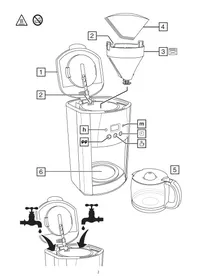
13 Use the grip to open the lid, and expose the reservoir.
14 Use the carafe to fill the reservoir, to avoid overfilling.
15 Press the lever at the rear of the carafe lid, above the handle, to open the carafe lid.
16 Fill with at least 2 cups of water, but not above the max mark.
17 Open up a #4 paper filter, and put it into the filter holder.
18 Put filter-ground coffee into the filter. The amount will vary with the type of coffee and individual taste, but we suggest two rounded teaspoons per cup of water.
19 Close the lid.
20 Replace the carafe on the hotplate.
switch on
21 Put the plug into the power socket.
coffee now
22 Ignore the clock.
23 If you're making less than 5 cups of coffee, press the button, to turn the brew strength feature on. will appear on the display (see "brew strength".
24 Press the button.
25 The light will come on, and "ON" will show on the display.
26 Shortly afterwards, coffee will start to drip into the carafe.
27 You can remove the carafe at any time. The non-drip valve will prevent coffee dripping on to the stand.
28 To prevent the filter holder overflowing, replace the carafe on the stand within about 20 seconds. This may not sound much, but you'll find it's more than enough time to pour a couple of cups of coffee.
29 When you replace the carafe on the stand, the non-drip valve opens, to let any remaining coffee through.
30 When it's done, the hotplate will keep the carafe warm.
31 If left for much more than an hour, chemical changes in the coffee liquor start to affect the flavour. It's best to pour it away and make a fresh pot.
finished?
32 Press the button.
33 The light will go off.
34 Unplug, and let the appliance and carafe cool down fully before cleaning, or for about 10 minutes before refilling.
warning Raising the lid before the coffee maker has cooled down may release steam, creating a scald hazard.
auto shut-off
35 About 2 hours after brewing, the coffee maker will shut down. The hotplate will go off, the light will go off, and "ON" will disappear from the display.
brew strength
36 Use this feature if you're brewing less than 5 cups of coffee. It slows the brewing process, so your coffee will have the same strength as coffee from a full carafe.
37 You may press the brew strength button before or during the brewing process, to activate or deactivate the brew strength feature.
38 Press the button to activate the brew strength feature, the icon will show up on the display.
39 Press the button to deactivate the brew strength feature, the icon will disappear from the display.
coffee later
40 Check that the light is off. If it isn't, press the button to turn it off.
41 Initially, the display will show AM, and 12:00 will be flashing.
42 Set the clock to the correct time.
43 The display will show AM for morning, and PM for afternoon.
a) Press and release the h button until the correct hour is shown
b) Press and release the m button until the correct minute is shown
If you overshoot, you can't step back. Either go right round (24 hours or 60 minutes), or unplug the coffee maker, to reset the display to 12:00.
44 The clock will retain its settings until the coffee maker is unplugged. It will reset to 12:00 next time you plug it in.
45 Set the timer to the time you want to start brewing.
46 Press the PROGRAM button.
47 "PROGRAM" will flash on the display.
a) Press and release the h button until the correct hour is shown
b) Press and release the m button until the correct minute is shown
If you don't press either the h or m buttons within 5 seconds, the coffee maker will revert to "normal", and the time will show. You'll have to press the PROGRAM button, and start again.
48 Press the button.
49 The light will come on, and "AUTO" will show on the display.
50 When the set time is reached, the light will go off, the light will come on, the display will change from "AUTO" to "ON", and brewing will start.
51 If you want to cancel the timer before brewing has started, press the button.
52 If you want to stop the coffee maker while it's brewing, press the button.
care and maintenance
1 Unplug the appliance and let it cool down before cleaning or storing away.
2 Use the grip to open the lid.
3 Use the handles on the sides of the filter holder to lift it out.
4 Tip the contents of the filter holder into the bin – don't flush coffee grounds down the sink. They'll build up and cause a blockage.
5 You may clean the carafe and filter holder in warm soapy water. Rinse thoroughly afterwards, to remove all traces of soap.
6 Clean the outside surfaces of the appliance with a damp cloth.
7 Align the tab at the back of the filter holder with the slot at the back of the coffee maker, and lower the filter holder back into the coffee maker.
8 Close the lid.
9 Don't put any part of the appliance in a dishwasher.
10 Don't put the appliance in water or any other liquid.
11 Don't use harsh or abrasive cleaning agents or solvents.
descaling
12 Scale build-up will cause the element to overheat, reducing its working life. It will also lengthen the brewing time.
13 Descale regularly. If you notice the brewing time getting longer, shorten the time between descalings. In areas of very hard water it may be necessary to descale as often as once a month, or to use filtered water instead of ordinary tap water.
14 Use a proprietary brand of descaler suitable for use in plastic-bodied products. Follow the instructions on the package of descaler. When descaling has finished, empty the carafe and operate the coffee maker twice more with fresh water, but without coffee. Discard the water to ensure that no chemical residues are left in the coffee maker.
Products returned under guarantee with faults due to scale will be subject to a repair charge.