
MAD-CENTER 160BR - Speaker MADISON - Free user manual and instructions
Find the device manual for free MAD-CENTER 160BR MADISON in PDF.



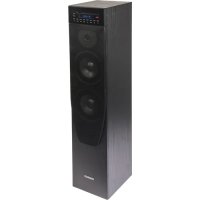
| Product Type | Active column speaker |
| Brand | MADISON |
| Model | MAD-CENTER 160BR |
| RMS Power | 80 W at 4 ohms |
| Impedance | 4 ohms |
| Frequency Response | 50 Hz – 20 kHz |
| Signal-to-Noise Ratio (Line Input) | ≥ 75 dB (A-weighted) |
| Total Harmonic Distortion (Nominal Conditions) | ≤ 2% (50-20 kHz) |
| Line Input Level | 500 mV |
| Power Supply | 220 – 240 V ~ 50/60 Hz |
| Power Consumption | ≤ 45 W |
| Dimensions (W x D x H) | 256 x 200 x 1000 mm |
| Net / Gross Weight | 12.2 kg / 13.5 kg |
| Audio Sources | Bluetooth, USB, SD/MMC, Line input (AUX), MP3 input |
| Functions | USB/SD player, Bluetooth, 7 presets, repeat, remote control, LED display |
| Protection | Internal fuse, power switch |
| Maintenance and Cleaning | Clean with a dry cloth; do not use liquid or abrasive products |
| Safety | Do not open the enclosure; use only indoors; avoid moisture and extreme temperatures |
| Spare Parts and Repairability | Fuse replaceable by a technician; no other user-accessible parts |
| General Information | Compliant with LVD, RTTE and RoHS directives |
Frequently Asked Questions - MAD-CENTER 160BR MADISON
User questions about MAD-CENTER 160BR MADISON
0 question about this device. Answer the ones you know or ask your own.
Ask a new question about this device
Download the instructions for your Speaker in PDF format for free! Find your manual MAD-CENTER 160BR - MADISON and take your electronic device back in hand. On this page are published all the documents necessary for the use of your device. MAD-CENTER 160BR by MADISON.
USER MANUAL MAD-CENTER 160BR MADISON
ACTIVE CENTER COLUMN SPEAKER WITH USB/SD & BLUETOOTH
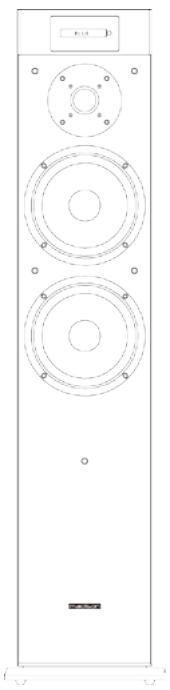
MAD-CENTER160: 16cm / 160W
IMPORTANT NOTE: You can help protect the environment! Please remember to respect the local regulations: hand in the non-working electrical equipment to an appropriate waste disposal centre.
Imported from China by
LOTRONIC SA - Av. Zénobe Gramme 9 - B-1480 Saintes
Operating Instructions
Congratulations to the purchase of your new speaker.
Warnings

CAUTION - VORSICHT - ATTENTION - OPGELET
Shock hazard - Do not open the housing
Explanation of signs

The triangle containing a lightning symbol is used to indicate whenever your health is at risk (due to electrocution, for example).

An exclamation mark in a triangle indicates particular risks in handling or operating the appliance.
In circuit diagrams or lists of components, a symbol is used to indicate that a specific component shall be replaced only by the component specified in that documentation for safety reasons.
Important Safety instructions and danger warnings
- Please read the manual carefully and keep it for future reference.
- The unit shall be connected to a power supply only of the type described.
- To reduce the risk of fire or electrical shock, do not expose this unit to rain or moisture.
- Unplug the unit from the wall socket when it is not to be used for a long period of time.
- When the internal batteries are not to be used, remove them to avoid damage caused by battery leakage or corrosion.
-
Adequate care shall be taken so that foreign objects do not fall, or liquids are not spilled into the enclosure through openings.
-
Do not remove the cover or back, as there are no user-serviceable parts inside.
- All safety instructions and warnings must be adhered to. They are part of the manual and must be kept with the manual.
- Any guarantee claims are rendered invalid if damage occurs due to non-observance of these operating instructions. We assume no liability for any consequent damage.
- We assume no liability for personal injury or damage to property caused by incorrect handling or disrespect of the safety instructions. Any guarantee claims expires in such cases.
- Unauthorized conversions and/or modifications of the appliance are not permitted for safety and licensing reasons (CE).
- The appliance is approved for operation in dry, closed rooms only. Do not operate the device nearby water, such as in bathrooms or nearby swimming pools.
- The appliance may not be exposed to extreme temperatures (< +5ircC / > +35ircC) in operation.
- Batteries shall not be exposed to excessive heat such as sunshine, fire or the like.
- The appliance may not be subject to strong vibrations or heavy mechanical strain.
- DISCONNECT DEVICE: Where the MAINS plug or an appliance coupler is used as the disconnect device, the disconnect device shall remain readily operable.
REMOTE CONTROL
Standby/on
Switches the amplifier between on and standby mode.
Mode
Source selector: selects USB/SD, BLUETOOTH, LINE IN.
Stop: Press this button to stop music play back from USB/SD /BLUETOOTH.
Mute
Mute the audio on the amplifier. The mute mode is indicated by the display VOL 00. Press again to cancel mute.
Repeat
First press repeat current song in USB/SD, second press repeat all the songs in USB/SD.
EQ: Select 7 Pre EQ sets.
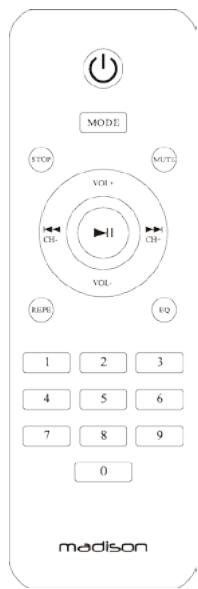
Numerical track select
Press the number of the desired track. The track will then play automatically.

VOL+: Press this button to increase volume
VOL-: Press this button to decrease volume
Press this button to select previous song
▶: Press this button to select next song
Play/pause music from USB/SD/BLUETOOTH
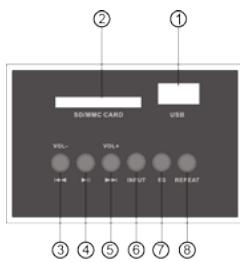
Instructions of Top panel
- USB stick input
- SD/MMC card input
- Press to select previous song, long press to decrease volume
- Play/pause music from USB/SD/BLUETOOTH
- Press to select next song, long press to increase volume
- Input selection
- Press to select 7 Preset EQ.
- Press to repeat current songs/ all the songs in USB/SD memory
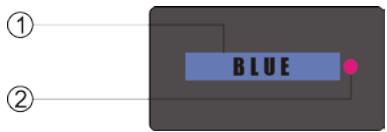
- Power LED
- Remote control window
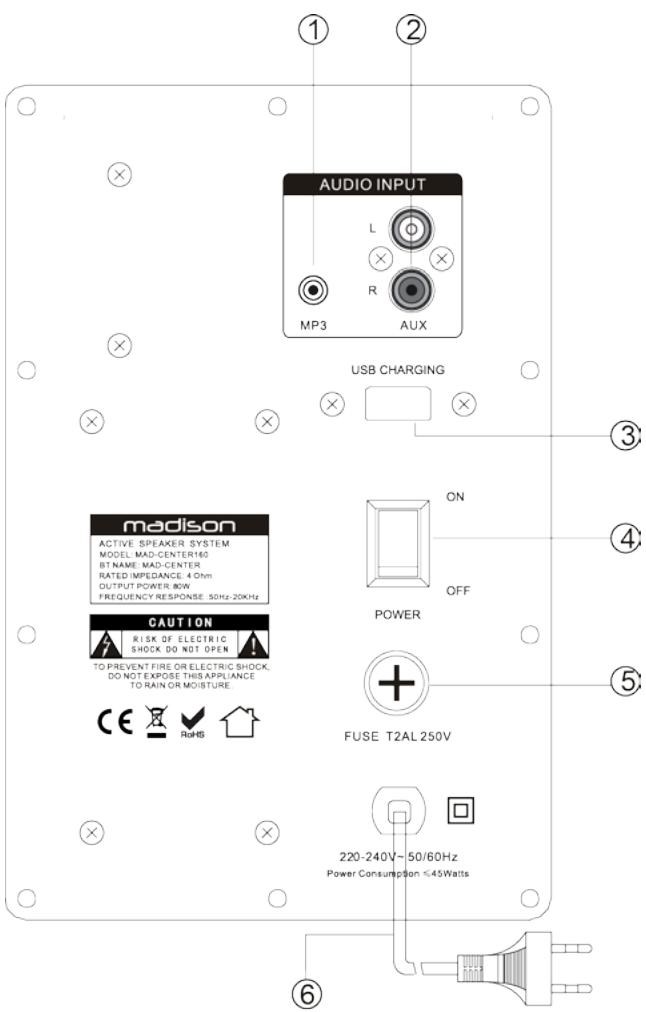
Rear panel of MAD-CENTER160
- MP3 input jack
- AUX input jack
- USB charging
- Power switch
- Fuse
- Power cable
Operating Instructions
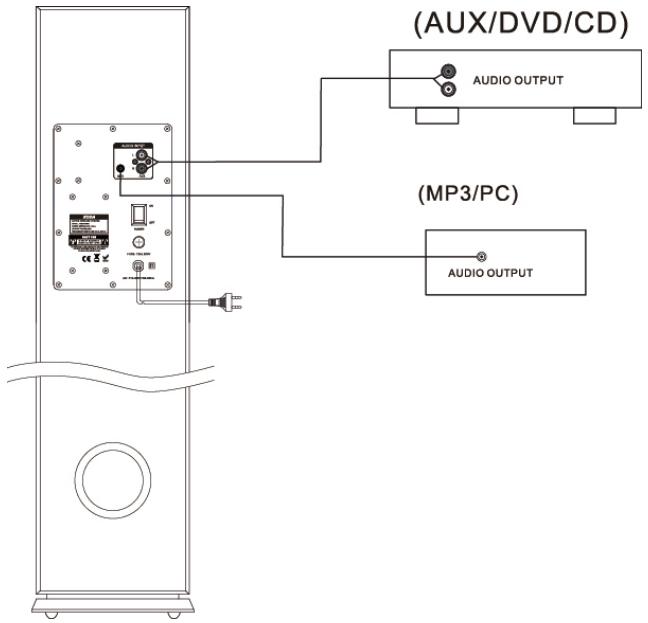
- Before starting the power, please connect the system properly according to the above chart. Make sure to connect the polarity correctly and turn the volume button to minimum position.
- Please turn input selector button to correct position and switch the unit on. After a few seconds, the amplifier is in normal working condition. Set the volume to an adequate level and enjoy your music.
- The power fuse is inside of the set. If it blows, it must be replaced by a trained technician. The new fuse must have the same specifications as the original one.
- If the LED is not bright once the system is switched on, the set is under abnormal condition. Switch the unit off and solve the problem. Turn power on again.
- Connection of Bluetooth: Press mode button on the top panel or on the remote control and select the Bluetooth input. Turn the Bluetooth function on your equipment on (such as mobile phone) and search for a Bluetooth device. The Bluetooth name is "MAD-CENTER", pair your mobile to "MAD-CENTER", and connect it. Now you can play your music.
Trouble-Shooting
If the product is not operating properly, make a check of the items in the table below. If the problem persists, a malfunction may be assumed. Disconnect the power immediately and contact the store where the unit was purchased.
| Problem | Causes | Corrections |
| No sound | • Insecure speaker lead connection. • Audio frequency input terminal connected improperly. • Mains plug & AC jack connection is insecure • Volume control sets to minimum. • Speaker output not in right position | • Connect securely. • Check the audio frequency terminal. • Connect the power properly. • Tum volume up to a suitable level. • Put the speaker output at right position |
| Distortion | • The volume is too loud. | • Reduce volume. |
Specifications
| Output power RMS | 80W @ 4 ohm |
| THD (at rated conditions) | ≤2% (50-20kHz) |
| S/N ratio (line in) | ≥75dB (A-weighted) |
| Impedance | 4 Ohm |
| Frequency response | 50Hz – 20kHz |
| Rated input level/impedance | Line in: 500mV |
| Input voltage | 220 – 240Vac 50/60Hz |
| Consumption | ≤45W |
| Dimensions | 256 x 200 x 1000mm |
| Net / Gross weight | 12.2kg / 13.5kg |
The above specifications are for reference only.
Design and specifications are subject to change for improvement without prior notice.
COLONNE CENTRALE AMPLIFIEE AVEC USB/SD & BLUETOOTH
Shock hazard - Do not open the housing
Shock hazard - Do not open the housing
Shock hazard - Do not open the housing
COLUNA CENTRAL ACTIVA COM BLUETOOTH USB/SD
Shock hazard - Do not open the housing
EC Declaration of Conformity
Hereby we,
LOTRONIC SA
Avenue Zénobe Gramme, 11
1480 SAINTES
Belgique
+32.2.390.91.91
Certify and declare under our sole responsibility that the following product:
Trade name: MADISON
Product name: MULTIMEDIA COLUMN WITH USB-SD-BLUETOOTH
Type or model: MAD-CENTER120 / MAD-CENTER160 / MAD-CENTER220BI
Conforms with the essential requirements of
LVD directive 2006/95/CE
RTTE 1999/5/EC
ROHS 2011/65/EU
Based on the following specifications applied:
EN60065: 2002 + A1: 2006 + A11: 2008 + A2: 2010 + A12: 2011
EN 301 489-1 V1.9.2
EN 62479 :2010
EN 301 489-17 V2.2.1
EN 300 328 V1.8.1
IEC 62321:2013
and therefore complies with the essentials requirements and provisions of the LVD, RTTE and ROHS Directive.
Place and date of issue: Saintes (Belgium), on August-11th 2015
Guive AKBAR / Technical manager
LOTRONIC SA
Av. Zenobe Gramme in 1480 Saintes
Belgium
Tel. +32.2.390.91.91
Tel. +32,2,390,93,19
TVA BE 0887 125 178
CE
Responsible technique
- ACTIVE CENTER COLUMN SPEAKER WITH USB/SD & BLUETOOTH
- MAD-CENTER160: 16cm / 160W
- Operating Instructions
- Warnings
- CAUTION - VORSICHT - ATTENTION - OPGELET
- Explanation of signs
- Important Safety instructions and danger warnings
- REMOTE CONTROL
- Standby/on
- Mode
- Mute
- Repeat
- Numerical track select
- Instructions of Top panel
- Rear panel of MAD-CENTER160
- Trouble-Shooting
- Specifications
- COLONNE CENTRALE AMPLIFIEE AVEC USB/SD & BLUETOOTH
- COLUNA CENTRAL ACTIVA COM BLUETOOTH USB/SD
- EC Declaration of Conformity
- CE
Brand : MADISON
Model : MAD-CENTER 160BR
Category : Speaker