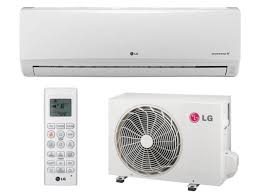
E12EL - Air-conditioner LG - Free user manual and instructions
Find the device manual for free E12EL LG in PDF.



| Product Type | Wall-mounted split air conditioner |
| Brand | LG |
| Model | E12EL |
| Operating Modes | Cooling, Heating, Dehumidification, Ventilation, Auto, Auto Changeover |
| Temperature Range (Cooling) | Indoor: 18°C to 32°C / Outdoor: -10°C to 48°C |
| Temperature Range (Heating) | Indoor: 16°C to 30°C / Outdoor: -10°C to 24°C |
| Remote Control | Wireless, AAA batteries (1.5 V) |
| Special Functions | Timer, Sleep Mode, Auto Clean, Jet Cool/Heat, Energy Saving, Auto Restart, Self Diagnosis |
| Airflow Direction | Adjustable horizontally (manual or automatic) |
| Air Filter | Washable, clean every 2 weeks |
| Power Supply | Not specified |
| Dimensions (Indoor Unit) | Not specified |
| Weight | Not specified |
| Safety | Compliant circuit breaker and fuse, grounding, child protection |
| Maintenance | Regular cleaning of filter, indoor/outdoor unit, checking drain pan |
| Repairability | Contact an authorized service center |
Frequently Asked Questions - E12EL LG
User questions about E12EL LG
0 question about this device. Answer the ones you know or ask your own.
Ask a new question about this device
Download the instructions for your Air-conditioner in PDF format for free! Find your manual E12EL - LG and take your electronic device back in hand. On this page are published all the documents necessary for the use of your device. E12EL by LG.
USER MANUAL E12EL LG
Please read this manual carefully before operating your set and retain it for future reference.
TYPE : WALL MOUNTED
TIPS FOR SAVING ENERGY
Here are some tips that will help you minimize the power consumption when you use the air conditioner. You can use your air conditioner more efficiently by referring to the instructions below:
- Do not cool excessively indoors. This may be harmful for your health and may consume more electricity.
- Block sunlight with blinds or curtains while you are operating the air conditioner.
- Keep doors or windows closed tightly while you are operating the air conditioner.
- Adjust the direction of the air flow vertically or horizontally to circulate indoor air.
- Speed up the fan to cool or warm indoor air quickly, in a short period of time.
- Open windows regularly for ventilation as the indoor air quality may deteriorate if the air conditioner is used for many hours.
- Clean the air filter once every 2 weeks. Dust and impurities collected in the air filter may block the air flow or weaken the cooling / dehumidifying functions.
For your records
Staple your receipt to this page in case you need it to prove the date of purchase or for warranty purposes. Write the model number and the serial number here:
Model number :
Serial number :
You can find them on a label on the side of each unit.
Dealer's name :
Date of purchase :
IMPORTANT SAFETY INSTRUCTIONS
READ ALL INSTRUCTIONS BEFORE USING THE APPLIANCE.
Always comply with the following precautions to avoid dangerous situations and ensure peak performance of your product
WARNING
It can result in serious injury or death when the directions are ignored
CAUTION
It can result in minor injury or product damage when the directions are ignored
WARNING
- Installation or repairs made by unqualified persons can result in hazards to you and others.
- Appliance shall be installed in accordance with national wiring regulations.
- If the supply cord is damaged, it must be replaced by the manufacturer, its service agent or similarly qualified persons in order to avoid a hazard.
- The information contained in the manual is intended for use by a qualified service technician familiar with safety procedures and equipped with the proper tools and test instruments.
- Failure to carefully read and follow all instructions in this manual can result in equipment malfunction, property damage, personal injury and/or death.
- When the power cord is to be replaced, replacement work shall be performed by authorized personnel only using only genuine replacement parts
Installation
- Use a standard circuit breaker and fuse conforming with the rating of the air conditioner. Failure to do so may result in electric shock or product failure.
- Contact an authorized service center when you install or relocate the air conditioner. Failure to do so may result in serious injury or product failure.
- Always use a power plug and socket with a ground terminal. Failure to do so may result in electric shock or product failure
- Install the panel and the cover of the control box safely. Failure to do so may result in explosion or fire.
- Install a dedicated electric outlet and circuit breaker before you use the air conditioner. Failure to do so may result in electric shock or product failure.
- Use a standard circuit breaker and fuse conforming with the rating of the air conditioner. Failure to do so may result in electric shock or product failure.
- Do not modify or extend the power cable. If the power cable or cord has scratches or skin peeled off or deteriorated then it must be replaced. It may result in fire or electric shock.
- Be cautious when you unpack or install the air conditioner. Failure to do so may result in serious injury or product failure.
- Do not install the air conditioner on an unstable surface or where there may be a danger of it falling. It may result in death, serious injury, or product failure.
- Use inflammable gas (nitrogen) to inspect leak and to purge air, using compressed air or flammable gas may cause fire or explosion.
Operation
- Do not let the air conditioner run for a long time when the humidity is very high or when a door or window has been left open. Failure to do so may result in product failure.
- Make sure that the power cord is not pulled or damaged while the air conditioner is operating. Failure to do so may result in fire, electric shock, or product failure.
- Do not place any objects on the power cord. It may result in electric shock or product failure.
- Do not turn on or off the air conditioner by plugging in or unplugging the power plug. It may result in fire or electric shock.
- Do not touch, operate or repair the air conditioner with wet hands. It may result in electric shock or product failure.
- Do not place a heater or other heating appliances near the power cable. It may result in fire, electric shock, or product failure.
- Do not allow water to run into the air conditioner. It may result in explosion or fire.
- Do not leave flammable substances such as gasoline, benzene and thinner near the air conditioner. It may result in explosion or fire.
- Do not use the air conditioner for an extended period of time in a small place without ventilation. Ventilate the place regularly. Failure to do so may result in explosion or fire.
- When there is a gas leak, ventilate sufficiently before using the air conditioner again. Failure to do so may result in explosion or fire.
- Unplug the power plug if there is a noise, smell or smoke coming from the air conditioner. Failure to do so may result in explosion or fire.
- Stop operating and close the window in strom or hurricane.If possible remove the product from the window before hurricane arrives
- Contact an authorized service center when the air conditioner is submerged into water due to flooding. Failure to do so may result in explosion or fire.
- Be cautious water could not enter the product
- Make sure to ventilate sufficiently when this air conditioner and a heating appliance such as a heater are used simultaneously. Failure to do so may result in fire, serious injury, or product failure.
- Turn the main power off and unplug the power plug when you clean or repair the air conditioner. Failure to do so may result in death, serious injury, or product failure.
- Unplug the power plug when the air conditioner is not used for an extended period of time. Failure to do so may result in product failure.
- Do not place any objects on the air conditioner. It may result in product failure.
- For inner cleaning, contact an Authorized Service Center or a dealer. Do not use harsh detergent that causes corrosion or damage on the unit. Harsh detergent may also cause failure of product, fire, or electronic shock.
- This appliance is not intended for use by persons (including children) with reduced physical, sensory or mental capabilities, or lack of experience and knowledge unless they have been given supervision or instruction concerning use of the appliance by a person responsible for their safety.
- Children should be supervised to ensure that they do not play with the appliance.

CAUTION
Installation
- Make sure to check if there is a refrigerant leak after you install or repair the air conditioner. Failure to do so may result in product failure.
- Install the drain hose properly for smooth drainage of condensed water. Failure to do so may result in product failure.
- Keep level even when installing the product.
- Install the air conditioner where the noise from the outdoor unit or the exhaust gas will not inconvenience the neighbors. Failure to do so may result in conflict between neighbors.
- When transporting the equipment, there should be at least 2 or more people, or a forklift. It may result in serious injury.
- Do not install the air conditioner where it will be exposed to sea wind (salt spray) directly. It may result in product failure.
Operation
- Do not expose people, animals or plants to the cold or hot wind from the air conditioner. It may result in serious injury.
- Do not use the product for special purposes, such as preserving foods, works of art, etc. It is a consumer air conditioner, not a precision refrigeration system. It may result in death, fire or electric shock.
- Do not block the inlet or outlet of air flow. It may result in explosion or product failure.
- Do not use strong cleaning agents or solvents when you clean the air conditioner, or spray water. Use a smooth cloth. It may result in serious injury or product failure.
- Never touch the metal parts of the air conditioner when you remove the air filter. It may result in serious injury or product failure.
- Do not place any objects on the air conditioner. It may result in product failure.
- Always insert the filter securely after cleaning. Clean the filter every two weeks or more often if necessary.
- Do not insert hands or other objects through the air inlet or outlet while the air conditioner is operating. It may result in electric shock.
- Do not drink the water drained from the air conditioner. It may result in serious health complications.
- Use a sturdy stool or ladder when you clean, maintain or repair the air conditioner at a height. Failure to do so may result in serious injury or product failure.
- Do not mix the batteries for the remote control with other types of batteries or mix new batteries with used batteries. Failure to do so may result in product failure.
- Do not recharge or disassemble the batteries. Failure to do so may result in explosion, fire or serious injury.
- Stop using the remote control if there is a battery fluid leak. If your cloth or skin is exposed to the battery fluid from a leak, wash it off with clean water. Failure to do so may result in serious injury.
- If you swallow the battery fluid from a leak, wash out the inside of your mouth thoroughly and then consult a doctor. Failure to do so may result in serious health complications.
Operation ranges
The table below indicates the temperature ranges the air conditioner can be operated within.
| Mode | Indoor temperature | outdoor temperature |
| Cooling | 18°C~32°C | -10°C~48°C |
| Heating | 16°C~30°C | -10°C~24°C |
TABLE OF CONTENTS
2 TIPS FOR SAVING ENERGY
3 IMPORTANT SAFETY INSTRUCTIONS
7 BEFORE USE
7 Components
8 Using the remote control
9 - Inserting batteries
9 - Installing the remote control holder
10 BASIC FUNCTIONS
10 Cooling your room
10 Heating your room
10 Removing humidity
11 Airing your room
11 Adjusting the fan speed
11 Adjusting the air flow direction
11 Setting the timer
11 - Setting the current time
12 -Turning on the air conditioner automatically at a set time
12 -Turning off the air conditioner automatically at a set time
12 - Canceling the timer setting
12 Setting sleep mode
13 ADVANCED FUNCTIONS
13 Changing room temperature quickly
13 Indoor air purification
13 - Auto Clean operation
14 Auto operation
14 Auto Changeover operation
15 Energy saving cooling mode
15 Display screen brightness
15 Operating the air conditioner without the remote control
16 Restarting the air conditioner automatically
16 Cleaning the air filter
17 MAINTENANCE
18 TROUBLESHOOTING
18 Self-diagnosis function
18 Before requesting service
BEFORE USE
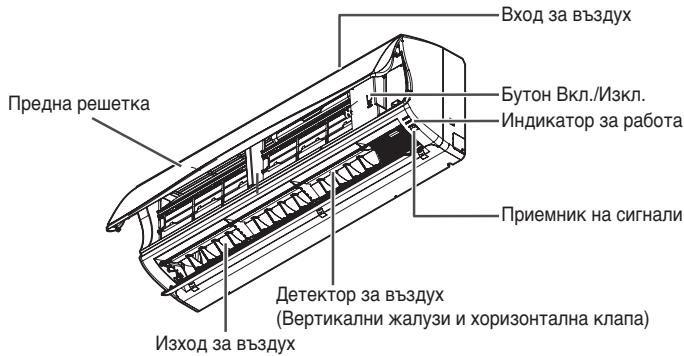
Components
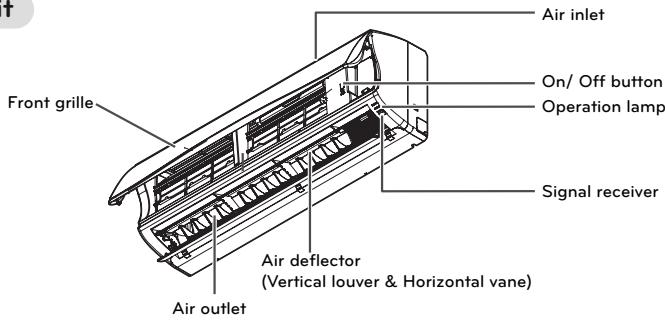
Indoor unit
- The feature can be changed according to a type of model.
NOTE
The number of operation lamps and their locations may vary, depending on the model of the air conditioner.
Outdoor unit
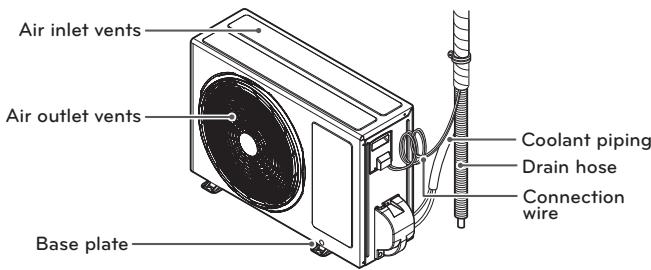
- The feature can be changed according to a type of model.
Using the remote control
You can operate the air conditioner more conveniently with the remote control. You will find the buttons for the additional functions under the cover of the remote control.
Wireless remote control
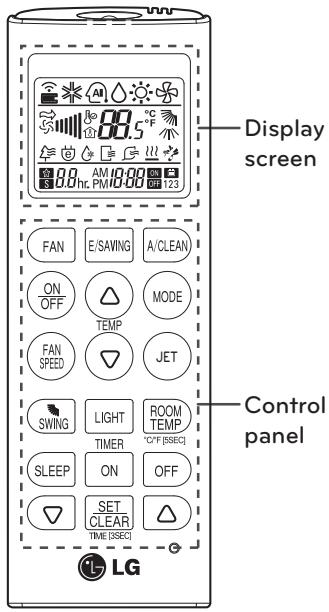
| Control panel | Display screen | Description |
| FAN | * | Fan button: Air come out from the in-door unit below to the room without air temperature change. |
| SLEEP | * hr | Sleep mode auto button*: Sets the sleep mode auto operation. |
| TEMP | * 88 °C | Temperature adjustment buttons: Adjusts the room temperature when cooling and heating. |
| ON OFF | - | On/Off button: Turns the power on/off. |
| FAN SPEED | * | Indoor fan speed button: Adjusts the fan speed. |
| MODE | * AI △ | Operation mode selection button*: Se-lects the operation mode. Cooling operation (※) / Auto operation or auto changeover (AI) / Dehumidify-ing operation (△) / Heating operation (◇) |
| JET | P0 | Jet cooling/heating button*: Warms up or cools down the indoor temperature within a short period of time. |
| SWING | * | Air flow direction button: Adjusts the air flow direction vertically. |
| ROOM TEMP | * | Temperature display button: Displays the room temperature. Press ROOM for 5 sec, conversion °C / °F |
| ON OFF | AM 1200 ON OFF | Timer button: Sets the current time and the start / end time. |
| A/CLEAN | * | Navigation and functions button*: Sets the special functions. *: Auto clean ◎: Operates energy saving cooling |
| E/SAWING | - | Set/clear button: Sets or cancels func-tions. |
| SET CLEAR | - | Reset button: Resets the remote control settings. |
| LIGHT | LIGHT button: Adjusts the brightness of the indoor unit display. |
- Some functions may not be supported, depending on the model.
Inserting batteries
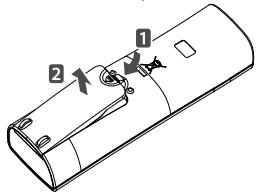
Insert batteries before using the remote control. The battery type used is AAA (1.5 V).
1 Remove the battery cover.
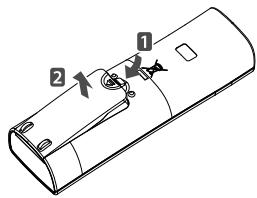
2 Insert the new batteries and make sure that the + and - terminals of the batteries are installed correctly.
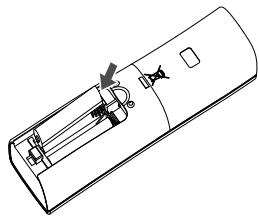
3 Reattach the battery cover.

NOTE
If the display screen of the remote control starts to fade, replace the batteries.
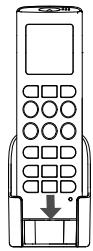
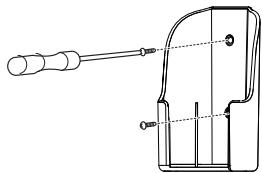
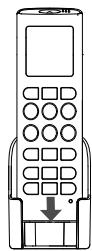
Installing the remote control holder
Install the holder where there is no direct sunlight to protect the remote control.
1 Choose a safe and easily-accessible place.
2 Remove the adhesive sticker protection film from the back of the holder before attaching it to the wall.
3 Fix the holder by fastening the 2 screws firmly with a screwdriver.
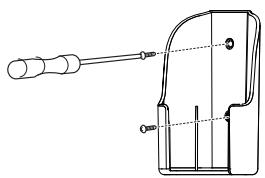
4 Slide the remote control into the holder.
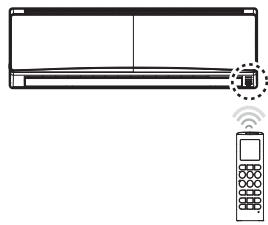
Operating method
Point the remote control towards the signal receiver at the bottom of the air conditioner to operate it.
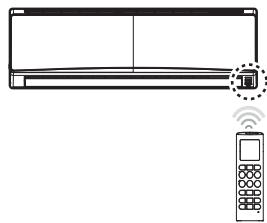
!NOTE
- The remote control may operate other electronic devices if pointed towards them. Make sure to point the remote control towards the signal receiver of the air conditioner.
- For proper operation, use a soft cloth to clean the signal transmitter and receiver.
BASIC FUNCTIONS
Cooling your room
(Cooling operation)
1 Press to turn on the power.
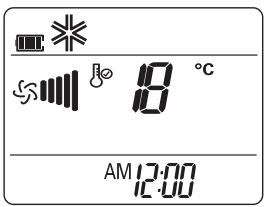
2 Press repeatedly to select the cooling operation.
- is displayed on the display screen.
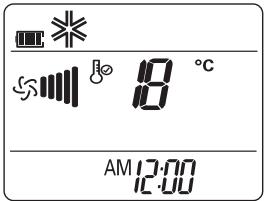
3 Press or to set the desired temperature.
- The temperature range is 18^ - 30^ .
Heating your room
(Heating operation)
1 Press to turn on the power.
2 Press repeatedly to select the heating operation.
- is displayed on the display screen.
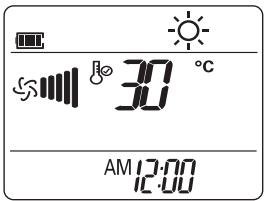
3 Press or to set the desired temperature.
- The temperature range is 16^ - 30^
NOTE
Cooling-only models do not support this function.
Removing humidity (Dehumidifying operation)
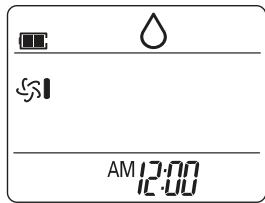
This mode removes excess moisture from an environment with high humidity or in the rainy season, in order to prevent mold from setting in. This mode adjusts the room temperature and the fan speed automatically to maintain the optimal level of humidity.
1 Press to turn on the power.
2 Press MODE repeatedly to select the dehumidifying operation.
- is displayed on the display screen.
!NOTE
- In this mode you cannot adjust the room temperature, as it is adjusted automatically. Also, the room temperature is not displayed on the display screen.
Airing your room (Air Circulation operation)
This mode only circulates the indoor air without changing the room temperature. The cooling lamp lights up in air circulation mode.
1 Press to turn on the power.
2 Press to select the air circulation operation.
- is displayed on the display screen.
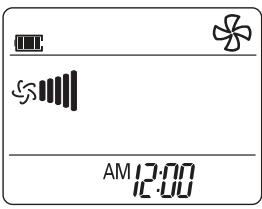
3 Press to adjust the fan speed.
Adjusting the fan speed
1 Press (FAN) repeatedly to adjust the fan speed.
- Select ≈ if you want natural air. The fan speed adjusts automatically.
Adjusting the air flow direction
1 To adjust the direction of the air flow horizontally, press SWING repeatedly and select the desired direction.
- Select to adjust the direction of the air flow automatically.
NOTE
- Adjusting the air flow direction vertically may not be supported, depending on the model.
- Adjusting the air deflector arbitrarily may cause product failure.
- If you restart the air conditioner, it starts to operate with the previously set direction of air flow, so the air deflector may not match the icon displayed on the remote control. When this occurs, press SWING to adjust the direction of the air flow again.
Setting the timer
You can use the timer function to save energy and to use the air conditioner more efficiently.
Setting the current time
1 Press [SET] and hold it for longer than 3 seconds.
- The AM/PM icon flickers at the bottom of the display screen.
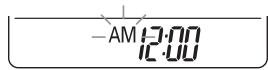
2 Press or to select the minutes.
3 Press SET to finish.
Turning on the air conditioner automatically at a set time
1 Press ON.
- The icon below flickers at the bottom of the display screen.
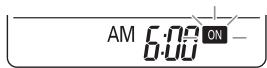
2 Press or to select the minutes.
3 Press SET to finish.
Turning off the air conditioner automatically at a set time
1 Press OFF
- The icon below flickers at the bottom of the display screen.
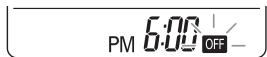
2 Press or to select the minutes.
3 Press SET to finish.
Canceling the timer setting
1 Press ON or OFF to select the timer setting to cancel.
2 Press SET CLEAR
- To cancel all timer settings, press SET CLEAR.
Setting sleep mode
Use the sleep mode to turn off the air conditioner automatically when you go to sleep.
1 Press to turn on the power.
2 Press (SLEEP)
3 Press or to select the hour (up to 7 hours).
4 Press SET to finish.
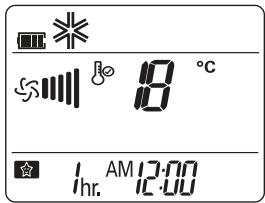
- is displayed on the display screen in sleep mode.
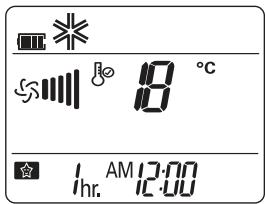

NOTE
In the Cooling and Dehumidifying modes, the temperature increases by 1^ after 30 minutes and by a further 1^ after another 30 minutes for a more comfortable sleep. The temperature increases with up to 2^ from the preset temperature.
ADVANCED FUNCTIONS
The air conditioner offers some additional advanced functions.
Changing room temperature quickly
(Jet Cool/Heat operation)
This mode allows you to cool indoor air quickly in summer or warm it quickly in winter.
1 Press to turn on the power.
2 Press
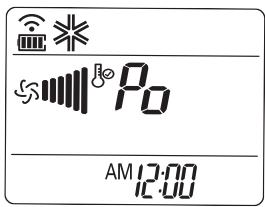
- In jet cooling mode, strong air blows out at a temperature of 18^ for 30 minutes.
- In jet heating mode, strong air blows out at a temperature of 30^ for 30 minutes.
NOTE
- In Air Circulation, Auto, or Auto Changeover mode, this function cannot be used.
- This function may not be supported, depending on the model.
Indoor air purification
Auto Clean operation
In the cooling and dehumidifying operations, moisture is generated inside the indoor unit. Use the auto cleaning function to remove such moisture.
1 Press to turn on the power.
2 Press [ACLBN].
- 23 is displayed on the display screen.
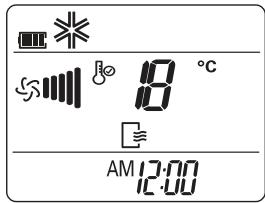
- If you turn off the power, the fan operates for 30 minutes and cleans the inside of the indoor unit.
NOTE
Some buttons cannot be used while the auto cleaning function is in operation.
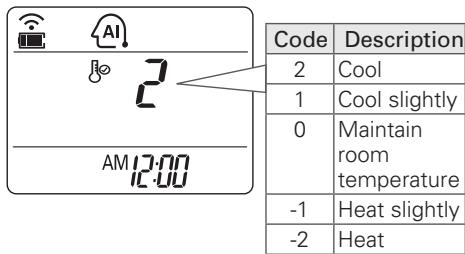
Auto operation (Artificial intelligence)
Cooling-only models
In this mode, the fan speed and the temperature adjust automatically, based on the room temperature.
1 Press to turn on the power.
2 Press repeatedly to select auto operation.
3 Press or to select the desired operation code if the temperature is higher or lower than the desired temperature.

NOTE
- In this mode, you cannot adjust the fan speed, but you can set the air deflector to rotate automatically.
- This function may not be supported, depending on the model.
Auto Changeover operation
This mode changes the operation mode automatically to maintain the set temperature at ± 2^ .
1 Press (on) to turn on the power.
2 Press MODE repeatedly to select the auto changeover operation.
- is displayed on the display screen.
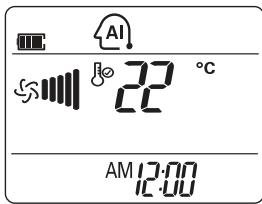
3 Press or to set the desired temperature.
- The temperature range is 18^ - 30^ .
4 Press () repeatedly to select the fan speed.

NOTE
This function may not be supported, depending on the model.
Energy saving cooling mode
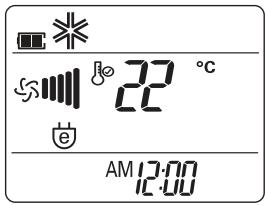
This mode minimizes power consumption during cooling and increases the set temperature to the optimal level for a more comfortable environment.
1 Press to turn the power on.
2 Press repeatedly to select the cooling operation.
3 Press [ESAW6].
- is displayed on the display screen.
NOTE
- This function may not be supported, depending on the model.
- During Energy Saving Cooling mode, temperature shown at the unit display may be different with the one shown at remote control.
- Possible, Different temperature is displayed on between remote controller and air conditioner during operation.
Display screen brightness
You can adjust the brightness of the indoor unit display screen.
1 Press Light repeatedly to set the brightness to the desired level.
NOTE
This function may not be supported, depending on the model.
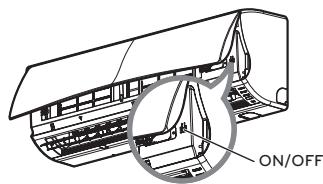
Operating the air conditioner without the remote control
You can use the On/Off button of the indoor unit to operate the air conditioner when the remote control is unavailable. However, the fan speed is set to high.
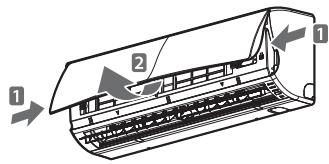
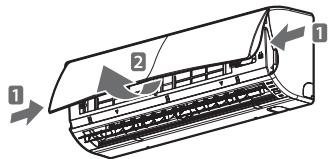
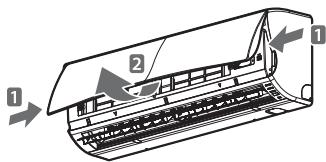
1 Open the front cover.
- Lift up both sides of the cover slightly.
- The feature can be changed according a type of model.
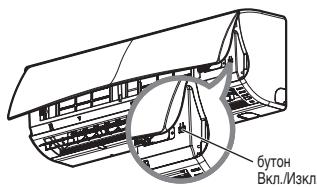
2 Press the On/Off button.
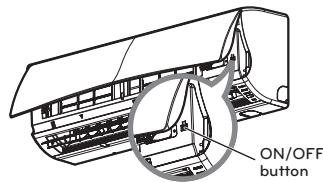
- The feature can be changed according a type of model.
- For cooling and heating models, the operation mode changes, depending on the room temperature.
| Room temp. | Set temp. | Operation mode |
| Below 21°C | 24°C | Heating operation |
| Above 21°C and below 24°C | 23°C | Dehumidifying operation |
| Above 24°C | 22°C | Cooling operation |
- For cooling-only models, the temperature is set to 22^ (71.6^) .
Restarting the air conditioner automatically
When the air conditioner is turned on again after a power failure, this function restores the previous settings. This function is a factory default setting.
Disabling auto restart
1 Open the front cover.
- Lift up both sides of the cover slightly.
- The feature can be changed according a type of model.
2 Press the On/Off button and hold it for 6 seconds.
- The unit will beep twice and the lamp will blink 6 times.
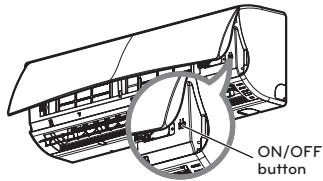
- The feature can be changed according a type of model.
- To re-enable the function, press the On/ Off button and hold it for 6 seconds. The unit will beep twice and the blue lamp will blink 4 times.
NOTE
If you press and hold the On/Off button for 3 - 5 seconds instead of 6 seconds, the unit will switch to the test operation. In the test operation, the unit blows out strong air for cooling for 18 minutes and then returns to the factory default settings.
Cleaning the air filter
Clean the air filter once every 2 weeks or more if necessary.
1 Turn off the power and unplug the power cord.
2 Open the front cover.
- Lift up both sides of the cover slightly.
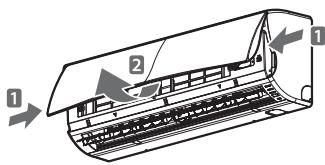
- The feature can be changed according a type of model.
3 Hold the knob of the air filter, lift it up slightly and remove it from the unit.
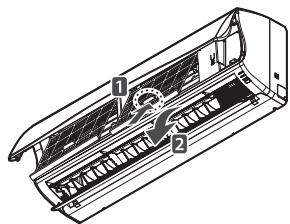
- The feature can be changed according a type of model.
4 Clean the filter with a vacuum cleaner or with warm water.
- If dirt is difficult to remove, wash the filter in lukewarm water with detergent.
5 Dry the filter in the shade.
MAINTENANCE
If the air conditioner will not be used for an extended of time, dry the air conditioner to maintain it in best condition.
1 Dry the air conditioner in Fan mode for 3 to 4 hours and disconnect the power plug. There may be internal damage if moisture is left in components.
2 Before using the air conditioner again, dry the inner components of the air conditioner in Fan mode for 3 to 4 hours. This will help to remove odor which is generated from moisture.
Clean the product regularly to maintain optimal performance and to prevent possible breakdown.
- This may not be provided, depending on the model.
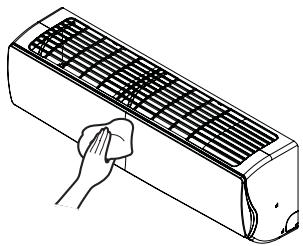
- The feature can be changed according a type of model.
| Type | Description | Interval |
| Air filter | “Cleaning the air filter.” | 2 weeks |
| Indoor unit | Clean the Indoor unit surface by using a soft, dry cloth. | Regularly |
| Clean the condensate drain pipe. | Every 4 months | |
| Clean the condensate drain pan. | Once a year | |
| Thoroughly clean the heat exchanger. | Once a year | |
| Replace the remote control batteries. | Once a year | |
| Outdoor unit | Use steam to clean the heat exchanger coils and the panel vents. (consult with technician) | Regularly |
| Clean the fan. | Once a year | |
| Clean the condensate drain pan. | Once a year | |
| Verify that all the fan assembly is firmly tightened. | Once a year | |
| Verify that electric components with jets of air. | Once a year | |
| Clean the electric components with jets of air. | Once a year |

CAUTION
- Turn off the power and unplug the power cord before you perform any maintenance; otherwise it may cause electric shock.
- Never use water that is hotter than 40^ when you clean the filters. It may cause deformation or discoloration.
- Never use volatile substances when you clean the filters. They may damage the surface of the product.

NOTE
- The location and shape of the filters may differ, depending on the model.
- Make sure to clean the heat exchanger coils of the outdoor unit regularly, as dirt collected in the coils may decrease the operational efficiency or increase energy costs.
TROUBLESHOOTING
Self-diagnosis function
This product has a built-in self-diagnosis function. If an error occurs, the lamp of the indoor unit will blink in 2 second intervals. If this occurs, contact your local dealer or service center.
Before requesting service
Please check the following before you contact the service center. If the problem persists, contact your local service center.
| Problem | Possible causes | Corrective action |
| There is a burning smell and a strange sound coming from the unit. | - | Turn off the air conditioner, unplug the power cord and contact the service center. |
| Water leaks from the indoor unit even when the humidity level is low. | ||
| The power cord is damaged or generating excessive heat. | ||
| A switch, a circuit breaker (safety, ground) or a fuse is not operated properly. | ||
| The air conditioner does not work. | The air conditioner is unplugged. | Check whether the power cord is plugged into the outlet. |
| A fuse is blown or the power supply is blocked. | Replace the fuse or check if the circuit breaker has tripped. | |
| A power failure has occurred. | Turn off the air conditioner when a power failure occurs. When the power is restored, wait 3 minutes, and then turn on the air conditioner. | |
| The voltage is too high or too low. | Check if the circuit breaker has tripped. | |
| The air conditioner turned off automatically at a preset time. | Press the power button again. | |
| The air conditioner does not generate cool air. | Air is not circulating properly. | Make sure that there are no curtains, blinds or furniture blocking the front of the air conditioner. |
| The air filter is dirty. | Clean the air filter once every 2 weeks. See “Cleaning Air Filter” for more information. | |
| The room temperature is too high. | In summer, it may take some time to cool indoor air. In this case, select the jet cool operation to cool indoor air quickly. | |
| Cold air is escaping from the room. | Make sure that no cold air is escaping through ventilation points in the room. | |
| The desired temperature is higher than the set temperature. | Set the desired temperature to a level lower than the current temperature. | |
| There is a heating source nearby. | Avoid using a heat generator such as an electric oven or a gas burner while the air conditioner is in operation. | |
| Air circulation operation is selected. | In the air circulation operation, air blows from the air conditioner without cooling or heating the indoor air. Switch the operation mode to the cooling operation. | |
| It is not possible to adjust the fan speed. | The auto operation, jet operation or dehumidifying operation is selected. | In some operation modes, such as the jet or dehumidifying operation modes, you cannot adjust the fan speed. Select an operation mode in which you can adjust the fan speed. |
| It is not possible to adjust the temperature. | The air circulation operation or jet operation is selected. | In some operation modes, such as the air circulation or jet operation mode, you cannot adjust the temperature. Select an operation mode in which you can adjust the temperature. |
MANUALE DEL'UTENTE
CLIMATIZZATORE
Setting the current time
Eeayviouc eowTeipKou aepa
Aeitoupyia Autouatou Kaapioou
Tic itoupyiesuEcn kai auypavons, uypaia npayetai meo stny eowtepkn mova. Xpnauonoeiote nvyleitouyia autouk aqapiaou yia va aapieoetaeutnvyupaia.
1 PAnoTc yia va θεσετε οε λειοργία.
2 PnntnoTcA(OCLAN).
2 Iahtote to nAktpo On/Off
^* Hovatotnata autn nnpes va aalaleva aloya Tov tuo tou mvtelou.
- Ia movTeIa yueIc kai thepavoc, o tpoIoc IeI toupyia aalzci, avaloya e Tnv thepokpaia Tou xwpou.
3a da n36eHHTe OAnCHn CNTyaunn I Da rapaHTnpaTe Bb3MOxHO hai-dO6paTa pa6oTa Ha Ba7uI npOdyKT, BUNHn 3NtBnHraBaiTe ONiCaHIne No-DoNY ppeDnA3Hm MepKIN

PPEyPPEKDEHNE
Ako yka3aHaIaTe cIpeHe6perHaT,ToBa MoKe da DoBoeDe IO cepNo3Hn HapaHbAHn IIN DO CmTpHn CnyaH.

BHIMMAHME
Ako yka3aHnraTa ce npene6perHaT, TOBa MoKe da DoBede Do IeKn HapaHbAHnHa II Do NobpeDu Ha npOdykTa.

PPEyPPEKDEHNE
- ɪЗɜːbɒpɛhɪte OT ṏκβaɪnɪφιπuρaɪn ěnpɑhən Mɔŋtʌkɪn pɛmɔHTɪ Mʊræt ᵠ ᶂɒbɛdʌt ᶂɒnɑsHocT 3a Bɑc N ἀpyrɪx opa.
KJIIMATIK TpIb6Ba Da ce MOHTnpa B CbOTBeTCTBne C hauNHOHInTe pa3nopei63 a eJekTpuecka Hnctalaia. - Ako eJektpo3axpauhBaunrKa6e n oBpeH, Tpa6Ba da bDe cMeH eO npou3BoDnteJIa, cepBn3Hn aEHT nIIN pOIObHO KBAJIuΦuUpaH OJIue, 3a da ce u36eHnat PnCKOBete.
CbIbPkaHATA B pKBOODCTBOTO INHΦOpMaUNe I nepHa3NaUeHa 3a I3nON3BaHe O KBAJIINPHuPAH CepBn3EN TexHNK, KOIT e 3aNo3HaTc IpoUeDpyrTe 3a 6eO2oNACHOte N e O6OpYDBaC NIOXoJHHTe HNCTpyMeHTn UyeDN 3a TECTBaHe.
AOKBCHNINHCTpyKUIN B HACTOIIO TO pkoBDCTBO He CE PPOHTaBHNMaTeJIHO I He CE N3TbJHBAT,TOBA MOKe Da DOHe npabnHOpyHKcnoHnpaHe Ha ypeDa,do YbpexKaHa He cO6CTBeHoCt,do Tenec-Hn HapaHbaHn n/nn Do CmbpTHn CnyuAn.
Korato Tp86Ba Da ce cMeHn 3axpaHbauHrKa6eN, CmHaTa Tpr6Ba Da ce H3BbPnO t OToPiuHnepcoHAn, KOITIOJIN3Ba Camo OpunHaiHn pe3epBn Yactn.
MOHTAX
-Излбайтсандатенпгьсвачипгдпаитк,КоТО OTROВAPТ на НOMHANINTOK на KINIMATINA.НиЗПЛнEHNETO на TOBA уka3ане може дд поеведо де оелктуческу уарлд пооврждане на уда.
-Пи мот tak Ha KлIMATnka Ипnpс mraHa Ha MCTOTo My ce CbpxeTe C yIbHOMOseH cepBn3e ΒeHTbp. Hen3-пьнehneTo Ha TOBa yKa3aHne Moke Da IOBeDe IO cepNo3Hn HapahBaHn IIN Do NOBpeKdaHe Ha ypeA.
- I3nO3BaTBe BnAgn KONTAKT N ⅢeNcE9 C 3B0Dy 3a 3a3eMBAHe. Hen3nBnHEnMeTo Ha TOBa yKa3aHne MoKe da doBeDe Do eNEKTPnueckn ydap nnn Do nobpeXdahe Na ypeDa.
- MoNTnpaIte NaJeKdNo paHena i KaNaKa Ha ynpablaBaIoTo Ta6I.No. HEn3IbIneHHeTo Ha ToBa yka3aHne MoKe da doBee do EKcIpl03m nn nnoxap.
- Ппддда зааночeteдаинлбатka, мontрайтпднзанченз Heroе ekeKtpueckn n3xodиппeКьсв. Heизпьлнehието на това указаиме може дд ддддддддддддддддддддддддддддддддддддддддддддддддддддддддддддддддддддддддддддддддддддддддддддддддддддд徳уpeда.
-Излбайтсандатенпгьсвачипгдпаитк,КоТО OTROВAPRT ha HOMHANHINTOK ha KINMaTka. HeN3-пьнEHMeToHa TOBA yka3aHneMoKe Да дOBeDEdo eNEKTPnueCKn yap Или Do nobpeXdAne Ha ypeDa.
- He moi dinu paime n He ydbnkaaba Te 3axpaHbuaa Kaaben. Ako no 3axpaHbuaa Kaaben mHa napraBaHnA, ako n3oIauyta My e obelen ha nn yBpeDeha, ToT trp6Ba da ce cmeH. Toba moKe da doBeede do npKap nn enektpn-ueckn udap.
-При раллоробогано и мостажа на Климатиka Вимавaite MHRо. Hen3пьненeto Ha TOBa yka3aHne Moxe da doBepeDo cepno3Hn HaparhaBnHn IIN Do nobpeKdaHe Ha ypeDa.
- He MOHTIpaIte KJIIMATNka Ha HeCTaBnIH NIOBbPxHOctn IIN Ha MRCTo, KbDETo MoKe Ja NaIHe. ToBa MoKe Da DoBeDe OcMbPTN CInyAn, Do CePNO3HN HapaHbAHn INI Do NOBpeJdaHe Ha UpeJa.
- I3n03BaTHe HeaIaIHTeHra3 (a3OT), 3a npOBepKa Ha TeOBe H npemaxBaHe Ha B3dyxa, TbK aTo I3n03BaHeTo Ha B3dyx NOD HAJIraHaE INI 3anaIIM Ra3 MoKe Da IOBede Do NOXap INI EKCIIO3M.
Pa6ota
AkoBnaJXocTtBaNOMeUHHeToE MNOHO TOLIAMA UNIMNA OTBOpEN IPO3OpeuINIBpata,He OCTaBnTE KJIIMATka da pa-60Tu npOdbJxntenHo. HeN3bIbnHeHMeTo Ha TOBA YKa3aHHe MoKe Da DoBeDe Do NOBpeJdahe Ha UpeJa.
- Y6eTeTe ce, ye 3axpaHbauIaIAT Ka6e He en 3terIeH IINIO NobpeH, KORaTO KINMaTnKbT pa6Otn. Hen3nbIhEnHeTo Ha ToBa yka3aHHe MoKe Da doBeDe Do noXap, Do eJeKTPuYeCKn Uydp IINIO NOBpeXdAne Ha UpeDa.
- He cnaarai Te HnkaBn npEmeTn Bbpxy 3axpaHbau n Ka6eI. ToBa moKe da doBepe Do eNeKtpnueckn yap uIN do nobpeXdahe ha ypeDa.
He BkIIOUBAITE He nKIIIOUBAITE KINIMATika Ype3 ueCenela. Toba moke da doBee do no Joxap nHn enEKeYnecku ynap.
C MOKPN pBue He DoKOCBaIte KJIIMATNka, He pa6oTe c Hero n He ro peMOHTnpaIte. Toba MoXe da DOBeJe do eJekTpHueCKn yIap nII no IObpeXdaHe haupeJa.
B 6bn30ct do 3axpaHbauia KabeI He nocTabraTe HarpBaTeHN ypei. Toba MoKe da noBeDe do noXap,do enektpn-ueckn yad npn do noPbeJxdaHe hyea.
- He donyuckaite b KImatika da teue BOda. Toba moke da doBeede do ekcnnoi nn noxap.
B 6n30ct Do KJIIMATika He octabayte 3anaIIMN BeueCTBa KaTO ra3oINH, 6eH3IN IIN pa3TbOpHTeIN. Toba MoKe da doBeDe Do ekCnlo3nn IIN NIOkap.
B MaJIKN IOMeUeHnI He n3PON3BaTKe KJIMMaTka PpOdbJXnTeHNO, 6e3 Da IPOBeTpBaTe. IPOBeTpBaTe NOMEUeHnETo peoBHO. Hen3PbJIHeHnETo Ha ToBA yKa3aHnne MoXe Da DoBede Do EKcPiOn3nn nn noxap.
B cnyuante Ha teohoe Na ra3 npei Da n3nol3bate KInMaTnka OTHOBo, npobetpe Te do6pe nomeeHHeTo. He3nblHeHneTo Ha ToBa yKa3aHne MoKe Da DoBe De o EKCnI03m NIN NOxap.
-AKo KINIMATIKbT 3NdaBa HeO6uAeH yM uNn 1N3MbYBa MmPn3Ma nNn PnyEe, N3KlOHeTe 3axpaHbaunr 7enCen. Hn3TbI-HeHneTO Ha TOBA YkazAHme MoKe da DOBeDe NO EKcNIO3nn NnnoKap.
- Пибури уразани спгете Климатika и 3аТьоре позорцп. АкToBa e Вьзможно, пedingуразаньт дe ectirнадявас, салerte уда от позорец.
Ako npn HabOnHeHne KInMaTnKbTe 6bnlNotOen NOD Boa, CbByPxe Tce cyynbHOMoeh cepBn3eH cHTbp. HeN3pblHeHNeto Ha ToBa yKa3aHne MoKe Da DoBeDe Do EKCnIO3m INI IOXap.
BnHmAbaiTe B npodykTa da He npOHKe BOa.
Korato eNHOBpemHeHc KInMaTnKa pa60Tu n OTOnPiTeJIHo TAno, He 3a6paBraIe Ta IpoBETPbAte NOMEUHeIeTo Do6pe. Hen3bnHeHMeTo Ha ToBa yka3aHne MoKe da DoBeDe Do NoXkap, Do cepno3Hn HapAHBaHn nn Do nobpeJxHaNe Ha ypeJa.
Korato nouchteBaTe IIN pemOHtupate KInMaTnKa, n3KnOyTe rnaBHOte 3axpaHbAne Hn3BaJeTe 3axpaHbAunIeCeN. He3nIhHeTo Ha ToBA yka3aHHe MoKe Da IdoBoeDe IooBpTHn CnyuAn, Do cepno3Hn HapaHbAHH NIN Do NobpeXdaHe Ha ypeDa.
Korato KINIMATIKbT HMA da ce n3noJI3Ba 3a npOblJxHtEne nepIOd OT BpeMe, n3KIOUChBaTe 3axpaHbuaIg IeIeN. HeI3PbJIHeHneTo HA TOBA yka3aHne MoKe Da DOBeE do NOBpeXdaHe Ha ypeDa.
- He cnaarai Te HnkaBn npedMeTn Bbpy KInMaTnKa. ToBa moKe da npuHn HOBpeDn Ha ypeA.
3a BbtpreHNOIOHCTBaHe cCBpXeTe C yIbIHOMOueH cEBIN3e HcHTbpNlC TpbroBeU. He N3nON3BaIte arpcBHN MNEu npenapatn, KOITo MORAT Da npEIN3BVKAT KOP03N IIN da NOBpeT YpeJa. OCBEN TOBA, aRpeCNHIne Mneu npenapatm MORAT DO NOBpeT IN3dEmTo I da npEIN3BVKAT NOXAP JIN pNCK OT eNEKTPUeCeKN Uyap.
To3n ypeI He e npEHa3NaHcH 3a n3NoJI3BaHe OT IuCa (BkNIOHTeHNO Deca) c HamaEn Hm3Nueckn, CTeVBHn NIM yMCTBeH b3MOxHOCTn INIb63 ONIT INo3HaHn, OCBEN AKO HE ca HabIoDabAHn ININHCTpyKTIpaHn KAK da INIPOJ3BaTypeAOT OTROBAPJIO 3a 6e3OJaNACOCTTa IM IINIe.
- Deuata Tpmba da ce HabnloabaT, 3a da ce rapaHTnpa, Ye He cn mprant cypea.

BHIMMAHNE
MOHTAX
CneIOHTaxIINpeMOHT HA KINIMATNKA He 3abpaBnTe Da npOBepnte daI INHMA yTeKN Ha XnaDInen areHT. Hen3ptbnHeHnETo H TOBa YkazAHnE MoKe Da NOBeDe Do NOBpExdane Ha ypea.
- MoHTnpaIte npabINHO dpEnaXHnMa MapKyu, 3a da OcNpynte pIaBHOto OTBeJdaHe Ha KOHNHeHnPaIaTbOJa. HeH3nJIHeHnETo Ha ToBaYka3AHoe MOKe Da IOBeDe Do NOBpeXdaHe Ha ypeJa.
-Подьржайтpe npodyktaВхориэntално поожене,дори nno ВрemeHaMOHTaKaMy.
- MoHTnpaIte KInMaTnka Taka, Ye 7yMbT O T BbHJHOTo TAnIO JINN 3NpyCahIne TaOBe Da He npuHnBaT HeyO6cTBo Ha CbSeDIne. HeN3PbJIHeHneTo Ha ToBa Yka3aHne MOKe Da DOBeDe Do KOHΦmIKT CbC CbSeDIne Bn.
- Пп траснортуарно на пюдукта Трябва да осигурпге Най-малко Дама души Или Вилчен Товарч. Тoba може д
прични серозни наразьвени.
- He MoNTpaIte KJIIMaTnka Ha TaKOBa MraCTo, KbJeTo MoKe Ja 6bJe DnpeKTHO N3IOXeH Ha MOpcKn Brtbp(COJIeH npbckn). Toba MoKe Ja pnuHn NobPeDn Ha ypeDa.
Pa6ota
- He n3nagaTe xopa, jxNBOTHNI INI pacteHnHa cTyDEHnTE INI ropeuIN TeueHnO T KInMaTnKa. Toba moKe da npuHn CePINO3Hn HapaRaBaHn.
- He n3no3BaIte KImatmka 3a hKaKbN CneuaJHn cJIe, KaTO HApIMep 3a CbXpaHeHMe Ha npOyKTNa, Ha npo3BeHnHa n3KyCTBToI nDpyr NpOobHn. KImatmkbTe 3a 6bTObu HyxJn, a He e npEua3Ha OxJaNTeHa cnCTema. Toba MoKe da doBede Do CmBpTHn Cnyaun, do noxap An IIO do EJekTPuYeckn ydap.
- He 6bnokupaTBe BxOa nIINn3xoJa Hb3dUnHnna TnOK. ToBa MoKe Da DoBede Do EKcnPOn3nn IInn Do NOBpeNn Ha YpeJa.
-Пи поочьанeto на поюкту He Изнорзайтс силп иочисваши прарати пи раэтборгели, каду И рпсkaнeto Myс вда. Изнорзайтм eмки Крпи. Тoba може ддовende д о серноизни наразьаняплдддддддддддддддддддддддддддддддддддддддддддддддддддддддддддддддддддддддддддддддддддддддддддддддддддд徳.
Korato CBaJIte Bb3dUnHnФmIbTp HNKORA He DoKocBaIte MeTaNHe Yactn Ha KImMaTnKa. TOba MoKe Da DoBeDe Do cepno3Hn HapahBaHnN IIN Do NobpeXdaHe Na YpeJa. - He cnaarate HnkaBn npdeMeTn Bbpy KImaTnKa. ToBa moKe da npuHnN nobpeDn Ha ypeA.
Cnei nouchtbahe na nntbpa BnHn rno BmkbaiTe dope n ro fncnpaTe ha mcto. NoucTbaite pfntbpa Ha BCEKn DBe cEmu, a akO ce halara n no-yeCTO.
Korato kIIMatikbT paobTu, He nbXaIte pBcTe cN nIN dpYn npEmdTe npe3 BXOa n3XoJa Ha Bb3duxa. Toba moKe da doBe de o eneKTPnueckn ydap. - He niiTe n3TeKnlaTo AT KJIIMaTnKa BODa. TOBa MoKe Da npuHnY yBpeJdaHe Ha 3dpaBeTo BV.
Korato nouchte, noiIbpxate nIpeMOHTaPe MOHTnpaH HABICKO KJIIMMaTik, n3IOJN3BaYTe 3dpaBa TabpyeTa IIN CTbIb6. Hen3IbIhEnHeTo HA TOBA yka3AHme MoKe Da IObeDe Do cepno3Hn HapaHbAHH NIO do IOBpexKaHaNe Ha ypeJa. - He cmeBaIte 6aTePnIte Ha IZCTaHIOHHOTO YpNaBHeHne Ha KIMMaTmKc pAzNIuHn TINOBe 6aTePnI, KaKTo Hne CMEBaIte CTapn C HOBn 6aTePnI. Hen3IbJIHeHMeTo Ha TOBa yKa3aHne MoKe Da DoBe De IO NOBpeJDaHe Ha yPeJa.
- He npe3apejkaIte n He pa3rIIO6BaIte 6aTepeHITe. Hen3IbJIHeHNeTo Ha ToBa yKa3aHMe MoKe da DoBeE da EKcNIO3n, do noXap IIN do cepno3HN hapaHbAHIn.
- Ako yctahobnte teohoe ot 6atepnte, npekpatete n3non3baheTo ha ndctahunHOHTo ynpabneHme. Ako dpexnte nI Koxata Bn ca 6nIn n3noxehnHa n3teKna ot 6atepnte TeHocT, n3mnTe rC CnCTa BoJa. Heu3nblHeHMeTo Ha TOBA yka3aHne MoKe da DOBeede do cepno3Hn HapaRaBaan.
Ako Cte nOtgblHnIuN3TeKJIaOT 6bATEpIMnte TcHOCt, I3MmIe CTapaTEHNO BbTpeHIOCTTa Ha yCTa TcN, CNeI KOeTOce KOnCynTpauTe C nekap. HeN3bIhEnHEmTo Ha ToBa Yka3AHme MoKe Da DObeDe Do cepNo3Hn 3dpabocOBHn YcNoXHeHn.
EkncnloaatauHOHe Dnaana3OH
B tabnuiata na-dony ca noka3aHn Te mnpaTyprHnte 0xbaTu, B paMKITE Ha KOnTO Tp6Ba da ce n3non-3Ba kInMaTnka.
| Рек imm | Станaitа Temперараза | Вън�нaita Temперараза |
| oxлaxданe | 18°C~32°C | -10°C~48°C |
| отолениe | 16°C~30°C | -10°C~24°C |
CbДbPЖAHNE
2 CbBETN3A NKOHOMNA EHEPnIa
3 BAXHIN INHCTPYKUN 3A BE3OPIACHA PABOTA
7 ПЕДи YNOTPEBA
7 KomnoheHTN
8 HauHH Ha 3nI0JI3BaHe Ha dNCTaHcIOHOHTo ynpabJeHne
9 -ПoctabянеHa6aTepuNTe
9 -MoHTaX Ha IbPkaHa Ha IInCTaHIOH HOTO ynpabLeHne
10 OCHOBHN FYHKUIN
10 OxnaJdaHe Ha nomeeHneTo
10 3aToPJIaHe Ha nOmeUeHneTe
10 OtctpaHbAhe Ha BJaXHoCTTa
11 PpOBeTpBaHe Ha NOMEeHneTo
11 Perynupahe cKopocTtHa BaHTnlaTopa
11 HactpoBaHe Ha nocokata Ha Bb3dyuHnI pNOTOK
11 HacTpoBaHe Ha TaIMepa
11 -3aabaheHa TekyuToTO BpeMe
12 - ABTomaTHO BKNIOUBaHe Ha KJIMaTnKaB PpeBapntelHO 3aJaDeHo BpeMe
12 - ABTOMaTnUHNo I3KJIIOUyBaHe Ha KJIMa-TnKa Ha npEiBapntelHo 3aJaDeH cac
12 -OTMnHa Ha 3aHaHnTa Ha TaIeMa
12 3aandaBaHeHa,peXIM3aCbH
13 NO-CLOXHNΦYHKUIN
13 Bbpr3a npomraHa Ha TemnepaypataB noMeueHneTo
13 PpeuNTBaHe Ha Bb3dUxa B NOMEeHHeTo
13 -Pa60Ta BpeKIM Ha aBTOMaTHUHO no- YnCTBaHe
14 ABTomatUeH peXIM
14 ABTomatnHa CmHa Ha cyHKuInTe
15 IkoHOMuHepexIMHa oxJaXdaHe
15 RpkocHa dnCnpe Ha ekpaHa
15 Pa6oTa c KJIIMaTnKa 6e3 dNCTaHcNoHHO ynpaBHeHne
16 ABTomaTnHOpceTApTnpaHeHaKJIma-TnKa
16 POnCTBaHe Ha Bb3dUshnHfHnTbp
17 NOДРьЖKA
18 OTKPNBAHE I OTCTPA-HRA-HE HA HEN3PAB-HOCTN
18 ΦyHKU3a cMoDnaHocHTka
18 PpeDn Da nOToBpcnte cepBn3Ho 06cnykBaHe
ПЕДИ YПOTPEБА
KOMNOHEHTN
Bbtpewho TaNo
*B3aBcIMoCT OT MOeJa, cyHKunTe MoRaT Da 6bDaT npomeHeHn.

BENEKKA
БpoT Ha pa60THIte INDnKaTopu IN T8XHOTo MRCTo MOrA Da BapnPaT B 3aBnCIMOcT OT MOdena Ha KJIIMATika.
BbHnHO TaI0
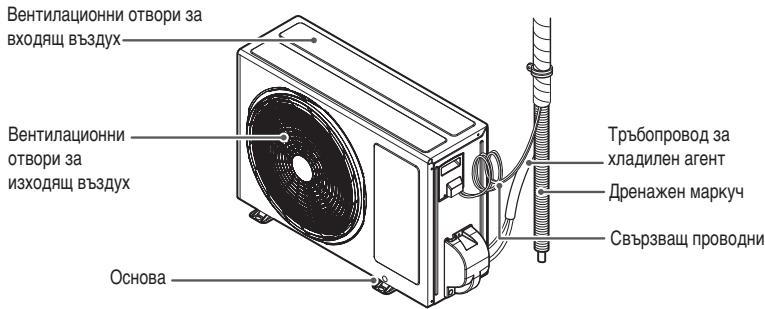
*B3aBnCmOcT OT MoJena,ФункUnTe MOraT DA 6bДТ npOMeHEn.
Haun Ha n3noJ3BaHe Ha nCTaHcIOHHOTO ynpabJeHne
Moxete da hactpoBaTe pa6oTaHa KInMaTnKa INo-JeNcH O C DnCTaHcUOnHTo UnpaBHeHne.
IoddoJnHaTacntHaDinCnpeJeOtkpneTe6yToHInTe3aOnbHNHTeHHInTeФyHKuIN.
Be3XnHNo nIcTaHnOHHo ynpaBneHne
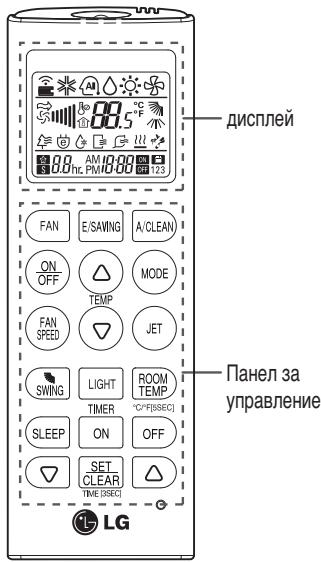
| Панел за улравлике | Ди检пел | Описане |
| FAN | Бутон 3a BEHTINATOPA : Вьздунов.TИЗЛИЗАОТ Вьт-рекшOTO ТАЮ NO наю КМ ПострахCTВОТ 6e3 Да ceПроменЯ Tempeparatypа.Tаhabьв. | |
| SLEEP | Ihr | Бутон 3a AVTOMATUCHEN "PEXIM 3A CBH"2:Здава AVTOMATUCHATA pa607a B "PEXIM 3A CBH". |
| TEMP | 88 °C | Бутони 3a Perуширание на Tempeparatypa: Perу-lipat Tempeparatypa наnomeшени.To pri ox-laxдаи пли OTONJIENHE. |
| ONOFF | - | Бутон Вкл./МЗк.::Вьлочва/ИЗКлочва зхарва-NETO. |
| FANPEED | Бутон 3a SCOKОСТ на BeHTINATOPA Na BvtpeeH-НOTо TЯLO: Perушир skopocSTТа Na BeHTINATOPA. | |
| MODE | Бутони 3a ИЗбор на pa6oTeH pexim*: ИЗборpa pa-бOTNHЯ рeximн Ha KINIMATINA. Pa607a B pEXIM Ha OXIAJDAne (Ф) / Pa607a B AVTOMATUCHEN PEXIM IINI B pEXIM Ha AVTOMATUCHA CMRAHa PhyH-KZIMITE (Ф) / Pa607a B pEXIM Ha obezBlaJXnR-BaHe(Ф) / Pa607a B pEXIM Ha OTONJIENHE (Ф) | |
| JET | P | Бутони 3a Форсирано OXIAJXDAнe/OTONJIENHE*: Повишава пли NOHIXKABA Tempeparatypa Na nome-шениTo 3a KpAtpbKперINOd OTВpeMe. |
| SWING | Бутони 3a NOcOKA Na Bv3dUnHnNnotOK: Habt-poIBa NOcOKAТа Na Bv3dUnHnNnotOK BervTKaJIHNo IINI XOpIN3OHTALNO. | |
| ROOMTEMP | 1 | Бутони 3a ИЗБЕЖДане на Tempeparatypa Na IMCПLE: ИЗБЕЖДа Na IMCПLE Tempeparatypa Na nomeшениTo. HAtnChete (ROOMTEMP) 3a 5 cekuHdi, npe-BvPheTe °C /°F. |
| ONOFF | AM ILOON | Бутон таймер: 3aДава TeKUsoTO Врeme и ча настар/CTON Na KINIMATINA. |
| A/CLEAN | Бутони 3a HabrGaци NФунКцin*: HabtrpoBa BPEMETO 3aДава Сспualинite PhyнКци. | |
| E/SAVING | Бутони 3a HabTOMATUHNo ПОчИТВА经 /Ф: 3aДeYiCSTBa pEXIM Na OXIAJDAne C ИКОHOMЯ Na eHepriY. | |
| SETCLEAR | - | Бутони 3a ZanametraBaHOr/OTmENHae: 3aДава пли OTMEнЯ PhyнКци. |
| O | - | Бутон установагаь в ИЗХODно сьctOnHIne: Yc-tAHOBЯ BAдадиЯТа Na KINIMATINA B IN3XODNo no-LOXeHme. |
| LIGHT | Бутони 3a LIGHT (OCBETEHOC): Perушир яр-KOCTTA Na DИСПLEЯ Na BvTpseHOTO TЯLO. |
*B3aBcIMoCT OToMOneI, HAnKoN FyHKuIN MoKe Da He Ce NpOdbPkaT.
NoctabAHe Ha 6aTepuInTe
Ioctabete 6aTePnITe, npEi Da n3nO13BaTe DnCTaHcIOHO HTo ynpabJIeHne. TInbT Ha n3nO13BaHnTe 6aTePn e AAA (1.5 V).
1 CbaJeTe kanaeTo 3a 6aTeepnTe.
2IocTabete HOBITE 6atePmN cye6eTe, ye+ n-noJIIOcITHe ha 6atePInTe ca npabINHOHacOeHn.
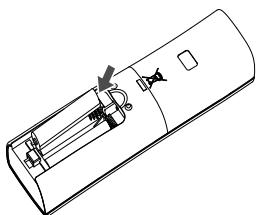
3 Cnojke Te 6baptho KaapaneTo 3a batepnte.

BENEKKA
Ako ekpaht Ha nicnne Ha nictaHOnHTo ynpabLeHne 3anOHe da n36neHnRa, cmeHete 6atePmTe.
MOnTaJHa nIbPkaJa Ha nIcTaHcNoH HOTO ynpabJeHne
3a da 3aunntte NCTaHtMOHHTO ynpaBneHHe, MOHTnpaTte NbPxaHa My Ha MCTo, KbdeTo He IonoaT dIpeKTHn CJIbH-ueBn PbYi.
1 Ⅰ36epeTe 6e3oNaCHO IeChOIOCTbHNO MRCTO.
2 Cbane 3aunthata Ieneneka OT rpb6a Ha Kytnra npedn da ro 3akaynte Ha CTehata.
3ФИКСИРаTe ДьрЖачспOMОЧТа Ha 2-Ta BИNTа, KONTO 3aВиTe 3ДраВо C OTВЕrtka, ИЛС NС NOСЛж经Te C DвОИНЗАLENBAZAл ЛЕнЕК.
4Пльз悔ETeДиСТаHиОнHOTOунравЛЕпЕВИБдржача.
Haun Ha pa6ota Ha KImmatka
3a da 3aJeCTBATE DuctahLIOHHTO ynpabHe HACOyTe ro KbM pIeEMHnKa Ha CnHn, KOITo Ce HAMpa BdoHaTatacHa KNIMATnKa.

BENEXKA
Ako ce HAcOu KbM HApKOn DpyrN eJeKToPHN yCtpoCTBa, NcTahUIOHOHOTo ynpabLeHne MOKe Da n3aDeiCTBa. He 3apBaRnTe da HacoUBaTe MCTaHIOHOHOTo ynpabLeHne KbM npEmHnKa Ha CnHaJNa Ha KInMaTnKa.
-3a npabinHaTa pa6Ota Ha nCTaHIOHHOTo ynpabLeHHe NOUcTeC MEka KbPna npedabaTeIa INpNiemnKa HA CnHAn.
OCHOBHNФУHKцИN
Oxlaackdahe Ha nOMEeHneTo
(Pa60Ta B peKIm Ha oxJaXdAnHe)
1 3a da BKNIOHHTe 3axpaHbAHETO, HATNCHEt e
2 23a da n36pepepejHMa oxnaXdaHe,HaTNCheTe HEKONKOKpaTHO (MOE).
- HaДиСплЯнHa ekрара се ИЗвекда.*
3a da 3aadaTe XeHaHaTa TempepaTpa, HATNCHeTe IJIN.
-TemnepaTyPhNtДилэзон e ot 18°C до 30°C.
3aToPnlaHe Ha NOMEeHneTo
(Pa60Ta BpeKm Ha oToJIeHne)
1 3aДа ВклочиTe 3axpaHbaHTo,HaTicHete (OFF)
2 3a da n36epeTe peXIM Ha OTOpJIeHHe,HaTnCHeTe HeKoJIOKoKpaTHO (mocc)
A B T O M a T N H O N I K L H O U C H A H K L H M a T N K A H p e d b a p n t e l h o 3 a d a d e n qac
1 HaTnCHETe
-BdoJnHaTuaCT Ha nCnIe Ha eKpaHa 3aOnuBa da npIMrBa pOKa3aHATA NO-DONY IKOHa.
PM
6:00
23a n36epTe MmHyTnTe, HATNCHe TnI IINI
3 HataHcHete SET 3a da npknIOHTe.
OTMraHa Ha 3aDaHnTa Ha TaMepa
1 13aJaN36peTe NpIeJkaUHTe HaOTMaHa 3aJaHnHaTaMepa,HaTNCHeTe ON INI OFF.
2 Hatnchete SET CLEAR
-3aДаOTMeHnTe BCnKn 3aJaHnHa TaMepa,HaTNCHeTe SETCLEAR
3aabaHa Ha,peKm 3a cbH
Из不动产ып "рекима сьн", за иклоче abTomatMuHo KJIMaTnka, korato laIrate da cnITE.
1 3a da BKNIOUHTe 3axpaHbAHeTo, HATNCHEt e
2 Hatichete SLEEP.
3 HaTnCHeTe 7ca.
4 HataHcHete SET 3a da npknIOHTe.
-B"peXMM3aCbH"HaIinCnIeHaekpaHa ce n3-BeXJa

BENEXKA
3a no-KomfopTeN cbH bpeXmIte OxnaJdane N
Obe3bIaxKHaBaHe cne1 30 MnHTn TempepaTypata
ce NOBnIaBa c 1^ n c oOE 1°C cne 0e 30 MNHyTN. TempepaTypata ce nobuaba c do 2^ ot
npEBApNTeHNo 3aJaDeHata TempepaTpa.
ПО-СЛОЖН ФУHKЦИN
KImatIKbT npednara n HAKOKo DOnbHInTeHN NocJIOXHNФyHKUIN.
A B T O M A T N U H O p e c t a p T h i p a H e n K L I M A T N K A
Korato cIe cnipahe Ha eJIeKTPO3aXpaHbAHeto KJIIMATAKbT CE BKNIOyBa NOBtOHO, Ta3n fYHKUa Bb3cTaHOBA IpeDNIHaTaa HAcTOpKa. Ta3n fYHKUa e 0pa6pnuHo 3aJaDeHa no nOpa3bnpaHe.
ДeakТВИпане Ha aВТOMaTчHOTOpecтApTиранe Ha KЛIMaTиka
1 OTBopete IInceBnKaNak.
-Повдигн electе Лкови дыгетстраима накалka.
^* B 3aBnCmOcT O T MoJena, fynKuInTe Morat Da 6bDaT pIpomeHEn.
2 HaTnCHETe 6yToHa BKn./M3Kn.II rO 3aApbXTe HaTnC-HaT B IpoDblJxHeH He 6 cekyHm.
- Ie ce nIbynI dBykpaTeH 3yKOB cIrHaJ "6n", aCBETINHHaT INdkaTOP ue npemirHe 6 nbTn.
*B3aBcIMOCOT OT moTeNa,ФyHKUInTe MoTaT Da 6bDat PnOMeHEn.
-3a da peakTbBnPaTe Ta3nФyHKnI,HATNCHeTe 6yToHa BKn./3Kn. n fo 3aDpBxTe HATNCat B npOdbJxHeNe Ha 6 cekyHn. KImMaTkBt Ye n3lbNHy DByKpATEH 3BbKOB CINHAn"BnIn" aCINHAT CBETNIEN HINikAtop Oe IpemnHRe 4 TbTn.
!BEJIEXKKA
Ako haTnchete n 3aIbpxKeTe haTnchat 6yToHa BKn./M3Kn. 3a 3-5 cekyn, BmecTo 3a 6 cekynDn, 6noBkT 1e npEbkNouH B pexHM Ha Tect B pexHM Ha Tect 6noKbT N3dyXba CnHa Bb3dyXha CTpy 3a OxnaJxDaHe B TeChHe Ha 18 MInHyT, CneI KoToe Ce Bp7a KbM 3aJaDeHOTo No nopda3bpaHae pa6pnH0 3aJaHHe.