INTENSE PURE AIR PU4010 - Air purifier ROWENTA - Free user manual and instructions
Find the device manual for free INTENSE PURE AIR PU4010 ROWENTA in PDF.

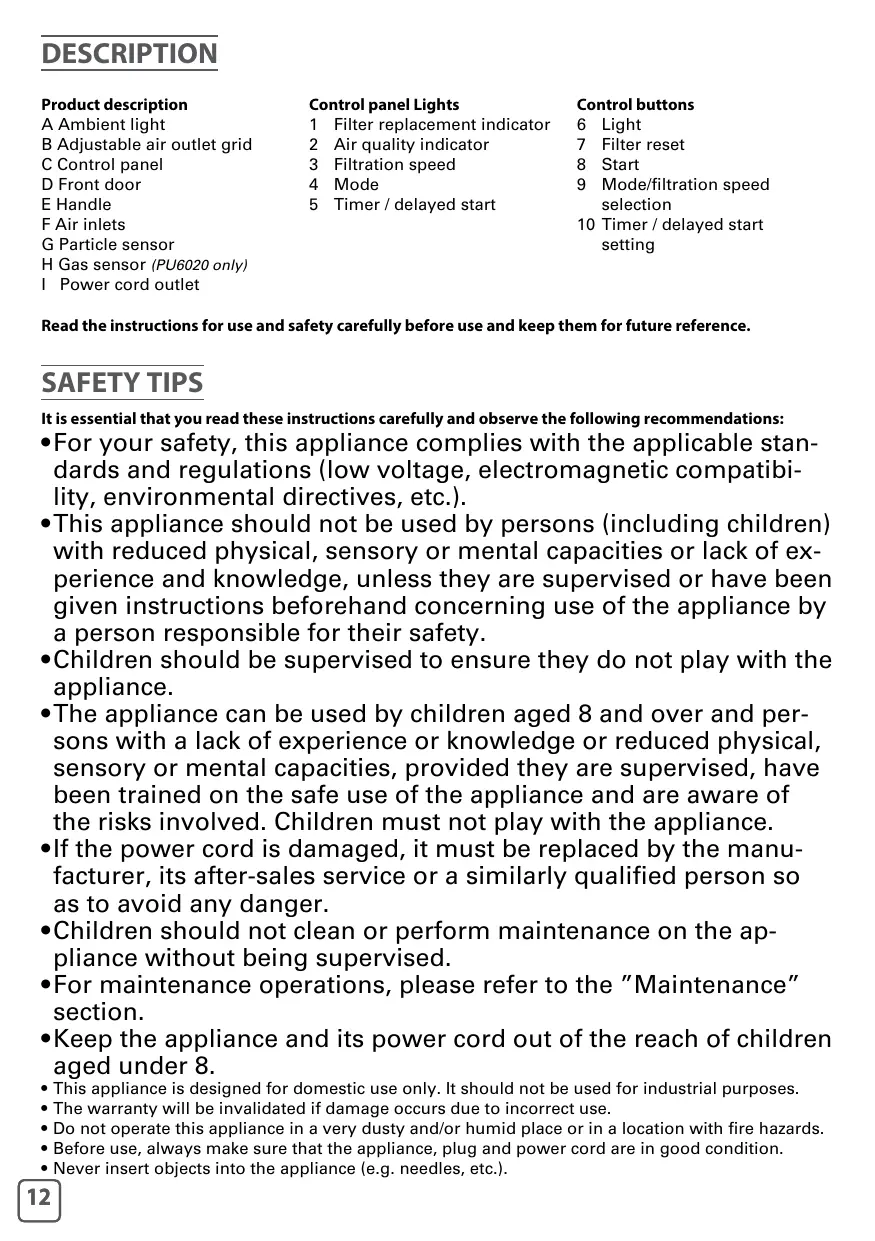


| Product type | Air purifier |
| Brand | Rowenta |
| Model | INTENSE PURE AIR PU4010 |
| Dimensions (approx.) | Height 50 cm, Width 30 cm, Depth 20 cm |
| Weight (approx.) | 5 kg |
| Power supply | 220-240 V, 50-60 Hz |
| Insulation class | Class II (double insulation) |
| Power consumption (approx.) | 35 W |
| Recommended area | Up to 35 m² |
| Filtration levels | 4: Pre-filter, Activated Carbon, Allergy+, NanoCaptur |
| Sensors | Particles (infrared) |
| Operating modes | Automatic, Night, Manual (4 speeds) |
| Air quality indicator | Light indicator: Blue (excellent), Purple (average), Red (poor) |
| Timer / Delayed start function | 1h, 2h, 4h, 8h (delayed on or off) |
| 3D Pure Air adjustable grille | Yes, manual tilt adjustment |
| Sensor sensitivity adjustment | Low, Medium, High |
| Pre-filter cleaning | Every 2 to 4 weeks (vacuum or water) |
| Activated Carbon filter replacement | Once a year |
| Allergy+ filter replacement | Every 2 years |
| NanoCaptur filter replacement | According to color change (check every 6 months) |
| Replacement filter references | Allergy+ XD6074, Activated Carbon XD6060, NanoCaptur XD6080 |
| Safety | Automatic shut-off if front door unlocked |
| Warranty | 2 years (standard) |
Frequently Asked Questions - INTENSE PURE AIR PU4010 ROWENTA
User questions about INTENSE PURE AIR PU4010 ROWENTA
0 question about this device. Answer the ones you know or ask your own.
Ask a new question about this device
Download the instructions for your Air purifier in PDF format for free! Find your manual INTENSE PURE AIR PU4010 - ROWENTA and take your electronic device back in hand. On this page are published all the documents necessary for the use of your device. INTENSE PURE AIR PU4010 by ROWENTA.
USER MANUAL INTENSE PURE AIR PU4010 ROWENTA
ROWENTA INTENSE PURE AIR
PU4020XX / PU6020XX
www.rowenta.com
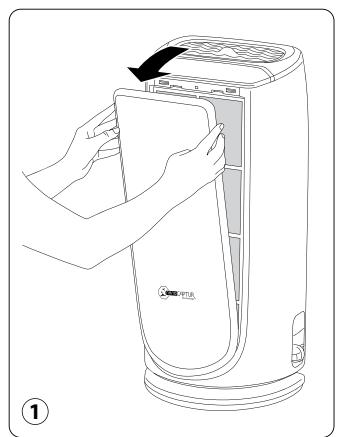
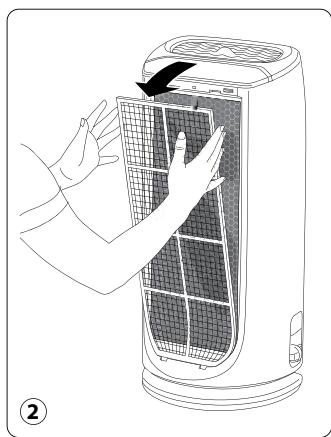
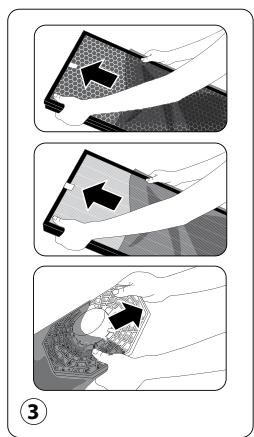
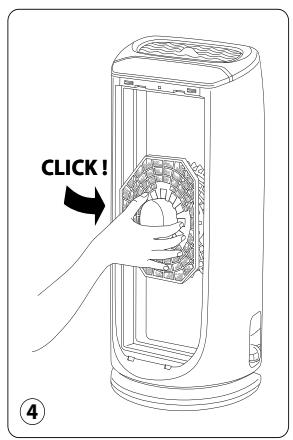
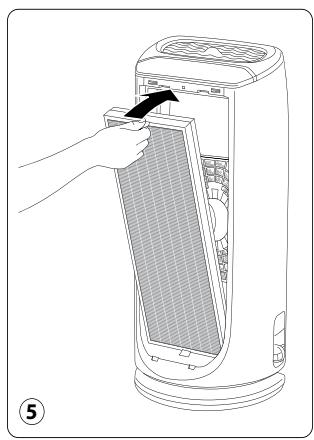
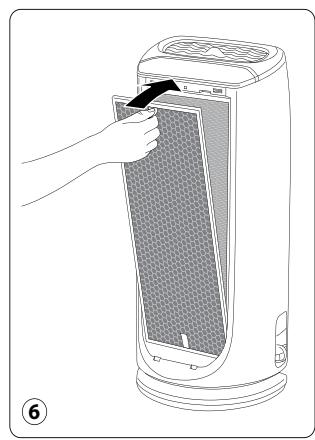
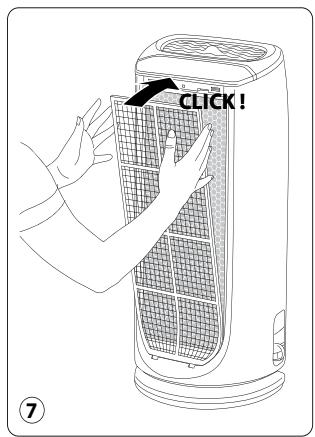
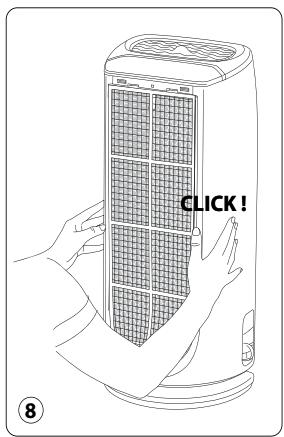
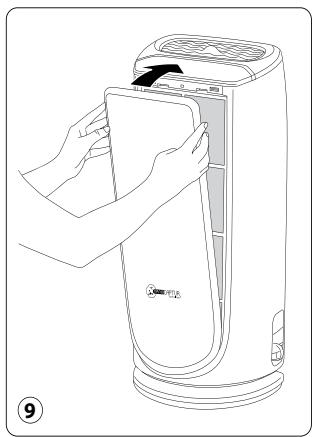
Montage/Demontage des Filtres — Demontage/Neumontage der filter — Demontage/Neumontage der filter — Instalacion/Desmontaje de los filtres — Pa3rno6bae/crno6bae ha qniltpn" — Dezasamblarea/ reasamblarea filtrlor — Demontaz / opetovne sestaveni filtru — Zdejmowanie/Ponowne zakladanie filtrów — demontax/Montax qinbtpib — Rimozione / Installazione dei filtri
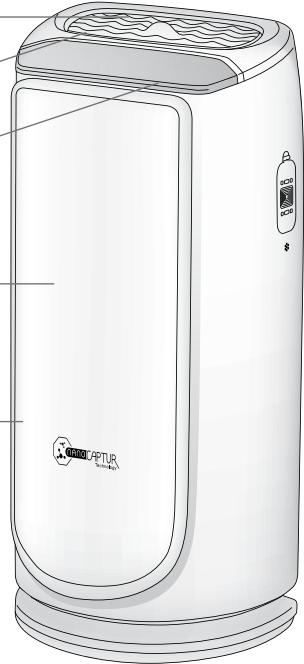
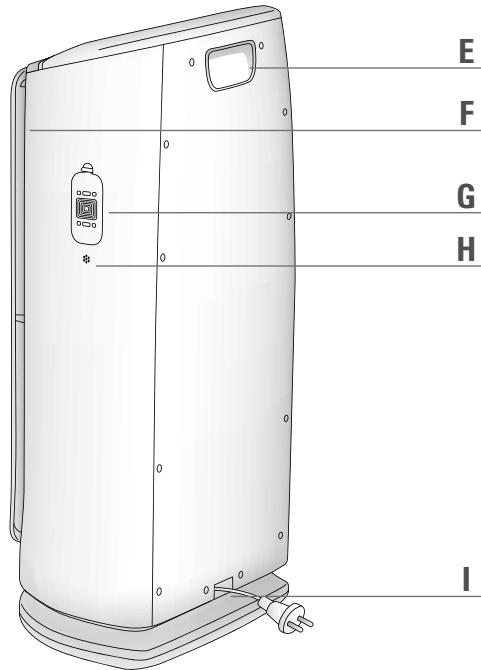
Descriptif Produkt
H Gas sensor (PU6020 only)
I Power cord outlet
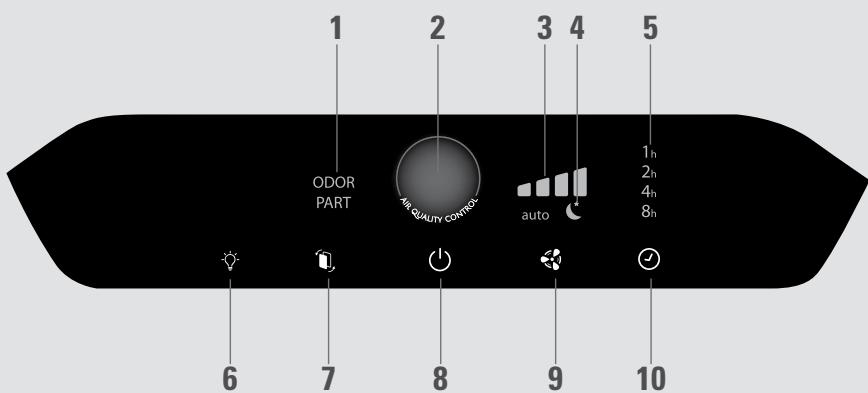
Control panel Lights
1 Filter replacement indicator
2 Air quality indicator
3 Filtration speed
4 Mode
5 Timer / delayed start
Control buttons
6 Light
7 Filter reset
8 Start
9 Mode/filtration speed selection
10 Timer / delayed start setting
Read the instructions for use and safety carefully before use and keep them for future reference.
SAFETY TIPS
It is essential that you read these instructions carefully and observe the following recommendations:
- For your safety, this appliance complies with the applicable standards and regulations (low voltage, electromagnetic compatibility, environmental directives, etc.).
- This appliance should not be used by persons (including children) with reduced physical, sensory or mental capacities or lack of experience and knowledge, unless they are supervised or have been given instructions beforehand concerning use of the appliance by a person responsible for their safety.
Children should be supervised to ensure they do not play with the appliance. - The appliance can be used by children aged 8 and over and persons with a lack of experience or knowledge or reduced physical, sensory or mental capacities, provided they are supervised, have been trained on the safe use of the appliance and are aware of the risks involved. Children must not play with the appliance.
- If the power cord is damaged, it must be replaced by the manufacturer, its after-sales service or a similarly qualified person so as to avoid any danger.
Children should not clean or perform maintenance on the appliance without being supervised. - For maintenance operations, please refer to the "Maintenance" section.
- Keep the appliance and its power cord out of the reach of children aged under 8.
- This appliance is designed for domestic use only. It should not be used for industrial purposes.
- The warranty will be invalidated if damage occurs due to incorrect use.
- Do not operate this appliance in a very dusty and/or humid place or in a location with fire hazards.
- Before use, always make sure that the appliance, plug and power cord are in good condition.
-
Never insert objects into the appliance (e.g. needles, etc.).
-
Do not pull on the power cord or the appliance, even to unplug it from the wall power outlet.
- Unroll the full length of the cord before use.
VERY IMPORTANT
EN
- Do not cover the air inlets or the outlet grid.
- Do not touch the appliance with wet hands.
- Never allow any liquid to enter the appliance.
- Never use the appliance in a humid place.
- Never use the appliance close to a heat source.
- Never place anything on the appliance or insert anything into it.
- Do not use the appliance close to flammable objects or products (curtains, aerosols, solvents, etc.).
- Never use the appliance in an inclined or horizontal position. Place the appliance on a flat, stable surface.
- In the case of prolonged absence: switch the appliance off using the button (8) and unplug it.
- Switch off and unplug your appliance before moving it.
- Unplug the air purifier during assembly and cleaning.
OPERATING PRINCIPLE
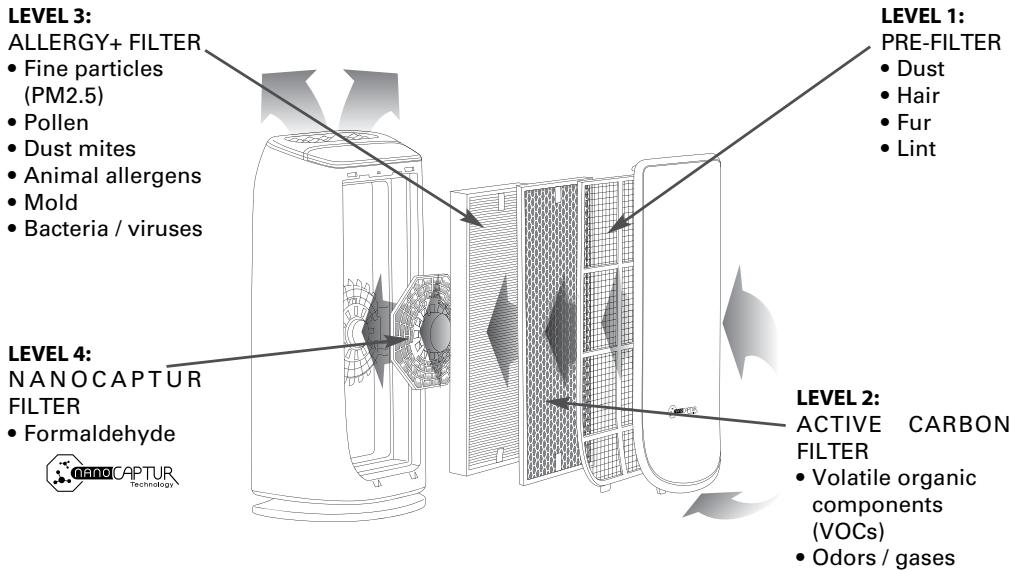
"The new Intense Pure Air purifier from Rowenta enables you to breathe up to 99.99% pure air in your home and protect your health with 4 filtration levels as described below. Each level is essential and traps characteristic pollutants:
In addition to using your Intense Pure Air purifier, here are some tips on how to improve the quality of your indoor air:
- Ventilate the rooms for at least 10 min. every day, in summer and winter
- Maintain your ventilation system
- Limit the use of household products
- Do not smoke indoors
- Avoid home fragrances, incense sticks, scented candles, etc.
- Ventilate whenever any work is being conducted in your home and for several weeks afterwards
- Avoid green plants that are allergenic or need frequent watering
WHERE TO INSTALL THE APPLIANCE
Place the purifier on a flat, stable surface in the room requiring treatment.
To allow the air to circulate freely, avoid placing the appliance behind curtains, below a window, item of furniture or shelf unit, or close to any other obstacle, and leave at least 50~cm of free space on each side of the appliance.
BEFORE USING THE APPLIANCE FOR THE FIRST TIME
Make sure that the plastic packaging protecting the filters has been removed before using the appliance.
Also make sure that:
- The voltage of your electrical installation corresponds to the one indicated on the appliance.
- Your appliance can be used with a power plug without an earth connection. It is a class II appliance (double electrical insulation),
- The appliance is positioned in the house as described above,
- The air inlet and outlet grids are completely unobstructed,
- Ensure the 4 filters and front panel have been correctly installed (see section titled filter assembly/dismantling paragraph).
This appliance is fitted with a device that automatically prevents it from operating if the front door is not correctly assembled.
Inserting and replacing the filters
This appliance is equipped with 4 types of filters:
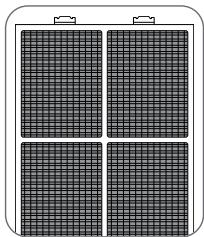
Pre-filter
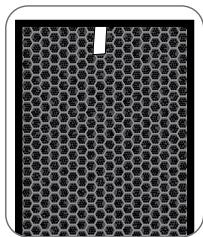
Active carbon filter
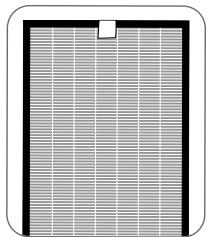
Allergy+filter
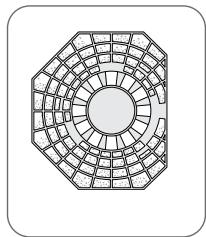
NanoCaptur filter
NB: For optimum performance of the appliance, only use filters provided by ROWENTA.
To replace the filters, follow the instructions in the section « Disassembling/Reassembling filters »
Please note: certain filters may emit a temporary slight odour, due to the transport and storage conditions.
SWITCHING THE APPLIANCE ON
Connect the power cord and press the start button (8).
Your appliance will be preset to automatic mode the first time you turn it on.
Thanks to its infrared particles sensor and its gas sensor (model PU6020 only), it detects the level of pollution in the room and automatically adjusts the filtration speed accordingly.
A light changes color to indicate the quality of air in the room.
| Air quality | Color of light | Filtration speed (in auto mode) |
| Excellent | Blue | |
| Average | Purple | |
| Poor | Red |
EN
SETTING THE POLLUTION SENSORS
The appliance is preset to medium sensitivity.
If the air quality indicator remains:
-
poor after 2 hours in operation although the air seems to be purified
-
excellent for more than 1 hour although the air seems to be polluted
you can adjust the sensor sensitivity as follows:
- When the air purifier is off, hold down the filtration speed setting button for 2 seconds:
- Set the sensitivity by briefly pressing the filtration speed setting button:"
| + Blue | + Purple | + Red |
| Low sensitivity | Medium sensitivity | High sensitivity |
- Select high sensitivity if the air purifier indicates excellent air quality for more than 1 hour although the air seems to be polluted.
- Select low sensitivity if the air purifier continues to indicate poor air quality even though it has been operating for more than 2 hours and the air seems sufficiently purified.
- The new setting is applied if no button is pressed for 10 seconds.
OPERATION
START
Briefly press this button to switch the air purifier on or off.
MODE/FILTRATION SPEED SELECTION
Automatic: In this operating mode, the filtration speed automatically adjusts according to the air quality detected by the particles sensor and the gas sensor (model PU6020 only). This mode is recommended for general use.
Night: The filtration speed of your appliance is adjusted for a whisper quiet air flow during the night. The light intensity of the appliance is also reduced. If pollution is detected, the filtration speed increases slightly to purify your air but remains quiet to avoid disturbing your sleep.
Manual: In this operating mode, you can manually select 1 of the 4 filtration speeds.
LIGHT
You can change the light intensity of the appliance as you wish or according to the time of day.
| Press | Ambient light | Air quality indicator | Control panel |
| 1 | Light up | Light up | Light up |
| 2 | Moderate light | Moderate light | Moderate light |
| 3 | Off | Moderate light | Moderate light |
| 4 | Off | Off | Moderate light |
TIMER / DELAYED START
If the appliance is on: you can use this button to define the operating duration. Briefly press the button to select the number of operating hours desired (1, 2, 4 or 8) and the appliance will automatically turn off at the end of the selected period.
If the appliance is off: briefly press the button to set the appliance to turn on in a certain number of hours (1, 2, 4 or 8).
3D PURE AIR FUNCTION (adjustable grid)
You can adjust the position of the air outlet grid manually, as desired. For an optimum, even flow of purified air in the room, set the angle to 45^ ; for maximum comfort, set the angle to 90^ .
MAINTENANCE
Always switch the appliance off with the button (8) and unplug it before conducting any maintenance operation.
You can clean the appliance with a slightly damp cloth.
IMPORTANT: Never use abrasive products which could damage your appliance's appearance.
FILTERS
| Filter | Action | Cycles |
| Pre-filter | Clean | Every 2 to 4 weeks |
| Active carbon filter | Replace | Every 12 months |
| Allergy+ filter | Replace | Every 2 years |
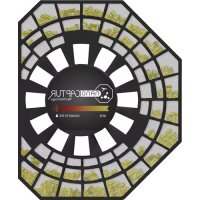
| NanoCaptur filter | Replace | Color changing (see Color chart on filter) |
This data is based on an average use of 8 hours per day at speed 2.
The recommended frequency for cleaning and replacing the filters may vary depending on the duration of use and the operating environment.
- A "PART" light indicates when the particle filter needs to be replaced.
The 'Odor' light display indicates when the carbon filter needs replacing. - The NanoCaptur filter contains translucent granules which change color according to the formaldehyde absorption rate. Refer to the color chart on the inside of the panel or the filter itself to establish the filter saturation rate.Once the saturation rate has reached its maximum, the filter must be replaced. You have to check the filter saturation rate every six months.
- The pre-filter can be re-used: remove the dust using a vacuum cleaner or wash with water.
CAUTION:
- The appliance's efficiency can be reduced if the pre-filter is not cleaned regularly.
- Never use a pre-filter that is still damp.
-
The pre-filter is the only filter which can be re-used and washed with water. The particle, NanoCapture and active carbon filters cannot be cleaned and re-used. Never wash with water.
-
To replace the filters, follow the instructions in the section « Disassembling/Reassembling filters »
Your replacement filters are available under the following codes:
| Filtre | Code PU4020 | Code PU6020 |
| Allergy+ filter | XD6074 | XD6077 |
| Active carbon filter | XD6060 | XD6061 |
| Nanocaptur filter | XD6080 | XD6081 |

IMPORTANT: Resetting the filters
The reset light flashes when a filter needs to be replaced. Once the filter has been replaced, hold down the reset button for 2 seconds.
Forced reset:
If you have replaced a filter before its end of life, force the reset of the filter replacement cycle:
- Hold the reset button for 2 seconds.
- Press the reset button briefly to select the filter you have changed.
- After selecting the filter to reset, hold the reset button for 2 seconds. The electronic meter is then reset.
- If no button is activated for 10 seconds in forced reset mode, the reset mode is canceled.

- Avoid handling used filters if you suffer from allergies or asthma.
- Wear gloves when changing the filters, or wash your hands well afterwards.
- Put used filters directly into a closed, air-tight bag before throwing them away to avoid spreading pollutants.
POLLUTION SENSORS
The particles sensor and gas sensor (model PU6020 only) need to be cleaned regularly (every 2 months) and appropriately.
Make sure you turn off and unplug the appliance before cleaning the pollution sensors and follow the recommendations below:
- Clean the air inlet and outlet using a soft brush or cloth.
- Open the sensor cover located on the right-hand side of the appliance.
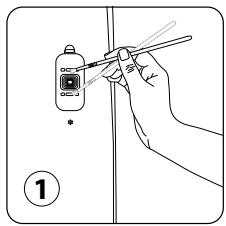
- Lightly wet a cotton swab and remove any dust from the lens and the inlet/outlet. Wipe using a dry cotton swab.
- Clean the gas sensor using a soft brush or vacuum cleaner.
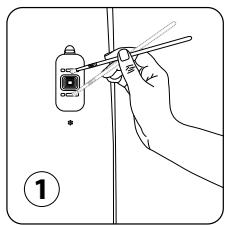
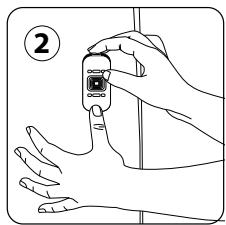
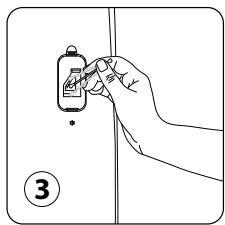
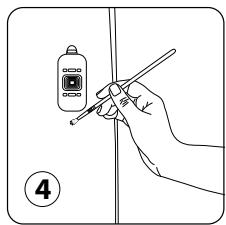
IMPORTANT:
- Never use a detergent or metal object to clean the sensors.
- The efficiency of the sensors may be reduced if not cleaned regularly.
- Cleaning frequency varies depending on the operating environment of the appliance. If it is used in a dusty environment, clean the sensors more frequently.
When you are not using the appliance, store it in a cool, dry place.
IN THE EVENT OF A PROBLEM
- Never dismantle your appliance yourself. A poorly repaired appliance can cause risks for the user.
- Check the troubleshooting table below before contacting an approved Service Center:
| Problem | Check | Solution |
| The appliance will not switch on. | Is the power cord connected? | Connect the power cord to a plug with the correct voltage. |
| Are all the display elements off? | Press the start button and select the required function. | |
| Is there a power outage? | You can use your purifier once the power turns on again. | |
| Is the front door closed? | Close the front door properly. | |
| The air flow does not change automatically. | Is the appliance in manual mode? | Select the correct operating mode. |
| The flow is a lot weaker than before. | Does the filter need to be cleaned or replaced? | Check the filter cleaning and replacement frequencies and clean/ replace the filter(s) if necessary. |
| There is an unpleasant smell coming from the air outlet. | Does the filter need to be cleaned or replaced? | Check the filter cleaning and replacement frequencies and clean/ replace the filter(s) if necessary. |
| The air quality light does not change color. | Is the sensor lens covered with dust? | Clean the sensor lens. |
| Does the light still indicate poor air quality? | Set the sensor sensitivity to «low» or «medium». | |
| Does the light still indicate excellent air quality? | Set the sensor sensitivity to “high” or “medium”. |
WARRANTY
Contact an approved Service Center if:
- your appliance has been dropped
- your appliance or its power cord is damaged
- your appliance is not working properly
LET'S HELP PROTECT THE ENVIRONMENT!

① Your appliance contains valuable materials which can be recovered or recycled.
Leave it at a local waste collection point or take to an approved service center so that it can be processed.
Produktbeschreibung
A Stimmungslicht
WAAR HET APPARAAT TE PLAATSEN?
INSCHAKELEN VAN HET APPARAAT
CbBETN3ABe3OJNACHOCT
Ot oco6eHa BaXnOCT e da npOyTeTe HactoIuTe NcHcTpyKuIN BHNMaTeHNO n da cna3BaTe CneDnTe npenopbkn:
- 3a Baша 6e3oNaChOcT, To3n ypeJ OTROBapr Ha npINIOxIMnTe CTAHdApTn n peRJaMeHTn (ДиpeKtNBITE 3a HnCKO NaPpeXeHne, eJIeKTpOMaRHTHa CbBMeCTmOcT, OKOJHa CpeJa N dp.).
To3n ypei cIeIbA da He ce nI3noI3Ba OT Xopa (BKJIIOUHTeJIHO deca) C HamaJIeHn fN3nueCKn, CETNBn IIN yMCTBeHn CnOCO6HOCTn IIN C IINCa Ha ONIT N 3HaHnI, OCBeH aKO He 6bDaT Na3nPaBaHn IIN INCTpyKTIpaHn OTHOcHO yNoTpe6aTa Ha ypeHa OT IInCe, OTROBOPHO 3a TExHaTa 6e3OnaChOCT.
-ДeцаТТрЯБаДаСеНбЛЮДаВaT,ЗаДаНсИграТСMaшинHaTa.
-Уретьт може за се използва OT Deца На Вьзразсг 8 roДии и по�елм, KОТTO HЯМAT ONNT ИИN 3HAня ИИN TaKINBA C HAMaleHInI3nueckn, CetNBи ИИN yMCTBENCno6HocTN,При уСLOВпe,ЧЕМ e ПOKaЗано КА Дд ИЗПOL3ВaTуpeда 6e3ОпаСнOи са наясно cппсьшte рисков.ДeцаТ He TprбВа Да си urpaTс урета. - Ako 3axpaHbauT Ka6eI e nOBpeJe, 3a da n36eHte BCaKbIn pNCKOBe, TOn Tp8Ba Da 6bDe CMeHeN OT npON3BOUnteJI, OT cepBn3a 3a rapaHcNoHNO O6CJyXBaHe Ha npON3BOUnteJI uIN OT JInCe Cbc CXoJa KBaIIΦnKaZn.
-ПодлрьжkaТи почстваНTo Ha урета He 6иВа дa ce ИЗВьршВaT Oпда сeЗнДзор. -
3a noДьржаши DeHocTи, moJia, pa3rIeJaIte pa3dJe„NoДрьжka".
-ДрьжTe ypeDAи HerOBn3axpaHbAaKabEn N3BbN O6cera Ha Deca POn8-roDnSHA Bb3pact.
To3n ypeI e npedna3haeH 3a ynoTpe6a cAmo B domaunu ycnoBna. He 6n Tp8BaNo da ce n3no3Ba 3a npofoecnoHaHn ueiN. -
Tapauneta cneBa da ce anylnpa, ako ce noaBn nobpea nopadn Hnnpabnilha ynoTpe6a.
- He n3noI3BaIe To3n UpeB I ppeKoMEpHO npaHIO n/IIIN BnaXHO MAcTO IIIN Ha MAcTO, KbJeTO mMa ONaCHOCT OT noJap.
- Ппеси улnotреба виаги ce уberяbaite, ue ilncelbT ha ypea n herobnT 3axpaHbau Ka6e n c B n3npabHo CbCTOHHie.
- HnKora He BkapBaIte npedmetu Bypea (HanpImep ngnn n dp.).
- He nbpnaite 3axpaHbauinja Ka6en nIu ypeDa, dOpu n 3a da ro n3KJIouHTe OT KOHTaTa.
-Преши уnotpe6а разипту сени kaбен.
MHOTO BAXKHO
- He nokpmbai Te BxOda 3a Bb3dUx IIN peWTeKaTa Ha n3XoDa.
He nuaaTe y
Принон НА РавORA
,HOBnAT Intense Pure Air ot Rowenta Bn daBa Bb3MOXHOCT da dniatae 99.99% uNCT b3dUx y doma n ce rpnKz 3a3dpabeTo Bn c 4 HnBa Ha fHITpnpaHe, KaKTo e OINCAHO no-dony. BcKaKO HnBO e BaxHo n yIaBx xapaKTePHN 3Ambpcnteni:
HMBO3:
Φπtpb ALLERGY+
ΦπΠΤbР3aΦnHuaCTnU (PM2.5)
- Poiner
Akapn
KINBOTNHCKNAleprenH
- Myxbl
BakTeepu/BnpyCn
HMBO4:
TANMEP/OTLOXEH CTAPT

Ako ypeBt E BkIouen: MoKeTe Da n3nON3BaTe To3n 6yToH, 3a Da OnpeJenIte npOdbJnxTEnHOCTTa Ha pa60ta. 3a KpaTko HataNCHete 6yToHa, 3a Da n36epTe eJHo cncIo OT JeJahnte 6pOu cacoBe Ha pa60ta 1, 2, 4, nIn 8) uypeBt ABTOMaTHUHO Ie Ce n3KJIouv B KpaR Ha n36paHnI nepoIod.
Ako ypeBt e n3KJIoueH: 3a KpaTko HaTnCHeTe 6yToHa, 3a da Na HactpOnTe ypeJa da Ce BKJIouH cIed onpeDeJeH 6poi YacOBe (1,2,4 nII 8).
Ako Cte cmEHnI Daen HcNtbp npedn Kpa Na JxN3HeHMy UKbI, Tp6Ba Da Hynipate pInHynteHNO cKbla 3a CMHa Ha HcNtbpa:
- 3aJpBxTe 6yToHa 3a HynipaHe HATnCHa 3a 2 cekyHnI.

- HatncheTe 6yToHa 3a HynipaHe 3a KpaTko, 3a da n36peTe fHnIbpbT, KOITo CMeHnII.
- CnE kato n36epete fHnTbpa, KOIto Da hynipaTe, HATNCHe TE 3aJpBXTe 6yToHa 3a HynipaHe 3a 2 cekyni. CnE TOBA eNEKtPOHNrT 6poa e Bue y HynipAn.
- Ako B npoIbIjKeHne Ha 10 cekyHn B pexkM Ha npiHydnteHNO HynipaHe He HATNCHEte HNKaKbB 6yTOH, pexkmbT 3a HynipaHe ce OTMeHn.

"CbBETN 3A CMRAHA HA ΦNJTPNTE"
- I36aBaaTe n3nOJ3BaHTo Ha yNOTpe6eHN 0nTpu, aKo cTpaTaTe O T aNEprnn nn actMa.
Hocete pBkabu, KORATO CMeHATE fNITPHTI NIN CN N3MBAITEpbueTe do6pe cneToba.
IocTabaIte n3nol3BaHHTe fHITPN DnpeKTHO B nltbTHO 3aTBoPeHa TOp6a Ipei Da rN i3- Xbplnte, 3a da N36erHeTe 3ambpcBaHe.
CEH30PN 3A 3AMbPCBAHE
Cen30pnte 3a fHn uactu n 3a ra3 (cAmO npu moJe PL6020) Tpa6Ba da ce nouchTBaT peoBHO n npaBnHO (Ha BCEKn 2 Meceua).
Ipeu da nouchntte 3ambpcenhte ceh3opn ce ybepete, ye cte n3KIOUynypea ot 6yToHa n OT KOnTaKaTn CneBDAe IpenOpbknte no-dony:
- Nocntete OTBOpTe 3a BXoN nI3XoN Ha Bb3duHnTa CTpy, KaTo I3NoJ3BaTe MeKa YeTka IIN Kbpna.
- OTbOpTe KaNaKa Ha ceH3Opa, KoITo Ce haMnPa OT JЯсHaTa cTpaHa Ha ypea.
- Лекно habлажн electamуна Крпа и пемaxн electрахо.T leшати OT OTbopa 3a BXOD/IN3XOD Ha Bb3duhataстуя.ИЗБршete CBС cuxa namуна Крпа.
4.Почиртete ceнзера за ra з с мека четка плпрахocмkaчka.
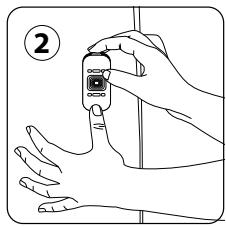
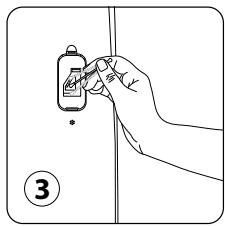
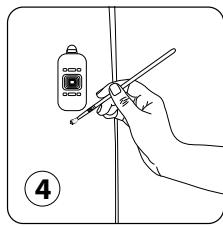
BAXHO:
- HnKora He n3noJ3BaIe Te nouchTbaa npenapat nn MeTaIIH npeMeTn 3a nouchTbaHe Ha ceH3OpTe.
- EfeKtNBHOCTT ha ceH3Opnte moKeJaHaMaJee, aKO He ce noYCTBaT peoBHO.
- YeCTOTATA Na NOUcTBaHe 3aBcN O T pa6OHTaTa cpeHa ypeHa. Ako ce n3non3Ba B npaSHA cpeHa, NOUcTBaIte CEH3OpIne No-YecTo.
CbXPAHEHNE
Korato He n3non3BaTe ypeDa, cxbxaHbAaTe ro Ha xlaHNO u cyxo MxCTO.
B CJIyUaH HA HEN3INPABHOCT
- HnKora He pa3rIIO6raBaiTe ypeDa cami. HenpabuJIHO peMOHTnpaHnT ypeD MoKe da Kpne pucKOBe 3a non3BaTeJIte.
- Hanpabete cnpabka c Ta6nlaata no-dolny 3a OTCTpaHbAhe Ha Heu3npaBHOCTn, npedn da ce CbpxKeTe OToPun3panc cepBn3eH ueTbp:
| ПюбLEM | Пюверka | Рeushevne |
| Урémonг не се вклочва. | Зхранвашил т кабел сбързан ли e? | Вклочete зхранвашил т кабел в Контакт с павильноу нарөжениe. |
| Изкоочени ли са BCочки сеlementи по дисп肺炎? | Натишete 6утона засторanie и ИзBERETe Heo6xOДмалота Функция. | |
| Има ли спиран в Велковозхардану? | Можete на ИзЮлбATEВашияпучим врүлүдүлүдүлүдүлүдүлүдүлүдүлүдүлүдүлүдүлүдүлүдүлүдүлүдүлүдүлүдүлүдүлүдүлүдүлүдүлүдүлүдүлүдүлүдүлүдүлүдүлүdүлүдүлүдүлүдүлүдүлүдүлүдүлүдүлүдүлүдүлүдүлүдүлүдүлүдүлүдүлүдүлүдүлүдүлүдүлүдүлүдүлүдүлүдүлүдүлүдүлү徳ы. | |
| Преднatable вратчка засторега ли e? | Затьогет рpondа вратчka добpe. | |
| Вьзduшнилnotok не се сmedеля AVTomatчho. | Урémonг в рьчен реким ли e? | Изbergetе радхдшни реким на pa60ta. |
| ПOTOKгЕ много по-stа6 отпеди. | Филтырьт лма ли hyжда от почесваце ли помmaну? | Пюверete чостotа за почесваке и Смаян на Филтырь и почестete/Смehete Филтыр(филтупente), akо e Heo6xODIMO. |
| Има Нэнригта мирпзma, Идвашиа от ВьзduхооТвoda. | Филтырьт лма ли hyжда от почесваце ли помmaну? | Пюверete чостotа за почесваке и Смаян на Филтырь и почестete/Смehete Филтыр(филтупente), akо e Heo6xODIMO. |
| ПюбLEM | Пюверka | Решения |
| С Beetлин就近 Иndикатор 3а качевто на Вьздуна не поменяцета с. | Има лу prax по леса та на сенида? | Почистете леса та на сенида. |
| С Beetлин就近 Иndикатор оке лу пokedзба Лошо качевто на Вьздуна? | Настойу чьвстовелноста на сенида на „ниска“ „лл“, „среда". | |
| С Beetлин就近 Иndикатор оке лу пokedзба OTлчно Качевто на Вьздуна? | Настойу чьвстовелноста на сенида на „ниска“ „лл“, „среда". |
TAPAHUN
CbpxKeCe c otOpn3npaH cepBn3eH zentb,p, ako:
- ypeBt Bn e 6nI n3nycHaT Ha 3emrTa
- ypeblBn nll 3axpaHbauJMy Ka6eI ca noBpeHn
- ypeDbT Bu He pa6oTu, KaKTo Tp8Ba
HEKA IOMOΓHEM 3A OПАЗBAHETO HA OKОЛHATA CPEДА!

① Baanayt ypeI cBdBypa ZeHHMaTePnaiN, KOITOMoRaT da Ce Bb3TaHOBAt NJI peuKlnpaT.
OCTaBete ypeDa B MeCTHnI pyNKT 3a Cb6IpaHe IINI rO 3aHeCte B OToPun3IpaH cepBUN3eH cHTbp, 3a Da MoKe da 6bJe 06pa6oTeH.

m = 311
W PRZYPADKU PROBLEMOW
TAIMEP/BIДКЛАDEHINCTAPT
KoII npIaNad yBIMKHeHn: Bn MOKeTe BnKOpNCTOByBaTn 1IO KHOKNy IJRA Bn3HaueHH TpNBaIocti pO6OTn. KOporTKo HATNCiTB KHOKNy, 106 Bn6paTn 6aKaHy KInbKiCTb rOdIHpo6OTn (1, 2, 4 a60 8).IpnIaNad ABTOMaTHNO BIDKJIouHTbcra HapnpkiHci Bn6paHoro nepioNy.
Koln npnilad BmKHeH: KOPOTKO HaTNCiTB KHOJKy, 06 yBIMKHyTN npnilad npotraom neBHOi KjIbKOcTi roHN (1,2,4 a6o 8).