
NUTRITAB - Kitchen scale TERRAILLON - Free user manual and instructions
Find the device manual for free NUTRITAB TERRAILLON in PDF.



| Brand | TERRAILLON |
| Model | NUTRITAB |
| Product type | Connected kitchen scale |
| Power supply | 3 AAA batteries (not included) |
| Connection | Bluetooth to smartphone (iOS 8.0+ / Android) |
| Display | LCD, displays weight and Bluetooth icon |
| Measurement units | g, ml, oz, fl. oz (switchable via M/UNIT button) |
| Tare function | Yes (automatic zero reset with ON/OFF/TARE button) |
| Timer | Up to 199 minutes, adjustable in minutes and seconds |
| Dedicated app | Wellness Coach - Health (free on App Store and Google Play) |
| Main functions | Connected weighing, barcode scanning, manual entry, history, nutritional journal |
| Care and cleaning | Damp cloth only; do not use detergents |
| Safety | Do not put in dishwasher or microwave |
| Warranty | 2 years against material and manufacturing defects |
| Consumer service | 0 826 88 1789 (France), serviceconsommateurs@terraillon.fr |
Frequently Asked Questions - NUTRITAB TERRAILLON
User questions about NUTRITAB TERRAILLON
0 question about this device. Answer the ones you know or ask your own.
Ask a new question about this device
Download the instructions for your Kitchen scale in PDF format for free! Find your manual NUTRITAB - TERRAILLON and take your electronic device back in hand. On this page are published all the documents necessary for the use of your device. NUTRITAB by TERRAILLON.
USER MANUAL NUTRITAB TERRAILLON
iPod® Touch 5th generation

iPad 3& + (iOS 8.0 &+)
iPad® Mini & + (iOS 8.0 & +)

Android 4.3 & +
Bluetooth Smart 4.0 / Bluetooth Smart Ready
Smartphone only / No tablet

Terraillon®
WELLNESS COACH

Download on the
App Store

GET IT ON
Google Play


iPhone is registered trademark of Apple Inc.
Android is a trademark of Google Inc.
The Bluetooth® word mark and logos are registered trademarks owned by Bluetooth SIG, Inc.
Other trademarks and trade names are those of their respective owners.
NUTRITAB
EN TERRAILLON CONNECTED NUTRITIONAL SCALE INSTRUCTION MANUAL 4
FR BALANCE NUTRITIONNELLE CONNECTÉTERRAILLON NOTICE D'UTILISATION 9
NL TERRAILLON VOEDINGSWAARDE WEEGSCHAAL
HANDLEIDING 14
IT BILANCIA NUTRIZIONALE COLLEGATA TERRAILON MANUALE DI ISTRUZIONI 19
ES BALANZA NUTRICIONAL CONECTADA TERRAILLON MANUAL DE INSTRUCCIONES 24
DE VERBINDBARE DIATETISCHE KUCHENWAAGE TERRAILON BEDIENUNGSPANLEITUNG 29
PT BALANÇA DE NUTRIÇÃO CONNECTADA TERRAILLON
MANUAL DE INSTRUÇÉS 34
Thank you very much for selecting the Terraillon connected nutritional scale NUTRITAB.
FIND MORE INFORMATION ON
http://www.terraillon.com
PRODUCT OVERVIEW

UNITS & MINUTES (TIMER)
FIRSTUSE
A Download the Terraillon Wellness Coach - Health application.

Terrailion. WELLNESS COACH

Download on the App Store

GET IT ON Google Play
B Create your account by following the instructions on the application.
Note: If you already have an account on Wellness Coach - Health or Wellness Coach - Sleep app, please login with your login details. In that case, refer to the section "HOW TO FILL IN MY NUTRITION DIARY?"
C When account creation is over, the application asks you which connected product Terraillon you want to use: tap "Yes", then "Nutritional kitchen scale".
Note: NUTRITAB does not need a Bluetooth pairing process with your Smartphone. You will be able to use it directly by following the next installation steps.
D Make sure the Bluetooth feature is enabled on your smartphone.
E In the Wellness Coach-Health app, tap the "ADD FOOD" tab.
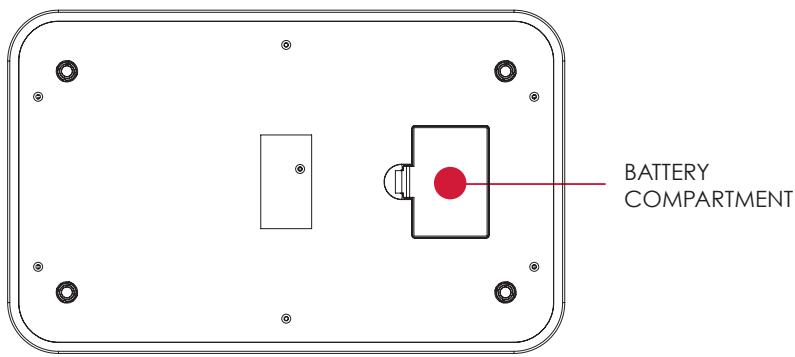
F Insert the batteries (3xAAA) into NUTRITAB.
G Place NUTRITAB on a hard, flat surface.
Press the NUTRITAB ON / OFF button: a Bluetooth logo appears on the NUTRITAB screen if the connection is established.
1 Your NUTRITAB is automatically connected to your Wellness Coach - Health app and is ready to use.
HOW TO FILL IN MY NUTRITION DIAGNOSIS?
There are four ways to fill in your nutritional dashboard: adding food from our database, scanning the barcode of a product, manually entering food nutritional information or by using the already used food history.
→ ADD FOOD FROM OUR DATABASE:
A Make sure the Bluetooth feature is enabled on your smartphone.
B In the Wellness Coach-Health app, tap the "MY DIET" tab and then on "ADD FOOD" tab.
C Place NUTRITAB on a hard, flat surface.
D Press the NUTRITAB ON / OFF button: a Bluetooth logo appears on the NUTRITAB screen if the connection is established.
Place the food on the NUTRITAB kitchen scale. The weight will be shown on the LCD screen and in the Wellness Coach - Health app.
F Fill in the food you are weighing: the app gives you its nutritional values.
6 Tap "NEXT".
H Fill in the day and time you ate the food.
Note: The automatically assigned amount to the user corresponds to the weight measured previously. If you wish, you are still able to manually change it or tap to reuse NUTRITAB.
1 Tap "VALIDATE".
→ BARCODE SCAN:
A Make sure the Bluetooth feature is enabled on your smartphone.
B In the Wellness Coach-Health app, tap the "MY DIET" tab and then on "BARCODE SCAN" tab.
Scan the barcode of the product packaging with your smartphone: the app shows you the nutritional values of the product for 100 grams.
D Tap "NEXT".
E Fill in the day and time you ate the food.
F Specify how much food you ate: tap to use NUTRITAB.
Note: You are still able to manually enter the quantity if you do not have NUTRITAB within easy rich.
Place NUTRITAB on a hard, flat surface.
Press the NUTRITAB ON / OFF button: a Bluetooth logo appears on the NUTRITAB screen if the connection is established.
1 Place the food on the NUTRITAB. The weight will be shown on the LCD screen and in the Wellness Coach - Health app. Tap "VALIDATE" then "NEXT".
The app shows you the nutritional values of the product based on the weighed quantity.
K Tap "VALIDATE".
→ FILL IN FOOD NUTRITIONAL INFORMATION MANUALLY:
A Make sure the Bluetooth feature is enabled on your smartphone.
B In the Wellness Coach-Health app, tap the "MY DIET" tab and then on "ENTER MANUALLY" tab.
C Fill in your food nutritional information and then tap « NEXT »
D Fill in the day and time you ate the food.
E Specify how much food you ate: tap to use NUTRITAB.
Note: You are still able to manually enter the quantity if you do not have NUTRITAB within easy rich.
F Place NUTRITAB on a hard, flat surface.
Press the NUTRITAB ON / OFF button: a Bluetooth logo appears on the NUTRITAB screen if the connection is established.
H Place the food on the NUTRITAB. The weight will be shown on the LCD screen and in the Wellness Coach - Health app. Tap "VALIDATE" then "NEXT".
The app shows you the nutritional values of the product based on the weighed quantity.
Tap "VALIDATE".
→ USE ALREADY USED FOOD HISTORY:
A Make sure the Bluetooth feature is enabled on your smartphone.
B In the Wellness Coach-Health app, tap the "MY DIET" tab and then on "FOOD HISTORY" tab.
C Select the food you want to use: the app will display its previous nutritional values. Then tap "NEXT".
D Fill in the day and time you ate the food.
E Specify how much food you ate: tap to use NUTRITAB.
Note: You are still able to manually enter the quantity if you do not have NUTRITAB within easy rich.
F Place NUTRITAB on a hard, flat surface.
Press the NUTRITAB ON / OFF button: a Bluetooth logo appears on the NUTRITAB screen if the connection is established.
H Place the food on the NUTRITAB. The weight will be shown on the LCD screen and in the Wellness Coach - Health app. Tap "VALIDATE" then "NEXT".
The app shows you the nutritional values of the product based on the weighed quantity.
J Tap "VALIDATE".
OTHER FUNCTIONS OF THE KITCHEN SCALE
→ TURNOFFTHEKITCHENSCALE:
Press the ON/OFF button for 3 seconds to turn off the NUTRITAB.
→ LIQUID/UNIT CONVERSION:
Press the M/UNIT button briefly to change the units: g → mI → oZ → fI.oz → g .
→ AUTOMATIC TARE:
Turn on NUTRITAB. Put your container / food then press the ON / OFF / TARE button to tare NUTRITAB. You can add your next ingredient and repeat the process.
→ TIMER FUNCTION:
The timer returns to 0 after 199 minutes. Press the ON/OFF button to stop the timer.
- Press the TIMER button.
- Press the M/UNIT button briefly to add 1 minute, and press for 2 seconds to add 10 minutes.
- Press the S button briefly to add 1 second, and press for 2 seconds to add 10 seconds.
- After having set the time, press the TIMER button to start the timer.
- Press TIMER to pause the timer and change the time, then press again to restart.
- Press the TIMER button for 2 seconds to desactivate it.
MAINTENANCE
Use only a damp cloth. NEVER use detergents or other chemicals. This product is not suitable for dishwasher or microwave.
WARRANTY & ENVIRONMENT PROTECTION
This product is guaranteed for 2 years against material and manufacturing defects. During this period, such defects will be repaired free of charge (proof of purchase must be presented if the scale is under warranty). This warranty does not cover damage resulting from accidents, improper use or negligence. If you have a complaint please contact the store where you purchased the product first.

Waste electrical products should not be disposed of with household waste. Please recycle where facilities exist. Check with your local authority or retailer for recycling advice.
A Téchécharge l'application Terraillon Wellness Coach - Health.

Terrailion. WELLNESS COACH

MEER INFORMATIE OVER
http://www.terraillon.com
OVERZICH

EERSTE GEBRUIK
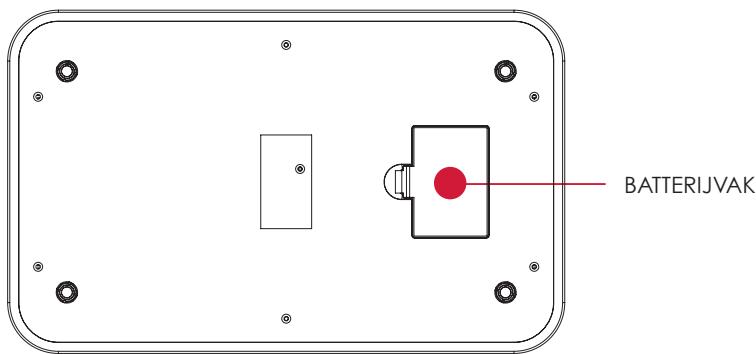
A Plaats de batterijen in de weegschaal (3xAAA).
B Download de Terraillon Wellness Coach Health-app.

Terraillon. WELLNESS COACH

Download in de App Store

A Insira as pilhas (3xAAA).
B Descarregue a aplicacao Terraillon Wellness Coach - Health.

Terrailion. WELLNESS COACH

Descarregar na App Store

DISPONÍVEL NO Google Play
Terraillon SAS France & Headquarters
1, rue Ernest Gouin
78290 Croissy-sur-Seine - France
Quarry Bay - Hong Kong
Tel: +852 (0)2960 7200
customerservice@terraillon-asia.com
Terraillon Corp USA

- NUTRITAB
- FIND MORE INFORMATION ON
- HTTP://WWW.TERRAILLON.COM
- PRODUCT OVERVIEW
- FIRSTUSE
- HOW TO FILL IN MY NUTRITION DIAGNOSIS
- → ADD FOOD FROM OUR DATABASE
- → BARCODE SCAN
- → USE ALREADY USED FOOD HISTORY
- OTHER FUNCTIONS OF THE KITCHEN SCALE
- → TURNOFFTHEKITCHENSCALE
- → LIQUID/UNIT CONVERSION
- → AUTOMATIC TARE
- → TIMER FUNCTION
- MAINTENANCE
- WARRANTY & ENVIRONMENT PROTECTION
- MEER INFORMATIE OVER
- OVERZICH
- EERSTE GEBRUIK
Brand : TERRAILLON
Model : NUTRITAB
Category : Kitchen scale