
Reston - Kitchen scale TERRAILLON - Free user manual and instructions
Find the device manual for free Reston TERRAILLON in PDF.


| Product Type | Sleep Monitor |
| Brand | Terraillon |
| Model | Reston |
| Band Dimensions | Approximately 800 x 65 x 2 mm |
| Weight | Approximately 165 g |
| Power Supply | Rechargeable lithium-ion battery 3.7 V, charging current 5.0 V / 1000 mA |
| Battery Life | Up to 4 weeks |
| Bluetooth Range | Maximum 10 m |
| Bluetooth Compatibility | Bluetooth 4.1 and later |
| Smartphone Compatibility | iOS 8 and later, Android 4.4 and later |
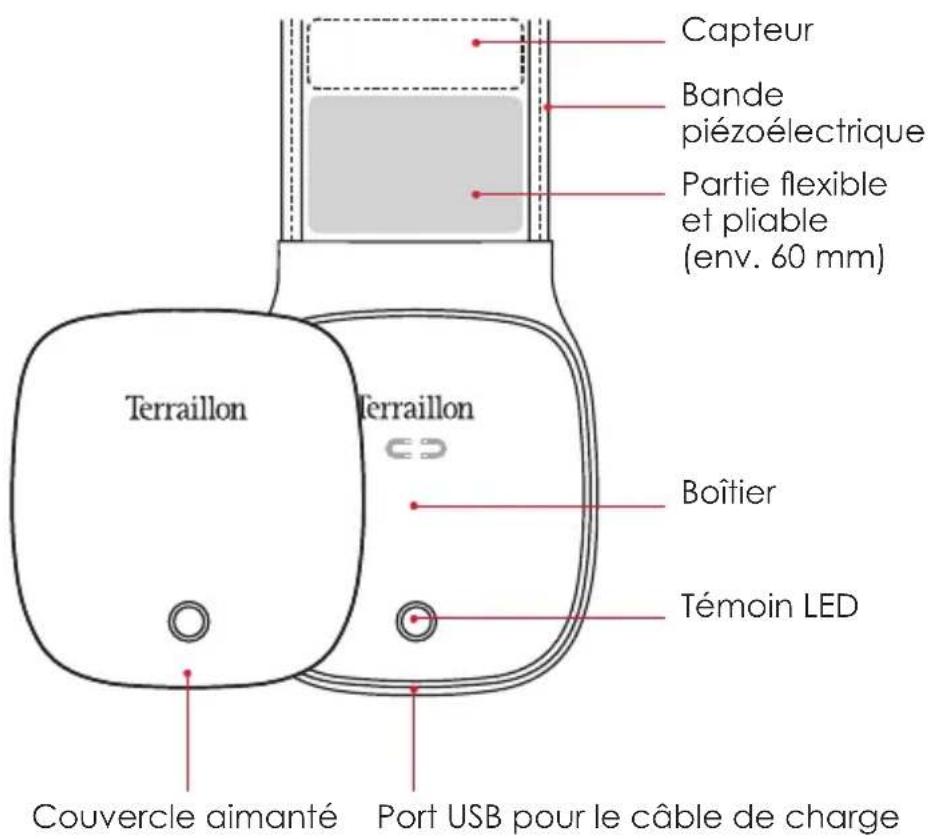
| Sensor | Piezoelectric band |
| LED Indicator | Red: low battery or charging; Green: full battery |
| Activation | By magnetic cover (180° rotation) |
| Charging Port | USB (charging only, no data transfer) |
| Associated App | Homni Terraillon (free, for sleep analysis) |
| Main Features | Recording of heart rate, respiratory rate, movements, sleep duration, historical analysis |
| Operating Conditions | Temperature: 0°C to 50°C; indoor use only |
| Maintenance | Clean with a dry cloth; do not immerse |
| Safety | Do not disassemble the battery, do not bend excessively, avoid contact with liquids, do not use with a pacemaker, do not use while charging |
| Warranty | 2 years against defects in materials and workmanship |
| Box Contents | 1 sleep monitor, 1 USB charging cable, 1 instruction manual |
| After-Sales Service | TERRAILLON Customer Service at GEFCO, ZA La Porte des Champs, Building A, 95470 SURVILLIERS |
| Consumer Service Number | 0 826 88 1789 |
Frequently Asked Questions - Reston TERRAILLON
User questions about Reston TERRAILLON
0 question about this device. Answer the ones you know or ask your own.
Ask a new question about this device
Download the instructions for your Kitchen scale in PDF format for free! Find your manual Reston - TERRAILLON and take your electronic device back in hand. On this page are published all the documents necessary for the use of your device. Reston by TERRAILLON.
USER MANUAL Reston TERRAILLON
Box content:
1 Terraillon Sleep Monitor
1 USB charging cable
1 Instruction manual
ACTIVATING AND POSITIONING THE SLEEP MONITOR
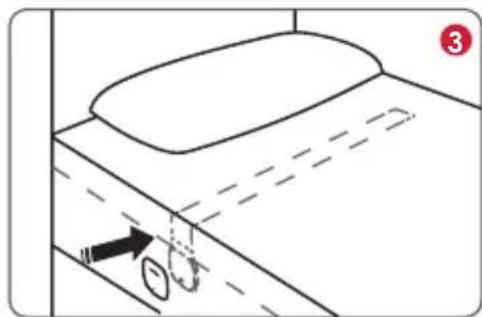
Depending on the position of the magnetic cover the Terraillon Sleep Monitor is in active or inactive mode.
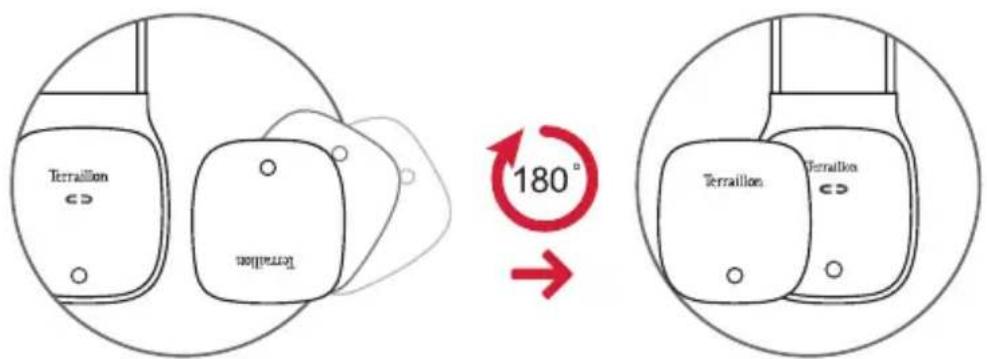
Inactive mode Active mode
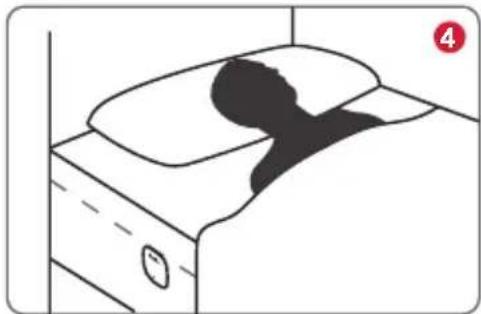
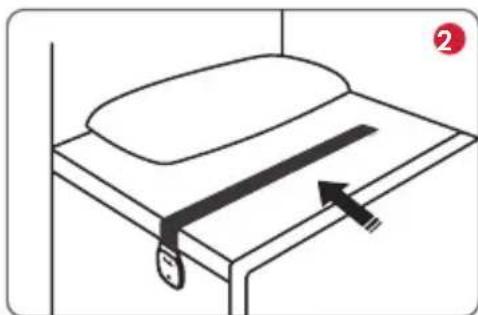
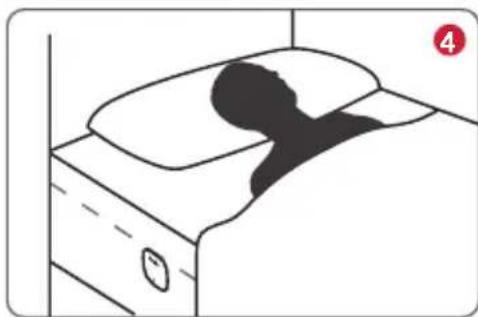
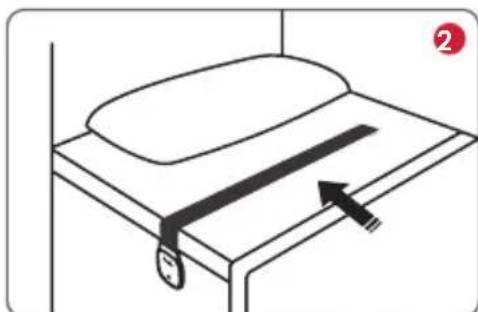
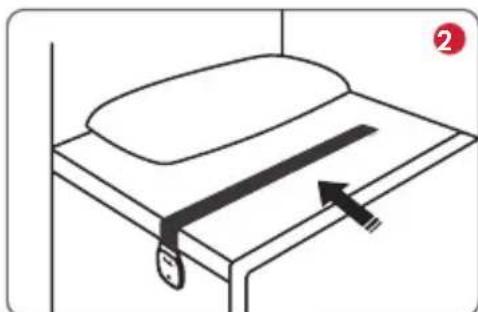
The Reston Sleep Monitor needs to be positioned correctly between mattress and sheet in order to function properly.
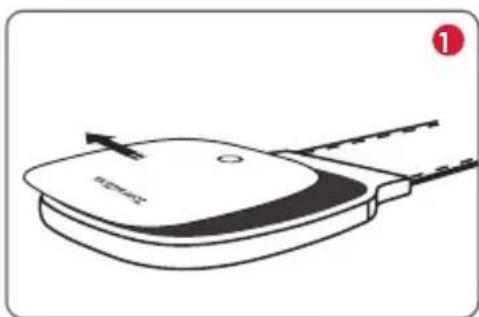
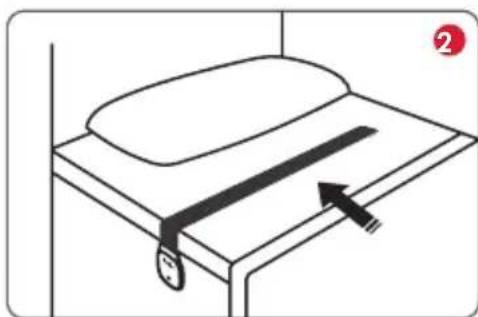
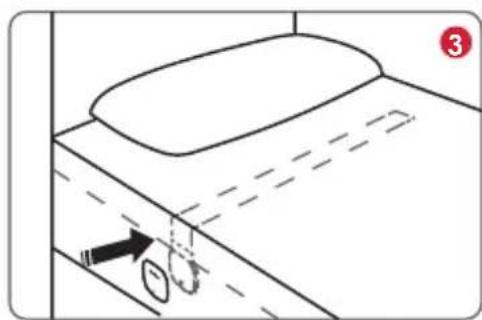
1 Remove the magnetic cover.
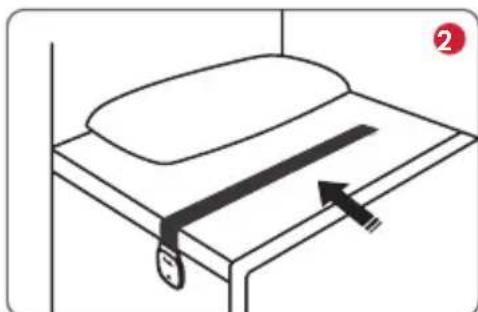
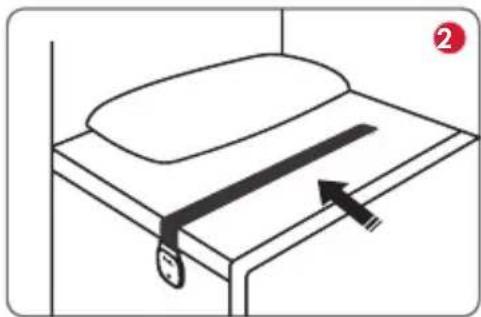
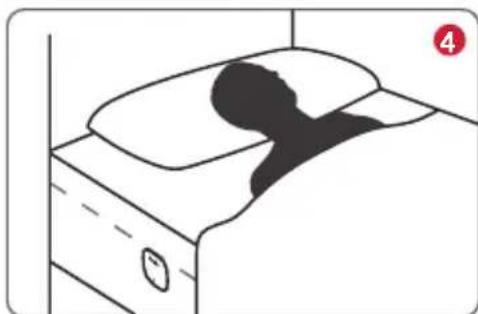
2 Put the piezo strap between mattress and sheet as shown approximately at the height of your chest. The housing will be fixed on the side of the bed (on the sheet).
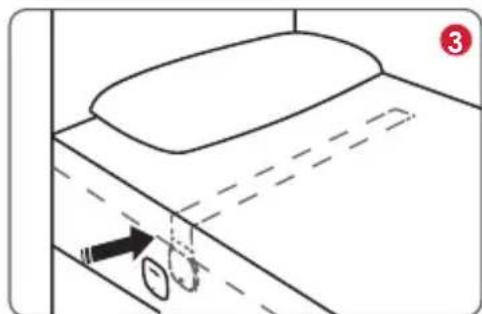
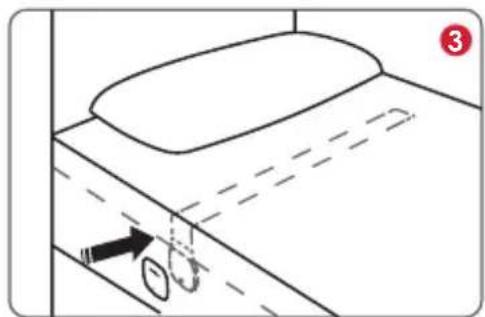
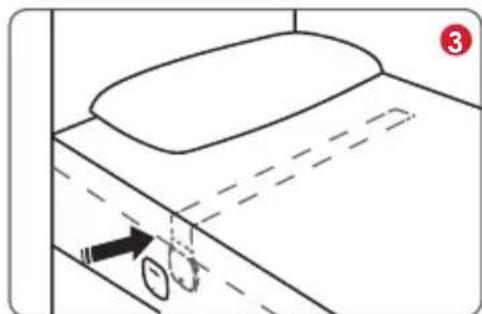
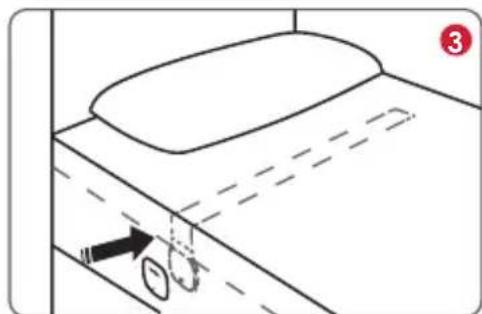
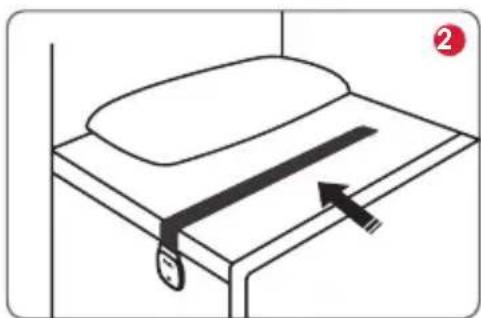
③ Replace the magnetic cover in that way, that the device is in active mode. Therefore turn the magnetic cover by 180° accordingly (the green LED will light up shortly).
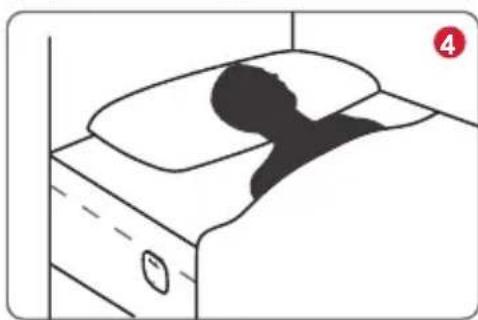
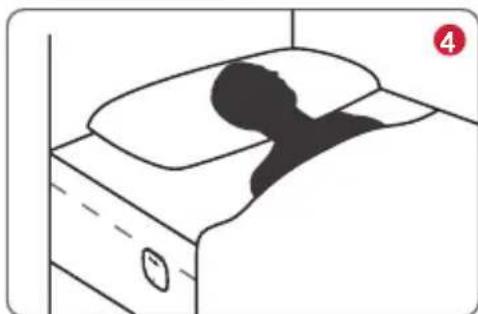
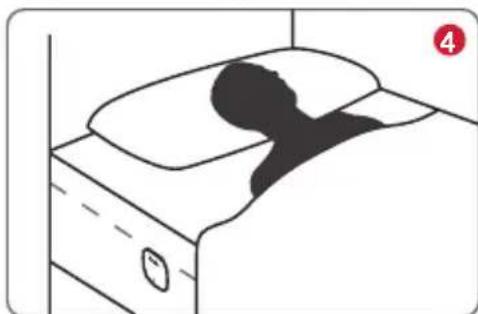
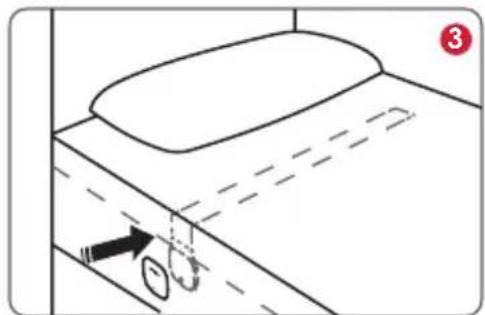
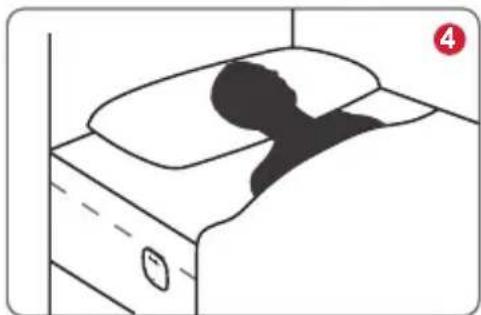
4 Lay down in your bed.
DOWNLOADING THE APP
Visit www.homni.terraillon.com in your smartphone's web browser and launch the application.


iOS: Version 8 and newer. Android: Version 4.4 and newer. Bluetooth® 4.1 and up.
CONNECTING TO THE APP
Make sure, sleep monitor and your smartphone are switched on and Bluetooth® is activated on your smartphone. Start the app and connect your smartphone with the Reston Sleep Monitor. You need to create an user account upon first start. Follow the instructions given by the app to start the sleep recording. It is not necessary to have a Bluetooth® connection to your smartphone during your sleep.
Then you can fall asleep. During short interruptions of sleep (e.g. going to the bathroom) the device keeps on recording. If longer interruptions (more than 60 minutes) occur, the device will stop the recording process and switch itself off. You may have to re-activate it then. The device will also switch off automatically after 60 minutes of non-usage. Connect the app with the monitor again to read out the recorded data. You now may check the recorded data in the app or recall historical data then.
The app offers various possibilities for evaluating your sleep quality, e.g. the recording of your heart and respiratory frequency, movements during sleep and sleep duration etc.
CHARGING THE BATTERY
To charge the battery, connect the device with the included USB cable to the USB-connection for charging cable and to a PC or a laptop or an USB power supply. The USB connection is suitable for charging only and not for the transfer of data. The charging state of the built-in battery will be indicated by the indicator LED as follows:
Indicator LED flashes red each 2 seconds: battery empty-please charge immediately!
Indicator LED lights up in red constantly: battery charging.
Indicator LED lights up in green constantly: battery fully charged.
SAFETY INSTRUCTIONS

- Do not disassemble or dismantle the battery! Danger of explosion!
- Keep away from fire and heat sources! Danger of explosion!
• PROTECT THE ENVIRONMENT
After life, dispose of this product at a designated waste recycling point.

• DECLARATION OF CONFORMITY
Hereby, Terraillon SAS declares that this device complies with the essential health and safety conditions. This product meets the essential requirements and other relevant provisions of the directive R&TTE 1999/5/EC. The complete declaration of conformity is available on http://www.terraillon.com/fr/mentions-legales.
TECHNICAL SPECIFICATIONS
| Power supply | Re-chargeable lithium-ion-battery 3,7V, Charging current 5.0V / 1000mA |
| Bluetooth® transmitting range | Max. 10 meters |
| Compatibility | Bluetooth® 4.1 and newer, iOS 8 and higher, Android 4.4 and higher |
| Strap size Approx. 800 x 65 x 2 mm | |
| Operating conditions | 0°C - 50°C (32°F - 122°F) |
| Battery runtime Up to 4 weeks | |
| Weight Approx. 165 g | |
SAFETY NOTICE
Only use the unit for the specific purpose described in the instruction manual. Any misuse will void the warranty.
- The unit is only designed for indoor use.
- The appliance is only suitable for use on flat and even bed surfaces. Do not use the Reston Sleep Monitor on mobile beds (such as inflatable beds or hammocks), as this could damage the appliance.
- This device is not a medical device and cannot be used to prevent sudden death.
- The use of this device does not replace the advice of a physician.
EN
• People with health problems should principally consult a physician before using this device.
- This item must not be used on patients with a cardiac pacemaker.
- Do not excessively bend this product. The built-in sensor may be damaged.
- Do not use the product during charging process.
- Do not let the device come in contact with liquids. It is not waterproof.
- The device must not be used close to any source of vibration (e.g. washing machines, loud music etc.) as the vibrations could affect the functions of the device.
- Only use the device within the ambient conditions mentioned in the chapter "technical specifications"!
• Children shall not play with the appliance.
WARRANTY
This product is guaranteed against defects in materials or manufacturing for 2 years. During this period, any such defects will be repaired free of charge (proof of purchase must be shown in the case of a complaint under warranty). The warranty does not cover damage resulting from improper use or negligence. In the event of a claim, first contact the shop where you purchased your scale.
For more information on the product warranty or service questions, please go to www.terraillon.com.
APPAREIL ET ÉLÉMENTS DE COMMANDE
VEILIGHEIDSWAARSCHUWINGEN
1 Retire a tampa magnética.
Terraillon SAS France & Headquarters
1, rue Ernest Gouin
78290 Croissy-sur-Seine - France
Quarry Bay - Hong Kong
Tel: + 852 (0)2960 7200
customerservice@terraillon-asia.com
Terraillon Corp USA

- ACTIVATING AND POSITIONING THE SLEEP MONITOR
- DOWNLOADING THE APP
- CONNECTING TO THE APP
- CHARGING THE BATTERY
- SAFETY INSTRUCTIONS
- PROTECT THE ENVIRONMENT
- DECLARATION OF CONFORMITY
- SAFETY NOTICE
- EN
- WARRANTY
- APPAREIL ET ÉLÉMENTS DE COMMANDE
- VEILIGHEIDSWAARSCHUWINGEN
- TERRAILLON SAS FRANCE & HEADQUARTERS
- TERRAILLON CORP USA
Brand : TERRAILLON
Model : Reston
Category : Kitchen scale