XF384B10 - Food Processor MOULINEX - Free user manual and instructions
Find the device manual for free XF384B10 MOULINEX in PDF.


User questions about XF384B10 MOULINEX
0 question about this device. Answer the ones you know or ask your own.
Ask a new question about this device
Download the instructions for your Food Processor in PDF format for free! Find your manual XF384B10 - MOULINEX and take your electronic device back in hand. On this page are published all the documents necessary for the use of your device. XF384B10 by MOULINEX.
USER MANUAL XF384B10 MOULINEX
- 10 vitesses continues progressive
(vitesses 3 à 12).
- Read the instructions for use carefully before using your appliance for the first time and keep them in a safe place. The manufacturer shall not accept any liability in the event of any use that does not comply with the instructions.
- Always disconnect the appliance from the power supply if you are to leave it unattended and before assembly, dismantling or cleaning. Do not allow children to use the appliance without supervision.
- This appliance should not be used by children. Keep the appliance and its lead out of reach of children.
- This appliance is not intended for use by persons (including children) with reduced physical, sensory or mental capabilities, or lack of experience and knowledge, unless they have been given supervision or instruction concerning use of the appliance by a person responsible for their safety.
Children should be supervised to ensure that they do not play with the appliance.
- Keep your appliance out of reach of children.

- While your appliance is in use, some parts may reach high temperatures (stainless
EN
steel wall of bowl, detachable common spindle, transparent parts of the lid and the cap, metal parts below the bowl, basket). They can cause burns. Handle the appliance by the cool plastic parts (handles, motor unit). The red heating indicator light shows that there is a risk of burning.
- The temperature of the accessible surfaces may be high when the appliance is in operation.
- The appliance is not intended to be operated using an external timer or by a separate remote control system.
- Do not use your appliance if it is not working properly, if it is damaged or if the power cable or plug is damaged. To avoid any danger have the lead replaced by an approved service centre (see list in the guarantee booklet).
- The appliance should not be immersed in water. Never put the motor unit (A) under running
water.

-
This appliance is designed for indoor household use only and at an altitude below 2000 ~m . The manufacturer shall not accept any liability and reserves the right to cancel the guarantee in the event of commercial or inappropriate use or failure to follow the instructions.
-
This appliance should not be used for household and similar use (not covered by the guarantee) such as:
-
Staff kitchen areas in shops, offices and other working environments.
- In kitchen areas reserved for staff in shops, offices and other professional environments.
- On farms.
- Use by clients of hotels, motels and other residential environments.
- in guest room environments.
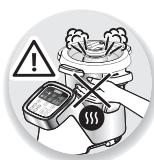
- Your appliance gives off steam which can cause burns. Handle the lid and the cap
with caution (use oven gloves, a potholder, etc. if necessary). Handle the cap by its central section.
- Never operate the appliance if the seal is not positioned on the seal holder or if the seal holder is not assembled on the lid. It is essential to operate the appliance with the cap positioned in the
hole in the lid (unless specifically otherwise stated in the recipe).
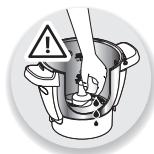
WARNING: Be aware of the risk of injury in the event of incorrect use of the appliance.
Take care with the knives of the Ultrablade knife (F1) and the kneading/grinding & crushing blade (F4) when you are cleaning them and when you empty the bowl, they are extremely sharp. Be careful if a hot liquid is poured into the food processor because it could be ejected from the appliance due to it suddenly boiling.
Place the Ultrablade chopper blade (F1) in the bowl after use.
WARNING: Be careful to avoid any spillage on the connector during cleaning, filling or pouring.
WARNING: The heating element surface is subjected to residual heat after use.
- Be sure to touch only the handles of your product (locks D2, handle of the lid E2 and handle of the cap E1) during heating and until complete cooling down.
- Refer to the instructions for setting the operating times and speed settings of each accessory and each programme.
Refer to the instructions for assembly and mounting
accessories to the appliance.
Refer to the instructions for cleaning and maintenance of your appliance.
- Always follow the cleaning instructions on how to clean your appliance :
- Unplug the appliance.
- Do not clean the appliance while hot.
- Clean with a damp cloth or sponge.
- Never immerse the appliance in water or put it under running water.
EUROPEAN MARKETS ONLY:
- Keep the appliance and its lead out of reach of children under 8 years of age.
Children should not use the appliance as a toy.
- This appliance may be used by persons with reduced physical, sensory or mental capabilities or whose experience or knowledge is insufficient, as long as they have the benefit of supervision or they have received instructions regarding safe use of the appliance and they understand its potential dangers.
- This appliance may be used by children of at least 8 years of age,
as long as they are supervised and have been given instructions about using the appliance safely and are fully aware of the dangers involved. Cleaning and maintenance by the user should not be carried out by children without supervision unless they are at least 8 years of age and are supervised by an adult.
Connection to the power supply
- The appliance should be plugged in to an earthed electrical socket.
- The appliance is designed to work with alternating current only. Check that the supply voltage indicated on the rating plate of the appliance corresponds to that of your electrical installation.
- Any connection error will negate the guarantee.
- Never pull on the power lead to unplug the appliance.
- Do not immerse the appliance, power cord or plug in any liquid.
- The power cord must never be left near or in contact with the hot parts of your appliance, near a source of heat or on a sharp edge.
Incorrect use
- Do not touch the lid before the appliance comes to a complete stop (stop button); wait until the food being mixed is no longer rotating.

- Always pour the solid ingredients into the bowl first before adding the liquid ingredients (See Fig. 11.1), without exceeding the 2.5 L MAX limit marked inside the bowl (See Fig. 11.2). If the bowl is too full, boiling liquid may be ejected.
- Please note, in the steam cooking programme, do not exceed 0.7 litres water (See Fig. 4.2).
- Never put your fingers or any other object in the bowl while the appliance is in operation.
- Do not use the bowl as container (storage, freezing, sterilisation).
- Place the appliance on a stable flat, heat-resistant, clean and dry surface.
- Do not place the appliance near a wall or a cupboard: the steam produced may damage them.
- Do not place your appliance near a heat source in operation (hob, household appliance, etc.).
-
Do not cover the lid with a dishcloth or other item, do not attempt to block the hole in the lid, use the steam regulator cap.
-
Never allow long hair, scarves, etc. to hang over the accessories while in operation.
- Never put the accessories, bowl and lid in a microwave.
- Do not use the appliance outdoors.
- Never exceed the maximum quantity indicated in the instructions.
- Store the appliance when it has cooled down.
After-sales Service
- For your own safety, do not use accessories or spare parts other than those provided by the approved after-sales centres.
- Any intervention other than cleaning and usual maintenance by the customer must be carried out by an approved service centre.
- Consult the table "What to do if your appliance does not work" at the end of the instruction manual.
EN
APPLIANCE DESCRIPTION:
A Motor unit
B Control panel
B1: speed selector
B2: cooking temperature selector and/or heat indicator light
B3: operating duration/pairing selector
B4: automatic programme selection buttons
B5: START/STOP/RESET button
B6: +/ - selector
C LCD screen
C1: connection indicator display
C2: steam programme display
C3: current step display in the step-by-step recipes
C4: safety indicator display
C5: speed display
C6: temperature display
C7: time display
D Bowl assembly
D1: stainless steel bowl
D2: locks (located under handles)
D3: detachable spindle
D4: bowl seal
D5: spindle locking ring
E Lid assembly
E1: steam regulator cap/stopper
E2: lid
E3: seal holder
E4: lid seal
F Accessories:
F0:accessory storage box
F1: ultrablade chopping knife
F2: mixer
F3:whisk
F4: knife for kneading/grinding blade
F5: steam basket
G Spatula
H On/Off switch 0/1 switches off the power supply to your appliance
I Cleaning brush
APPLIANCE TECHNICAL DATA:
| Power: | 1550W (1000W: heating element / 550W: motor) |
| Temperature range: | 30° to 130°C adjustable in steps of 5°C. |
| Operating duration range: | 5 sec to 2 hours adjustable in steps of 5 sec min to 1 min max. |
| Number of speeds: 13 | - 2 intermittent speeds: speed 1 (5 sec On / 20 sec Off). speed 2 (10 sec On / 10 sec Off). |
| - 10 progressive continuous speeds (speeds 3 to 12). - 1 max intermittent speed (speed 13). |
- *The Bluetooth® brand and logos are registered brands of Bluetooth SIG, Inc. and their use by the SEB Group has been officially authorised.
- Google Play and Android are Google Inc. brands.
- Apple and the Apple logo are Apple Inc. brands, registered in the USA and other countries. App Store is an Apple Inc. service mark.
Your appliance comes with the following accessories:

| Ultrablade knife | F1 ultrablade | Mixing soups | 30 | 3min | 2,5L | --→80°C |
| Mixing fruit purees | 40 sec | 1Kg | --→80°C | |||
| Chopping vegetables | 15 sec | 1Kg | --→80°C | |||
| Chopping meat | 30 sec | 1Kg | --→80°C | |||
| Chopping fish | 15 sec | 1Kg | --→80°C | |||
| Do not use this accessory to chop hard products, use the F4 kneading blade/crusher. | ||||||
| Mixer | It mixes Cooked dishes without damaging the ingredients Very useful for browning phases before preparations (risottos, soups). | |||||
| F2 | Browned dishes | 3 | 5min | 500g | 130°C | |
| Stews | 1 | 45min | 2,5L | 95°C | ||
| Risottos | 2 | 22min | 1,5Kg | 95°C | ||
| Ratatouille, Chutney, Pulses (settings: check the recipe booklet) | ||||||
| Whisk | F3 !!! V9 max | Wisking egg whites, | 7 | 5/10min | 7 max | |
| Mayonnaise, Whipped cream, meringues | 7 | 2/5min | 0,5L | |||
| Sauces,Creams,Dressings (mashed potatoes, polenta, etc.) | 4 to 7 | 1/20min | 1L | 60-90°C | ||
| Kneading/grinding knife | F4 | Kneading white bread dough | 5 | 2min 30s | 1,2Kg | |
| Kneading short crust pastry, biscuit dough, special bread | 5 | 2min 30s | 1Kg | |||
| Kneading rich dough (brioche, kugelhopf, etc.) | +5 | 1min 30s | 0,8Kg | |||
| Mixing light batters (cake mixture, etc.) | +40 sec | 40 sec | 1Kg | |||
| Grinding nuts | 80 | 1min | 0,6Kg | |||
| Grinding hard texture foods | 80 | 1min | 0,6Kg | |||
| Crushing ice | 80 | 1min | 6 à 10 | |||
| Pancake batter, waffle batter | 80 | 1min | 1,5L | |||
| Steam basket | F5 | Steam cooking vegetables, fish or meat | 20/40min | 1Kg | 80°C | |
| Soup with chunks | 82 | 40/45min | 2,5L | 80°C | ||
| Cap/ Stopper | E1 | Cap/Stopper for regulating steam extraction - High steam setting (a) = steam cooking. - Low steam setting (b) = risotto, creamy puddings, sauces, etc. | ||||
These accessories are also fitted with gripping areas to facilitate easier handling.
Your i-Companion appliance can operate in 'connected' mode, and also in 'unconnected' mode. It also has two operating modes: automatic programme mode and manual mode.
Automatic programme mode:
the speed, cooking temperature and cooking time are pre-programmed to make soups, stews, steamed dishes and pastries automatically.
- Manual mode:
you can personalise the settings for speed, cooking temperature and cooking time as you wish.
FITTING THE BOWL, ACCESSORIES AND LID ASSEMBLY
- Before using your appliance for the first time, clean all the parts (D, E, F, G) in warm soapy water, except for the motor unit (A). Your bowl (D) has a removable drive (D3) to make cleaning easier.
- Make sure that all the packaging has been removed before use, especially the protection between the bowl (D) and the motor unit (A).
- Position the gasket (E4) on the gasket retainer (E3) (see Fig. 1) and clip the assembly onto the lid (E2) (see Fig. 2).
- Position the gasket (D4) on the shared drive (D3). Lock the assembly to the bottom of the bowl with the locking ring (D5) (see Fig. 3).
- Position the chosen accessory in the bowl:
- the accessories (F1, F2, F3, or F4) on the shared drive at the bottom of the bowl (see Fig. 4.1),
- for steam cooking, the steam basket (F5) inside
the bowl, (see Fig. 4.3), taking care to first fill the 0.7l basin with a liquid (water, sauce, etc.) (see Fig. 4.2).
- Add the ingredients to the inside of the bowl or steam basket.
- Position the lid on the bowl (D) by aligning the two triangles (see Fig. 5), lock the lid without pressing by turning it in the direction of the arrow (see Fig. 6).
Position the steam regulator cap (E1) on the lid. There are 2 possible positions:
The low steam setting allows a maximum

amount of condensation to be released and therefore it is recommended to prepare dishes and sauces with a better consistency
(risotto, creamy puddings, sauces, etc.).

The high steam setting allows a maximum amount of heat and steam to build up in the bowl for
all types of steam cooking (soups, etc.). This setting also prevents splashing during mixing.
- Position the bowl (D) on the motor unit (A) until you hear a "click" (See Fig. 8).
- The appliance only starts up if the bowl and the lid are correctly positioned and locked on the motor unit.
In the event of incorrect positioning of the bowl or incorrect locking of the lid (See Fig. 10.1 and 10.2), the logo starts to flash when a function is activated.
Selecting custom settings:


Selecting the motor speed.
2 intermittent speeds (Speed 1 & 2) and 10 continuous progressive speeds (Speed 3 to 12)
Max intermittent speed (S13).


Increase speed, cooking temperature and duration.
Decrease speed, cooking temperature and duration.

Selecting cooking speed.
From 30^ to 130^
Heating indicator light: lights up when cooking starts and switches off when the temperature inside the bowl falls to below 50^ .

2s = reset
This button has 3 functions:
- 'Validation' of your automatic programme selection or the settings you have chosen in manual mode (speed, cooking temperature, time).
- 'Pause' when operating, once the appliance has been started.
- 'Reset' of the appliance settings, selected by pressing and holding for 2 seconds.
- 'Validation of step' in step-by step recipes.

Selecting operating time.
From 5 sec to 2 hours.
1st connection pairing
Tips for use:
Your appliance is fitted with a microprocessor that controls and analyses its stability. In the event of instability, the motor rotation speed will be automatically reduced, if this instability continues, the motor will be stopped and "STOP" will be displayed on the screen.
- Check that the quantity of ingredients is not too large and that the speed used is the correct one.
- Check that you are using the recommended accessory.
- Then restart your appliance normally.
Powering up your appliance
Your appliance has an on/off switch marked 0/1. Switch it to 1. (See Fig. 9).
The LCD screen will display all the settings as '0'.
In connected mode, the i-Companion LCD screen is blue.
EN
PREPARING TO INSTALL
Smartphones and tablets that are compatible with i-Companion:

Available on the
App Store
iPhone 4S or newer
iPad 3 / iPad mini or later
From iOS 8.

ANDROID APP ON
Google Play
From Android 4.3
(list of compatible models www.moulinex.com)
INSTALLI-COMPANION
What you need to install i-Companion:
- The Companion app, which can be downloaded for free from App Store (iPhone/iPad) and Google Play (Android)
- A Bluetooth connection supplied by your Bluetooth® Smart 4.0 smartphone or tablet: i-Companion connects to your smartphone/tablet via a stand-alone wireless connection
- The smartphone/tablet must be close to the i-Companion (the connection range varies, depending on the layout of the home).
- A power point for plugging in the i-Companion: i-Companion is only connected to your smartphone/ tablet when it is plugged in to the power supply.
About Bluetooth® Smart
Bluetooth® Smart 4.0 technology (or Bluetooth Low Energy) makes it possible to communicate wirelessly between an app and a device with very low energy consumption.
FIRST CONNECTION OF I-COMPANION IN CONNECTED MODE
Downloading the app
To start, download the app onto your smartphone/tablet by connecting to App Store for iOS or Google Play for Android.
Once you have downloaded the app, you will be able to make your first recipes with i-Companion within just a few minutes, without creating an account. (50 recipes are available to you without creating an account).
If you create an account on the app you will be able to access all the content, and vary your menus.
Powering up the i-Companion
Your appliance has an on/off switch marked 0/1 (H). Switch this to 1 (see Fig. 9).

Bluetooth activation
Move close to the i-Companion and check that Bluetooth is activated on your smartphone/tablet.
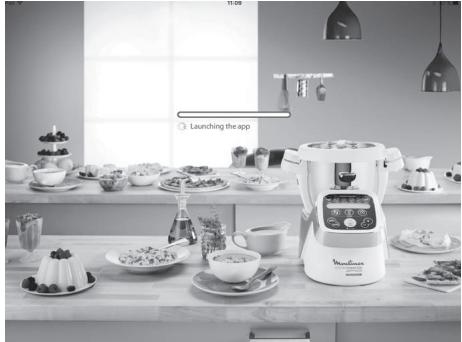
Launching the app
Launch the Companion app by clicking on the 'Companion' icon.

Pairing
What is pairing?
On first connection, the app you have downloaded onto your smartphone/tablet and i- Companion will automatically and quickly detect each other, provided you follow the steps below.
If you wish, you can pair up to 10 devices with i-Companion.
To do this, pair each device separately. (See pairing).
However, only one device may be connected at a time.
- Accept the cookies, which will improve the app by collecting your usage preferences.

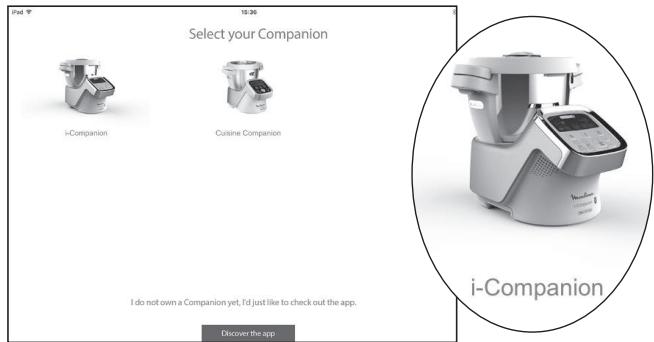
- Select your device
- When requested by the app, press and hold the Timer button (B3) on the i-Companion (for 4 seconds).
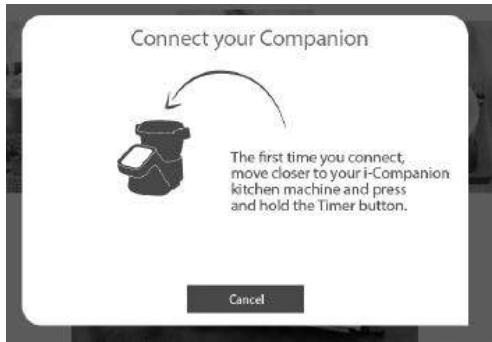

The connection indicator (C1) will blink for a maximum of 30 seconds, while the i-Companion connects to your smartphone/tablet.
- Accept the pairing request displayed on your smartphone/tablet or access the notification centre to accept the pairing.
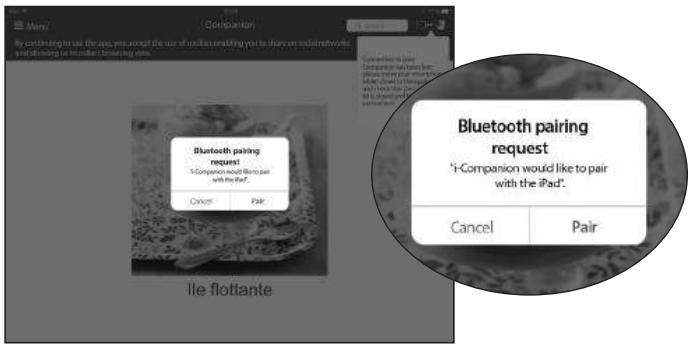
When the connection indicator (C1) is constantly lit it indicates that the connection has been established.
NB : When the pairing has been carried out, i-Companion will automatically recognise your smartphone/tablet when you next connect. You will not have to carry out this pairing step again.
The connection has been successful

Your i-Companion is now connected to your smartphone/tablet. The icon above shows you that the connection has been established.

The icon above shows you that the connection has not been established.
Please repeat the following operations:
- AMove close to i-Companion.
- Check that i-Companion is properly plugged into the socket and that the plug is working properly.
- Check that your smartphone/tablet is compatible (see compatibility list at www.moulinex.com).
- Check that Bluetooth is activated on your smartphone/tablet.
- Start the pairing steps again, and consult the FAQs (frequently asked questions).
If there is still a problem, make sure that your smartphone/tablet is compatible
If you are using an Android device, make sure that it is one of the compatible models (see compatibility list at www.moulinex.com).
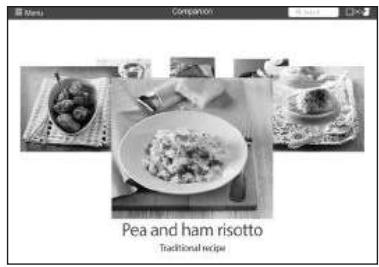
- Access the app menu to see our range of recipes.

Menu
In connected mode, during a step-by-step recipe, the first reset ends the step, and the second reset ends the recipe.
FAQs: FREQUENTLY ASKED QUESTIONS
Where should I put i-Companion?
- Put i-Companion on a flat, stable, heat resistant work surface.
- For the best connection between i-Companion and your smartphone/tablet, we recommend you make any changes required to ensure the connection is at a reasonable distance.
- If the connection indicator (C1) is constantly lit, this shows that your devices are connected.
- If the connection is lost (the connection symbol is shown crossed out), move closer to i-Companion to re-establish the connection.
What happens if the connection is lost during a recipe?
If the connection between i-Companion and your smartphone/tablet is lost during a recipe, the two devices will be automatically synchronised as soon as the connection is re-established. You will be able to carry on with your recipe from the step you were on when the connection was lost.
Can I use i-Companion without the app?
Your appliance may be used without the app. (See first use in unconnected mode).
For this, please refer to the 'use of the appliance' paragraph.
However, only the app will enable you to benefit from the many advantages of the connected product.
Can i-Companion be used with more than one smartphone or tablet?
If you wish, you can pair several devices with i-Companion. To do this, pair each device separately. (See pairing).
However, only one device may be connected at a time.
Must the Bluetooth on my phone by constantly activated?
Bluetooth must be activated in order to synchronise the app with i-Companion.
Must the Bluetooth on my phone by constantly activated?
Bluetooth must be activated in order to synchronise the app with i-Companion.
USE IN UNCONNECTED MODE
USING THE CONTROL PANEL (B)
Selecting an automatic programme:

Pastry
Pastries (list of subprogrammes)
Mijoté
Stews(list of subprogrammes)

Soup
Soups (list of sub-programmes)

Steam
Steamed dishes (list of subprogrammes)
Powering up your appliance
Your appliance has an on/off switch marked 0/1. Switch it to 1.
The LCD screen will display all the settings as '0'. (See Fig. 9).
In unconnected mode, the i-Companion LCD screen is white.
AUTOMATIC PROGRAMME MODE
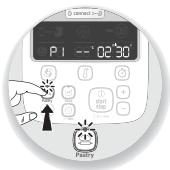
1- Press the programme you wish to use (B4). A bright dot will appear above the programme you have selected. Each time you press again, the various sub-programmes will be shown, one after the other.
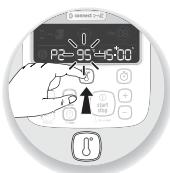
2- The pre-programmed settings can be modified for the time of a recipe (depending on the chosen recipe, ingredients and quantities prepared). Press the cooking temperature selector (B2) or the time selector (B3): the chosen setting will flash on the screen (C6-C7).
3- Adjust the setting(s) using the + / - selector (B6).
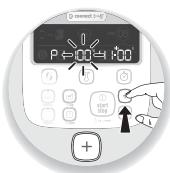
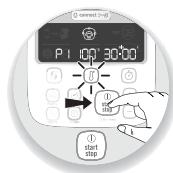
4- When you have finished modifying all your settings, press the "start" button (B5) to start the programme. When your appliance is using cooking mode, the red indicator light (B3) lights up to inform you that cooking has started.
5- When the programme has ended, the appliance sounds 3 beeps.
6- At the end of the soups, P2 and P3 slow-cook and steam cooking programmes, the appliance will automatically switch to keepwarm mode for 45 minutes to keep your meal hot until it is ready to serve. On slow-cook programmes P2 and P3 and in manual mode, the appliance's motor operates at a specific speed, to keep the food in good condition and prevent it from sticking to the bottom of the bowl. To stop the keep-warm mode, just press the 'stop' button (B5). The keep-warm mode will stop automatically if you open the lid, press the triggers (D2) or remove the bowl.
At the end of kneading in the pastry programmes P1 and P2, the appliance changes to "dough rising" mode at 30^ C for 40 minutes for your dough to prove. If you open the lid, press the locks (D2) or remove the bowl, the appliance changes to pause mode and you have the possibility of restarting it by pressing "start" again.
If you wish to stop this mode, press and hold the "stop" button for 2 seconds.
7- Press the locks (D2) and then remove the bowl assembly (D) (See Fig. 12).
In connected mode, after the automatic programme has started, you can stop the appliance at any time by pressing the 'stop' button. The automatic programme is then in pause mode, you have the possibility of restarting by pressing the "start" button again. If you have chosen the wrong programme and if you want to cancel it, press and hold the "stop" button for 2 seconds.
DISCOVER THE AUTOMATIC PROGRAMMES AVAILABLE:
| Soup P1 | Soup P2 | Stew P1 | Stew P2 | Stew P3 | |
| Automatic programmes | Soup | Soup | Mijoté | Mijoté | Mijoté |
| «Default» speed (adjustable) | 10 Pulses and Speed 12 for 2 min. | V7 - V10 for 30s | Speed 3 | Speed 1 | Speed 2 |
| «Default» temperature (adjustable) | 100°C (90°C to 100°C) | 100°C (90°C to 100°C) | 130°C (non-adjustable) | 95°C (80°C to 100°C) | 95°C (80°C to 100°C) |
| Time speed (adjustable) | 40 min (20min to 60 min) | 45 min (20 min to 60 min) | 5 min (2 min to 15 min) | 45 min (10 min to 2hr) | 20 min (10 min to 2hr) |
| Keep warm ‘default function’ at the end of the programme | 45 min | 45 min | 45 min | 45 min | |
| Motor speed at keep-warm level | 5s ON at Speed 3 / 20s OFF | 10s ON at Speed 3 / 10s OFF | |||
| Steamed dishes P1 | Steamed dishes P2 | Pastry P1 | Pastry P2 | Pastry P3 | |
| Automatic programmes | Steam | Steam | Pastry | Pastry | Pastry |
| «Default» speed (adjustable) | Speed 5 for 2 min 30 sec | Speed 5 for 1 min 30 sec then Speed 6 for 2 min | Speed 3 for 40 sec then Speed 9 for 3 min | ||
| «Default» temperature (adjustable) | 100°C (non-adjustable) | 100°C (non-adjustable) | |||
| Time speed (adjustable) | 30 min (1 min to 60 min) | 35 min (1 min to 60 min) | 2 min 30 sec (30 sec to 2 min 30sec) | 3 min 30 sec (30 sec to 3 min 30 sec) | 3 min 40 sec (1 min 40 sec to 3 min 40 sec) |
| Keep warm 'default function' at the end of the programme | 45 min | 45 min | |||
| Motor speed at keep-warm level | |||||
| Raise the dough 30° 'default function' at the end of the programme | 40 min | 40 min |
| EN |
USING THE INTERNAL STEAM BASKET
Cooking times are for information purposes only; in most cases the food will be properly cooked.
However, certain conditions may affect the cooking time:
- size of the vegetables (cut or uncut)
-
quantity of ingredients in the basket
-type of vegetables, their ripeness -
quantity of water in the bowl, which corresponds to the measurement (0.7l).
Remember to use te steam cap with "maxi steam" (a) facing towards you.
If the food is not properly cooked, you can set an additional cooking time.
| Steam cooking time (for fresh ingredients) | |||
| Ingredients | Quantities (max) | Estimated cooking times | Recommended steam programme |
| Courgettes (sliced) | 800 g | 20 min | P1 |
| Parmi (sliced or cubed) | 800 g | 25 min | P1 |
| White part of the leek | 800 g | 25 min | P1 |
| Broccoli (florets) | 500 g | 20 min | P1 |
| Fish (thick fillets or steaks) | 600 g (with baking parchment) | 15 min | P1 |
| Potatoes (small whole new) | 1 kg | 30 min | P2 |
| Carrots (sliced) | 1 kg | 30 min | P2 |
| Green beans | 800 g | 30 min | P2 |
| White meat (chicken breast fillets) | 600 g (with baking parchment) | 20 min | P2 |
Some recipes may cause unexpected overflow due to the information of bubbles, particularly when using frozen vegetables. In this case, you should reduce the volumes accordingly.
MANUAL MODE

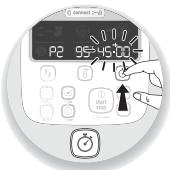
1- Press directly on the button for the setting you want to adjust, i.e. the speed selector (B1) or the cooking temperature selector (B2) or the time selector (B3), the chosen parameter flashes on the screen (C5-C6-C7).
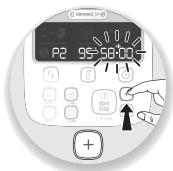
2- Then adjust the setting(s) using the + / - selector (B6). For safety reasons, it is not possible to set a temperature without setting a cooking time.
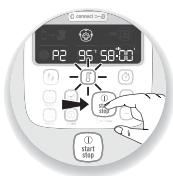
3- When you have finished entering all your settings, press the "start" button (B5). When your appliance is using cooking mode, the red indicator light, lights up to inform you that cooking has started. When the programme has started, you have the possibility of stopping the appliance at any time by pressing the "stop" button (B5).
The programme is then in pause mode and you have the possibility of restarting by pressing "start" again. If you have chosen the wrong programme and if you want to cancel it, press and hold the "stop" button for 2 seconds.
4- When the programme has ended, the appliance sounds 3 beeps.
5- Press the locks (D2) and then remove the bowl assembly (D) (See Fig. 12).
CLEANING YOUR APPLIANCE
- The appliance should not be immersed. Never put the motor unit (A) under running water. Once you have finished using it, disconnect the appliance.
- Clean the bowl immediately after use to avoid staining.
- Press the locks (D2) then lift the bowl assembly (D).
- Place the bowl on a flat surface.
- Unlock the lid by rotating one quarter of a turn clockwise. Carefully remove the lid.
- When the parts have cooled, unclip the seal holder from the lid with help of the spatula (G) (See Fig. 15).
Take care with the knives of the ultrablade knife (F1) and the kneading / grinding knife
(F4) when you are cleaning them and when you empty the bowl, they are extremely sharp.
-
When the parts have cooled down:
-
dismantle the common spindle (D3), the seal (D4) and the locking ring (D5) (See Fig. 13).
- clean the bowl (D), the common spindle (D3), the seal (D4), the locking ring (D5), the accessories (F1), (F2), (F3), (F4), (F5), the steam regulator cap (E1), the lid (E2), the seal holder (E3) and the seal (E4) using a sponge and some soapy water.
- Rinse these different parts under running water.
- For baked-on food, let the bowl soak for several hours in water and dishwashing detergent and scrape, if necessary, with a spatula (G) or with
the abrasive side of a sponge.
-
If there is a build up of limescale in the bowl, use a damp sponge and, if necessary, white vinegar.
To clean the motor unit (A), use a damp cloth. Dry carefully.
To help you with cleaning, the bowl, lid assembly and accessories are dishwasher safe, with the exception of the common spindle (D3 and D4) and its locking ring (D5) (See Fig. 14). -
The accessories, the detachable common spindle and the parts of the lid may become slightly discoloured with certain ingredients such as curry, carrot juice, etc; this does not represent any danger for your health or for the operation of your appliance. To avoid this, clean these parts immediately after use.
- Before using your bowl set (D), make sure that the electrical contacts under the bowl are clean and dry.

IMPORTANT - 'MAKING YOUR APPLIANCE SECURE' INSTRUCTIONS ( 'SECU')
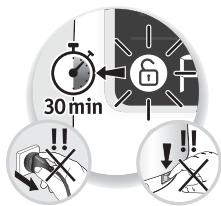
Your appliance is equipped, as standard, with electronic motor protection to guarantee its longevity. This electronic security safeguards against incorrect use; in
this way, the motor is properly protected.
In cases of extreme use which disregard the recommendations in the instructions (see paragraph 'FIRST USE': potentially excessively large quantities and/or abnormally long use and/or preparing different recipes at short intervals), the electronic protection will be triggered to preserve the motor; in this case, the appliance will stop functioning and the message 'SECU' will be displayed on the LCD screen of the control panel to indicate that the appliance is temporarily out of service.
If 'SECU' is displayed on the control panel and your appliance stops working, proceed accordingly:
-
Leave your appliance plugged in, do not press the '0/1' switch (H).
-
Please refer to the recommendations in the instructions and readapt your use of the appliance (see paragraph 'FIRST USE': amount of ingredients/recipe preparation time/temperature/type of accessories).
- Allow the motor to cool down for half an hour.
- Restart the appliance by clicking on the 'Start / Stop/Reset' button for two seconds (B5).
Your appliance is now ready to be used again. For further information, customer service department is at your disposal (see details in the guarantee booklet).

| PROBLEMS | CAUSES | SOLUTIONS |
| Problems when steam cooking. | The steam regulator cap is not properly attached. | Set the steam cap to 'high steam' (turn towards you); this setting allows a maximum amount of steam to build up in the bowl for all types of steam cooking (soups, etc.), so there will be more steam in the bowl and the cooking process will be more efficient. The 'low steam' position allows a maximum amount of heat and steam to be dispersed into the bowl for all steam cooking (soups, etc.). This position also helps to avoid splashing during cooking. The 'high steam' position allows a maximum amount of condensation to escape and results in dishes or sauces with a better consistency (risotto, cream desserts, sauces, etc.). |
| Insufficient cooking time | Cooking times are for information purposes only; in most cases it ensures that the food is properly cooked. However, certain conditions may affect the cooking time: - size of the vegetables (cut or uncut) - quantity of ingredients in the basket - type of vegetables, their ripeness - quantity of water in the bowl, which corresponds to the measurement (0.7l). If the food is not properly cooked, you can set an additional cooking time. You can also use the manual mode by selecting a temperature of 130°C and the cooking time according to the quantity and type of ingredients. | |
| The appliance does not work. | It is not plugged in. | Plug the appliance into an electrical socket. |
| The switch (H) is in position 0. | Move the switch to position 1. | |
| The bowl or the lid are not correctly positioned or locked. | Check that the bowl or the lid are correctly positioned and locked according to the diagrams in the instruction manual. | |
| The lid does not lock. | The lid is incorrectly assembled. | Check that the seal is correctly assembled on the seal holder and that the seal holder is fully pushed onto the lid in all places. |
| Excessive vibration. | The appliance is not positioned on a flat surface, the appliance is not stable. | Place the appliance on a flat surface. |
| Volume of ingredients too high. | Reduce the quantity of ingredients processed. | |
| Accessory error. | Check that you are using the recommended accessory. | |
| Leak through lid. | Volume of ingredients too high. | Reduce the quantity of ingredients processed. |
| The lid is incorrectly positioned or locked. | Lock the lid correctly on the bowl. | |
| The lid seal is not present. | Position the seal on the seal holder and clip the assembly to the lid. | |
| The seal is cut or damaged. | Change the seal, contact an approved service centre. | |
| Accessory error. | Check that you are using the recommended accessory. | |
| Leak through the bowl spindle. | The bowl seal is not correctly positioned. | Position the seal correctly. |
| The bowl seal is damaged. | Contact an approved service centre. | |
| The locking ring (D5) is not locked correctly. | Lock the ring correctly (D5). | |
| The blades do not rotate easily. | Pieces of food that are too big or too hard are blocking it from rotating. | Reduce the size or quantity of the ingredients processed. Add some liquid. |
| Smell from motor. | On using the appliance for the first time, or in the event of overload of the motor caused by too large a quantity of ingredients or by pieces that are too hard or too big. | Allow the motor to cool down (about 30 minutes) and reduce the number of ingredients in the bowl. |
| "STOP" is displayed. | The appliance has detected too many vibrations and has changed to the safety mode. | Check that you are using the right speed and that you are using the recommended accessory. |
| "SECU" is displayed. | Motor overload caused by too many ingredients or pieces which are too hard or too large or overuse without sufficient cooling down time. | Allow the motor to cool down (about 30 minutes) and reduce the number of ingredients in the bowl. |
| "SECU" is displayed + red indicator light is flashing. | Overheating of temperature sensors. | Contact an approved service centre. |
| "Err1" is displayed. + red indicator light is flashing. | The heating element is not working. | Check that the power pins under the bowl are not clogged with food. If this is the case, clean them and try again. If that still does not work, contact an approved service centre. |
| "Err2" is displayed. | Electronic fault. | Contact an approved service centre. |
| "Err3" is displayed. | Speed fault. | Contact an approved service centre. |
| "Err4" is displayed. | Communication fault with chopper electronic card. | Contact an approved service centre. |
| "ntc1" is displayed. + red indicator light is flashing. | Temperature sensor 1 is no longer working. | Contact an approved service centre. |
| "ntc2" is displayed. + red indicator light is flashing. | Temperature sensor 2 is no longer working. | Contact an approved service centre. |
| Connection problem | See the app guide |
Is your appliance still not working?
Contact an approved service centre (see list in service booklet).
RECYCLING

- Elimination of packaging and appliance materials.

The packaging exclusively contains materials that are not dangerous to the environment, which can be disposed of in accordance with the recycling regulations in force.
To dispose of your appliance, ask the appropriate department of your local authority.
- End-of-life electronic or electrical appliances:
Environmental protection first!
① Your appliance contains numerous materials that can be recovered or recycled.
Take it to a collection point for processing.
- *The Bluetooth® brand and logos are registered brands of Bluetooth SIG, Inc. and their use by the SEB Group has been officially authorised.
- Google Play and Android are Google Inc. brands.
- Apple and the Apple logo are Apple Inc. brands, registered in the USA and other countries. App Store is an Apple Inc. service mark.
GLOSSARY
Pairing: grouping or associating two devices.
This is carried out when your smartphone or tablet first connects with i-Companion.
Synchronising: updating of information. The app and i-Companion synchronise with each other to exchange information when they are connected.
Connecting: establishing a link between the app (smartphone/tablet) and the appliance (i-Companion). Connecting is vital for synchronisation.
Cookies: usage information sent to Moulinex to improve the app.
BESCHRIJVING VAN HET APPARAAT:
A Motorblok
B Bedieningspaneel
HET APPARAAT SCHOONMAKEN
SOLO MERCADOS EUROPEOS
Available on the App Store
iPhone 4S o mas referencia
iPad 3 / iPad mini o mas tarde
Descr iOS 8.

DISPONIBLE EN Google Play
A partir de Android 4.3

(lista de modelos compatibles www.moulinex.com)