USER MANUAL EA 8118 KRUPS
FR HOTLINE:BE:3270233159-FR:0974501061-CH:0800377737 EN HOTLINE:UK:0345 3306460-ROI: (01)6774003 DE HOTLINE:DE:0800980000-AT:0800225225-CH:0800377737 NL HOTLINE:NL:0318582424 IT SERVIZIO CONSUMATORI: IT: 199 207701 - CH: 0800 37 77 37 ES HOTLINE:ES:902312300 PT Centro de Contacto do Consumidor: PT: 808 284 735 EL EAMAA:GR:2106371251 RU TOPYAA JINHNA:RU:4952133228 UK TAPRAJALIHJ:UK:0443001304 PL INFOLINIA:PL:0801300420 CZ HOTLINE: CZ:731010111 SK ZAKAZNICKA LINKA:SK:233595224 HU Ügyfélszolgálat:HU:(1)8018434
www.krups.com
SD
KRUPS
ESPRESSERIA AUTOMATIC
SERIE EA80 EA81
www.krups.com
1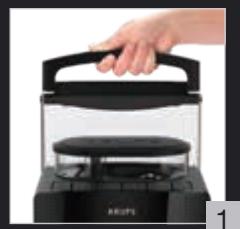
2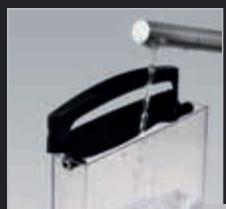
3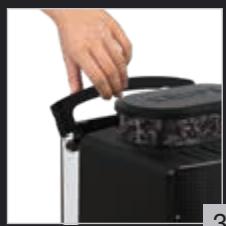
4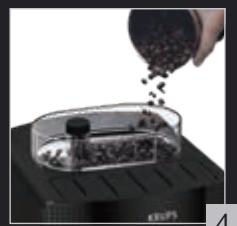
5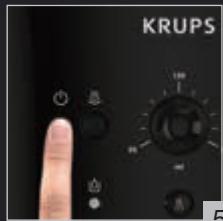
6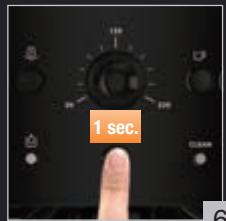
7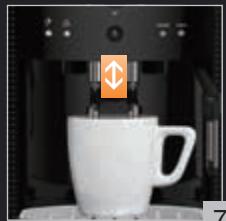
8
9
10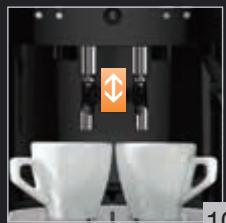
11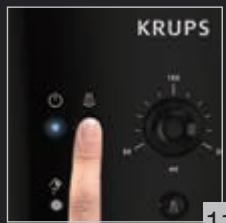
12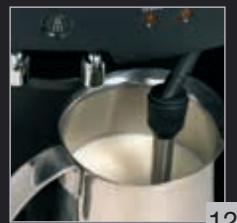
13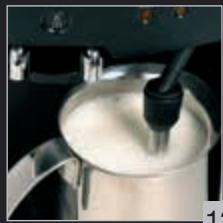
14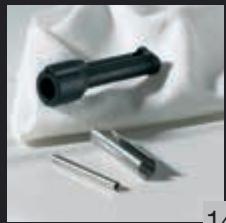
15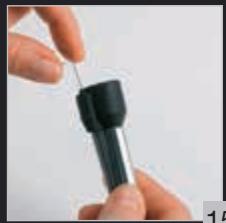
16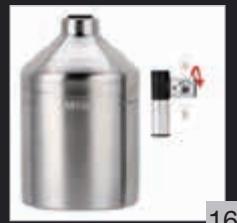
17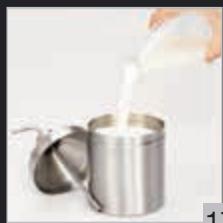
18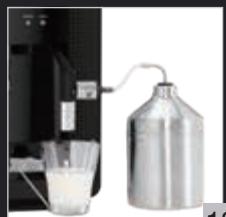
19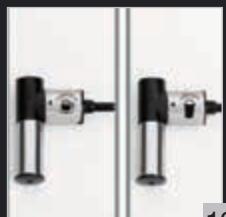
20
21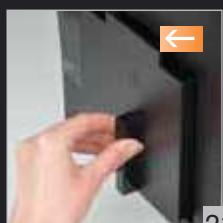
22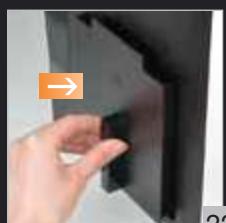
23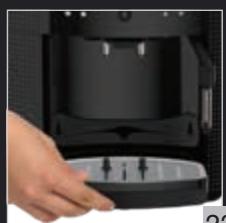
24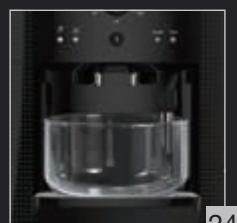
25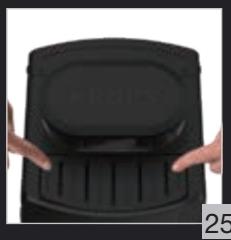
26
29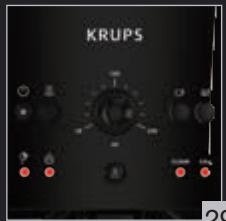
26
31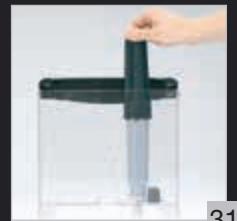
32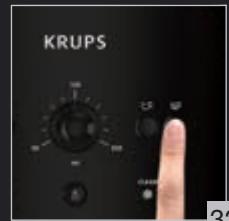
33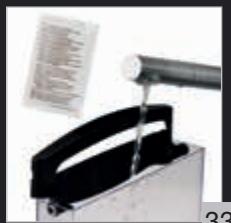
34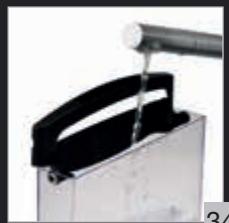
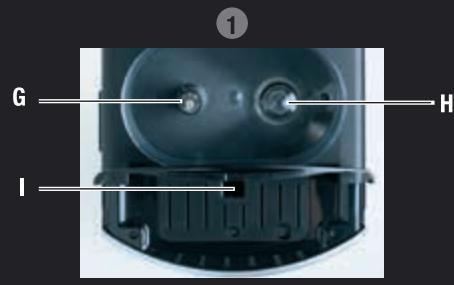
J Cup rest grid

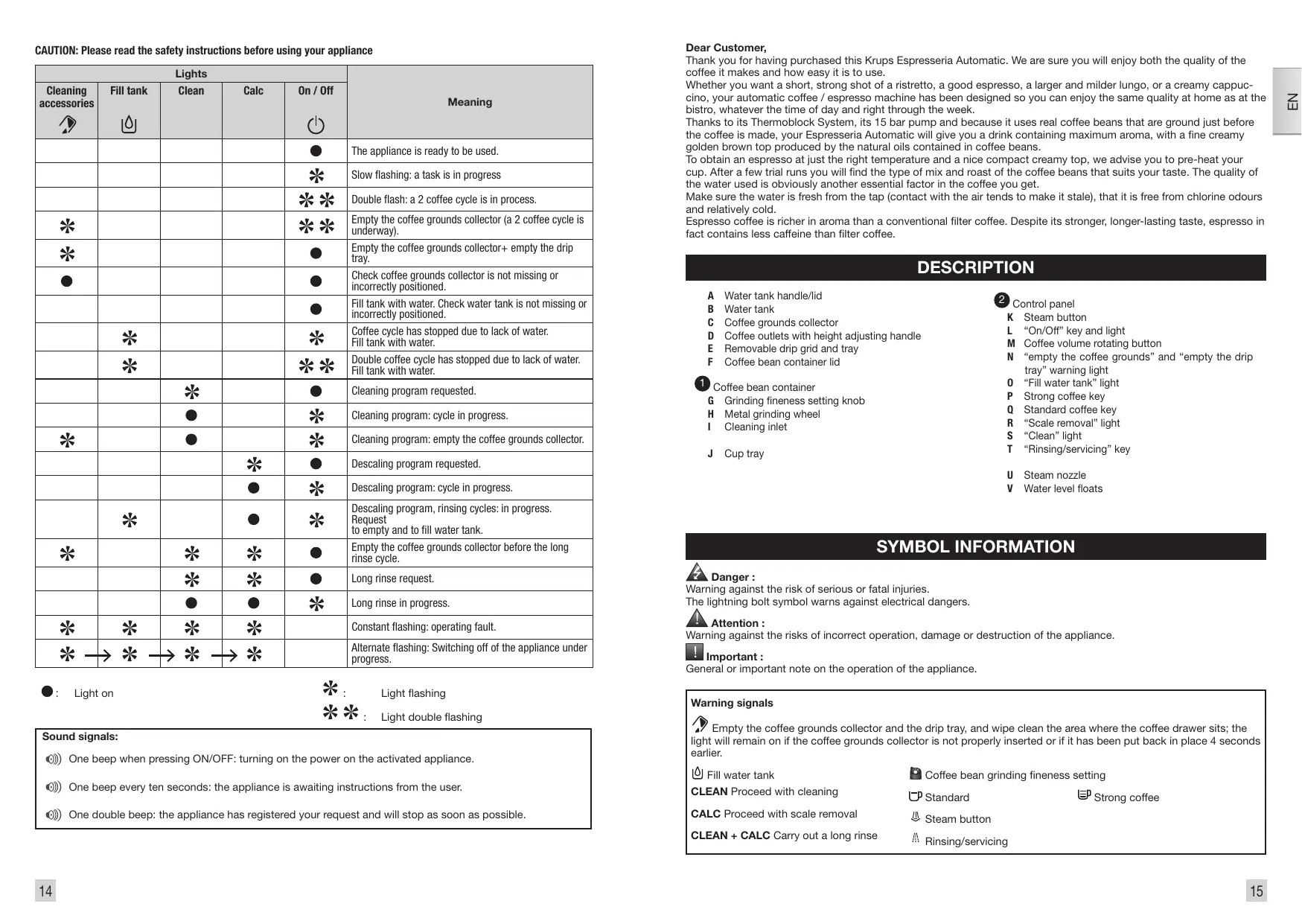
CAUTION: Please read the safety instructions before using your appliance
| Lights | Meaning |
| Cleaning accessories | Fill tank | Clean | Calc | On / Off |
| | | | ● | The appliance is ready to be used. |
| | | | * | Slow flashing: a task is in progress |
| | | | ** | Double flash: a 2 coffee cycle is in process. |
| * | | | | ** | Empty the coffee grounds collector (a 2 coffee cycle is underway). |
| * | | | | ● | Empty the coffee grounds collector+ empty the drip tray. |
| ● | | | | ● | Check coffee grounds collector is not missing or incorrectly positioned. |
| | | | ● | Fill tank with water. Check water tank is not missing or incorrectly positioned. |
| * | | | * | Coffee cycle has stopped due to lack of water. Fill tank with water. |
| * | | | ** | Double coffee cycle has stopped due to lack of water. Fill tank with water. |
| | * | | ● | Cleaning program requested. |
| | ● | | * | Cleaning program: cycle in progress. |
| * | | ● | | * | Cleaning program: empty the coffee grounds collector. |
| | | * | ● | Dscaling program requested. |
| | | ● | * | Dscaling program: cycle in progress. |
| * | | ● | * | Dscaling program, rinsing cycles: in progress. Request to empty and to fill water tank. |
| * | | * | * | ● | Empty the coffee grounds collector before the long rinse cycle. |
| | * | * | ● | Long rinse request. |
| | ● | ● | * | Long rinse in progress. |
| * | * | * | * | | Constant flashing: operating fault. |
| *→ | *→ | *→ | * | | Alternate flashing: Switching off of the appliance under progress. |

Light on

Light flashing

Light double flashing
Sound signals:
One beep when pressing ON/OFF: turning on the power on the activated appliance. One beep every ten seconds: the appliance is awaiting instructions from the user. One double beep: the appliance has registered your request and will stop as soon as possible.
Dear Customer,
Thank you for having purchased this Krups Espresseria Automatic. We are sure you will enjoy both the quality of the coffee it makes and how easy it is to use.
Whether you want a short, strong shot of a ristretto, a good espresso, a larger and milder lungo, or a creamy cappucino, your automatic coffee / espresso machine has been designed so you can enjoy the same quality at home as at the bistro, whatever the time of day and right through the week.
Thanks to its Thermoblock System, its 15 bar pump and because it uses real coffee beans that are ground just before the coffee is made, your Espresseria Automatic will give you a drink containing maximum aroma, with a fine creamy golden brown top produced by the natural oils contained in coffee beans.
To obtain an espresso at just the right temperature and a nice compact creamy top, we advise you to pre-heat your cup. After a few trial runs you will find the type of mix and roast of the coffee beans that suits your taste. The quality of the water used is obviously another essential factor in the coffee you get.
Make sure the water is fresh from the tap (contact with the air tends to make it stale), that it is free from chlorine odours and relatively cold.
Espresso coffee is richer in aroma than a conventional filter coffee. Despite its stronger, longer-lasting taste, espresso in fact contains less caffeine than filter coffee.
DESCRIPTION
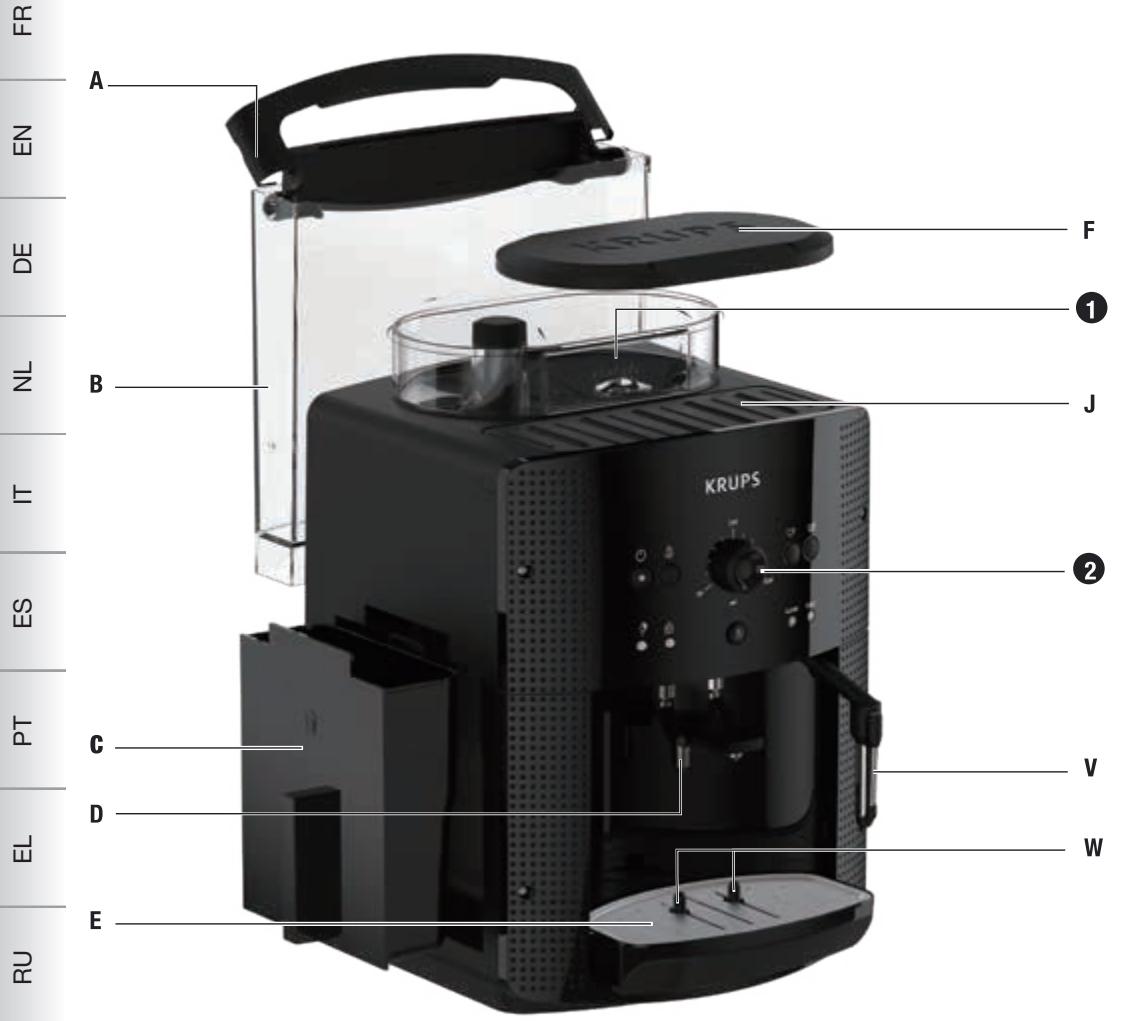
A Water tank handle/lid B Water tank C Coffee grounds collector D Coffee outlets with height adjusting handle E Removable drip grid and tray F Coffee bean container lid

Control panel
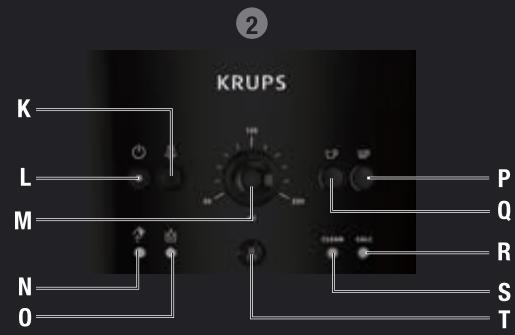
K Steam button L "On/Off" key and light M Coffee volume rotating button N "empty the coffee grounds" and "empty the drip tray" warning light 0 "Fill water tank" light P Strong coffee key Q Standard coffee key R "Scale removal" light S "Clean" light T "Rinsing/servicing" key U Steam nozzle V Water level floats

Danger:
Warning against the risk of serious or fatal injuries.
The lightning bolt symbol warns against electrical dangers.

Attention:
Warning against the risks of incorrect operation, damage or destruction of the appliance.

Important:
General or important note on the operation of the appliance.
Warning signals
Empty the coffee grounds collector and the drip tray, and wipe clean the area where the coffee drawer sits; the light will remain on if the coffee grounds collector is not properly inserted or if it has been put back in place 4 seconds earlier.

Fill water tank

Coffee bean grinding fineness setting
CLEAN Proceed with cleaning

Standard

Strong coffee
CALC Proceed with scale removal
Steam button
CLEAN + CALC Carry out a long rinse
Rinsing/servicing
BEVERAGE PREPARATION
| TYPES OF COFFEE | Number of cups possible | Possible volume settings (ml) | Possible strength settings |
| RISTRETTO | 1 | 20 to 30 ml | ☐ or ☐ |
| 2 x 1 | 2 x 20 to 30 ml in two cycles |
| ESPRESSO | 1 | 30 to 70 ml | ☐ or ☐ |
| 2 x 1 | 2 x 30 to 70 ml in two cycles |
| COFFEE or LUNGO | 1 | 80 to 220 ml | ☐ or ☐ |
| 2 x 1 | 2 x 80 to 220 ml in two cycles |
BEFORE FIRST USE
Preparing the appliance
Pull out and fill the water tank - Fig. 1 and 2.
Put it back in place by pressing firmly and close the lid again - Fig. 3.
Open the coffee bean container lid. Add the coffee beans - Fig. 4.
Close the coffee bean container lid again.
Do not fill the water tank with hot water, milk or any other liquid. If you turn on the appliance when the water tank is not in place or not correctly filled (under the "min." level.), the light will come on and making an espresso or a cup of coffee will be made impossible.

NEVER PUT GROUND COFFEE IN THE COFFEE CONTAINER.
It is recommended that you do not use oily, caramelised or flavoured coffee beans for this appliance. These kinds of beans may damage the appliance.
Check that the coffee beans do not contain any foreign particles such as grit, as any damage caused by the presence of foreign particles will invalidate the guarantee.
Do not put water into the coffee bean container.
Remember to fit the drip tray to avoid waste water flowing onto the work surface and staining it or scalding you.
Check that your water tank is clean.
Initialisation cycle - total duration: around 3 minutes
Turn on the appliance by pressing the button Ⓥ - Fig. 5. The light Ⓥ is constant.
Put a container with a minimum capacity of 0.6 litres underneath the two coffee outlets and steam nozzle.
Press the 山 - Fig. 6 button: the appliance starts the initialisation cycle for rinsing of the steam and coffee circuits. The light Ⓥ flashes.
The cycle is finished when the light Ⓥ becomes constant. The appliance is now ready to use.

It is preferable to rinse the 2 circuits out at least once after the appliance has not been used for several days. Each time you plug your appliance in, it will carry out an initialisation cycle.
Preparing the grinder
You can choose the strength of your coffee by setting the coffee bean grinding fineness. The finer the grinding setting, the stronger and creamier the coffee should be. Set the desired fineness for grinding by turning the 'Grinding fineness setting' knob. Turn to the left for finer grind. Turn to the right for coarser grind.

CHANGE THE SETTING DURING GRINDING.
Never force the grinding fineness setting button.
PREPARING ESPRESSO AND LONG COFFEES

YOUR APPLIANCE IS DESIGNED TO MAKE COFFEE FROM COFFEE BEANS ONLY.
When you first make coffee with the appliance or after a long period of absence or a cleaning or scale removal procedure, a little steam and hot water will come out of the steam nozzle (priming).
Splashing or scalding may occur if the coffee outlets are set too high in relation to the size of the cups.
Note:
The amount of water needed to make an espresso is between 30 and 70 ml.
The amount of water needed to make a coffee is between 80 and 220 ml.
Production of an espresso or coffee
Plug in your appliance.
Press the button ①. The light will flash during the pre-heating and initialisation cycle.
The light ① becomes constant.
Put a cup under the coffee outlets. You can lower or raise the coffee outlets to suit the size of your cups - Fig. 7.
Select the key to get a strong espresso or the key to get a standard espresso - Fig. 8.
You can change the volume of water at any time - Fig. 9.
To stop coffee flowing into the cup, you can either again press one of the □ or □ keys or turn the knob to the min. position.

The ground coffee is moistened with a little hot water after the grinding stage. A few moments later, percolation as such starts. Beyond a certain amount of coffee in the cup, we recommend - in order to obtain a stronger coffee - to divide your preparation into two separate cycles. Example: 2 × 70 ml cycles for a cup of 140 ml.
2 cup function
You can prepare 2 cups of coffee or espresso with your appliance.
Press the button \(\mathbb{O}\): the light flashes during the pre-heating of the appliance.
The light \(\mathbb{O}\) becomes constant.
Place 2 cups under the coffee outlets. You can lower or raise the coffee outlets to suit the size of your cup - Fig. 10.
Select the button or according to your choice, by quickly pressing the button twice. The light \(\odot\) comes on with a double flash to inform you that you have requested two cups of coffee.

The appliance will automatically sequence 2 complete coffee-making cycles.
Make sure that you don't remove the cups after the first cycle.
If you press the \(\square\) button once and the \(\square\) button a second time (or the other way round), the second one isn't taken into account.
PREPARING STEAM
Steam froths up the milk to make a cappuccino or a caffe latte, for example, and also heats up liquids. As you need a higher temperature to produce steam than to make an espresso, the appliance runs an additional pre-heating phase for steam.
Plug in your appliance.
Press the \(\oplus\) button: the light flashes during the pre-heating of the appliance.
The light \(\mathbb{O}\) becomes constant.
Press the button \(\text{念}\) - Fig. 11.
The light \(\mathbb{O}\) flashes during the pre-heating.
Once the pre-heating is finished, the light ① stays constant and you can start the steam production by pressing the ② button again.
Press the button again to stop the cycle.

The appliance returns to its initial position if the steam control is not used within 2 minutes.

Frothing milk
We recommend using pasteurized or UHT milk that has been recently opened. Untreated milk does not give the best results.
Pour the milk into your milk jug. Immerse the nozzle in the milk - Fig. 12.
Initiate the steam function as explained in the paragraph above.
Once your milk is frothy enough - Fig. 13 - press the button again to stop the cycle.
To remove any milk traces from the steam nozzle, place a container under the nozzle and restart a preparation with steam (around 10 seconds).
The steam nozzle can be removed for more intense cleaning. Wash it with water and a little washing-up liquid and a small non-abrasive brush. Rinse and dry it - Fig. 14. Before putting it back, ensure that the air inlet holes are not blocked by any milk residues. If necessary, unblock them using the needle supplied - Fig. 15.

Do not wash the steam nozzle in a dishwasher.
To interrupt the steam function, simply press any button.
If the nozzle is obstructed, unblock it with the needle provided.
Steam can be produced for a maximum of 2 minutes per cycle.

After the steam function has been used, the nozzle can be hot, and we recommend waiting a few moments before handling it.
Auto-cappuccino XS 6000 Set (sold separately)
This auto-cappuccino accessory enables you to make cappuccinos or lattes - Fig. 16. Connect the different parts to each other. Ensure that you do not pierce the pipe by keeping the button in the correct place.
After removing the lid, fill the jug with milk - Fig. 17 and place a cup or glass under the auto-cappuccino nozzle - Fig. 18. Select the cappuccino or latte position on the special nozzle - Fig. 19.
Start the steam, as indicated in the chapter 'Making drinks with steam'.
Once you have made the milk froth, place your cup under the coffee outlets and start a coffee cycle - Fig. 20.
To prevent the milk from drying on the auto-cappuccino accessory, ensure that you clean it thoroughly. You are advised to wash it immediately by running a steam cycle with the accessory jug filled with water in order to clean the inside of the nozzle. You can use the KRUPS liquid cleaner for this, available separately.
MAINTAINING YOUR APPLIANCE
Emptying the coffee grounds collector and the drip tray.
If the light flashes,
Remove, empty and clean the coffee ground collector - Fig. 21.
Replace the coffee grounds collector - Fig. 22
Remove, empty and clean the drip tray - Fig. 23.
The drip tray is equipped with floats to indicate when it needs to be emptied.
Put all parts back in place.
As soon as you remove the coffee grounds collector, you will have to empty it completely to avoid any overflow.

The light will remain on if the coffee drawer (1) area is not cleaned thoroughly and if the used grounds collector is not pushed firmly into place or is incorrectly installed.
You cannot make espresso or coffee while the light is on or is flashing. The coffee grounds collector has a capacity of 9 coffees.
Rinsing of circuits
These 2 functions are available anytime, except if the appliance requests a 'CLEAN' and/or 'CALC' cycle.
Rinsing out the coffee circuit:
Place a container under the coffee nozzles. Press the button - Fig. 6 quickly to start a coffee circuit rinsing cycle, which will automatically stop after around 40 ml.
Rinsing out the steam circuit:
Place a container under the steam nozzle and press the button for 3 seconds to start a steam circuit rinsing cycle, which will automatically stop after around 300 ml.
Appliance cleaning program, 3 times a year (total duration: about 13 minutes)
For hygienic reasons and to preserve all best coffee flavor we recommend you to clean the coffee system when the machine asks you to, about 3 times a year.
To perform this cleaning you will need:
- 1 KRUPS cleaning tablet
- 1 container of minimum 600ml several flows will follow one another
When to carry out this program?
When it is necessary to run a cleaning program, the appliance alerts you by flashing the CLEAN indicator light. This program can only be accessed when the appliance requests it (approximately every 300 brews of coffee or espresso).
To comply with the warranty conditions, it is essential to perform the cleaning cycle when the appliance alerts you. Follow the order of operations carefully.
Use only KRUPS cleaning tablets (available on our KRUPS.com store).
How to start the automatic cleaning program?
- Start the cleaning program by pressing the button A. The CLEAN indicator becomes solid and the B and D indicators flash.
- Remove, empty, clean and replace the coffee grounds collector (Fig 21-22). The indicator light goes off.
- Remove, empty, clean and replace the drip tray (Fig 23).
- Fill and replace the water tank.
- Place the 600 ml container under the coffee nozzles (Fig 24).
- Open the maintenance hatch (Fig 25).
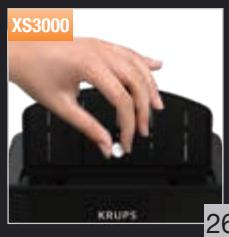
- Insert the KRUPS XS3000 cleaning tablet into the cleaning chute (Fig 26).
- Press the button to start the cleaning cycle.
- The cleaning phase (about 13 min) starts. Several water flows follow one another in several phases without any necessary intervention. They allow the device to be rinsed and the cleaning residue to be removed.
- The cleaning cycle is finished when the light ① stays on and the CLEAN light goes out. Empty the drip tray.
Your device is ready to be used.
Important:
You do not have to run the cleaning program as soon as the appliance requests it, but you must do it reasonably soon after. If cleaning is postponed, the alert message will remain displayed as long as the operation has not been performed.
If you unplug your machine or if you turn it off during cleaning or in the event of electrical failure, the cleaning program will resume the current step at the time of the incident.
It will not be possible to postpone this operation: rinsing the water circuit is mandatory.
If there is not enough water in the water tank when you start the program, the light will come on to warn you. Add the appropriate amount of water to the container and cleaning will continue automatically.

If you unplug the appliance during cleaning, press the ① button, or there is an electrical power cut, the cleaning program will start again from the beginning. In this case, another cleaning tablet may be necessary. Make sure to carry out the full cleaning cycle to ensure good maintenance of your appliance. The cleaning cycle is intermittent: do not put your hands under the water outlets 'E' and 'W' while the cycle is in progress.
Only use KRUPS (XS3000) cleaning tablets. We cannot be held responsible for any damage that may result from the use of tablets from other brands.
You can obtain cleaning tablets from KRUPS Service Centres.
Scale removal program - total duration: about 20 minutes
The quantity of scale deposited depends on the hardness of the water used. The appliance will automatically warn you by the 'CALC' light coming on when you need to proceed with scale removal.
This program is only accessible when the appliance requests it.

To benefit from the guarantee conditions, it is essential to perform the appliance's scale removal cycle when informed to do so. Be sure to follow the procedure closely step by step. You can continue to use the appliance when the light is on, but you are advised to perform the program as soon as possible.
If your appliance is fitted with our Claris - Aqua Filter System F088 cartridge, please remove the cartridge during the descaling operation.
Only use KRUPS scale removal products. You can obtain scale removal products from KRUPS Service Centres.
We cannot be held responsible for any damage that may result from the use of tablets from other brands.

Make certain to protect your work surface during cleaning and scale removal cycles, especially if it is made of marble, stone or wood.
Start the descending program by pressing the button. The 'CALC' light becomes constant and the indicator lights and φ flash.
Remove and clean the drip tray.
Place a container with a minimum capacity of 0.6 I under the coffee outlets as well as under the steam nozzle - Fig. 24.
Empty the tank and refill it with warm water up to the line 'CALC' - Fig. 33.
Dissolve a sachet of Krups (40g) F054 descaler in the tank - Fig. 33.
Replace the water tank. The indicator light switches off.
Press the button after carrying out all of these operations.
The first phase (approximately 8 min) begins.
The descending cycle will start automatically.
At the end of this phase, the sound signal beeps every 10 seconds and the indicator light 0 ’ flashes.
Empty the used water container and put it back in place.
Empty and rinse the water tank - Fig. 34.
Refill the tank with water and put it back into place. The warning light 日 goes out.
Press the button again to start the second phase. The sound signal stops.
The second phase (about 6 min) begins.
The program continues. It rinses the appliance and removes any traces of the descaler.
At the end of this phase, the sound signal beeps every 10 seconds.
Remove and empty your used water container and put it back in place.
Press the button again to start the final phase. The sound signal stops.
The final phase (approximately 6 min) begins.
The program continues. It removes the last particles of descaler.
When the descending cycle is finished, the indicator light 'CALC' goes out.
Refill your water tank.
Your appliance is ready for the next use.
If there is not enough water in the water tank, you will be warned by the light. Add the appropriate amount of water to the tank and scale removal will continue automatically.

If you unplug the appliance during cleaning, press the ① button, or there is an electrical power cut, the cleaning program will start again from the beginning. In this case, another cleaning tablet may be necessary. Make sure to carry out the full cleaning cycle to ensure good maintenance of your appliance.
The cleaning cycle is intermittent: do not put your hands under the water outlets 'E' and 'W' while the cycle is in progress.
Long rinsing program - total duration: about 2 minutes.
When it is necessary to make a long rinsing program, the appliance warns you of this by flashing the 'CLEAN' and 'CALC' lights.
Remove, fill and replace the water tank.
Place a container with a minimum capacity of 0.6 L under the coffee outlets and the steam nozzle.
Start the long rinsing program by pressing the A button. The lights 'CLEAN' and 'CALC' become constant and the indicator light O starts flashing.
When the long rinse is finished, the lights 'CLEAN' and 'CALC' go out and the indicator light becomes constant.
Your appliance is ready for the next use.
The appliance can ask you to empty the coffee ground collector.
OTHER FUNCTIONS
To switch the appliance off
You can switch off your appliance at any time. As the appliance is switching off, a double beep is emitted and all of the red lights flash, one after the other. The appliance has registered your request and will stop as soon as possible.
Installation of the filter cartridge - total duration: around 2 min
To get the best taste from your coffee and extend your appliance's service life, we advise you to use only the Claris - Aqua Filter System cartridge sold as an accessory.
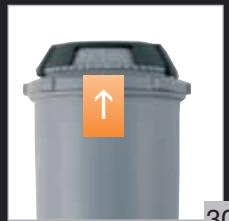
Fig. 30 : Mechanism to indicate the month the cartridge was fitted and when to replace it (after 2 months at most). Installing the cartridge in the appliance. On first use, screw the filter cartridge into the bottom of the water tank - Fig. 31. Place a 0.6 L container under the steam nozzle.
Press the button for more than 3 seconds (unless the appliance requires a 'CLEAN' and/or 'CALC' maintenance). The indicator light flashes.
When the installation of the filter cartridge is finished, the indicator light becomes constant.
Your appliance is ready for the next use.
The Claris cartridge needs to be replaced after about every 50 litres of water or every two months at least. If you are using the Claris - Aqua Filter System cartridge, set the water hardness to level 0.
Coffee temperature display
Appliances are pre-set in the factory to level 2.
Connect the appliance to the mains supply but do not switch it on.
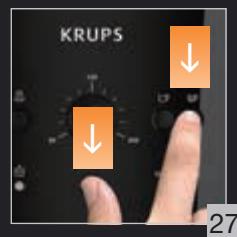
Press the A and E buttons together, -Fig.27.
The LED flashes during the setting phase.
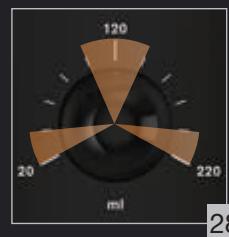
Twist the knob to 20 ml to set the coffee temperature - Fig. 28.
Press the P button to increase or touch the square button to decrease the setting - Fig. 32.
Select the coffee temperature level: 1 LED lit = temperature 1, 2 LEDs lit = temperature 2, 3 LEDs lit = temperature 3, the hottest setting.
To exit settings mode, press Theta.
Water Hardness Setting
Appliances are pre-set in the factory to hardness level 4.
Before using the appliance for the first time or after a change to the water hardness, it is advisable to set the appliance to the correct water hardness. Contact your water supplier to find out the water hardness for your area.
| Degree of hardness | 0 Verv soft | 1 soft | 2 moderately hard | 3 hard | 4 extremely hard |
| °f | < 5,4° | >7,2° | >12,6° | >25,2° | >37,8° |
| °dH | < 3° | >4° | >7° | >14° | >21° |
| °e | < 3,75° | >5° | >8,75° | >17,5° | >26,25° |
Connect the appliance to the mains supply but do not switch it on.
Press the A and E buttons together, -Fig.27.
The LED flashes during the setting phase.
Twist the knob to 120 ml to set the water hardness - Fig. 28.
Press the P button to increase or touch the square button to decrease the setting - Fig. 32.
Select the level of water hardness to be used: 0 LEDs lit = very soft, 1 LED lit = soft, 2 LEDs lit = average hardness, 3 LEDs lit = hard, 4 LEDs lit = very hard - Fig. 29.
To exit settings mode, press the heart button.
Setting the electrical supply cut-off mechanism
Appliances are pre-set in the factory to 1 hour.
You can program your machine's automatic shut-off following a pre-programmed number of hours.
Connect the appliance to the mains supply but do not switch it on.
Press the A and E buttons together, - Fig. 27.
The LED flashes during the setting phase.
Twist the knob to 220 ml to set the automatic cut-off duration - Fig. 28.
Press the E button to increase or touch the square button to decrease the setting - Fig. 32.
Select the desired hardness: 1 LED lit = 1 hour, 2 LEDs lit = 2 hours, 3 LEDs lit = 3 hours, 4 LEDs lit = 4 hours - Fig. 29. To exit settings mode, press the up-down arrow.
Connect the appliance to the mains supply but do not switch it on.
Press the and buttons together, - Fig. 27.
The LED flashes during the setting phase.
To go to "cycle number" mode, press and hold the button for 3 seconds; all of the red LEDs flash three times before displaying the information - Fig. 29.
Cycle number:
- Less than 3000: 1 LED lit.
- Greater than 3000: 2 LEDs lit.
- Greater than 6000: 3 LEDs lit.
To exit settings mode, press O

At each of these steps you can exit settings mode by pressing the button if you have finished your settings. All of the lights are off. These settings will be saved even if there is an electrical failure. You can modify these settings at any time by repeating these steps.
TROUBLESHOOTING, CORRECTIVE ACTIONS
| PROBLEM MALFUNCTION | CORRECTIVE ACTION |
| Your appliance detects a fault. | Switch off and disconnect the appliance, remove the fil-
ter cartridge, wait for a minute and restart the appliance. |
| The appliance does not turn on when the ⊙ button is pressed. | Check your fuses and plug sockets.
Check that the two power plugs are correctly pushed in the socket. |
| The coffee grinder makes a strange noise. | There is a foreign body in the grinder. Disconnect the appliance before investigating. See if you can extract the foreign body using your vacuum cleaner. |
| The steam nozzle makes a noise. | Check that the steam nozzle is correctly attached to its corresponding end piece. |
| The steam nozzle on your appliance seems partially or completely clogged. | Ensure that the opening in the end piece is not ob-
structed by milk residue or limescale. Unclog the holes with the needle supplied with your appliance. |
| The steam nozzle makes little or no milk froth. | For milk-based drinks, use very fresh, very cold pa-
teurised or UHT milk. It is also advisable to use a cold container. If the results do not improve, try changing the brand of milk. |
| No steam comes out of the nozzle. | Empty the tank and temporarily remove the filter car-
tridge. Fill the water tank with mineral water which is high in calcium (>100 mg/l) and run successive steam cycles. |
| The auto-cappuccino set makes little or no froth.
The auto-cappuccino set does not take in milk. | Check that the accessory is correctly attached to the appliance, remove it then replace it.
Check that the flexible tube is not obstructed or pierced and that it is correctly attached to the accessory so as to make it airtight. Rinse and clean the accessory (refer to the “Auto-cappuccino accessory” chapter). |
| PROBLEM MALFUNCTION | CORRECTIVE ACTION |
| There is water underneath the appliance. | Before removing the water tank, wait for 15 seconds after the coffee has finished flowing so that the appli-ance finishes its cycle properly.
Check that the drip tray is correctly positioned on the appliance; it should always be in place, even when the appliance is not in use.
Check that the drip tray is not full.
The drip tray should not be removed during a cycle.
Clean the tank and its connection regularly to avoid the build up of scale, which can cause leaks. |
| After emptying the coffee grounds collector, the warning message is still displayed on the screen. | Remove the coffee grounds collector and ensure it is empty and clean. Wait at least 6 seconds before replac-ing, and ensure it is correctly installed. |
| The coffee dispenses too slowly. | Turn the coffee fineness dial to the right to make the grounds courser (this could also depend on the type of coffee used).
Run one or several rinsing cycles.
Change the Claris Aqua Filter System cartridge (see “Installing the filter”). |
| The water/steam is not dispensed normally from the steam nozzle. | At the beginning or end of making a drink, the steam nozzle may drip slightly. |
| The coffee fineness dial is difficult to turn. | Only change the grinder setting when it is running. |
| The espresso or coffee is not hot enough. | Change the coffee temperature setting. Warm the cup by rinsing it with hot water before making the drink. |
| The coffee is too lightly coloured or too weak. | Avoid using oily, caramelised or flavoured coffee. Check that the coffee bean container has coffee in it and that it is dispensing correctly.
Decrease the drink volume, increase the drink strength.
Turn the coffee fineness dial to the left to make the grounds finer.
Make the drink in two cycles by using the 2 cups func-tion. |
| The appliance is not producing coffee. | A problem has been detected during preparation of the drink.
The appliance has restarted automatically and is ready for a new cycle. |
| Why can I not start the descaling or cleaning program? Why does my appliance not request to be descaled or cleaned? | The appliance only requests to be cleaned once it has made several types of coffee. The appliance only requests a descaling cycle once it has made a certain number of drinks using steam. |
| A power failure occurs during a cycle. | The appliance is automatically restarted when power is switched back on. |
| Coffee flows behind the coffee nozzles. | Pour cold or room-temperature water into the tank. Re-duce the temperature level. |
| The appliance is working but no liquid comes out. | Check that the water tank is in the correct position and that the cord is not jammed between the appliance and the water tank. |
| Ground coffee is in the drip tray. | Yes, to stay clean the appliance clears ground coffee which has fallen out of the percolation tank. |
Here are some recipes you can make using your Espresseria Automatic:
Cappuccino
For a cappuccino in the rules of the art, the ideal proportions are as follows: 1/3 hot milk, 1/3 coffee, 1/3 milk froth.
Caffe Latte
To make coffee with milk, also often called Latte Macchiato, the proportions are as follows: 3/5 hot milk, 1/5 coffee, 1/5 milk froth.
- For these milk-based preparations, it is best to use cold skimmed milk straight from the refrigerator (ideally between 6 and 8°C).
- To finish off, you can sprinkle with cocoa.
Café Crème
- Prepare a conventional espresso in a large cup.
- Add a little cream to get a café crème.
Café corretto*
Prepare a cup of espresso as usual. Then add 1/4 or 1/2 of a liqueur glass of Cognac to taste. - You can also use anisette, brandy, Sambuca, Kirsch or Cointreau. - There are many other ways to give some punch to your espresso. - Just use your imagination.
Coffee liqueur*
Mix 3 cups of espresso, 250g of brown sugar candy and 1/2 litre of Cognac or Kirsch in an empty 0.75 litre bottle. Leave the mixture to macerate for at least 2 weeks. - You will obtain a delicious liqueur. A real treat for coffee lovers
Italian style iced coffee
4 scoops of vanilla ice-cream, 2 cups of espresso with sugar to taste, 1/8 I milk, fresh cream, grated chocolate. - Mix the cold espresso with the milk. - Serve the scoops of ice-cream into the glasses, pour the coffee onto them and decorate with fresh cream and grated chocolate.
Café à la frisonne*
Add a small glass of rum to a cup of sweetened espresso.
Decorate with a good layer of fresh cream and serve.
Flambéed espresso*
2 cups of espresso, 2 small glasses of Cognac, 2 teaspoons of brown sugar, fresh cream.
- Pour the Cognac into heat-resistant glasses, heat and light.
- Add the sugar, mix, pour in the coffee and decorate with fresh cream.
Espresso Parfait*
2 cups of espresso, 6 egg yolks, 200g sugar, 1/8 litre of sweetened fresh cream, 1 small glass of orange liqueur. - Beat the egg yolks with the sugar until it forms a thick, frothy mass. - Add the cold espresso and the orange liqueur. - Then mix in the whipped fresh cream. - Pour the mix into saucer champagne glasses or ordinary. - Put the champagne glasses in the freezer.
(∵ Remember, over-indulgence in alcohol is bad for the health.)
MAKING ESPRESSO AND COFFEE

THE MACHINE IS EXCLUSIVELY SUITABLE FOR MAKING COFFEE WITH COFFEE BEANS.
Safety and Troubleshooting Topics
Empty the water tank and the drip tray regularly: the machine will remain functional if you do not empty the water tank or if the drip tray is not emptied before the water overflows.
Water hardness
CLEAN Perform cleaning
CALC Perform descaling
CLEAN Perform drying
CALC Perform descaling
BEFORE FIRST USE
Preparing the appliance
Remove the water reservoir and fill it - fig. 1 and 2.
Place it back in position, firmly pressing down the lid - fig. 3.
Open the lid of the coffee bean container. Pour in the coffee beans - fig. 4.
Close the lid of the coffee bean container.

Do not fill the container with ground coffee, milk, or any other liquid. If, when filling the reservoir, water is absent or not filled to the end, the indicator and the coffee brewing process will be temporarily impossible.

Never fill the coffee bean container with ground coffee.
We strongly recommend not using caramelized or flavored coffee beans. Their use may lead to clogging.
Make sure that the coffee bean container has no foreign objects, such as stones or debris that may be in coffee beans. The warranty does not cover damage caused by foreign objects that have fallen into the container.
Do not pour water into the coffee bean container.
To avoid burns and spills on the work surface, do not forget to empty the drip tray.
Make sure that the water reservoir is clean.
Initialization cycle - total duration: approximately 3 minutes
Turn on the appliance by pressing the button ① - fig. 5. The indicator lights up continuously.
Install the container with a minimum capacity of 0.6 liters under the coffee spout.
Press the button 6, the device will start the rinsing cycle of the coffee system. Wait for it to complete.
The cycle is complete when the indicator lights up continuously. The machine is ready to prepare your drinks.

It is necessary to perform one or more rinsing cycles if the appliance has not been used for several days. Each time you plug the appliance into the mains, the machine will perform a rinsing cycle.
Preparing coffee grounds
You can adjust the grind of the coffee using the coffee grinder. The finer the grind set on the grinder, the stronger and more aromatic the coffee will be. Set the desired grind level by turning the grind adjustment knob. Turn left for a finer grind. Turn right for a coarser grind.

The adjustment can only be made during grinding.
Never try to change the position of the grind adjustment knob by force.
Preparing espresso and coffee

Your appliance is designed exclusively for use with coffee beans.
During the first coffee preparation after cleaning or to eliminate scale, as well as after a long period of inactivity, a small amount of hot water comes out of the steam spout (automatic control cycle).
If the coffee flow is set too high relative to the size of your cups, there is a risk of splashing or getting burned.
Warning.
The amount of water for one espresso is between 30 and 70 ml.
The amount of water for one coffee is between 80 and 220 ml.
Preparing espresso coffee
Plug the appliance into the power outlet.
Press the button. The indicator lights up during the preheating of the machine.
The indicator lights up continuously.
Place the cup under the coffee outlet. You can lower or raise the coffee outlet according to the cup size - Fig.7.
Press the button for strong espresso or the button for standard espresso -
Fig.8.
You can always adjust the amount of water - Fig. 9.
To stop filling the cup, you can press one of the buttons again or turn the rotary switch to the minimum position.

The coffee maker wets the ground coffee with a small amount of hot water after the first phase. After a few seconds, the brewing process begins. Starting with a certain amount of coffee in the cup, we recommend preparing two cups to get strong coffee. For example, 2 times 70 to get a cup with 140 ml of coffee.
Function "2 cups"
The device allows you to prepare 2 cups of espresso coffee.
Press the button. The indicator lights up during the preheating of the machine.
The indicator lights up continuously.
Place two cups under the coffee outlet. You can lower or raise the coffee outlet according to the cup size - Fig.10.
Press the button to select. The indicator light signals that you have selected two coffee cups.

The machine automatically performs 2 full cycles for preparing coffee.
Be careful, do not remove the cup after the first cycle.
If you press button P and then button K (or vice versa), the last press is not taken into account.
PREPARING STEAM
Steam is used to froth milk for preparing cappuccino, as well as for heating liquids. Since steam production requires high temperature, before preparing espresso, the machine performs an additional preheating step.
Plug the appliance into the socket.
Press the button; the indicator lights up during the preheating of the machine.
The indicator lights up intermittently.
Press the button - Fig. 11
The indicator lights up during preheating.
When the preheating phase is complete, the indicator lights up continuously and you can start preparing coffee by pressing the button again.
Press the button again to stop the cycle.
The machine returns to its initial position if the coffee regulator is not activated within 2 minutes.

The cycle stop is not immediate.
We recommend using freshly opened pasteurized or ultra-pasteurized milk. Raw milk does not provide optimal results.
Place the steam wand into the milk - Fig. 12.
Start the steam function as described above.
When enough foam has formed - Fig. 13 - press the button again to stop the steam.
To clean the milk jug from the steam wand, place a container under it and start the steam function again for about 10 seconds.
For deep cleaning of the steam wand, you can use a damp cloth with a small amount of mild detergent. Then wipe it dry - Fig. 14. Before installing the steam wand, make sure that the air holes are not clogged with milk residues. If necessary, clean them with a pin, which is included in the kit - Fig. 15.
Do not touch the steam wand during operation.
To restore the steam function, simply press the steam button.
If the steam wand is clogged, clean it with the pin included in the kit.
The maximum duration of steam generation per cycle is no more than 2 minutes.

After using the steam function, the steam wand may be hot. We recommend waiting a few minutes before handling it.
Milk frother XS 6000 (sold separately)
This milk frother simplifies the preparation of milk foam for cappuccino - Fig. 16. Connect its parts together. Make sure the tube is not kinked while maintaining the desired position of the button.
Before using the frother, fill its container with milk - Fig. 17 and place the cup or glass under the frother's spout - Fig. 18. Install the special nozzle for preparing milk foam for cappuccino - Fig. 19. Steam the milk as indicated in the "Preparation with steam" table.
As soon as the coffee machine is turned on, place the cup under the outlet and press the coffee button - Fig. 20.
To prevent the drip tray from overflowing, it must be cleaned regularly. It is recommended to clean it immediately with the help of the rinse cycle using a little water under the tap. For these purposes, you can also use a mild detergent.
CARE OF THE APPLIANCE
Empty the container for used coffee grounds and the drip tray.
If the indicator lights up
Remove, empty and clean the coffee grounds container - Fig. 21.
Put the container for used coffee grounds back in place - Fig. 22.
Remove, empty and clean the drip tray - Fig. 23.
The drip tray has floats that signal the need to empty the tray.
Put all components back in place.
As soon as you remove the coffee grounds container, you must empty it completely to avoid overflow later.

The indicator continues to light if the coffee grounds container is not inserted or is inserted incorrectly, and also if it has been in place for less than 4 seconds.
When the indicator lights up or flashes, preparing espresso or coffee is impossible. The container is designed to collect coffee grounds from 9 cups of coffee.
Descaling
Access to these functions can be obtained at any time, except in cases where the machine requires maintenance 'CLEAN' and/or 'CALC'.
Preparation of the coffee system:
Place a container under the coffee outlet. Quickly press the button . - Fig. 6 to start the coffee system rinse cycle, which will stop automatically after dispensing 40 ml of water.
Steam system rinse:
Place a heat-resistant container under the steam wand. Then press and hold the button to start the steam system rinse, which will stop automatically after dispensing 300 ml of water.
Descaling program, 3 times a year (duration: approximately 13 minutes)
For hygienic reasons and to preserve the best taste and aroma of the coffee, it is recommended to run the coffee preparation system when the descaling indicator requests it (approximately 3 times a year).
Start the descaling program by pressing the button . The 'CALC' indicator flashes, and the indicators light up.
Remove and clean the drip tray.
Place a container with a capacity of 0.6 liters under the coffee outlet, and also under the steam wand - Fig. 24.
Empty the reservoir and fill it with fresh water up to the 'CALC' mark - Fig. 33.
Dissolve the Krups descaling agent sachet (40 g) F054 in the reservoir - Fig. 33.
Fill the reservoir with water. The indicator goes out.
Press the button after performing all operations.
The first phase (about 8 minutes) starts.
The descaling cycle will be performed automatically.
At the end of this stage, the sound signal is emitted every 10 seconds, and the indicator flashes.
Drain the used water from the container and put it back in place.
Empty and rinse the water reservoir - Fig. 34.
Fill the reservoir with water and put it back in place. The indicator L goes out.
Press the button again to start the second stage. The sound signal is interrupted.
The second stage (about 6 min.) starts.
The program continues. It allows you to rinse the device and remove the remaining descaling agent.
At the end of this stage, the sound signal is emitted every 10 seconds.
Remove the container, pour out the used water, and put the container back in place.
Press the button again to start the last stage. The sound signal is interrupted.
The last stage (about 6 min.) starts.
The program continues. It allows you to remove the last traces of the descaling agent.
The cleaning cycle is complete, the 'CALC' indicator goes out.
Fill the reservoir with water.
The device is ready for operation.
If there is not enough water in the reservoir, the appliance will alert you with an indicator.
Add enough water to the reservoir, and the descaling cycle will continue automatically.

If you unplug the appliance from the power outlet during the descaling cycle, the cycle will be interrupted. In this case, the descaling agent will not be required. Select the full descaling cycle to ensure proper machine maintenance.
The descaling cycle is interrupted; during its execution, do not place containers under the water outlets 'E' and 'W'.
Descaling program - approximate duration: about 2 minutes.
The appliance will indicate the need for descaling with the 'CLEAN' and 'CALC' indicators lighting up.
Remove, fill, and replace the reservoir.
Install the spout for steam and place a container with a capacity of at least 0.6 L.
Start the descaling program by pressing the button. The 'CLEAN' and 'CALC' indicators will light up continuously, and the indicator will start flashing.
When the descaling is complete, the 'CLEAN' and 'CALC' indicators will turn off, and the indicator will light up continuously.
The appliance is ready for use.
The machine may suggest emptying the drip tray.
Other functions
Turning off the appliance
You can stop the appliance at any time. When turning off, a sound signal is emitted, and all red indicators go off one by one. The appliance will stop and perform a quick shutdown.
Installation of the filter element - total duration: approximately 2 minutes.
To optimize the taste of the coffee being prepared, we recommend using the Claris - Aqua Filter System filter for water, which is sold as an accessory.
Fig. 30: Mechanism that allows you to memorize the installation position of the filter and the position of its proposed replacement (maximum after 2 months).
Installing the filter in the appliance: remove the filter from the reservoir. - Fig. 31.
Supplied container 0.6 l with a spout for dispensing steam.
Press and hold the button for 3 seconds (except when the machine requires maintenance
'CLEAN' or 'CALC'). The indicator flashes.
When the installation of the filter element is complete, the indicator lights up continuously.
The device is ready for operation.
The Claris cartridge must be replaced approximately every 50 liters of water, at least every two months. If using the Claris - Aqua Filter System cartridge, set the water hardness level to 0.
Changing the coffee temperature.
The factory setting of the device is level 2.
Connect the device to the power supply, but do not turn it on.
Press the buttons and simultaneously - Fig. 27.
The indicator will flash throughout the entire adjustment process.
Turn the rotary knob to position 20 min to change the coffee temperature - Fig. 28.
Press the button ▲ to increase or the button ▼ to decrease - Fig. 32.
Selecting the temperature level. Level 1 indicator = temperature 1, level 2 indicator = temperature 2, level 3 indicator = temperature 3 (highest temperature).
Changing the water hardness.
Factory setting of the device - hardness level 4.
Before first use of the device, or if the water hardness changes, it is necessary to adapt the device operation to the determined water hardness. To find out the water hardness, contact the local water supply company.
Connect the device to the power supply, but do not switch it on.
Press the buttons ▲ and ▼ simultaneously - Fig. 27.
The indicator will flash throughout the entire setup process.
Turn the rotary knob to position 120 min to change the water hardness - Fig. 28.
Press the button ▲ to increase the value or the button ▼ to decrease the value - Fig. 32.
Select the hardness of the water used: no indicator lights = very soft, 1 indicator lights = soft, 2 indicators light = medium hard, 3 indicators light = hard, 4 indicators light = very hard - Fig. 29.
Connect the device to the power supply, but do not switch it on.
Press the buttons ▲ and ▼ simultaneously - Fig. 27.
The indicator will flash throughout the entire setup process.
Turn the control knob to the 220 V position to set the automatic shutdown time.
Fig. 28.
Press the increase button to increase the value or the decrease button to decrease it — Fig. 32.
Select the desired time: indicator 1 = 1 s, indicator 2 = 2 s, indicator 3 = 3 s, indicator
4 = 4 s - Fig. 29.
FAULTS AND ACTIONS TO REMEDY THEM
If any of the faults listed in the table persists, contact the KRUPS service center.
For 2 weeks, put the mixture.
You will get an excellent coffee, which above all will please you.
Coffee with ice cream
You will need: 4 scoops of vanilla ice cream, 2 cups of cold strong espresso, 1/8 liter of milk, whipped cream, grated chocolate.
Mix the cold espresso with the milk.
Distribute the ice cream among the glasses, pour the coffee over it, and garnish with whipped cream and grated chocolate.
Coffee with ice cream*
Add a glass of rum to the cup of strong espresso.
Apply a thick layer of the selected glue to the table.
Fill the reservoir with water

Adjust the steam supply knob
CLEAN Carry out cleaning

Standard coffee

Milk coffee
CALC Run the descaling cycle

Steam button

CLEAN + CALC Run the cleaning and descaling cycle

Cleaning/Maintenance
Preparing drinks
Preheating cups
Preparing the iron
Fill the water reservoir up to the MAX mark - Fig. 1 and 2. Place it in position, close and shut the lid - Fig. 3. Open the lid of the coffee bean container. Pour in the beans - Fig. 4. Close the lid of the coffee bean container.
If you forget to fill the reservoir with water, milk, or cleaning solution, or if the reservoir is not inserted or is not filled to the MIN level, the indicator will light up and preparing espresso or coffee will be temporarily impossible.

3A6BOPOHЯCTbC3ACINATM MEJIENHY KABY B JOTOK DJIY KABN.
He peKoMeHEnyEeTbcra BnKOpNcTObvBAtu y npUaDi MaCJIaHnCTi, KApAmeJI3ObaHi a6o apOMaTI3ObaHi 3epHa KaBn. LcIe Bn 3epeH MoKe TPOUkODHTn npUaI.
IpekoHaiTece, uo 1 pe3epBvap InraKABN He nOtpanHIN CTOpOHNI pEIMeTH, 30kPema Dp6HI KAMHui, uo MOxUTb 3hAXODITNCRA KABONIX 3epHax. Ii rapaHTTI npINHHETcR, AkuIO NsIKoDKJEHHa pe3epBvap IA naKABN cPnUHeNO TnpaIIHNHAM DO hBOrTO CTOPOHHX INpEIMeTIB.
3a6b0pOHaTeBc 3aJIbAtn Body B pe3epByap IJI KABOBx 3epeH.
Ioo 3ano6iTn 3abpydneHHIO pObooOIO nobepxHt Ta pu3NkU OTPMaHnO nIKIB rapaOIO BDOIO, IO MOKe NiDTikATn 3 npuIaNy, He 3abvBaTe BCTaHOBNIbAtn niDOn dIra 3bOpY Kpanenb.
KoHTpOJIouIte YnCTOTy pe3epByapa IJIA BOIN.
Lizknihiiziai3aui-3araJIbHa TpIbAlicTb: npI6Jn3HO 3 XBUNH
YbIMKHiTb npnIaI, HATNCHByWn Ha KnaBiIy ① - Man.5. IHdNkatop ① 6yde CbITnTcNc 6e3nepepbHO.
IocTabe EMHICTb MictKicTIO npHaimMHI 0,6 nITpa niID conna dIy BHXOy KabN Ta napn.
HaTnCHtB KhONky - Man. 6, npncpii noHue zKKn iHuiian3auii dIy npommbaHHc nCTeMn noaHi npu Ta CNTeMn dI py npriotybaHHa KabN. IHnKATop oHnHa e 6nIMatN.
Lckn 3aebpuTbcra, kOJI nHdkatop 1 noUHe cBITNTscra 6e3nepepbHO. KabOMaunHa doctynHa dIra npiroToBaHHa Baux pecentrib.
OnonocnItb obuBti ciTcEmi kIbka pa3iB, kAIO npnaIaD IOBO He BkOpncTOByBaBC. KokeH pa3, koni BN iNkIouaTe npnaIaDo mepeKi, maunHa BkOHy e NkKn iNciianiaui.
Пиготовka MЛИннka
Bn MaTe 3Mory HanaaTobByBatn MiHicThb KaBN, perynIOOCh CTynHb nepemEnHNaKabOBx 3eep. Pn diPbHiOmy nepemEnHNI KABOBX 3eep, Kaba 6yde MlCHIa N MaITMe nHKy. BIdperynIOte baxaHn CTynHb nepemEnHNaBN, noberpHyBm perynIaTOp PReyNIOBaHHra CTynEHIO nepemEnHNA. Pn nobopoTI perynIaTopa BnIO nepemEnHb 6ye de dpiOHiunm.

PENEIOBAHHMAIPOBOINTTcIiD YAC IEPEMENH
Steam iron with thermostat and variable steam control.
Be careful, do not touch the hot surfaces.
If you press the button (or press and hold), the last press will not be counted.
PREPARATION FOR USE WITH STEAM
With the help of the steam function, the iron can be used for ironing or steaming, depending on the selected mode. The appliance is equipped with a steam boost function, as steaming requires a higher temperature than ironing.
Do not connect the appliance to the power outlet.
Press the button; the indicator light will blink during the preheating phase.
The indicator light will blink continuously.
Press the button - small.
Indicator 1 will blink during the preheating phase.
When the preheating phase is complete, indicator 0 will blink continuously and you can start ironing by pressing the button again.
Press the button once more to activate the steam burst.

The machine will return to the upright position, and the steam regulator will not be activated for 2 minutes.

The steam burst will not be activated immediately.
Milk jug
It is recommended to use pasteurized or ultra-pasteurized milk. Using raw milk will not ensure an optimal result.
Pour the milk into the milk container - Fig. 12.
Start the steam function, insert the whisk into the milk.
When the required amount of milk foam is created - Fig. 13 - press the steam button again.
To clean the milk spout from steam, place a container under it and start the steam function again (about 10 seconds).
The steam spout is removed, so you can clean it thoroughly inside. Perform cleaning with a cloth and water with a small amount of mild detergent. Rinse and dry.
When the milk froth is ready, place the cup under the coffee spout and start making coffee - Fig. 20.
Wipe the milk frother thoroughly after use, so that milk does not dry on it. Rinse the spout inside immediately after preparation. If steam has formed, use the accessory container filled with water. Alternatively, you can use a mild cleaning agent from KRUPS, available as an accessory.
CARE AND MAINTENANCE
The drip tray is equipped with a float that indicates when it needs to be emptied.
The float rises,
Empty, rinse and clean the container for collecting coffee grounds - Fig. 21.
Place the container for coffee grounds back in place - Fig. 22.
Empty, rinse and clean the drip tray - Fig. 23.
The drip tray is equipped with floats that from time to time indicate the need to empty it.
Install the container in place.
After filling the container with coffee drink, clean it completely to fill the drink outlet with the drink.

The indicator lights up when the coffee drink container is not installed or installed incorrectly, and also when it is installed in place, but not more than 4 seconds.
When the indicator lights up, preparing coffee or drink is impossible. The container is designed for 9 coffee drinks.
Rinsing system
Access to these two functions can be obtained at any time, except during rinsing, when the machine is in 'CLEAN' and/or 'CALC' mode.
Rinsing system for preparing drinks:
Install the container under the drink outlet. Press the button - approx. 6 to start the rinsing cycle of the drink preparation system, which will automatically stop after 40 ml of water has passed.
Rinsing system for steam:
Place the container under the steam outlet. Then press and hold the steam release button to rinse the steam system, which will automatically stop after 300 ml of water has passed.
Empty the container, rinse it with clean water and put it back in place.
Press the button again to start the last step. A sound signal is emitted.
Start the last step (duration approx. 6 min.)
The program runs. Water is used to remove limescale deposits.
The descaling cycle is complete, the 'CALC' indicator goes out.
HaIIte BoDy Bpe3epByap.
Pnpctpi roTOBm do pO6OTn.
JaKuO BpeepByapi HeIOctaTHbO Bodn, npnaIc cnoBicITnb Bac npo ce 3a donOMorO IHdkaTopa [0]. DoaTe IOCTaTHIO kJIbKlcB bODn BpeepByap, iUKN OUnueHHe BID HauNpy ABToMaTHNo npoOBxntbCra.
IyKuo BmKHyTn npicpti 3 po3eKn iD cac BuaJenHna HAKny, HATNCHTN KhoNky a6oB pa3i 360o JxNBHeHH, nporpaMy BuaJenHna HAKny 6yde BUKOHaHO 3 Camoro NoaTky. yCbOMy BnAaKy Bam 3HaOobntc HOBa Ta6NeTKa dIy OunuHn. BUKOHai Te NobHn cUKN oUHnHn, Uo 3abe3neHTn HaneXhnn DOrJa 3 KaBOMaunHO.
LcKn OunuHnna npoxoDntb i3 nepepbAmn, ni d yac Ioro BVkoHaHH He cni d nictabTn pykn ni d BVxOdn dIy BoDn E' i W'.
HaTnCHiB i yTpmyte KhONky B npToTROM 3 cekyHd (Kpim BnnaKIB, KOJIM MaunHa nOtpbeye o6cnyroBaHHA
'CLEAN' i/a6o 'CALC'). IHNkaTOp 6JIIMAE.
Koln BCTaHOBLeHHa fInbtpyBaIbHOr KaTpndka 3aBepSeHo, iDnKaTOp 念 noHnae Cbitntncs 6e3nepepeBHO.
Pnpctpi roTOBm do pO6OTn.
KaptpnDxk Claris Heo6xioHO 3amHOBaTn pnp6n3HO uepe3 KOxHi 50 nItpB BOAn a6o npHaiMHI KOxHi Da BmCiu. y pa3i BVOKOpCTaHHa KaptpnDxa Claris - Aqua Filter System bCTaHObit pIBeHb JopcKoCTi BOAn 0.
HanaHTyBaHHa Tempeatypn KabN
Прилади поеднын оданштовано на заюп на рibeь 2.
Iπiklouitb npnlaD do mepexi xnbIeHna, aJe He BmkaTe noro.
OndHouacHO HATNCiTh Ha KONKn i (MaJ.27).
IhdkaTop 6nMaE BnpoobX ycboro npocecy HanaTsyBaHHa.
Set the desired water temperature using the buttons (Fig. 28).
Press the button to increase the value, or the button to decrease the value (Fig. 32).
Select the water temperature value: 1 indicator lit = temperature 1, 2 indicators lit = temperature 2, 3 indicators lit = temperature 3 (label).
To exit the setting mode, press the button.
Water hardness setting
Set the water hardness level according to the water hardness in your area.
Before first use of the device or after changing the water hardness, it is necessary to set the hardness level of the water used. To find out the water hardness level, contact your water supplier.
Select the desired time interval: 1 indicator lit = 1 hour, 2 indicators lit = 2 hours, 3 indicators lit = 3 hours, 4 indicators lit = 4 hours (Fig. 29).
To exit the setting mode, press the button.
Number of operating cycles
Do not exceed the maximum number of operating cycles.
Press the buttons simultaneously (Fig. 27).
The indicator flashes throughout the entire setting process.
To enter the "Number of operating cycles" mode, press and hold the button for 3 seconds. Before
The displayed information of all indicators is shown (Fig. 29).
Number of operating cycles:
- Less than 3000 cycles: 1 indicator is lit. - More than 3000 cycles: 2 indicators are lit. - More than 6000 cycles: 3 indicators are lit.
To exit programming mode, press the button
At each of the three stages, you can exit programming mode. Therefore, if you have finished programming, press the button. All indicators are lit. All programming is stored in the device memory even after a power outage. You can change the programming at any time by repeating the procedure.
TROUBLESHOOTING
If a malfunction listed in the table is not resolved, contact an authorized service center.
Add a cup of coffee to a cup with sweet espresso.
First, whip the cream and add it.
Espresso classic*
2 cups of espresso, 2 small cups of coffee, 2 spoons of brown sugar.
Pour the coffee into a cup, stir, and add.
Add the sugar, stir, pour the coffee, and top with cream.
Ideal espresso*
2 cups of espresso, 6 egg yolks, 200 g of sugar, 1/8 liter of sweet cream, 1 shot of apple liqueur.
Store in a cool, dry place.
Place in the base or container.
Place the base in the freezer.
(* Alcohol consumption can harm your health.)
PREPARING ESPRESSO AND COFFEE
THE APPLIANCE IS INTENDED EXCLUSIVELY FOR USE WITH BEAN COFFEE.
To get the best taste from your coffee and extend your appliance's service life, we advise you to use only the Claris -
Aqua Filter System cartridge sold as an accessory.
PROBLEMS AND THEIR SOLUTIONS
If the problem described in the table persists, please contact the KRUPS customer service point.
CLEAN Indicates the descaling process
CALC Indicates the descaling process