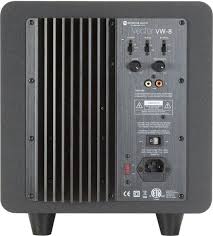
VECTOR VW-8 - Speaker MONITOR AUDIO - Free user manual and instructions
Find the device manual for free VECTOR VW-8 MONITOR AUDIO in PDF.


| Product type | Active subwoofer |
| Brand | Monitor Audio |
| Model | Vector VW-8 |
| Dimensions (H x W x D, with feet) | 320 x 280 x 280 mm |
| Weight | Approx. 8 kg (estimated) |
| Power supply | 110-120 V or 220-240 V, 50/60 Hz (factory selection) |
| Amplifier power | 100 W RMS, class A-B |
| Driver | 1 x 8 inch (200 mm) MMP®II long throw |
| Load type | Bass reflex, downward-firing port |
| Frequency response | 28 Hz – 150 Hz (with filter) |
| Crossover frequency (low-pass filter) | 45 to 150 Hz, variable, 12 dB/octave |
| Phase | Adjustable (0° or 180°) |
| Operating mode | Auto (automatic standby), On (continuous), Off |
| Audio input | 1 x RCA (LFE/mono) |
| Input impedance | 20 kΩ |
| Power consumption | 100 W (max), < 0.5 W standby |
| LED indicators | Red (standby), Green (on) |
| External fuse | Yes, replaceable (under mains socket) |
| Maintenance and cleaning | Dry, clean cloth; do not use liquid products |
| Safety | Double insulation (class II); do not expose to water or humidity |
| Warranty | 1 year (mandatory registration within 30 days) |
| Spare parts and repairability | Fuse and IEC power cable replaceable; no internal parts accessible |
| Included accessories | Power cable, user manual |
| Country of manufacture | United Kingdom (English brand) |
| General information | Designed for home cinema and hi-fi systems; furniture-grade finish |
Frequently Asked Questions - VECTOR VW-8 MONITOR AUDIO
User questions about VECTOR VW-8 MONITOR AUDIO
0 question about this device. Answer the ones you know or ask your own.
Ask a new question about this device
Download the instructions for your Speaker in PDF format for free! Find your manual VECTOR VW-8 - MONITOR AUDIO and take your electronic device back in hand. On this page are published all the documents necessary for the use of your device. VECTOR VW-8 by MONITOR AUDIO.
USER MANUAL VECTOR VW-8 MONITOR AUDIO
Important Safety Instructions 2
Re-cycling 3
RoHS Declaration of Conformity 3
Unpacking 4
Amp Panel and Controls 4
Positioning/Initial Set Up 6
Set Up 6
Specifications 7
Trouble Shooting
Guarantee and Service 8
Claims under this Guarantee 8
EC Declaration of Conformity 9
Data Protection 10
Owner Information 10
Introduction
Thank you for your purchase of a Monitor Audio Vector VW-8 subwoofer, which has been designed and constructed using quality systems and materials to provide years of enjoyment, reliability and pride of ownership.
Please read through this manual to familiarize yourself with any safety advice and how to set up your subwoofer to achieve the very best listening experience.
Please follow this user manual carefully as it contains important information about positioning and set up procedures. For further advanced information on system set-up, FAQ's and multi-lingual support please refer to our web site at: www.monitoraudio.co.uk
Please retain this manual for future reference.
Important Safety Instructions
-
Read these instructions.
-
Keep these instructions.
-
Heed all warnings.
-
Follow all instructions.
-
Do not use this apparatus with water.
-
Clean only with a dry cloth. Great care and attention has gone into the materials chosen to produce the product. A gentle wipe with a dry, clean cloth is all that is required to remove any dust. Treat it as you would a fine piece of furniture because that is how they have been designed.
-
Do not block any ventilation openings. Install in accordance with Monitor Audio's instructions.
-
Do not install near any heat source, such as radiators, heat registers, stoves, or other apparatus (including amplifiers) that produce heat.
-
Do not defeat the purpose of the polarised or grounding type plug. A polarised plug has two blades with one wider than the other. A grounding type plug has two blades and a third grounding prong. The wider blade or the third prong are provided for your safety. If the provided plug does not fit your outlet, consult an electrician for replacement of the obsolete outlet.
-
Protect the power cord from being walked on or pinched particularly at plugs, convenience receptacles, and the point where they exit from the apparatus.
11.Only use attachments/ accessories specified by Monitor Audio.
12.Use only with the cart, stand, tripod, bracket, or table specified by the manufacturer or sold with the apparatus. When a cart is used, use caution when moving the cart/ apparatus combination to avoid injury from tip-over.

- Unplug this apparatus during lightening storms, or when unused for long periods of time.
14.Refer all servicing to qualified service personnel. Servicing is required when the apparatus has been damaged in any way, such as power supply cord or plug is damaged, liquid has been spilled or objects have fallen onto the apparatus, the apparatus has been exposed to rain or moisture, does not operate normally or has been dropped.
-
This apparatus shall not be exposed to dripping or splashing water and that no object filled with liquids such as vases shall be placed on the apparatus.
-
The appliance coupler is used as the disconnect device, the disconnect device shall remain readily operable.
-
This exclamation point within an equilateral triangle is intended to alert the user to the presence of important maintenance (servicing) instructions in the literature accompanying the appliance.

WARNING
- TO PREVENT FIRE OR SHOCK HAZARD, DO NOT USE THIS PLUG WITH AN EXTENSION CORD, RECEPTACLE OR OTHER OUTLET UNLESS THE BLADES CAN BE FULLY INSERTED TO PREVENT BLADE EXPOSURE
- TO PREVENT FIRE OR SHOCK HAZARD, DO NOT EXPOSE THIS APPLIANCE TO RAIN OR MOISTURE
- TO PREVENT ELECTRIC SHOCK, MATCH WIDE BLADE PLUG TO WIDE SLOT AND FULLY INSERT.

This lightning flash with an arrow head symbol, within an equilateral triangle, is intended to alert the user to the presence of un-insulated "dangerous voltage" within the product's enclosure that may be of sufficient magnitude to constitute a risk of electric shock to the persons.
Warning: To reduce the risk of electric shock, do not remove cover (or back), no user-serviceable parts inside. Refer servicing to qualified service personnel.


This exclamation point within an equilateral triangle is intended to alert the user to presence of important maintenance (servicing) instructions in the literature accompanying the appliance.
This is a “Class II”, “double insulated apparatus”. This apparatus must NOT have a safety connection to Earth.
Re-cycling
Correct Disposal of Waste Electrical and Electronic Equipment (WEEE) by User in Private Households in the EU.


This symbol on the product or accessories indicates that they must not be disposed of with your household wastes throughout the EU. To prevent possible harm to the environment or human health from uncontrolled waste disposal, recycle it responsibly to promote the sustainable reuse of material resources. Instead it is your responsibility to dispose of your waste equipment by handing it over to a designated WEEE collection point for recycling. The separate collection and recycling of your waste equipment will help conserve natural resources and ensure that it is recycled in a manner that protects human health and the en
For more specific information about where you can take your equipment for recycling please contact your local city/council office, your local waste disposal service or the outlet where you purchased your Vector product.
RoHS Declaration of Conformity
Directive 2002/95/EC of the European Parliament and of the Council on the reduction of the use of certain hazardous substances in electrical and electronic equipment, January2003.

Background
The RoHS directive restricts the use of Lead (Pb), Cadmium (Cd), Mercury (Hg), hexavalent Chromium (CrVI), polybrominated biphenyl (PBB) compounds, and polybrominated diphenyl ether (PBDE) compounds in electrical and electronic equipment sold in the European Union.
Unpacking
The feet are attached to your product ready to use. The mains power cord is contained separately in the packaging and should be removed prior to unpacking the product.
To remove the product from its carton place some protective material on the floor and having removed any other loose items (mains lead) from the top of the packaging, carefully invert the carton. Also see the icons on the carton. Gradually pull the carton upwards to expose the subwoofer, which will be presented with its base uppermost. Remove fixing tape from plastic bag and expose the base/cabinet. The feet are factory fitted to your product to allow for swift installation and enjoyment of you new purchase.
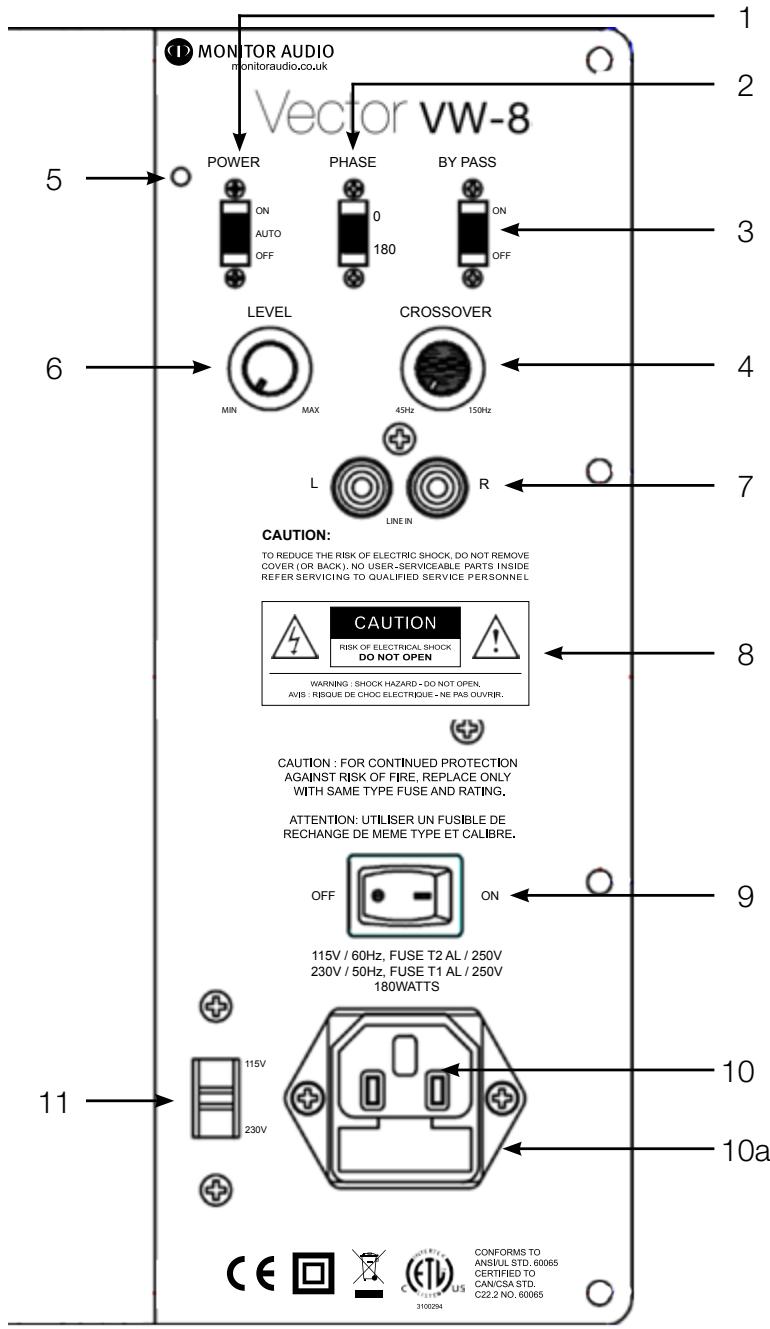
Amp Panel & Controls for VW-8
- Power Mode Switch with On-Auto-Off Facility
The Power Mode Switch has three positions: 'On'-'Auto'-'Off'. With the switch in the 'On' position, the subwoofer is permanently switched on under all conditions. In the 'Auto' position the subwoofer will automatically switch on when an input signal is received and will remain on until no signal is received for around 10-15 minutes, the VW-8 will then switch into standby mode until a signal is received once more. When the switch is in the 'Off' position the subwoofer will not function.
- Phase
The phase control is used to synchronise the output between the VW-8 and main/satellite speakers. For most applications this should be set to 0 degrees.
- By Pass Filter Switch
When set to the 'Off' position the crossover frequency control (section 4) is activated and can be adjusted from 45Hz to 150Hz using the crossover frequency control. When set to the 'Off' position it can be used with an amplifier that does not have a dedicated subwoofer or LFE output, such as a stereo 2-channel amplifier. If the amplifier or AV processor has a dedicated LFE or subwoofer output, the By Pass Filter Switch should be set to the 'On' position. The low pass filter will then be set by the AV amplifier's internal filter. This is set in accordance with the amplifier or AV processor user guide. The table below can be used to set the frequency.
- Frequency
This feature controls the upper frequency limit of the VW-8. The table below will help you to select the correct frequency at which to crossover depending on your main speakers.
| Type of Main Speaker | Monitor Audio Product | Crossover Control Setting |
| Small stand-mount/ bookshelf speaker | V10/V20 | 60-100 Hz |
- Power LED
The LED indicates whether the unit is in stand-by mode or operational. It will be illuminated red when in stand-by, and green when operational. The logo badge on the front of the cabinet will also illuminate red and green depending on operational state.
- Volume
This control allows the subwoofer level or loudness to be adjusted in order that you can achieve a totally controlled, balanced sound.
- RCA Phono Input Connection
This is the only method of signal input connection to the VW-8. When using a stereo amplifier system, connection can be provided by a pair of high-quality signal cables from the pre-out section of an amplifier. If a digital AV processor or AV receiver/amplifier is to be used, a single cable can be connected from the 'sub out' or LFE connection on the amplifier to the RCA input connection on the VW-8 labelled 'R'. The RCA input marked 'L' in this case will remain unused. Note: - cable lengths should not exceed 10 metres to avoid interference from other electrical appliances.
- Warning Information
See warning information on page 3
- Power Switch
The Mains Power Switch should be switched to the 'Off' position when the VW-8 will not be used for extended periods. The switch must be in the 'On' position for the subwoofer to function.
WARNING: Due to the mains switch being located on the rear panel, the apparatus must be located in the open area with no obstructions to access the mains switch.
10.IEC Mains Power Connector/ Fuse Location
The VW-8 is supplied with a two-pin mains input socket for connection to the mains supply. Use ONLY the appropriate IEC mains lead provided with the product. Also fitted is an external mains fuse. If this fuse blows during operation a spare fuse is provided within the fuse holder for replacement. If you wish to change the fuse, you can do this by removing the IEC mains lead and carefully levering out the original fuse from its holder below the IEC mains input socket (10a). If the fuse blows again it is advisable to seek help from an authorised service agent. DO NOT attempt to re-fit a further fuse as this could result in serious damage to the amplifier unit.
11.Mains Voltage Selector
This is factory set to your country's mains voltage specification. Do not attempt to adjust this as this may lead to permanent damage to the product and even the risk of fire. There is a clear plastic cover over the selector to prevent accidental adjustment.
Positioning/Initial Set Up
Leave the subwoofer unplugged from the mains until the installation procedure is completed. The subwoofer should now be sited in the most suitable position, preferably not directly in the corner of the room as this may cause excessive bass 'boom'. Once a desirable position is achieved it is important to check if the cables are long enough to reach comfortably without being under tension. The optimal control settings will depend entirely on your system configuration. For initial trials set the controls as follows:
Volume Control
Should be set to minimum
Frequency Control
Should be set to the minimum position (45Hz)
Phase Control
Should be set to zero degrees
Power Mode Switch
Should be set to 'Auto'
By Pass Filter Switch
Should be set to the 'On' position
Input connections can be made at this stage before the power is connected to the subwoofer.

Never connect or disconnect any leads with the subwoofer switched on.
Set Up
Once the input cables are connected and the controls are set in accordance with the initial set-up procedure above, the subwoofer can be connected to the mains power supply and switched on at the mains power switch. Do not play any music at this stage. Power Mode Switch in the 'Auto' position, the unit should remain in standby with the power LED around the Logo Badge on the front and on the amp panel should be red, until the AV amp is turned on or a signal is received.
To manually set up you sub, play a variety of music/ film excerpts that you are familiar with starting at a very low volume level, increasing to an average listening level once you are sure everything is working correctly. Please now follow the instructions below: -
- For use with an AV amp/receiver (product with Subwoofer output) please select the by pass filter switch to the 'On' position. Otherwise select by pass filter switch to the 'Off' position. This engages the crossover frequency control on the subwoofer (please refer to pages 5).
- If using the crossover frequency control please adjust in accordance with the table on page 5. Further fine-tuning may be required.
- The Phase Control can now be set, please refer to pages 4 for further information.
It is important to try a variety of music and film excerpts with which you are familiar in order to obtain the optimum overall settings.
A lot of AV amplifiers/ receivers have an auto set up on them. If you use this to set up your sub, please remember to go back into the settings of your AV amp and check them. You may need to go back and manually fine tune, both on the sub and on the AV amp to achieve optimum performance.
Specification
Low frequency limit:- 28Hz
Upper frequency limit:-
45 - 150 Hz Variable
Low pass filter alignment:
12dB per octave filter
Cabinet Specification: -
Bass Reflex (downward firing port), 18mm M.D.F construction
Amplifier Output:-
100 Watts (RMS)
Amplifier classification:
Class A-B amplifier
Driver compliment:-
1 x 8” MMP®ll long throw driver
Dimensions (height includes feet):-(H x W x D)
Millimetres:- 320 × 280 × 280 Inches:- 125/8 × 11 × 11
Input Impedance: -
20K Ohms
Mains input voltage:-(Factory Preset)
110 - 120 Vac / 220 - 240 Vac 50/60Hz
Trouble Shooting
Should you experience any technical, or set-up problems with your subwoofer please check the Trouble Shooting Guide below:
My subwoofer will not turn on/no power.
- Are the LED's (one on the amp panel and the other on the front illuminating the 'M' Logo) illuminated on the unit? If not, then check your mains lead is properly connected both at the subwoofer and at the mains outlet. Also check the fuse of the mains plug (where fitted) and also the fuse in the subwoofer. See page 5 for further information on changing the fuse and it's location.
- Are the LED's red? If so, you have power going to the unit. It could be that there is no signal.
- Has it got a signal going to it? If so, is the Power Mode Switch in the Auto or On position, and the signal source is turned on? Try adjusting the volume level of the source.
If it still does not turn on/ power up, please contact your local dealer/ distributor or Monitor Audio immediately.
No sound from subwoofer.
- Are the LED's red or green? If it is red, then the unit hasn't actually turned on, see suggestions above. If it is green, then your unit is powered up and turned on. Check further suggestions below.
- Are the signal leads connected correctly? Check these. If possible, check with a second, known to be working set.
Is the volume level just very low?
If it still does not output a signal, please contact your local dealer/ distributor or Monitor Audio immediately.
Guarantee and Service
To validate your warranty please visit www.monitoraudio.co.uk within 30 days of purchase.
When you register here you'll gain free entry to our monthly prize draw! What's more you'll be the first to hear about the great things happening at Monitor Audio, including new products and events!
This equipment has been fully tested prior to dispatch from the factory. Both the craftsmanship and the performance of this product is guaranteed against manufacturing defects for the period of one year from the date of purchase (see conditions below), provided that the product was supplied by an authorised Monitor Audio retailer under the consumer sale agreement. (The words 'consumer sale' shall be construed in accordance with section 15 of the supply of goods act 1973). Monitor Audio accepts no responsibility for defects arising from accident, misuse, abuse, wear and tear, modification or operation outside of that specified within this instruction manual. Neither will responsibility be accepted for damage or loss occurring during transit to or from the parties claiming under this guarantee.
This guarantee covers both labour and parts. The liability of Monitor Audio is limited to the cost of repair or replacement of the defective parts (at the discretion of Monitor Audio) and under no circumstances extends to consequential losses or damage.
Claims under this Guarantee
The equipment should be returned in its original packaging to the original supplier where possible, or to any other authorised Monitor Audio dealer. If it is not possible to return the equipment by hand, then it should be sent carriage prepaid via a reputable carrier. If the original packing is not available replacement packaging can be purchased from Monitor Audio. If you have any difficulties complying with these requirements please contact us at the following address:
Customer Service
Tel: 44 (0) 1268 740580
Monitor Audio Ltd.
Fax: 44 (0) 1268 740589
Unit 2, 24 Brook Road
Internet: www.monitoraudio.co.uk
Rayleigh
Email: info@monitororaudio.co.uk
Essex
SS67XJ
England
This guarantee does not affect the statutory rights of the consumer under UK law.
EC Declaration of Conformity
We, Monitor Audio Ltd.
Unit 2,24 Brook Road
Rayleigh
Essex
SS67XJ
England

Declare in own responsibility, that the Vector VW-8 product described in this manual is in compliance with Technical Standards/Council Directives:
(LVD) 73/23/EEC Low Voltage Directive
EN60065: 09.93+ A11:09.97 Safety requirements for mains operated electronic and related apparatus for household and similar use.
(EMC) 89/336/EEC Electro Magnetic Compatibility
EN55013:2001 + A1:2003 + A2:2006 Sound and television broadcast receivers and associated equipment - Radio disturbance characteristics - Limits and methods of measurement.
EN55020:2007 Sound and television broadcast receivers and associated equipment - Radio disturbance characteristics - Limits and methods of measurement.
EN6100-3-3:1995 + A1:2001 + A2:2005 Electro magnetic compatibility (EMC). Limits. Limitation of voltage changes, voltage fluctuations and flicker in public low-voltage supply systems, for equipment with rated current up and including 16 Ampere per phase and not subject to conditional connection.
EN61000-3-2:2006 Electro magnetic compatibility (EMC). Limits. Limits for harmonic current emissions (equipment input current up to and including 16 Ampere per phase).
Signed by:

Name: D.S. Hartley
Position: Technical Director
Company: Monitor Audio Ltd
Data Protection
We at Monitor Audio are committed to respecting the wishes and privacy of our customers. Any information you provide will be held in the strictest confidence and only used within the Monitor Audio organisation for the provision of services such as warranty claims or spare parts.
We may wish to contact you in the future to ensure you are happy with the products and standards of service we provide and to keep you up-to-date with the latest products and promotions we have to offer.
Should you wish not to be contacted by us either by post, e-mail or phone, please tick the box on the warranty card. Alternatively you can request not to be contacted in future by writing to Customer Service, at the address on the previous page.
Owner Information
Product Details
Model Vector VW-8
Product Serial No
Amp panel Serial No
Date of Purchase
Dealer Details
Dealer Name
Address
Town, Post code, Country
e-mail address
Monitor Audio reserves the right to alter specifications without notice.
Vector vw-8
(H x I x P) Pouces:- 12 5/8 x 11 x 11
Unit 2, 24 Brook Road
Internet: www.monitoraudio.co.uk
Rayleigh
Email: info@monitoraudio.co.uk
Essex
SS6 7XJ
Angleterre
Directiveasse tension 73/23/CE
1 x driver de长大 alcance (long throw) 8"
MMP@II
Unit 2, 24 Brook Road Internet: www.monitoraudio.co.uk
Rayleigh E-mail: info@monitororaudio.co.uk
Essex
SS67XJ
Inglaterra
Unit 2,24 Brook Road
Rayleigh
Essex
SS6 7XJ
Inglaterra

- CeNEkTop ceTeBOrO HanpJxKeHn
Cetbeoe HapjxHne yCTaHO BnOHe M COTBcTcBn CTexNueckm TpeoHaHmK HapjxHIO cTe, DeIcTByUoImM B BaWe cTpaHe. He IbTaIeCb 3MeHHTb 3NaueHne CeTeBOr HapjxHn, TAK KaK 3TO MOKeT npVBecTI K HeoBpAUMoN oOpYe o6OpyDobAHn Nn NOnApay. Jn PpeoTbpaSeHn HnpeDHaMepeHHOr O3MeHn 3NaueHn HapjxHn CeJIeKTOp 3aUuSeH nPo3paHbIM PnaCTIKOBbIM KOIIaYKom.
YcTaHOBnTb Ha 0 rpaIycOB
YcTaHOBnTb B nIoXKeHne «Auto» («ABTomaTuYeCKn»)
YcTaHOBnTb B nIoJxKeHne «On» («BkJIuOyeHo»)
Ha 3tOM 3tane BCE BXoHbIe Ka6eIaOJXhbl 6bITb NODKIOUChbI. Pocne 3toro ca6Byep MOxHO NODKIOUHTb K cETNIITAHnI.

HnkOrda He noDcoeHNHaIte Hn pa3beHNHaIte Ka6eJ npn BkNochHom ca6Bypepe.
YCTAHOBKa
Iocne TOrO, KaK BxOHNbIe Ka6eJI NaODCoEINHeHbI, a NapaMeTpbl CnCTeMbI yCTaHOBJIeHbI B COOTBeTCTBnC BbIWeu3IOJKeHHo IpoUeDpyoR, cABByFep MoJcET 6bITb NODCoEINHeN K CeTI NITAHnA, a BbIKNoUaTeJI b 3JIeKTpOniTahnRA BKIOUeyen. Ioka BO3dEprXInTeCb OT npOINrPbIBaHnra My3bIKn. PepeKIOUaTeJI pexIMma pa60tbi HaxODNTCB I NOLOKeHNN «Auto» («AbTomatUneckn»), n CnCTema DoJIxHa OCTaBaTbcR B pexIMme OxNiDaHnA. Pnp 3tOM INDnKaTOp LED, NODcBeuBaIoUmN IoroTnP, a TAKKe LED Ha nepeDHeN PaHENI CBeTAYTcR KpaCHbIM noka AV ycINlTeJIb He 6ydet BKIOUeyen IIJI He 6yDet NOLUyeH CNrHaI.
MoUHOCTb yCnIITeJIa 100Br (RMS)
EcIIN Bce paBHO HeT CnHajla, To HemeIeHHO o6paTntEcB K MeCTHomy DInIepy/DnCTpN6bIoTpOy Monitor Audio.
ГараNTиHoe obcIyЖиBaHne
Для akтунзаци ваший rapаHTи постпе сait www.monitoraudio.co.uk He no3xe, чм чepe3 30 дн e c dntbI npno6peTeHn.
Pn peNCTpaun nokynn Ha caTe Bbl aBtOMaTneckn (6ecnPaTHO) cTaHOBnteCb yactHkOM Hawei IOTepen, po3bIrpbIsh KOTOpO npOn3BOIDTCs EKemecyHo. Ho n 3To eSe He BCE! Bbl 6ydeTe noLyuATb NocJeHnE HOBOCTn H3 HaWei KOMNaHmN i ByTe ODNHM n3 nepBbIX y3HaBaTb O HOBNKax i PNOBOIMbIX peKJaAMhblx akUJX.
Unit 2, 24 Brook Road
Béçcaïr: www.monitoraudio.co.uk
Rayleigh
3π. nochta: info@monitororaudio.co.uk
E
SS67XJ
England
Данна rapаNTя He orpaHnUbaT npaba Notpe6nteJIe, yCTaHOBJIeHHbIe 3aKoHODaTeJIbCTBOM BeJINKo6pItaHIn.
KoMaHaHn: MoHITop AynIO JTT
3auntaaHOpmaun
HaSHA KOMPNAHNA CTeMaTc CTeNaTb BCE BO3MOXHOe, YTO6bI yDObNETBOpNTb JKeJAHNA HaaNX 3aKa3UKNOB IN 3aUHTNtB INx IpaBO HA KOHΦnDEHuaJIbHoCTb. NIO6aYnΦopMaZnA, KOToPOB BbC HAMN NOeININCb, ByET XpaHNTbc CTpORO KOHΦnDEHuaJIbHO IN cNOJIb3ObaTbCS TOJIbKO BHyTpN KOMPNAHn Monitor Audio dIra OKa3aHn BA m YcIyr, TAKNX KAp IpeTeH3NI NO rapaHTNI INI 3aKa3 3aNaChbIX qAcTei.
MblMOxEM Bpemr OT BpeMeHn C83bIbTbcra C Bamu, yTO6bI y6eHTbcra, yTO Bbl yIOBnETBOpeHbHaIe npOdyKcnei n KaueCTBOM IpeIOCTaBJIeHHbIX HAMN ycnyr, a TaKKe IJRA TORO, yTO6bI IepXaTb Bac B Kypce HOBNOK n peKJaAMhbx akun.
EcnBbHe JxepaTe, TTObMbI CB83bIbAINCb C Bamn NO NOyTe, 3JIeKtpOHHO NOyTe NII TeJefoHy, NOCTaBbTe Nometky B COOTBeTCTByUoSeI rpaFe rapaHTnHOrO TaIOHa, KOtOpbBb MoKeTe HaITn Ha HsE MbeCauTe. Bb TaKc MeKeTe HAnCaTb B NaH OTdeN ObcJyXuBaHnI 3aKa3uKOB No BblweyKa3aHHOMy aDpeCy I Nonpocntb Hac HNKOrda BoJbWe He KOHTaKTIPOBaTb Bac.
Информаць O Ваденьке пибopa
HaMeOBaHne n KpaTkoe onncahne npOdyKta
Mодель Vector VW-8
CepnHbI HOMep npOdyKta
CepnHbI HOpE npHeJI
Дата поулки
HΦopMaζηo npOaBuce
Ha3BaHne ToproBoi opraHn3aun
Ampes
TporoI,poTuToBbI INHeKc,ctpaHa
3π. noyta
KomnaHnM Monitor Audio octabnAeT 3a coBoi npaBO BHOcNTb N3MeHeHnB TexHnueckne ycIOBnI XapaKTePnCTnKn 6e3 npedBaPntbHoro yBeDOMnEHH.
Vector vw-8
Manuale dell'utente
Unit 2, 24 Brook Road
Internet: www.monitoraudio.co.uk
Rayleigh
E-mail: info@monitoraudio.co.uk
Essex
SS6 7XJ
Inghilterra
Unit 2,24 Brook Road
Rayleigh
SS6 7XJ
Inghilterra

Unit 2, 24 Brook Road
E-Mail: info@monitoraudio.co.uk
Rayleigh
Internet: www.monitoraudio.co.uk
Essex
SS67XJ
Großbritannien
Unit 2, 24 Brook Road
Internet: www.monitoraudio.co.uk
Rayleigh
Email: info@monitoraudio.co.uk
Essex
SS6 7XJ
Inglaterra
Unit 2,24 Brook Road
Rayleigh
Essex
SS6 7XJ
Inglaterra

Declaramos sob a)nossa propria responsabilitad que o produit Vector VW-8 descriptoestemanual estádeacordo comasDirectivasdo Conselho/NormasTecnicas:
Unit 2, 24 Brook Road
网址:www.monitoraudio.co.uk
Rayleigh
电邮:info@monitororaudio.co.uk
Essex
SS6 7XJ
England
该保修单不触犯英国消费者法定权益。
EC符合性声明
EC符合性声明
We, Monitor Audio Ltd.
Monitor Audio Ltd.
Unit 2, 24 Brook Road
Rayleigh, Essex
SS6 7XJ
England

Unit 2, 24 Brook Road
Rayleigh, Essex
SS67XJ
England
Tel: +44 (0) 1268 740580
Fax: +44 (0) 1268 740589
Email: info@monitororaudio.co.uk
monitororaudio.co.uk
Designed in the United Kingdom
Version 1. 2008