TASSIMO TAS5546 - Coffee maker BOSCH - Free user manual and instructions
Find the device manual for free TASSIMO TAS5546 BOSCH in PDF.


User questions about TASSIMO TAS5546 BOSCH
0 question about this device. Answer the ones you know or ask your own.
Ask a new question about this device
Download the instructions for your Coffee maker in PDF format for free! Find your manual TASSIMO TAS5546 - BOSCH and take your electronic device back in hand. On this page are published all the documents necessary for the use of your device. TASSIMO TAS5546 by BOSCH.
USER MANUAL TASSIMO TAS5546 BOSCH
natural_image
Abstract geometric pattern composed of overlapping colored circles (no text or symbols)TQSSIMO
TAS 55XX
de Gebrauchsanleitung
en Instruction manual
fr Mode d'emploi
es Instrucciones de uso
pt Instruções de serviço
it Istruzioni per l'uso
sv Bruksanvisning
da Brugsanvisning
no Bruksanvisning
el Oδηγίες χρήσης
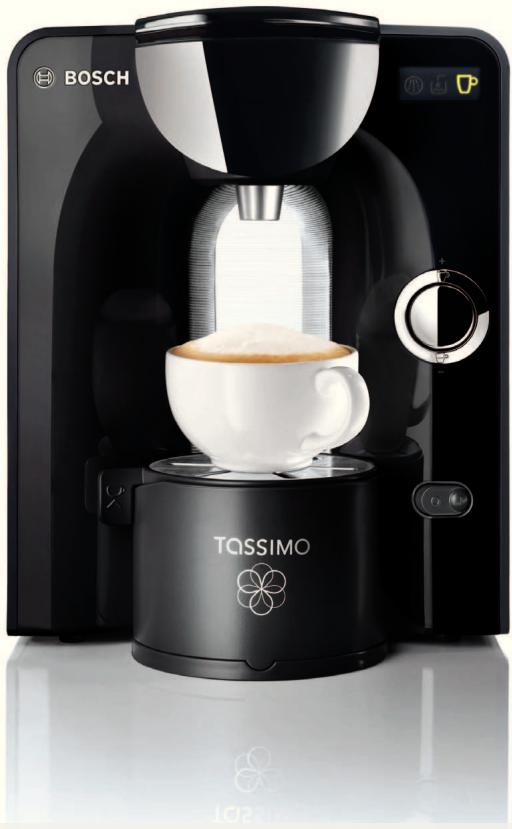
natural_image
Exterior view of a Bosch coffee maker with TQSSIMO branding and white foam cup (no visible text or symbols on the device itself)
BOSCH
de Gebrauchsanleitung 2
en Instruction manual 20
fr Mode d'emploi 38
es Instrucciones de uso 56
pt Instruções de serviço 74
it Istruzioni per l'uso 92
SV Bruksanvisning 110
da Brugsanvisning 128
no Bruksanvisning 146
el Oδηγίες χρήσης 164
text_image
0,5l min 4a 4e 4b BOSCI 4c 4d 5d 5c 5a 5b 6a 6b TOSSIMO BRITA 3f 5 6 3e 3d 3c 2a 2b 7b TOSSIMO 7aSicherheitshinweise
text_image
Diagram showing a hand inserting a device into a microwave oven, with labeled components and directional arrows indicating process flow.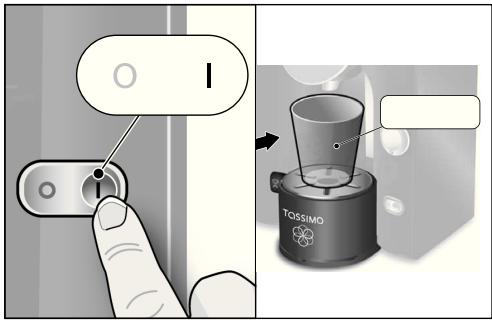
text_image
Diagram showing a hand pressing a button on a device, with a magnified view of a TOSSIMO device being inserted.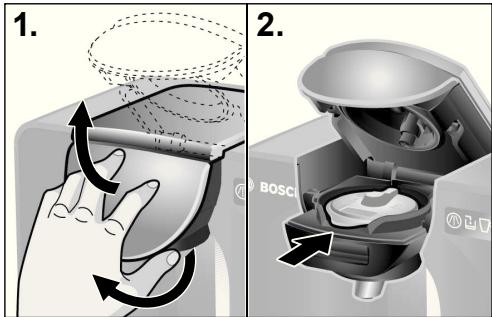
text_image
1. 2. BOSCInatural_image
Illustration of a hand washing a container with bubbles, no text or symbols present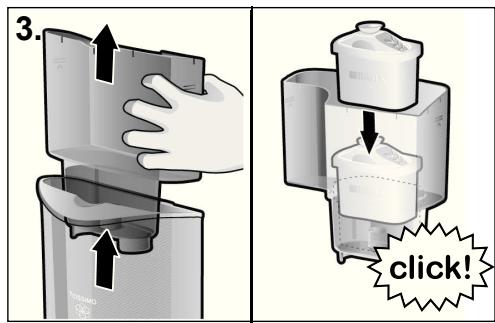
text_image
3. TOMATO click!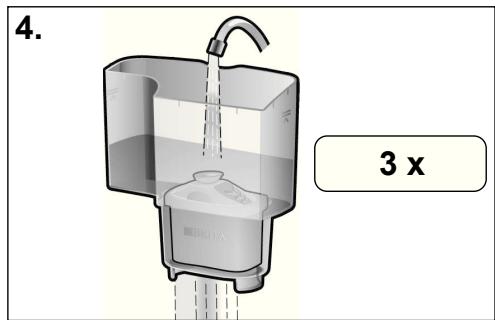
text_image
4. 3 xnatural_image
Three identical Bosch water dispenser machines, each with a different color and icon, shown side by side (no text or symbols on the devices themselves)natural_image
Illustration of a hand placing a small object into a multi-section container (no text or symbols visible)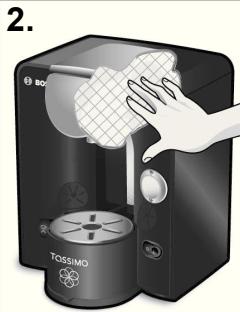
text_image
2. BG TOSSIMO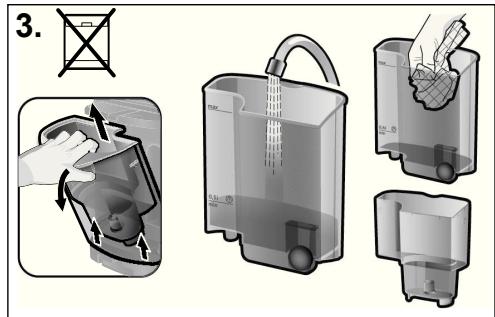
text_image
3.natural_image
Hand inserting a small component into a water dispenser device (no text or symbols visible)text_image
4. click!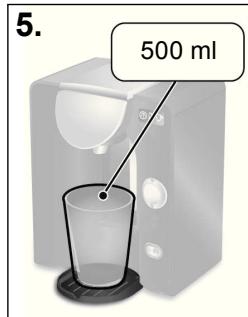
text_image
5. 500 ml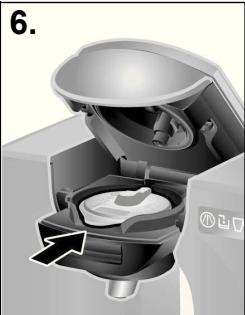
natural_image
Cross-sectional diagram of a mechanical device showing internal components and a directional arrow (no text or symbols)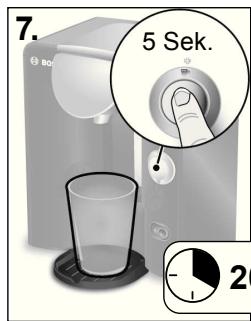
text_image
7. 5 Sek. 2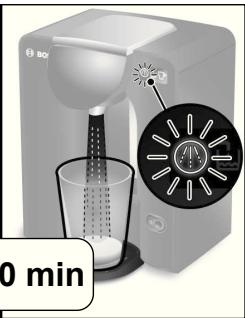
natural_image
Product photo of a white Bo2 water dispenser with a digital display showing a circular design, no visible text or symbols on the device itself.! Wichtig:
flowchart
graph TD
    A["Bag with liquid"] --> B["Bag with liquid"]
    B --> C["Box with Max Volume"]
    C --> D["Box with 100% label"]
    D --> E["Box with 100% label"]
    E --> F["Box with 100% label"]
    F --> G["Box with 100% label"]
    G --> H["Box with 100% label"]
    H --> I["Box with 100% label"]
    I --> J["Box with 100% label"]
    J --> K["Box with 100% label"]
    K --> L["Box with 100% label"]
    L --> M["Box with 100% label"]
    M --> N["Box with 100% label"]
    N --> O["Box with 100% label"]
    O --> P["Box with 100% label"]
    P --> Q["Box with 100% label"]
    Q --> R["Box with 100% label"]
    R --> S["Box with 100% label"]
    S --> T["Box with 100% label"]
    T --> U["Box with 100% label"]
    U --> V["Box with 100% label"]
    V --> W["Box with 100% label"]
    W --> X["Box with 100% label"]
natural_image
Cross-sectional diagram of a coffee maker with internal components and a rotating arrow indicating rotation (no text or symbols)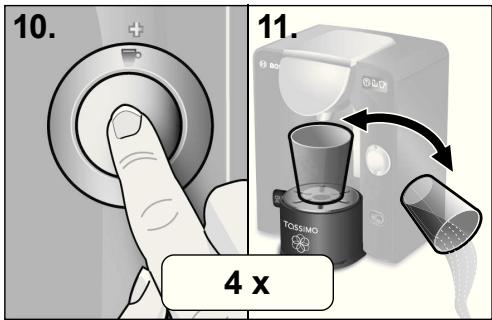
text_image
10. 11. 4 x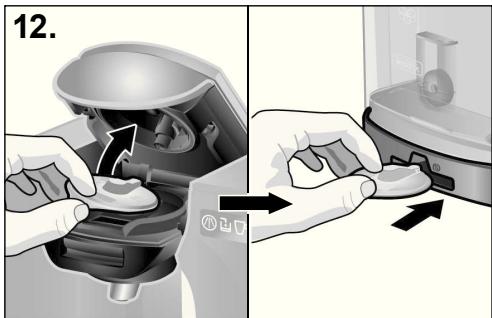
text_image
12.Risk of electric shock!
- This appliance is designed for preparation of small amounts of coffee for domestic use or for use in non-commercial, household-like environments, such as staff kitchens in shops, offices, agricultural and other small businesses or for use by guests at bed-and-breakfast establishments, small hotels and similar residential facilities.
- Connect and operate the appliance only in accordance with the specifications on the rating label situated on the base of the machine.
- Do not use your TASSIMO machine if either the power cord or appliance is damaged.
- Use indoors at room temperature only and not above 2000m sea level.
- Do not let children or persons with reduced mental or sensory abilities or limited knowledge and experience use the appliance, unless they are supervised or have been instructed in the use of the appliance by a person who is responsible for their safety.
- Keep children away from the appliance.
– Supervise children to ensure that they do not play with the appliance. - In the event of malfunction, unplug the appliance immediately.
- To avoid potential hazards, repairs such as replacing a damaged cord should only be performed by our service personnel.
- Never immerse the appliance or power cord in water.
Risk of scalding!
- Your TASSIMO machine prepares hot beverages – please handle them carefully.
- Never attempt to open the brewing unit during the brewing process.
- Wait until the Status LED ☐ (3c) has stopped blinking before attempting to open the brewing unit.
! Important:
- Please read this user manual and the enclosed materials carefully and follow the instructions carefully.
- Keep them for future reference.
Thank you for choosing a TASSIMO machine. With TASSIMO, you can enjoy your favourite drink at any time. Aromatic coffee, strong espresso, tasty caffé crema, creamy cappuccino or latte macchiato, or even a cup of tea or hot chocolate: they're all waiting for you at the push of a button.
Your TASSIMO machine works exclusively with specially developed capsules known as TASSIMO T DISCs. When you insert the T DISC, the machine automatically reads the bar code printed on the label. This contains exact details of the amount of water needed, as well as the brewing time and temperature required to prepare the chosen beverage. T DISCs are specially designed for use with the TASSIMO brewing system and offer perfect enjoyment, cup after cup. To ensure long-term enjoyment, please only use the T DISCs specially developed for the TASSIMO machine.
Table of contents
Safety instructions....20
Your TASSIMO machine at a glance .....21
First use of your TASSIMO machine......22
BRITA MAXTRA water filtration system ..24
Controls and Displays 26
Cup size 27
How to use your TASSIMO machine .....28
Maintenance and day to day care....30
Descaling 32
Disposal....35
Troubleshooting....35
Guarantee 184
TASSIMO careline....188
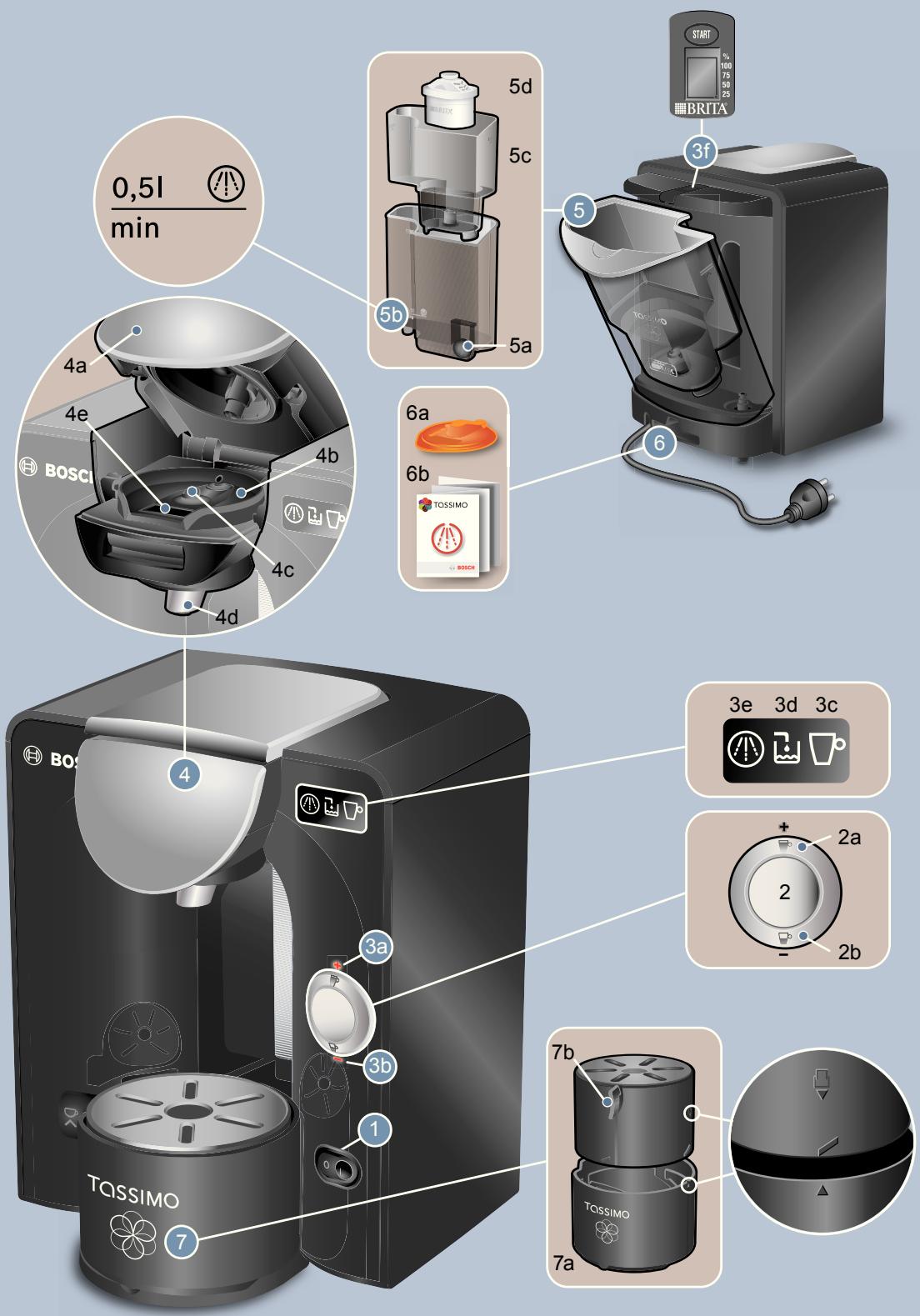
Your TASSIMO machine at a glance
Before reading further, please open the folded diagram page at the start of the manual out to the left.
1 ON/OFF switch
2 Start/Stop button
a Drink adjustment button + 📋
b Drink adjustment button – 📋
3 Indicators
a + LED
b - LED
c Status LED
d Fill water tank 📄
e Descale required
f BRITA cartridge replacement indicator
4 Brewing unit
a Handle
b T DISC holder
c T DISC piercing unit
d Drink outlet
e T DISC barcode reading window
5 Removable water tank
a Float
b Fill mark for descaling solution
c Filter cartridge holder
d BRITA MAXTRA filter cartridge
6 Storage compartment
a Service T DISC
b Short instructions for cleaning/descaling
7 Cup stand
a Drip tray
b Height adjustment with drip grate
i Note:
We recommend that you store the Service T DISC and the cleaning/descaling programme short instructions in the compartment (6) provided at the back of the appliance.
First use of your TASSIMO machine
text_image
max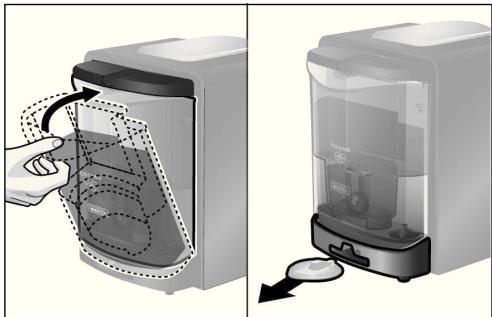
text_image
Diagram showing a hand inserting a device into a microwave oven, with labeled components and directional arrows indicating process flow.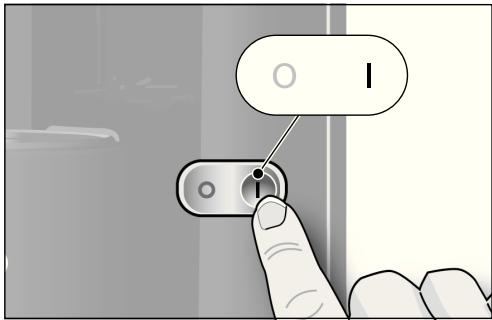
text_image
I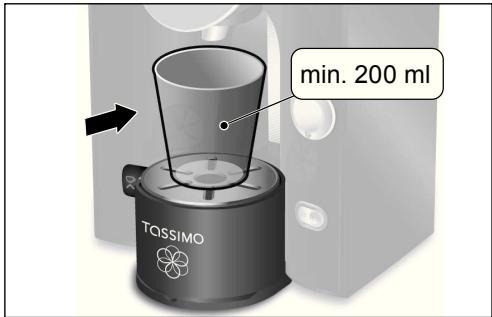
text_image
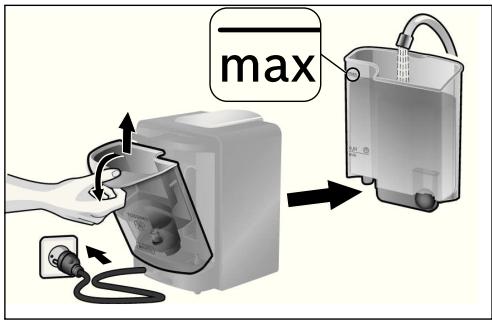
min. 200 ml TASSIMO▶ Insert the power plug into a wall outlet.
▶ Remove the water tank, rinse it and the filter cartridge holder (5c) thoroughly under running water, and fill it up to the max mark with cool fresh water.
▶ Replace the water tank by slanting it slightly and returning it to its original position until it clicks into place.
▶ Remove the Service T DISC (6a) from its compartment (6) at the back of the appliance.
▶ Turn the machine on by pressing the ON/OFF switch (1). The display elements will light up briefly.
▶ Select a large cup (minimum capacity 8 oz / 200 ml) and place it on the cup stand (7).
text_image
1. 2.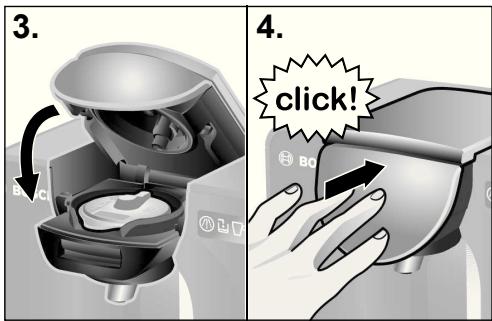
text_image
3. 4. click!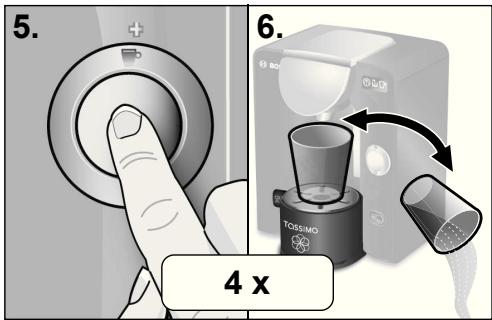
text_image
5. 6. 4 x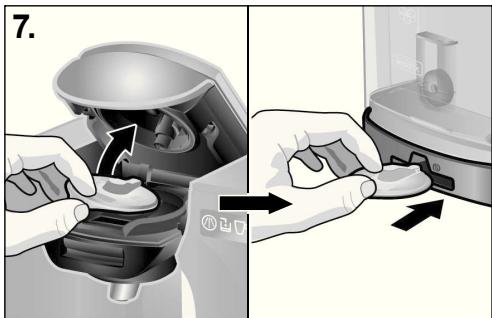
natural_image
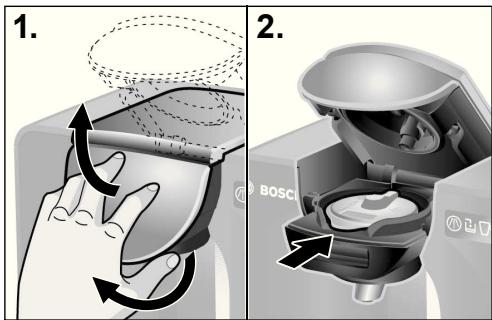
Two-step diagram showing hands using a device to adjust the interior (no text or symbols present)- Open the brewing unit by lifting the handle (4a) and then pushing the brewing unit up.
- Place the Service T DISC (6a) on the T DISC holder (4b) with the barcode facing down. Make sure that the flap of the T DISC is centred in the slot in the front.
- Close the brewing unit by first bringing it down.
-
Then push the handle (4a) firmly to the machine, until you hear an audible click.
-
Press the Start / Stop button (2) to start the cleaning process.
-
When the cleaning process is complete, empty the cup and return it under the drink outlet.
! Important:
- Please complete steps 5 and 6 four times to ensure the machine is cleaned and prepared for the next steps.
- Open the brewing unit, remove the Service T DISC and store it in the compartment (6) at the back of the machine.
The next step involves installing the BRITA MAXTRA water filter system that came with your machine. Please follow the instructions on the next pages.
BRITA MAXTRA water filtration system
text_image
1. BNTA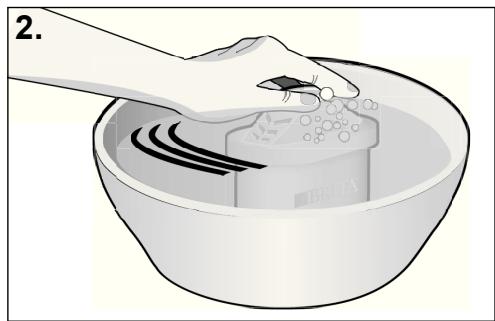
natural_image
Illustration of a hand washing a bowl with a brush, showing liquid and bubbles (no text or symbols)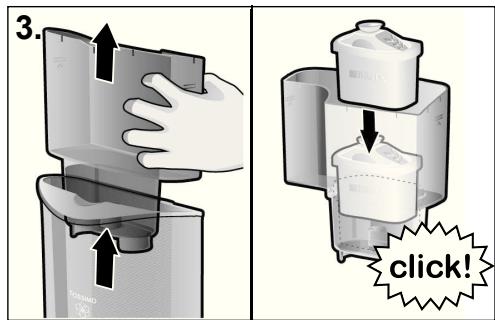
text_image
3. click!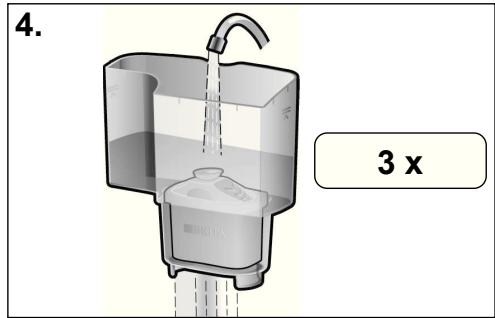
text_image
4. 3 xOnly BRITA MAXTRA water filtration system cartridges may be used in TASSIMO machines.
BRITA MAXTRA filter cartridges (5d) are available from various retailers or directly from the Bosch Customer Service Department (see page 186 for contact information).
To operate your machine with a new filter cartridge (5d), proceed as follows:
Preparing and inserting BRITA MAXTRA filter cartridge
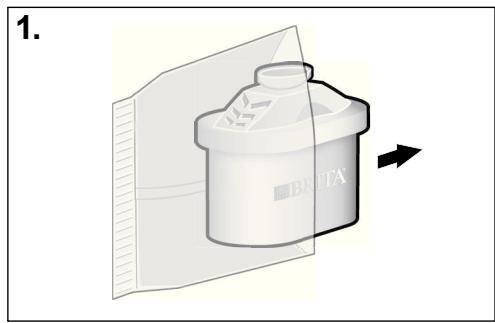
- Remove the filter cartridge (5d) from its protective wrap.
- Immerse the filter cartridge (5d) in cold tap water and move it gently back and forth to remove any air bubbles (about 5 seconds).
- Remove the filter cartridge holder (5c) from the water tank and insert the filter cartridge (5d) into the appropriate chamber of the filter cartridge holder (5c) until it snaps into place with an audible click.
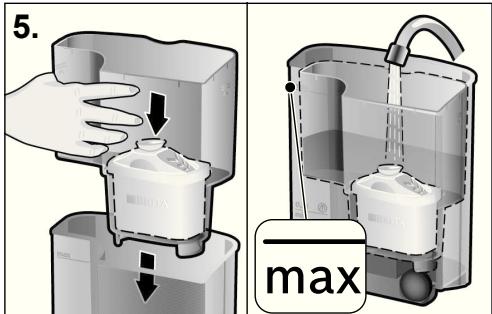
- Hold the filter cartridge holder (5c) under the tap, fill it with fresh, cold water and let the water run through the filter cartridge (5d).
Repeat this procedure three times.
text_image
5. maxActivate BRITA Filter cartridge replace indicator
For maximum filter performance and anti-scale protection, the BRITA MAXTRA filter cartridge (5d) should be replaced every eight weeks.
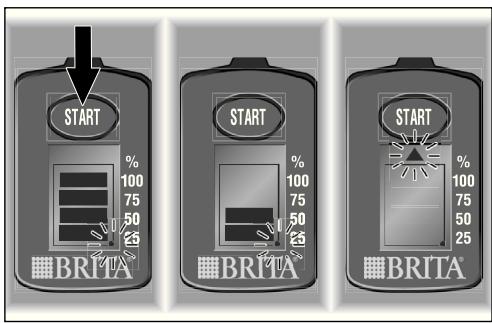
The BRITA cartridge replacement indicator (3f) on the top of the machine uses bars to indicate when the filter cartridge (5d) should be replaced with a new one.
To activate the BRITA filter cartridge replacement indicator (3f), press and hold the Start button until all four bars appear on the display and blink twice.
The blinking dot in the lower right corner indicates that the filter cartridge replacement indicator (3f) is activated. All four bars should be visible.
text_image
START % 100 75 50 25 BRITA START % 100 75 50 25 BRITA START % 100 75 50 25 BRITA- Now place the filter cartridge holder (5c) with the filter cartridge (5d) into the empty water tank and fill the tank with fresh water to the max mark.
! Important:
- Always remove the filter cartridge holder (5c) with the filter cartridge (5d) before running the descaling programme.
From this moment on, one bar disappears every two weeks. When no bars are visible after eight weeks and the arrow is blinking, replace the filter cartridge (5d).
To remove the filter cartridge (5d), simply pull it out by its tab.
To prepare a new filter cartridge (5d), follow the instructions in the section titled "Preparing and inserting BRITA MAXTRA filter cartridge" and reset the BRITA filter cartridge replacement indicator (3f), by pressing and holding the Start button.
i Note:
Your TASSIMO machine is now ready for use.
i Note:
It's a good idea to purchase a new filter cartridge (5d) when the replacement indicator shows only one bar. BRITA MAXTRA filter cartridges (5d) are available from various retailers or directly from the Bosch Customer Service Department (see page 186 for contact information).
Controls and Displays
(see the illustration at the beginning of this instruction manual)
ON/OFF switch (1)
The ON/OFF switch is the main power switch for the machine. You use it to turn on your TASSIMO machine or turn it off completely.

Note:
To save even more energy, the appliance should be switched off after each use.
Start/Stop button (2)
The Start/Stop button is used to start and interrupt the brewing, cleaning and descaling processes.
Drink adjustment buttons
+ 📋 (2a) and - 📋 (2b)
You use the drink adjustment buttons to adjust the size of the drink you are preparing.
2a Makes a larger/longer drink (milder flavour)
2b Makes a smaller/shorter drink (stronger flavour)
+ LED (3a) and - LED (3b)
These LEDs light up when the T DISC has been detected. The + and - LEDs light up individually according to whether a bigger or smaller drink has been selected and flash during the brewing process.
Status LED 📋 (3c)
The status LED indicates four machine conditions:
- Steady yellow:
Machine is in standby mode - Blinking yellow:
Machine is in the process of brewing a drink/cleaning/descaling - Steady red:
Error mode (for example, if the barcode was not recognized) - Dimmed, yellow light:
Power save mode
! Risk of scalding!
- Wait until the Status LED ☐ (3c) has stopped blinking before attempting to open the brewing unit.
Fill water tank 📋 (3d)
This indicator lights up when the removable water tank needs to be refilled or is not in place.
Descale required ⏻ (3e)
This indicator lights up or blinks when your TASSIMO machine must be descaled.
i Note:
Always descale your TASSIMO machine in accordance with the instructions provided under “Descaling” on page 32.
BRITA filter cartridge replacement indicator (3f)
This indicator reminds you that it is time to replace the BRITA MAXTRA filter cartridge (5d).
Cup size
text_image
TQSSIMO click!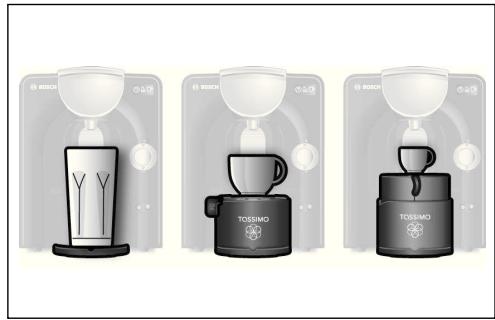
natural_image
Three identical Bosch water dispenser machines with different shades of liquid, each showing a different product (no text or symbols visible)To use cups of different sizes in accordance with your beverage selection, you can adjust the cup stand of your TASSIMO machine.
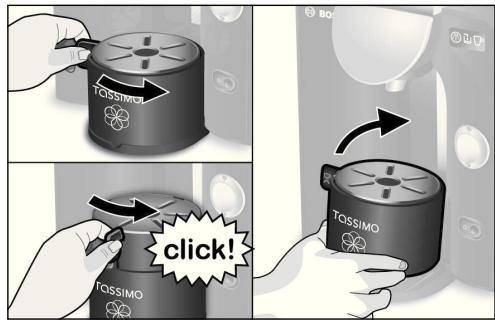
To adjust the height setting for small cups, turn the control handle (7b) left to right until it clicks into place.
For large cups or glasses, the cup stand can be removed completely.
To remove lift up the front of the cup stand and tilt towards the back.
Notes:
- To ensure the best possible beverage quality and avoid splashing, always use the highest cup stand position.
- To avoid spillage, select the appropriate cup size for each type of beverage. The recommended cup size is indicated on the original T DISC outer packaging.
How to use your TASSIMO machine
! Important:
- For optimum results, fill the tank only with cool, fresh, non-carbonated water each day. Do not use chemically softened water.
i Note:
Make sure that your TASSIMO machine has been set up for use as described in the section titled “First use of your TASSIMO machine” on page 22.
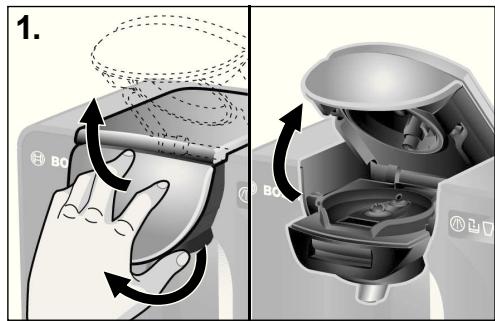
text_image
1. Bo Bo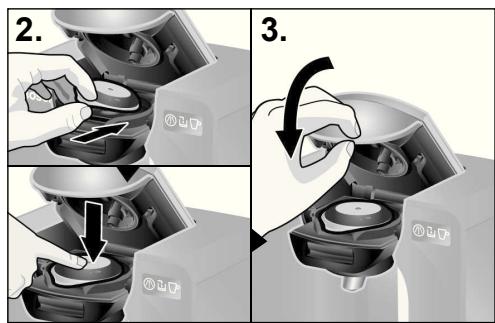
text_image
2. 3.To prepare your favourite beverage, proceed as follows:
▶ Turn the TASSIMO machine on by pressing the ON/OFF switch (1).
▶ Place a suitable cup on the stand (7) according to the type of beverage.
Adjust the height of the cup stand, if necessary, or remove it altogether for large cups or glasses.
▶ Always set the cup stand as high as possible.
-
Open the brewing unit by lifting the handle (4a) and then pushing the brewing unit up.
-
Select a beverage T DISC and insert it into the T DISC holder (4b) with the printed side down. Make sure that the flap of the T DISC is located in the slot in the front.
- Close the brewing unit by first bringing it down and then pushing the handle (4a) firmly to the machine.
▶ When the T DISC has been detected, the + / - LEDs light up.
The machine is now ready to brew your beverage.
- To brew your beverage with the recommended settings as defined in the T DISC bar code, go straight to Step 5.
▶ You have the option to adjust the beverage quantity to your taste with the drink adjustment buttons:
drink adjustment button + 📋 (2a): larger/longer drink for a milder flavour
drink adjustment button - 📋 (2b): smaller/shorter drink for a stronger flavour
▶ If drink adjustment was chosen, either the + or - LED will light up until you start the brewing proces. - Press the Start / Stop button (2) once to start the brewing process.

Risk of scalding!
- Never attempt to open the brewing unit during the brewing process.
- Keep in mind that the beverages are very hot when dispensed.
▶ The status LED ☐ (3c) and (if selected) the + or - LED blinks, while the machine is brewing.
▶ If you want a larger beverage, you can add more water immediately after the brewing process by pressing and holding the Start/Stop button (2) or the drink adjustment button + 📋 (2a).
6. When the brewing process is complete, the status LED ☐ (3c) stops blinking. Your beverage is now ready. You can sit back and enjoy it or prepare another beverage.
i Note:
There may be short pauses during the brewing process. This is to achieve the optimal flavour extraction.
If you don't prepare any other beverages, your machine automatically switches to power-save mode.
To save even more electricity, we recommend turning your TASSIMO machine off with the ON/OFF switch (1) after each use.
Where to buy T DISCs
Your TASSIMO appliance works only with specially developed capsules known as TASSIMO T DISCs.
You can buy these T DISCs at various retailers, or online at www.tassimo.com.
T DISC storage
T DISCs may be stored in their own packaging or in other containers of your choice. They should be stored in a cool, dry place. It is not necessary to store T DISCs in the refrigerator. Do not keep them in the freezer. Provided the outer packaging is intact, T DISCs may be used until the best-before date which is printed on the outer package.
Once outer foil packaging is removed, use T DISCs within 6 weeks.
Maintenance and day to day care

Risk of electric shock!
- Switch off and unplug the appliance before cleaning.
- Never immerse the appliance in water.
- Do not use a steam cleaner.
Clean your TASSIMO machine regularly to ensure that it continues to produce beverages of the best possible quality. If the appliance has been unused for a long time, run the cleaning process with the Service T DISC several times to ensure that the drinks it produces are of its normal high quality (see “First use of your TASSIMO machine”).
Never use vinegar or vinegar-based products, scouring agents or chemically softened water.
natural_image
Interior view of a car showing a hand cleaning the dashboard with a mesh plastic wrap (no text or symbols visible)
text_image
2. BG TCCSIMO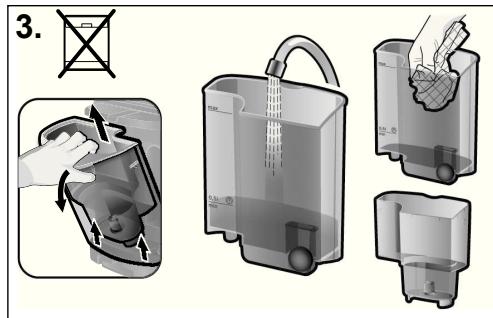
text_image
3.- Clean the brewing system regularly with a soft, damp cloth, especially the T DISC barcode scanner (4e) and the area around the clamp, so that the T DISC barcode can be scanned properly.
- Wipe the outside of the appliance with a soft, damp cloth.
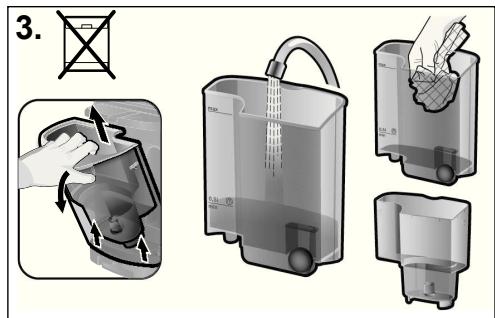
- Rinse out the water tank (5) and the filter cartridge holder (5c) by hand and with water only; do not place them in the dishwasher.
text_image
4. TOSSIMO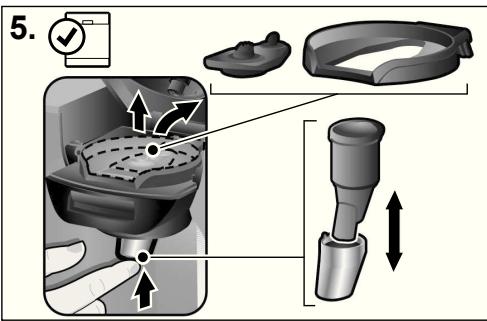
text_image
5. ↑ ↑ ↑! Important:
- The piercing unit and the drink outlet can be very hot immediately after brewing.
- After use, we recommend that the Service T DISC be stored in its compartment (6) at the back of the appliance.
-
The drink outlet (4d) must be put back in place after cleaning.
-
All parts of the cup stand (7) are dishwasher-safe.
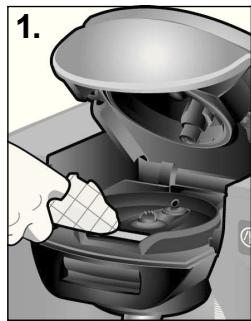
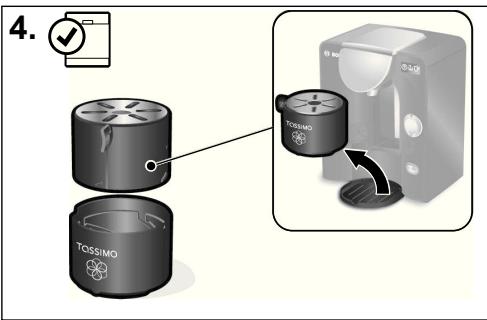
- Remove the T DISC holder (4b) and the piercing unit (4c). Also remove the drink outlet (4d) by pushing it up. It is recommended to clean these parts regularly, otherwise the drink outlet could become blocked, possibly causing leakage or reduced drink sizes.
▶ All these parts can also be cleaned in the dishwasher.
▶ When preparing a number of drinks one after another, the piercing unit may be manually cleaned quickly and easily under running water.
i Note:
If you prepare beverages containing milk or cocoa, we recommend cleaning the brewing unit more frequently by using the Service T DISC as described in the section titled “First use of your TASSIMO machine”.
Descaling
! Important:
- If you have very hard water, notice an unusual amount of steam or if the beverage size is not what it should be, descale the machine before the LED comes on.
- Although the enclosed BRITA MAXTRA filter system reduces the amount of lime in the water significantly, it does not eliminate the need for regular descaling.
- Do not drink any of the liquids used for descaling.
- Never use vinegar or vinegar-based products.
- Always remove the filter cartridge holder (5c) with the filter cartridge (5d) before running the descaling programme.
- Never interrupt the descaling programme.
Your TASSIMO machine must be descaled regularly, because heating water creates limescale which accumulates in the machine over time. When descaling is needed, the machine indicates this by activating the "Descale required" LED (3e). When this LED lights up, you should descale your machine immediately. Not doing so may result in machine not functioning properly and beverage quality deteriorating.
If you have not descaled the machine after another 30 T DISCs, the indicator starts to blink.
Special descaling agents can be obtained from www.tassimo.com, the Bosch customer service department (article no. 310967, for contact details, see page 186) or from your retailer.
text_image
1.
natural_image
Hand inserting a small component into a water dispenser device (no text or symbols visible)Running the descaling programme
-
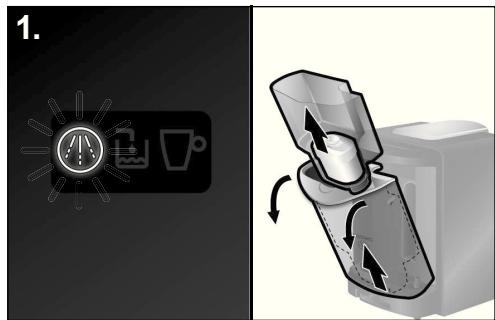
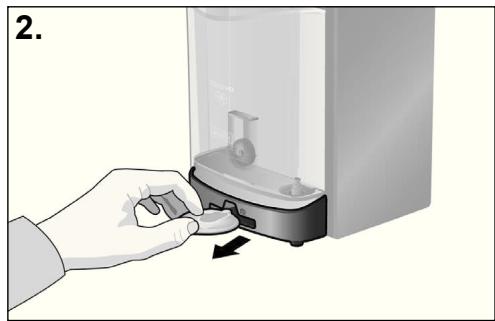
Remove the water tank from your TASSIMO machine and take out the filter cartridge holder (5c) with the filter cartridge (5d).
-
Remove the Service T DISC from the compartment (6) at the back of the machine.
text_image
3. 0,51 min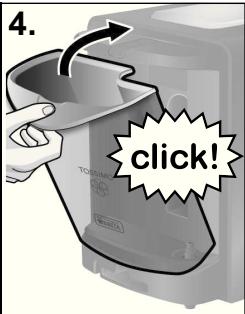
text_image
4. click!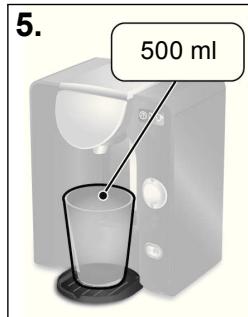
text_image
5. 500 ml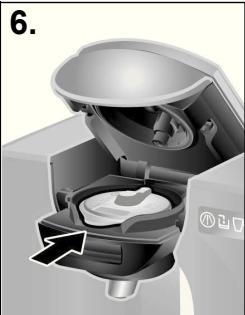
natural_image
Cross-sectional diagram of a mechanical device showing internal components and a directional arrow (no text or symbols)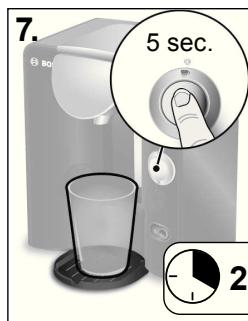
text_image
7. 5 sec. 2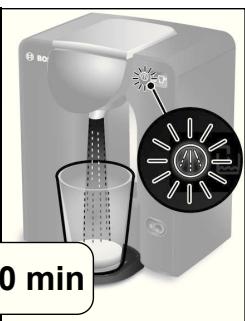
natural_image
Product image of a coffee maker with a glass cup and a circular inset showing time (no text or symbols on the device itself)! Important:
- The descaling programme runs for about 20 minutes.
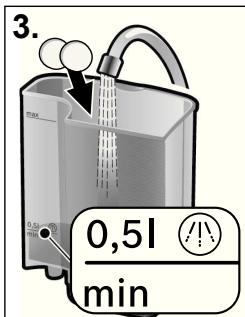
- Fill the water tank up to the descaling mark (0,51) and add the descaling agent in accordance with the manufacturer's instructions.
i Note:
If you have hard water, increase the amount of the descaling agent.
- Replace the water tank by slanting it slightly and returning it to its original position until it clicks into place.
- Place a container with a capacity of at least 500 ml under the drink outlet.
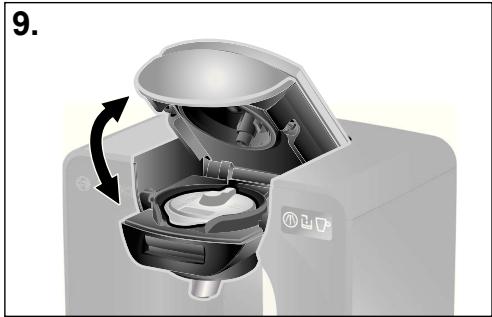
- Open the brewing unit by lifting the handle (4a) and then pushing the brewing unit up. Place the Service T DISC on the T DISC holder (4b) with the barcode facing down. Make sure that the flap of the T DISC is located in the slot in the front.
▶ Close the brewing unit by first bringing it down and then pushing the handle (4a) firmly to the machine, until you hear an audible click.
- Press and hold the Start/Stop button (2) for at least 5 seconds to start the descaling programme.
▶ Release the Start/Stop button after 5 seconds; the machine will run the descaling cycle automatically. This is indicated by the Status LED □P and “Descal required” LED ⏻ blinking.
i Note:
The descaling solution is pumped through the machine in intervals and then runs into the container until the water tank is almost empty. A small amount of liquid is always left in the tank.
flowchart
graph TD
    A["Bag with liquid"] --> B["Bag with liquid"]
    B --> C["Box with Max Volume"]
    C --> D["Box with 100% label"]
    D --> E["Box with 100% label"]
    E --> F["Box with 100% label"]
    F --> G["Box with 100% label"]
    G --> H["Box with 100% label"]
    H --> I["Box with 100% label"]
    I --> J["Box with 100% label"]
    J --> K["Box with 100% label"]
    K --> L["Box with 100% label"]
    L --> M["Box with 100% label"]
    M --> N["Box with 100% label"]
    N --> O["Box with 100% label"]
    O --> P["Box with 100% label"]
    P --> Q["Box with 100% label"]
    Q --> R["Box with 100% label"]
    R --> S["Box with 100% label"]
    S --> T["Box with 100% label"]
    T --> U["Box with 100% label"]
    U --> V["Box with 100% label"]
    V --> W["Box with 100% label"]
    W --> X["Box with 100% label"]
natural_image
Cross-sectional diagram of a coffee maker with internal components and a rotation arrow (no text or symbols)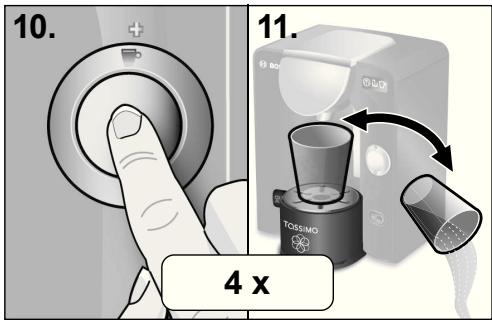
text_image
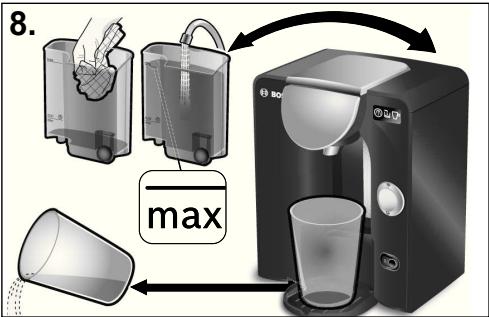
10. 11. 4 x- When the Status LED ▶ and “Descale required” LED Ⓜ stop blinking, the descaling process is complete. Empty the receiving container and return it under the drink outlet.
▶ Rinse the water tank thoroughly and fill up to the max mark with fresh water.
▶ Replace it back onto your TASSIMO machine.
-
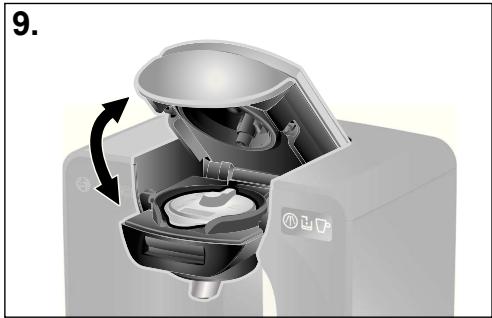
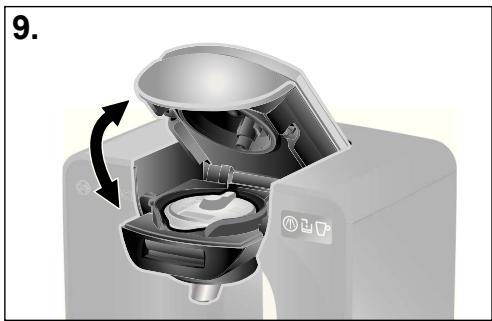
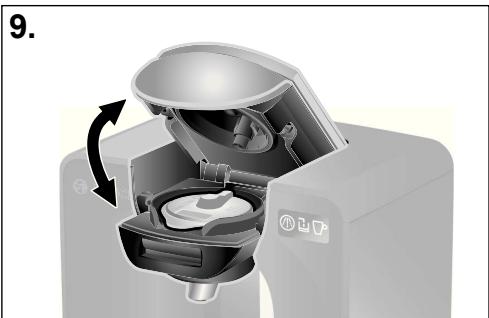
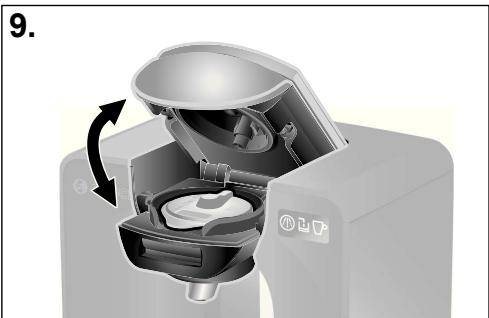
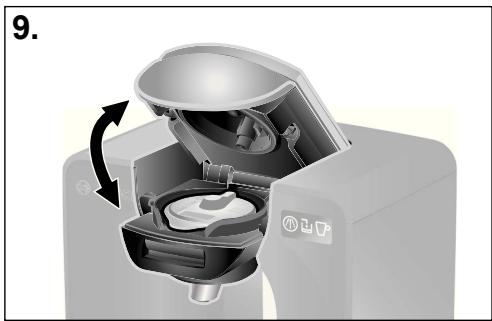
Open and close the brewing unit (Leave the Service T DISC in the T DISC carrier).
-
Press the Start/Stop button (2) briefly to run the cleaning cycle.
- When the cleaning process is complete, empty the cup and return it under the drink outlet.
! Important:
- Please complete steps 10 and 11 four times.
Your TASSIMO machine has now been properly descaled and cleaned.
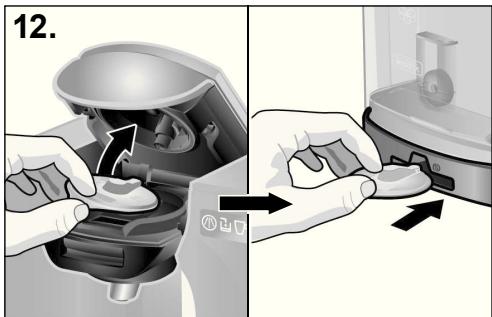
- Now open the brewing unit, remove the Service T DISC and store it in the compartment (6) at the back of the machine.
text_image
12.This appliance is labelled in accordance with the European Directive 2002/96/EG relating to waste electrical and electronic equipment – WEEE. The directive provides the framework for the EU-wide take-back and disposal of end-of-life appliances. Please ask your retailer about current disposal facilities.
All rights reserved.
- Now place the filter cartridge holder (5c) with the filter cartridge (5d) into the empty water tank and fill the tank with fresh water to the max mark.
i Note:
Your TASSIMO machine is ready for use again.
! Important:
- Bosch only manufactures the TASSIMO machine. It therefore does not guarantee the availability of TASSIMO T DISCS.
- To find out where to purchase beverage T DISCS go to www.tassimo.com
Troubleshooting
The following table provides solutions for problems and glitches that may arise as you use your TASSIMO machine. If you do not find a solution for your specific problem, or the problem persists after troubleshooting please contact our customer service department.
| Problem | Possible cause | Solution |
| Appliance not working; no symbols light up. | There is no power supply. | Check that the appliance is properly plugged into the power supply. |
| Machine brews but no drink dispensed. | The water tank is not correctly positioned. | Make sure that the water tank is positioned correctly. |
| The water tank was removed during the brewing process or there is air in the system. | Start a cleaning cycle with the Service T DISC. | |
| The float in the water tank is stuck. | Clean the water tank and ensure the float can move. | |
| Drink size smaller than usual. | Not enough water in the water tank. | Fill the water tank after the drink has finished dispensing and press the start/stop button to finish the drink. |
| The appliance needs descaling. | Descale the appliance (for details see “Descaling”). | |
| More steam than usual. | The appliance needs descaling. | Descale the appliance (for details see “Descaling”). |
| The appliance does not recognise the inserted T DISC and remains in stand-by mode or the Status LED lights up red. | No T DISC inserted. | Check if T DISC has been inserted. |
| The barcode could not be detected. | Clean the T DISC barcode reading window and try again or smooth the barcode on the T DISC out with your thumb. | |
| Use another T DISC. | ||
| If problems persist contact the TASSIMO careline 0800 0328833 (UK only) | ||
| The brewing system is not properly closed. | Clean the brewing system thoroughly, especially in the area of the clamp. | |
| The quality of the foam/crema has deteriorated. | The drink outlet is clogged or dirty. | Remove the drink outlet from the brewing unit and detach the piercing unit. After cleaning everything thoroughly, reassemble the parts and replace them in the brewing unit. |
| Clean the brewing unit with the Service T DISC. | ||
| The appliance needs descaling. | Descale the appliance (for details see “Descaling”). | |
| Brewing unit cannot be securely closed. | T DISC Piercing unit or T DISC holder is not properly inserted. | Insert T DISC holder or T DISC piercing unit properly. |
| The T DISC is not inserted properly. | Re-insert the T DISC and make sure it is properly positioned. | |
| The brewing unit is not properly closed. | Push the handle down until it snaps into place with an audible click. | |
| Clean the brewing system thoroughly, especially in the area of the clamp. | ||
| Water dripping from the brewing unit. | The T DISC is damaged or leaky. | Stop the brewing process. Wait until the machine is cooled down before removing the T DISC and then clean the brewing unit |
| The piercing unit is either not inserted or not inserted properly. | Check to ensure that the piercing unit is inserted properly. | |
| Water on the surface under the cup stand. | Water from condensation. | Condensation may occur and is not a fault. Remove it by wiping with a cloth. |
| The Service T DISC is damaged or lost. | The Service T DISC is required for the cleaning cycle and the descaling cycle. | Check the storage compartment for the Service T DISC at the back of the appliance. |
| The Service T DISC can be ordered from Bosch customer service (Product No. 624088). See page 186 for contact information. | ||
| “Fill water tank” lights up even though there is sufficient water in the tank. | The float in the water tank is stuck. | Clean the water tank and ensure that the float can move. |
| “Descale required” lights up even though you are using soft water. | Even soft water contains small amounts of dissolved lime. | Descale the appliance. Special descaling agents can be obtained from www.tassimo.com, the Bosch customer service department (article no. 310967, for contact details, see page 186) or from your retailer. |
| Filter cartridge change indicator is not working anymore. | Please proceed as described on page 25. | If filter cartridge change indicator is still not working, please contact TASSIMO careline 0800 0328833 (UK only). |
More Customer Service information is available online at www.tassimo.com
natural_image
Two-step diagram showing a hand inserting a container into a microwave oven, with no text or symbols present.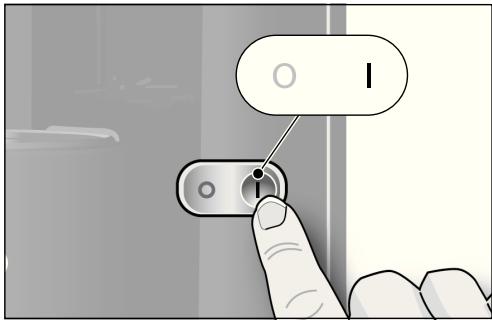
text_image
I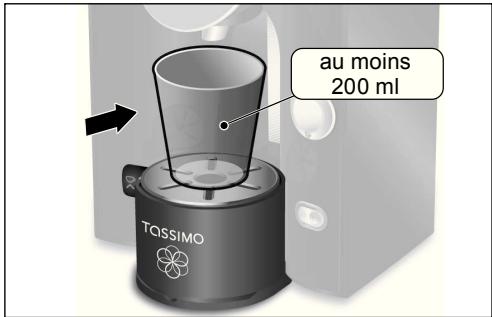
natural_image
Two-step diagram showing hands using a device to adjust a component, with no visible text or symbols.natural_image
Illustration of a hand washing a bowl with a brush, showing liquid and bubbles (no text or symbols)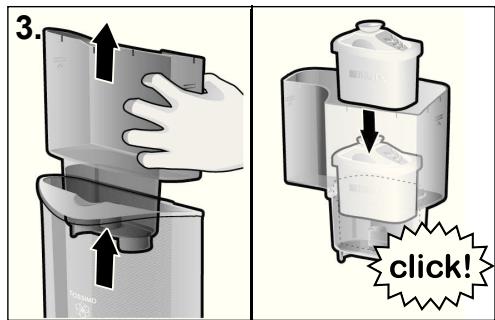
text_image
3. click!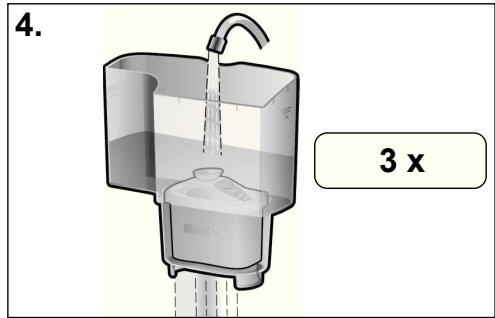
text_image
4. 3 xnatural_image
Three identical Bosch water dispenser machines with different shades of liquid, each showing a different product (no text or symbols visible)text_image
Diagram illustrating a step-by-step procedure for using a blender, showing hand positioning and rotation steps.natural_image
Interior view of a car showing a hand cleaning the dashboard with a meshed plastic component (no text or symbols visible)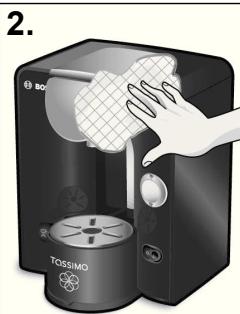
text_image
3.natural_image
Hand placing a small electronic device into a water dispenser (no text or symbols visible)text_image
4. click!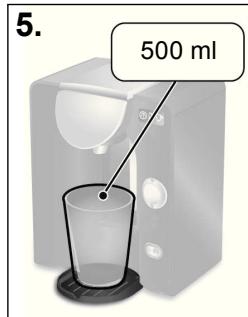
text_image
5. 500 ml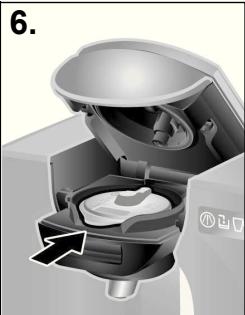
natural_image
Cross-sectional diagram of a microwave oven with internal components and an arrow indicating rotation (no text or symbols)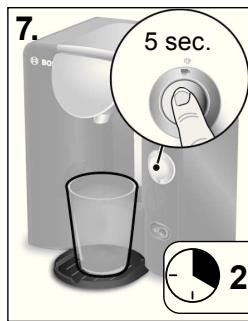
text_image
7. 5 sec. 2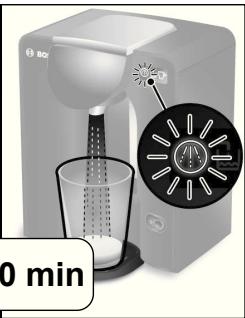
natural_image
Product photo of a white BDI watercolor blender with a circular inset showing its lid and speaker grille (no text or symbols visible)! Important:
natural_image
Cross-sectional diagram of a coffee maker with internal components and a rotating arrow indicating rotation (no text or symbols)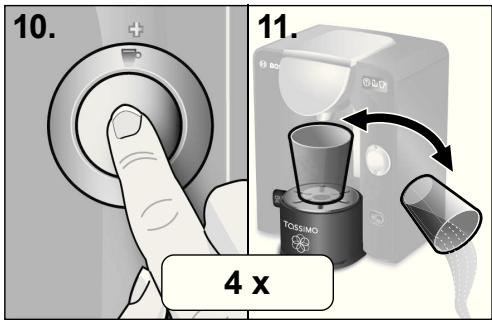
text_image
10. 11. 4 x1 Interruptor on /off
2 Botón Start/Stop
text_image
Diagram showing a hand inserting a device into a microwave oven, with labeled components and directional arrows indicating process flow.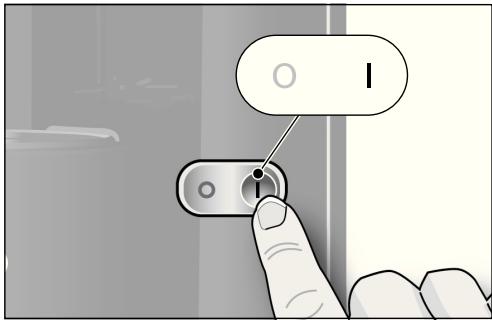
text_image
I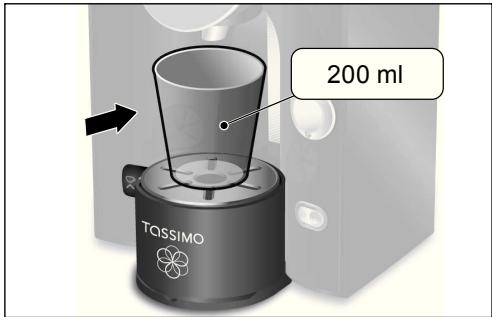
text_image
200 ml TASSIMOnatural_image
Two-step diagram showing hands using a device to adjust a component, with no visible text or symbols.natural_image
Illustration of a hand washing a bowl with a brush, showing liquid and bubbles (no text or symbols)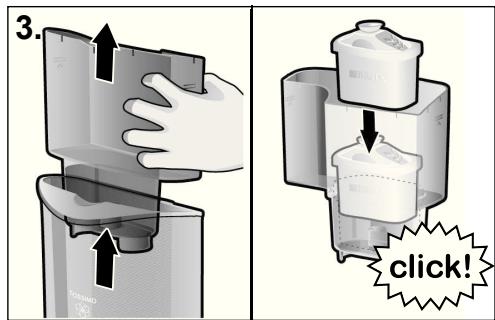
text_image
3. click!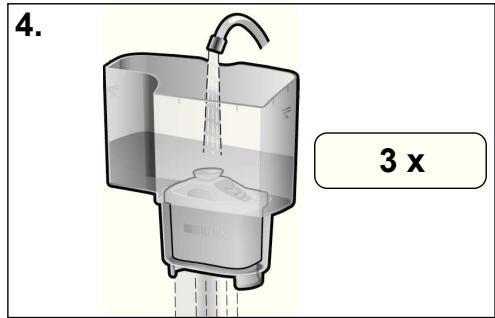
text_image
4. 3 xInterruptor on/off (1)
Descalcificar ⚠️ (3e)
natural_image
Three identical Bosch watercraft models with different shades of gray and black, each featuring a stylized drink (no text or symbols visible)text_image
1. BQ M M M BQ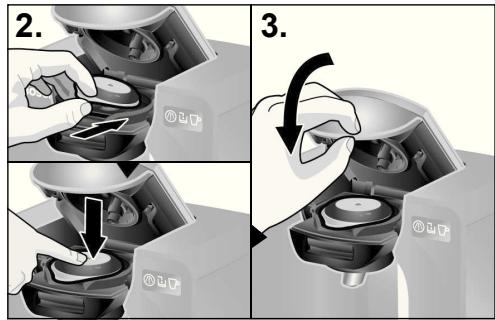
text_image
2. 3.text_image
5. ↑ ↑ ↑ ↑ ↑ ↓! Importante:
natural_image
Illustration of a hand pressing a small electronic device with a scroll wheel (no text or symbols visible)text_image
4. click!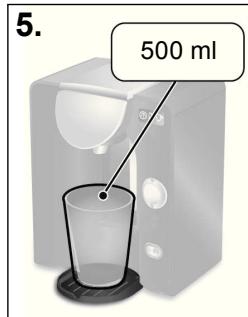
text_image
5. 500 ml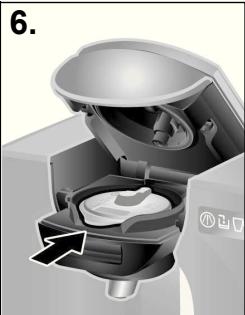
natural_image
Cross-sectional diagram of a microwave oven showing internal components and airflow direction (no text or symbols)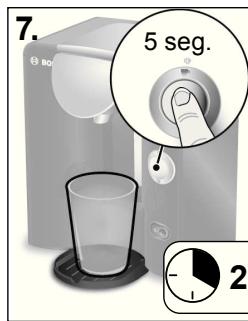
text_image
7. 5 seg. 2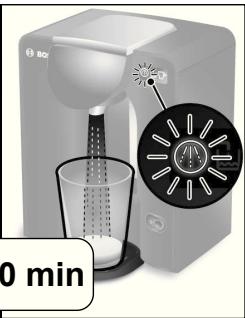
natural_image
Product photo of a white BDI watercolor blender with a circular inset showing its lid and speaker grille (no text or symbols visible)! Importante:
flowchart
graph TD
    A["Bag with liquid"] --> B["Package with bag"]
    B --> C["Box with Max Volume"]
    C --> D["Box with 100% label"]
    D --> E["Box with 100% label"]
    E --> F["Box with 100% label"]
    F --> G["Box with 100% label"]
    G --> H["Box with 100% label"]
    H --> I["Box with 100% label"]
    I --> J["Box with 100% label"]
    J --> K["Box with 100% label"]
    K --> L["Box with 100% label"]
    L --> M["Box with 100% label"]
    M --> N["Box with 100% label"]
    N --> O["Box with 100% label"]
    O --> P["Box with 100% label"]
    P --> Q["Box with 100% label"]
    Q --> R["Box with 100% label"]
    R --> S["Box with 100% label"]
    S --> T["Box with 100% label"]
    T --> U["Box with 100% label"]
    U --> V["Box with 100% label"]
    V --> W["Box with 100% label"]
    W --> X["Box with 100% label"]
natural_image
Cross-sectional diagram of a coffee maker with internal compartments and a rotating arrow indicating rotation (no text or symbols)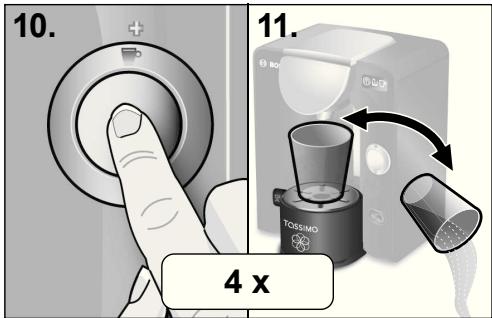
text_image
10. 11. 4 x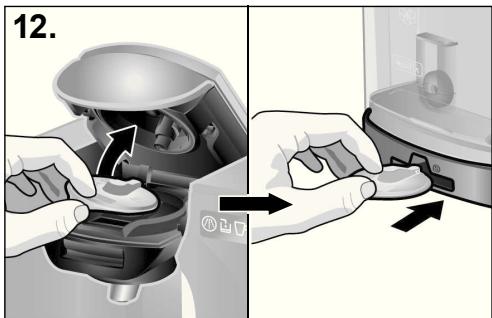
text_image
12.text_image
Diagram showing a hand inserting a device into a microwave oven, with labeled components and directional arrows indicating process flow.
text_image
I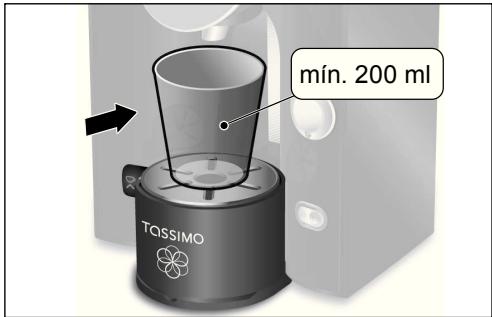
text_image
mín. 200 ml TASSIMOnatural_image
Two-step diagram showing hands using a device to adjust the interior (no text or symbols present)natural_image
Illustration of a hand washing a bowl with a small container and bubbles (no text or symbols)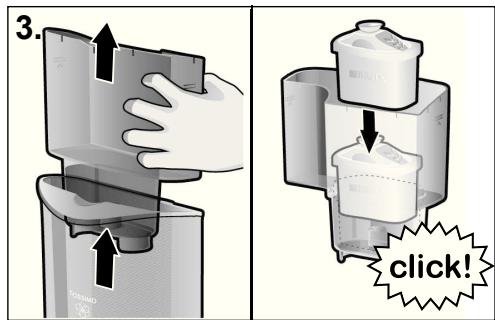
text_image
3. click!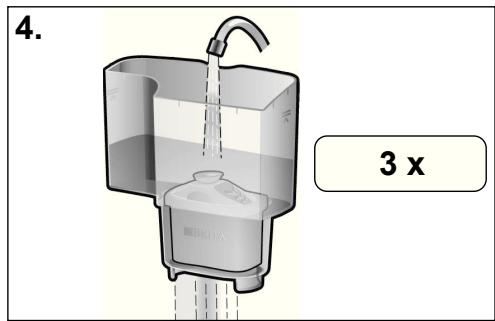
text_image
4. 3 xnatural_image
Three identical Bosch water dispenser machines, each with a different color and icon, shown side by side (no text or symbols on the devices themselves)text_image
1. BQ M M M BQ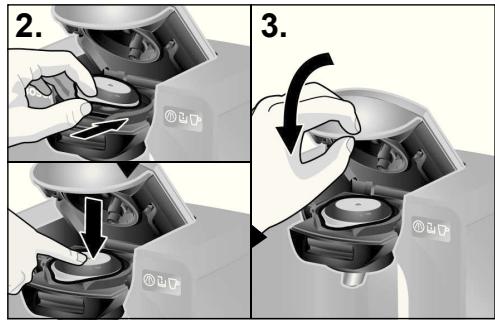
text_image
2. 3.Guardar as cápsulas T DISC
natural_image
Illustration of a hand pressing a small electronic device with a scroll wheel (no text or symbols visible)text_image
4. click!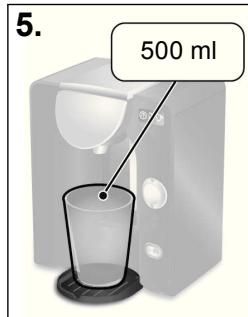
text_image
5. 500 ml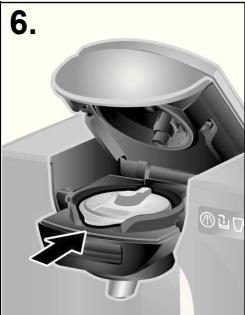
natural_image
Cross-sectional diagram of a mechanical device showing internal components and a directional arrow (no text or symbols)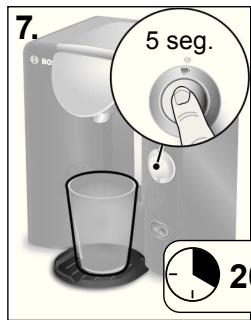
text_image
7. 5 seg. 2
natural_image
Product image of a white BCI water dispenser with a circular inset showing its internal components (no text or symbols visible)! Importante:
flowchart
graph TD
    A["Bag with liquid"] --> B["Package with bag"]
    B --> C["Box with Max Volume"]
    C --> D["Box with 100% label"]
    D --> E["Box with 100% label"]
    E --> F["Box with 100% label"]
    F --> G["Box with 100% label"]
    G --> H["Box with 100% label"]
    H --> I["Box with 100% label"]
    I --> J["Box with 100% label"]
    J --> K["Box with 100% label"]
    K --> L["Box with 100% label"]
    L --> M["Box with 100% label"]
    M --> N["Box with 100% label"]
    N --> O["Box with 100% label"]
    O --> P["Box with 100% label"]
    P --> Q["Box with 100% label"]
    Q --> R["Box with 100% label"]
    R --> S["Box with 100% label"]
    S --> T["Box with 100% label"]
    T --> U["Box with 100% label"]
    U --> V["Box with 100% label"]
    V --> W["Box with 100% label"]
    W --> X["Box with 100% label"]
natural_image
Cross-sectional diagram of a coffee maker with internal components and a rotation arrow (no text or symbols)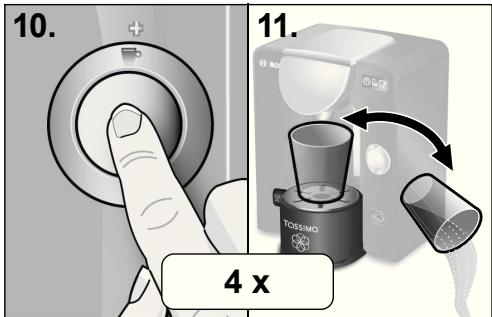
text_image
10. 11. 4 x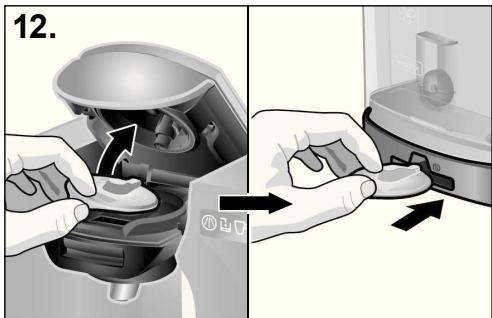
text_image
12.natural_image
Two-step diagram showing a hand inserting liquid into a microwave oven, with no text or symbols present.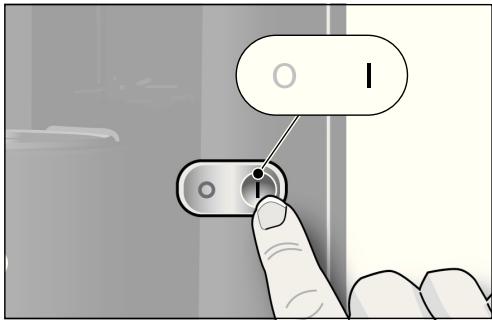
text_image
I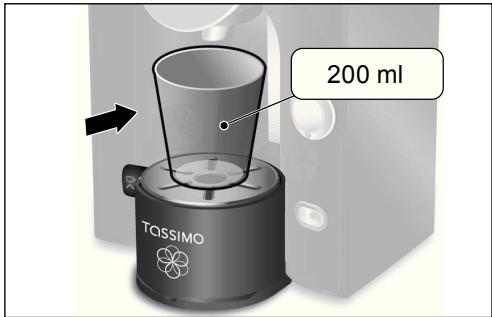
text_image
200 ml TASSIMOnatural_image
Two-step diagram showing hands using a device to adjust a component, with no visible text or symbols.Decalcificare ⚠️ (3e)
natural_image
Three identical Bosch water dispenser machines, each with a different color and icon, shown side by side (no text or symbols on the devices themselves)text_image
5. ↑ ↑ ↑ ↑ ↑ ↑ ↑ ↓! Importante:
natural_image
Illustration of a hand pressing a small electronic device with a scroll wheel (no text or symbols visible)text_image
7. 5 sec. 20 min! Importante:
flowchart
graph TD
    A["Bag with liquid"] --> B["Bag with liquid"]
    B --> C["Box with Max Volume"]
    C --> D["Box with 100% label"]
    D --> E["Box with 100% label"]
    E --> F["Box with 100% label"]
    F --> G["Box with 100% label"]
    G --> H["Box with 100% label"]
    H --> I["Box with 100% label"]
    I --> J["Box with 100% label"]
    J --> K["Box with 100% label"]
    K --> L["Box with 100% label"]
    L --> M["Box with 100% label"]
    M --> N["Box with 100% label"]
    N --> O["Box with 100% label"]
    O --> P["Box with 100% label"]
    P --> Q["Box with 100% label"]
    Q --> R["Box with 100% label"]
    R --> S["Box with 100% label"]
    S --> T["Box with 100% label"]
    T --> U["Box with 100% label"]
    U --> V["Box with 100% label"]
    V --> W["Box with 100% label"]
    W --> X["Box with 100% label"]
natural_image
Cross-sectional diagram of a coffee maker with internal components and a rotating arrow indicating rotation (no text or symbols)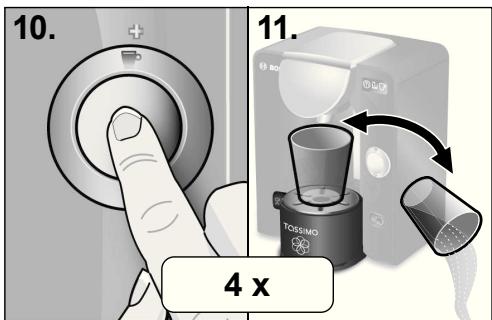
text_image
10. 11. 4 x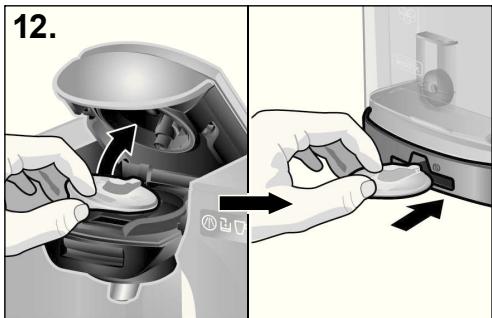
text_image
12.text_image
Diagram showing a hand inserting a device into a microwave oven, with labeled components and directional arrows indicating process flow.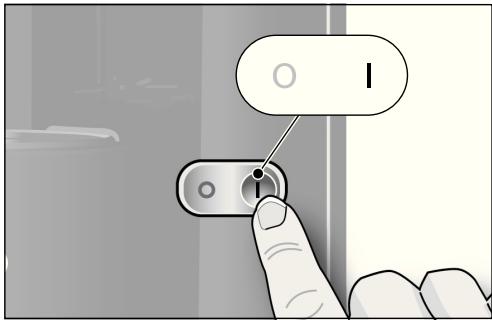
text_image
I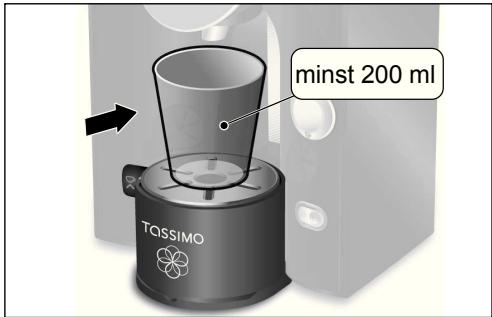
text_image
minst 200 ml TASSIMOnatural_image
Two-step diagram showing hands using a device to adjust the interior (no text or symbols present)natural_image
Illustration of a hand cleaning a bowl with a small container and bubbles (no text or symbols)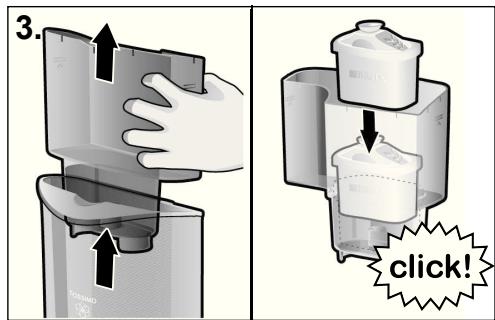
text_image
3. click!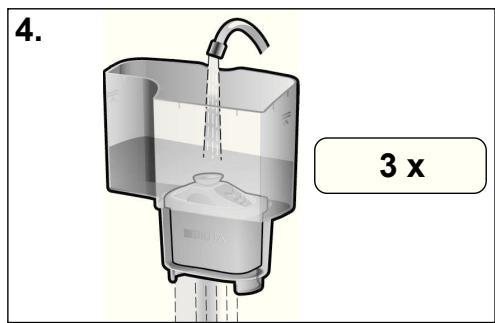
text_image
4. 3 xnatural_image
Three identical Bosch water blisters with different shades of liquid, displayed side by side (no text or symbols visible)natural_image
Cross-sectional illustration of a car interior showing internal components and a hand placing a grid on the floor (no text or symbols)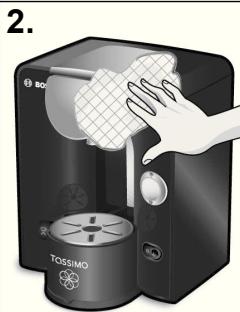
natural_image
Illustration of a hand cleaning a BOG (Booster) tea machine with a cloth cover, no text or symbols present
text_image
3.text_image
5. ↑ ↑ ↑ ↑ ↑ ↓⚠️ Viktigt:
natural_image
Hand placing a small component into a device with a scroll wheel, labeled '2.' (no text or symbols on the device itself)text_image
4. click!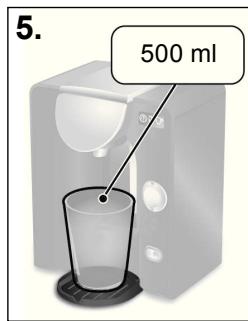
text_image
5. 500 ml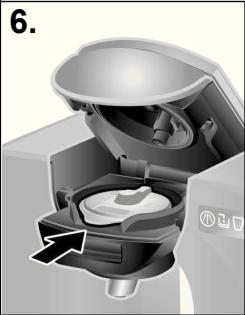
natural_image
Cross-sectional diagram of a microwave oven with internal components and an arrow indicating rotation (no text or symbols)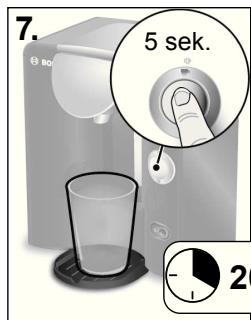
text_image
7. 5 sek. 2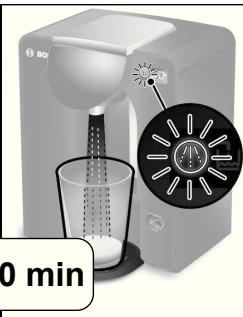
natural_image
Product photo of a white BDI watercolor blender with a digital display showing a time indicator (no text or symbols on the device itself)flowchart
graph TD
    A["Bag with liquid"] --> B["Bag with liquid"]
    B --> C["Box with Max Volume"]
    C --> D["Box with 100% label"]
    D --> E["Box with 100% label"]
    E --> F["Box with 100% label"]
    F --> G["Box with 100% label"]
    G --> H["Box with 100% label"]
    H --> I["Box with 100% label"]
    I --> J["Box with 100% label"]
    J --> K["Box with 100% label"]
    K --> L["Box with 100% label"]
    L --> M["Box with 100% label"]
    M --> N["Box with 100% label"]
    N --> O["Box with 100% label"]
    O --> P["Box with 100% label"]
    P --> Q["Box with 100% label"]
    Q --> R["Box with 100% label"]
    R --> S["Box with 100% label"]
    S --> T["Box with 100% label"]
    T --> U["Box with 100% label"]
    U --> V["Box with 100% label"]
    V --> W["Box with 100% label"]
    W --> X["Box with 100% label"]
natural_image
Cross-sectional diagram of a coffee maker with internal components and a rotating arrow indicating rotation (no text or symbols)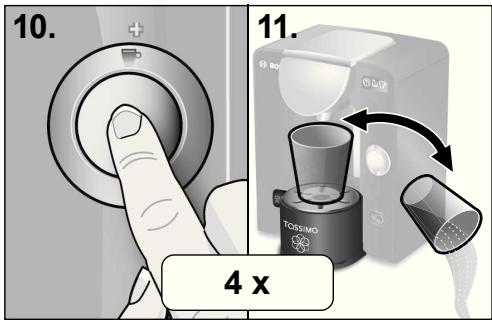
text_image
10. 11. 4 xtext_image
Diagram showing a hand inserting a device into a microwave oven, with labeled components and directional arrows indicating process flow.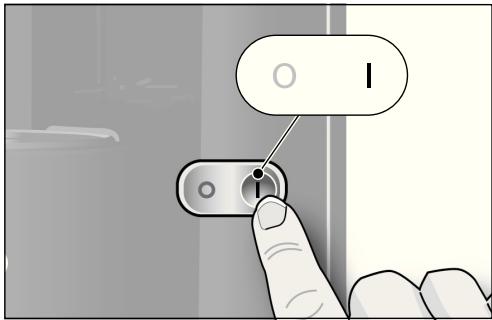
text_image
I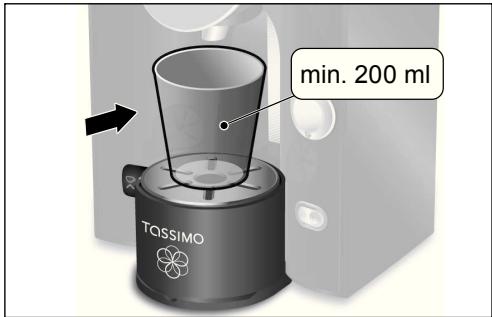
text_image
min. 200 ml TASSIMOnatural_image
Two-step diagram showing hands using a device to adjust a component, with no visible text or symbols.natural_image
Illustration of a hand cleaning a container with liquid, no text or symbols present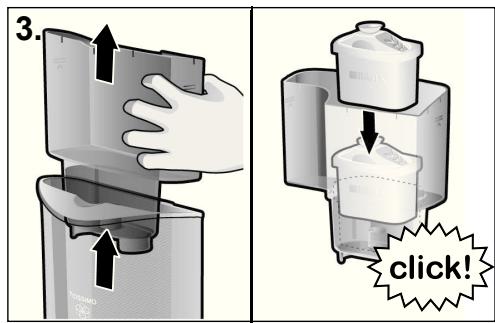
text_image
3. click!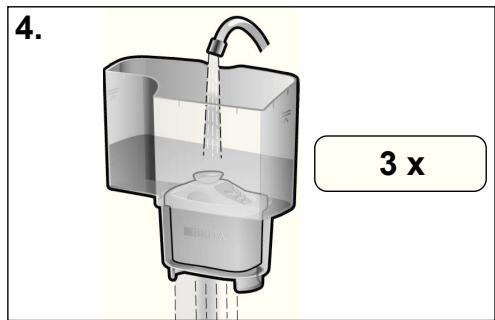
text_image
4. 3 xDer må kun anvendes BRITA MAXTRA vandfilterpatroner til TASSIMO-maskiner.
Du kan købe BRITA MAXTRA-patroner (5d) i specialforretninger eller direkte hos Bosch-kundeservice (for kontaktoplysninger, se side 186).
natural_image
Three identical Bosch water dispenser machines with different shades of liquid, each showing a different product (no text or symbols visible)natural_image
Cross-sectional illustration of a car interior showing internal components and a hand placing a grid on the floor (no text or symbols)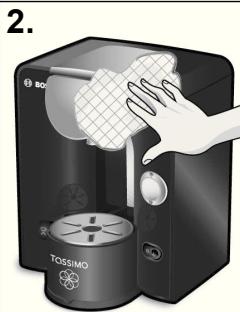
text_image
2. TOSSIMO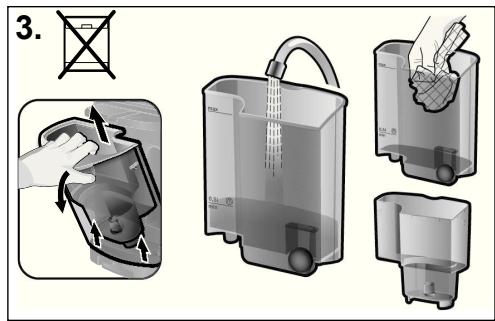
text_image
3.text_image
5. ↑ ↑ ↑ ↑ ↑ ↓! Vigtigt:
natural_image
Hand placing a small component into a device with a scroll wheel, labeled '2.' (no text or symbols on the device itself)Udføring afkalkningsprogram
text_image
4. click!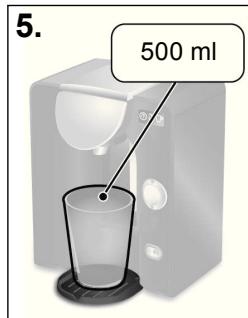
text_image
5. 500 ml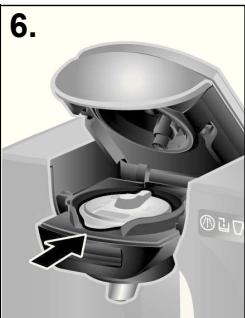
natural_image
Cross-sectional diagram of a mechanical device showing internal components and a directional arrow (no text or symbols)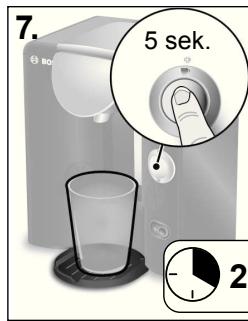
text_image
7. 5 sek. 2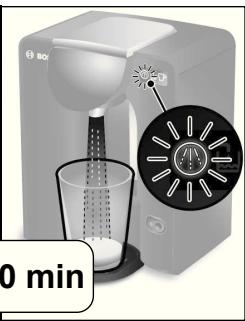
natural_image
Product image of a white BDI water dispenser with a digital display showing a circular design, no visible text or symbols.! Vigtigt:
- Afkalkningsprogrammet varer ca. 20 minutter.
flowchart
graph TD
    A["Bag with liquid"] --> B["Package with bag"]
    B --> C["Box with Max Volume"]
    C --> D["Box with 100% label"]
    D --> E["Box with 100% label"]
    E --> F["Box with 100% label"]
    F --> G["Box with 100% label"]
    G --> H["Box with 100% label"]
    H --> I["Box with 100% label"]
    I --> J["Box with 100% label"]
    J --> K["Box with 100% label"]
    K --> L["Box with 100% label"]
    L --> M["Box with 100% label"]
    M --> N["Box with 100% label"]
    N --> O["Box with 100% label"]
    O --> P["Box with 100% label"]
    P --> Q["Box with 100% label"]
    Q --> R["Box with 100% label"]
    R --> S["Box with 100% label"]
    S --> T["Box with 100% label"]
    T --> U["Box with 100% label"]
    U --> V["Box with 100% label"]
    V --> W["Box with 100% label"]
    W --> X["Box with 100% label"]

natural_image
Cross-sectional diagram of a coffee maker with internal components and directional arrows indicating rotation (no text or symbols)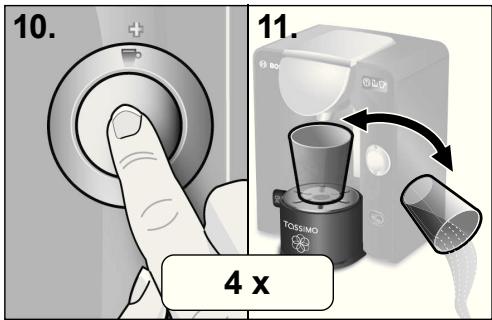
text_image
10. 11. 4 x⚠️ Fare for skålding!
2 Knapp for start/stopp
text_image
Diagram showing a hand inserting a device into a microwave oven, with labeled components and directional arrows indicating process flow.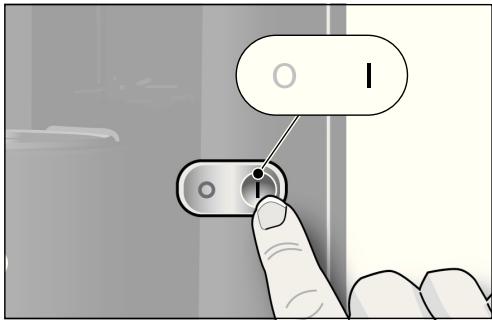
text_image
I
text_image
min. 200 ml TASSIMOnatural_image
Illustration of a hand cleaning a bowl with a small container and bubbles (no text or symbols)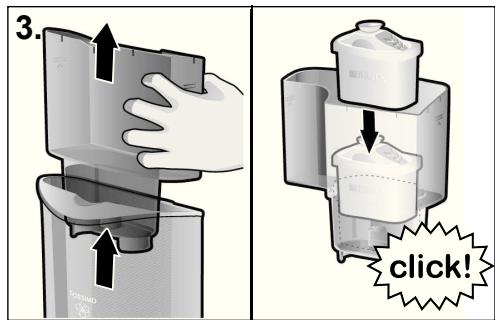
text_image
3. click!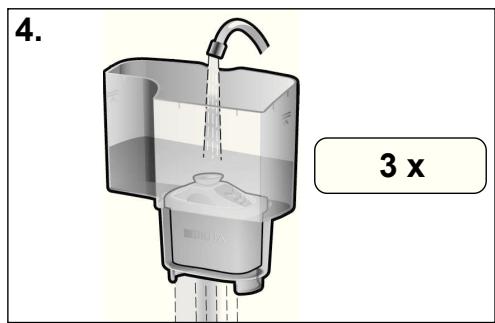
text_image
4. 3 xTASSIMO-maskiner skal kun benytte BRITA MAXTRA vannfilterhylser.
Knapp for start/stopp (2)
natural_image
Three identical Bosch water dispenser machines with different shades of liquid, each showing a black-and-white illustration of a coffee cup (no text or symbols visible)text_image
1. BQ M M M BQ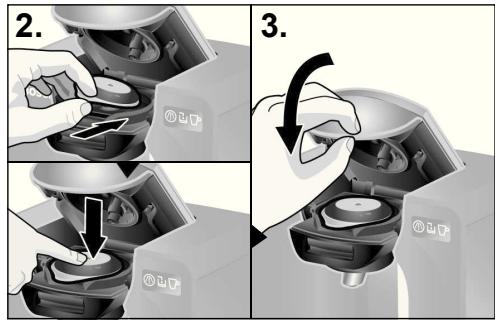
text_image
2. 3.⚠️ Fare for skålding!
natural_image
Illustration of a hand inserting a small component into a water dispenser device (no text or symbols visible)text_image
4. click!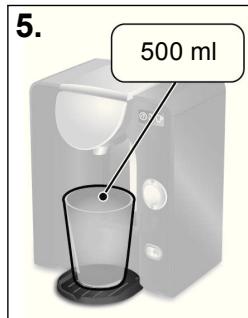
text_image
5. 500 ml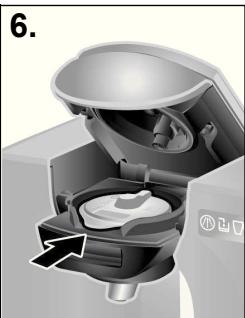
natural_image
Cross-sectional diagram of a mechanical device showing internal components and a directional arrow (no text or symbols)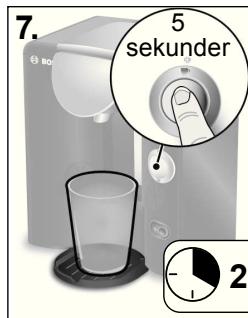
text_image
7. 5 sekunder 2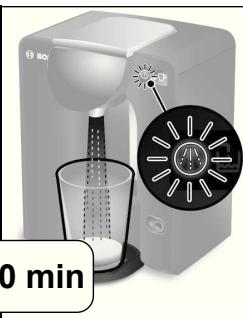
natural_image
Product photo of a white coffee maker with a digital display showing a circular design, no visible text or symbols on the device itself.! Viktig:
- Avkalkingsprogrammet tar ca. 20 minutter.
- Fyll opp vanntanken til avkalkingsmerket (0,51) og hell på avkalkingsmidlet slik det er angitt på pakningen.
i Merk:
natural_image
Cross-sectional diagram of a microwave oven showing internal components and airflow direction (no text or symbols)
text_image
10. 11. 4 x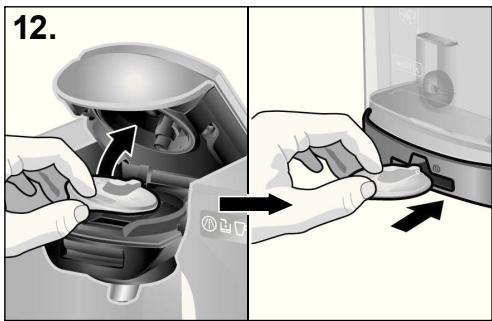
text_image
12.text_image
Diagram showing a hand inserting a device into a microwave oven, with labeled components and directional arrows indicating process flow.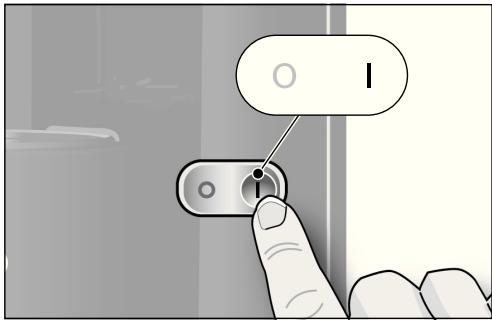
text_image
I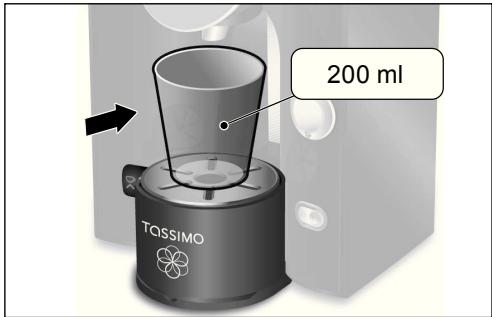
text_image
200 ml TASSIMOnatural_image
Two-step diagram showing hands using a device to adjust the interior (no text or symbols present)natural_image
Three identical Bosch water dispenser machines with different shades of liquid, each showing a different product (no text or symbols visible)text_image
Diagram showing two steps of a mechanical device operation, labeled 2 and 3, with arrows indicating process direction.text_image
5. ↑ ↑ ↑ ↑ ↑ ↑! Σημαντικό:
natural_image
Hand inserting a small component into a water dispenser device (no text or symbols visible)text_image
4. click!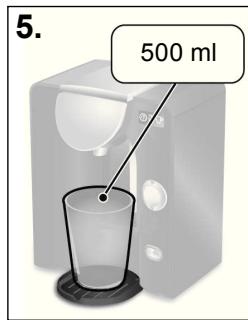
text_image
5. 500 ml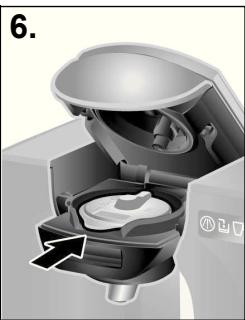
natural_image
Cross-sectional diagram of a microwave oven showing internal components and airflow direction (no text or symbols)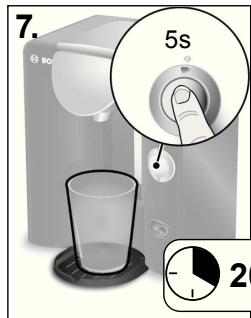
text_image
7. 5s 2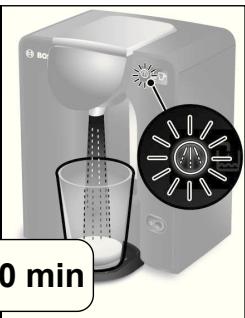
natural_image
Product photo of a white coffee maker with a digital display showing its lid and cup (no visible text or symbols)natural_image
Cross-sectional diagram of a coffee maker with internal components and a rotation arrow (no text or symbols)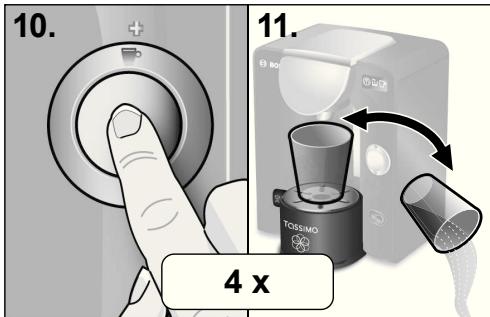
text_image
10. 11. 4 xi Υπόδειξη:
The guarantee conditions for this appliance are as defined by our representative in the country in which it is sold. Details regarding these conditions can be obtained from the dealer from whom the appliance was purchased. The bill of sale or receipt must be produced when making any claim under the terms of this guarantee.
fr Garantie (CH)
Service interventions:
To arrange an engineer visit,
to order spare parts and accessories
or for product advice please visit:
www.bosch-home.cu.uk
or call
*Calls from a BT landline will be charged at up to 3 pence per minute. A call set-up fee of up to 6 pence may apply.
GR Greece, Ελλάς
BSH Ikiakes Siskeves A. B. E.
Central Branch Service
17 km E.O. Athinon-Lamias &
Potamou 20
14564 Kifisia
Greece – Athens
Tel.: 2104 277 701
Fax: 2104 277 669
Central-Greece – Patras
Tel.: 2610 330 478
Fax: 2610 331 832
North-Greece – Thessaloniki
Tel.: 2310 497 200
Fax: 2310 497 220
South-Greece – Heraklion/Kreta
Tel.: 2810 325 403
Fax: 2810 324 585
mailto:cs_gr_helpdesk@bshg.com
www.bosch-home.gr
IE Republic of Ireland
BSH Home Appliances Ltd.
Unit F4, Ballymount Drive
Ballymount Industrial Estate
Walkinstown
Dublin 12
Service Requests, Spares and
Accessories
Tel.: 01450 2655
Fax: 01450 2520
www.bosch-home.cu.uk
NO Norge, Norway
KRAFT FOODS HELLAS SA.
Φ. Γκινοσάτη 19.
For all other countries: www.tassimo.com

TASSIMO Infoline
For information, questions or locations of authorised Bosch service centres nearest you, please contact TASSIMO:
Phone: 0800 0328833 (UK only. Calls made from a mobile phone might be charged)
Mail: Freepost SWC3320, Cheltenham, GL50 3ZZ
Kraft Foods Ireland, Malahide Road, Coolock, Dublin 5