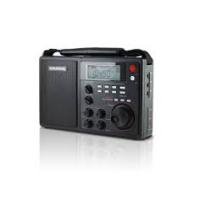
S450DLX - Radio ETON - Free user manual and instructions
Find the device manual for free S450DLX ETON in PDF.


| Product type | AM/FM/SW multiband radio with alarm clock |
| Power supply | 6 D-type alkaline batteries (not included) or 9V DC / 500 mA AC adapter (provided) |
| Frequency ranges | AM 520-1710 kHz (10/9 kHz step), FM 87-108 MHz, SW 1711-29999 kHz |
| Antenna | Telescopic FM/SW, built-in AM ferrite; jacks for external FM/SW antenna (50/75 ohm coax) and AM (500 ohms) |
| Main functions | Digital tuner, 50 presets, dual alarm with snooze, sleep timer, night light, key lock, bandwidth switching, adjustable RF gain |
| Audio outputs | 3.5 mm stereo headphone jack, 3.5 mm line out, AM IF output jack for DRM (F-type) |
| Audio input | 3.5 mm line input for external source (MP3 player) |
| Display | LCD with battery indicator, frequency, time, alarm |
| Care and cleaning | Clean with a dry cloth; do not use detergents or solvents |
| Safety | Do not expose to rain or moisture; unplug during storms; do not remove the cover |
| Warranty | 1 year, registration recommended at www.etoncorp.com |
| Customer service | USA: 1-800-872-2228; Canada: 1-800-637-1648; International: 650-903-3866 |
| Backup function | Automatic switch to batteries in case of power failure (if batteries installed) |
| Reset | Hole on lower right side; insert a paperclip to reset |
| Included accessories | 9V DC AC adapter, warranty card |
Frequently Asked Questions - S450DLX ETON
User questions about S450DLX ETON
0 question about this device. Answer the ones you know or ask your own.
Ask a new question about this device
Download the instructions for your Radio in PDF format for free! Find your manual S450DLX - ETON and take your electronic device back in hand. On this page are published all the documents necessary for the use of your device. S450DLX by ETON.
USER MANUAL S450DLX ETON
AM/FM/Shortwave field radio with LCD backlight display and signal strength indicator
OWNER'S MANUAL
etōn
CORPORATION

DO YOU NEED HELP? Contact Us
If you need help, please contact us, Monday-Friday, 8:30 a.m.-4:00 p.m., North American Pacific Time. 1-800-872-2228 from the U.S; 1-800-637-1648 from Canada; 650-903-3866, worldwide; FAX: 650-903-3867; website, www.etoncorp.com; Etón Corporation, 1015 Corporation Way, Palo Alto, CA 94303, USA
WARNING
- Do not expose this appliance to rain or moisture.
- Do not submerge or expose for extended period to water.
- Protect from high humidity and rain.
- Only operate within specified temperature range (0 °C to 40 °C).
- Unplug immediately if liquid has been spilled or object have fallen into the apparatus.
- Clean only with a dry cloth. Do not use detergents or chemical solvents as this might damage the finish.
- Unplug and disconnect external antennas during lightning storms.
- Do not remove cover [or back].
Refer servicing to qualified service personnel.
ENVIRONMENT

Disposal
According to the European Directive 2002/96/EC all electrical and electronic products must be collected separately by a local collection system.
Please act according to your local rules and do not dispose of your old products with your normal household waste.
MORE INFORMATION
This operation guide provides instructions for the most commonly used aspects of this product. Additional instructions and information can be found on our web site at www.etoncorp.com.
INSTALLING BATTERIES
The battery compartment is on the back of the radio. Remove it by pressing the two tabs and pulling up. Install only fresh, new alkaline D cells, all of the same brand and type. To prevent battery acid leakage, follow these instructions. Battery acid leakage is not covered by the radio's warranty. Never install or replace with batteries of different brands and types. Never intermix old batteries with new ones. When not using the radio for more than 30 days, remove the batteries.
USING BATTERIES
Use 6 D size alkaline batteries. Install them with correct polarity using the diagram inside the battery compartment on the back of the radio. Replace them if the battery strength indicator in the display shows one bar or the sound becomes distorted. The radio will turn off automatically if the batteries become too weak.
BATTERY LEVEL INDICATOR
The battery level indicator is in the upper left corner of the display. When batteries are full, "..." will be displayed in the LCD; if "..." flashes, it indicates that batteries are low and the radio will soon turn off automatically.
USING AC POWER
Plug AC adapter into the socket on the left side of the radio. Use only the AC adapter supplied. When the AC adapter is plugged in, the full power level will show in the upper left corner of the display, looking like a full battery. If you lose the AC adapter that came with the radio, use one with 9 Volt DC output, negative polarity, 500 milliampere and a plug with 5.5 millimeter outer diameter, 2.1 millimeter inner diameter.
POWERING FROM A CAR OR BOAT
Use a DC to DC converter. Output: 9 Volt DC, negative polarity, outer diameter 5.5 millimeter; inner diameter 2.1 millimeter.
TURNING ON AND OFF / SETTING AND DEACTIVATING THE SLEEP TIMER
Turn on the radio by pressing the red POWER & SLEEP button on the front top right corner of the radio. When it turns on you will briefly see a sleep timer symbol in the bottom portion of the display, this is the sleep time and the radio will play for this amount of minutes and then shut off. It can be deactivated by continuously pressing the power button until 'on' appears in the bottom of the display; with each press you will see the numbers going down from 90 to 60 to 45 to 30 to 15 to 10 to 5 to 1 minute and then to 'on'. When 'on' appears, stop pressing the button. The sleep timer is now disengaged and you don't have to change it unless you want a sleep time to appear.
To activate the sleep timer, turn the radio on and press the POWER & SLEEP button continuously until the desired sleep time appears. The radio will play for the specified length of time and automatically shut off. The sleep timer symbol will show in the display, " ".
TURNING THE S450DLX ON AND OFF
Turn on the radio by pressing the red POWER & SLEEP button on the front top right corner of the radio. When the unit is on, press the POWER & SLEEP again to turn the radio off.
SETTING AND DEACTIVATING THE SLEEP TIMER
To activate the sleep timer, turn the radio on and press the POWER & SLEEP button continuously until the desired sleep time appears. The sleep timer symbol will show in the display, "▶". With each press, the display will show the following on/sleep options: On, 90 to 60 to 45 to 30 to 15 to 10 to 5 to 1 minute and then to 'on'. The radio will play for the specified length of time and automatically shut off. When 'on' appears, the sleep timer will be disengaged.
VOLUME KNOB
Turn up the volume by turning the volume knob (upper left of four knobs at lower front center of radio) clockwise (right), down by turning the knob counterclockwise (left).
POWER FAILURE BACKUP FEATURE
If batteries are in the unit and it is powered via its AC adapter, it will automatically switch to battery use if there is an AC power failure.
USING THE LOCK BUTTON
To lock all of the keys and buttons press and hold the LOCK button "CTT" (front top of the radio) until you see a symbol of a key appear in the top, middle of the display. Press the same button for 2 seconds to unlock it.
USING THE QUICK TUNE BUTTON
(Q.TUNE button, below the display)
To quickly tune across a band press the Q.TUNE button. It will save you time when going to a frequency on the other end of the band. This works on AM, FM and Shortwave.
THE TUNING KNOB CONTROLS: STOP, SLOW, FAST
Above the tuning knob are the STOP, SLOW and FAST buttons. Pressing STOP locks the tuning dial. Press it again to unlock it. Pressing SLOW or FAST gives you slow tuning or fast tuning. Use which ever one that you prefer.
ANTENNA DX/LOCAL SWITCH
(right side of radio)
If the station you're listening to is so strong that it sounds distorted, turn this switch to the LOCAL position. Otherwise, leave it on DX, which stands for maximum distance.
TUNING IN FM STATIONS
The FM frequency range is from 87 to 108MHz
-
Fully extend the telescopic antenna and turn on the radio.
-
Place the top BANDWIDTH control onto the MONO or STEREO position. Stereo is needed only when you're using headphones and STEREO appears above the top left of the frequency in the display. FM mono has better signal and noise ratio as well as anti-multiplex interference.
-
Tune in the station with the TUNING knob or by pressing the UP/DOWN button or by pressing and holding the UP/DOWN button for one second to engage auto tuning.
BASS/TREBLE KNOBS
(lower left and right of four knobs at lower front center of radio)
Use these knobs to control the bass and treble response of the radio's speaker system.
USING THE AM RF GAIN KNOB
(upper right of four knobs at lower front center of radio)
When listening to AM (MW) broadcast stations, this control knob should be dialed to or near position 5. If you are listening to a weak station, increase the gain, when listening to extremely strong stations, decrease the gain. For listening to Shortwave stations, place this control to maximum gain and decrease the gain as necessary.
TUNING IN MW STATIONS (AM); CHANGING THE TUNING STEPS
MW, or medium wave stations, known as AM stations in North America, range from 520 to 1710 KHz in North America and from 522 to 1620 KHz in other parts of the world. In North America they tune in 10 KHz steps and in other parts of the world they may tune in 9 KHz steps. The radio is set up for 10 KHz tuning by default, but to change the steps to 9 KHz, go into the battery compartment and move the switch from 10 KHz to 9 KHz and then press the reset button (in the front lower right of the radio) with a paper clip. The switch is located on the middle of the ridge between the upper set and lower set of batteries.
- Turn on the radio.
- Place the top BANDWIDTH switch into the W or N position (wide or narrow). Place bottom BANDWIDTH switch into the MW position.
- Place AM/SW RF GAIN switch into the 5 position, higher if necessary.
- Tune in the station with the TUNING knob or by pressing the UP/DOWN button or by pressing and holding the UP/DOWN button for one second to engage auto tuning.
Use WIDE if no interference is present. Use NARROW if interference is present.
TUNING IN SW (shortwave) STATIONS
- Turn on radio.
- Place the upper BANDWIDTH switch in the W or N position. Place the lower switch into SW1, SW2 or SW3.
- Place AM/SW RF GAIN control into the 10 position; decrease if necessary.
- SW appears in frequency range of 1711 to 29999 KHz.
- Tune in the station with the TUNING knob or by pressing the UP/DOWN button or by pressing and holding the UP/DOWN button for one second to engage auto tuning.
TUNING TO SW FREQUENCY RANGES (BANDS)
Tune to these frequency ranges for best results. The radio can also tune between these ranges.
| Meter Band (m) | Frequency | Best Time of Day |
| 90m | 3,200-3,400 kHz | |
| 75m | 3,900-4,000 kHz | |
| 60m | 4,750-5,050 kHz | night |
| 49m | 5,800-6,200 kHz | night |
| 41m | 7,100-7,500 kHz | night |
| 31m | 9,500-10,000 kHz | night |
| 25m | 11,650-12,200 kHz | |
| 19m | 15,100-15,800 kHz | day |
| 16m | 17,550-17,900 kHz | day |
| 15m | 18,900-19,020 kHz | |
| 13m | 21,450-21,850 kHz | day |
| 11m | 25,600-26,100 kHz | day |
OPTIMIZING SHORTWAVE RECEPTION
Shortwave enables listening to broadcasts over vast distances including other countries and continents. The following information will help you get the best results.
During the day, frequencies above 13 MHz are usually best.
- At night, frequencies below 13 MHz are usually best.
- Around sunset and sunrise, the entire shortwave range may be good.
- Getting very close to a window and holding the radio improves shortwave reception.
To learn about shortwave we recommend the publication below, published yearly and available from major booksellers. Additionally, the Internet is a great resource for learning about shortwave. Type 'shortwave reception' into your favorite search engine.
WORLD RADIO TV HANDBOOK
Published in the USA by Watson-Guptill Publications, 770 Broadway, 7th Floor, New York, NY 10003-9595. www.watsonguptill.com
STORING AND RETRIEVEING STATIONS INTO AND FROM PRESETS (MEMORIES)
Tune to the station that you want to store. Press and release the T_SET button and see 'Preset' with a number underneath it flash in the right side of the display. Press the UP or DOWN buttons over and over to find the 'Preset' number that you want to store it into. A quick press of the T_SET button will finalize the entry.
Press the PRESET button continuously to retrieve the stations that have been stored. Notice that the frequency in the display changes and the 'Preset' number shows on the right side of the display.
A station cannot be erased from memory. Simply store another station over it.
SETTING THE CLOCK
The S450DLX's clock works in either the 12 hour or 24 hour mode. To change the clock from one mode to another, turn the radio off, press and hold the UP button for 5 seconds.
To set the clock:
- Turn radio off.
- Press and hold the T.Set button until the hour starts flashing.
- Turn the tuning knob in either direction or press the UP button to set the hour.
- Quick press the DOWN button to make the minutes flash and turn the tuning knob to set the minutes
- Quick press the T. SET button to finalize the entry.
Do the above steps quickly or the time set mode will exit. If it exits, simply start over.
SETTING THE ALARM CLOCK
There are two alarm clocks, Timer A and Timer B.
- Turn the radio off.
- Press and hold the TIMER A or TIMER B button until the hour flashes.
- Turn the tuning knob in either direction or press the UP button to set the hour.
- Quick press the DOWN button to make the minutes flash and turn the tuning knob to set the minutes.
- Quick press whichever button you are using, TIMER A or TIMER B, to finalize entry.
ACTIVATING AND DEACTIVATING THE ALARM CLOCK
Press and release the TIMER A or TIMER B button. 'Timer A' or 'Timer B' flashes in the display. While it flashes, press ALARM over and over. A bell "(A)", "speaker" or nothing appears in the display next to 'Timer A' or 'Timer B'. Select the bell icon to activate the alarm and set the alarm to go off with a beeping sound. Select the speaker icon if you wish to wake up to the last radio station tuned to. If nothing is selected the alarm will be deactivated. Set the volume to a level you want to hear.
USING THE SNOOZE FEATURE
(top right of radio)
To delay the alarm, the snooze feature can be activated by pressing the SNOOZE button when the alarm turns on. Once pressed, the alarm will activate again in 5 minutes. This can be repeated up to 4 times.
USING THE LINE IN/OUT Sockets
These sockets are on the right side of the S450DLX, an 1/8 inch stereo type (3.5 mm). An external audio device (such as an MP3 player) can be played by connecting an AUX line from the device into the Line-In socket. The Line-Out socket can be used to feed audio from the S450DLX to amplified external speakers.
The earphone jack can be used with stereo headphones using an 1/8 inch (3.5 millimeter) plug. FM sound is in stereo if the signal is sent in stereo and the ST position is selected with the BANDWIDTH switch.
EXTERNAL ANTENNAS
FM/SW EXT. ANT. – this socket, on the back of the radio is primarily for antennas designed to be fed with 50 or 75 ohm coaxial cable, such as dipoles or comparable antennas. It can also be used for long wire antennas. Use F plugs for feeding this socket.
ANT. SENS SWITCH:EXT or INT
(right side of radio)
Use this switch to enable the use of FM or SW internal or external antennas. MW EXT. ANT. – This is a 500 ohm impedance socket, for use with long wire antennas.
USING THE GRUNDIG AN200 ANTENNA FOR IMPROVED AM(MW) PERFORMANCE
(not included)
The AN200 AM broadcast band (MW) loop antenna or any similar model does not need to be plugged in, simply set it next to the radio and tune it to the same frequency that the radio is tuned to. Swivel the radio and the antenna to achieve maximum performance. This antenna can be purchased by contacting Eton or one of our distributors. Call us for details.
USING THE AM IF OUT SOCKET
(back of radio)
Use this F socket to access an amplitude modulated intermediate frequency output for use in receiving DRM signals. It can also be used for other types of radio frequency experimentation. We do not provide support for this feature. To find out more about it, enter 'DRM digital radio mondial' or 'AM intermediate frequency output for DRM' or 'AM intermediate frequency output' on an internet search site or look up these terms in a radio electronics book or in an encyclopedia. To access an amplitude modulated intermediate frequency output for use in receiving DRM signals. It can also be used for other types of radio frequency experimentation. We do not provide support for this feature. To find out more about it, enter 'DRM digital radio mondial' or 'AM intermediate frequency output for DRM' or 'AM intermediate frequency output' on an Internet search site or look up these terms in a radio electronics book or in an encyclopedia.
LIGHT BUTTON
(right top of radio)
Press this button to light the display for a few seconds. When using the AC adapter pressing it for 3 seconds will permanently light the display.
KEY LIGHT SWITCH
(right side of radio)
Flip this switch to ON to make the keys light when they are pressed. Flip it to OFF to turn off this feature.
TO RESET THE S450DLX
If the radio malfunctions or doesn't work properly, insert a paper clip into the hole on the front lower right side. Make sure the paper clip is inserted until the display reappears.
WARRANTY REGISTRATION
The radio is warranted for one-year. To ensure full warranty coverage or product updates, registration of your product should be completed as soon as possible after purchase or receipt. You may use one of the following options to register your product:
- By visiting our website at www.etoncorp.com.
- Mail in enclosed warranty card.
- Mail your registration card or information to the following address; Include your name, full mailing address, phone number, model purchased, date purchased, retail vendor name and product serial number (typically located in or near the battery compartment):
Etón Corporation
1015 Corporation Way
Palo Alto, CA 94303
LIMITED WARRANTY
Retain the warranty information from your warranty card with your proof of purchase or the Limited Warranty information can also be viewed at www.etoncorp.com.
SERVICE FOR YOUR PRODUCT
To obtain service for your product, we recommend first contacting an Etón service representative at 800-872-2228 US, 800-637-1648 Canada or (650) 903-3866 for problem determination and trouble-shooting. If further service is required, the technical staff will instruct how to proceed based on whether the radio is still under warranty or needs non-warranty service.
WARRANTY – If your product is still in warranty and the Etón service representative determines that warranty service is needed, a return authorization will be issued and instructions for shipment to an authorized warranty repair facility. Do not ship your radio back without obtaining the return authorization number.
NON-WARRANTY - If your product is no longer under warranty and requires service our technical staff will refer you to the nearest repair facility that will be able to best handle the repair.
For service outside of North America, please refer to the distributor information included at time of purchase/receipt.

AVEZ-VOUS BESOIN D'AIDE?
| Meter Band (m) | Frequency | Best Time of Day |
| 90m | 3,200-3,400 kHz | |
| 75m | 3,900-4,000 kHz | |
| 60m | 4,750-5,050 kHz | night |
| 49m | 5,800-6,200 kHz | night |
| 41m | 7,100-7,500 kHz | night |
| 31m | 9,500-10,000 kHz | night |
| 25m | 11,650-12,200 kHz | |
| 19m | 15,100-15,800 kHz | day |
| 16m | 17,550-17,900 kHz | day |
| 15m | 18,900-19,020 kHz | |
| 13m | 21,450-21,850 kHz | day |
| 11m | 25,600-26,100 kHz | day |
OPTIMISATION DE LA RECEPTION DES ONDES COURTES
770 Broadway, 7th Floor
New York, NY 10003-9595.
www.watsonguptill.com.
STOCKAGE ET RAPPEL DES STATIONS VERS ET À PARTIR DES PROGRAMMES (MÉMOIRES)
| Meter Band (m) | Frequency | Best Time of Day |
| 90m | 3,200-3,400 kHz | |
| 75m | 3,900-4,000 kHz | |
| 60m | 4,750-5,050 kHz | noches |
| 49m | 5,800-6,200 kHz | noches |
| 41m | 7,100-7,500 kHz | noches |
| 31m | 9,500-10,000 kHz | noches |
| 25m | 11,650-12,200 kHz | |
| 19m | 15,100-15,800 kHz | dia |
| 16m | 17,550-17,900 kHz | dia |
| 15m | 18,900-19,020 kHz | |
| 13m | 21,450-21,850 kHz | dia |
| 11m | 25,600-26,100 kHz | dia |
OPTIMIZADO DE LA RECEPCION DE ONDA CORTA
TITLE: WORLD RADIO TV HANDBOOK
herausgegeben in the USA von
Watson-Guptill Publications,
770 Broadway, 7th Floor, New York, NY 10003-9595.
www.watsonguptill.com.
BESCHRANKTE GARANTIE
| Meter Band (m) | Frequency | Best Time of Day |
| 90m | 3,200-3,400 kHz | |
| 75m | 3,900-4,000 kHz | |
| 60m | 4,750-5,050 kHz | notte |
| 49m | 5,800-6,200 kHz | notte |
| 41m | 7,100-7,500 kHz | notte |
| 31m | 9,500-10,000 kHz | notte |
| 25m | 11,650-12,200 kHz | |
| 19m | 15,100-15,800 kHz | giorno |
| 16m | 17,550-17,900 kHz | giorno |
| 15m | 18,900-19,020 kHz | |
| 13m | 21,450-21,850 kHz | giorno |
| 11m | 25,600-26,100 kHz | giorno |
TITLE: WORLD RADIO TV HANDBOOK
Publiclico to negli Stati Uniti d'America da
Watson-Guptill Publications,
770 Broadway, 7th Floor, New York, NY 10003-9595.
www.watsonguptill.com.
Corporate Headquarters
1015 Corporation Way
Palo Alto, California 94303 USA
tel +1 650-903-3866
tel +1 800-872-2228
fax +1 650-903-3867
Etón Canada
1 Yonge Street, Suite 1801
Toronto, Ontario M5E 1W7 Canada
tel +1 416-214-6885


- DO YOU NEED HELP? Contact Us
- WARNING
- ENVIRONMENT
- Disposal
- MORE INFORMATION
- INSTALLING BATTERIES
- USING BATTERIES
- BATTERY LEVEL INDICATOR
- USING AC POWER
- POWERING FROM A CAR OR BOAT
- TURNING ON AND OFF / SETTING AND DEACTIVATING THE SLEEP TIMER
- TURNING THE S450DLX ON AND OFF
- SETTING AND DEACTIVATING THE SLEEP TIMER
- VOLUME KNOB
- POWER FAILURE BACKUP FEATURE
- USING THE LOCK BUTTON
- USING THE QUICK TUNE BUTTON
- THE TUNING KNOB CONTROLS: STOP, SLOW, FAST
- ANTENNA DX/LOCAL SWITCH
- TUNING IN FM STATIONS
- BASS/TREBLE KNOBS
- USING THE AM RF GAIN KNOB
- TUNING IN MW STATIONS (AM); CHANGING THE TUNING STEPS
- TUNING IN SW (shortwave) STATIONS
- TUNING TO SW FREQUENCY RANGES (BANDS)
- OPTIMIZING SHORTWAVE RECEPTION
- WORLD RADIO TV HANDBOOK
- STORING AND RETRIEVEING STATIONS INTO AND FROM PRESETS (MEMORIES)
- SETTING THE CLOCK
- SETTING THE ALARM CLOCK
- ACTIVATING AND DEACTIVATING THE ALARM CLOCK
- USING THE SNOOZE FEATURE
- USING THE LINE IN/OUT Sockets
- EXTERNAL ANTENNAS
- SENS SWITCH:EXT or INT
- USING THE GRUNDIG AN200 ANTENNA FOR IMPROVED AM(MW) PERFORMANCE
- USING THE AM IF OUT SOCKET
- LIGHT BUTTON
- KEY LIGHT SWITCH
- TO RESET THE S450DLX
- WARRANTY REGISTRATION
- Etón Corporation
- LIMITED WARRANTY
- SERVICE FOR YOUR PRODUCT
- AVEZ-VOUS BESOIN D'AIDE?
- OPTIMISATION DE LA RECEPTION DES ONDES COURTES
- STOCKAGE ET RAPPEL DES STATIONS VERS ET À PARTIR DES PROGRAMMES (MÉMOIRES)
- OPTIMIZADO DE LA RECEPCION DE ONDA CORTA
- TITLE: WORLD RADIO TV HANDBOOK
- BESCHRANKTE GARANTIE
- Etón Canada
Brand : ETON
Model : S450DLX
Category : Radio