USER MANUAL ACULASER C1700 EPSON
Epson AcuLaser C1700/C1750 Series
NPD4431-01
Safety Instructions
Important Safety Instructions
The illustrations used in this section show the Epson AcuLaser C1700 Series.
Setting up the printer
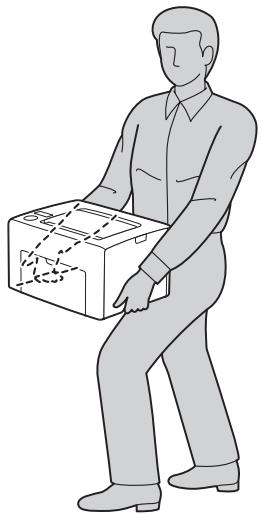
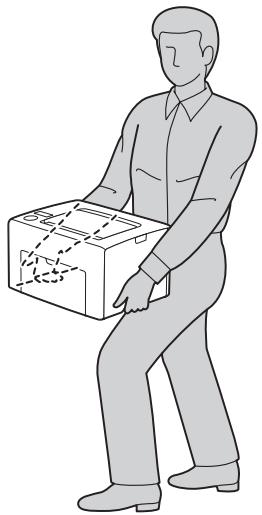
- Be sure to lift the printer by the correct positions as shown below.
When moving the printer, always keep it horizontal.
If you are unable to insert the AC plug into the electrical outlet, contact an electrician.
- Be sure the AC power cord meets the relevant local safety standards. Use only the power cord that comes with this printer. Use of the another cord may result in fire or electric shock. This printer's power cord is for use with this printer only. Use with other equipment may result in fire or electric shock.
If damage occurs to the plug, replace the cord set or consult a qualified electrician. If there are fuses in the plug, make sure you replace them with fuses of the correct size and rating.
Use a grounded outlet that matches the printer's power plug. Do not use an adapter plug.
- Avoid using an electrical outlet that is controlled by wall switches or automatic timers. Accidental disruption of power can erase valuable information in your computer's and printer's memory.
Make sure that there is no dust on the socket.
- Be sure to insert the plug completely into the electrical outlet.
Do not handle the plug with wet hands.
- Unplug this printer from the wall outlet and refer servicing to a qualified service representative under the following conditions:
| A | When the power cord or plug is damaged or frayed. |
| B | If liquid has been spilled into it. |
| C | If it has been exposed to rain or water. |
| D | If it does not operate normally when the operating instructions are followed. Adjust only those controls that are covered by the operating instructions since improper adjustment of other controls may result in damage and will often require extensive work by a qualified technician to restore the printer to normal operation. |
| E | If it has been dropped or the cabinet has been damaged. |
| F | If it exhibits a distinct change in performance, indicating a need for service. |
Avoid sharing outlets with other appliances.
- Connect all equipment to properly grounded power outlets. Avoid using outlets on the same circuit as photocopiers or air control systems that regularly switch on and off.
- Connect your printer to an electrical outlet that meets the power requirements of this printer. Your printer's power requirements are indicated on a label attached to the printer. If you are not sure of the power supply specifications in your area, contact your local power company or consult your dealer.
If you use an extension cord, make sure that the total of the ampere ratings on the products plugged into the extension cord does not exceed the extension cord ampere rating.
- When connecting this printer to a computer or other device with a cable, ensure the correct orientation of the connectors. Each connector has only one correct orientation. Inserting a connector in the wrong orientation may damage both devices connected by the cable.
Finding the place for the printer
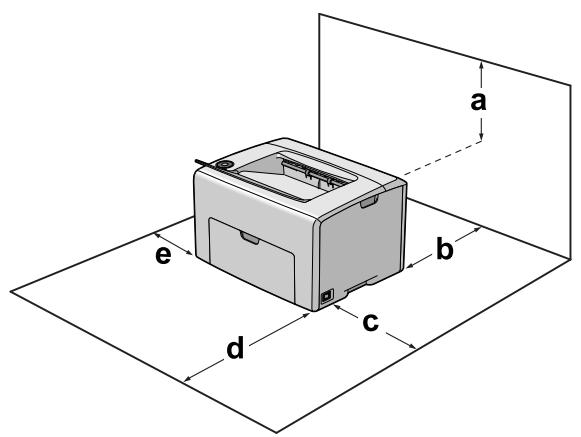
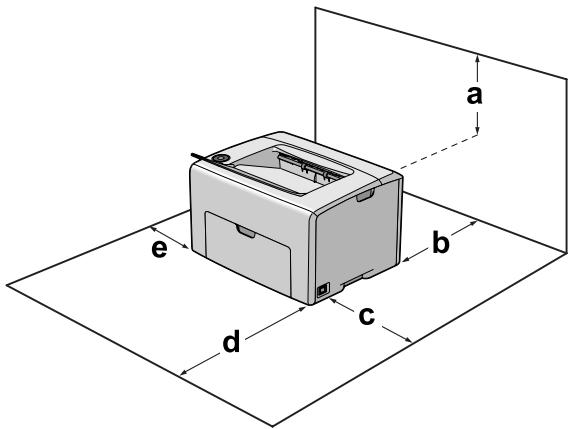
When relocating the printer, always choose a location that has adequate space for easy operation and maintenance. Use the following illustration as a guide for the amount of space required around the printer to ensure smooth operation.
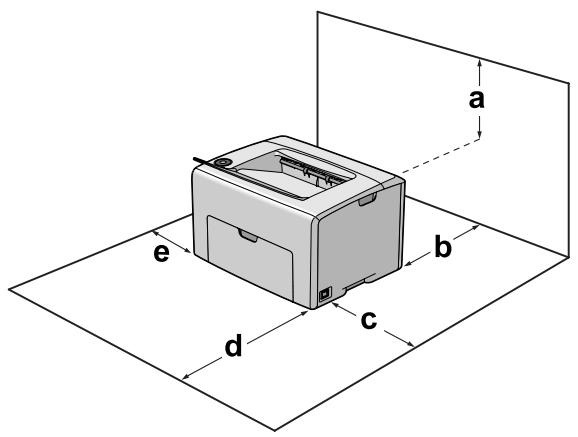
| a | 22 cm |
| b | 30 cm |
| c | 31 cm |
| d | 33 cm |
| e | 10 cm |
To install and use any of the following options, you will need the indicated amount of additional space.
In addition to space considerations, always heed the following precautions when finding a place to locate the printer:
Place the printer near an electrical outlet where you can easily plug in and unplug the power cord.
Do not put your printer where the cord will be stepped on.
Do not use printer in a damp environment.
Avoid locations that are subject to direct sunlight, excessive heat, moisture, oil vapor, or dust.
Do not place the printer on an unstable surface.
□ Slots and openings in the cabinet and the back or bottom are provided for ventilation. Do not block or cover them. Do not put the printer on a bed, sofa, rug, or other similar surface or in a built-in installation unless proper ventilation is provided.
- Keep the entire computer and printer system away from potential sources of interference, such as loudspeakers or the base units of cordless telephones.
Leave adequate room around the printer to allow for sufficient ventilation.
Using the printer
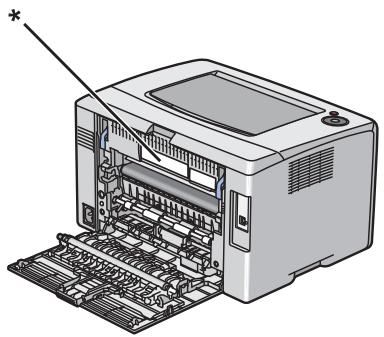
- Be careful not to touch the fuser, which is marked CAUTION, or the surrounding areas. If the printer has been in use, the fuser and the surrounding areas may be very hot. If you must touch one of these areas, turn off the printer and wait 40 minutes to allow the heat to subside before doing so.
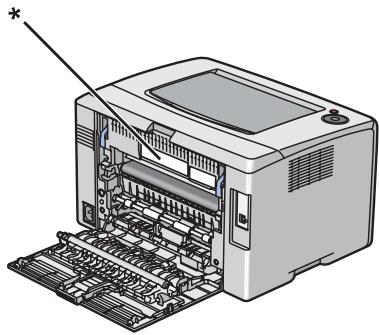
* CAUTION
□ Do not insert your hand deep into the fuser unit as some components are sharp and may cause injury.
- Never push objects of any kind through cabinet slots as they may touch dangerous voltage points or short out parts that could result in a risk of fire or electric shock.
Do not sit or lean on the printer. Do not put heavy objects on the printer.
Do not use any kind of combustible gases in or around the printer.
- Never force the printer's components into place. Although the printer is designed to be sturdy, rough handling can damage it.
Do not leave jammed paper inside the printer. This can cause the printer to overheat.
Never spill liquid of any kind on the printer.
Adjust only those controls that are covered by the operating instructions. Improper adjustment of other controls may result in damage and may require repair by a qualified service representative.
Do not turn off the printer:
For Epson AcuLaser C1700
- After turning on the printer, wait until the Ready/Data light is on.
- While the Ready/Data light is flashing.
- While printing.
For Epson AcuLaser C1750 Series
Handling consumable products
- Do not burn used consumable products because they might explode and injure someone. Dispos of them according to local regulations.
- Be sure to keep consumable products out of the reach of children.
When handling a toner cartridge, always place it on a clean, smooth surface.
Do not attempt to modify a toner cartridge or take it apart.
Do not touch the toner. Always keep toner away from your eyes. If toner gets on your skin or clothes, wash it off with soap and water immediately.
If toner is spilled, use a broom and dustpan or a damp cloth with soap and water to clean it up. Because the fine particles can cause a fire or explosion if they come into contact with a spark, do not use a vacuum cleaner.
Wait at least one hour before using a toner cartridge after moving it from a cool to a warm environment to prevent damage from condensation.
To get the best print quality, do not store the toner cartridge in an area subject to direct sunlight, dust, salty air, or corrosive gases (such as ammonia). Avoid locations subject to extreme or rapid changes in temperature or humidity.
Do not let the paper's edge slide across your skin because the edge of the paper may cut you.
Ozone safety
Ozone emission
Ozone gas is generated by LED printers as a by-product of the printing process. Ozone is produced only when the printer is printing.
Ozone exposure limit
The Epson LED printer generates less than 3mg / h of continuous printing.
Minimize the risk
To minimize the risk of exposure to ozone, you should avoid the following conditions:
Use of multiple LED printers in a confined area
Operation in conditions of extremely low humidity
Poor room ventilation
Long, continuous printing together with any of the above
Printer location
The printer should be located so that the exhaust gases and heat generated are:
Not blown directly into the user's face
Vented directly out of the building whenever possible
Standard and approvals
European model
| Low voltage directive
2006/95/EC | EN60950-1 |
| EMC directive 2004/108/EC | EN55022 Class B
EN61000-3-2
EN61000-3-3
EN55024 |
| R&TTE directive 1999/5/EC* | EN300 328
EN301 489-1
EN301 489-17
EN60950-1 |
- This only applies to the Epson AcuLaser C1750W.
For European users (Epson AcuLaser C1750W only)
We, Seiko Epson Corporation, hereby declare that the equipment model L661C is in compliance with the essential requirements and other relevant provisions of Directive 1999/5/EC.
For use only in:
Ireland, United Kingdom, Austria, Germany, Liechtenstein, Switzerland, France, Belgium, Luxembourg, Netherlands, Italy, Portugal, Spain, Denmark, Finland, Norway, Sweden, Iceland, Cyprus, Greece, Slovenia, Bulgaria, Czech Republic, Estonia, Hungary, Poland, Romania, Slovakia, Malta.
Only indoor operation is permitted in France.
If used outside of own premises, general authorization is required in Italy.
Epson can not accept responsibility for any failure to satisfy the protection requirements resulting a non-recommended modification of the products.

Sicherheitshinweise
- Si applica solo a Epson AcuLaser C1750W.
Para a Epson AcuLaser C1750 Series
Placering of printeren
For Epson AcuLaser C1700
Placering of printer
For Epson AcuLaser C1700
- Nár du har slättp áskriveren, venter du til Klar/data-lampen lyser.
- När Klar/data-lampen blinker.
- Under utskrift.
For Epson AcuLaser C1750-serien
For Epson AcuLaser C1700
- Vänta tills lampan Klar/Data lyser, Near du har slagit på skrivaren.
- Medan lampan Klar/Data blinkar.
- Under utskrift.
Model Epson AcuLaser C1700
Ttα to Epson AcuLaser C1700
CpaHdapD u oOo6peHuja
Ebponcku Model
| Ди rupeктiva 3a НizOK нараз
2006/95/EC | EN60950-1 |
| EMC ди rupeктiva 2004/108/EC | EN55022 КласьВ
EN61000-3-2
EN61000-3-3
EN55024 |
| R&TTE ди rupeктiva 1999/5/EC* | EN300 328
EN301 489-1
EN301 489-17
EN60950-1 |
- Oba ce odHeCyBa cAmo Ha Epson AcuLaser C1750W.
3a ebooncu Kopuchu (cmo Epson AcuLaser C1750W)
Hne, KopIIopauuJaTa Seiko Epson, n3jaByBaMe IeKa OIIpeMaTa co MoIeI L661C e Bo cOrIaChOcT co cIte oCHOBHN II6apyBaHa n IpyrN peIeBaHTn HaueHa Na IInpeKTHBaTa 1999/5/EC.
3a yIIOTepe6a cAmO BO:
Ирса,ОбeДиНeToКраЛСТВО,АВсTpNiJa,ГерMaHиJa,ЛинХeHIIrTajH,IIIБaJIapNiJa,ФpaHиJa,БeIgNiJa,Луксem6bypr,XoJIaHиJa,ItaiNiJa,ПорTuTalNiJa,IIIpaHиJa,IaHsKa,ФинсKa,HopBeeIIka,IIIBeIcKa,IcIaHn,IknIap,ΓpUNa,IcOBeHиJa,ByrapNiJa,PeNy6IIuKaYeIIka,EctOnHja,YHrapNiJa,Полса,РоманиJa,CLOBaKиJa,MaIITa.
BoΦpaHnju e IOn3BOJIeHa OIIepIpuIbe caMo BO 3aTBopeHa IIpocToPnuJa.
Ako ce KopncTn HaBbOp oI cBoNTe IpoCTOpuN, BO IVaInja e IOTpe6Ho OIIITO OBlaCTyBaHe.
Epson He Moze Ia IIpeB3eMe OJIOROBOpHocT 3a He3aIOBOJIyBaIbe Ha IIO6apyBaIbTa 3a 3aIITNa IopaIi HeIIpeIopaUINBn I3MeHn Ha IPOUN3BOIInTe.

Baxkhble nHCTpyKcnn no 6e3oNaChoctn
IaHocTpaHIM, IIpNBeEHHbIE B aAHOM pa3Ae, oTHocTcK MoaEaM Epson AcuLaser C1700 Series.
BbI6Op MeCTa AIA yCTaHOBKn pInHTepa
Пи перемшенипринтета BCEгда БИбпайтмecTo, obecпeуньIoIJeedoctaTOHoe KOANueCTBO CBO6OAnHOIIPOCTpaHCTBa AЯ erO NcIOANb3OBaHNI N O6cAYKNBaHnI. NcIOANb3yIte cAeAlyOIIIN PNCYHOK AЯ OIIpeAeLEHnI KOLUeCTBa CBO6OAnHOI OMeTa, Heo6XoAMOrO AIA HOpMaIbHOJ 3KCIaIyaTaiJInN I O6cAYKNBaHnI пriHTepa.
| a | 22 cm |
| b | 30 cm |
| c | 31 cm |
| d | 33 cm |
| e | 10 cm |
EcAn yCTaHOBaeHo cAeAyoIe ee OIOAoHHTeAbHoe o6OpyOBAHne, Bam IIOHaObntcA OIOAHNTeAbHoe MeCTo.
* CAUTION (BHIMAHINE)
He IipocobbIaIe pyky BHyTp6IoKa IIeKu, IIOCKoABy HeKOTOpbIe KOMIOHeHTbI NMeIOT ocTpbIe KpaI N MOrYTH HaHeCTn TpaBMy.
HnKoTa He BCTaBAAIte IpeAMeTbIB OTBepCTna Ha KOpIyce IpiHTepa - OHN MOrTy T IIpIKOCHyTbcra K TOcKaM BbICOKOTo HAnPjaKeHna N BbI3BaTb KOPOTKoe 3aMbIkaHne, YTO IIpNBeAet K IIOJkapu nn IopajKeHHO 3AeKTPnueCkM TOKOM.
He caAHTecb H He oInpaTecb Ha IprHTe. He KlaAHTe Ha IprHTep TjXKeAble IpeAMeTbI.
He nIOa3yIte pAOM c IIpHTEpOM AeKOBocIIaMeHaHOIIuecBeIecTba.
HnKOrda He npImeHnTe cnAly dA y yCTaHOBKn KOMIOHeHTOB Ha MeCTO. XOTy IpnHTep — IpoUHoe ycTPOIcTBO, rpyboe o6paJIeHNHe MOKeT pINBeCTN K eRO NOBpeJKeHnIO.
He ocTabaIte 3amTyIO 6yMaIg BHyTpN IpiHTepa. To MoKet IpiBecTu K IpeperpeBy IpiHTepa.
HnKorda He IPOAunBaIte KnaKocTb Ha IIpNHTe.
BbIOAHnTe ToaBko peYAnpOBKn, KOtOpBie OINcaHb B HcTpyKJIn N IO 3KcIIaTaIyN. Heo3BOeHHbe peYAnpOBKn MOrT IIpNBecTN K IOBpeKdEHNIO IIpHTepa; dAЯ peMOHTa IOTpe6yeTcra obpaTntbcra K KBaHnOIpOBaHHOMy IepcoHaay.
He BbIKAouaTe IpnHTep:
Epson AcuLaser C1700
- IIOCSAE BKAIOUeHnI IIpHTepa, IOKa He 3aIropNTcI HAnKaTOp Ready/Data;
- ПОКа мигает ИнданkaTop Ready/Data;
- IOKa NAdET IIeYaTb.
Ддя Epson AcuLaser C1750 Series
-IOcAe BkAnOueHnI IpnHTepa,IOKa Ha KK-ⅡaHeu He IOBbTcReed (ToTOB);
- INOKa MUNraeT INHAnKaTOP Data;
- IIOKa IAnTeI NeuTaTb.
He IpiKacaiTecb K AeTaAM BHyTpN IIpHTepa, ecn 3TO He OROBopeHO B HcTpyKJIM.
CaeAynTe Bcem IpeAynpeKdEHNa IM NnHCTpyKJnMa, HnHeceHHbIM Ha KOpIyc npHTepa.
He IIbITaItec b caMOCTOaTEaHbHO peMOHTnPOBaTb yCTpOcTBO, ecAn 3TO He OROBopeHo B pyKOBoaCTBe.
Перноан ueckn OTKIoUaIe IIHyp IITaHnI OTe 3AeKtpueckoI po3eTKn I OChuaJTe KOHTaKTbI.
He OTKIAOHTe IHHyp NHTAHNA BO BpeMa NeaTu.
EcnI IpnHTep He nCIOAb3yeTcra IpoAoJXITeABHbI IepNOA, BpeMeHn, BbIHbTe IIHyp IITaHnI 13 po3ETKn.
PepaOnCTKoI pHTepa OTKIOuAte erO oT 3eKTPueeCKo P03eTKn.
OuHJaTe IpnHTep XopoIO OToKaTOB BAaXHOJ TkaHbIO; He NcIIOAB3yJTE JxNkne IAN a3pO3OAbHbIE cpeAcTBA.
Оврашени с расховим MaTeрnaаamN
He cKnraTe HcIOb3OBaHHbIe pacXoAHbIe MaTePnaABy - 3TO MOKeT IIpNBecTH K B3pbIBy I TeAechbIM TpaBmAM. YTuAn3HpyIte IX COrACHO MecTHOMY IIpnpOdooxpaHHOMy 3aKOHOdaTeAcbTBy.
XpaHnTe paCXoHbIe MaTePnaB I B MeCTaX, HeOcTyIHbIX AeTAM.
Pn o6paHHeHn c ToHep-KapTpJxKem BceIa KaAHTe eTO Ha YnCTyIO POBHyIO IOBepXHOCTb.
He IIbIaTaeTcB MoAnΦHJInpOBA Tb Ia36uPaTb KaTpuaXn c TohePOM.
He TporaTe Tohep pykami. He OIpyckaTe ero IIOIaHaB rA3a. EcAn ToHeP IIOIaHa KOJy IAN OAdEJKay, HeMeADAEHHO cMOITe erO BOAO C MBIAM.
EcaHToHEpIPOcblIaIcra,co6epHTeeroIpiNIOMOUBeHNkaNCOBkaHAN BAAJHOHaMbIaEHHO TKAH.NoCKOaBky NCKpa MOKeT Bb3BaTb BOcIIaMeHeHne HAN B3pbIB MeAKNXuaCTnI,He co6uPaTe ToHEp IIaIecocom.
EcaN KApTpuaK C ToHepom 6bIA BHeceH C XOAnHOBO3AUYa B TeIaoe IOMeJeHne, Ipea eTO yCTaHOBko OH AOJKeH IIporpeTBcR B TeueHne Yaca BO n36eKaHne IOBpeKdEHNr N3-3a KOHaehCaUN BAArN.
UTo6bI oBeCIIeHTb HauAUYHIEe KaeCTBO IIeATu, XpaHITe KApTPnJxK BdaAn OT IprAmOro COaHeHOrO CBeTa, IIbIIN, COaHbIX IapOB NAn Bb3bIBaIOIIx Koppo3NIO ra3OB (HaIprImep, aMMOnH). IV36eAaTe XpaHuaNIIc c 3KCTpeMaALbHbIMu YCAOBnIMu n pe3KNIMn IpePnaDAMn TEMIIePaTYP IN BAaXHOCTU BO3dYxa.
He OIpyckaTe IIOcKaaB3bIBaHnKpa8bMaRn BAOb BaIIINx pyK, INaYe Bbl MoKeTe IOpE3aTbcra.
CbeHnO 6e3oNacHOCTN
O3OHOBa 6e3OpachOCTb
BbIaIeHne 03OHa
O3OH BbIeAeTcB CBeTOaIOAHyX IIpHTEpax KaK IObOuHbI INoAkyT IpoJecca NeaTu. O3OH BbIeAeTcT ToA bKO TOrda, KOrda IIpHTEp IeeaTaet.
OrpaHnueHne Ha BbIXOa 03OHa
CBeToaHbI IpnHTep Epson co3aet MeHee 3 M/Qu IIpn HeIIpepbIBHOJ NeaTu.
Mннмн3aця риcka
AЯ yMeHbIeHn pUcKa BbIXOa O3OHa OcTepeaTecb CaeAyoIJIero:
IcIOa3OBAHHe HeCKoAaKHX CBeTOaHOaHbIX IpnHTepOB B 3aMKHYTom IOMeJeHN;
pa60tby BycAOBnX Ype3BBYaHNO Hn3KoB BaJxHOCTn;
IIAOXOBEHTNIAIINIOMEIIJHNI;
IPOAOJKTaeBHOH HeJIpepbHBHOI PeaTN B COeTaHnC AIObIM N3 BBIIIEIIpNBBeAeHHbIX YCAOBNI.
Pa3meueHne npntepa
ПиHTepdoJKeH 6bITb pa3MeIeH TaKIM O6pa3OM, YTO6bI BbIXOaIIJe Ra3bI I IPOU3BOAnMOe TeIIIO:
He 6bIaH aIIpaBaeHb I AUNIO IOAa3OBaTeA;
IIpnI IIOMOUI BbITJXKHOI BeHTNIAJIIN BBIBOAnNCb HApIyMO U3 3aHn,ecnTO BO3MOxKHO.
CoOTBeTCTBHe CTaHApTAM N AOnyCKAM
Moæb AЯ EBpOŋbl
| Директiva O Нзkom
напräжени
2006/95/EC | EN60950-1 |
| Директiva об
эль ekтpondагнithов
сobmec'timoc'tn 2004/108/EC | EN55022 Class B
EN61000-3-2
EN61000-3-3
EN55024 |
| R&TTE directive 1999/5/EC* | EN300 328
EN301 489-1
EN301 489-17
EN60950-1 |
- ΘTo OTHOCHTCRA ToBko K Epson AcuLaser C1750W.
MoAeIb COOTBeTCTByeT Tpe6OBaHnI M HOpMaTHBbIX AOKyMeHTOB FOCT P M3K 60950-1-2005, FOCT P 51318.22-99 (Kaacc B), FOCT P 51318.24-99, FOCT P 51317.3.2-2006 (Pa3AeI 6, 7), FOCT P 51317.3.3-2008
UpaaHn, BeaKo6pTuHaHn, AbcTpy, EpMaHn, AnxTeHITeH, IIBeiApn, PhaHn, BebHn, AIOKceM6ypr, HApAaHbI, NTaAun, IOpTyraHn, NcHn, AaHn, HOpBerHn, IIIBeiHn, NcAaHn, KnIrp, TpeiHn, CObEHN, BoIapHn, Yexn, 3ctOnHn, BeHTpy, PmBHHn, CObaKn n MaBt.
Bo paHun pa3peIeHo nIOaB3ObaHne TObKO B IOMeIJIeHNx.
B IVaIIIN Tpe6yeTcra pa3peIeHHe Ha IICIOAIBOBAHNBE HHe IIOMEIJEHN.
Epson He Hecet OTBeTCTBHeHHOCTn, CB3aHHoN C AIObIMN IIOAMKaMn N3-3a HepeKOMeHDoBAHHORU NCIOAb3OBaHnA HAn MOAnΦHKaIJuN yCTPOnCTBa.
Ihcmpykuji3 mexHiku 6e3neku
Baxlubi iHcmpykuii 3 mexhiku 6e3neku
Ha iIIOCTpaizyx y daHomy po3iiIi 3o6paXeHa moJIb cepii Epson AcuLaser C1700.
YcmaHOBJIeHHnpuHmepa
PiHimTn IpnItep IOTpi6Ho y TaKn cnoci6, k 3o6paKeHo HxKue.
IiJ uac IepeHeceHHa IIpuHTepa 3aBkDn TpMaJTe IORo B rOpN3OHTaJIbHOMy IIOJOKeHHI.
YKIO BV He MoKTe PiI'eHaTn IITeNcIb 3MiHHO cTpMy Io eJIeKTPuHoi pO3eTKU, 3BepHiTbcI Do eJIeKTPuKa.
IpekoHaTeC8B TOMy,IO Ka6eJIb KINBHeHn 3mHHOrO cTpyMByiIOBiae BiIOOBiHN MicueBM cTaHApTaM 6e3IIeKn. BnKOpNcTOByTe IInIe Ka6eJIb KINBHeHn,IO IOCTaBnEbCS 3 IIpnHTepOM.BNKOpNcTAHnIHIIoro Ka6eIIO MoKe Iprn3BeCTn IO BnHKHeHn IooKexi a6o BpaJKeHH eIekTpUHm cTpyMOM.Ka6eJIb KINBHeHn,IO IOJaETbcrIO pIpnHTepa, IIpI3NaueHn IJIb BnKOpNcTAHn IInIe 3 IIm pIpnHTepOM.BNKOpNcTAHn IIOBOrKa6eIIO IJIa II'EDHaHH iHIoi aIIapatypMoKe Iprn3BeCTn IO BnHKHeHn IooKexi a6o BpaJKeHH eIekTpUHm cTpyMOM.
YKIIIOIⅢKOJKeHO IITeIcEJIb, 3aMIHITb YBeCb Ka6eJIb a6O 3BepHIbCra IO KBaJIiΦiKOBaHOreIeKTPnKa. YIKIO y IITeIcEJIb YcTaHOBJIeHO 3aIIO6IXHKNk, IpeKoHaITeCra B TOMy, IIO INo 3aMHeHO Ha 3aIO6IXHKNk IOTpi6HOrO po3Mipy Ta HOMHaJIy.
BnKOpncTOByTe y3eMJIeHy po3eTKy, IIO BiIIOBIIaE IITeIcEIIo Ka6eIIIO JKNBIIeHHN IpiHTepa. He BnKOpncTOByTe aIaIITep IJIa IIITeIcEJIa.
He BnKOpNCToBMyTe eIeKtpnHy po3eTKy, IIO Kepyetbca HactiHHMn BmNKaayMa a6o aBTOMaTHHmTaIMepaMn. BnIaIKOBe po3MnKaHHaHIOra eIeKtpOJKNBHeHHa MoKe IIpN3BeCTN Do BTPaTn IINHOi IHΦopMaui 3 Na'M'Ti KOMI'IoTEpa Ta IIpNHTepa.
IpekeKoHaTecB TOMy, IIO Bpo3eTuHema IIuIy.
IpekoHaTecB TOMy, IIO IITeIcIb Ka6JIIO JKNBIIeHnI IOBHicTb BCTaBJIeHO B eJIeKTPuHy po3etKy.
He TopkaTecI IITeIeJIa BOIOIIMn pyKaMn.
Bi'edHaTe IIpHTEp BiI HacTIHHoI pO3eTKn Ta 3BepHiTbc8 3a 06cIyTOByBaHHaM IO KBaJIiΦIKOBaHOrO IpeIcTaBHnKa cepBicHO rIeHTpy B TaKnx BIIaIqKax:
He ciJaIte Ta He oIIpaItecHa IIpHTEp. He KJIaIITb Ha IIpHTEp BaJkI IIpeIMeTn.
He BnKOpncToBvIte Iopyu i3 IIpInTePOM 6yIb-akI IeRko3aMmcti Ra3N.
HikonHe BCTabIaIteIeTaII IprnTepcaNIOmiIb. XoHa IIpInTep cIIpoEKTOBaHO IJIaIINHO yHKIOHyBaHHra, rpy6e IOBOJKeHHMaOKe IORIO IOIKOINTn.
He 3aIIaIte 3iM'ayTn IIaIIp y IIpIHTepi. Ie moKe IIpN3BecTN IO IIpeERPiBaHHI IIpIHTepa.
Hikon He npoIbAaTe Ha npInTepe6yNb-aykpyiINHy.
BnKohyTe IiIe Ti HaJIaHTyBaHn, IIO NepeIb6aueHi iHCTpyKciEIO 3 ekCIIpyaTauii. HeHaJIeJHe BnKoHaHH iHIIIX HAJIaHTyBaHb MoKe IIpn3BecTN IO IIIOIKoJKeHH IprnHTepa, i IJIa peMOHTy IOTpi6HO 6yIe 3BepHyTncsI DO KBAJIiΦIKOBaHOrO IIpeIcTaBHnKa cepBicHO rHTpy.
He BmKaiTe IIpHTep: Ima MoeIpsilon Epson AcuLaser C1700
-Пись ВВIMКнЕНЯ пиHTepa,Дочекайтеся,ПOKИЗагорпсь сIHДИКATOP ГOTOBИ/ДаHI.
- KoIII rOpIb a6o 6JIIMae iHIIKaTOp IToOBn/JaHi.
-Пицac npky.
Дия модалі cepii Epson AcuLaser C1750
aIbIg 1yI yI bI I aI bI I aI bI I aI bI I aI bI I aI bI I aI bI I aI bI I aI bI I aI bI I aI bI I aI bI I aI bI I aI bI I aI bI I aI bI I aI bI I aI bI I aI bI I aI bI I aI bI I
I 1
.
aalbllgabai. aaiiogjylll aagbjgblalglal jilablaababwlgbypksaiill pkiyjldjdoJlloaaii J 1
. 15
y
: 1
| .aaaalalalalalalalalalalalalalalalalalalalalalalalalalalalalalalalalalalalalalalalalalalalalalalalalalalalalalalalalalalalalalalalalalalalalalalalalalalalalalalalalalalalalalalalalalalalalalalalalalalalalAL | 1 |
| .aaaalalalalalalalalalalalalalalalalalalalalalalalalalalAL | ? |
| .aaaalalalalalalalalalalalalalalAL | ? |
| .aaaalalalalalalalalalalalalAL | ? |
| .aaaalalalalalalalalalAL | ? |
| .aaaalalalalalalalalAL | ? |
| .aaaalalalalalalalAL | ? |
| .aaaalalalalalalAL | ? |
| .aaaalalalalalalAL | ? |
| .aaaalalalalalAL | ? |
| .aaaalalalalAL | ? |
| .aaaalalalAL | ? |
| .aaaalalAL | ? |
| .aaaalAL | ? |
| .aaaAL | ? |
| .aaaAL | ? |
| .aaaAL | ? |
| .aaaAL | ? |
| .aaaAL | ? |
| .aaaAL | ? |
| .aaaAL | ? |
| .aaaAL | ? |
| .aaaAL | ? |
| .aaaAL | ? |
| .aaaAL | ? |
| .aaaAL | ? |
| .aaaAL | ?2 |
| .aaaAL | ? |
| .aaaAL | ? |
| .aaaAL | ? |
| .aaaAL | ? |
| .aaaAL | ? |
| .aaaAL | ? |
| .aaaAL | ? |
| .aaaAL | ? |
| .aaaAL | ? |
| .aaaAL | ? |
| .aaaAL | ? |
| .aaaAL | ? |
| .
.
.
.
.
.
.
.
.
.
.
.
.
.
.
.
.
.
.
.
.
.
.
.
.
.
.
.
.
.
.
.
.
.
.
.
.
.
.
.
.
.
.
.
.
.
.
.
.
.
.
.
.
.
.
.
.
.
.
.
.
.
.
.
.
.
.
.
.
.
.
.
.
.
.
.
.
.
.
.
.
.
.
.
.
.
.
.
.
.
.
.
.
.
.
.
.
.
.
.
?
.
.
.
.
.
.
.
.
.
.
.
.
.
.
.
.
.
.
.
.
.
.
.
.
.
.
.
.
.
.
.
.
.
.
.
.
.
.
.
.
.
.
.
.
.
.
.
.
.
.
.
.
.
.
.
.
.
.
.
.
.
.
.
.
.
.
.
.
.
.
.
.
.
.
.
.
.
.
.
.
.
.
.
.
.
.
.
.
.
.
.
.
.
.
.
.
.
.
.
-
.
.
.
.
.
.
.
.
.
.
.
.
.
.
.
.
.
.
.
.
.
.
.
.
.
.
.
.
.
.
.
.
.
.
.
.
.
.
.
.
.
.
.
.
.
.
.
.
.
.
.
.
.
.
.
.
.
.
.
.
.
.
.
.
.
.
.
.
.
.
.
.
.
.
.
.
.
.
.
.
.
.
.
.
.
.
.
.
.
.
.
.
.
.
.
.
.
.
.
- - - - - - - - - - - - - - - - - - - - - - - - - - - - - - - - - - - - - - - - - - - - - - - - - - - - - - - - - - - - - - - - - - - - - - - - - - - - - - - - - - - - - - - - - - - - - - - - - - - - - -
.
.
.
.
.
.
.
.
.
.
.
.
.
.
.
.
.
.
.
.
.
.
.
.
.
.
.
.
.
.
.
.
.
.
.
.
.
.
.
.
.
.
.
.
.
.
.
.
.
.
.
.
.
.
.
.
.
.
.
.
.
.
.
.
.
.
.
.
.
.
.
.
.
.
.
.
.
.
.
.
.
.
.
.
.
.
.
.
.
.
.
.
.
.
.
.
.
.
.
20
20
20
20
20
20
20
20
20
20
20
20
20
20
20
20
20
20
20
20
20
20
20
20
20
20
20
20
20
20
20
20
20
20
? | |
1
1 1 1 1 1 1 1 1 1 1 1 1 1 1 1 1 1 1 1 1 1 1 1 1 1 1 1 1 1 1 1 1 1
1 1 1 1 1 1 1 1 1 1 1 1 1 1 1 1 1 1 1 1 1 1 1 1 1 1 1 1 1 1 1 1 1 1 1 1 1
llw 1 jn jggl y udwl ellww alogbl lglall llae! n no sI dEellw p dss
Joo o Joo o Joo o Joo o Joo o Joo o Joo o Joo o Joo o Joo o Joo o Joo o Joo o Joo o Joo o
aBbB bBbB bBbB
aJyI aagogll oogall pduw .daw dlaugg Jg Jn no aol ds aLw 4 bik So leo jol aal gog n koo
| pω 22 | a |
| pω 30 | b |
| pω 31 | c |
| pω 33 | d |
| pω 10 | e |
Epson AcuLaser C1750
LCD 10000000000000000000000000000000000000000000
L
a|b|1
. 1
aIbI Ie aie 1e eae ee e e
Jg
.
..
.15
Lg 1
.
a5y1y1 y1y1b1 20 Jolzil
. 11111111111111111111111111111
Jbblglg 1y
.0e1g 2b2w d e lfo 4ofo 4ofo 4ofo 4ofo 4ofo
Jgaaa aagb jgljglj
a a a a a a a a a a a a a a a a a a a a a a a a a a a a
.
gJyI gJyI yI yI yI yI yI yI yI yI yI yI yI yI yI yI yI yI yI yI yI yI yI yI yI yI yI yI yI yI yI yI yI yI yI yI yI yI yI yI yI yI yI yI yI yI yI yI yI
.
.
aolalil
gjgjj 20xw
jgjj
g luee 100 g 11. a c b 11 11 11 11 11 11 11 11 11 11 11 11 11 11 11 11 11 11 11 11 11 11 1
. 3 3 3 3 3 3 3 3 3 3 3 3 3 3 3 3 3 3 3 3 3 3 3 3 3 3 3 3 3
jbjjj
:
LED
a
0x1f 1
aaiiie
:
p#u#u#14g9 #o#u#u#
J 1
1520g 1520
39 1
| EN60950-1 | تانيه الحرفیال پاشفندی
2006/95/EC |
| الترجمة EN55022
EN61000-3-2
EN61000-3-3
EN55024 | 2004/108/EC ره EMC ترانه |
| EN300 328
EN301 489-1
EN301 489-17
EN60950-1 | *1999/5/EC ره R&TTE ترانه |
.Epson AcuLaser C1750W 1
(EPson AcuLaser C1750W)
aLalalalalalalalalalalalalalalalalalalalalalalalalalalalalalalalalalalalalal
.1999/5/EC a
1
LgIgIgU, IlogJrIgUyj, yj, gUu! uuuuauuauuuuuuuuuuuuuuuuuuuuuuuuuuuuuuuuuuuuuuuuuuuuuuuuuuuuuuuuuuuuuuuuuuuuuuuuuuuuuuuuuuuuuuuuuuuuuuuuuuuuuuuuuuuuuuuuuuuuuuuuuuuuuuuuuuuuuuuuuuuuuuuuuuuuuuuuuuuuuuuuuUU
.12
.
pL 1
. 111111111111111111111111111111111111111

安全須知
重要安全須知
図音樂,樂,樂,樂,樂,樂,樂,樂,樂,樂,樂,樂,樂,樂,樂,樂,樂,樂,樂,樂,樂,樂,樂,樂,樂,樂,樂,樂,樂,樂,樂,樂,樂,樂,樂,樂,樂,樂,樂,樂,樂,樂,樂,樂,樂,樂,樂,樂,樂,樂,樂
FrLrTe 1tJt JtJtJtJtJtJtJtJtJtJtJtJtJtJtJtJtJtJtJtJtJtJtJtJtJtJtJtJtJtJtJtJtJtJtJtJtJtJtJtJtJtJtJtJtJtJtJtJtJtJtJt
Epson AcuLaser C1750 Series
FrLrtn is n h s t.
□ 河用者的尔或到
□ 压能法用,
Indication of the manufacturer and the importer in accordance with requirements of directive 2011/65/EU (RoHS)
Manufacturer: SEIKO EPSON CORPORATION
Address: 3-5, Owa 3-chome, Suwa-shi, Nagano-ken 392-8502 Japan
Telephone: 81-266-52-3131
Fax: 81-266-52-8409
Importer: EPSON EUROPE B.V.
Address: Azië building, Atlas ArenA,
Hoogoorddreef 5,