
23694 - Headphones BAZOO - Free user manual and instructions
Find the device manual for free 23694 BAZOO in PDF.

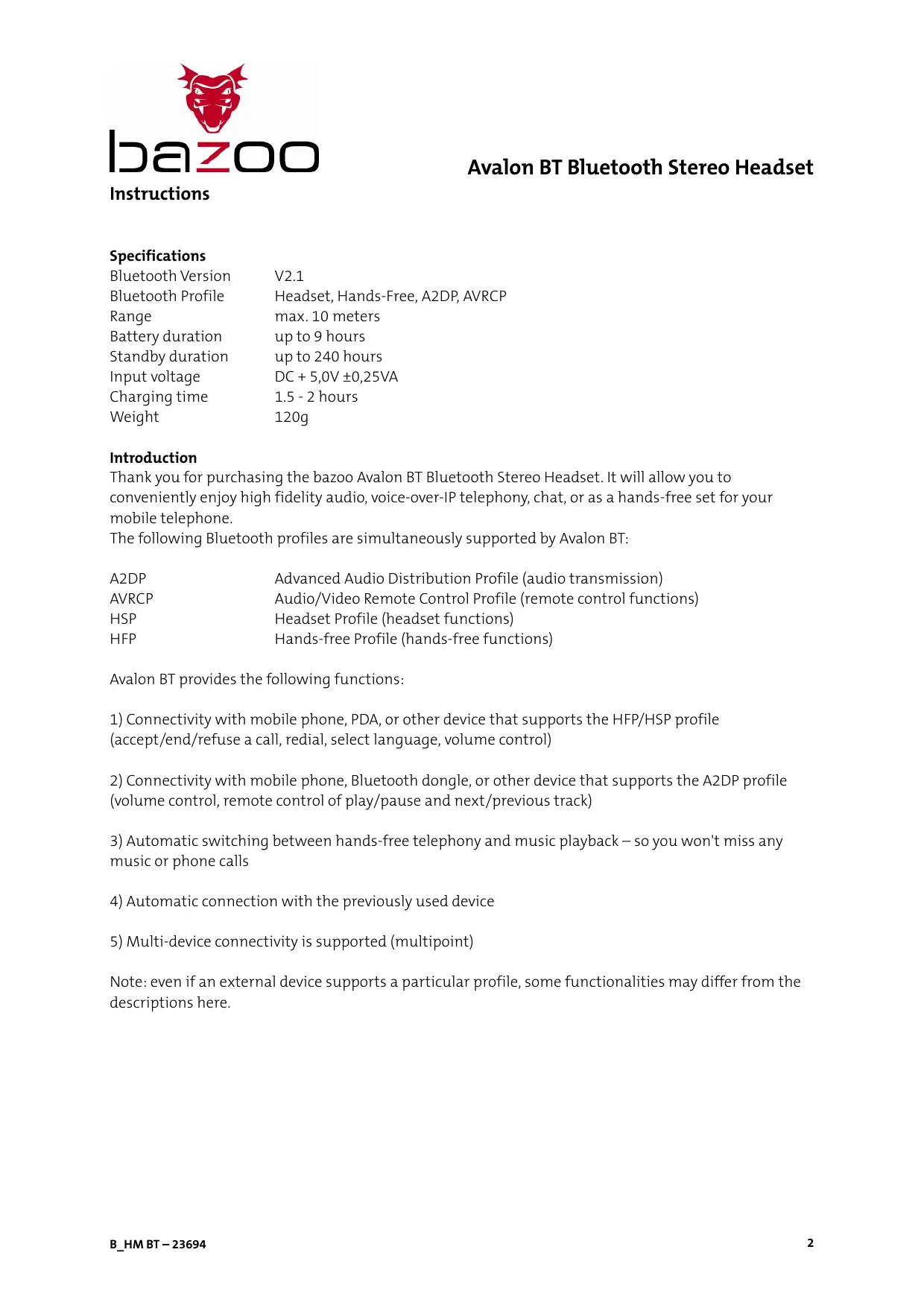


| Product type | Bluetooth stereo headset |
| Model | BAZOO Avalon BT (23694) |
| Weight | 120 g |
| Playback time | Up to 9 hours |
| Standby time | Up to 240 hours |
| Charging time | 1.5 to 2 hours |
| Power | Built-in rechargeable battery, charging via USB cable (DC 5.0 V ±0.25 V) |
| Supported Bluetooth profiles | AVRCP, HSP, HFP, A2DP |
| Bluetooth range | Up to 10 m (Class 2) |
| Pairing PIN code | 0000 |
| Phone functions | Answer, reject, end call, voice dial, redial, headset/phone switching, mute |
| Music functions | Play/pause, next/previous track, volume control (with AVRCP) |
| Multipoint connection | Simultaneous pairing with two devices (e.g., PC and phone) |
| LED indications | Solid red (charging), off (charged), flashing red/blue (pairing mode), flashing blue (standby/call), flashing red (low battery) |
| Control elements | Multifunction button, volume +/- buttons, previous/next track buttons, adjustable headband strap |
| Care and cleaning | Clean with a soft dry cloth, avoid moisture, heat, shocks, and chemicals |
| Safety | Do not open the casing, do not disassemble the battery, use only the provided USB charger |
| General information | Brand BAZOO, model Avalon BT (23694), category audio headset, 64-page manual |
Frequently Asked Questions - 23694 BAZOO
User questions about 23694 BAZOO
0 question about this device. Answer the ones you know or ask your own.
Ask a new question about this device
Download the instructions for your Headphones in PDF format for free! Find your manual 23694 - BAZOO and take your electronic device back in hand. On this page are published all the documents necessary for the use of your device. 23694 by BAZOO.
USER MANUAL 23694 BAZOO
BLUETOOTH STEREO HEADSET
Specifications
Bluetooth Version V2.1
Bluetooth Profile Headset, Hands-Free, A2DP, AVRCP
Range max. 10 meters
Battery duration up to 9 hours
Standby duration up to 240 hours
Input voltage DC + 5,0V ±0,25VA
Charging time 1.5 - 2 hours
Weight 120g
Introduction
Thank you for purchasing the bazoo Avalon BT Bluetooth Stereo Headset. It will allow you to conveniently enjoy high fidelity audio, voice-over-IP telephony, chat, or as a hands-free set for your mobile telephone.
The following Bluetooth profiles are simultaneously supported by Avalon BT:
A2DP Advanced Audio Distribution Profile (audio transmission)
AVRCP Audio/Video Remote Control Profile (remote control functions)
HSP Headset Profile (headset functions)
HFP Hands-free Profile (hands-free functions)
Avalon BT provides the following functions:
1) Connectivity with mobile phone, PDA, or other device that supports the HFP/HSP profile (accept/end/refuse a call, radial, select language, volume control)
2) Connectivity with mobile phone, Bluetooth dongle, or other device that supports the A2DP profile (volume control, remote control of play/pause and next/previous track)
3) Automatic switching between hands-free telephony and music playback – so you won't miss any music or phone calls
4) Automatic connection with the previously used device
5) Multi-device connectivity is supported (multipoint)
Note: even if an external device supports a particular profile, some functionalities may differ from the descriptions here.
Overview of operation
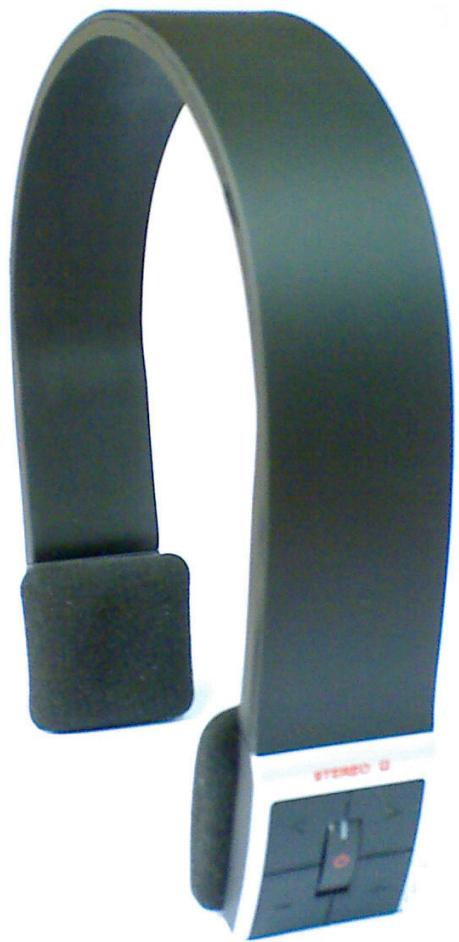
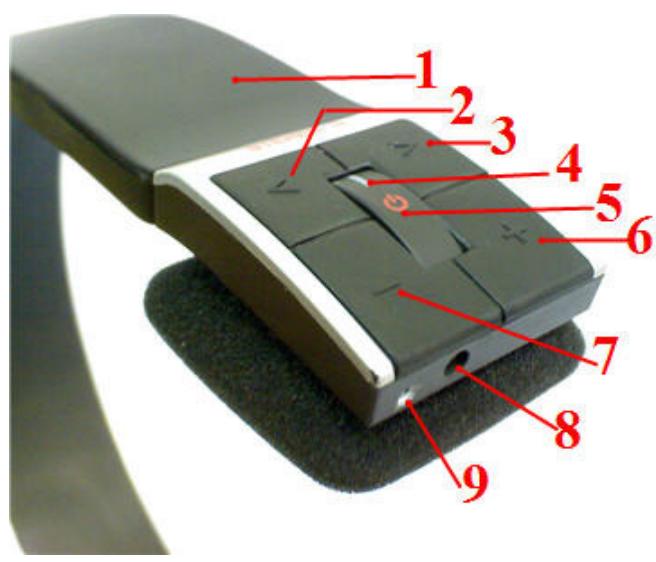
1 – adjustable headband
6 – increase volume
2 - previous track
7 - decrease volume
3 - next track
8 - port for USB charging cable
4 - multifunction LED
9 - integrated microphone
5 - multifunction key
Charging the headset with the USB cable
The integrated battery must be charged before the first usage. If the battery levels become too during usage, a warning tone will sound every 20 seconds, and the multifunction LED will blink red. This indicates that the headset requires recharging. To charge, connect the headset to your computer's USB port. Alternatively, the USB cable can also be connect to an adapter, which allows a charging from an electrical outlet (available separately). The multifunction LED is constantly illuminated during charging. When the multifunction LED dims, the headset is fully charged. The USB cable may be separated.
Caution: please do not attempt to charge the integrated battery by other means other than those described. The battery cannot be removed or replaced. Please deposit at your local recycling center for removal.
Basic operation of headset
| Function | Command | Multifunction LED display |
| Power on | Press and hold the multifunction key for 3-5 seconds until the LED blinks blue | Four blue blinks |
| Power off | Press and hold the multifunction key for 2-3 seconds until the LED blinks red | Four red blinks |
| Pairing mode | Press and hold the multifunction key for 5-7 seconds until the LED blinks red and blue | Alternating red and blue blinks |
Note: to save energy, the headset automatically switches to standby mode if not connected to another device within 5 minutes.
Connecting the headset to a Bluetooth transmitter (mobile phone, USB dongle, etc.)
Ensure that your mobile phone, PDA, etc. supports Bluetooth functionality and that Bluetooth is activated. Procedures for pairing your mobile phone vary by manufacturer. Please refer to the instructions for your device. Basic procedure is as follows:
Place the Avalon BT near the device to be connected (less than 1 meter), and ensure it that pairing mode (see above) is activated. Search for new Bluetooth devices with the external device. Select "AVALONBT." You may be required to enter a password or PIN code in order to connect. Please enter 0000 and confirm. Once the connection is successfully established, you will see "AVALONBT" in the device list of your external component. Some devices will automatically connect with the headset. Others may require the connection to be activated.
Note: if connection is unsuccessful, switch off the headset and repeat steps.
After successful connection, the Avalon BT and the most recently connected device are "acquainted," so that the pairing process must not be repeated. If you would like to connect the headset with a different device, power off or deactivate Bluetooth for the previously connected device.
Default password/PIN code for the Avalon Bt is 0000.
Connecting the headset with two devices (multipoint)
The Avalon BT may be simultaneously connected with two different devices (mobile phone and PC). Both connections can use the HFP and A2DP profiles. Basic connection procedures are as follows: First connect the headset with the computer's Bluetooth transmitter as previously described. Then deactivate the computer's Bluetooth function. Thereafter connect the headset with your mobile phone as described above. Reactivate the computer's Bluetooth transmitter, which then automatically reconnects with the headset.
Note: after successfully connecting both devices, all three units are "acquainted," so that the pairing process must not be repeated.
Default password/PIN code for the Avalon Bt is 0000.
Adjusting the headset
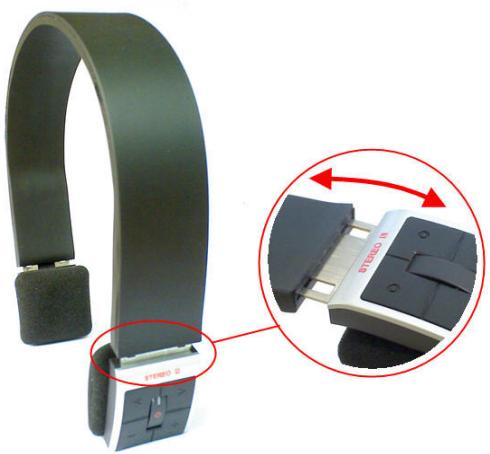
Headband can be adjusted on both sides for optimum comfort. To ensure correct stereo listening, please note the "L" indicating the left channel and the "R" indicating the right channel.
Telephone usage using the headset
| Function | Headset status mode | Command |
| Select language | Standby | Press and hold the multifunction key for 2 seconds until a tone sounds |
| Redial | Standby | Press the multifunction key twice in succession |
| Increase volume | Successful phone connection | Press the "+" key |
| Decrease volume | Successful phone connection | Press the "-" key |
| Answer call | Telephone ring | Briefly press the multifunction key |
| Refuse call | Telephone ring | Press and hold the multifunction key for 2 seconds |
| End call | Successful phone connection | Briefly press the multifunction key |
| Switch between headset and telephone | Successful phone connection | Press and hold the multifunction key for 2 seconds until a tone sounds |
| Mute microphone | Successful phone connection | Briefly press the multifunction key twice in succession |
| Activate microphone | Successful phone connection | Briefly press the multifunction key twice in succession |
Note: some mobile phones do not support all of the functions described above. Please consult the instructions for your mobile phone. A brief tone sounds when the maximum or minimum volume has been reached. Use "Switch between headset and telephone" to switch a call from the headset to the telephone.
Listening to music
If the connected device supports the A2DP profile, you can transmit music from the device to the Avalon BT.
| Function | Headset status mode | Command |
| Increase volume | Music playback | Press the "+" key |
| Decrease volume | Music playback | Press the "-" key |
| Pause* | Music playback | Briefly press the multifunction key |
| Playback* | Pause | Briefly press the multifunction key |
| Previous track* | Music playback | Press the "<" key |
| Next track* | Music playback | Press the "> " key |
*Only functional with supported AVRCP profile. Please refer to your Bluetooth device instructions.
Note: Some mobile phones may require you to switch music playback from integrated speakers to the headset (usually under phone settings). Please refer to your mobile phone instructions for detailed information. A brief tone sounds whenever the volume reaches maximum or minimum level.
Multifunction LED signals
Signal
Constant red light
Dim red light
Red and blue blinking
Blue blinking (twice per second)
Blue blinking (twice following each second)
Blue blinking (3 times every 2 seconds)
Blue blinking (once every 3 seconds)
Red blinking (once per second)
Headset status/mode
Headset is charging
Headset is charged
Pairing mode
Successful phone connection
Standby (no device connected)
Telephone is ringing
Standby (with device connection)
Low battery level
Maintenance and care of headset
The Avalon BT features premium quality and advanced technology. Please adhere to the following instructions to ensure maximum lifespan for your Avalon BT:
- The headset should not become damp or be stored in a damp place, as this could damage electronics
- Do not place the headset in direct sunlight or on hot surfaces, as this can damage the electronics and battery
- Do not attempt to open the headset, as it contains no replaceable parts
- Do not drop the headset or subject it to jolting
- Do not use chemicals to clean the headset
Frequently asked questions
F: What does a constantly blinking red LED mean?
A: Battery level is low. Please charge the headset.
F: Why does the red LED not illuminate, although the headset is fully charged?
A: The battery will release charge if the headset is not used for long periods; in this case, recharge the battery. After about 30 minutes the LED will illuminate.
F: How far is the range between headset and Bluetooth transmitter?
A: In accordance with the Bluetooth Class 2 Standard, range is up to 10 meters, depending on the Bluetooth device and external conditions.
F: Why can't my mobile phone find the headset?
A: The headset can only be found when it and the mobile phone are both in pairing mode. Ensure that the headset and mobile phone are within 1 meter of each other.
F: Why can't I hear sound from the headset speakers?
A: Make sure the headset power is on and connected with the Bluetooth transmitter.
A: Check the headset volume level and if applicable the Bluetooth transmitter volume level.
A: Make sure the headset and Bluetooth transmitter are in range of each other.
F: Why can't I start/pause or select tracks with the headset during playback?
A: Remote control function is supported only by devices with an AVRCP profile. Please refer to the instructions for your Bluetooth device for details.
Bedienungsanleitung
Spezifikationen
Bluetooth Version V2.1
Bluetooth Profile Headset, Hands Free (Freisprechen), A2DP, AVRCP
Reichweite max. 10m
A2DP Advanced Audio Distribution Profile (transmission audio)
Mode jumelage (Pairing)
Tensione in entrata DC + 5,0 V ±0,25VA
A2DP Advanced Audio Distribution Profile (transmissione audio)
HSP Headset Profile (Headset-functions)
HFP Hands-free Profile (hands free-functions)
Bluetoothversion V2.1
Bluetoothprofiler Headset, handsfree (högtalare), A2DP, AVRCP
Räckvidd max. 10 m
Bluetooth version V2.1
Bluetooth profil Headset, Hands Free (händfri), A2DP, AVRCP
Rækkevidde max.10m
Brugstid op til 9 timer
Standbytid optil240timer
Indgangsspaending DC + 5,0V ±0,25VA
Ladetid 1,5-2 timer
Vægt 120g
Indledning
Declaration of Conformity in according with the Radio and Telecommunications Terminal Equipment Act
(FTEG) and Directive 1999/5/EC (R&TTE Directive)
Vivanco GmbH
complies with the essential requirements of 3 and other relevant provisions of the FTEG (Article 3 of the R&TTE Directive), when used for the intended purpose.
Health and safety requirements pursuant to 3 (1) 1. (Artikel 3(1) a))
Protection requirements concerning electromagnetic compatibility 3 (1) 2, (Article 3(1) b))
Measures for the efficient use of radio frequency spectrum § 3 (2) (Article 3(2))
Adress: D-22926 Ahrensburg
Phone: +49 4102 231 0
Fax: +49 4102 231 160
Ahrensburg, 14.10.2008

Hotline Support
Design and specifications are subject to change without notice. Alle Markennamen sind eingetragene Warenzeichen der jeweiligen Inhaber. All brandnames are trademarks of their respective owners.