
ROOMGROOVE - Wireless Speaker KLIPSCH - Free user manual and instructions
Find the device manual for free ROOMGROOVE KLIPSCH in PDF.

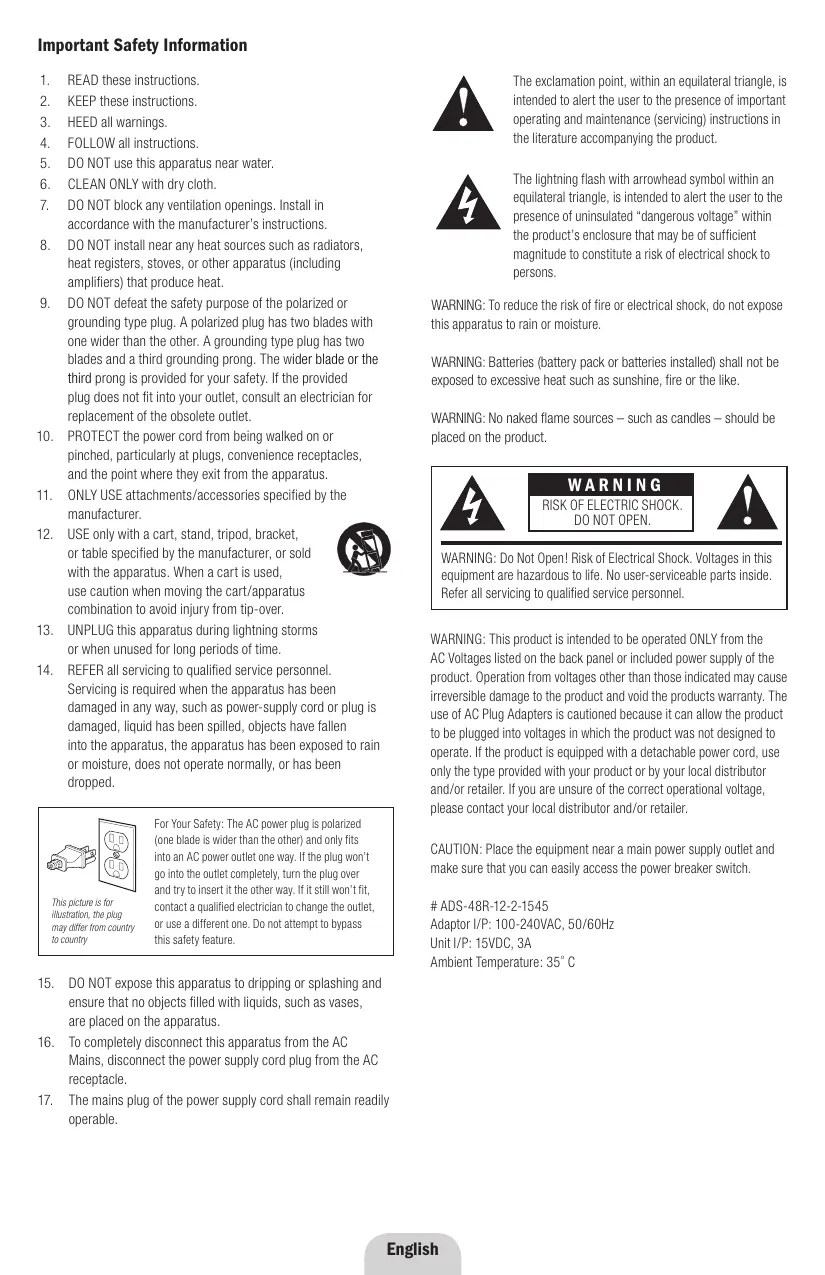


| Product Type | Wireless Speaker |
| Brand | KLIPSCH |
| Model | ROOMGROOVE |
| Wireless Technology | KlipschCast™ |
| Power Supply (Adapter) | 100-240 V~, 50/60 Hz |
| Power Supply (Unit) | 15 V =, 3 A |
| Audio Inputs | iPod docking station, 3.5 mm stereo auxiliary input |
| Speakers | Two long-throw woofers, two MicroTractrix™ horn tweeters |
| Remote Control | Wireless, CR2025 battery |
| iPod Docking Station | Retractable, compatible with Apple adapters |
| Charging Function | Charges iPod when connected |
| Cleaning | Dry cloth only |
| Safety | Instructions: do not expose to water, do not block vents, etc. |
| Maintenance and Repairability | Contains no user-serviceable parts; refer to a professional |
| Warranty (USA and Canada) | 1 year from date of purchase |
| Local Code | Adjustable from 0 to 9 to avoid interference |
| General Information | Brand: KLIPSCH, Model: ROOMGROOVE, Category: Wireless Speaker |
Frequently Asked Questions - ROOMGROOVE KLIPSCH
User questions about ROOMGROOVE KLIPSCH
0 question about this device. Answer the ones you know or ask your own.
Ask a new question about this device
Download the instructions for your Wireless Speaker in PDF format for free! Find your manual ROOMGROOVE - KLIPSCH and take your electronic device back in hand. On this page are published all the documents necessary for the use of your device. ROOMGROOVE by KLIPSCH.
USER MANUAL ROOMGROOVE KLIPSCH
- READ these instructions.
- KEEP these instructions.
- HEED all warnings.
- FOLLOW all instructions.
- DO NOT use this apparatus near water.
- CLEAN ONLY with dry cloth.
- DO NOT block any ventilation openings. Install in accordance with the manufacturer's instructions.
- DO NOT install near any heat sources such as radiators, heat registers, stoves, or other apparatus (including amplifiers) that produce heat.
- DO NOT defeat the safety purpose of the polarized or grounding type plug. A polarized plug has two blades with one wider than the other. A grounding type plug has two blades and a third grounding prong. The wider blade or the third prong is provided for your safety. If the provided plug does not fit into your outlet, consult an electrician for replacement of the obsolete outlet.
- PROTECT the power cord from being walked on or pinched, particularly at plugs, convenience receptacles, and the point where they exit from the apparatus.
- ONLY USE attachments/accessories specified by the manufacturer.
- USE only with a cart, stand, tripod, bracket, or table specified by the manufacturer, or sold with the apparatus. When a cart is used, use caution when moving the cart/apparatus combination to avoid injury from tip-over.
- UNPLUG this apparatus during lightning storms or when unused for long periods of time.
- REFER all servicing to qualified service personnel. Servicing is required when the apparatus has been damaged in any way, such as power-supply cord or plug is damaged, liquid has been spilled, objects have fallen into the apparatus, the apparatus has been exposed to rain or moisture, does not operate normally, or has been dropped.
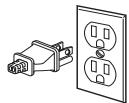
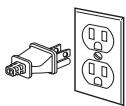
This picture is for illustration, the plug may differ from country to country
For Your Safety: The AC power plug is polarized (one blade is wider than the other) and only fits into an AC power outlet one way. If the plug won't go into the outlet completely, turn the plug over and try to insert it the other way. If it still won't fit, contact a qualified electrician to change the outlet, or use a different one. Do not attempt to bypass this safety feature.
- DO NOT expose this apparatus to dripping or splashing and ensure that no objects filled with liquids, such as vases, are placed on the apparatus.
- To completely disconnect this apparatus from the AC Mains, disconnect the power supply cord plug from the AC receptacle.
- The mains plug of the power supply cord shall remain readily operable.

The exclamation point, within an equilateral triangle, is intended to alert the user to the presence of important operating and maintenance (servicing) instructions in the literature accompanying the product.

The lightning flash with arrowhead symbol within an equilateral triangle, is intended to alert the user to the presence of uninsulated "dangerous voltage" within the product's enclosure that may be of sufficient magnitude to constitute a risk of electrical shock to persons.
WARNING: To reduce the risk of fire or electrical shock, do not expose this apparatus to rain or moisture.
WARNING: Batteries (battery pack or batteries installed) shall not be exposed to excessive heat such as sunshine, fire or the like.
WARNING: No naked flame sources - such as candles - should be placed on the product.

WARNING
RISK OF ELECTRIC SHOCK. DO NOT OPEN.

WARNING: Do Not Open! Risk of Electrical Shock. Voltages in this equipment are hazardous to life. No user-serviceable parts inside. Refer all servicing to qualified service personnel.
WARNING: This product is intended to be operated ONLY from the AC Voltages listed on the back panel or included power supply of the product. Operation from voltages other than those indicated may cause irreversible damage to the product and void the products warranty. The use of AC Plug Adapters is cautioned because it can allow the product to be plugged into voltages in which the product was not designed to operate. If the product is equipped with a detachable power cord, use only the type provided with your product or by your local distributor and/or retailer. If you are unsure of the correct operational voltage, please contact your local distributor and/or retailer.
CAUTION: Place the equipment near a main power supply outlet and make sure that you can easily access the power breaker switch.
ADS-48R-12-2-1545
Adaptor I/P: 100-240VAC, 50/60Hz
Unit I/P: 15VDC, 3A
Ambient Temperature: 35^
Thank You
Congratulations on your purchase of the Klipsch RoomGroove music center. The RoomGroove is a wireless transceiver utilizing Wireless KlipschCast™ Technology to transmit and receive CD-quality audio signals to and from other KlipschCast components. The RoomGroove features an iPod® dock and auxiliary input for connecting your favorite components and enjoying them locally or transmitting them throughout your home.
The RoomGroove is a true two-way, stereo sound system incorporating two long-throw woofers and two MicroTractrix™ Horn-loaded tweeters in a ported enclosure. This system provides the accuracy, detail and output that will bring your music to life as only Klipsch can.
Unpack the Box
Unpack the entire contents of the shipping box and make sure you have the following items.
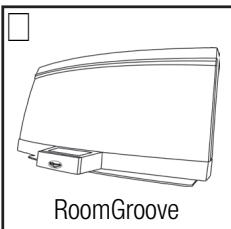
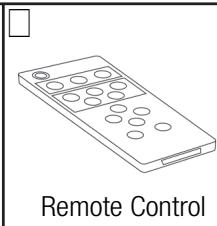
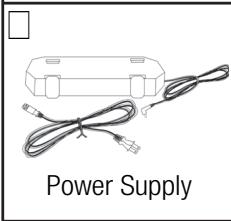
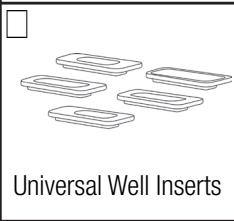
Place the RoomGroove on a sturdy surface. Plug the power cord into the rear of the RoomGroove and then into a standard wall outlet. The RoomGroove is now ready to listen to any source being transmitted with wireless KlipschCast Technology.
Docking and Listening to an iPod
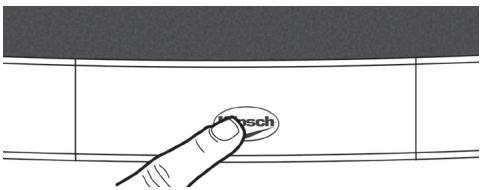
The RoomGroove is intelligently designed to easily accommodate all iPods. Touching the Klipsch logo on the front of the RoomGroove will reveal the retractable iPod dock. The RoomGroove must be powered on for the drawer to open and close. When the dock is extended, touching the dock again will cause it to retract. The dock will not move when an iPod is docked. The dock will automatically retract when no iPod is present and the RoomGroove is in standby mode (the power LED will be red).
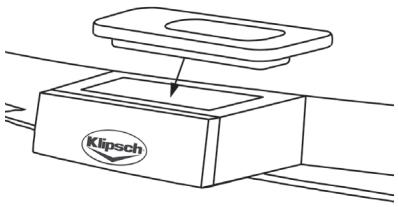
The RoomGroove is designed to work with Apple universal well inserts. Several inserts are supplied with your RoomGroove system. If your iPod came with an insert, it can also be used in the RoomGroove. To configure the RoomGroove for your specific iPod, select the appropriate well insert and place it in the universal well as shown in the diagram. Now you are ready to dock your iPod. While your iPod is docked, its battery is charging (until it is fully charged).
To listen to the docked iPod, press the "Listen" button on the RoomGroove or the remote until the "Listen" light becomes blue and you hear the iPod. The iPod can be directly accessed by pressing the "I Pod" button on the RoomGroove's remote control.
Connecting an Auxiliary Source
The RoomGroove offers a 3.5mm stereo auxiliary input on the rear of the device. To connect an auxiliary device, simply plug the audio output of the device into the "Aux Input" on the rear of the RoomGroove. You must use a 3.5mm stereo cable.
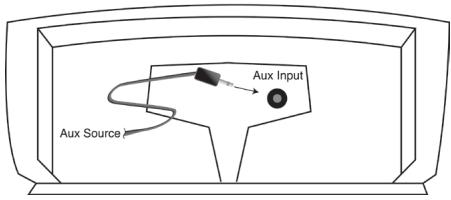
To listen to the auxiliary source, press the "Listen" button on the RoomGroove or the remote until the "Listen" light becomes blue and you hear the auxiliary device. This can also be done by pressing the "Aux" button on the RoomGroove's remote control.
Note: The "Listen" light will be blue when listening to either a local iPod or a device connected to the local auxiliary input. If both inputs are in use, the "Listen" button will go from the Aux to the iPod in that order.
Transmitting Audio from the RoomGroove
The RoomGroove is designed to allow you to transmit the iPod or the auxiliary source so that it can be received and played by other KlipschCast components. To transmit from the RoomGroove, simply select the source you wish to transmit by pressing the "Listen" button, or the desired source on the remote (iPod or Aux), and then press the "Transmit" button. The selected source is now being transmitted throughout your home and is available to other KlipschCast-enabled products.
Note: If a RoomGroove is transmitting and a second RoomGroove is told to transmit, the second RoomGroove will bump the first RoomGroove and occupy that wireless channel. If you wish to configure your wireless multi-room system to allow two RoomGrooves to simultaneously transmit, see the "Transmitting Audio from Two RoomGrooves" section of this manual.
Listening to Other KlipschCast Devices with Your RoomGroove
The RoomGroove is designed to allow you to listen to sources connected to, or integrated into, other KlipschCast components such as another RoomGroove or the CS-700 DVD Entertainment System.
To listen to a source being transmitted by another KlipschCast device, simply press the "Listen" button to access the transmitted source. The "Listen" light becomes red (or purple for a second wireless source) when a wireless source is received and played. A flashing color indicates no source is available on that channel.
Sources and Colors of the "Listen" Light
Blue always indicates a local source. Red and purple indicate wireless channels. If the color is flashing, the source or wireless channel is not available.
For systems transmitting from a CS-700 system and RoomGroove
| Local source (iPod or Aux) = blue |
| Transmitted Cinema System source = red |
| Transmitted RoomGroove source = purple |
For systems transmitting from two RoomGrooves
| Local source (iPod or Aux) = blue |
| 1st Transmitted RoomGroove source = red |
| 2nd Transmitted RoomGroove source = purple |
Transmitting Audio from the CS-700
In a multi-room system incorporating a CS-700 cinema system (sold separately), the RoomGroove remote can be used to directly select sources from the CS-700 once the CS-700 has been selected by the RoomGroove's "Listen" button. The CS-700 will default to transmit its local source (the source selected for listening/viewing on the CS-700 system) until another source is selected. See the "Remote Control" section of this manual for details on the remote's functionality.
Transmitting Audio from Two RoomGrooves
In systems not incorporating a CS-700 system (or if the cinema system in not intended to be part of the wireless multi-room system), two RoomGrooves can transmit simultaneously. To enable this feature, all components of the wireless multi-room system must be assigned to a home code from 5 to 9. Selecting a home code from 5 to 9 will allow a second RoomGroove to occupy the wireless channel which was previously assigned to the CS-700. (See "Setting the Home Code" for more detailed information.)
If two RoomGrooves are transmitting and you wish to transmit from a third and control which wireless channel will be used for the new transmission, you must first select the broadcast you wish to terminate by pressing the "Listen" button until that source is heard. Then press transmit and the new source will occupy that wireless channel and stop the transmission of the other source. You should now hear the new source in all the locations in which the previous source was playing. The new source should now be available to all active listeners.
Note: All devices in the wireless multi-room system must be set to the same home code in order for transmissions to take place.
Setting the Home Code
The home code dial on the rear of your RoomGroove allows you to select a code specific to all of your KlipschCast components to avoid interference from neighboring systems. The home code numbers range from 0 to 9 with 0 set as the default. All of your KlipschCast components will initially be set to 0 and allow one wireless channel to broadcast audio from a cinema system and the second wireless channel to broadcast wireless audio from a RoomGroove. The home code number should only be changed for one of two reasons:
1) There is interference from a neighboring system – If a neighboring system in interfering with your wireless system, simply change all KlipschCast components to another home code. KlipschCast components will only transmit and receive audio from components on the same home code. Home codes 0 through 4 can be used for systems transmitting audio from a cinema system and a RoomGroove (home codes 5 through 9 are reserved for systems transmitting from two separate RoomGrooves and no cinema system).
2) You wish to transmit audio from two RoomGrooves (not a cinema system) - If you wish to transmit audio from two separate RoomGrooves and not a cinema system, simply choose a home code from 5 to 9 and change all KlipschCast components to that home code. KlipschCast components will only transmit and receive audio from components on the same home code.
Once the home code has been changed, you must disconnect and reconnect the power cord from the wall outlet for the change to be made. This will change the home code and allow the component to talk to other KlipschCast components set to the same home code.
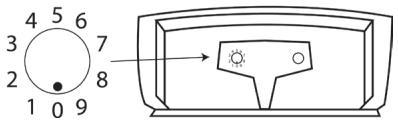
Note: All devices in the wireless multi-room system must be set to the same home code in order for transmissions to take place.
Remote Control
The wireless remote control allows interaction with the RoomGroove and iPod as well as other transmitting devices such as other RoomGrooves and Klipsch cinema systems such as the CS-700.
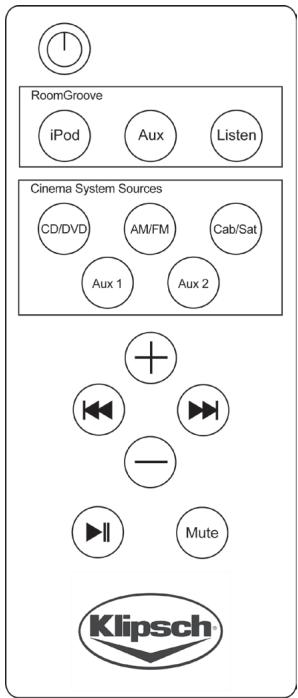
Note: This remote must be pointed at the RoomGroove for proper interaction.
Buttons
Power Press to turn the RoomGroove "On". Press again to put the RoomGroove into "Standby" mode.
RoomGroove
iPod Selects the iPod docked in the local RoomGroove.
Aux Selects the audio device connected to the local RoomGroove (the audio device must be playing to be heard).
Listen Toggles through available sources both local and wireless.
Cinema System Sources
CD/DVD Accesses the CD/DVD drive of the cinema system connected to the KlipschCast network.
AM/FM Accesses the AM/FM tuner of the cinema system connected to the KlipschCast network.
Cab/Sat Accesses audio from the device connected to the cinema system's Cab/Sat input connected to the KlipschCast network. The device must be delivering audio to the cinema system to be heard on the RoomGroove.
Aux 1 Accesses audio from the device connected to the cinema system's Aux 1 input connected to the KlipschCast network. The device must be delivering audio to the cinema system to be heard on the RoomGroove.
Aux 2 Accesses audio from the device connected to the cinema system's Aux 2 input connected to the KlipschCast network. The device must be delivering audio to the cinema system to be heard on the RoomGroove.
Track Selection ( and ) These buttons enable control of several different sources:
- When controlling the local iPod, press and to move to the previous or next track; press and hold to reverse or fast-forward through the current track.
- When controlling a transmitted iPod docked in another RoomGroove, press and to move to the previous or next track.
- When controlling the CD/DVD cinema system source, press and to move to the previous or next track/chapter.
- When controlling the AM/FM cinema system source, press and to move to the previous or next preset station (if no stations have been preset, these buttons will not function).
- When controlling the Cab/Sat cinema system source, press and to move to the previous or next channel.
- These buttons are non-functional when listening to the transmitted Aux 1 or Aux 2 sources of a cinema system.
Play/Pause

Press once to "Pause" play; press again to resume play.
Volume

Press + or - to increase or decrease the RoomGroove volume level (local RoomGroove only).
Mute
Decreases the volume of the local RoomGroove to a zero level (no sound).
Changing the Remote Control Battery
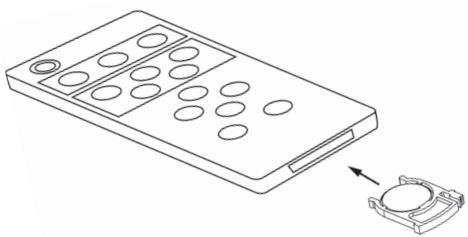
The remote control battery will need to be changed when it stops working or when its performance is noticeably reduced. To remove the battery, simply pull the battery housing tab from the remote control (as shown in the diagram) and remove the battery. Replace only with a 3-volt CR2025 lithium battery.
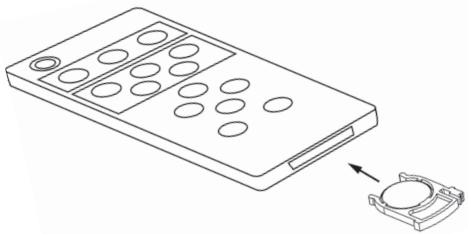
Note: Lighting and other room conditions can reduce remote performance.
Cable Management System and Mounting the Power Supply
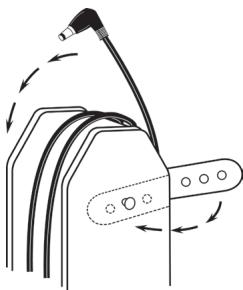
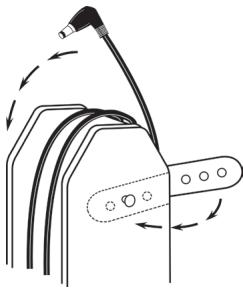
The RoomGroove's power supply has an integrated cable management system. Excess cable length can be wrapped around the power supply and secured with the rubber straps as shown in the diagram.
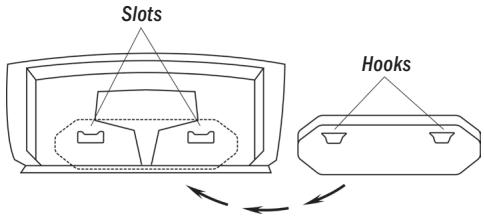
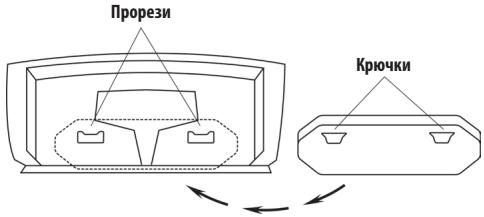
The RoomGroove's power supply can be conveniently mounted on the rear of the RoomGroove. To mount the power supply simply position the hooks on the side of the power supply into the slots on the rear of the RoomGroove as show in the diagram.
We Klipsch Group Incorporated
Of 3502 Woodview Trace, Suite 200 Indianapolis, IN 46268 USA
Declare that
Equipment: iPOD Audio System with Wireless Transmitter / Receiver
Model Name: Klipsch RoomGroove
In accordance with the following Directives:
1999/5/EC R&TTE Directive: Radio Equipment and Telecommunications Terminal Equipmer
2004/108/EC The Electromagnetic Compatibility Directive and its amending Directives
has been designed and manufactured to comply with the following specifications:
EN300440-1 V1.3.1 EN300440-2 V1.1.2
EN301489-1 V1.5.1 EN301489-3 V1.4.1
EN50371
I hereby declare that the equipment named above has been designed to comply with the relative sections of the above reference specifications. The unit complies with all essential requirements of the Directives.
| Signature: | Clint Bloor |
| Name: | Clinton Bradley |
| Position: | Certification Engineer |
| Klipsch Audio Technologies 3502 Woodview Trace, Suite 200 | |
| Done At: | Indianapolis, IN 46268 USA |
| On date: | 12/12/07 |
KLIPSCH GROUP INCORPORATED
3502 WOODVIEWTRACE
INDIANAPOLIS, IN 46268 USA
KLIPSCH EUROPEBV
INDUSTRIESTRAAT 1
7041 GD 's-HEERENBERG, NETHERLANDS

Warranty - U.S. and Canada
Klipsch warrants to the original retail purchaser that this product is to be free from defective materials and workmanship for a period of one (1) year, from the date of purchase, if it is properly used and maintained. If this product proves defective in either material or workmanship, Klipsch, at its option, will (a) repair the product, or (b) replace the product, at no charge for parts or labor. If the product model is no longer available and cannot be repaired effectively or replaced with an identical model, Klipsch at its sole option may replace the unit with a current model of equal or greater value. In some cases, modification to the mounting surface may be required where a new model is substituted. Klipsch assumes no responsibility or liability for such modification. To obtain a repair or replacement under the terms of this warranty, please contact our customer service group at 1-800-KLIPSCH. You will be required to submit a copy of the original receipt via fax or email. The receipt must reflect that you are the original purchaser, the product was bought from an authorized Klipsch retailer, and the product is still within warranty. You will be issued a return authorization number (RA#) and asked to ship the defective product, together with proof of purchase and RA#, prepaid insured to the address set forth Klipsch 137 Heampstead #278 Hope, AR 71801. Freight collect shipments will be refused. Risk of loss or damage in transit is to be borne by the purchaser. Once Klipsch receives the defective product, a repair or replacement order will be initiated.
Limitations:
- This limited warranty does not cover failure of the product resulting from improper installation, misuse, abuse, accident, neglect, mishandling, or wear from ordinary use or environmental deterioration.
- This limited warranty does not cover cosmetic damage, including paint damage, or consequential damage to other components or premises which may result for any reason from the failure of the product.
- This limited warranty is null and void for products not used in accordance with Klipsch's instructions.
- This limited warranty is null and void for products with altered or missing serial numbers and for products not purchased from an authorized dealer.
This limited warranty terminates if you sell or otherwise transfer this product to another party.
THIS WARRANTY GIVES YOU SPECIFIC LEGAL RIGHTS, AND YOU MAY ALSO HAVE OTHER RIGHTS WHICH VARY FROM STATE TO STATE, JURISDICTION TO JURISDICTION OR COUNTRY TO COUNTRY. KLIPSCH'S RESPONSIBILITY FOR MALFUNCTIONS AND DEFECTS IN HARDWARE IS LIMITED TO REPLACEMENT OR REPAIR AS SET FORTH IN THIS WARRANTY STATEMENT. FOR CANADIAN CUSTOMERS, KLIPSCH DISCLAIMS ALL OTHER WARRANTY AND CONDITIONS, EXPRESS OR IMPLIED, STATUTORY OR OTHERWISE, FOR THE PRODUCT. FOR U.S. CUSTOMERS, ALL EXPRESS AND IMPLIED WARRANTYES FOR THE PRODUCT, INCLUDING BUT NOT LIMITED TO ANY IMPLIED WARRANTY OF MERCHANTABILITY AND FITNESS FOR A PARTICULAR PURPOSE ARE LIMITED IN TIME TO THE TERM OF THIS WARRANTY. SOME STATES, JURISDICTIONS OR COUNTRIES DO NOT ALLOW THE EXCLUSION OF CERTAIN IMPLIED WARRANTYES OR CONDITIONS, OR LIMITATIONS ON HOW LONG AN IMPLIED WARRANTY OR CONDITIONS LASTS, SO THIS LIMITATION MAY NOT APPLY TO YOU. KLIPSCH DOES NOT ACCEPT LIABILITY FOR SPECIAL, INDIRECT, CONSEQUENTIAL OR INCIDENTAL DAMAGES, INCLUDING WITHOUT LIMITATION, ANY LIABILITY FOR THIRD PARTY CLAIMS AGAINST YOU FOR DAMAGES OR FOR PRODUCTS NOT BEING AVAILABLE FOR USE. THE MAXIMUM LIABILITY FOR WHICH KLIPSCH MAY BE RESPONSIBLE WILL BE NO MORE THAN THE AMOUNT YOU PAID FOR THE PRODUCT THAT IS THE SUBJECT OF THE CLAIM. SOME STATES, JURISDICTIONS OR COUNTRIES DO NOT ALLOW THE EXCLUSION OR LIMITATION OF SPECIAL, INDIRECT, INCIDENTAL OR CONSEQUENTIAL DAMAGES, SO THE ABOVE LIMITATION OR EXCLUSION MAY NOT APPLY TO YOU.
Warranty Outside the United States and Canada
The Warranty on this product if it is sold to a consumer outside of the United States and Canada shall comply with applicable law. To obtain any applicable warranty service, please contact the dealer from which you purchased this product, or the distributor that supplied this product.
FCC Information
This device complies with Part 15 of the FCC Rules. Operation is subject to the following two: (1) This device may not cause harmful interference, and (2) this device must accept any interference received, including interference that may cause undesired operation.
This equipment has been tested and found to comply with the limits for a Class B digital device, pursuant to Part 15 of the FCC Rules. These limits are designed to provide reasonable protection against harmful interference in a residential installation. This equipment generates, uses and radiates radio frequency energy and, if not installed and used in accordance with the instruction, may cause harmful interference to radio communications. However, there is no guarantee that interference will not occur in a particular installation.
In accordance with FCC requirements, changes or modifications not expressly approved by Klipsch could void the user's authority to operate this product.
This device generates and uses radio frequency (RF) energy, and if not installed and used properly, this equipment may cause interference to radio and television reception.
If this equipment does cause interference to radio or television reception (which you can determine by unplugging the unit), try to correct the interference by one or more of the following measures:
- Re-orient the receiving antenna (that is, the antenna for the radio or television that is "receiving" the interference).
- Move the unit away from the equipment that is receiving interference.
- Plug the unit into a different wall outlet so that the unit and the equipment receiving interference are on different branch circuits.
If these measures do not eliminate the interference, please consult your dealer or an experienced radio/television technician for additional suggestions.
Also, the Federal Communications Commission has prepared a helpful booklet, "How To Identify and Resolve Radio TV Interference Problems." This booklet is available from the U.S. Government Printing Office, Washington, DC 20402. Please specify stock number 004-000-00345-4 when ordering copies.
This product complies with DHHS Rules 21 CFR Subchapter J. Applicable at the date of manufacture.
This Class B digital apparatus complies with Canadian ICES-003. Cet appeareil numeroque de la classe B est conforme à la norme NMB-003 du Canada.
FCC Declaration Of Conformity
| Trade Name: | Klipsch Audio Technologies |
| Product Name: | Audio Speaker System |
| Model Number: | RoomGroove |
| Responsible Party | |
| Manufacturer: | Klipsch Audio Technologies |
| Address: | 3502 Woodview Trace, Suite 200 Indianapolis, IN 46268 |
| Telephone: | 317-860-8100 |
| Date: | 1/15/2006 |
These devices were tested and found to comply with Part 15 of the FCC Rules. Operation is subject to the following conditions: The devices may not cause harmful interference, and the devices must accept any interference received, including interference that may cause undesired operation.
KILIPSCH AUDIO TECHNOLOGIES
RoomGroove

Tested To Comply
With FCC Standards
FOR HOME OR OFFICE USE
Cinema System Sources
Tested To Comply With FCC Standards
FOR HOME OR OFFICE USE
Tested To Comply With FCC Standards
FOR HOME OR OFFICE USE
Tested To Comply With FCC Standards
FOR HOME OR OFFICE USE
重要安全說明
Tested To Comply With FCC Standards
FOR HOME OR OFFICE USE
Baxhna HnΦopmaaia n0 6e3oNaChOCTn npn o6paueHH cYctpoiCTbOM.
- PPOHTMTE 3TN INHCTpykUIM.
- COXPAHHTE 3Tm HNCTpykUIM
- 05PATITE BHIMAHHE Na BCE npedoctepekenia.
4.COBJIIOJADAITEBCEHNCTPKUIM. - HE INCIOJIb3yIte 3Ty CNTemy PdOm C BDOJ.
- YNCTKY UCTPOYCTBA BbInonHnTe TOnbKO cyxO TpnoouKo.
- HE BLOKIKIYPUYE KAKOE-Ni60 M3E BENTINUMIOHOBHbX OTBEPCTH. YcTahAaBnBaIte Ye TPOPTIETBO CooTERTBNI C HINTCPUKNAMN PNOV3BDOITENIA.
- HE YCTAHABIVBAIYE UcTPOJCTBO B0NJ3N IIO6bIX MTOCHNKOB TenNA, TAKINKAK radnatoBpI, oObrpeBaTeiN, neuHmI npDpyne UcTPOJCTBA (BKIOUaYacynnteI), n3IyauoJIue Nte Teno.
- B ceyx 6ezonacnctn HE IPEHESPFTAIE BYIKO NOIpaNIOBaHORO mnn 3a3emennHO Tnla. NpIarH aBnka IMeET dBA KOHTAKTa, Odn H3 KOTOBb uInepe DpyrTO. BnKHa 3a3emennHO Tnla IMeET dBA KOHTAKTa nTpreT 3a3emnlooan 1tBuPK. UIpOKm KOnKT AIN TpreT 1tBuPK npdycmptbIy for oEcnpeuHbaueh 6eONACnCTHc. EcnnpinraAemaB BnKa He noDxOHT K Bauei pozTe, obpatntc b KeNTPKUc c eIbIy 3AmBb PO3eTKY UCTapeBUErTO.
- 0ECEIeHTE3aUHTyHbNy pIaTnAHy OTHaTyNAAH HAre IINI 3aAeIMENH, BOCOeHHOCTN BbNInBnIOK, 3JIeKtPHcckXmP03eTK INI M B MEcTe, TDE uHpy BbXoDNTu 3YcTOpTBa.
- IcTb3yTE ToIbKO Te BCnmoTaTe bHne npCnOcBHeNn mnn o60pyoBaHnE, KOTpepeKekOMeHDoBaHNpOn3BDoNTeHem.
- ICNIOJIb3yIeToBko C TeNeKKO, KOHcOJIbIO, TpeHOrO, KpeNekHO cKo6OB IINI TOONOM, KOTOpBE PEKOMEhOBOHbI NPOIm3BDQITENEM INI INPODAKOTCA BMECTC C UcTPOIcTBOM. IPII ICNIOJIb3OBAHIMN TENEKKM, 6yIbeIeOCTOPOKbI, IIpi NEPEMeUeHN MycTPOIcTBa HAI TENEKKE IN CnDEITE 3a TEM, YTObIb OHa HE ONPOKMHJpAcB, BO M36EKAHne CepbE3HOH TpaBMbI.
- OTKJIIOUHTYE CTPOICTBO OT cETN BO BVPMA rpo3b IIN eCNI OH He MCNOB3yETCA T BTEHNE IINITENbHO BPEMEHN.
14.Длгятунческого obслужимань OБРАЛСИЕТСК K KBALINФИЦрован_HOMO obcлужимiocему nepсонancy。Obслужимане Небобдимо рпи пюбом nobpeхдении устрий CBа, наразимер, рпь NOBEPEXДENHи StHyр рпигдэннии ви ВИКМ, поадани BИУтБу cTPOCTBAЖIDKOCTN ИИ NGTOCTOHINx npedmetOB, рпь EKCSIIpyaTuIMu YCTOPTCBa NOДdoJOKdEMИИВ yCNOBIAx NBbIshENH BIAJIKHOCHTI,ВTom CIVUeA,ecnIy cTPOCTBO He pa60taet HopmaIbHo IINI erO yPONIHIN.
TSTYPOHYCKCNYWKJI
JIINHNOCTPACU,BNIKIK
MOYGHTb6MbPAHMBH
3BABNOMCIFOTCPAHb.
B vBnIX o6euehNBAuB 63018 63018 TOKIO K C UUA N KaHae: BmKia PNTAHAR OT cTei nepeMeHHOrO ToKA
bIaHTcE NpOHrN O (OgIN H3 e KOHKTABO WUPE dpyrTO)
T NAKOM bPDA30A OH NOOJTDN K PO3EKTE KTOKBO D OHMON
NOPOENK. E.CJIb BmKIA NPOHOCTBO K 3AOXH B PO3EKY,
PONEHITE e N pONIATBteC BBECTN e B DYPOTN NOPOENK.
ECLN OHa no-POpEHKYN H3e XAOHTB a PO3EKY, OBPATRtE K
K BANlHΦMnPoBaHOMy 3NeKTPKHy C cIeNo 3MaEHy PO3EKY
NNI nONPOByTE ApyrQy PO3EKY. He npEpeoeraiTe 3tof Mepoi
63018ACNHOCTHO.
15.3AUNIaIIATEYCTPOITCBTOOTPONHIOBENHJXIKOCTMNIIIN6bI3NHECTABBeHa YCTPOITCBTOHNAKKEMEEMOKTNCBOIDNOHAPIMMEp,BA3bl.
16.ДлгоюногуOTKIOJUHcENHЯyCTPOMCTBAOTcETN,OTCOeIMHITe BMLKYuHypa nITAHNYO TpO3ETKN.
17. BvJka shHpya nIHTAHmJa DOnJIHxBa CERdA CIERKcTbIO BByHMAtCbA I3 po3eKIM.

Bocklntatehbln3hak B pabHOCTOPHHeM TpeYolnbHne
yka3an DarI TO, 0tObbl pJeDpyeDttb NIOb3obaten O
NaHmMn Baxhblx IHcTpykUINo KcNpIyatauIM INTexHHueCKOMY
ObcNyKKBAHnIO (peMOHT) BY kyoBOdCTBe, PnIPOkeHNOM K
ycTPOCTBY.

PekHM MoJUaHnA ("Mute")
YMeHbIaET yPObEh 3ByKa IokaIbHorO yCTpoIcTBa RoomGroove do HynEboro yPObHra (noHIOHe OTCyTCTBne 3ByKa).
3aMeHa 6atapen nynbTa duCTahCuHnHO nppaBneHna
Ecni npyIb nepctaet a6o3obTb mnn er0 yhKnUmoHOBaHme 3aMeTHO yxdyIaTeTc, to cIeDJIy 3aBnE3bTaBaeu (KAK YkA33HO hO bncYHc) HNbEHyNe HNbEHyE BAtaeu TnA BApae 10JHka 6b3bTaMHeHaToBbKaHbHnA 3-Bo7bByIO NmTEBHy BoaTea TnA CR2025.
IpumueaHue: OcseueHue u dpyeu KOMhamhble ycnobua Mocym ydyduumb paomby nynbma ducmanuohnozo ynpaanenhu
Cnctema 3aKpenneHn shypa n aadanTepa nntaan
AadTepn Tpinyan HcOyOBTaGroMoVmeET BCTPOeHNyIO CTsEMy 3aKpENNEH IUnhya. IVIImWek UChpyo Moket 6bTy bO6MOtAn BOKpyt aDTeTepa I 3aKpENNeI eP3HOBIMn PemEiKaMAM, KAK YK3AAHO HA pCHyHE.
Aadantep pintanahy yctpoiTbra RoomGroove moKet 6bTy bDooHb 3aKePnIeN ha ero 3dAnne hApEn.Ди a3kpanenHn adantepa nTtAnHry cIeJyET noMecTeB tyOchN, paONIOKENHbIe no 6bokAm dAapTePA, B npopezHa naDHe n PteOHy TcpoTbCTBA, KaK nOka3AHo Ha pCNYHe.
TapaNTra 3a npedeJama CWA J KaHabbl
IapaHTnHa 3to 06obpyOboAHme,ecnHIO npdoHAn 0ntpe6mTeNo 3a npedeamn CUSA
mN KAnaDbI,doJXna HdyOBnetBTOpTaBc 0oBETCTByUOeMy 2AKOHy. IJa nOnyeHHA
COOTBCTBYIOE rapaTmHnHO 06bCynKBAMHn, noKanlyIcto 6oPAtiTeCb K dInnepy,
y KOTOPORo BnPiNooBPe 3to 06obpyOboAHme IN K DnCTpnBbToTy, KOtporb erO
BAM NocTABIN.
HΦopmaunFCC(ΦepepaBhoH KOmncn CBA3n C7JA)
Данhoe оobopyobahnne coobbetctbvy tpe6obahm npa3dena 15 pabin FCC. KcnlnyataunoiDokhka yDooBETOBpOBy CneDyUOum DBM yCNOBIMM: (1)Данhoe ycTpoIbTO bOJHKnBbYb3BaTbBpeDhNb NOMe, n (2)Данhoe ycTpoIbTO dOJIHKnBpHmMbIOkyoNOMexy, BkJIOuaNOMexy, KOtporA MOKet Bb3BaTb HNeJzEaTeBbHbN peKjMn pa60bI.
Dannhoe oobpyoabHne 6bIoo NcBtHaO, Bpe3yIbTaTe cero 6bIoo BbIaBHeO,TO OHO COOTBETCTBYET ORpAHUeHHIM UcHPOBxuYCTPOiCTK NAcca B,BOOTBETCTBMn CTreboBAnHmam pa3dena 15 PpaBN FCC.3Tu ORpAHUeHHIN PA3paObTahbl Dn OeCNEeHHN COOTBETCTBuOcIe 3AaHTbMb OT BPeDhMb NOMEx B KJbMb NOMEuHEMIX.
Dannhoe oobpyoabHne co3daet, McNoB3yEt n3Iyuaet pAdIOuACTOTHy0 3EnerIIO IN B CUYae, eCN IOO He YCTaOHBeHNO H Ne IcNoB3yeTc B COOTBETCBNI C IHCTPyKlJIIMM, 3TO MOKet pInBecTI K BPeDhMb NOMexAm dai pAOICbZnn. BMecte CTem, Tet r aPANTIN TOM TY, 3TO NOMEx HE B03NkHyt pRr ONpeDNeHHO yCTaOHOBe OOBpyoabHn.
BcoTBECTBmC TpeobAHnma FFC,IM3MeHEnHIMM MoDfNkauuH, KOTOpbEe B AHBNOΦopme H6bln CAnKUHIOHPoBaHbIΦpMOn Klipsch, MOrYT AnHyInpoBaT npaO nONbOaTeT EKcPiYAtIpoBaTa DAnHoe OobopydOanHe.
Данhoeу cypoTbTO co3aTeI nIcN0JIb3yET paNDIOUCTOHyIeHrMIO,и ecNIOHO HE tAOBNOHEIo He KcNpIyATnpyetcaHdNeKaeMaIMOpBa3OmO, OMO MOKET Bb3BaTb NOMEXPiP1PnEmeIpaNDIOYeTEBIIIMOHxCITNAHO.
ECNIA 3TOYCTOBBO BBybBaET NOMEXINPnIPnPEMe PAADMOI INI TENEB3MOHNbIX CmHANOB (E YCM BBI MOKETeY6EJIbCt,OTKNIIOUYB YCTOPICBTO OTcEM),NONPOBYTe NOrACNTB NOMEXIN C NOMOJbIO PNHOJTHNO ODIHOI NIEHECKONIKX KYA3AHbNX HMIKeMep:
- ПовернITE риминимаюу anteHHY (t.e., anteHHY padmIo JINI TeneBnOpa, KOTOPA"prinHMaet"nomexu).
IpeMeCTIte UcTPOCTBO NODaJIbSe OT oBOpyIOBaHnA, KOTOpoe npHHMaTe NTOMEXN.
IpondcdoenHHTyOCTBTOKdpyTOrPO3eTke, cIeIbIO Tc0b6YcTPOI CTBO IN pIINIMAMUoHoe Nemome ObopyDobHeN HaxOJIMnCb Ha pa3hBix paacPnEDITmEBnBX cetHX.
ECNJI TNI MEPIH NcYCTPRAHOT NOMEXH, NOKJANJCTa PPOKOHCYbTnPYBTECb C BAAMH DIIJIPEOP MINCI ONBHTbIM paIIO/TeEBINHOHNbIM TeHXIKOM O DOJONIHNTeBbIXpIeDIOKENHX.
Kpome 3Toro, FepeapbnaHraomKomccnCBAzHNI CIIa COCTabuna nnon3hyoBpoKopy Kac BlyBHTb N pasepuHNTpbno6mEpaNDIOuN TneBmIIOHNHXN NOMX.3Ta 6bpOJOpA mIEeTcB H aHINuH B PpABtBeNTcbENHO TnInorpaFIM CIIa Noaepcy: U.S.Government Printing Office, Washington, DC 20402. Pnp oPOMMeHHn 3akaz3 npocMM Bac yKa3a3b INHEBtAPbHb Homep 004-000-00345-4.
Данhoe obopydOBaHnE haoXoITcR B COOTBETCTBN C IOpDa3ENOM J'CbOda ФepepAnhBxH nobMAtnBnBxA kTOB》,IpaBmIO 21 MInHCTePCTBA 3dpabOxoPahENHn u coaIaNbHorO obecneHEnCHCUA (DHHS Rules 21 CF SubChapter J),deIcbTBeNtBHO NaDaty IwTOTOBHeHN ObopydOBaHnE
Данhoe unфоробе устюг STBO Klacca B COOTBETCTBYET Trpe6obAHm KMHaDcKoro CTanDarpa ICE-003.
Tested To Comply With FCC Standards
FOR HOME OR OFFICE USE
Tested To Comply With FCC Standards
FOR HOME OR OFFICE USE
Kilder for kinasystem
For over 60 years, we've made speakers for people who are as passionate about great sound as we are. That's why every Klipsch speaker is horn-loaded to create a remarkably accurate listening experience for your music and movies. From our smallest satellites to our acclaimed professional theater installations, our speakers deliver sound that's so lifelike, you have to feel it to believe it.
- WARNING
- Thank You
- Unpack the Box
- Docking and Listening to an iPod
- Connecting an Auxiliary Source
- Transmitting Audio from the RoomGroove
- Listening to Other KlipschCast Devices with Your RoomGroove
- Sources and Colors of the "Listen" Light
- For systems transmitting from a CS-700 system and RoomGroove
- For systems transmitting from two RoomGrooves
- Transmitting Audio from the CS-700
- Transmitting Audio from Two RoomGrooves
- Setting the Home Code
- Remote Control
- Buttons
- RoomGroove
- Cinema System Sources
- Play/Pause
- Volume
- Mute
- Changing the Remote Control Battery
- Cable Management System and Mounting the Power Supply
- Warranty - U.S. and Canada
- Limitations:
- Warranty Outside the United States and Canada
- FCC Information
- FCC Declaration Of Conformity
- 重要安全說明
- Baxhna HnΦopmaaia n0 6e3oNaChOCTn npn o6paueHH cYctpoiCTbOM.
- 3aMeHa 6atapen nynbTa duCTahCuHnHO nppaBneHna
- Cnctema 3aKpenneHn shypa n aadanTepa nntaan
- TapaNTra 3a npedeJama CWA J KaHabbl
- HΦopmaunFCC(ΦepepaBhoH KOmncn CBA3n C7JA)
- Kilder for kinasystem
Brand : KLIPSCH
Model : ROOMGROOVE
Category : Wireless Speaker