
COURIER 2.0 - Laptop bags DICOTA - Free user manual and instructions
Find the device manual for free COURIER 2.0 DICOTA in PDF.


| Product type | 7-in-1 card reader with 3-port USB hub |
| Brand | DICOTA |
| Model | COURIER 2.0 |
| Interfaces | USB 2.0 (compatible USB 1.1) |
| Supported cards | CompactFlash Type I/II, IBM Microdrive, Secure Digital, MultiMediaCard, Memory Stick, Memory Stick PRO |
| Number of slots | 4 |
| USB hub | 3 USB downstream ports |
| Transfer rate (USB 2.0) | Up to 480 Mbit/s |
| Transfer rate (USB 1.1) | Up to 12 Mbit/s |
| Power supply | USB bus; optional external power adapter (if >100 mA per port) |
| LED indicator | Yes (power and access) |
| Hot swap | Yes |
| Plug & Play | Yes |
| Card-to-card transfer | Yes |
| Supported operating systems | Windows 98SE/ME/2000/XP, Mac OS 9.0+, Mac OS X 10.1.2+ |
| Package contents | Reader, driver CD-ROM, USB 2.0 cable, power adapter, instruction manual |
| Maintenance | Clean with a soft, dry cloth |
| Safety | Use only the supplied power adapter |
| Repairability | Spare parts not specified |
Frequently Asked Questions - COURIER 2.0 DICOTA
User questions about COURIER 2.0 DICOTA
0 question about this device. Answer the ones you know or ask your own.
Ask a new question about this device
Download the instructions for your Laptop bags in PDF format for free! Find your manual COURIER 2.0 - DICOTA and take your electronic device back in hand. On this page are published all the documents necessary for the use of your device. COURIER 2.0 by DICOTA.
USER MANUAL COURIER 2.0 DICOTA
7 in 1 Cardreader with 3-Port USB HUB
INDEX
Introduction 1
Features 1
Package Contents 2
System Requirements 2
Installation Guide for 3
For 7 in1 card reader
Guide for Windows 98SE 3
Guide for Windows 2000 5
Guide for Windows ME/XP 7
Guide for Mac OS 8
For USB2.0 HUB
Hardware Installation 9
SPECIFICATION 10
INTRODUCTION
Thank you for your purchasing CR7-09-20, USB 2.0 7-IN-1 Card Reader with USB HUB. Please take your time and read the following instructions carefully.
Features:
Compliant to USB Spec. 2.0 with high speed.
7 in 1 Card Reader with 3 USB HSB hubs.
Four sockets support Compact Flash Type I, Compact Flash Type II, IBM MicroDrive, Secure Digital Card, MultiMedia Card, Memory Stick and Memory Stick PRO Cards.
USB Powered, no extra power needed.
Low power consumption, suitable for desktop and notebook PC.
How-swappable supported, plug-and-play installation
LED indication for power and access
Disk-to-disk data transfer
Package Contents
The package of the Combo 7-IN-1 Card Reader includes the following items:
7-in1 Card Reader x 1
12 cm CD for driver x 1
User Manual x 1
USB cable x 1
AC Adapter x 1 (Optional)
System Requirements
USB 1.1 or 2.0 port
Windows 98 SE, ME, 2000, XP or Mac OS 9.0 or above CD-ROM drive
INSTALLATION GUIDE
FOR 7 in 1 CARD READER
Guide for Windows 98 SE
(Do not Plug Card Reader into USB port before CD setup)
- Insert CD into CD-ROM.
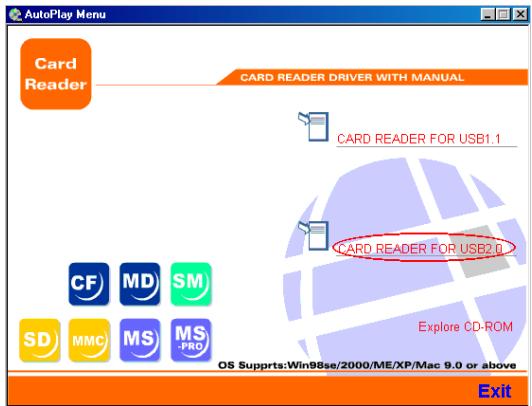
- "AutoPlay Menu" shown on the desktop
a: Click"CARD READER FOR USB2.0"
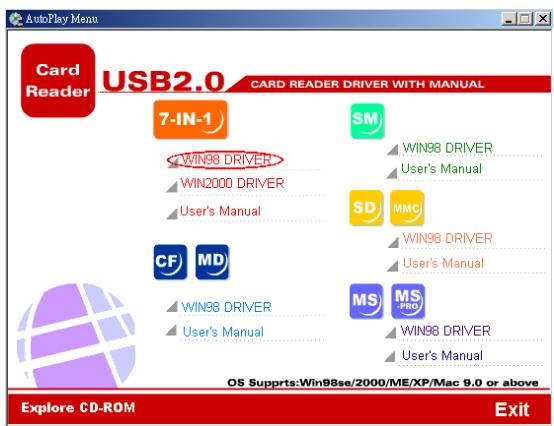
b: Click "WIN 98SE driver" and installed automatically
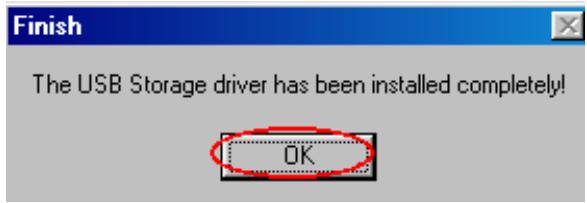
c: Click "OK"
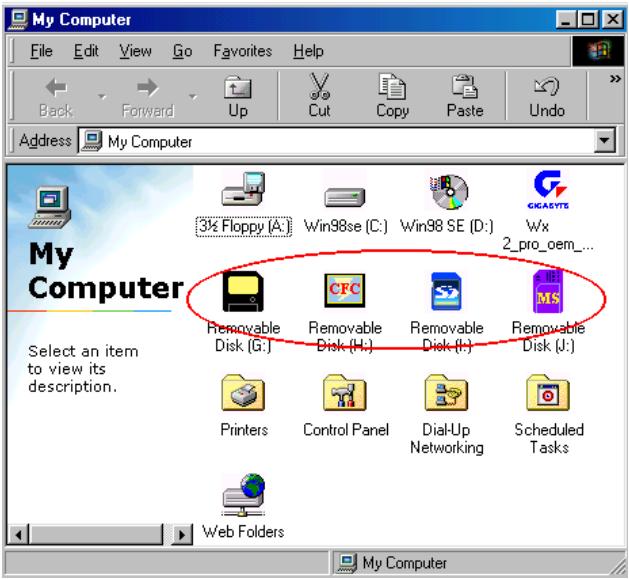
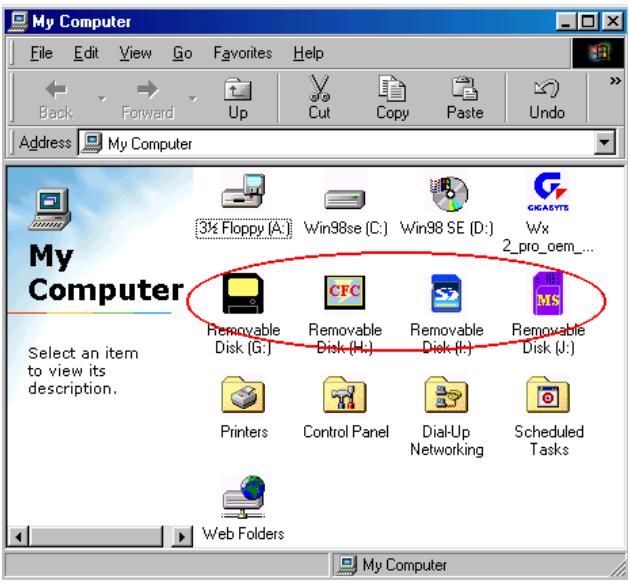
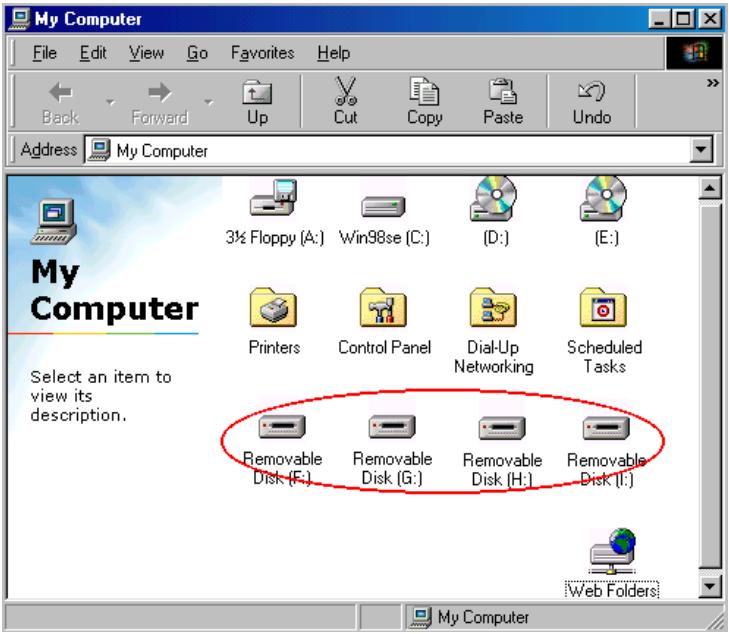
- Plug Card Reader to USB port after restarted. "My Computer" shown 4 more icons. The installation has been completed
Guide for Windows 2000
(Do not Plug Card Reader into USB port before CD setup)
- Insert CD into CD-ROM.
- "AutoPlay Menu" displayed on the screen
a: Click"CARD READER FOR USB2.0"
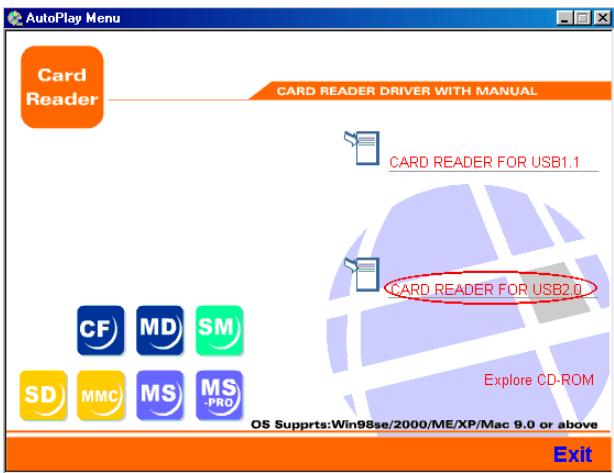
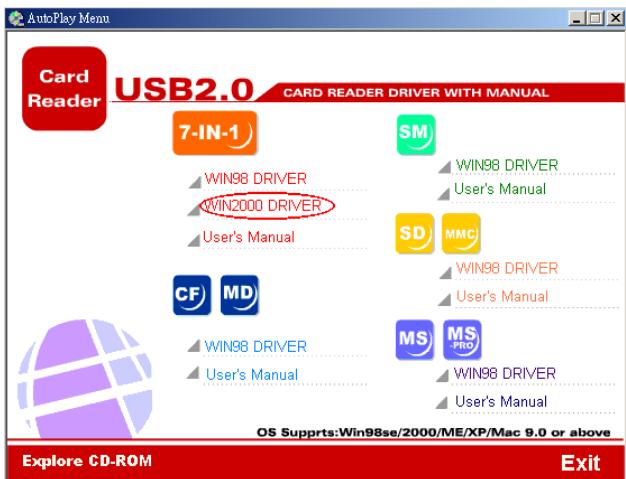
b: Click "WIN 2000 driver" and installed automatically
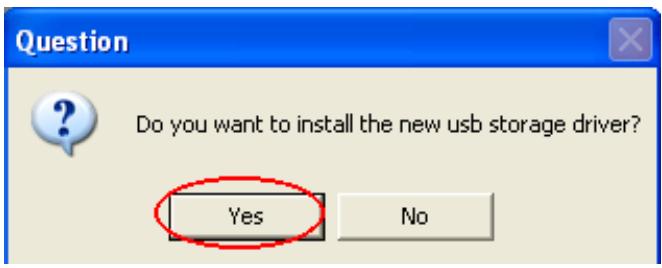
c: Click"YES
d: Click"OK
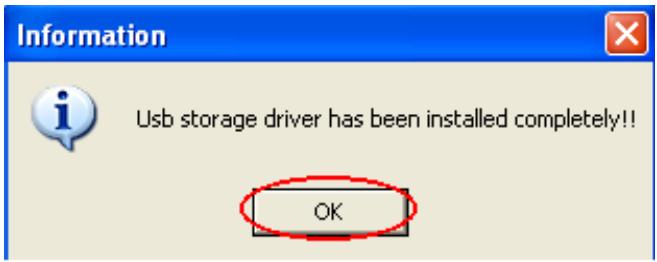
- Plug Card Reader to USB port after restarted. "My Computer" shown 4 more icons. The installation has been completed
Guide for Windows ME/XP
No driver is needed. "My Computer" shown 4 more icons after inserts card reader into USB port. Be free to use card reader.
Notes: In "My Computer", flash cards are not addressed on the icons due to Windows ME/XP provides the original driver for card reader.
Guide for Mac OS
Mac OS 9.X
(Plug card reader to USB port before CD setup)
- Insert CD into CD-ROM.
- Double click CD-ROM icon and find path to "USB 1.1 DRIVER\7in1\installer".
- Double click "installer" The driver will be installed automatically.
- Restart the computer after completed the driver.
- Plug the Card Reader into the USB port after computer starts.
Note: An “untitled” HDD icon on the desktop after inserts one Flash Card. Two “untitled” HDD icons on the desktop after insert two kinds of Flash Card, and so on.
Mac OS 10.1.2 or above
(No driver is needed)
Plug USB Card Reader into USB port.
An "untitled" HDD icon on the desktop after inserts one Flash Card. Two "untitled" HDD icons on the desktop after insert two kinds of Flash Card, and so on.
FOR USB 2.0 HUB
HARDWARE INSTALLATION
- Plug in AC power adapter to power jack (No external power required under 100ma)
- Plug in Mini USB connector to USB.
- Plug in A-type connector to USB port of PC.
- Connect to USB 2.0 devices to 4-port HUB downstream 1~4 ports.
SOFTWARE INSTALLATION
After connecting this hub to PC by a USB 2.0 cable, the system will detect the device and install the required drivers automatically.
-
Please follow the instructions as below, if you can not find the correct device.
-
For Windows 2000 (Follow system driver)
-
After connecting this HUB to PC, the screen will be shown "Hardware Update Wizard" and then click "Next".
- Please select "Recommended" and click "Next"
- Click "Next"
- Click "Next" again
- The screen will be shown "Please Insert Driver" just click "Apply"
- Click "Browse" for next step
- Find the path "C:/winnt/system32/drivers" and click "open"
- Please click "Apply"
- Complete the installations
SPECIFICATIONS
Cards Support
- Compact Flash Card: 8MB~1GB
- IMB MicroDrive: 340MB~1GB
- Smart Media Card: 8MB~128MB
Multi Media Card: 16MB~128MB - Secure Digital Card, 8MB~512MB
Memory Stick Card: 4MB~128MB
Memory Stick PRO Card: 256MB~1GB
USB Interface
USB1.1 / USB 2.0 (Compatible with USB 1.1)
Transfer rate
- USB 1.1 : up to 12 Mbps
- USB 2.0 : up to 480 Mbps, USB1.1 : up to 12 Mbps
Power Support
USB Bus-powered.
- Can be powered by AC power adapter if necessary.