
XDOM LIGHTSPEAKER SYSTEM - Audio System EDOBE - Free user manual and instructions
Find the device manual for free XDOM LIGHTSPEAKER SYSTEM EDOBE in PDF.



| Product type | Wireless audio system with integrated LED lighting |
| Brand | EDOBE |
| Model | XDOM LIGHTSPEAKER SYSTEM |
| Speaker dimensions (with connector and grille) | Depth 181 mm, diameter 130 mm (without trim) |
| Transmitter dimensions | 151 x 177 x 60 mm |
| Speaker weight | 1.14 kg |
| Transmitter power supply | 100-240 V AC, 50/60 Hz |
| Connector type | E27 socket (standard thread) |
| Amplifier power | 20 W |
| Frequency response | 90 Hz - 20 kHz (±3 dB) |
| Maximum sound pressure level | 93 dB |
| LED lamp | 10 W, equivalent to 65 W incandescent, lifespan 25,000 to 40,000 hours |
| Main functions | 2.4 GHz wireless audio streaming, individual volume and lighting control per zone, up to 2 zones and 8 speakers (4 pairs) |
| Transmitter range | 15 to 30 meters (depending on environment) |
| Audio inputs | 2 inputs (RCA or mini-jack via adapter) |
| Remote control | RF 868 MHz, range 15-30 m |
| Care and cleaning | Clean with a soft, dry cloth. Do not use liquids. |
| Safety | Do not expose to water or moisture. Disconnect before maintenance. Use only in dry locations. |
| Spare parts and repairability | No user-serviceable parts. Have servicing performed by qualified personnel. |
| Warranty | 2 years against manufacturing defects |
Frequently Asked Questions - XDOM LIGHTSPEAKER SYSTEM EDOBE
User questions about XDOM LIGHTSPEAKER SYSTEM EDOBE
0 question about this device. Answer the ones you know or ask your own.
Ask a new question about this device
Download the instructions for your Audio System in PDF format for free! Find your manual XDOM LIGHTSPEAKER SYSTEM - EDOBE and take your electronic device back in hand. On this page are published all the documents necessary for the use of your device. XDOM LIGHTSPEAKER SYSTEM by EDOBE.
USER MANUAL XDOM LIGHTSPEAKER SYSTEM EDOBE
State-of-the-art LIGHT & SOUND
One complete system that installs in minutes!
OWNER'S MANUAL
AND INSTALLATION INSTRUCTIONS
User guide 2
The lightning flash with arrowhead symbol, within an equilateral triangle, is intended to alert the user to the presence of uninsulated "dangerous voltage" within the product's enclosure that may be of sufficient magnitude to constitute a risk of electric shock to persons.

The exclamation point within an equilateral triangle is intended to alert the user to the presence of important operating and maintenance (servicing) instructions in the literature accompanying the appliance.
Caution marking is located at the side of the apparatus.
CAUTION: Risk of Electrical Shock - Use in Dry Locations Only
CAUTION: To reduce the risk of electric shock, do not remove cover (or back). No user servicable parts - refer servicing to qualified service personnel only.
WARNING: To reduce the risk of fire or electric shock, do not expose this apparatus to rain or moisture.
IMPORTANT SAFETY INSTRUCTIONS
- Read these instructions. Keep these instructions. Heed allWarnings. Follow all instructions.
- Do not use this apparatus near water. The apparatus shall not be exposed to dripping or splashing and that no objects filled with liquids, such as vases, shall be placed on apparatus.
- Clean only with a dry cloth.
- Do not block any ventilation openings. Install in accordance with the manufacturer's instructions.
- Do not install near any heat sources such as radiators, heat registers, stoves, or other apparatus (including amplifiers) that produce heat.
- The lamp holder is used as disconnect device. The lamp holder of apparatus should not be obstructed OR should be easily accessed during intended use. To completely disconnect the power input, the lamp holder of the apparatus shall be disconnected from the mains.
- Only use attachments/accessories specified by the manufacturer.
- Refer all servicing to qualified service personnel. Servicing is required when the apparatus has been damaged in any way, such as power-supply cord or plug is damaged, liquid has been spilled or objects have fallen into the apparatus, the apparatus has been exposed to rain or moisture, does not operate normally, or has been dropped.
- Added weight of the device may cause instability of a free-standing lamp.
- This device is not intended for use with emergency exit fixtures or emergency exit lights
- NOT FOR USE WHERE EXPOSED TO THE WEATHER
- NOT FOR USE IN TOTALLY ENCLOSED RECESSED LUMINAIES
Congratulations
Thank you for choosing a LightSpeaker® from ebode electronics. You have chosen one of the most unique, patented, audio systems in the world. With proper installation and operation, you will enjoy years of trouble-free use. ebode electronics sells numerous products for use inside or outside your home. To see the complete ebode electronics product assortment, visit us on the internet at: www.ebodeelectronics.eu.
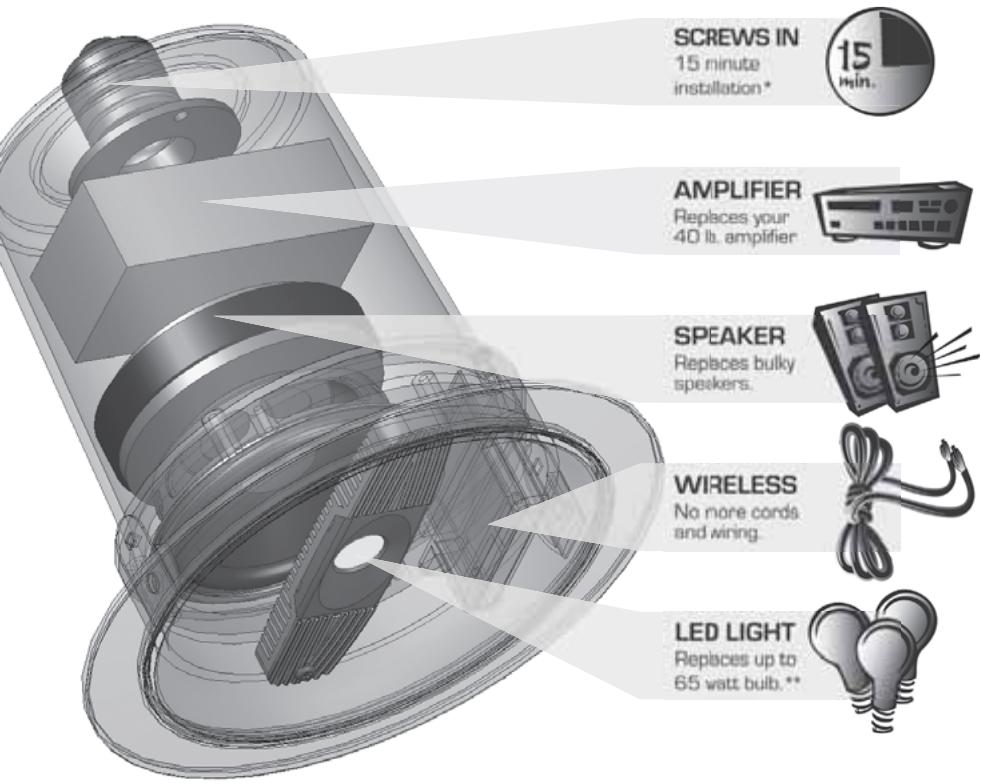
Table of Contents
System Overview. 6
What is in this box. 8
Step 1 - Where will you install. 9
Step 2 - Check your connector type. 9
Step 3 - Fit your LightSpeaker® 10
Step 4 - Setting the zone and stereo switches. 11
Step 5 - Pairing. 14
Step 6 - Plug in your sources. 15
Step 7 - Enjoy your LightSpeakers16
Operating the transmitter & remote control. 17
Helpful hints. 19
Where to put the transmitter. 20
Specifications 23
Possible causes of interference 26
Troubleshooting the remote. 27
Warranty. 28
Questions? 29
CE Declaration. 226
Technical Support Information............Back Cover
System Overview
This wireless LightSpeaker® System is intended to install into any home easily and without any expensive and complicated wiring. You can install a typical system in your home in a few minutes and not have to worry about repairing walls or ceilings.
Plus there is no climbing intoAttics or
wriggling into crawl spaces!
LightSpeakers® deliver great sound into any room in your house. You screw it in like a bulb into most recessed fixtures, table lamps, and pendants, fitting a standard E27 Edison screw socket.
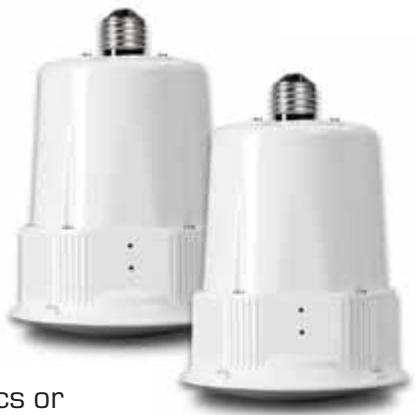
This unique patented LightSpeaker® has full bandwidth audio and “green” lighting together in one small package. Part of what makes this possible is the use of a 10W LED to provide the equivalent light of a 60W incandescent bulb while using 80% less power than the light bulb it replaced. Consider also that you may never have to replace this light; an operating life of 25,000 to 40,000 hours means that with average use this light should easily last 15 to 25 years.
Your system can use up to 4 pairs of LightSpeakers® to provide audio and lighting to your entire home. You can even divide your home into two unique areas where different music sources, sound and lighting control allow you to add music with integrated “green” lighting to places you only dreamed of having it before.
There's no wiring and no big [or small] speaker boxes. The wireless transmitter can be centrally located which will provide audio and, together with the remote, allow you to control your LightSpeakers® from anywhere in your home. The RF remote and the transmitter base station will control which source you listen to in a room as well as the level of the sound and the brightness of the light; this can be done from anywhere in the house, you don't need to be near the transmitter.
Plug two separate audio sources into your transmitter and deliver the music from your AM/FM Radio, TV or MP3, or any audio source, to any room in your house. To expand your system, additional LightSpeakers® are available from your local dealer.
This incredible patented system provides even greater flexibility to you as the owner; since you can take this system with you if you move; and when you do, it leaves no trace (holes that need to be covered) that the system was ever installed and used.
Please take a few moments to copy down the serial number and model number found on the side of your product box or on the product itself onto the 'Questions' page at the end of this manual.
Take just a minute to be sure you have everything you need to install your first wireless distributed audio system from ebode electronics.
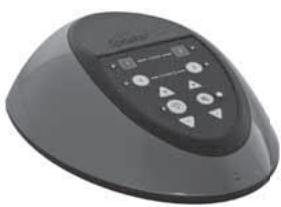
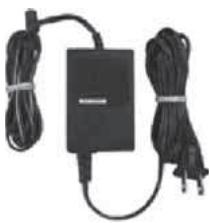

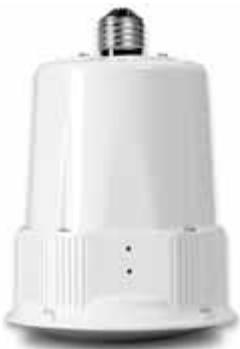
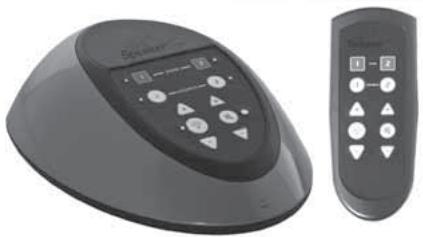
Transmitter
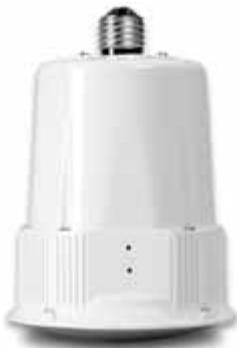
Power Cord
Large & Small Trim Rings
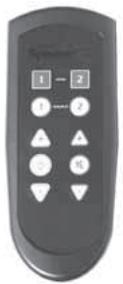
LightSpeakers®
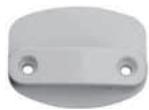
Remote Wall Bracket
Lenses
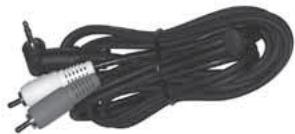
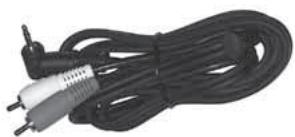
Attachment Cords
Instruction Manual
Step 1: Decide which lights will be replaced with LightSpeakers®.
Your ebode electronics LightSpeakers® have been specifically designed to cover large areas, however if the location of your fixtures allow you to do so, you should think about how you use your room and where you are likely to spend most of your time. Then choose the fixtures that are most evenly spaced to your preferred listening position.

WARNING!
Turn off circuit breakers to all lighting fixtures you are working on!
A) Turn off the circuit breaker and light switch, to the bulbs you intend to replace with LightSpeakers®.
B) Remove the existing light bulb.
Step 2: Check your connector type. Your ebode electronics LightSpeaker® is designed to fit into a standard E27 socket. It will not fit any other type connector.

STOP!
Check your connector!
Step 3: Fit your LightSpeaker®.
Your LightSpeaker® is designed to fit directly into most recessed fixtures, table lamps and pendants by simply removing the existing light and, in the same manner as a light bulb, re-installing your LightSpeaker® in its place.
Because of all the technology packed into LightSpeaker, it is much larger than a normal light bulb, both in length and width. The best way to use Lightspeaker is in a fitting where you cannot actually see the sides of the product at all. As long as the front grille is unrestricted so you can hear the music and see the light, you do not really want to see where the sound and light comes from. In general this means that the ideal is a long, slim lampshade rather than one short and wide.
Please give this some thought when choosing a fitting for your LightSpeaker.
Please note - between the front edge of the E27 socket in your fitting and the front Grill of LightSpeaker you need to have a shade/fitting that will be at least 15 cm long and 14 cm wide
At www.ebodeelectronics.eu you can find a selection of lampmodels that will work with LightSpeaker
Step 4: Setting the Zone and L/R Stereo Switches.
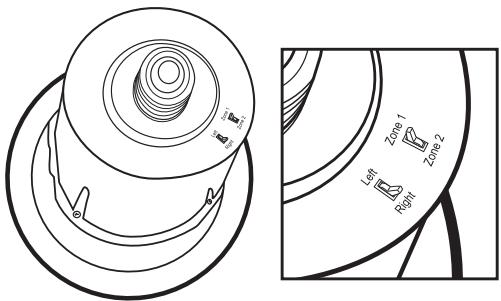
A) Set the zone switch on the back of the LightSpeakers® to one, unless you are setting up a two zone system. For more on zones see Step 4B: Setting up a Two Zone System below after completing B and C below.
B) Set the left/right stereo switch. "L" if it is the left speaker, "R" if it is the right speaker.
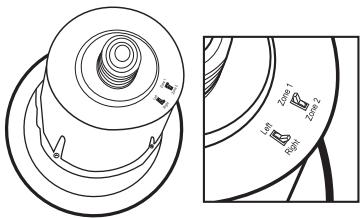
C) Your LightSpeaker® system allows you to install up to 4 pairs of [or 8 total] speakers. If you are installing more than one pair of LightSpeakers® you will probably want to divide your home into zones.
If you are not setting up a two zone system, go to Step 5.
Step 4B: Setting up a Two Zone System
Your system allows you to set up two separate zones. Zones are the different spaces in your home where you want to listen to music, and are important because, later in this setup, your Transmitter will automatically seek out and identify each zone. This in turn will allow you to control the music and lighting in each zone separately.
Assign Zone 1 to one area and Zone 2 to the other unique area. (See below figure 2A)
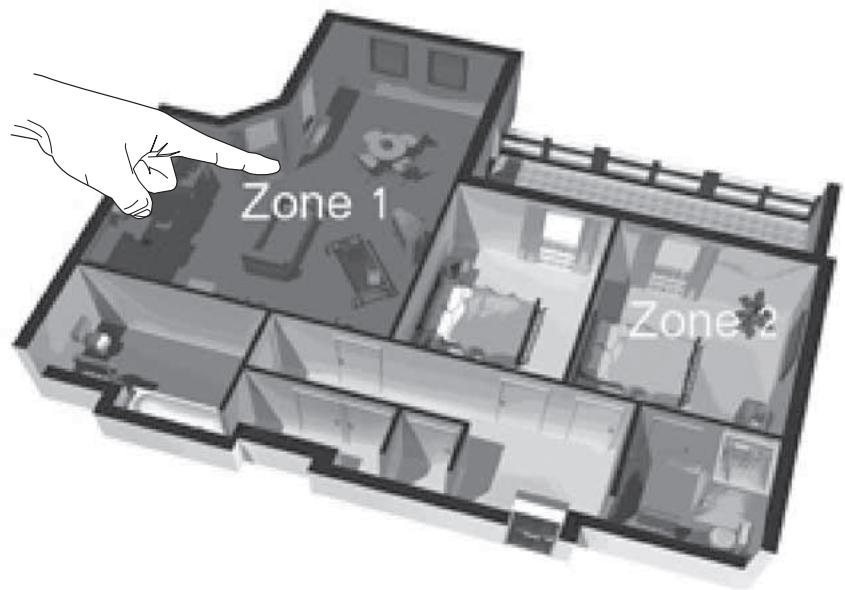
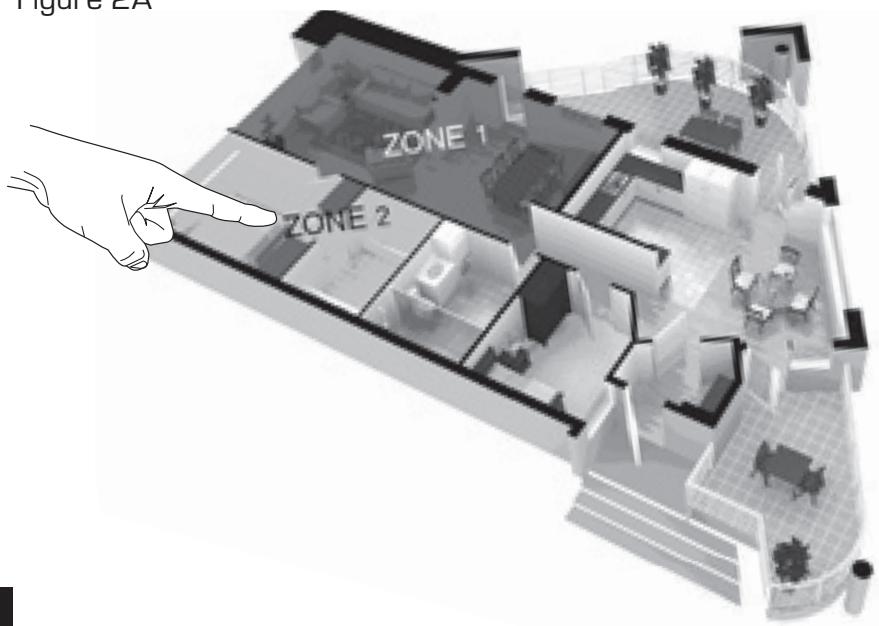
Figure 2A
Here we have assigned Zone 1 to the family room, and Zone 2 to the kitchen area; these are areas where, even though you are listening to the same music [the same source], you may still want to control lighting brightness and speaker volume separately. For example persons listening to music in the kitchen may want to turn the music volume lower while those in the family room may want the turn the music louder and dim the lights. With two zones each group can have the music and lights the way they want them without affecting the other group.
Two-Zone System: Assign each LightSpeaker® to the zone where it will be installed.
A) Create a sketch of your anticipated zones (ie. Figure 2A).
B) Decide what zone the speaker will go into.
C) Place the LightSpeakers® in their respective zones. Set the zone switch, on the back of each LightSpeaker®, to the zone it will be placed.
This LightSpeaker® will be used in Zone 1 and is the right side of a stereo pair.
Step 5: Pairing The Transmitter to the speakers
A) Attach the power cord at the "DC IN" connector on the back of the Transmitter.
B] Turn on the Power Switch.
C) Pairing - This fully automated process will tell the transmitter where each LightSpeaker® is located, allow you to control each zone separately and make your LightSpeaker® system secure from other nearby systems. After you have set the zone switch on each speaker to the correct zone and you have installed your light speakers into the correct sockets in the correct zones (i.e. Zone 1 speakers in Zone 1, Zone 2 LightSpeakers™ in Zone 2) the job is nearly finished all that remains is allowing the transmitter discover where each of the installed LightSpeakers® is located.
1) To pair your LightSpeakers® to your transmitter, turn off all of the light switches in the areas where LightSpeakers® are located.
2] Be sure Transmitter is plugged in and the power button is on.
3) Push the button marked "PAIRING". The PAIRING LED on the transmitter will begin flashing RED.
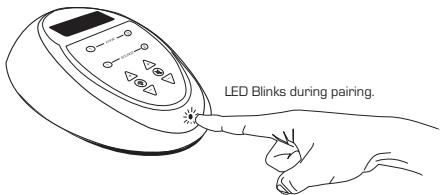
4) Turn on all light switches that your LightSpeakers®
are connected to. The Small LED light on the speakers will begin to flash red and will turn green when the pairing is complete. The transmitter will automatically find each speaker and assign it to its proper zone.
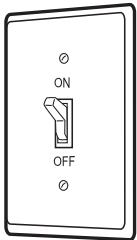
5) If after 1 minute the LED on the LightSpeaker® has not turned “GREEN”, repeat steps 1-4.
a) If after 2 attempts the LED on the LightSpeaker® fails to turn green, try relocating the Transmitter closer to the LightSpeaker®
Step 6: Plugging in your sources.
Using the supplied audio cords, plug your MP3, CD Player, television or other desired sources to the back of the transmitter.
Attach 1 or 2 audio sources.
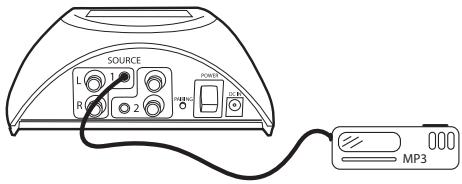
A) Locate the sources you want to use. They will have audio level outputs on them. Typically these are RCA or stereo headphone type jacks. You will need to have the proper cable from the source you want to attach to the Transmitter. You have two choices:
1) RCA to RCA cable
2) RCA to Stereo Mini Plug Cable

CAUTION!
Do not use the speaker outputs from your existing amplifier as this can damage the transmitter!
B) If you are attaching only one source it may be attached to either input but may be convenient to attach to source one.
Step 7: Enjoy your LightSpeakers®!
Operating the Transmitter and Remote Control:
The remote control and the transmitter are controlled in exactly the same manner.
When you push a button on the transmitter the small LED next to the
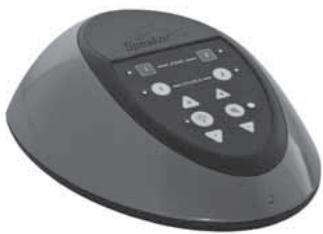
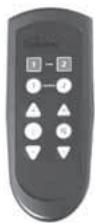
button will light up and remain lit until you push another button affecting either that zone or that source. The LEDs that are lit will tell what action the remote or transmitter is currently set to control.
Here are the steps to take to operate the Transmitter and Remote Control:
A] Press the zone you want to control
B) When the LED next to the button lights, that zone is active and will be playing the source that is currently lit. To change to a different source simply press the source with the "unlit" LED until the LED next to the source you are choosing lights.
C) Pressing Light once makes the light go On/Off
D) Pressing the + arrow above the light “on” button will increase the brightness of the light. Pressing the “-” arrow below the light on/off button will dim the light. The LED will flash when the arrows are pushed and will turn red and flash quickly when either the maximum or minimum brightness is reached.
E) Pressing and holding the ON/OFF button turns ON or OFF all Zones with source 1 playing if turned ON.
F) When Power is applied to a LightSpeaker® by the wall switch the light defaults to the ON state. This allows the LightSpeaker's LED to function like a light bulb.
NOTE: If your remote does not operate, or you have purchased additional remotes to be used with the same transmitter, please see the Trouble shooting section in this manual.
Helpful Hints
Installing and Removing the Lens:
A) Removal BEFORE your LightSpeaker® is installed.
1) While holding the LightSpeaker® in the palm of your hand, rotate the unit until one of the holding tabs is facing up.
2) Using a fingernail, common screwdriver or other small flat object, gently push down and then out on the tab, easing it out through the opening in the LightSpeaker® housing.
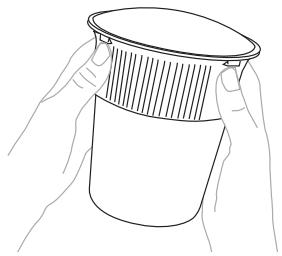
CAUTION: Do not touch the LED or Speaker Baffle with the lens off when the unit is hot, allow the unit to cool down before touching the LED.
3) When the lens pops up, gently pry it away from the housing, being gentle and making sure not to break the tabs.
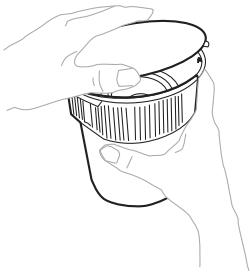
B) Removal of the lens AFTER your LightSpeaker® has been installed.
1) There are three small indentations around the lens; with a small tip common screwdriver, nail file, paper clip or similar object, gently slip the tip into the indentation and pry the lens outward until the retaining tabs pull free.
2) To re-install the lens, align the tabs and the hole for the pairing LED, then push gently until the locking tabs snap into place.
Where to put the transmitter?
Typically, the perfect place for your transmitter is near your home entertainment system, if you have one. If you don't have a home audio system then you can chose a place that is centrally located to the rooms you will be transmitting the audio to. Remember the range of the system is approximately 15 meter radius circle of the transmitter, so as long as the distance from the transmitter to the farthest speaker in any direction is less than 15 meters, the placement of the transmitter is up to you.
Note: There is a maximum of two transmitters in one home and they need to be 8 meters* apart.
*Range depending on environmental conditions.
To illustrate how the Transmitter and Remote work, here are a few examples:
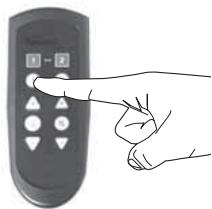
To play Source 1 in Zone 1
Press Zone 1
Press Source 1
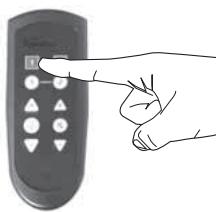
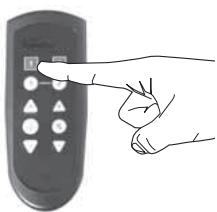
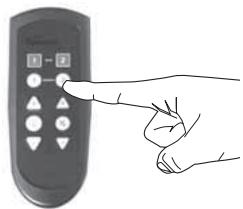
To play Source 2 in Zone 1 after the source 1 is playing
Press Zone1
Press Source 2
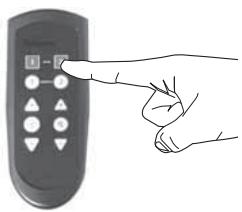
To play Source 2 in Zone 2
Press Zone 2
Press Source 2
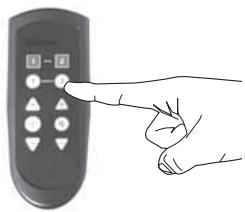
To play Source 1 in Zone 2 after already playing source 2 Press Zone 2 Press Source 1
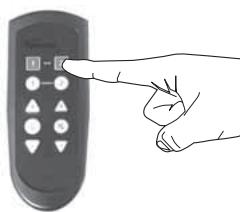
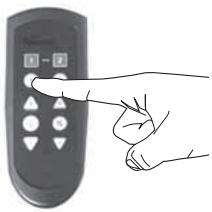
To turn off lights in Zone 1
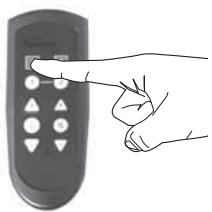
Press Zone 1
Press light button once
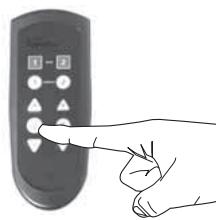
To Dim/Brighten
lights in Zone 1
Press Zone 1
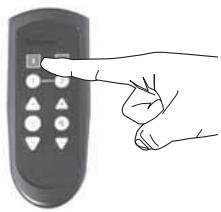
Press light button up arrow and hold it, the light will increase in brightness, and when the light is at the level you want, release the button. When
you reach maximum brightness the lighting LED will flash quickly. To decrease the brightness press the light button down arrow and hold till the desired brightness is reached.
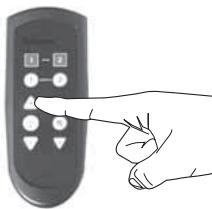
Remember: First Zone, then Action and you will be able to use the Remote and Transmitter functions intuitively.
Specifications
LED Light
- 10W super bright LED provides a sharp crisp light that is easy on the eyes.
- LED outputs the light suitable to replace up to a 65W incandescent bulb
- Long Lasting LED is rated for over 25,000 to 40,000 hours of use (15 to 20 years average use)
- LED Light is fully dimmable and is controlled from either the remote or the light button on the transmitter
Wireless Transmitter
Sends a 2.4 GHz wireless stereo signal broadcast from the Transmitter and depending on the zone assigned to the speaker and the left or right audio channel selected, the receiver sends the correct signal to each LightSpeakers® on-board digital amplifier.
Digital Amplifier & Switch Mode Power Supply
- The E27 standard Edison Screw allows the unit to attach to any standard light fixture socket.
- The high efficiency switch mode power supply delivers power to the LED and the digital amplifier without generating a lot of heat.
- 20W high performance low distortion digital amplifier provides energy efficient sound
- The on-board Digital Signal Processing delivers customized audio to each LightSpeaker® giving big speaker sound in a small speaker.
Loud Speaker
- 2.5" high performance custom engineered woofer with Micro Cellulose Polymer treated cone material provides even coverage and smooth natural sounding audio reproduction
- Integrated high frequency disperser.
Accessories
- Frosted Lens is acoustically transparent
Transmitter
- 2 sets of RCA audio inputs allows 2 separate sources to be used
- Wireless simultaneous transmission to two separate zones of loudspeakers
Controls LED light in each zone independently - Controls Audio level and source in each zone independently
- Simple front panel controls allow easy adjustment of the speakers' sound
- Wireless transmitter can send audio to loudspeakers 15 to 30 meters in any direction. Depending on environmental conditions.
Accessories
RF remote allows control of sound 15 to 30 meters away from transmitter depending on the environment
- RF Remote allows selection of zone and source which allows you to adjust audio in each zone
DC power supply for transmitter
5" LightSpeaker® Specifications
Woofer 2.5" Micro Cellulose
Light Brightness 10W LED
Wireless Reception 2.4 GHz proprietary signal
Frequency Response [+/- 3dB] 90 Hz - 20 kHz
Amplifier Power 20W
Max SPL 93 dB SPL
Dimensions
LightSpeaker® depth [w/out Edison Screw] 135.3 mm (5.3")
LightSpeaker® diameter [without Flange] 130.0 mm (5.1")
LightSpeaker® diameter [with Flange] 182.8 mm (7.2")
Depth without socket - no lens 140.0 mm (5.5")
Depth with Socket - no lens 167.2 mm [6.6"]
Depth without socket with lens 153.8 mm (6.1")
Depth with Socket with lens 181.0 mm [7.1"]
OD of 6" Flange 192.0 mm [7.6"]
OD of 5" Flange 171.2 mm (6.7")
Weight 1.14 kg [2.51 lbs]
Transmitter & Remote Specifications
Transmitter Sources 2
Discrete Transmitter Zones 2
Audio Transmission Frequency 2.4 GHz proprietary
RF Remote Transmission Frequency 868 Mhz
Audio Transmitter range [omni-directional] 15 to 30
meters depending on environmental conditions
RF Remote range [omni-directional] 15 to 30 meters
depending on environmental conditions
AC Power 100 VAC to 240 VAC
Dimensions
Transmitter 151 mm (5.9") W x 177 mm (7") L x 60 mm (2.4") H
Remote: 52 mm (2") W x 130 mm [5.1"] L x 30 mm [1.2"] H
Possible causes of interference with your
LightSpeaker® System
A) Metal studs, in fact any metal wall material, can cause the signal to be diminished or lost. This may also be a problem if your wall paper happens to be a foil type or have metal fibers in it.
B) Microwave ovens, when operating, may degrade or interrupt the signal from your transmitter. Usually this will only be a problem for those speakers in close proximity to the microwave. For best results, do not locate the transmitter near your microwave.
C) Certain portable phones operating in the 2.4 Ghz range, wireless computer routers, and other consumer electronics and toys using 2.4 Ghz may cause interference when operated too close to either the transmitter or the speakers.
Troubleshooting the Remote
If your remote does not operate when any of the buttons are pushed:
A] Check the batteries to be certain that they have a charge. Replace them if necessary.
The remote may need to be paired to the transmitter. To pair the transmitter:
A] Press the pairing button on the back of the transmitter. Five lights on the transmitter keypad (Zone 1, Zone 2, Source 1, Source 2 and the pairing light in the front) will light up and begin flashing;
B) Stand 60-120 cm away from the transmitter with the remote. Press and hold the Zone 2 key on the remote for about 4 seconds. All lights will stop flashing, then pairing is complete. In the event this does not work, try again, beginning at Step A.
If the remote still does not operate, try pairing one more time, contact your local dealer where you bought your system, or visit www.ebodeelectronics.eu.
Warranty - Home and Commercial Audio
Limited Liability
ebode electronics warrants its lighting and loudspeaker products to the original purchaser to be free of manufacturing defects in material and workmanship for a period of two years from date of purchase. This warranty is subject to the following additional conditions and limitations.
The warranty is void and inapplicable if ebode electronics deems that the product has been used or handled other than in accordance with the instructions provided by the manufacturer, including but not limited to damage caused by accident, mishandling, improper installation, abuse, negligence, or normal wear and tear, or any defect caused by repair to the product by anyone other than ebode electronics.
To obtain warranty service, please visit your dealer. A factory return authorization number will be sent to you. Do not return any unit without first receiving written authorization and shipping instructions from your dealer.
There are no other warranties, including without limitation, either express or implied warranties of merchantability or fitness for a particular purpose, with respect to the product.
Repair or replacement as provided under this warranty is the exclusive remedy of the consumer/purchaser. ebode electronics shall not be responsible for any incidental or consequential damages except to the extent provided [or prohibited] by applicable law.
Some COUNTRIES do not allow the exclusion or limitation of incidental or consequential damages, so the above limitation may not apply to you.
This warranty gives you specific legal rights, and you may also have other rights which vary from COUNTRY TO COUNTRY.
Questions? Contact your local dealer!
Have a question about your Lightspeaker speakers?
Talk to the people who know them best!
WRITE THE MODEL NUMBER AND SERIAL NUMBER FROM YOUR PRODUCT BOX HERE
Model Number:
Serial Number:
OD van 6" Flens 192,0 mm [7,6"]
OD van 5" Flens 171,2 mm [6,7"]
C)党的建设 LightSpeaker® you can connect your system to the LightSpeaker®. It's easy to set up and use, but it takes time. You can also use the LightSpeaker® for your home or office.
Aquí hemos asignado la Zona 1 a la habitación familiar y la Zona 2 al aire de la comida; estas son Areas donde, although it is not always the case that you can find them in the restaurant. In general, they are usually located in the same area of the cafeteria.
Ligue as fontes audio 1 e 2.
A) Localize as fontes quepretendeutilizar.Estas terao nveis de saida de audio nas masmas.Normalmente estasaojacks tipoRCAou altifalante estereo. Necessitarade terocabo adequadoa partir dafonte a qualpretendeligar oEmissor.Temdus opcões:
1] Cabo RCA a RCA
2] Cabo Mini Ficha RCA a Estéreo

CUIDADO!
Instalar e Remover as Lentes:
A) Remover ANTES do seu LightSpeaker® ser instalado.
Woofer 2,5" in micro-cellulosa
OD 6" flangia 192,0 mm [7,6"]
OD 5" flangia 171,2 mm [6,7"]
Peso 1,14 kg (2,51 libre)
DECLARATION OF CONFORMITY
Hereby, BMB Electronics BV, declares that this LightSpeaker System is in compliance with the essential requirements and other relevant provisions of the following Directives:
Directive 1999/5/EC of the European Parliament and of the Council of 9 March 1999 on radio equipment and telecommunications terminal equipment and the mutual recognition of their conformity
Directive 2004/108/EC of the European Parliament and of the Council of 15 December 2004 on the approximation of the laws of the Member States relating to electromagnetic compatibility
Directive 2006/95/EC of the European Parliament and of the Council of 12 December 2006 on the harmonization of the laws of Member States relating to electrical equipment designed for use within certain voltage limits
Directive 2002/95/EC of the European Parliament and of the Council of 27 January 2003 on the restriction of the use of certain hazardous substances in electrical and electronic equipment
Directive 2005/32/EC of the European Parliament and of the Council of 6 July 2005 establishing a framework for the setting of eco design requirements for energy-using
Technical data and copies of the original Declaration of Conformity are available and can be obtained from ebode electronics: PB 25, NL-4264ZG, the Netherlands.
C
User Information for Consumer Products Covered by EU Directive 2002/96/EC on Waste Electric and Electronic Equipment (WEEE)
This document contains important information for users with regards to the proper disposal and recycling of ebode products. Consumers are required to comply with this notice for all electronic products bearing the following symbol:

Environmental Information for Customers in the European Union
European Directive 2002/96/EC requires that the equipment bearing this symbol on the product and/or its packaging must not be disposed of with unsorted municipal waste. The symbol indicates that this product should be disposed of separately from regular household waste streams.
It is your responsibility to dispose of this and other electric and electronic equipment via designated collection facilities appointed by the government or local authorities. Correct disposal and recycling will help prevent potential negative consequences to the environment and human health.
For more detailed information about the disposal of your old equipment, please contact your local authorities, waste disposal service, or the shop where you purchased the product.
DECLARATION OF CONFORMITY TO R&TTE DIRECTIVE 1999/5/EC for the European Community, Switzerland, Norway, Iceland and Liechtenstein
Product category: general consumer (category 3).
English: This equipment is in compliance with the essential requirements and other relevant provisions of the European R&TTE Directive 1999/5/EC
ebode electronics PB 25, NL4264ZG The Netherlands
For more detailed installation instructions go to www.ebodeelectronics.eu
LightSpeaker Technical Support
Contact your local dealer!
If you want to expand your light and sound system to additional rooms, replace existing lights with LED lights only or enjoy the same music outdoors as well as indoors, visit www.ebodeelectronics.eu.
Protected under multiple US and or international issued and pending patents



- STATE-OF-THE-ART LIGHT & SOUND
- OWNER'S MANUAL
- AND INSTALLATION INSTRUCTIONS
- IMPORTANT SAFETY INSTRUCTIONS
- CONGRATULATIONS
- TABLE OF CONTENTS
- SYSTEM OVERVIEW
- INSTRUCTION MANUAL
- WARNING
- STOP
- STEP 3: FIT YOUR LIGHTSPEAKER®
- STEP 4B: SETTING UP A TWO ZONE SYSTEM
- STEP 5: PAIRING THE TRANSMITTER TO THE SPEAKERS
- STEP 6: PLUGGING IN YOUR SOURCES
- CAUTION
- OPERATING THE TRANSMITTER AND REMOTE CONTROL
- HELPFUL HINTS
- INSTALLING AND REMOVING THE LENS
- WHERE TO PUT THE TRANSMITTER
- TO PLAY SOURCE 1 IN ZONE 1
- TO PLAY SOURCE 2 IN ZONE 1 AFTER THE SOURCE 1 IS PLAYING
- TO PLAY SOURCE 2 IN ZONE 2
- SPECIFICATIONS
- LED LIGHT
- WIRELESS TRANSMITTER
- DIGITAL AMPLIFIER & SWITCH MODE POWER SUPPLY
- LOUD SPEAKER
- ACCESSORIES
- TRANSMITTER
- 5" LIGHTSPEAKER® SPECIFICATIONS
- DIMENSIONS
- TRANSMITTER & REMOTE SPECIFICATIONS
- POSSIBLE CAUSES OF INTERFERENCE WITH YOUR
- LIGHTSPEAKER® SYSTEM
- TROUBLESHOOTING THE REMOTE
- WARRANTY - HOME AND COMMERCIAL AUDIO
- QUESTIONS? CONTACT YOUR LOCAL DEALER
- WRITE THE MODEL NUMBER AND SERIAL NUMBER FROM YOUR PRODUCT BOX HERE
- CUIDADO
- INSTALAR E REMOVER AS LENTES
- DECLARATION OF CONFORMITY
- C
- USER INFORMATION FOR CONSUMER PRODUCTS COVERED BY EU DIRECTIVE 2002/96/EC ON WASTE ELECTRIC AND ELECTRONIC EQUIPMENT (WEEE)
- ENVIRONMENTAL INFORMATION FOR CUSTOMERS IN THE EUROPEAN UNION
- DECLARATION OF CONFORMITY TO R&TTE DIRECTIVE 1999/5/EC FOR THE EUROPEAN COMMUNITY, SWITZERLAND, NORWAY, ICELAND AND LIECHTENSTEIN
- FOR MORE DETAILED INSTALLATION INSTRUCTIONS GO TO WWW.EBODEELECTRONICS.EU
- LIGHTSPEAKER TECHNICAL SUPPORT
Brand : EDOBE
Model : XDOM LIGHTSPEAKER SYSTEM
Category : Audio System