
XDOM ROCKSPEAKER - Outdoor speaker EDOBE - Free user manual and instructions
Find the device manual for free XDOM ROCKSPEAKER EDOBE in PDF.



| Product Type | Wireless Outdoor Speaker |
| Brand | EDOBE |
| Model | XDOM ROCKSPEAKER |
| Power Supply | Rechargeable 12V lithium-ion battery |
| Battery Life | Up to 8 hours (depending on volume) |
| Charging Time | Approximately 4 hours |
| Wireless Range | Up to 35 meters outdoors |
| Operating Frequency | 2.4 GHz |
| Amplifier Power | 40 watts |
| Woofer | 5.25-inch dual voice coil woofer |
| Tweeters | Two 3/4-inch tweeters |
| Protection Rating | IPX4, IPX5 (weather resistant) |
| Color | Neutral Granite |
| Compatibility | Works with EDOBE LightSpeaker transmitter |
| Maximum Number of Speakers | Up to 8 AudioRocks (with compatible transmitter) |
| Audio Zones | 2 configurable zones |
| Volume Control | Rear knob and RF remote (sold separately) |
| Included Accessories | Charger, rechargeable battery, user guide |
| Maintenance and Cleaning | Do not use high pressure cleaner; avoid immersion |
| Safety | Follow lithium-ion battery instructions; do not open |
| Warranty | 2-year limited warranty (see terms) |
Frequently Asked Questions - XDOM ROCKSPEAKER EDOBE
User questions about XDOM ROCKSPEAKER EDOBE
0 question about this device. Answer the ones you know or ask your own.
Ask a new question about this device
Download the instructions for your Outdoor speaker in PDF format for free! Find your manual XDOM ROCKSPEAKER - EDOBE and take your electronic device back in hand. On this page are published all the documents necessary for the use of your device. XDOM ROCKSPEAKER by EDOBE.
USER MANUAL XDOM ROCKSPEAKER EDOBE
State-of-the-Art Wireless Portable AudioRock
Installs in 5 minutes or less!

OWNER'S MANUAL and installation instructions
Note: The AudioRock is an add on unit to an existing LightSpeaker® System. You need a LightSpeaker® Transmitter to supply audio and control the music on this unit. The Transmitter and Remote discussed in the manual are sold separately.
User guide 2
Bedienungsanleitung 18
Gebruiksaanwijzing 34
Anvandermanual 50
Guideutilisateur 66
Guia del usuario 82
Manual do utiliser 98
Manuale per l'utente 114

User Guide AudioRockRM
The AudioRock speaker uses a 12 volt Lithium Ion Battery for operation. Please review the following safety instructions before use:
Li Ion Battery Safety Instructions:
Misuse can result in the batteries short-circuiting, the insulator melting and damage to the safety valves or safety mechanisms, leading to leakage, heat generation or rupturing. Please observe the following precautions when using batteries.
- Do not dispose in fire or expose to high temperature. [60°C]
- Do not under any circumstances insert the batteries with the positive and negative poles reversed.
- If the connection with the charger does not operate correctly, do not force the battery in, but instead check the direction of the positive and negative poles.
- Do not charge with chargers not specified for this product.
- Do not short the positive terminal and the negative terminal with metals such as wire, coins, etc. Also, do not store or carry the batteries with metal necklaces, etc.
- Do not disassemble or modify the battery.
- Do not puncture the battery.
- Do not directly solder the battery.
- Do not use the battery if it shows signs of leakage, a change of color or shape or any other changes in appearance.
- Do not wet the battery or place it in water or sea water. This may lead to the battery generating heat or rusting.
- Store the battery out of reach of small children.
- When not using the battery, or not using the device for a prolonged period, remove the battery from the device and store it in a dry place between the temperatures of -20°C and +21°C ( -4°F - and +70°F ). This prevents decreased battery performance and service life.
- The battery (battery or batteries or battery pack) shall not be exposed to excessive heat such as sunshine, fire or the like.
CAUTION/MISE EN GARDE
Risk of Electric Shock, Do Not Open

The lightning flash with arrowhead symbol, within an equilateral triangle, is intended to alert the user to the presence of uninsulated "dangerous voltage" within the product's enclosure that may be of sufficient magnitude to constitute a risk of electric shock to persons.

The exclamation point within an equilateral triangle is intended to alert the user to the presence of important operating and maintenance [servicing] instructions in the literature accompanying the appliance.
CAUTION: Risk of Electrical Shock - Do not submerge the product in water
CAUTION: To reduce the risk of electric shock, do not remove cover (or back). No user serviceable parts - refer servicing to qualified service personnel only.
IMPORTANT SAFETY INSTRUCTIONS
- Read these instructions. Keep these instructions. Heed all warnings. Follow all instructions.
- Do not use this apparatus in water. The apparatus can be exposed to rain, snow or any weather element without risk of injury or damage. Do not submerge in water or other liquids. The product is water resistant not water proof.
- Clean only with a wet rag or light spray of water from garden hose. Do not use high pressure hoses or washers to clean the product.
- Do not block any ventilation openings. Install in accordance with the manufacturer's instructions.
- Do not install near any heat sources such as radiators, heat registers, stoves, or other apparatus (including amplifiers) that produce heat.
- Only use approved batteries in this product in accordance with the manufacturers' instructions.
- Only use attachments/accessories specified by the manufacturer.
- Refer all servicing to qualified service personnel. Servicing is required when the apparatus has been damaged in any way, such as power-supply cord or plug is damaged, liquid has been spilled or objects have fallen into the apparatus, the apparatus has been exposed to rain or moisture, does not operate normally, or has been dropped.
- The weight of this device may cause instability of a free-standing table or stand near a pool, pond or other standing water. Insure that the surface or object that the product is placed on is stable and cannot be tipped over causing the product to be immearsed in water.

Congratulations
Thank you for choosing the wireless, portable AudioRock™ from ebode electronics. With proper installation and operation, you will enjoy years of trouble-free use. ebode electronics offers numerous loudspeakers for use inside or outside your home. To see the complete ebode electronics product assortment, visit us on the Internet at: www.ebodeelectronics.eu.
Table of Contents
AudioRock Overview. 6
What is in this box. 7
Installation Considerations. 8
Selecting Locations. 8
Setting up Zones. 9
Preparing AudioRock for Installation. 10
Installation Instructions 11
Pairing the AudioRock to the Transmitter 12
Operating and Controlling Your AudioRock. 14
Specifications. 15
Accessories 15
Warranty. 16
CE Declaration of Conformity. 130
Technical Support Information............Back Cover
AudioRock™ Overview
This wireless portable AudioRock is intended to install in a few minutes. Since it runs on batteries it increases the flexibility of where these speakers can be used. The transmitter
can support up to 8 wireless AudioRocks and provide audio to your entire outdoor area. You can even divide your outdoor spaces into unique areas, selecting between two sources, with variable sound control allowing you the flexibility to easily configure and install an outdoor system to be enjoyed by all.
Additionally, the system can be expanded by adding our patented LightSpeakers®. These LightSpeakers install in minutes and fit into table lamps as well as hanging lamps or anywhere you find a standard E27 Edison socket. The LED provides "green" lighting and the speaker provides outstanding sound throughout your home. The LightSpeakers are available from your retailer or at www.ebodeelectronics.eu.
The entire system provides even greater flexibility to you as the owner because you can take it with you if you move. If you do need to remove it, it leaves no trace that the system was ever installed or used.

What's in this Box

Wireless AudioRock
Owner's Manual
One Charger
One Rechargeable Lithium-ion Battery
NOTE: The AudioRock can only be used with the ebode electronics wireless LightSpeaker transmitter. It cannot be used or operated without the LightSpeaker transmitter.
Remote and transmitter also sold separately.
Installation Considerations
Remember the outdoor line-of-sight range of the system is up to 35 meter, so as long as the distance from the transmitter to the farthest AudioRock, in any direction, is less than 35 meter, the placement of the transmitter is up to you.
Selecting AudioRock Locations
Your wireless AudioRock can be placed anywhere it is convenient in your outdoor listening areas. You can even space multiple AudioRocks so that no one speaker is further than 10 meter from the other speaker. This provides the best and most even coverage for outstanding sound quality.
Setting Up Zones
If you have more than one AudioRock and you want to set up separate listening zones in your outdoor area, you have the option of setting up a second zone. An audio zone is any area or group of areas where you want the same audio source playing and want the volume of the speakers to be about the same. If you want an area to have different volume level or play a different set of music then use the two zone option. Please note that there is no right or wrong way to do this, it is simply how you think you want to use your AudioRock system. If you try an option and don't like it, it is easy to change and try another one.
NOTE: You have some control over an area being on or off by using the power switch that is on the rear of the AudioRock. Simply turn it off and there will not be any sound in that area.
Preparing AudioRock for Installation
Please charge your battery for your rock by plugging in the power supply and inserting the battery into the charger. Allow at least 8 hours for the first charge.
NOTE: Leaving the battery in the charger for periods longer than 24 hours may reduce battery life. When an uncharged battery is placed in the charger the LED on the front of the charger will shine RED; when charging is complete the LED will turn GREEN.
Charging the AudioRock Battery
Step 1: Plug adapter into the charger.
Step 2: Plug adapter into AC socket.
Step 3: Slide battery into the charger making sure that it is inserted correctly and that you do not have to force the battery into the charger.
Step 4: When the battery is fully charged the LED on the front of the charger will turn GREEN.
Step 5: Remove Battery from charger and place it into the AudioRock.
Installation Instruction
Step 1: After the battery has been charged, install it into the battery compartment. Be sure it is pushed all the way in. Secure the battery by sliding the tabs over the battery until they are pointing straight at each other.
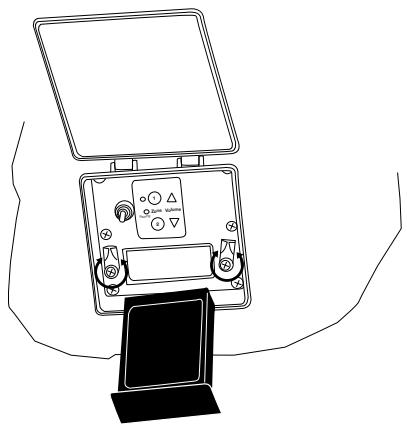
Step 2: Be sure the zone switch on the back of your AudioRock is set to zone 1 unless you are setting up a two zone system. If you intend to set up a two zone system, be certain the zone switch is set to the number corresponding to the zone you intend to place it in.
Pairing the AudioRock to the Transmitter
Before you can begin using and enjoying your new portable wireless AudioRock system, it is necessary to "teach" your AudioRock the identity of the transmitter you are using; this teaching is called "pairing" and is very easy to do.
Step 1: With the Transmitter power on [LED on front will be lit], find and press the pairing button on the back of the unit. You may need a sharp object, like a pen, to press the button in. When you do, you will see the LED on the front of the transmitter flash.
This means the unit is in the "pairing" mode.
Step 2: Quickly set the power switch, located at the back of your AudioRock, to "ON" and press the pairing button also located on the back of the AudioRock.
You have a total of 30 seconds to get this done. If you take too long, leave the units you have already switched the power on, ON.
Press the pairing button again and proceed through the other areas.
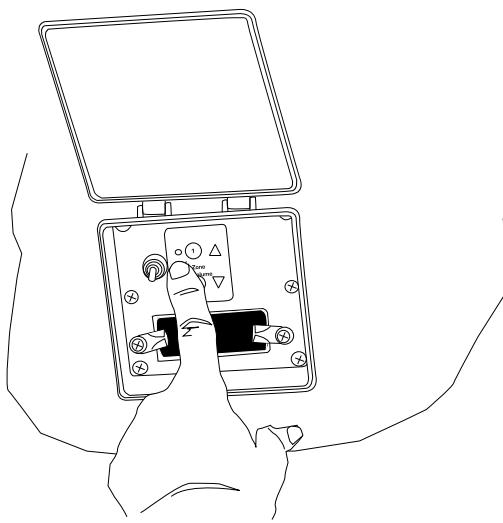
You will know if the unit is ON because LEDs on the back of your AudioRock will light up as you flip the switch.
If no LEDs light up, check to be certain the battery is charged.
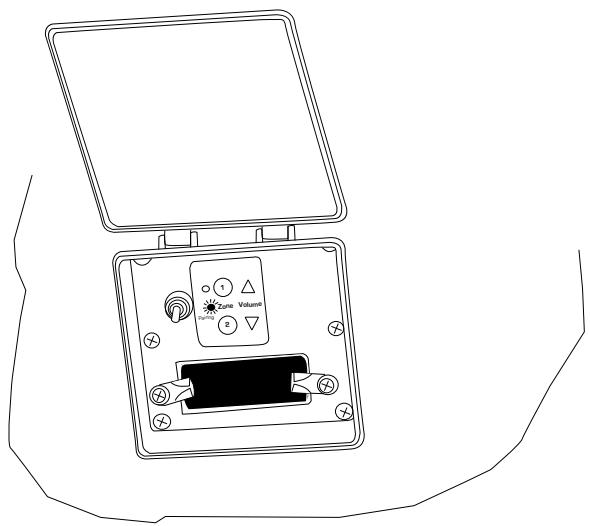
When the pairing light turns solid GREEN, the pairing is complete. You have about 30 seconds to get this done. If this is not enough time to pair all of your AudioRocks, simply repeat for each AudioRock in your system.
Step 3: When all units are paired, you are ready to start using and controlling the system.
Step 4: If you have more AudioRocks, LightSpeakers or other speakers designed to work on the LightSpeaker network, make sure they are all paired. If not, pair them per the instructions in the owner's manual for that speaker. When all units are paired, you are ready to start enjoying your entire LightSpeaker network.
Operating and Controlling Your AudioRock
AudioRock Electronics
The battery compartment accepts the supplied rechargeable battery and provides up to 8 hours of playback. Playback time will depend upon how loud you listen to your music; the lower the average level, the longer the battery will last.
Built-in wireless receiver allows reception and control of the AudioRock up to 35 meter away from your LightSpeaker transmitter and remote control.
You can also control: "ON/OFF" and "Volume" from the adjustment buttons on the back of your AudioRock.
Weatherproof sealing of electronics assures reliability of unit over time when left outdoors. This unit is built to withstand severe weather conditions and the affects of sprinklers and other watering systems. It is, however, not designed to be submerged, or left to sit in open water pools more than 2,5 cm deep.
AudioRock Specifications:
This stereo outdoor wireless rock speaker, with a 5 1/4 ” woofer, is optimally tuned for outdoor performance. The sound is electronically equalized to provide superior acoustic performance in open-air environments. Neutral Granite styling allows this system to blend unobtrusively into most outdoor environments. This single-speaker stereo unit provides dual-channel audio from a single enclosure.
Electronics
- Battery compartment accepts supplied rechargeable battery providing up to 8 hours of playback [depending on type of music and volume]
- Built-in 2.4 GHz wireless receiver and 40 watts peak total audio amplifier power.
- On-board on/off control and volume control allow direct volume adjustment without need of the supplied RF remote
- Weatherproof sealing of electronics assures reliability of unit over time when left outdoors
Acoustics
- Dual Voice Coil 51 1/4 Environmental Injection Molded Polypropylene Woofer
-Dual 3 / 4 Polypropylene Tweeters - Drivers are angled upward 20 degrees to deliver great sound when system is placed at ground level
- System uses active acoustic equalization to smooth, enhance and extend frequency response
Mechanics and Reliability
- Fully weatherproof enclosure and drivers are UV protected with rustproof hardware and grille (IEC 60529, IPX4, IPX5)
- All components tested to withstand temperature and humidity extremes
Accessories
- Long-lasting rechargeable lithium-ion Battery Pack provides up to 8 hours of audio when fully charged. Recharges in 4 hours
- Separate Charging Base for the Battery
DC Power Supply for Battery Charger
Warranty - Home and Commercial Audio
Limited Liability
ebode electronics warrants its loudspeaker products to the original purchaser to be free of manufacturing defects in material and workmanship for a period of two years from date of purchase. This warranty is subject to the following additional conditions and limitations.
The warranty is void and inapplicable if ebode electronics deems that the product has been used or handled other than in accordance with the instructions provided by the manufacturer, including but not limited to damage caused by accident, mishandling, improper installation, abuse, negligence, or normal wear and tear, or any defect caused by repair to the product by anyone other than ebode electronics.
To obtain warranty service, please visit your dealer. A factory return authorization number will be sent to you. Do not return any unit without first receiving written authorization and shipping instructions from your dealer.
There are no other warranties, including without limitation, either express or implied warranties of merchantability or fitness for a particular purpose, with respect to the product.
Repair or replacement as provided under this warranty is the exclusive remedy of the consumer/purchaser. ebode electronics shall not be responsible for any incidental or consequential damages except to the extent provided [or prohibited] by applicable law.
Some COUNTRIES do not allow the exclusion or limitation of incidental or consequential damages, so the above limitation may not apply to you.
This warranty gives you specific legal rights, and you may also have other rights which vary from COUNTRY TO COUNTRY.
Questions? Contact your local dealer!
Have a question about your ebode electronics speakers? Talk to the people who know them best! We're waiting to hear from you!
WRITE THE PART NUMBER AND SERIAL NUMBER FROM YOUR PRODUCT BOX HERE AND RETAIN FOR PRODUCT REGISTRATION
Part Number:
Serial Number:
Risk of Electric Shock, Do Not Open

Risk of Electric Shock, Do Not Open

AudioRock Specifications:
Risk of Electric Shock, Do Not Open

Forbereda AudioRock for installation
AudioRock Electronics
AudioRock Electronics
Risk of Electric Shock, Do Not Open

Risk of Electric Shock, Do Not Open

DECLARATION OF CONFORMITY
Hereby, ebode electronics BV, declares that this AudioRock is in compliance with the essential requirements and other relevant provisions of the following Directives:
Directive 1999/5/EC of the European Parliament and of the Council of 9 March 1999 on radio equipment and telecommunications terminal equipment and the mutual recognition of their conformity
Directive 2004/108/EC of the European Parliament and of the Council of 15 December 2004 on the approximation of the laws of the Member States relating to electromagnetic compatibility
Directive 2006/95/EC of the European Parliament and of the Council of 12 December 2006 on the harmonization of the laws of Member States relating to electrical equipment designed for use within certain voltage limits
Directive 2002/95/EC of the European Parliament and of the Council of 27 January 2003 on the restriction of the use of certain hazardous substances in electrical and electronic equipment
Directive 2005/32/EC of the European Parliament and of the Council of 6 July 2005 establishing a framework for the setting of eco design requirements for energy-using
Technical data and copies of the original Declaration of Conformity are available and can be obtained from ebode electronics: PB 25, NL-4264ZG, the Netherlands.
C
User Information for Consumer Products Covered by EU Directive 2002/96/EC on Waste Electric and Electronic Equipment (WEEE)
This document contains important information for users with regards to the proper disposal and recycling of ebode products. Consumers are required to comply with this notice for all electronic products bearing the following symbol:

Environmental Information for Customers in the European Union
European Directive 2002/96/EC requires that the equipment bearing this symbol on the product and/or its packaging must not be disposed of with unsorted municipal waste. The symbol indicates that this product should be disposed of separately from regular household waste streams.
It is your responsibility to dispose of this and other electric and electronic equipment via designated collection facilities appointed by the government or local authorities. Correct disposal and recycling will help prevent potential negative consequences to the environment and human health.
For more detailed information about the disposal of your old equipment, please contact your local authorities, waste disposal service, or the shop where you purchased the product.
DECLARATION OF CONFORMITY TO R&TTE DIRECTIVE 1999/5/EC for the European Community, Switzerland, Norway, Iceland and Liechtenstein
Product category: general consumer (category 3).
English: This equipment is in compliance with the essential requirements and other relevant provisions of the European R&TTE Directive 1999/5/EC
For more detailed installation instructions go to www.ebodeelectronics.eu
AudioRock Technical Support:
Contact your local dealer!
If you want to expand your light and sound system to additional rooms, replace existing lights with LED lights only or enjoy the same music outdoors as well as indoors, visit www.ebodeelectronics.eu.


- STATE-OF-THE-ART WIRELESS PORTABLE AUDIOROCK
- OWNER'S MANUAL AND INSTALLATION INSTRUCTIONS
- USER GUIDE AUDIOROCKRM
- LI ION BATTERY SAFETY INSTRUCTIONS
- CAUTION/MISE EN GARDE
- IMPORTANT SAFETY INSTRUCTIONS
- CONGRATULATIONS
- TABLE OF CONTENTS
- AUDIOROCK™ OVERVIEW
- WHAT'S IN THIS BOX
- INSTALLATION CONSIDERATIONS
- SELECTING AUDIOROCK LOCATIONS
- SETTING UP ZONES
- PREPARING AUDIOROCK FOR INSTALLATION
- CHARGING THE AUDIOROCK BATTERY
- INSTALLATION INSTRUCTION
- PAIRING THE AUDIOROCK TO THE TRANSMITTER
- OPERATING AND CONTROLLING YOUR AUDIOROCK
- AUDIOROCK SPECIFICATIONS
- ELECTRONICS
- ACOUSTICS
- MECHANICS AND RELIABILITY
- ACCESSORIES
- WARRANTY - HOME AND COMMERCIAL AUDIO
- QUESTIONS? CONTACT YOUR LOCAL DEALER
- WRITE THE PART NUMBER AND SERIAL NUMBER FROM YOUR PRODUCT BOX HERE AND RETAIN FOR PRODUCT REGISTRATION
- FORBEREDA AUDIOROCK FOR INSTALLATION
- DECLARATION OF CONFORMITY
- C
- USER INFORMATION FOR CONSUMER PRODUCTS COVERED BY EU DIRECTIVE 2002/96/EC ON WASTE ELECTRIC AND ELECTRONIC EQUIPMENT (WEEE)
- ENVIRONMENTAL INFORMATION FOR CUSTOMERS IN THE EUROPEAN UNION
- DECLARATION OF CONFORMITY TO R&TTE DIRECTIVE 1999/5/EC FOR THE EUROPEAN COMMUNITY, SWITZERLAND, NORWAY, ICELAND AND LIECHTENSTEIN
- FOR MORE DETAILED INSTALLATION INSTRUCTIONS GO TO WWW.EBODEELECTRONICS.EU
- AUDIOROCK TECHNICAL SUPPORT
- CONTACT YOUR LOCAL DEALER
Brand : EDOBE
Model : XDOM ROCKSPEAKER
Category : Outdoor speaker