
BEAT 4 MK2 - DJ Controller BEGLEC - Free user manual and instructions
Find the device manual for free BEAT 4 MK2 BEGLEC in PDF.


| Product type | DJ controller |
| Brand | BEGLEC |
| Model | BEAT 4 MK2 |
| Dimensions (W x H x D) | 294 x 370 x 95 mm |
| Weight | 5 kg |
| Power supply | 230 V AC, 50 Hz |
| Number of inputs | 11 (7 line, 3 phono, 1 mic) |
| Number of channels | 4 |
| Equalizer | 3-band (treble, mid, bass) per channel, range -26 dB to +12 dB |
| Crossfader | Assignable, replaceable, with optical start switches |
| Master outputs | 2: 1 balanced XLR, 1 unbalanced (Master 1 and Master 2) |
| VU meters | LED on PFL and master |
| BPM counter | With sync indicator (offset) via LED |
| Fader Start function | Yes, compatible with CD players |
| Pre-listening | PFL with Cue selector, Cue Mix control and headphone level |
| Talkover | Automatic attenuation of channels 2 to 4 |
| Frequency response | 20-20,000 Hz (±2 dB) |
| Distortion (THD + noise) | < 0.09% at 1 kHz, 0 dB |
| Signal-to-noise ratio | > 86 dB (IHF-A) |
| Microphone input | 1.5 mV / 10 kΩ (6.35 mm jack and XLR) |
| Line/CD inputs | 150 mV / 22 kΩ |
| Phono inputs | 3 mV / 47 kΩ |
| Record output | 775 mV / 600 Ω (not affected by master level) |
| Cleaning | Soft slightly damp cloth, no abrasive liquids |
| Safety | Do not open the device, avoid humidity and exposure to rain |
| Replaceable parts | Crossfader easily replaceable |
| Included accessories | Mixing unit, instruction manual |
Frequently Asked Questions - BEAT 4 MK2 BEGLEC
User questions about BEAT 4 MK2 BEGLEC
0 question about this device. Answer the ones you know or ask your own.
Ask a new question about this device
Download the instructions for your DJ Controller in PDF format for free! Find your manual BEAT 4 MK2 - BEGLEC and take your electronic device back in hand. On this page are published all the documents necessary for the use of your device. BEAT 4 MK2 by BEGLEC.
USER MANUAL BEAT 4 MK2 BEGLEC
Copyright © 2004 by BEGLEC cva.
Reproduction or publication of the content in any manner, without express permission of the publisher, is prohibited.
Version: 1.1
OPERATION MANUAL
FEATURES
- 11 inputs on 4 channels (7line, 3phones, 1micro)
1 DJ micro with talkover - Gain, treble, mid, bass controls on all channels
- Assignable and easy replaceable crossfader
- High quality, easy gliding "steel rail" DJ faders
- 2 Master outputs, master1 with balance control
- Master1 with balanced XLR outputs
- LED VU-meters on PFL and masters
Automatic beat counters with offset indicators
Crossfader starts for compatible CD players - Pre-fade listening with cue mix option
BEFORE USE
Check the contents:
Check that the carton contains the following items:
- Mixer
- Operating instructions
SAFETY INSTRUCTIONS:

CAUTION
RISK OF ELECTRIC SHOCK DO NOT OPEN

CAUTION: To reduce the risk of electric shock, do not remove any cover. No user-serviceable parts inside. Refer servicing to qualified service personnel only.

The lightning flash with arrowhead symbol within the equilateral triangle is intended to alert the use or the presence of un-insulated "dangerous voltage" within the product's enclosure that may be of sufficient magnitude to constitute a risk of electric shock.

The exclamation point within the equilateral triangle is intended to alert the user to the presence of important operation and maintenance (servicing) instructions in the literature accompanying this appliance.
To prevent fire or shock hazard, do not expose this appliance to rain or moisture. Do not place metal objects or spill liquid inside the turntable. Electric shock or malfunction may result.
INSTALLATION GUIDELINES:
- Install the unit in a well-ventilated location where it will not be exposed to high temperatures or humidity.
- Placing and using the unit for long periods near heat-generating sources such as amplifiers, spotlights, etc. will affect its performance and may even damage the unit.
- The unit can be mounted a rack. Attach the unit using the 4 screw holes on the front panel. Be sure to use screws of the appropriate size. (screws not provided) Take care to minimize shocks and vibrations during transport.
- When installed in a booth or flight case, please make sure to have good ventilation to improve heat evacuation of the unit.
- To avoid condensation to be formed inside, allow the unit to adapt to the surrounding temperatures when bringing it into a warm room after transport. Condense sometimes prevents the unit from working at full performance.
CLEANING THE MIXER:
Clean by wiping with a polished cloth slightly dipped with water. Avoid getting water inside the unit. Do not use volatile liquids such as benzene or thinner which will damage the unit.
CONNECTIONS
Except for microphones, headphone and master outputs, all connections are cinch. Use good quality cinch-cinch cables to prevent bad audio quality. (example: JB Systems code: 2-0370)
For more information on connections, please refer to the next chapter.
Be sure to turn off the mixer before you make changes to the different connections.
In this manual we talk about "line inputs". This is a global name for inputs with a level between 750mV and 2V. This includes tuners, videos, CD-players, etc.
CONTROLS AND FUNCTIONS

- DJ MIC INPUT JACK: Accepts an unbalanced microphone with XLR connector. You can find the 14 mono jack on the rear of the mixer (30). This input is mainly used as DJ-microphone. The talkover does not affect the signal level of this input.
- INPUT SOURCE SELECTOR: Used to select the correct input on each channel: Phono, line, aux or mic. On some channels there are additional input selectors on the back.
Hint: Line, Aux, CD, Tuner, etc... are different names for inputs with almost the same signal levels. - GAIN LEVEL: Adjusts the input level on each channel. Use this control to adjust the level on the VU-meter at about 0dB.
- 3-BAND TONE CONTROLS: The frequency of each channel can be controlled separately over a range from -26dB to +12dB. In the center position the tone control is flat. (switched off)
- TALKOVER: Use this switch to automatically mute the input channels 2 to 4 while you are talking through the DJ microphone.
- PFL SELECTOR: Used to select this channel to be monitored via the headphones output. Pressing multiple Cue Buttons makes it possible to derive a mixed sound from the selected sources.
- CHANNEL FADER: Used to set the level of each channel separately.
-
CROSSFADER ASSIGN: Selects the input channels to be used with the crossfader (11) and beat counters (9). When set to "0" the crossfader is switched off.
-
BEAT COUNTER DISPLAY: Shows the number of beat per minute (BPM) of the music on the channel selected with the crossfader assign selector (8). To have a reliable result on the display the music must have a clear and steady beat.
- BEAT OFFSET INDICATOR: This indicator has several colored LEDs which indicate if the beat on both beat counters are well synchronized. When both beat counters are completely out of sync, the red LEDs will be lit. You will have to adapt the speed of the connected audio sources so the beats will be nicely synchronized. When the synchronization becomes better the yellow LEDs will turn on. Finally, when both beats are in perfect sync, the green led in the center turns on. Now you can mix the beat of 2 audio sources together.
- CROSSFADER: With this fader you can mix over between the channels you selected with the crossfader assign selectors (8). The crossfader only works when you move the selected channel faders (7) to the desired level! The crossfader also integrates the optical fader starts. See the next chapter for more information on this issue.
12.FADER START ON/OFF SWITCH: When you have a compatible CD-player connected to the fader control connectors, you can control its start/stop (re-cue) functions with the cross fader. With this switch you can turn the fader start control on and off. - MASTER1 VU METERS: Monitors the output level of master1. Make sure the levels do not exceed 0dB (or 100% ). The audio risks to be distorted when the signal level comes in the red zone of the VU-meter.
-
PFL VU METERS: Monitors the level of the channel you selected with the PFL-switch (6). Make sure the levels do not exceed 0dB (or 100% ).
15.CUE LEVEL: Used to control the output level of the headphone output.
16.CUE MIX: With this fader you can mix the master output and any of the input channels through the headphone output (17): -
Put the fader in the extreme left position to monitor a selected PFL signal (6).
- Put the fader in the extreme right position to hear the master output.
- Put the fader in any other position to hear a mix of the two signals.
This option makes it possible to check your mix before you put it on the master output.
- HEADPHONE jack: You can monitor all inputs/outputs when you connect any modern stereo headphone to this 6.3mm jack.
- MASTER1 LEVEL: Used to adjust the level of the balanced Master1 output.
19.BALANCE MASTER1: used to adjust the balance between left and right output on Master1. - MASTER2 LEVEL: Used to adjust the level of the unbalanced Master2 output.
- POWER switch: Used to turn the power of the mixer on and off. The blue led is lit when the mixer is turned on.
REAR PANEL

- FADER CONTROL: When connected to these inputs, compatible CD-players can be controlled by the fader starts of this mixer.
- MAINS CABLE: connect this cable to a 230V/50Hz mains outlet. Before use, inspect the cable to be sure it's not damaged!
- GROUND (GND) CONNECTION: Many Turntables have a GND-connection. It is preferable to connect this signal ground to the GND-connector. If your turntable does not have a ground wire, you don't have to use this connector.
- MASTER1 BALANCED OUTPUT: The XLR-connectors can be used to connect this mixer to any balanced amplifier input, using special balanced signal cables.
- MASTER UNBALANCED OUTPUTS: The "mast.1" output has the same output signal as the balanced master output(25) but unbalanced. The "mast.2" output carries the same signal but can be controlled independently by the master2 level (20). Use the outputs to connect unbalanced amplifiers.
- RECORD OUTPUT: Carries the same signal as the master outputs but is not influenced by the master level, balance and mono/stereo controls. Used to connect analog recording equipment.
- INPUT CHANNELS: each used to connect two different line level audio signals. Refer to switch (31) to change one line input to phono level. The input source selector (2) on the front determines which input will be active.
29.LINE INPUT CHANNEL1: used to connect a line level audio signal to channel1. - MIC INPUT: 14 mono jack alternative to the XLR microphone input on the front (1).
31.PHONO/CD SWITCH: This switch makes it possible to switch between the CD and phono level inputs on channels 2, 3 and 4.
CROSSFADER STARTS
The crossfader integrates the optical fader start switches. These fader starts are compatible with all current JB Systems CD-players. This is how it works:
A. CROSSFADER IN LEFT POSITION:
CD-player connected to fader start connector 1 is playing, the other CD-player is paused.
B. CROSSFADER MOVES TO THE RIGHT: CD-player connected to fader start conne 1 stops playing, returns to its previous programmed cue point and waits in part The other CD-player starts playing from previously programmed cue point.
C. CROSSFADER IN RIGHT POSITION:
CD-player connected to fader start connector 2 is playing, the other CD-player is paused.
D. CROSSFADER MOVES TO THE LEFT: CD-player connected to fader start conn 2 stops playing, returns to its previous programmed cue point and waits in pa The other CD-player starts playing from previously programmed cue point.


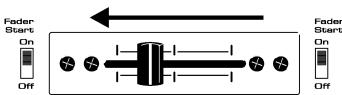
Important: Both fader start switches must be in "ON" position!
SPECIFICATIONS
Power Supply: AC 230 V, 50Hz
Frequency response: 20-20.000Hz (+/-2dB)
THD + noise: <0.09% @ 1kHz, 0dB
S/N Ratio (IHF-A): >86dB @ 1kHz.
Micro inputs: 1.5mV @ 10kΩ
Line/CD inputs: 150mV @ 22kΩ
Phono inputs: 3mV @ 47kΩ
Record output: 775mV @ 600Ω
Master A/B output: 1.5V @ 4k7Ω unbal.
Master A/B output: 850mV @ 600Ω bal.
Talkover: 0dB → -15dB
Tone controls: +12dB / -26dB
Headphone: 1.5V@33Ω
Dimensions: 294(W) x 370(H) x 95(D) mm
Weight: 5kg
MODE D'EMPLOI
CHARACTERISTIQUES
Saida Master A/B: 1.5V @ 4k7Ω s/balance
Saida Master A/B: 850mV @ 600Ω balanceada
Talkover: 0dB → -15dB