
2802W - Wireless Network Card SMC - Free user manual and instructions
Find the device manual for free 2802W SMC in PDF.



User questions about 2802W SMC
0 question about this device. Answer the ones you know or ask your own.
Ask a new question about this device
Download the instructions for your Wireless Network Card in PDF format for free! Find your manual 2802W - SMC and take your electronic device back in hand. On this page are published all the documents necessary for the use of your device. 2802W by SMC.
USER MANUAL 2802W SMC
EZ-Connect™ g Wireless PCI Card
EZ-Connect™ g Wireless PCI Card
EZ-Connect™ g Wireless PCI-Karte
Carte PCI sans fil EZ Connect™ g
Tarjeta inalámbrica PCI EZ-Connect™ g
Scheda PCI wireless EZ Connect™ g
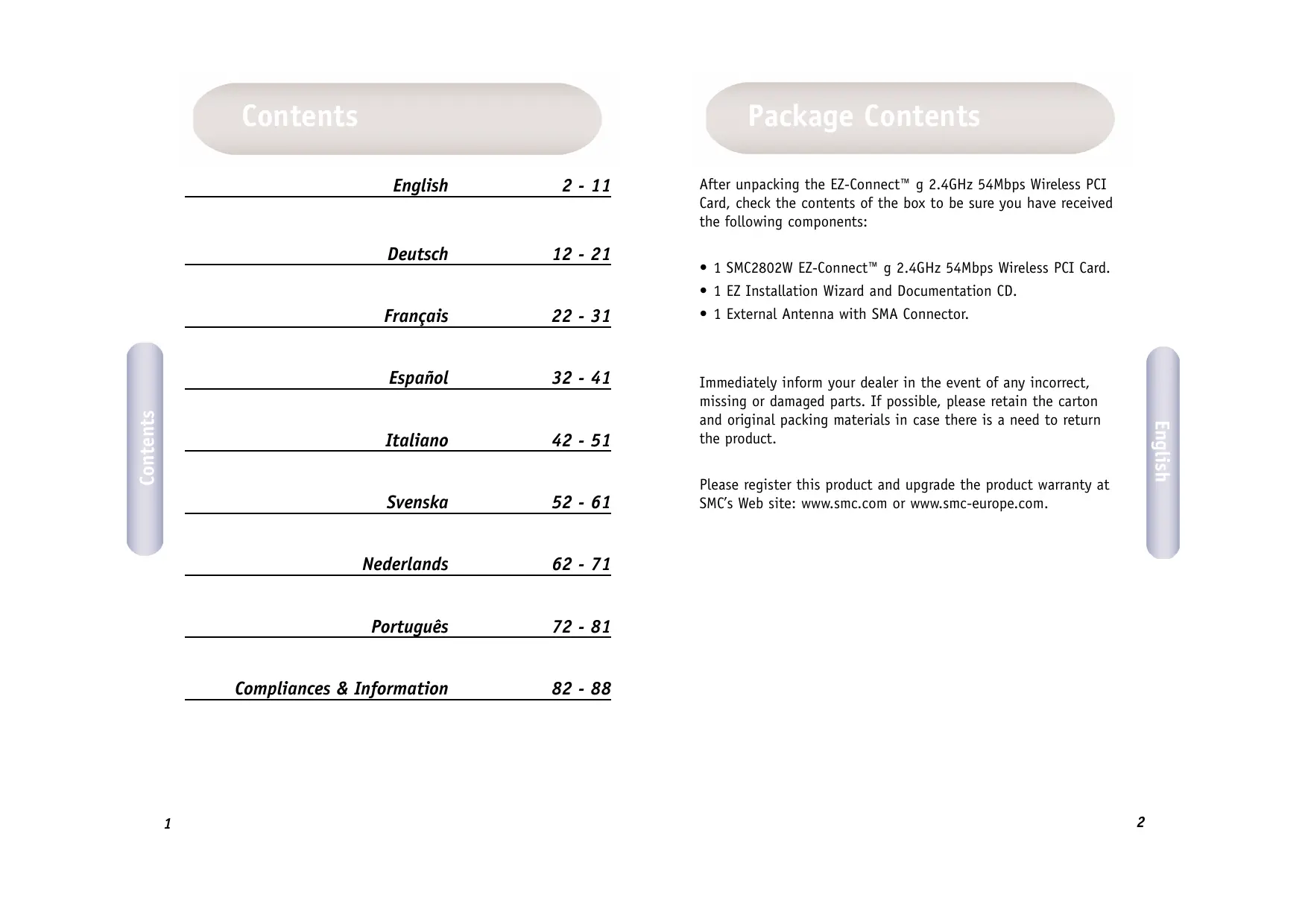
After unpacking the EZ-Connect™ g 2.4GHz 54Mbps Wireless PCI Card, check the contents of the box to be sure you have received the following components:
- 1 SMC2802W EZ-Connect™ g 2.4GHz 54Mbps Wireless PCI Card.
- 1 EZ Installation Wizard and Documentation CD.
- 1 External Antenna with SMA Connector.
Immediately inform your dealer in the event of any incorrect, missing or damaged parts. If possible, please retain the carton and original packing materials in case there is a need to return the product.
Please register this product and upgrade the product warranty at SMC's Web site: www.smc.com or www.smc-europe.com.
System Requirements
- A PC running Windows 98SE/Me/2000/XP.
- CD-ROM drive.
- An available bus-mastered PCI.
Minimum of 32MB RAM and 300 MHz CPU. - Minimum of 6MB available hard disk space for utility and driver installation.
- Another IEEE 802.11b, or 802.11g compliant device installed on your network such as the Barricade™ g 2.4GHz 54Mbps Wireless Broadband Router with Print Server (SMC2804WBRP-G), or another wireless adapter, such as the EZ-Connect™ g 2.4GHz 54Mbps Wireless Cardbus Adapter (SMC2835W).
Hardware description
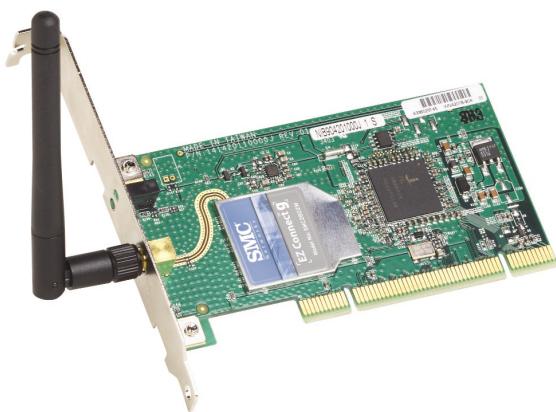
SMC's EZ-Connect™ g 2.4GHz 54Mbps Wireless PCI Card (SMC2802W) is a high speed IEEE 802.11g-compliant wireless network adapter that supports up to 54Mbps data rate, and seamlessly integrates with existing Ethernet networks to support applications such as mobile users or temporary conferences. This solution offers a high data rate and reliable wireless connectivity with considerable cost savings over wired LANs (which include long-term maintenance overhead for cabling). Just install enough wireless access points to cover your network area, plug wireless cards into your notebooks or computers, and start networking.
The EZ Connect™ g 2.4GHz 54Mbps Wireless PCI Card has two status LED indicators:
| LED | Status | Function |
| Power/Link | On | Indicates a valid connection with an access point. |
| Flashing | Indicates that the Wireless PCI Card is operating in the 802.11 ad hoc mode. | |
| Activity | Flashing | Indicates that the Wireless PCI Card is browsing active access points. |
Applications
EZ-Connect™ wireless products offer a fast, reliable, cost-effective networking solution for:
- Remote access to corporate network information
E-mail, file transfer, and terminal emulation.
- Difficult-to-wire environments
Historical or old buildings, asbestos installations, and open areas where wiring is difficult to employ.
- Frequently changing environments
Retailers, manufacturers, and banks which frequently rearrange the workplace or change locations.
- Temporary LANs for special projects or peak periods
Trade shows, exhibitions, and construction sites that need a temporary setup. Retailers, airline, and shipping companies that need additional workstations for peak periods. Auditors who require workgroups at customer sites.
- Access to databases for mobile workers
Doctors, nurses, retailers, or white-collar workers who need access to databases while being mobile in a hospital, retail store, in an office, or on a campus.
SOHO users
SOHO (Small Office and Home Office) users who need easy and quick installation of a small computer network.
Hardware Installation
Warning: This network adapter requires a PC and BIOS that supports the PCI Local Bus Specification v2.2 or later. If you are installing in an older computer model, upgrade the BIOS to the latest version. In addition, network cards are sensitive to static electricity. To protect the card, avoid touching its electrical components and always touch the metal chassis of your computer before handling the card.
- Switch off the computer, unplug the power cord, and remove the computer's cover.
-
Select an available bus-mastering PCI slot and remove the cover bracket.
-
Detach the antenna from the Wireless PCI Card before inserting the card into a PCI slot.
- Install the network card into the slot so that it is firmly seated. Screw the card's bracket securely into the computer's chassis.
English
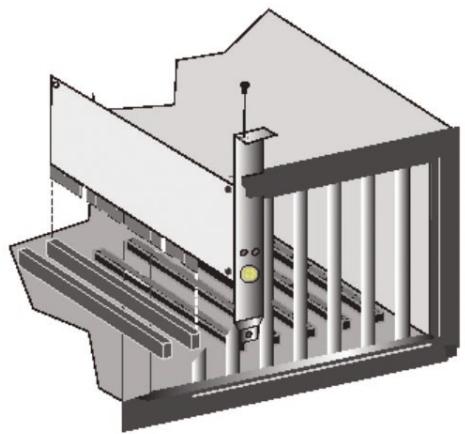
Note: Be careful that it does not touch any conducting parts on the computer motherboard.
- Attach the antenna to the Wireless PCI Card.
- Replace the chassis cover on your computer and power it on.
- The Wireless PCI Card should be automatically configured by the host computer's BIOS. However, if you have an older computer, you may have to manually configure the computer's BIOS settings.
y
Note: Installation processes such as this may require the use of your original, licensed copy of Windows. Please have your Windows CD available BEFORE proceeding with the installation.
This installation method makes the process as simple and Plug- and-Play as possible. Simply run the driver/utility program, reboot your machine and insert your EZ-Connect™ g 2.4GHz 54 Mbps Wireless PCI Card. It's as easy as 1-2-3.
- Insert the EZ Installation Wizard and Documentation CD.
- Click the [Install Driver/Utility] button to continue.
- Choose your language requirement and click [OK]. Please wait while the utility detects your system environment.
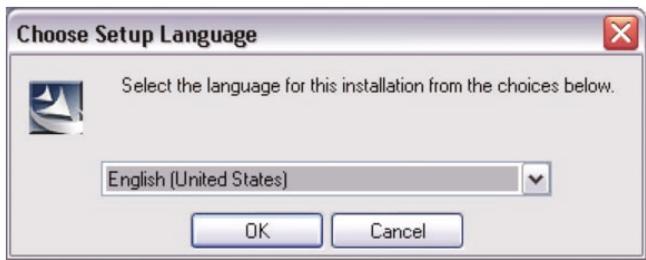
- The installation program will proceed to copy the necessary files to your hard drive. Please click [Finish] when completed.
(Note: This will restart your computer. If you do not wish to restart now, select the [No, I will restart my computer later] radio button and click [Finish].)
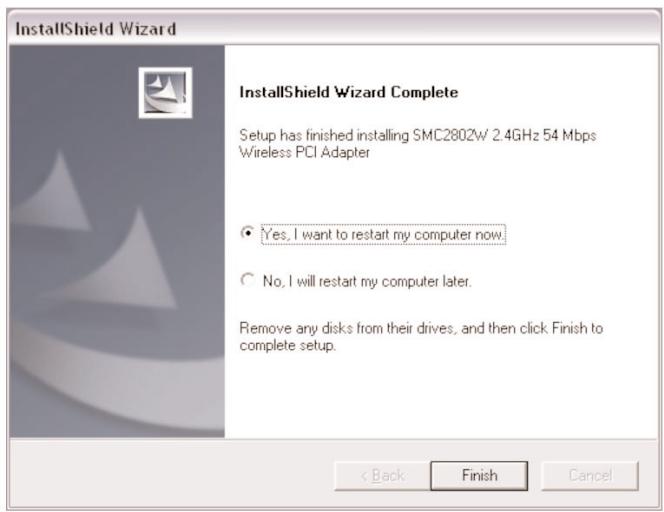
- Upon boot up, Windows will detect your SMC2802W. Please follow the on-screen directions to complete the installation process. Insert your Windows CD-ROM if requested to do so.
(Note: In Windows 2000 or Windows XP, you may be prompted by a Digital Signature pop up window. Please be sure to click [Yes] or [Continue Anyway] to continue the driver installation.)
Packungsinhalt
Federal Communication Commission Interference Statement
This equipment has been tested and found to comply with the limits for a Class B digital device, pursuant to Part 15 of the FCC Rules. These limits are designed to provide reasonable protection against harmful interference in a residential installation. This equipment generates, uses and can radiate radio frequency energy and, if not installed and used in accordance with the instructions, may cause harmful interference to radio communications. However, there is no guarantee that interference will not occur in a particular installation. If this equipment does cause harmful interference to radio or television reception, which can be determined by turning the equipment off and on, the user is encouraged to try to correct the interference by one of the following measures:
- Reorient or relocate the receiving antenna.
- Increase the separation between the equipment and receiver.
- Connect the equipment into an outlet on a circuit different from that to which the receiver is connected.
- Consult the dealer or an experienced radio/TV technician for help.
FCC Caution: Any changes or modifications not expressly approved by the party responsible for compliance could void the user's authority to operate this equipment.
This device complies with Part 15 of the FCC Rules. Operation is subject to the following two conditions: (1) This device may not cause harmful interference, and (2) this device must accept any interference received, including interference that may cause undesired operation.
IMPORTANT NOTE:
FCC Radiation Exposure Statement
This equipment complies with FCC radiation exposure limits set forth for an uncontrolled environment. This equipment should be installed and operated with minimum distance 20cm between the radiator & your body.
This transmitter must not be co-located or operating in conjunction with any other antenna or transmitter.
Industry Canada - Class B
This digital apparatus does not exceed the Class B limits for radio noise emissions from digital apparatus as set out in the interference-causing equipment standard entitled "Digital Apparatus" ICES-003 of the Department of Communications.
This RF product complies with R&TTE Directive 99/5/EC. For the evaluation of the compliance with this Directive, the following standards were applied:
- Electromagnetic compatibility and radio spectrum matters (ERM)
EN300 328-1 (2001-12)
EN300 328-2 (2001-12)
- Electromagnetic Compatibility (EMC) Standard for radio equipment and services
EN301 489-1
EN301 489-17
- Safety Test
EN60950
CE Mark Warning
In a domestic environment this product may cause radio interference in which case the user may be required to take adequate measures. Warning!
Full installation manuals are provided on the Installation CD-Rom. Manuals in other languages than those included on the CD-Rom are provided on www.smc-europe.com (section support).
Firmware and Drivers
For latest driver, technical information and bug-fixes please visit www.smc-europe.com (section support).
Limited Lifetime Warranty Statement
For detailed information on SMC's limited lifetime warranty please check the English full manual on this CD-Rom or visit www.smc-europe.com (section support, product registration).
Contact SMC
Contact details for your relevant countries are available on www.smc-europe.com and www.smc.com.
Statement of Conditions
In line with our continued efforts to improve internal design, operational function, and/or reliability, SMC reserves the right to make changes to the product(s) described in this document without notice. SMC does not assume any liability that may occur due to the use or application of the product(s) described herein. In order to obtain the most accurate knowledge of installation, bug-fixes and other product related information we advise to visit the relevant product support page at www.smc-europe.com before you start installing the equipment. All information is subject to change without notice.
Limitation of Liability
In no event, whether based in contract or tort (including negligence), shall SMC be liable for incidental, consequential, indirect, special or punitive damages of any kind, or for loss of revenue, loss of business or other financial loss arising out of or in connection with the sale, installation, maintenance, use, performance, failure or interruption of its products, even if SMC or its authorized reseller has been advised of the possibility of such damages.
Copyright
Information furnished by SMC Networks, Inc. (SMC) is believed to be accurate and reliable. However, no responsibility is assumed by SMC for its use, nor for any infringements of patents or other rights of third parties which may result from its use. No license is granted by implication or otherwise under any patent or patent rights of SMC. SMC reserves the right to change specifications at any time without notice.
Trademarks
SMC is a registered trademark and EZ Connect is a trademark of SMC Networks, Inc. Other product and company names are trademarks or registered trademarks of their respective holders.