
KOSMOS V2 - Audio Equipment PEAVEY - Free user manual and instructions
Find the device manual for free KOSMOS V2 PEAVEY in PDF.


| Product Type | Spectrum Expander / Sub-Harmonic Generator |
| Brand | Peavey |
| Model | Kosmos V2 |
| Dimensions (HxWxD) | 4.45 cm x 48.6 cm x 22.86 cm (1.75" x 19" x 9") |
| Weight | 3.22 kg (7.1 lb) |
| Power Supply | 120 VAC 60 Hz, 15 W |
| Frequency Response | <10 Hz to 80 kHz (+0/-1 dB) |
| Nominal Input Level | +4 dBu (1.23 V RMS) |
| Maximum Output Level | +26 dBu |
| Maximum Input Level | +22 dBu |
| Input Impedance | Balanced (XLR/TRS) |
| Output Impedance | Balanced (XLR/TRS) |
| Main Functions | Subharmonic generator, stereo widening, bass and treble control, subwoofer output, 90 Hz filter, mono/stereo mode, system bypass |
| Maintenance and Cleaning | Use a dry cloth for cleaning. Do not use liquids. |
| Safety | Do not open the device, risk of electric shock. Entrust repairs to a Peavey authorized technician. Do not expose to moisture or liquids. |
| Spare Parts and Repairability | No user-serviceable parts. Contact a Peavey authorized repairer. |
| General Information | User manual available in multiple languages. Made in the USA. |
Frequently Asked Questions - KOSMOS V2 PEAVEY
User questions about KOSMOS V2 PEAVEY
0 question about this device. Answer the ones you know or ask your own.
Ask a new question about this device
Download the instructions for your Audio Equipment in PDF format for free! Find your manual KOSMOS V2 - PEAVEY and take your electronic device back in hand. On this page are published all the documents necessary for the use of your device. KOSMOS V2 by PEAVEY.
USER MANUAL KOSMOS V2 PEAVEY
Intended to alert the user to the presence of uninsulated “dangerous voltage” within the product’s enclosure that may be of sufficient magnitude to constitute a risk of electric shock to persons.

Intended to alert the user of the presence of important operating and maintenance (servicing) instructions in the literature accompanying the product.
CAUTION: Risk of electrical shock — DO NOT OPEN!
CAUTION: To reduce the risk of electric shock, do not remove cover. No user serviceable parts inside. Refer servicing to qualified service personnel.
WARNING: To prevent electrical shock or fire hazard, this apparatus should not be exposed to rain or moisture, and objects filled with liquids, such as vases, should not be placed on this apparatus. Before using this apparatus, read the operating guide for further warnings.

WARNING: When using electrical products, basic cautions should always be followed, including the following:
- Read these instructions.
- Keep these instructions.
- Heed all warnings.
- Follow all instructions.
- Do not use this apparatus near water.
- Clean only with a dry cloth.
- Do not block any of the ventilation openings. Install in accordance with manufacturer's instructions.
- Do not install near any heat sources such as radiators, heat registers, stoves or other apparatus (including amplifiers) that produce heat.
- Do not defeat the safety purpose of the polarized or grounding-type plug. A polarized plug has two blades with one wider than the other. A grounding type plug has two blades and a third grounding plug. The wide blade or third prong is provided for your safety. If the provided plug does not fit into your outlet, consult an electrician for replacement of the obsolete outlet.
- Protect the power cord from being walked on or pinched, particularly at plugs, convenience receptacles, and the point they exit from the apparatus.
- Only use attachments/accessories provided by the manufacturer.
- Use only with a cart, stand, tripod, bracket, or table specified by the manufacturer, or sold with the apparatus. When a cart is used, use caution when moving the cart/apparatus combination to avoid injury from tip-over.
- Unplug this apparatus during lightning storms or when unused for long periods of time.
- Refer all servicing to qualified service personnel. Servicing is required when the apparatus has been damaged in any way, such as when power-supply cord or plug is damaged, liquid has been spilled or objects have fallen into the apparatus, the apparatus has been exposed to rain or moisture, does not operate normally, or has been dropped.
- Never break off the ground pin. Write for our free booklet “Shock Hazard and Grounding.” Connect only to a power supply of the type marked on the unit adjacent to the power supply cord.
- If this product is to be mounted in an equipment rack, rear support should be provided.
- Note for UK only: If the colors of the wires in the mains lead of this unit do not correspond with the terminals in your plug, proceed as follows:
a) The wire that is colored green and yellow must be connected to the terminal that is marked by the letter E, the earth symbol, colored green or colored green and yellow.
b) The wire that is colored blue must be connected to the terminal that is marked with the letter N or the color black.
c) The wire that is colored brown must be connected to the terminal that is marked with the letter L or the color red.
-
This electrical apparatus should not be exposed to dripping or splashing and care should be taken not to place objects containing liquids, such as vases, upon the apparatus.
-
Exposure to extremely high noise levels may cause a permanent hearing loss. Individuals vary considerably in susceptibility to noise-induced hearing loss, but nearly everyone will lose some hearing if exposed to sufficiently intense noise for a sufficient time. The U.S. Government's Occupational Safety and Health Administration (OSHA) has specified the following permissible noise level exposures:
| Duration Per Day In Hours | Sound Level dBA, Slow Response |
| 8 | 90 |
| 6 | 92 |
| 4 | 95 |
| 3 | 97 |
| 2 | 100 |
| 112 | 102 |
| 1 | 105 |
| 1/2 | 110 |
| 1/4 or less | 115 |
According to OSHA, any exposure in excess of the above permissible limits could result in some hearing loss. Earplugs or protectors to the ear canals or over the ears must be worn when operating this amplification system in order to prevent a permanent hearing loss, if exposure is in excess of the limits as set forth above. To ensure against potentially dangerous exposure to high sound pressure levels, it is recommended that all persons exposed to equipment capable of producing high sound pressure levels such as this amplification system be protected by hearing protectors while this unit is in operation.
SAVE THESE INSTRUCTIONS!
Congratulations on the purchase of your new Kosmos® v2.
The Kosmos® v2 is a second generation subharmonic and stereo image enhancement system. As the successor to the award-winning Kosmos®, it incorporates improved circuitry and adds features to provide even more functionality for live sound and recording applications. Like the original Kosmos®, it can provide planet rattling bass as its subharmonic processor watches the source material, analyzes the bass, then generates additional phase-synced low frequencies an octave below it. Borrowing from the Kosmos® Pro, the damping (tracking) has two preset ranges.
When using the Kosmos® v2, it is recommended that other equalization (especially output equalization) be set flat. Adjust the Kosmos® v2 to optimize the tone quality, then make any fine adjustments with the other gear. You may find that little needs to be tweaked, since the Kosmos® v2 corrects deficiencies in the speaker system. Bass boost applied before the Kosmos® v2 may defeat what you are trying to accomplish by causing the sound to be muddy or distorted.
FEATURES:
- Creates intelligent, phase-synced subharmonics that don’t overpower existing material
- Dynamic source tracking yields tight, clean bass sounds
- Subharmonic activity indicator shows processing status
- A specially tuned low frequency circuit, compliments the subharmonics and can be used to fatten the low end
- High frequency image enhancement provides atmosphere through improved stereo separation and clarity
- A rear panel stereo/mono switch allows use as a channel insert or in a monophonic system
- Internal 90 Hz crossover signal can be removed from the subwoofer output when used as a side-chain effect
- Master output level controls left, right, and subwoofer output levels simultaneously
- All inputs & outputs are balanced XLR or 1/4" TRS jacks
• Signal and Peak lamps monitor signal activity and warn of overload - Independent subwoofer output level control
Please read this guide carefully to ensure your personal safety as well as the safety of your equipment
Connecting your Kosmos® II in your signal chain:
Direct: Insert Kosmos® v2 between the output of the mixer and the input of the power amp
As An Effect: Create an effects loop between your mixer and Kosmos® v2 by connecting an Aux send from your mixer into the Kosmos® v2, and return the signal to your mixer through an aux return or channel strip input. See MONO (15) on page 9.

System Bypass
This switch is a hard bypass of all functions and disables the subwoofer output. The status is indicated by a red lamp, which lights when the unit is off-line. Because the system bypass switch circumvents the internal circuitry, it functions even when no power is applied to the unit.
② Subharmonics
This control adds a synthesized phase synced bass signal one octave lower than what is present in the source. The adjacent LED indicates sub bass activity. This feature generates bass subharmonics that would register on a seismograph, yet are pleasing to the ear. No processing occurs when the input signal is outside the defined range. This thickens and deepens the bass of most program material without clouding the midrange, and is especially effective on bass drums. Consequently, speaker systems seem larger and more defined. Since low frequencies can be boosted significantly, care must be taken to prevent amplifier clipping and speaker damage by excessive bass levels. It's louder than you think.
③ Low Damping
Perfect for acoustic and bass guitars, this switch loosens the tracking, allowing the subharmonics to ring out with less damping. (Normally, the subharmonics tightly follow the envelope of the input bass signal, resulting in a sharp, clean bass, which works best for kick drums and other percussive sounds.) Lower damping has a lower peak value, but can have a higher average level (depending on the source), so the level of the subharmonics may need to be reduced.
(4) Low Freq
This control adds a specific band of bass frequencies (natural, not synthesized) to the bass enhancement mix. It is voiced to compliment the subharmonics and is used to even out the low end balance. This control can be considered as a waveform adjustment tool when used in conjunction with the subharmonic level control, or used alone for bass boost.
⑤ High Freq
This is a combination control. It simultaneously adjusts high frequency boost and stereo width. The minimum position is the flat setting; as the control is rotated clockwise, the left-right image becomes wider and clarity is increased. It has been designed to pull vocals more to the front of the mix while giving them a three dimensional quality.
(6) Output Level
This is the master volume control of the Kosmos® v2 processor. The left, right, and subwoofer outputs are affected simultaneously.
⑦ Cut Sub Bass From Mains
This switch removes the subharmonics and the low frequency effects from the main left and right outputs. This allows the added bass enhancements to be sent only to the subwoofer output when a system with subs is used. When the left and right speakers cannot handle the additional bass produced, this is the best way to route low frequency energy. The high frequency effects are always sent to the mains and are not affected by this switch's setting.
⑧ Crossover Disable
Built into the Kosmos® v2 is a 90 Hz crossover filter, which is normally sent to the subwoofer output with the bass enhancement signals. This switch removes that signal, leaving only the bass enhancements. This is useful when the Kosmos® v2 is used as a side chain effect, when only the added bass information is desired.

flowchart
graph LR
    A["DESIGNED AND MADE IN U.S.A."] --> B["120 VAC 60Hz 15 WATTS"]
    B --> C["TBS"]
    C --> D["SLEEVE-GND"]
    D --> E["TP-POS"]
    E --> F["RING-NEG"]
    F --> G["INPUT OUTPUT"]
    G --> H["1-GND"]
    H --> I["2-POS"]
    I --> J["3-NEG"]
    J --> K["MOUNT IN RACK ONLY - INSTALLER SUB SUPPORT DE MONTAGE SEULEMENT"]
    K --> L["SUB OUT"]
    L --> M["OUTPUTS"]
    M --> N["LEFT/MONO"]
    N --> O["INPUTS"]
    O --> P["LEFT/MONO"]
    P --> Q["INPUTS"]
    Q --> R["INPUTS"]
    R --> S["INPUTS"]
    S --> T["INPUTS"]
    T --> U["INPUTS"]
    U --> V["INPUTS"]
    V --> W["INPUTS"]
    W --> X["INPUTS"]
    X --> Y["INPUTS"]
    Y --> Z["INPUTS"]
    Z --> AA["INPUTS"]
    AA --> AB["INPUTS"]
    AB --> AC["INPUTS"]
    AC --> AD["INPUTS"]
    AD --> AE["INPUTS"]
⑨ Subwoofer
This control sets the output level of the subwoofer signal, which is the sum of the subharmonic output, the low frequency bass output, and the information from the 90 Hz cross-over network (if not disabled by the crossover disable switch). When the bypass switch is engaged the subwoofer is disabled.
10 Power
Depressing the power switch supplies power to the unit.
⑪ IEC Mains
Connect the supplied AC mains cord here. Make sure that the correct voltage is applied, or damage to the unit could result. (See markings on unit.)
US DOMESTIC AC MAINS CORD:
The mains cord supplied with the unit is a heavy-duty, 3-conductor type with a conventional 120 VAC plug with ground pin. If the outlet used does not have a ground pin, a suitable grounding adapter should be used, and the third wire should be grounded properly.
Never remove or cut the ground pin of the line cord plug. The console is supplied with a properly rated line cord. If lost or damaged, replace this cord with one of the proper rating.


NOTE FOR UK ONLY:
If the colors of the wires in the mains lead of this unit do not correspond with the colored markings identifying terminals in your plug, proceed as follows: (1) The wire that is colored green and yellow must be connected to the terminal marked by the letter E, or by the earth symbol, or colored green or green and yellow. (2) The wire that is colored blue must be connected to the terminal that is marked with the letter N, or colored black. (3) The wire that is colored brown must be connected to the terminal that is marked with the letter L or colored red.
12 Subwoofer Output
This 1/4" TRS electronically balanced output can be used in either balanced (with a 1/4" TRS jack) or unbalanced (standard 1/4" jack) mode. The levels will automatically match the configuration. This output supplies the signal for the subwoofer amplifier (line level).
13 Left and Right Outputs
The left and right outputs are electronically balanced, with pin 2 (and tip) positive. The XLR and 1/4" TRS phono jacks are directly wired in parallel. They should not be used on the same channel at the same time since the output balance would not necessarily be maintained, especially if a balanced and an unbalanced connector were used.
14 Inputs
The left and right input jacks are balanced with pin 2 (and tip) positive. The XLR and 1/4" TRS jacks are directly wired in parallel. Balanced or unbalanced inputs can be used. As mentioned above, do not use both the XLR and the 1/4" inputs on the same channel at the same time or an imbalance could occur, compromising the unit's hum and noise rejection.
15 Mono
This switch converts the Kosmos® v2 to monophonic operation by selecting the left/mono input jack as the source and routing it to both the left and right signal paths internally. The right input jacks are disabled in this mode. Both the left and right outputs function, with only the high frequency stereo circuitry causing a difference between them. When the unit is used as an insert effect, the switch should be set to mono to operate properly.
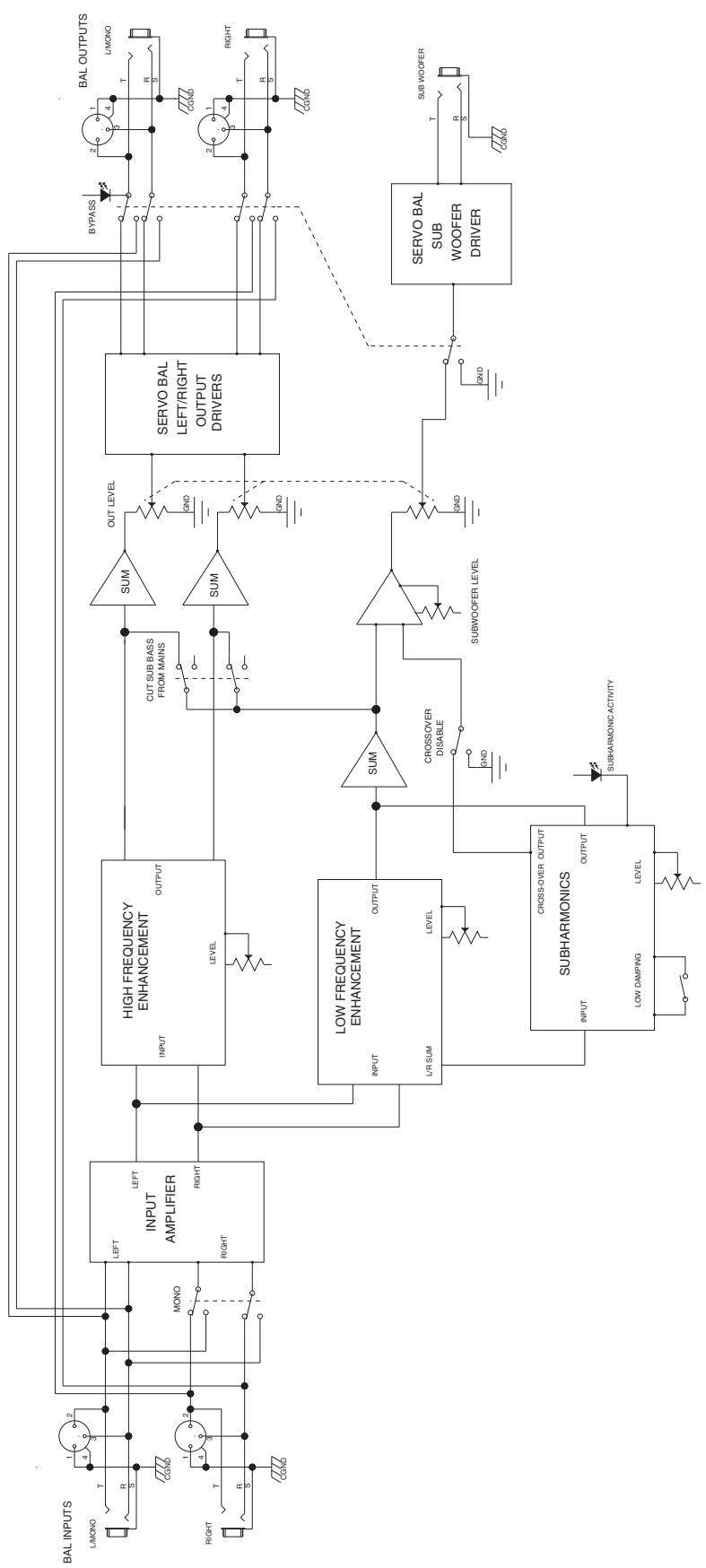
flowchart
graph TD
    A["BAL INPUTS"] --> B["1 L/MONO"]
    B --> C["2 R S"]
    C --> D["3 CGND"]
    D --> E["4 RIGHT"]
    E --> F["5 R S"]
    F --> G["6 CGND"]
    G --> H["7 RIGHT"]
    H --> I["8 R S"]
    I --> J["9 HIGH FREQUENCY ENHANCEMENT"]
    J --> K["OUTPUT LEVEL"]
    K --> L["SUM"]
    L --> M["OUT LEVEL"]
    M --> N["SERVO BAL LEFT/RIGHT OUTPUT DRIVERS"]
    N --> O["1 OUT"]
    O --> P["2 OUT"]
    P --> Q["3 OUT"]
    Q --> R["4 OUT"]
    R --> S["5 OUT"]
    S --> T["6 OUT"]
    T --> U["7 OUT"]
    U --> V["8 OUT"]
    V --> W["9 OUT"]
    W --> X["10 OUT"]
    X --> Y["11 OUT"]
    Y --> Z["12 OUT"]
    Z --> AA["13 OUT"]
    AA --> AB["14 OUT"]
    AB --> AC["15 OUT"]
    AC --> AD["16 OUT"]
    AD --> AE["17 OUT"]
    AE --> AF["18 OUT"]
    AF --> AG["19 OUT"]
    AG --> AH["20 OUT"]
    AH --> AI["21 OUT"]
    AI --> AJ["22 OUT"]
    AJ --> AK["23 OUT"]
    AK --> AL["24 OUT"]
    AL --> AM["25 OUT"]
    AM --> AN["26 OUT"]
    AN --> AO["27 OUT"]
    AO --> AP["28 OUT"]
    AP --> AQ["29 OUT"]
    AQ --> AR["30 OUT"]
    AR --> AS["31 OUT"]
    AS --> AT["32 OUT"]
    AT --> AU["33 OUT"]
    AU --> AV["34 OUT"]
    AV --> AW["35 OUT"]
    AW --> AX["36 OUT"]
    AX --> AY["37 OUT"]
    AY --> AZ["38 OUT"]
    AZ --> BA["39 OUT"]
    BA --> BB["40 OUT"]
    BB --> BC["41 OUT"]
    BC --> BD["42 OUT"]
    BD --> BE["43 OUT"]
    BE --> BF["44 OUT"]
    BF --> BG["45 OUT"]
    BG --> BH["46 OUT"]
    BH --> BI["47 OUT"]
    BI --> BJ["48 OUT"]
    BJ --> BK["49 OUT"]
    BK --> BL["50 OUT"]
Kosmos® V2 Specifications
Frequency Response
Process Mode: Program Controlled
Bypassed: <10Hz to 80Khz +0/-1 dB
Dimensions (HxWxD)
1.75" x 19.0"x9.0"
(4.45 cm x 48.6 cm x 22.86 cm)
Weight
Net: 7.1 lbs (3.22 kg)
Shipping Weight: 8.7 lbs (3.95 kg)
THD+N (10Hz -80K Hz BW)
Process Mode: ≤ .003%
Bypassed: ≤.001%
Power Requirements
8 Watts @ 120VRMS 50/60 Hz
8 Watts @ 230VRMS 50/60 Hz
Signal to Noise
88 dB
Crosstalk
<75 dB @ 1KHz
CMRR
60 dB
Nominal Input Level
+4 dBu (1.23 VRMS)
Max Output
+26 dBu
Max Input
+22 dBu
Input Impedance
20K ohms balanced (Pin 2 positive), 10K ohms unbalanced
Output Impedance
200 ohms balanced (Pin 2 positive), 100 ohms unbalanced
ESPAÑOL
Kosmos® v2
Kosmos® V2 Specifications
Shipping Weight: 8.7 lbs (3.95 kg)
THD+N (10Hz -80K Hz BW)
8 Watts @ 120VRMS 50/60 Hz
8 Watts @ 230VRMS 50/60 Hz
Señal a Ruido
88 dB
Crosstalk
<75 dB @ 1KHz
CMRR
60 dB
Nivel de Entrada Nominal
+4 dBu (1.23 VRMS)
Salida Max
+26 dBu
Entrada Max
+22 dBu
(7) Cut Sub Bass From Mains
13 Left and Right Outputs
Kosmos® V2 Specifications
Shipping Weight: 8.7 lbs (3.95 kg)
THD+N (10Hz -80K Hz BW)
Mode Process : ≤ .003%
Dérivé: ≤.001%
Energie requise
8 Watts @ 120VRMS 50/60 Hz
8 Watts @ 230VRMS 50/60 Hz
Signal vers Bruit
88 dB
Diaphonie
<75 dB @ 1KHz
CMRR
60 dB
20K ohms balanced (Pin 2 positive),
10K ohms unbalanced
Output Impedance
200 ohms balanced (Pin 2 positive),
100 ohms unbalanced
⑦ 7. Cut Sub Bass From Mains
Kosmos® V2 Specifications
Frequenzgang
1,75" x 19,0" x 9,0"
4,45 cm x 48,6 cm x 22,86 cm
Weight
Net: 7.1 lbs (3.22 kg)
Shipping Weight: 8.7 lbs (3.95 kg)
What This Warranty Covers
Your Peavey Warranty covers defects in material and workmanship in Peavey products purchased and serviced in the U.S.A. and Canada.
What This Warranty Does Not Cover
The Warranty does not cover: (1) damage caused by accident, misuse, abuse, improper installation or operation, rental, product modification or neglect; (2) damage occurring during shipment; (3) damage caused by repair or service performed by persons not authorized by Peavey; (4) products on which the serial number has been altered, defaced or removed; (5) products not purchased from an Authorized Peavey Dealer.
Who This Warranty Protects
This Warranty protects only the original retail purchaser of the product.
How Long This Warranty Lasts
The Warranty begins on the date of purchase by the original retail purchaser. The duration of the Warranty is as follows:
| Product Category | Duration |
| Guitars/Basses, Amplifiers, Pre-Amplifiers, Mixers, Electronic Crossovers and Equalizers | 2 years (+ 3 years)* |
| Drums | 2 years (+ 1 year)* |
| Enclosures | 3 years (+ 2 years)* |
| Digital Effect Devices and Keyboard and MIDI Controllers | 1 year (+ 1 year)* |
| Microphones | 2 years |
| Speaker Components (incl. speakers, baskets, drivers, diaphragm replacement kits and passive crossovers) and all Accessories | 1 year |
| Tubes and Meters | 90 days |
[*Denotes additional warranty period applicable if optional Warranty Registration Card is completed and returned to Peavey by original retail purchaser within 90 days of purchase.]
What Peavey Will Do
We will repair or replace (at Peavey's discretion) products covered by warranty at no charge for labor or materials. If the product or component must be shipped to Peavey for warranty service, the consumer must pay initial shipping charges. If the repairs are covered by warranty, Peavey will pay the return shipping charges.
How To Get Warranty Service
(1) Take the defective item and your sales receipt or other proof of date of purchase to your Authorized Peavey Dealer or Authorized Peavey Service Center. OR
(2) Ship the defective item, prepaid, to Peavey Electronics Corporation, International Service Center, 412 Highway 11 & 80 East, Meridian, MS 39301 or Peavey Canada Ltd., 95 Shields Court, Markham, Ontario, Canada L3R 9T5. Include a detailed description of the problem, together with a copy of your sales receipt or other proof of date of purchase as evidence of warranty coverage. Also provide a complete return address.
Limitation of Implied Warranties
ANY IMPLIED WARRANTIES, INCLUDING WARRANTIES OF MERCHANTABILITY AND FITNESS FOR A PARTICULAR PURPOSE, ARE LIMITED IN DURATION TO THE LENGTH OF THIS WARRANTY.
Some states do not allow limitations on how long an implied warranty lasts, so the above limitation may not apply to you.
Exclusions of Damages
PEAVEY'S LIABILITY FOR ANY DEFECTIVE PRODUCT IS LIMITED TO THE REPAIR OR REPLACEMENT OF THE PRODUCT, AT PEAVEY'S OPTION. IF WE ELECT TO REPLACE THE PRODUCT, THE REPLACEMENT MAY BE A RECONDITIONED UNIT. PEAVEY SHALL NOT BE LIABLE FOR DAMAGES BASED ON INCONVENIENCE, LOSS OF USE, LOST PROFITS, LOST SAVINGS, DAMAGE TO ANY OTHER EQUIPMENT OR OTHER ITEMS AT THE SITE OF USE, OR ANY OTHER DAMAGES WHETHER INCIDENTAL, CONSEQUENTIAL OR OTHERWISE, EVEN IF PEAVEY HAS BEEN ADVISED OF THE POSSIBILITY OF SUCH DAMAGES.
Some states do not allow the exclusion or limitation of incidental or consequential damages, so the above limitation or exclusion may not apply to you.
This Warranty gives you specific legal rights, and you may also have other rights which vary from state to state.
If you have any questions about this warranty or service received or if you need assistance in locating an Authorized Service Center, please contact the Peavey International Service Center at (601) 483-5365 / Peavey Canada Ltd. at (905) 475-2578.
FEATURES AND SPECIFICATIONS SUBJECT TO CHANGE WITHOUT NOTICE.

Logo referenced in Directive 2002/96/EC Annex IV (OJ(L)37/38,13.02.03 and defined in EN 50419: 2005
The bar is the symbol for marking of new waste and is applied only to equipment manufactured after 13 August 2005
NOTES

Features and specifications subject to change without notice.
Peavey Electronics Corporation • 711 A Street • Meridian, MS 39301
(601) 483-5365 • FAX (601) 486-1278 • www.peavey.com


- SAVE THESE INSTRUCTIONS!
- FEATURES:
- Connecting your Kosmos® II in your signal chain:
- System Bypass
- ② Subharmonics
- ③ Low Damping
- Low Freq
- ⑤ High Freq
- Output Level
- ⑦ Cut Sub Bass From Mains
- ⑧ Crossover Disable
- ⑨ Subwoofer
- Power
- ⑪ IEC Mains
- US DOMESTIC AC MAINS CORD:
- NOTE FOR UK ONLY:
- Subwoofer Output
- Left and Right Outputs
- Inputs
- Mono
- Kosmos® V2 Specifications
- Frequency Response
- Dimensions (HxWxD)
- Weight
- THD+N (10Hz -80K Hz BW)
- Power Requirements
- Signal to Noise
- Crosstalk
- CMRR
- Nominal Input Level
- Max Output
- Max Input
- Input Impedance
- Output Impedance
- ESPAÑOL
- Kosmos® v2
- Señal a Ruido
- Nivel de Entrada Nominal
- Salida Max
- Entrada Max
- Cut Sub Bass From Mains
- Energie requise
- Signal vers Bruit
- Diaphonie
- ⑦ 7. Cut Sub Bass From Mains
- Frequenzgang
- What This Warranty Covers
- What This Warranty Does Not Cover
- Who This Warranty Protects
- How Long This Warranty Lasts
- What Peavey Will Do
- How To Get Warranty Service
- Limitation of Implied Warranties
- Exclusions of Damages
- NOTES
Brand : PEAVEY
Model : KOSMOS V2
Category : Audio Equipment