
FEEDBACK FERRET - Audio Equipment PEAVEY - Free user manual and instructions
Find the device manual for free FEEDBACK FERRET PEAVEY in PDF.


| Product Type | Digital Feedback Controller |
| Brand | PEAVEY |
| Model | FEEDBACK FERRET |
| Power | Mains via IEC cord (100-240 V, 50/60 Hz) |
| Consumption | 1 A (USA) / 500 mA (export) slow blow fuse |
| Filters | 16 dynamic digital filters (1/12 octave), divided into 8 static (9-16) and 8 dynamic (1-8) |
| Resolution | 24 bits |
| Audio Inputs | Balanced XLR and combo 1/4" TRS |
| Audio Outputs | Balanced XLR and 1/4" TRS jack |
| Input Impedance | 40 kΩ |
| Output Impedance | 100 Ω |
| Dynamic Range | 103 dBu (ref. +18 dBu output) |
| Switchable Levels | Input and output: +4 dBu (nominal) / -10 dBV (nominal) |
| Preset Memories | 4 presets (store and recall) |
| Main Functions | Normal Mode (with Panic filters), Setup Mode (search), Reset (partial/total), Wide/Narrow selector, front panel disable, last preset memory |
| LED Indicators | Signal present, Clip, filters (16 LEDs), Normal mode, power, Panic, width |
| Safety | Do not expose to rain or moisture; do not open (risk of electric shock) |
| Maintenance | No user-serviceable parts; refer servicing to a Peavey authorized repairer |
Frequently Asked Questions - FEEDBACK FERRET PEAVEY
User questions about FEEDBACK FERRET PEAVEY
0 question about this device. Answer the ones you know or ask your own.
Ask a new question about this device
Download the instructions for your Audio Equipment in PDF format for free! Find your manual FEEDBACK FERRET - PEAVEY and take your electronic device back in hand. On this page are published all the documents necessary for the use of your device. FEEDBACK FERRET by PEAVEY.
USER MANUAL FEEDBACK FERRET PEAVEY
Feedback Ferret™ Operation Manual


Intended to alert the user to the presence of uninsulated "dangerous voltage" within the product's enclosure that may be of sufficient magnitude to constitute a risk of electric shock to persons.

Intended to alert the user of the presence of important operating and maintenance (servicing) instructions in the literature accompanying the product.
CAUTION: Risk of electrical shock — DO NOT OPEN!
CAUTION: To reduce the risk of electric shock, do not remove cover. No user serviceable parts inside.
Refer servicing to qualified service personnel.
WARNING: To prevent electrical shock or fire hazard, do not expose this appliance to rain or moisture. Before using this appliance, read the operating guide for further warnings.

WARNING: When using electrical products, basic cautions should always be followed, including the following:
- Read these instructions.
- Keep these instructions.
- Heed all warnings.
- Follow all instructions.
- Do not use this apparatus near water.
- Clean only with a dry cloth.
- Do not block any of the ventilation openings. Install in accordance with manufacturer's instructions.
- Do not install near any heat sources such as radiators, heat registers, stoves or other apparatus (including amplifiers) that produce heat.
- Do not defeat the safety purpose of the polarized or grounding-type plug. A polarized plug has two blades with one wider than the other. A grounding type plug has two blades and a third grounding plug. The wide blade or third prong is provided for your safety. If the provided plug does not fit into your outlet, consult an electrician for replacement of the obsolete outlet.
- Protect the power cord from being walked on or pinched, particularly at plugs, convenience receptacles, and the point they exit from the apparatus.
- Only use attachments/accessories provided by the manufacturer.
- Use only with a cart, stand, tripod, bracket, or table specified by the manufacturer, or sold with the apparatus. When a cart is used, use caution when moving the cart/apparatus combination to avoid injury from tip-over.
- Unplug this apparatus during lightning storms or when unused for long periods of time.
- Refer all servicing to qualified service personnel. Servicing is required when the apparatus has been damaged in any way, such as power-supply cord or plug is damaged, liquid has been spilled or objects have fallen into the apparatus, the apparatus has been exposed to rain or moisture, does not operate normally, or has been dropped.
- Never break off the ground pin. Write for our free booklet "Shock Hazard and Grounding." Connect only to a power supply of the type marked on the unit adjacent to the power supply cord.
- If this product is to be mounted in an equipment rack, rear support should be provided.
- Exposure to extremely high noise levels may cause a permanent hearing loss. Individuals vary considerably in susceptibility to noise-induced hearing loss, but nearly everyone will lose some hearing if exposed to sufficiently intense noise for a sufficient time. The U.S. Government's Occupational and Health Administration (OSHA) has specified the following permissible noise level exposures:
| Sound Duration Per Day In Hours | Sound Level dBA, Slow Response |
| 8 | 90 |
| 6 | 92 |
| 4 | 95 |
| 3 | 97 |
| 2 | 100 |
| 1 1/2 | 102 |
| 1 | 105 |
| 1/2 | 110 |
| 1/4 or less | 115 |
According to OSHA, any exposure in excess of the above permissible limits could result in some hearing loss. Ear plugs or protectors to the ear canals or over the ears must be worn when operating this amplification system in order to prevent a permanent hearing loss, if exposure is in excess of the limits as set forth above. To ensure against potentially dangerous exposure to high sound pressure levels, it is recommended that all persons exposed to equipment capable of producing high sound pressure levels such as this amplification system be protected by hearing protectors while this unit is in operation.
SAVE THESE INSTRUCTIONS!
Feedback Ferret™ precision digital dynamic anti-feedback filter array
Thank you for purchasing the Feedback Ferret™ by Peavey—the most cutting-edge feedback control system currently on the market. The Ferret applies 16 digital dynamic filters at a resolution of 24-bits, automatically controlling feedback without sacrificing volume or tone. The Ferret, armed with sophisticated algorithms, distinguishes between music and feedback, seeking and destroying the feedback, leaving your music alone. Although there is no substitute for a good soundman, the Ferret can greatly improve your sound application.
Please read this guide carefully to ensure your personal safety as well as the safety of your equipment.
Features
sophisticated seek & destroy algorithms find, lock and reduce offending frequencies
24-bit resolution provides the greatest dynamic range and best signal-to-noise ratio
16 digital dynamically controlled notch filters configured for 1 / 12 octave performance give the Ferret more feedback control than any other unit on the market
4 preset locations allow you to store settings for your most common performance venues
front panel disable button (located on rear panel) allows you to quickly disable the front panel once your settings are made
wide/narrow button enables you to change the width of filters (more on this later)
reset button allows you to reset some or all of the filters
QUICK SETUP
- Turn off power to all units.
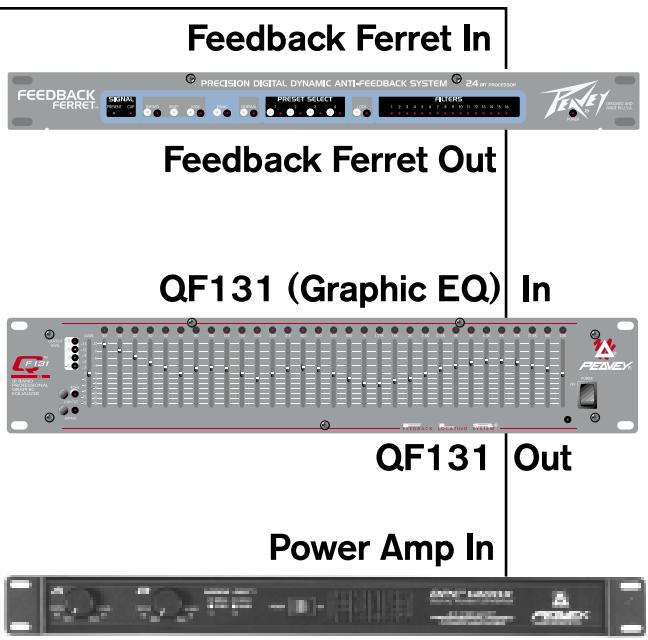
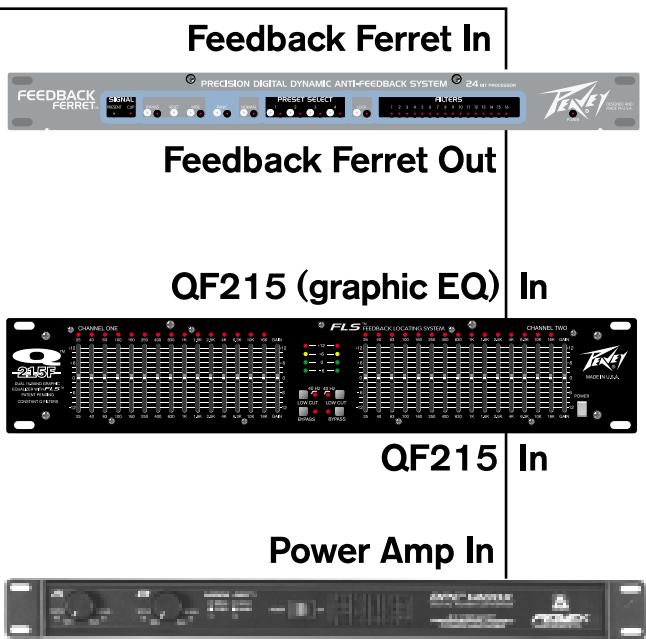
- Connect the Ferret between your mixer and power amp. (Make sure your speakers are connected.) Connect the main output or monitor output (depending on your application) on your mixer to the input on the Ferret. Connect one of the Ferret's outputs to the input on your power amp. Connect all microphones you plan on using.
- Power up all units with the master volume completely down. (Remember: You should turn your power amp on LAST and OFF FIRST.) Make sure the Ferret is NOT set to Normal Mode (LED off). (Remember: you want a fairly quiet room with no signal going through the system and the microphone levels up.)
- Slowly bring up the master volume. As feedback occurs, the Ferret starts to work beginning with filter 16. As the filters are needed, the associated LEDs will blink letting you know that a feedback frequency has been found and the filter defined. Expect some LEDs to light solid as filters lock down on a problem!
- Once the feedback is eliminated and filters are set, depress the Normal button on the front panel of the Ferret and return the mixer gain to a normal level. That's it! Your Ferret is working for you!
PLEASE READ THE ENTIRE OPERATING GUIDE FOR THE BEST RESULTS.
Ferret Front Panel Controls

Signal
The Present LED lights when signal is present (40 dB down from full scale). The Clip LED lights when the signal is 1/2 dB down from clipping.
Bypass
Press and hold to bypass filters. This takes the Ferret out of the signal path completely. Use caution when engaging the Bypass. Feedback could occur again—very loudly!
Reset
The reset button has two stages. By pressing and holding the reset button, all filter LEDs will begin to flash. Filters 1-8 (dynamic) will clear first as indicated by their non-lit LEDs. Releasing the button at this point will leave the static filters (9-16) in their current state. Continuing to hold the rest button will clear the remaining filters 9-16 (static).
Wide
Engaging the Wide button increases the range of frequencies that each filter affects. The LED lights when Wide is activated. (Note: Feedback often occurs around a range of pitches or frequencies, not necessarily a single pitch. By engaging this button, the Ferret widens the effective range of each filter and subsequently uses fewer filters to accomplish the same result.)
Ferret Back Panel
Panic
Panic filters are a special class of filters designed to quickly control sudden, extreme feedback. Panic is automatically engaged when in Normal operating mode. The LED lights when Panic is activated.
Normal
Activated after setting up for each venue. Automatically engages the Panic filters. Deactivated when in Setup Mode.
Preset Select
4 presets and associated LEDs. Press and hold to store. Press to recall. A preset stores all front panel information.
Lock
Stops the Ferret from setting any new filters but keeps the filters already defined and in place.
Filters
There are two sets of filters on the Ferret. Filters 9-16 are static and always set before the dynamic filters. Once these static filters are defined, they lock and maintain their status until they are reset. The dynamic filters (1-8) are those filters that change as input changes (i.e. volume changes, etc.).
Power
The LED lights when AC power is supplied and the power switch is on.

AC Power

This is a standard IEC power connector. An AC mains cord having the appropriate AC plug and ratings for the intended operating voltage is included. The mains cord should be connected to the unit before connecting to a suitable AC outlet.

Fuse
Domestic: 1A Slow-Blow
Export: 500 mA Time Delay
Power Switch
This switch applies AC mains power to the internal power supply. When the unit is functioning, the Power LED on the front panel will illuminate.
Front Panel Disable Switch
When the Disable switch is engaged, all buttons on the front of the unit are disabled. Use this switch after you've set up your system. This will prevent any accidental changes to your current settings.
Power Up Recall
This button determines, upon power up, whether the unit recalls the last settings used or preset 1.
Outputs
1/4 TRS balanced audio output. [tip = positive; ring = negative; sleeve = ground]. XLR balanced audio output.
[pin 1 = ground; pin 2 = positive; pin 3 = negative]
unbalanced: [tip = positive; sleeve = ground]
Input
XLR and 1 / 4 " combo jack: 1 / 4 "TRS balanced audio input. [tip = positive; ring = negative; sleeve = ground]. XLR balanced audio input. [pin 1 = ground; pin 2 = positive; pin 3 = negative] unbalanced: [tip = positive; sleeve = ground]
Output Level
Sets the output level for +4 dBu (nominal) (+18dB max) or -10 dBV (nominal) (+4dBVmax)
Input Level
Sets the input level for +4 dBu (nominal) (+18dB max) or -10 dBV (nominal) (+4dBVmax)
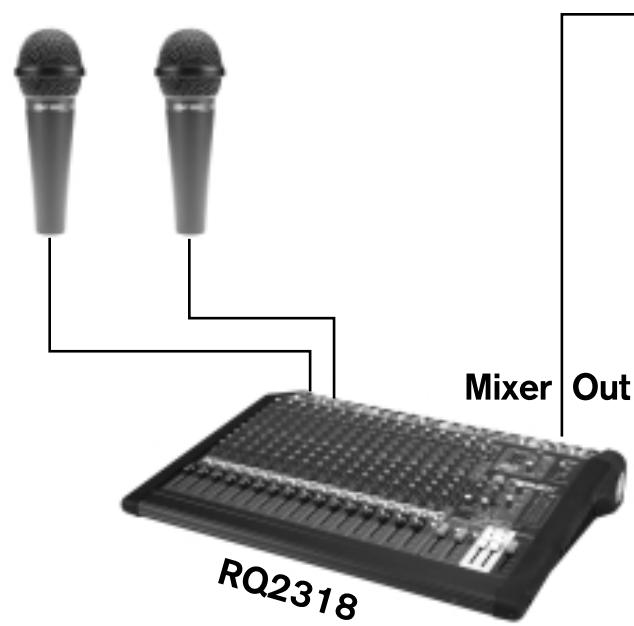
Ferret—Main PA
DPC1400C
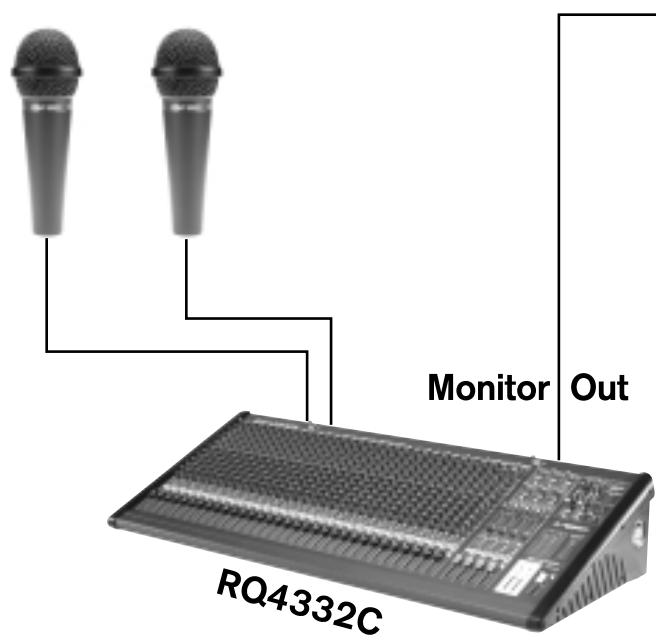
Ferret—Monitors
DPC1400C
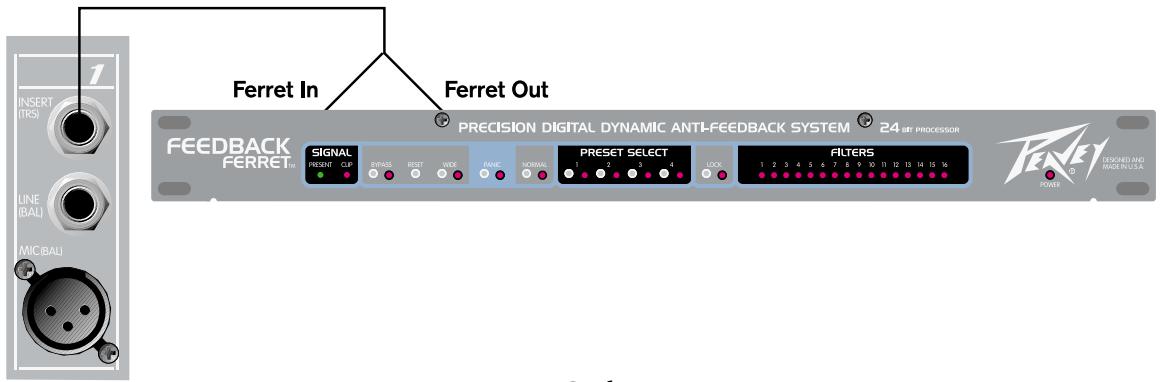
Ferret—Channel Insert
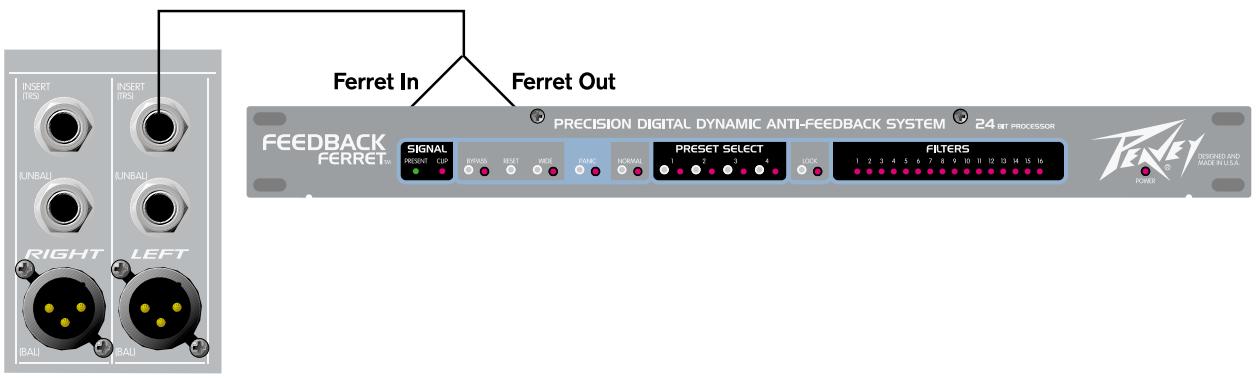
Ferret—Sub Insert
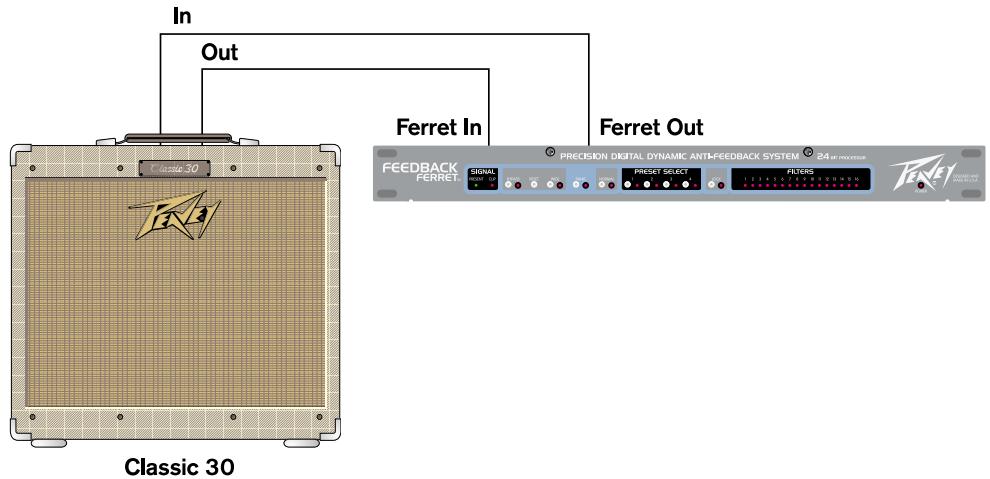
Ferret—Instrument Amp
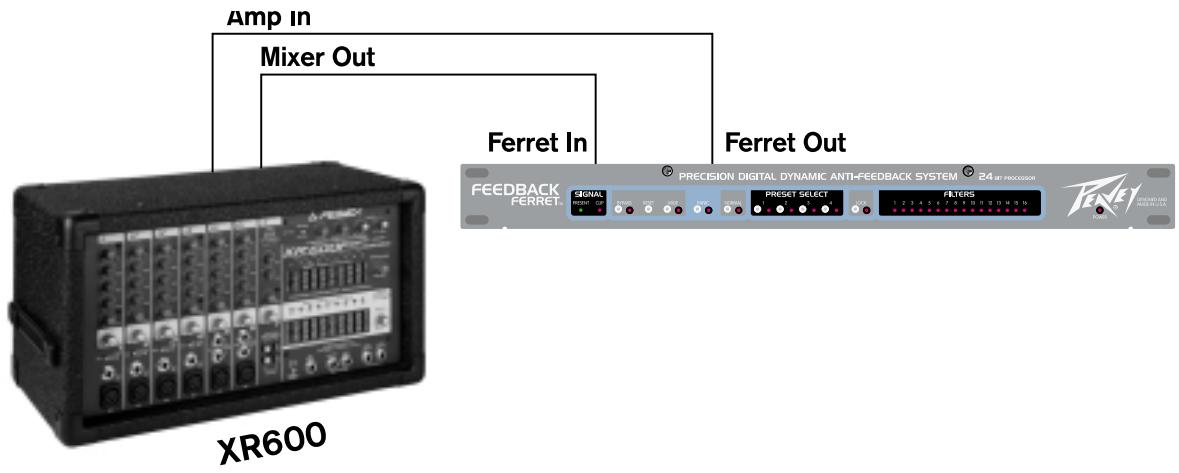
Ferret—Powered Mixer
Where To Put Your Ferret™
The Feedback Ferret can be used in a variety of locations within a sound system. Place a Ferret at the input insert of every microphone or you could process many microphones together by placing a single Ferret on the output of a vocal subgroup. One of the most common connections is to install the Ferret between the mixer's output and the power amp's input. This mixer output may be from the main output or the monitor output, depending on your needs. You can also place the Ferret on a single channel's insert to eliminate feedback from a single microphone or instrument. Once the Ferret has determined the problem frequencies for a particular setup, you can save that group of filter settings to one of the four preset buttons for instant recall.
How Does It Work?
The Ferret includes a set of 16 digital notch filters that employ sophisticated algorithms that seek out and destroy feedback, without destroying your tone. There are two sets of filters on the Ferret, static and dynamic. Filters 9-16 are static and always set before the dynamic filters (1-8). Once these static filters are set, they lock and maintain their status until they are reset by the user or a different preset is selected. The dynamic filters (1-8) are those filters that change as your needs change. Any filter (static or dynamic) that is set, but not locked (as indicated by blinking filter LED), will slowly release and return to flat (o dB) and be available for further use.
When the Ferret locates an offending frequency (feedback), it applies a filter, starting with filter 16. This filter is centered at the feedback frequency and uses only as much attenuation as needed to remove the feedback. If feedback continues, the filter depth is progressively increased until the feedback is gone. If the feedback is momentary, such as a short squeal, the Ferret applies a filter but slowly releases it in .10 dB steps until it is returned to flat (o dB). If the same frequency causes feedback again, the same filter will be reapplied. This process continues as additional filters are engaged, starting from the right side of the Ferret, until all feedback is gone. Monitoring continues as the Ferret attempts to release each active unlocked filter .10 dB at a time. Once a filter reaches o dB, the Ferret returns the filter to the queue. The Feedback Ferret continuously applies the least amount of attenuation required to eliminate feedback.
Setup
For best results, complete the Setup in a relatively quiet room. This allows the Ferret to find primary acoustic feedback frequencies. Every room and setup has problem frequencies. This makes each room different and creates different feedback problems. It is also important to understand that while in Setup mode, the Ferret does not distinguish between feedback and music. If you play music through the system while in Setup mode, the Ferret will try and eliminate it.
Step One
These instructions assume you have connected the Ferret from the mixer outputs and not from a single channel insert. Make sure the Normal LED is off (this engages Setup mode) and that your microphone levels are set. Slowly bring up the master level. You should see the filters begin to seek and lock as feedback begins to occur. This will begin with filter 16 and progress from right to left automatically. You will notice that each filter will begin by blinking and then light solidly when each frequency is locked down. This is accomplished with the minimum amount of attenuation.
Step Two
Continue bringing the master level up until you've reached the required volume level. As you start to hear feedback, momentarily stop adjusting the levels to allow the Ferret to complete the adjustment of its filter. Normally, you should hear the onset of feedback before the Ferret takes control. In most applications, this should give you plenty of gain and still leave additional filters open for later use. If all or most of the filters are lit up, bring the master level back down, reset the filters and start over. But this time, hit the Wide button on the front panel. The Wide button allows each filter to work on a wider range of frequencies thereby freeing up additional filters for other use. (Note: If all or most of the filters light up it's probably an indication that it is a bad room, a bad system setup or you are just too loud!)
Step Four
Finally, put the unit in Normal mode. This mode automatically engages the Panic button. Your system should be performance ready! At this point, it is advisable to engage the Front Panel Disable Switch to minimize accidental changes. Once you are content with your settings, press and hold one of the preset buttons (1-4) to save your filter settings.
Note: The Ferret is not a replacement for a good soundman. Good sound sytem performance starts with good placement of the microphones and speakers.
Feedback Ferret™
SPECIFICATIONS
Input Impedance:
4ok ohm
Output Impedance:
100 ohm
Dynamic Range:
103 dBr @ 1kHz ref to +18 dBu output
22 Hz to 22 kHz unweighted
Total Harmonic Distortion:
0.002% @ 1kHz typical
Input Sensitivity:
+4 dBu nominal, +18 dBu full scale
-10 dBV nominal, +4 dBV full scale
Output Drive:
+4 dBu nominal, +18 dBu full scale
-10 dBV nominal, +4 dBV full scale
Dimensions:
Width: 19.000 in (48.26 cm)
Depth: 8.000 in (20.32 cm)
Height: 1.750 in (4.45 cm)
Weight: 7 lbs (3.17 kg)
Power:
Domestic: 120 VAC; 60 Hz; 25 watts
Export: 230 VAC; 50/60 Hz; 25 watts
Bypass:
True power off bypass
22 Hz to 22 kHz unweighted
Total Harmonic Distortion:
0.002% @ 1kHz typical
Input Sensitivity:
+4 dBu nominal, +18 dBu full scale
-10 dBV nominal, +4 dBV full scale
Output Drive:
+4 dBu nominal, +18 dBu full scale
-10 dBV nominal, +4 dBV full scale
Dimensions:
Width: 19.000 in (48.26 cm)
Depth: 8.000 in (20.32 cm)
Height: 1.750 in (4.45 cm)
Weight: 7 lbs (3.17 kg)
Power:
Domestic: 120 VAC; 60 Hz; 25 watts
Export: 230 VAC; 50 / 60Hz ; 25 watts
Bypass:
True power off bypass
DEUTSCH
Feedback Ferret™ digitales dynamisches Anti-Feedback-Prätzisions-Filtersystem
22 Hz to 22 kHz unweighted
Total Harmonic Distortion:
0.002% @ 1kHz typical
Input Sensitivity:
+4 dBu nominal, +18 dBu full scale
-10 dBV nominal, +4 dBV full scale
Output Drive:
+4 dBu nominal, +18 dBu full scale
-10 dBV nominal, +4 dBV full scale
Dimensions:
Width: 19.000 in (48.26 cm)
Depth: 8.000 in (20.32 cm)
Height: 1.750 in (4.45 cm)
Weight: 7 lbs (3.17 kg)
Power:
Domestic: 120 VAC; 60 Hz; 25 watts
Export: 230 VAC; 50 / 60Hz ; 25 watts
Bypass:
True power off bypass
Feedback Ferret™ Filtre digital dynamique anti-Larsen
Front Panel Disable Switch
22 Hz to 22 kHz unweighted
Total Harmonic Distortion:
0.002% @ 1kHz typical
Input Sensitivity:
+4 dBu nominal, +18 dBu full scale
-10 dBV nominal, +4 dBV full scale
Output Drive:
+4 dBu nominal, +18 dBu full scale
-10 dBV nominal, +4 dBV full scale
Dimensions:
Width: 19.000 in (48.26 cm)
Depth: 8.000 in (20.32 cm)
Height: 1.750 in (4.45 cm)
Weight: 7 lbs (3.17 kg)
Power:
Domestic: 120 VAC; 60 Hz; 25 watts
Export: 230 VAC; 50/60 Hz; 25 watts
Bypass:
True power off bypass
NOTES:
PEAVEY ELECTRONICS CORPORATION LIMITED WARRANTY
EFFECTIVE DATE:JULY 1,1998
What This Warranty Covers
Your Peavey Warranty covers defects in material and workmanship in Peavey products purchased and serviced in the U.S.A. and Canada.
What This Warranty Does Not Cover
The Warranty does not cover: (1) damage caused by accident, misuse, abuse, improper installation or operation, rental, product modification or neglect; (2) damage occurring during shipment; (3) damage caused by repair or service performed by persons not authorized by Peavey; (4) products on which the serial number has been altered, defaced or removed; (5) products not purchased from an Authorized Peavey Dealer.
Who This Warranty Protects
This Warranty protects only the original retail purchaser of the product.
How Long This Warranty Lasts
The Warranty begins on the date of purchase by the original retail purchaser. The duration of the Warranty is as follows:
| Product Category | Duration |
| Guitars/Basses, Amplifiers, Pre-Amplifiers, Mixers, Electronic Crossovers and Equalizers | 2 years * (+ 3 years) |
| Drums | 2 years * (+ 1 year) |
| Enclosures | 3 years * (+ 2 years) |
| Digital Effect Devices and Keyboard and MIDI Controllers | 1 year * (+ 1 year) |
| Microphones | 2 years |
| Speaker Components (incl. speakers, baskets, drivers, diaphragm replacement kits and passive crossovers) and all Accessories | 1 year |
| Tubes and Meters | 90 days |
[Denotes additional warranty period applicable if optional Warranty Registration Card is completed and returned to Peavey by original retail purchaser within 90 days of purchase.]
What Peavey Will Do
We will repair or replace (at Peavey's discretion) products covered by warranty at no charge for labor or materials. If the product or component must be shipped to Peavey for warranty service, the consumer must pay initial shipping charges. If the repairs are covered by warranty, Peavey will pay the return shipping charges.
How To Get Warranty Service
(1) Take the defective item and your sales receipt or other proof of date of purchase to your Authorized Peavey Dealer or Authorized Peavey Service Center. OR
(2) Ship the defective item, prepaid, to Peavey Electronics Corporation, International Service Center, 412 Highway 11 & 80 East, Meridian, MS 39301 or Peavey Canada Ltd., 95 Shields Court, Markham, Ontario, Canada L3R 9T5. Include a detailed description of the problem, together with a copy of your sales receipt or other proof of date of purchase as evidence of warranty coverage. Also provide a complete return address.
Limitation of Implied Warranties
ANY IMPLIED WARRANTY, INCLUDING WARRANTY OF MERCHANTABILITY AND FITNESS FOR A PARTICULAR PURPOSE, ARE LIMITED IN DURATION TO THE LENGTH OF THIS WARRANTY.
Some states do not allow limitations on how long an implied warranty lasts, so the above limitation may not apply to you.
Exclusions of Damages
PEAVEY'S LIABILITY FOR ANY DEFECTIVE PRODUCT IS LIMITED TO THE REPAIR OR REPLACEMENT OF THE PRODUCT, AT PEAVEY'S OPTION. IF WE ELECT TO REPLACE THE PRODUCT, THE REPLACEMENT MAY BE A RECONDITIONED UNIT. PEAVEY SHALL NOT BE LIABLE FOR DAMAGES BASED ON INCONVENIENCE, LOSS OF USE, LOST PROFITS, LOST SAVINGS, DAMAGE TO ANY OTHER EQUIPMENT OR OTHER ITEMS AT THE SITE OF USE, OR ANY OTHER DAMAGES WHEATHER INCIDENTAL, CONSEQUENTIAL OR OTHERWISE, EVEN IF PEAVEY HAS BEEN ADVISED OF THE POSSIBILITY OF SUCH DAMAGES.
Some states do not allow the exclusion or limitation of incidental or consequential damages, so the above limitation or exclusion may not apply to you.
This Warranty gives you specific legal rights, and you may also have other rights which vary from state to state.
If you have any questions about this warranty or service received or if you need assistance in locating an Authorized Service Center, please contact the Peavey International Service Center at (601) 483-5365 / Peavey Canada Ltd. at (905) 475-2578.
FEATURES AND SPECIFICATIONS SUBJECT TO CHANGE WITHOUT NOTICE.

LISTEN TO THIS
Features and specifications subject to change without notice.
Peavey Electronics Corporation • 711 A Street • Meridian • MS • 39301
(601) 483-5365 • FAX (601) 486-1278 • www.peavey.com

80303057


- SAVE THESE INSTRUCTIONS!
- Feedback Ferret™ precision digital dynamic anti-feedback filter array
- Features
- QUICK SETUP
- Ferret Front Panel Controls
- Signal
- Bypass
- Reset
- Wide
- Ferret Back Panel
- Panic
- Normal
- Preset Select
- Lock
- Filters
- Power
- AC Power
- Fuse
- Power Switch
- Front Panel Disable Switch
- Power Up Recall
- Outputs
- Input
- Output Level
- Input Level
- Where To Put Your Ferret™
- How Does It Work?
- Setup
- Step One
- Step Two
- Step Four
- Feedback Ferret™
- SPECIFICATIONS
- DEUTSCH
- Feedback Ferret™ digitales dynamisches Anti-Feedback-Prätzisions-Filtersystem
- Feedback Ferret™ Filtre digital dynamique anti-Larsen
- PEAVEY ELECTRONICS CORPORATION LIMITED WARRANTY
- What This Warranty Covers
- What This Warranty Does Not Cover
- Who This Warranty Protects
- How Long This Warranty Lasts
- What Peavey Will Do
- How To Get Warranty Service
- Limitation of Implied Warranties
- Exclusions of Damages
Brand : PEAVEY
Model : FEEDBACK FERRET
Category : Audio Equipment